



- App store optimization for games works differently from regular ASO because players search by genre and mood, not by problem.
- Genre-specific, long-tail keywords rank faster than broad category terms for most new titles.
- Player reviews are one of the richest, most overlooked keyword sources in game ASO.
- Screenshots and preview video need real gameplay footage, not static UI screens.
- Game ASO needs a faster refresh cycle than most apps, roughly every 4 to 6 weeks.
- TekRevol runs genre-specific ASO for gaming clients, from keyword research through post-launch iteration.
Most players don’t search for games the way they search for apps. They search by genre, mood, or gameplay — “offline puzzle game,” “cozy farming game,” “idle RPG” — not by feature lists. Yet many studios still rely on generic ASO tactics designed for productivity or utility apps, leaving valuable organic traffic on the table.
Game ASO is different because player behavior is different. Success depends on understanding how players search, choosing the right genre keywords, and presenting visuals that instantly communicate the gameplay experience. A great game can still struggle if its store listing doesn’t match the language players actually use.
This guide explains how app store optimization for games works, from genre-specific keyword research to creative optimization and ongoing updates. You’ll also see where partnering with an experienced ASO agency can help keep your game visible long after launch.
What Is App Store Optimization for Games?
App store optimization for games is the process of improving how a mobile game ranks in search and how well its store listing converts a view into a download. It uses the same fields as any app: title, keywords, screenshots, and ratings, but the search behavior behind those fields is completely different.
Game ASO matters for the same reason why app store optimization is important for any app: most discovery still happens through store search. The difference is what players type into that search bar in the first place.
On paper, the fields look identical. Open App Store Connect or Google Play Console for a game and a productivity app, and you’ll see the same title field, the same keyword box, and the same screenshot slots. The difference only shows up once real players enter the picture, searching in a completely different way than someone hunting for a solution to a task.
Not sure your game's listing is speaking the language players actually search?
A quick audit shows which keywords are pulling their weight and which ones aren't.
Get a Free Game ASO Audit →How Is ASO for Games Different From ASO for Regular Apps?
ASO for games differs from regular app ASO because players search by genre, mood, or mechanic instead of by function. A budgeting app user searches “expense tracker.” A game player searches “idle RPG offline” or “match 3 no ads.”
| Search Behavior | Utility App | Mobile Game |
| What users search | The problem they need solved | The genre or feeling they want |
| Example term | “Expense tracker” | “Cozy farming game” |
| Keyword source | Feature and benefit language | Genre, mood, and mechanical language |
| Screenshot focus | Core feature in action | Gameplay moment or “wow” scene |
The same logic that separates ASO vs SEO as two distinct disciplines applies again here, one level down: even within app store search, games and utility apps aren’t optimized the same way, despite living on the same store shelf.
This difference cascades through every field in the listing. A budgeting app’s screenshots show a dashboard solving a task. A game’s screenshots need to show a moment worth wanting, which is a completely different creative brief, even though both apps are filling the same screenshot slots in App Store Connect.
How Do You Research Keywords for a Mobile Game by Genre?
Keyword research for a mobile game starts with the genre and mechanic terms players actually type, not the feature language.
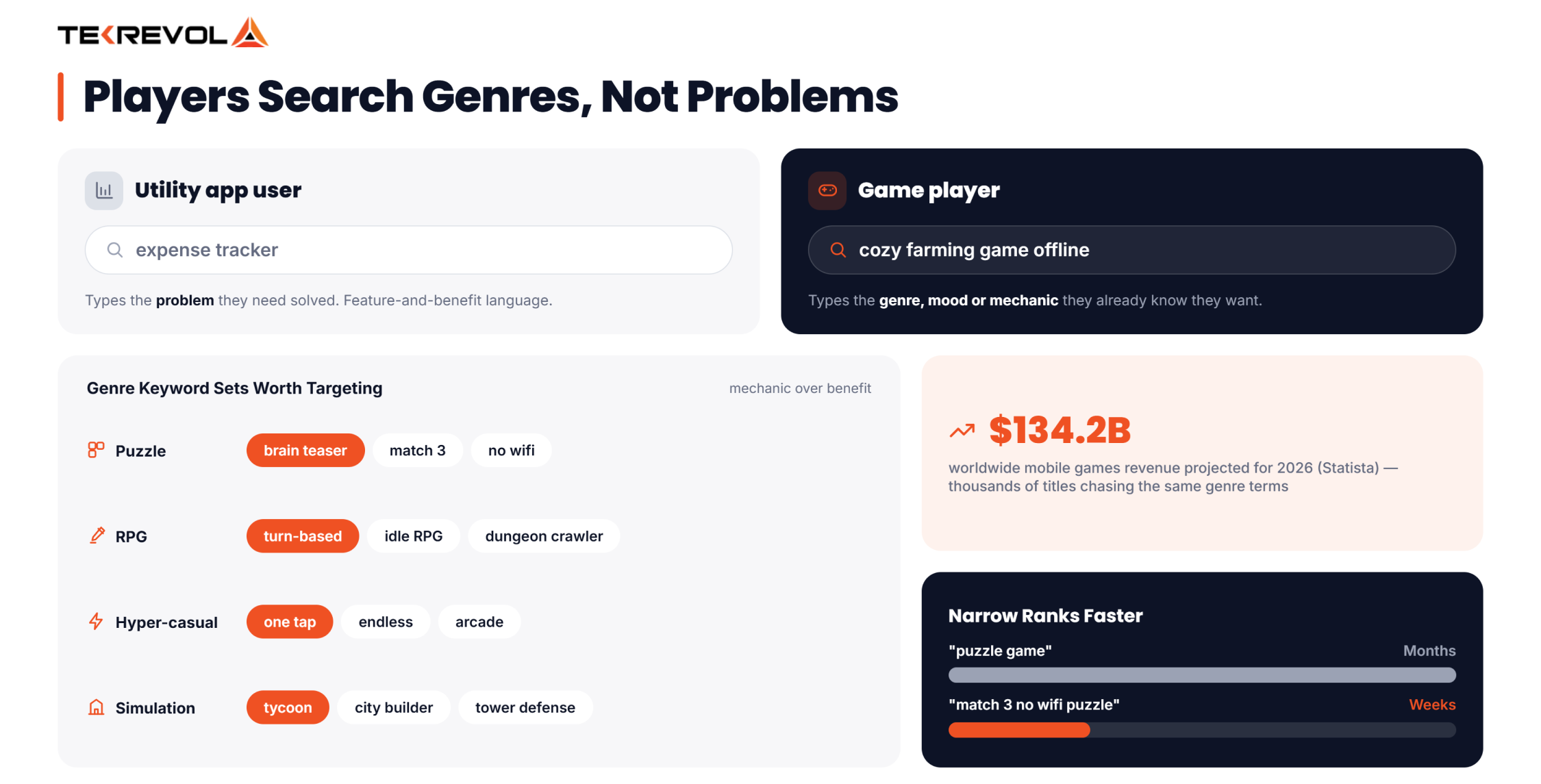
- Puzzle — “brain teaser,” “match 3,” “no wifi”
- RPG — “turn-based,” “idle RPG,” “dungeon crawler”
- Hyper-casual — “one tap,” “endless,” “arcade”
- Simulation/strategy — “tycoon,” “city builder,” “tower defense”
Notice that none of these describes a feature or a benefit. They describe a genre convention or a mechanic that a player already knows they want. That’s the mindset shift most feature-focused ASO advice never accounts for.
Why Long-Tail Genre Terms Rank Faster Than Broad Ones
A broad term like “puzzle game” is short, competitive, and slow to rank for. A specific phrase like “match 3 no wifi puzzle” targets a smaller audience, but it’s realistic to rank for within weeks instead of months. Start narrow, win that ranking, then expand outward as your listing gains traction.
This mirrors how keyword strategy works for any app category, just with a different vocabulary. The principle of climbing from an achievable long-term goal toward a broader, more competitive one holds true whether you’re ranking a puzzle game or a productivity tool — only the specific words change.
Player Reviews Are a Keyword Source Most Teams Ignore
Read your own reviews and your top competitors’ reviews line by line. Players describe your game in their own words, “relaxing,” “addictive,” “grindy,” “chill”, and those words are exactly what a future player types into the search bar.
This is the fastest way to learn how to search keywords for ASO without guessing in a spreadsheet. It also feeds directly into a broader list of mobile app keywords worth tracking across genres over time.
How Should You Write a Game Title and Subtitle for ASO?
Write a game title that leads with genre or mechanic language, not just a stylized brand name with no searchable meaning attached.
- Established studios can lean on brand recognition, but should still add a genre keyword alongside it
- Indie and new titles need the keyword to do more work, since there’s no existing brand search volume to rely on
- Use the subtitle as a second genre or mood cue instead of repeating the title
A title like “Sunny Farms: Cozy Idle Game” tells the algorithm and the player exactly what they’re getting. A title that’s just a made-up brand name tells neither.
Check this reasoning against the full ASO checklist before finalizing your fields; the character limits and field rules are the same across genres, even if the keyword strategy inside them isn’t.
Balancing Brand and Keywords Without Sounding Generic
A title packed entirely with genre keywords and no brand identity blends into every other listing in the category. The goal isn’t to strip out personality; it’s to make sure the genre or mood keyword sits somewhere in the title or subtitle, not buried in a description field nobody reads before installing.
For an established franchise, brand recall alone can drive a meaningful share of searches. But even then, adding a genre cue captures the players who don’t yet know the brand and are still browsing by mood instead of by name.
What Makes Game Screenshots and Preview Videos Different From App Creatives?
Game screenshots need to show gameplay, not a menu screen or a settings panel. Players are buying an experience, and a static UI screenshot doesn’t sell that experience the way a real gameplay moment does.
- Lead with the most visually exciting gameplay moment, not the tutorial screen
- Show variety and progression across your screenshot set — different levels, environments, or upgrades
- The first 3 seconds of a preview video decide whether a viewer keeps watching, more so for games than for most utility apps
- Avoid opening on a loading screen, splash logo, or tutorial prompt — none of it sells the experience
Why Gameplay Footage Outperforms Static UI
A screenshot of a menu tells a player nothing about how the game feels to play. A short clip of an actual match, level, or battle answers the one question every potential player has: Is this fun to watch, let alone play?
For teams building this out alongside a full release, these mobile app development tips cover how creative assets and build quality should be planned together, not bolted on at the end.
Still using static UI screenshots for your game's listing?
A creative test can show exactly how much a gameplay-led screenshot set moves conversion.
Talk to TekRevol About Creative Testing →How Do Ratings and Reviews Impact Game Store Rankings?
Ratings and reviews influence game rankings the same way they influence any app, but games tend to accumulate reviews faster, which makes rating volatility a bigger risk after a rough patch or update.
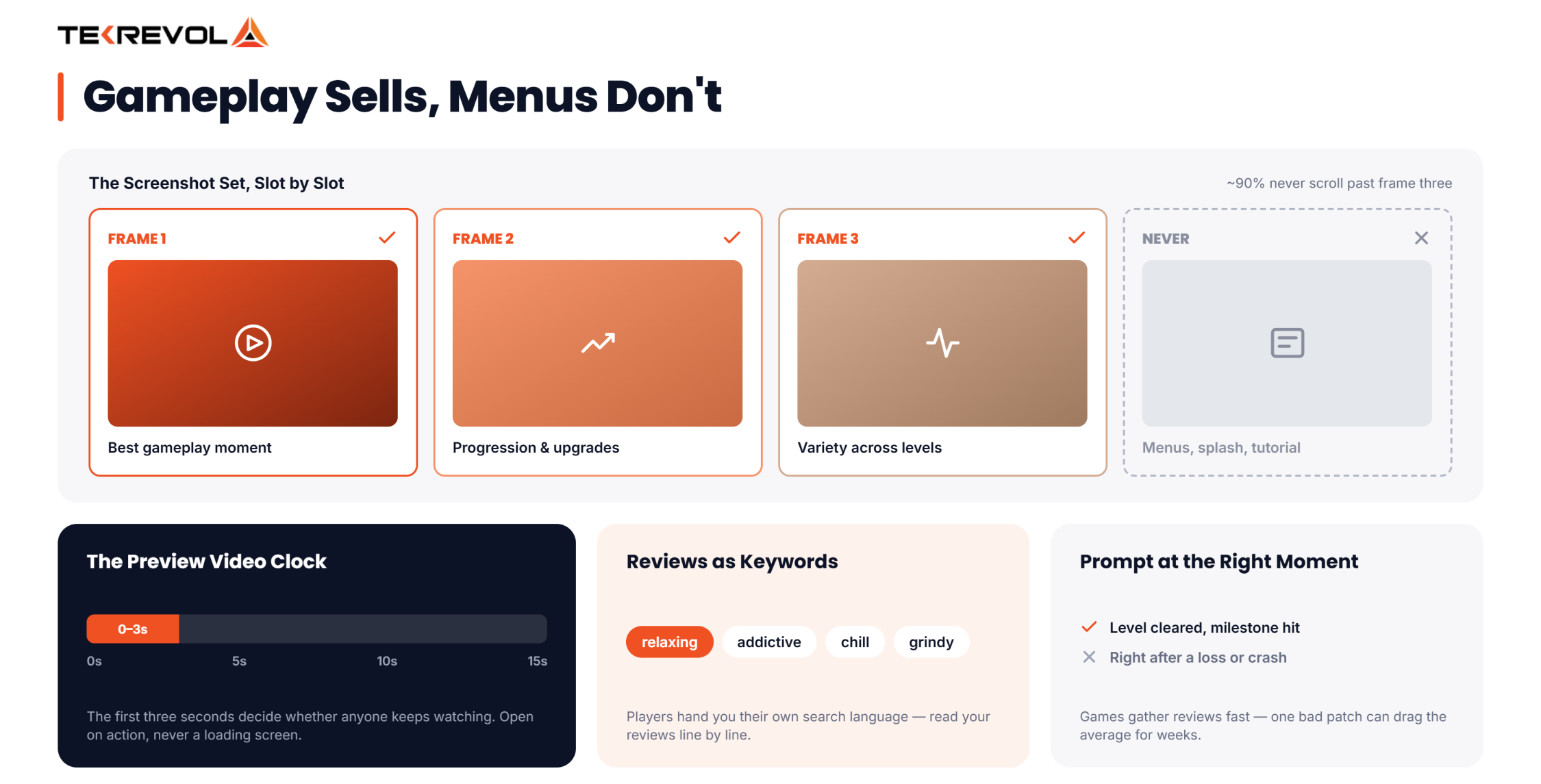
- Time review prompts after a positive moment — completing a level, hitting a milestone, not right after a loss or a crash
- Respond to reviews after major updates, specifically, since patch-related complaints cluster quickly and can drag your average down fast
- Mine review text for both keyword ideas and messaging gaps, tying this step back into your keyword research cycle
- Track rating trends by app version, since a single buggy patch can drag your average down for weeks if it goes unaddressed
Review strategy works best as part of a full growth plan. These proven mobile app promotion strategies show how review momentum and broader promotion reinforce each other instead of running in isolation.
How Do In-App Events and Seasonal Content Affect Game ASO?
In-app events and seasonal content refresh your keyword relevance between full updates, which matters more for games than for most utility apps because players expect new content constantly.
- Time metadata and creative refreshes around content drops, not on a fixed monthly schedule disconnected from what’s actually live in the game
- Use event names and short descriptions as extra indexed fields, the same way core metadata works
- A seasonal reskin or limited-time mode gives you a natural reason to test new keywords without waiting for the next major version
Most studios already build seasonal content for engagement reasons alone. Treating that same content as an app store optimization for games opportunity, a fresh event name, a refreshed screenshot, and a timed keyword test costs almost nothing extra and adds a ranking benefit that a fixed-schedule refresh never captures.
This is also where top app marketing strategies and ASO overlap directly; a well-timed event push does double duty as both a marketing beat and a ranking opportunity.
How Does Genre Affect Category and Store Placement?
Genre affects category placement because sub-genre competition varies wildly, and choosing the wrong bucket puts you up against titles with far bigger budgets and review counts.
- Compare “Puzzle” vs. “Casual” vs. “Board” before defaulting to the obvious choice
- A secondary category can open a less competitive ranking lane, the same way it does for non-gaming apps
- Category placement feeds directly into the app store ranking algorithm, since download velocity and conversion are measured relative to your category peers, not the whole store
A puzzle game listed under “Casual” is competing against a completely different set of titles than one listed under “Puzzle” specifically. Neither choice is automatically right; it depends on where your actual competitors sit and where the search volume for your specific mechanic lives.
How Do You Localize ASO for a Global Gaming Audience?
Localize ASO for games by translating genre and mood keywords natively per market, not by running a single English listing through machine translation and calling it done.
- Games often draw a larger share of installs from non-English-speaking markets than utility apps do
- A genre term that ranks well in English rarely maps word-for-word into another language’s search behavior
- Cross-localization can index multiple language variants under one storefront, multiplying usable keyword space in high-volume gaming markets
A genre term like “idle RPG” doesn’t have a clean one-to-one translation in every market, and even where it does, local players may search using a completely different convention shaped by which games are already popular there. Native keyword research per language catches this; direct translation rarely does.
How Should You Think About ASO for Games as an Ongoing Cycle, Not a Launch Task?
Think about app store optimization for games as a flywheel: better visibility drives installs, installs generate reviews, and reviews improve both discoverability and messaging. Momentum compounds when the cycle keeps turning.
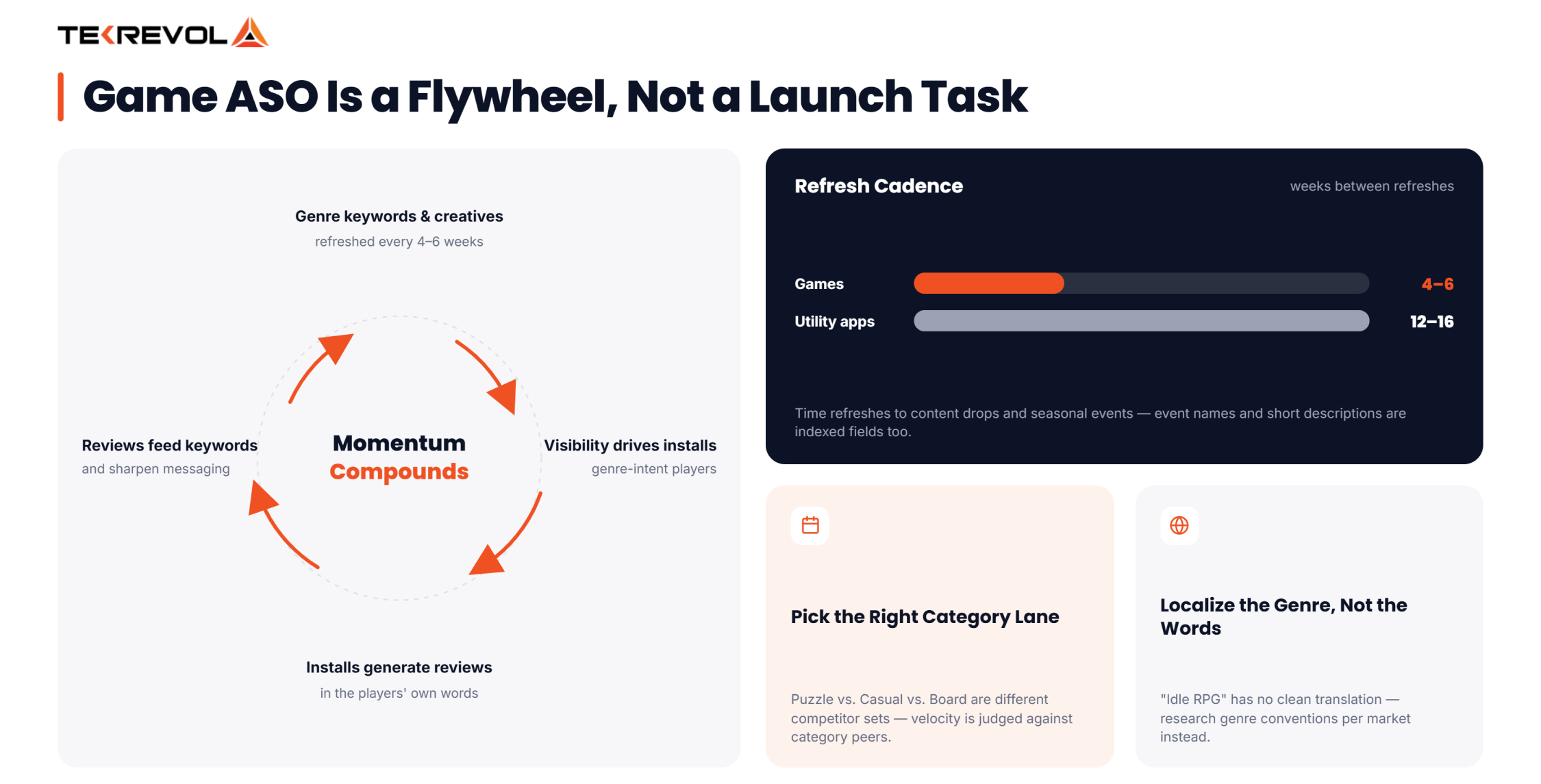
- Revisit keywords and creatives roughly every 4 to 6 weeks, faster than most utility apps need
- Treat this the same way you’d treat any repeatable ASO process — audit, test, measure, repeat, rather than a one-time setup
- Games iterate faster because player expectations and content cycles move faster than most software categories
A studio that runs this loop consistently outranks a studio with a technically better game and a static, untouched listing. Consistency beats a single brilliant update run once and never repeated.
Why Games Need Faster Iteration Than Most Apps
A budgeting app can go months without a metadata refresh and barely notice. A game’s audience expects new content, new events, and new reasons to come back constantly, and a listing that doesn’t reflect any of that starts to feel stale to both players and the algorithm at the same time.
What Are the Most Common ASO Mistakes Specific to Games?
- Using generic app-store keyword advice instead of genre and mood terms that players actually search is one of the mistakes ASO best practices help you avoid.
- Leading creatives with UI or menus instead of real gameplay moments, which fails to answer the one question every viewer actually has
- Ignoring reviews as a keyword source, missing the exact language players already use to describe the game in their own words
- Treating seasonal content as marketing only, disconnected from metadata and keyword refreshes that could piggyback on the same event
Each of these mistakes is easy to fix once it’s named. The harder part is remembering to check for them every cycle, not just once at launch.
Teams building this process from scratch alongside a launch should pair it with this guide for marketing your mobile app as a startup, since ASO and go-to-market planning move faster when they’re built together instead of bolted on separately.
How Does TekRevol Help Studios Run ASO for Games?
TekRevol, a mobile game development company, helps game studios build a launch strategy that extends beyond development. Our team aligns keyword research, store creatives, and positioning with the game’s audience while planning updates that support long-term discoverability.
Rather than treating ASO as a one-time checklist, the focus is on continuous optimization. Keyword opportunities, store visuals, and messaging are reviewed alongside game updates to keep the listing aligned with changing player behavior and market trends.
When ASO is planned during development instead of after launch, studios can enter the app stores with a stronger foundation. Store assets, metadata, and creative strategy are prepared early, reducing last-minute changes and supporting a smoother launch.
The goal is simple: help games remain competitive over time through ongoing analysis, creative refinement, and data-informed optimization rather than relying on a single round of updates.
Great ASO doesn’t stop after launch. The best-performing games continuously test keywords, creatives, reviews, localization, and events.
Studios that treat ASO as an ongoing growth engine consistently outperform those treating it as a one-time checklist.
Players Are Searching. Will They Find Your Game?
Turn player search behavior into organic installs with a game-specific ASO strategy tailored to your genre.
Book Your Free Game ASO Strategy Session →


