



- A complete app store optimization checklist covers metadata, visuals, ratings, and localization together, not one in isolation.
- Fixing title, subtitle, and keyword field placement is the fastest way to move a stalled ranking.
- The iOS 1field and Google Play’s long description are indexed completely differently; copy-paste strategies fail on one platform.
- Cross-localization and in-app events are the two most overlooked indexed fields in most checklists.
- Ranking can shift within a day of a metadata change, so test one field at a time.
- TekRevol’s ASO team turns this checklist into an ongoing process: audit, execute, and measure every release.
Your app is live, but downloads aren’t coming in. In most cases, the problem isn’t the product; it’s the app store listing. App Store Optimization (ASO) helps people discover your app by improving the fields that influence search visibility and conversions.
With more than four million apps competing across the Apple App Store and Google Play, visibility is harder than ever. Every element of your listing, from the title and keywords to screenshots, ratings, and descriptions, affects how your app ranks and whether users decide to install it. Overlooking even one of these fields can limit your organic growth.
This app store optimization checklist walks you through every key element of your App Store and Google Play listing in the order you should optimize them. You’ll learn which fields each platform indexes, the character limits that matter, common mistakes that hurt rankings, and how to measure your results after each update.
If you need help implementing or scaling these optimizations, partnering with an experienced ASO agency can help you prioritize high-impact changes, run ongoing experiments, and improve organic app growth over time.
What Is App Store Optimization and Why Does It Matter?
App store optimization is the process of improving how easily an app is found in store search and how often that search result turns into a download. It covers two jobs at once: getting seen and getting picked. Most teams only work on one.
Search still drives the majority of app discovery. That’s exactly why app store optimization is important for any app trying to grow without burning through ad budget. A user types a term, the store ranks results, and your listing either shows up in the first few rows or it doesn’t exist to that user at all.
Struggling to get your app found in search?
Avoiding common pitfalls is only half the game; success depends on having the right game development team by your side.
Get in TouchWhat Should a Complete App Store Optimization Checklist Include?
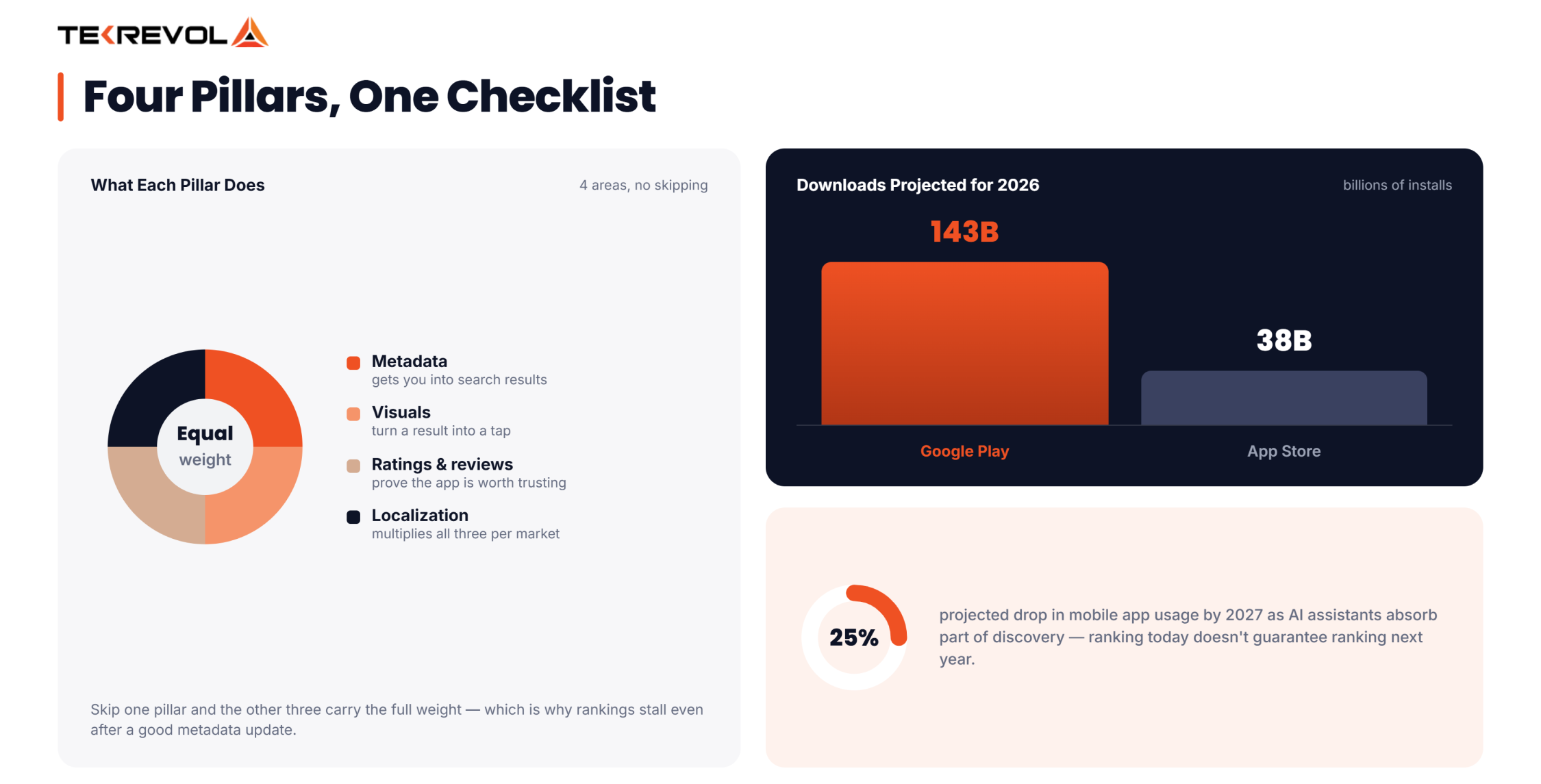
A complete app store optimization checklist covers four areas: metadata, visuals, ratings, and localization. Miss one, and the other three can only do so much.
- Metadata optimization — title, subtitle, keyword field, description, developer name, category
- Visual assets — icon, screenshots, preview video
- Ratings and reviews — prompt timing, response strategy, sentiment tracking
- Localization — translated metadata and visuals per target market, plus cross-localization coverage
Metadata gets your app into search results. Visuals decide whether a search result becomes a tap. Ratings tell the algorithm, and the user, whether your app is worth trusting. Localization multiplies all three across every market you actually sell in.
Skip one pillar and the other three carry the full weight, which is why rankings often stall even after a “good” metadata update.
Each piece below breaks down exactly what to fill in, with the character limits both stores enforce.
How Do You Optimize Your App Title for Better ASO Rankings?
You optimize your app title for better ASO rankings by placing your brand name alongside your highest-value keyword in a clear, readable title that matches what users are searching for.
Your app title is the single most heavily weighted indexed field in ASO. On iOS, you get 30 characters. On Google Play, the title field runs longer, but every extra word still needs to earn its place.
- Lead with your brand name, then follow with your highest-value keyword
- Don’t waste characters on filler words; every character is indexed
- Keep it readable. A title stuffed with keywords hurts click-through even if it ranks
Why Title Placement Beats Everywhere Else
Apple and Google both give the title field more ranking weight than any other. A keyword buried in your description won’t outrank the same keyword sitting in your title.
For example, a meditation app titled “Calm Space – Sleep & Anxiety Relief” is doing far more work than one titled just “Calm Space.” The brand name still leads, but the added keywords tell the algorithm, and the user, exactly what problem the app solves.
What Should You Write in Your App Subtitle or Short Description?
Your subtitle should state your core value proposition using a secondary keyword you couldn’t fit in the title. On iOS, the Subtitle field (30 characters) is indexed and shown directly under your app name. On Google Play, the Short Description (80 characters) does the same job.
- Build a keyword “combo” between title and subtitle instead of repeating words
- Split a longer target phrase across both fields — Apple’s algorithm forms pairs from words used across them
- Write it for a human first; it’s the second thing a user reads before deciding to tap in
- Avoid vague phrases like “the best app for you” — they waste indexed characters without adding a real keyword
Think of the subtitle as your second sentence, not a repeat of your first. If the title says what you are, the subtitle should say what the user gets.
How Does the iOS 100-Character Keyword Field Work?
The iOS keyword field is 100 characters, invisible to users, and dedicated entirely to search indexing. Most teams waste half of it without realizing it.
- Separate terms with commas, no spaces: keyword1,keyword2,keyword3
- Skip words already used in your title or subtitle; they’re already indexed
- One form of a word is usually enough; you rarely need both singular and plural
- Use all 100 characters; testing shows no ranking benefit to leaving space unused
- Drop generic filler like “free”, it rarely earns its character cost
- Never repeat a keyword twice in the field; duplication adds nothing
A quick way to check your work: list every word already in your title and subtitle, then confirm none of them reappear in the keyword field. Whatever’s left of your 100 characters should go to terms you haven’t covered yet, synonyms, use cases, and problem-based phrases users actually type.
Getting this field right takes research, not guesswork. Search keywords for ASO the way ranking data rewards, target mobile app keywords by category, and align your optimization efforts with an experienced mobile app development company that builds discoverability into the product from day one.
How Do You Write an App Description That Supports ASO?
You write an app description that supports ASO by optimizing it for each app store, using relevant keywords in Google Play and persuasive, user-focused copy in the Apple App Store.
- Google Play: the long description (up to 4,000 characters) is indexed. Write it naturally, keyword-rich, feature-focused
- App Store: the description isn’t indexed for search, but it still drives conversion — a strong first paragraph is what turns a view into a download
Treat the opening lines as the part a user actually reads before they scroll or tap away.
What Belongs in the First Paragraph?
Lead with the single problem your app solves, in plain language. Save the full feature list, awards, or press mentions for further down. A user deciding whether to install rarely reads past the first three lines, so that’s where your strongest keyword-relevant sentence should sit.
Does Your Developer Name Affect App Store Search Rankings?
Yes, on iOS, the developer name is indexed. If a relevant keyword fits naturally, it adds a small amount of ranking weight most teams never bother auditing, worth a five-minute check even post-launch.
How Does Category Selection Impact App Store Optimization?
Category names are auto-indexed. Apple indexes your app for its category term the moment you select it, and that weight increases further if the same term appears in your title.
Choosing the right primary and secondary category is a ranking decision, not just an organizational one. It also determines which competitors you’re measured against inside the app store ranking algorithm, so pick the category your target users actually browse, not just the one that technically fits.
A secondary category can also open up a less competitive ranking lane. A niche fitness app, for example, might rank on page one under “Health & Fitness” while getting buried under “Lifestyle,” simply because fewer strong competitors are fighting for the first spot.
What Are In-App Events and How Do They Improve ASO?
In-app events give you two more indexed fields most checklists skip entirely: Event Name (30 characters) and Short Description (50 characters). These form a keyword pair the same way title and subtitle do.
Beyond ranking, events let you re-surface in search around a seasonal push or feature launch, without waiting for a full app update to refresh your keyword relevance.
Most teams treat in-app events as a marketing feature, not an ASO one. Setting one up for a limited-time challenge, a holiday theme, or a new feature drop does double duty: it drives engagement and adds two more indexed fields you control.
What Is Cross-Localization and How Does It Multiply Your Keywords?
Cross-localization lets a single country storefront index multiple language localizations at once, effectively doubling your usable keyword space without touching your primary fields.
Two rules to know:
- Keywords across different localizations don’t combine or blend — each one needs its own complete coverage
- Not every localization pairs with every storefront, so confirm current coverage before assuming a language doubles your reach automatically
Expanding into new markets and not sure your listing is ready?
Avoiding common pitfalls is only half the game; success depends on having the right game development team by your side.
Get in TouchWhat Visual Assets Are Essential for App Store Optimization?
Your icon, screenshots, and preview video decide whether a search result turns into an install. Metadata gets you found; visuals get you picked.
- App icon: simple, legible at small sizes, instantly signals what the app does
- Screenshots: lead with your strongest value proposition in the first 2–3 frames — most users never scroll past them
- Preview video: show the core feature within the first 10–30 seconds, before drop-off accelerates
Localize screenshots per market instead of reusing one global set. For a broader look at execution, these mobile app development tips cover how visual polish ties back into build quality.
Why Testing Beats Assuming
A redesigned icon or screenshot set can look better and still convert worse. Run a controlled test before rolling out a visual change store-wide, and give it enough traffic to reach a reliable result before concluding.
How Do Ratings and Reviews Influence App Store Rankings?
Ratings influence the algorithm directly, and reviews influence the human deciding whether to trust your app. Both need active management, not a “set and forget” prompt.
- Time your review request for right after a positive moment, task completion, a milestone, not a random app open
- Respond to reviews, especially negative ones, and treat recurring complaints as a prioritized fix list
- Recent, consistent ratings carry more algorithmic weight than a large but stale review base
- Segment feedback by app version, so a bug fixed two updates ago doesn’t keep dragging your average down
Review strategy works best paired with a broader plan. These proven mobile app promotion strategies show how review momentum fits into a full growth cycle, not just a launch checklist.
iOS vs Google Play — How Does ASO Differ Between the Two Stores?
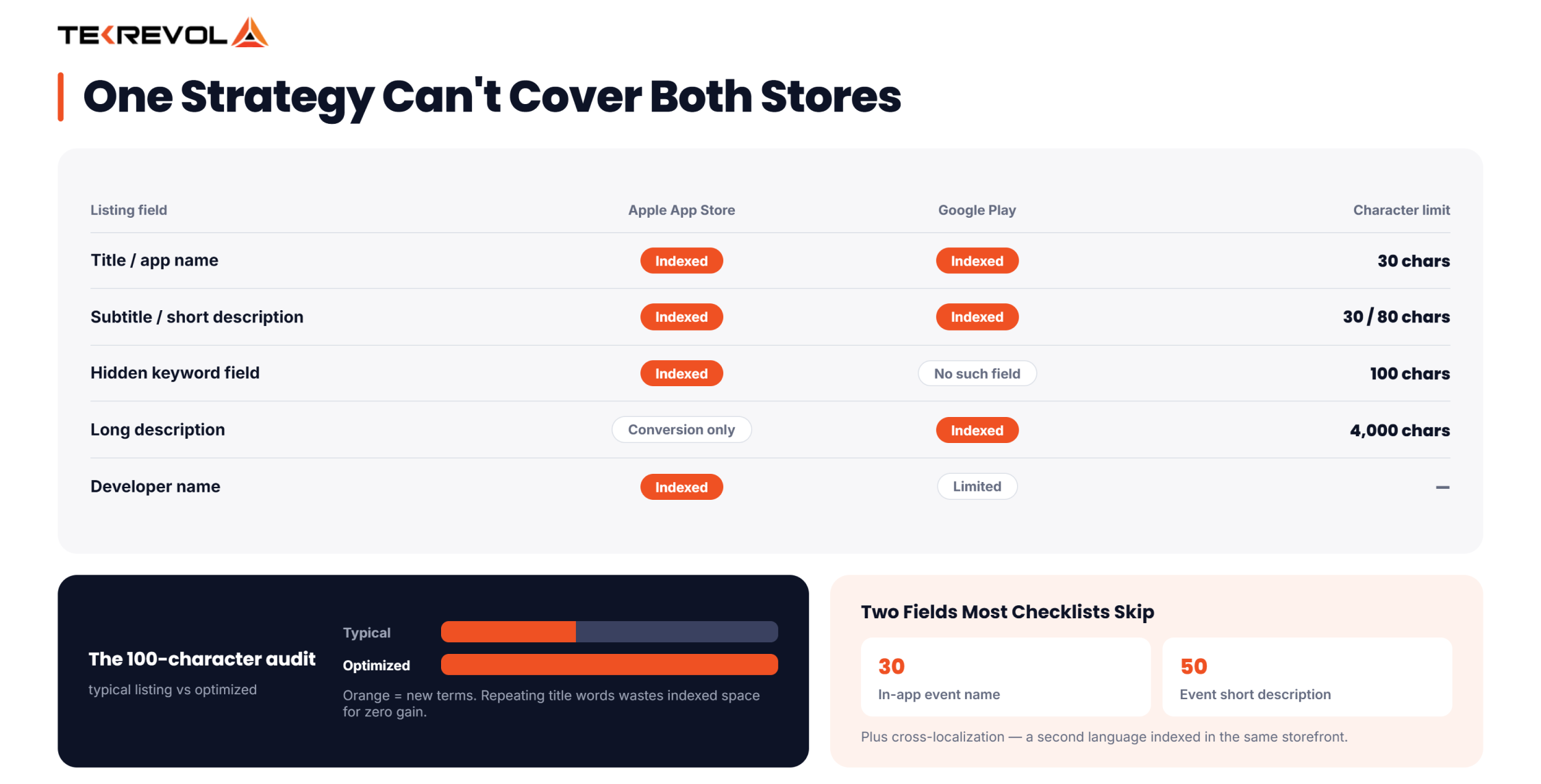
The two stores index different fields, so one strategy can’t cover both. Here’s the field-by-field breakdown:
| Field | Indexed on iOS? | Indexed on Google Play? |
| Title / App Name | Yes (30 char) | Yes |
| Subtitle / Short Description | Yes (30 char) | Yes (80 char) |
| Keyword Field | Yes (100 char, hidden) | No such field |
| Long Description | No (conversion only) | Yes (up to 4,000 char) |
| Developer Name | Yes | Limited |
| Category | Yes (auto-indexed) | Yes |
A strategy built entirely around the iOS keyword field will underperform on Google Play, where the long description carries indexing weight it never has on iOS.
What Tools Can Help You Execute an ASO Checklist Efficiently?
Managing App Store Optimization manually becomes difficult as your app grows. ASO tools help you track keyword rankings, monitor competitors, analyze user reviews, and measure how listing updates affect visibility and conversions. Instead of relying on guesswork, you can make optimization decisions using real performance data.
Most ASO teams use keyword research, competitor analysis, review monitoring, and A/B testing tools. These platforms show which keywords drive impressions, how rankings change after updates, which visuals convert better, and where competitors are gaining visibility. The insights help you focus on the changes that deliver the greatest impact.
Tools provide the data, but well-planned ASO strategies drive the results. Understanding your audience, prioritizing the right optimizations, and testing your listing consistently are what lead to sustainable organic growth. That’s why app store optimization is important; it combines actionable insights with continuous execution to increase visibility and long-term downloads.
What Are the Most Common App Store Optimization Mistakes to Avoid?
Many apps struggle to gain organic visibility not because of poor quality, but because of not following ASO best practices. Fixing these common ASO mistakes can improve your rankings, increase discoverability, and help you get more value from every app update.
- Repeating keywords across title, subtitle, and keyword field instead of building combos, it wastes space that could cover new terms
- Ignoring the Google Play description as an indexing opportunity, since it’s one of the few fields Google actually reads for ranking
- Skipping localization, or translating text without adapting screenshots to match the local audience
- Treating ASO as a pre-launch task instead of an ongoing process tied to every release
- Leaving the iOS keyword field partially filled, which leaves ranking potential on the table for no real benefit
Avoiding these mistakes is only one part of improving organic growth. Pairing a strong ASO foundation with broader mobile app marketing strategies helps you increase visibility across search, social, paid acquisition, and retention channels while turning more store visitors into long-term users.
How Do You Measure Whether Your ASO Strategy Is Working?
Track keyword ranking position, impression-to-view conversion, view-to-install conversion, and your organic-to-paid download split on a recurring schedule, not just after launch.
Ranking shifts can show up within about a day of a metadata change. Change one field at a time so you know exactly what moved the needle, instead of updating everything at once and guessing later.
Keep a simple log of what changed and when; it turns “rankings went up” into “the subtitle change is what worked.” It also helps to compare your movement against a benchmark; this guide for marketing your mobile app as a startup covers what early-stage growth benchmarks typically look like.
How Does TekRevol Help You Execute App Store Optimization Successfully?
App Store Optimization isn’t a one-time checklist; it’s an ongoing process of testing, measuring, and refining every element that influences visibility and conversions. At TekRevol, ASO is integrated into the broader app growth strategy, ensuring your listing evolves alongside your product and changing search behavior.
Our team combines keyword research, competitor analysis, metadata optimization, localization, creative testing, and review management to improve both discoverability and conversion rates. Every update is backed by performance data, allowing us to identify what drives impressions, installs, and user engagement instead of relying on assumptions.
As new features are released, store listings are updated to reflect changing user intent and maximize ranking opportunities. This data-driven approach has supported the success of apps across industries, including fitness, education, fintech, healthcare, and eCommerce.
From launching new products to helping established apps expand into competitive markets, TekRevol focuses on sustainable organic growth through continuous optimization, regular performance analysis, and iterative improvements. Rather than treating ASO as a standalone task, we make it an ongoing part of your app’s long-term growth strategy.
Ready to stop guessing and start ranking?
Avoiding common pitfalls is only half the game; success depends on having the right game development team by your side.
Get in Touch


