The types of software testing are the different ways a team checks software, and each type answers a different question. Some types check what the software does, and others check how well it does it. This guide explains the types of testing in plain terms, shows one feature tested in every way, and gives a test for choosing your mix for a custom software development project.
What is software testing?
Software testing is the process of running software to check that it works as required and to find defects before users do. Testing is one phase of the software development lifecycle, and our guide to SDLC vs STLC explains how the testing cycle runs alongside the build.
No single test answers every question about a product. Teams therefore combine several kinds of tests, each aimed at a different risk, and those kinds are the types this guide covers.
What are the main test types?
The ISTQB Foundation syllabus names four test types, which are functional, non-functional, black-box and white-box testing, and it groups tests into five levels. Longer lists of test types look endless because those lists mix types, levels, techniques and release practices. In TekRevol’s reading, it is clearer to sort tests with four questions, and the diagram shows them.
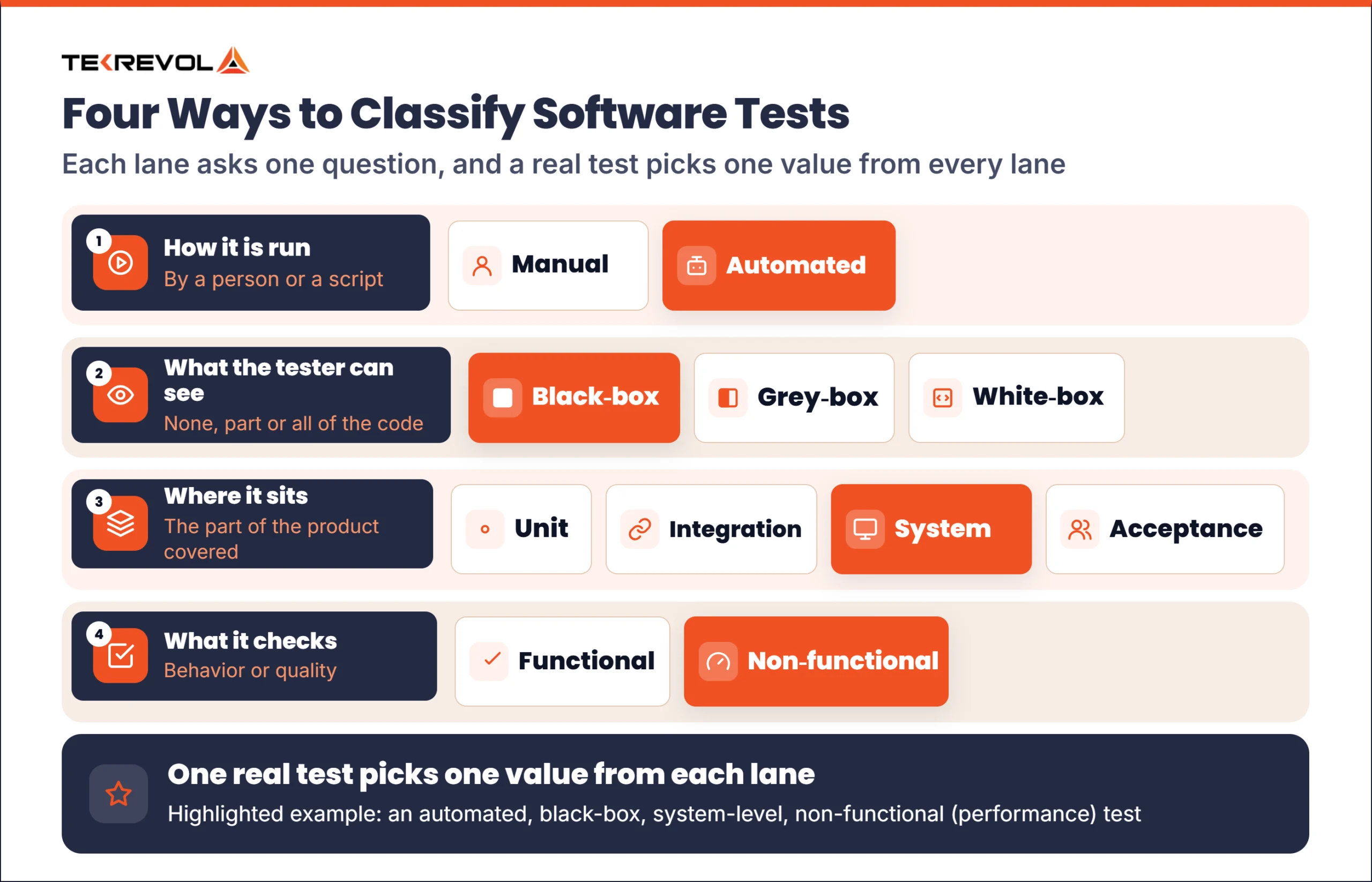
Each question gives one group of types:
- How the test is run. A person or a script runs it: manual or automated testing.
- What the tester can see. The tester sees none, part, or all of the code: black-box, grey-box, or white-box testing.
- Where the test sits. It covers a unit, a group of units, the whole system, or the user’s acceptance: unit, integration, system, or acceptance testing.
- What the test checks. It checks behavior or quality: functional or non-functional testing.
A real test combines one value from each group, such as an automated, black-box, system-level performance test. Sorting software testing types this way keeps the list short and avoids counting the same test twice.
Manual and automated testing
Manual testing relies on a person’s judgment, and automated testing runs scripts that repeat the same check every time. These two software testing methods suit different jobs: manual testing fits usability, visual checks and exploration, and automated testing fits repeat checks such as regression suites and API checks. In TekRevol’s reading, most teams use both, and the split depends on how often a check has to be repeated.
Black-box, white-box and grey-box testing
The three approaches differ in how much of the code the tester can see. ISTQB lists black-box and white-box as test types, while many guides call them techniques, so expect the label to vary. The table below is TekRevol’s summary.
| Approach | What the tester knows | Typical use |
| Black-box | Only inputs and outputs, as a user sees them | Checking behavior against requirements |
| White-box | The code and its structure | Checking logic paths and code coverage, often by developers |
| Grey-box | Part of the internals, such as the database design | Integration and API checks where some inside knowledge helps |
Levels of testing in software testing
ISTQB lists five levels of testing: component (unit), component integration, system, system integration, and acceptance. In TekRevol’s reading, most guides use the four that matter most, which are unit, integration, system, and acceptance testing. The table below, including the “Who usually runs it” column, is TekRevol’s summary.
| Level | What it checks | Who usually runs it |
| Unit | One function, method, or class on its own | Developers |
| Integration | That units and services work together | Developers and testers |
| System | The complete product against its requirements | Testers |
| Acceptance | That the product is ready for the business and its users | Business users and product owners, with testers |
In TekRevol’s reading, most of your tests should be unit tests, with fewer integration and system tests above them.
Functional vs non-functional testing
Functional testing checks what the software does, and non-functional testing checks how well it does it. A login that accepts the right password is a functional check, and a login that stays fast when many people sign in at once is a non-functional one. The ISTQB syllabus says most of those test activities can be performed at every test level, so these two groups cut across the levels above.
Types of functional testing
The main functional test types are smoke, sanity, regression, confirmation, API, UI, and user acceptance testing. The table below is TekRevol’s summary.
| Type | What it checks | When to run it |
| Smoke | That the main functions work in a new build | After every new build |
| Sanity | That a specific fix or small change works | After a minor change |
| Regression | That existing features still work after a change | After every change, usually automated |
| Confirmation (retesting) | That a fixed defect is really fixed | After each defect fix |
| API | That services return correct data and errors | During development and in each build |
| UI | That screens and controls behave as designed | After interface changes and before release |
| User acceptance | That real users accept the product for their work | Before release |
The ISTQB syllabus says testing after a change should include confirmation testing and regression testing. Confirmation testing checks that a fix worked, and regression testing checks that a change broke nothing else. TekRevol’s guide to visual regression testing covers the interface side of regression.
Types of non-functional testing
Non-functional types check quality traits such as speed, safety, and ease of use. The table below is TekRevol’s summary.
| Type | Question it answers | Example check |
| Performance | How fast and stable is it under load? | Response time when many riders book at once |
| Security | Can someone misuse it or break in? | Trying to open another user’s data |
| Usability | Can people use it without help? | Watching new users finish a task |
| Accessibility | Can people with disabilities use it? | Screen reader and keyboard-only use |
| Compatibility | Does it work across devices, browsers, and systems? | The same flow on several phones and browsers |
| Reliability | Does it keep working over time? | A long session watched for failures |
| Localization | Does it fit each language and region? | Dates, currency, and text direction in each market |
Performance testing has several subtypes. Load testing applies expected traffic, stress testing pushes past it, spike testing adds a sudden surge, soak testing runs for a long period, and volume testing uses large amounts of data.
Other test types
In TekRevol’s reading, some approaches do not sit on the four axes because they describe how a test is found.
- Exploratory testing. A tester investigates without a script and follows what they find.
- Ad hoc testing. The tester checks informally, with no written cases.
- Fuzz testing. Random or unexpected inputs are sent to find crashes and security gaps.
- Monkey testing. Random actions show whether the software survives bad input.
- Mutation testing. Small deliberate faults are added to the code to check that the tests catch them.
Alpha, beta and A/B testing: types or release practices?
In TekRevol’s reading, alpha, beta and A/B testing are release practices more than separate test types. A/B testing compares two versions of a feature to see which one users prefer, so it is an experiment that measures user preference.
Test types with a ride-booking example
One feature shows what each type catches. It is TekRevol’s illustration: a ride-booking app shows a fare estimate and then books the ride.
| Type | What the team checks | What it could catch |
| Unit | The function that calculates the fare from distance and time | A rounding error on short trips |
| Integration | The fare service calling the map and payment services | A map response the fare service cannot read |
| System | The full flow of requesting and confirming a ride | A confirmed ride that never reaches the driver |
| Acceptance | That the ride company’s operations team can accept the flow for daily use | A missing pickup-note field that dispatchers rely on |
| Regression | The booking flow after a pricing change | A discount rule that stops the estimate from showing |
| Performance | Booking while many riders request at once | Estimates that slow down at rush hour |
| Security | Access to ride history | One rider seeing another rider’s trips |
| Usability | First-time riders booking a ride | Riders who cannot find where to change the pickup point |
Each type looks at the same feature from a different angle, which is why one type alone leaves gaps. A real project would have many more tests, and our guide on how to write test cases shows how to write them.
Which test types does your project need?
In TekRevol’s judgment, every project needs unit, integration, smoke, and regression tests, and the rest depends on risk. The mix below is TekRevol’s judgment for software projects.
| Project | Core mix | Add when |
| Web application | Unit, integration, system, smoke, regression | Compatibility and load testing, and security testing if users log in |
| Mobile app | Unit, integration, smoke, regression, usability | Device compatibility and slow-network performance, and security if it handles payments |
| API or back-end service | Unit, integration, API, regression | Load testing for peak traffic and security testing for exposed endpoints |
| Enterprise system | Integration, system, regression, user acceptance | Performance testing for peak business periods, and role-based access checks |
| Regulated product | System, regression, acceptance, with written evidence | Security and reliability testing, and any checks the regulator requires |
How to choose: the TekRevol Test Mix Check
Choose test types by what a failure would cost. The TekRevol Test Mix Check turns that into five questions.
| Question | If yes, add | If no |
| Does the product handle payments or personal data? | Security testing and access checks | Basic security checks in the regular test runs |
| Do you expect traffic spikes? | Load, stress, and spike testing | A simple performance check before launch |
| Does it run on many devices or browsers? | Compatibility testing on the main combinations | Testing on the one or two main setups |
| Is the interface new or changing often? | Usability and exploratory testing | Occasional exploratory sessions |
| Do you release often? | Automated smoke and regression tests | Manual regression before each release |
If you answer yes to most questions, plan for a wider mix and automate what repeats. If you answer no to most, a small core of unit, integration and smoke tests may be enough at first.
Limits of testing
No set of testing types can guarantee a product without defects. In TekRevol’s judgment, the opposite mistake is also common: running many low-value tests that nobody reads. Pick the types that match your biggest risks, and review checks that have not found a defect in a long time.
Not sure which tests your product needs before launch?
If you cannot say which failures would hurt your product most, settle that before the build ends. Share your product plan and your release date, and we will help you decide the types of QA testing to run and when.
TekRevol is a software development company that starts every project with discovery, which identifies the project’s risks. Its Test stage later covers four kinds of testing: functional, performance, security, and usability, run by QA engineers.
Choose your test types after you list your risks, not before. Start with a 30-minute Free Consultation!