- To make an app: define the idea, validate it, study competitors, plan how it earns, scope an MVP, pick a platform, design, build, test, and publish.
- Choose your build path first. No-code or AI builders can ship a simple app in days to weeks; a custom app built by a team takes months.
- A custom basic MVP costs about $15,000 to $40,000 and takes 2 to 4 months; mid-complexity apps run $40,000 to $120,000 (TekRevol cost guide, 2026).
- Publishing costs $99 a year on Apple and a one-time $25 on Google Play.
- New personal Google Play accounts must run a closed test with at least 12 testers for 14 days before going live.
- Budget 15% to 20% of the build cost every year for maintenance.
How to build an app for your business if you’ve just visualized it in your mind?
Well, it’s not that hard to join the clan of innovative entrepreneurs who are reshaping industries through cutting-edge mobile solutions.
That’s because a person will surely own a mobile device, whether they’re running a global corporation or managing a quaint neighborhood bakery. In fact, 91% of US adults now own a smartphone, according to the Pew Research Center.
With the industry’s rapid growth and these astonishing statistics, it’s no surprise that businesses and entrepreneurs are increasingly drawn to app development, aiming to capitalize on its potential to drive innovation and revenue.
In this blog, we’ll walk you through the insights on how to build an app, exploring the essential steps, strategies, and costs involved in creating a mobile masterpiece that can stand out in the marketplace.
However, let’s start with the basics and learn about mobile app development, which is necessary if you’re new to this exciting field.
What is Mobile App Development?
Mobile app development is the process of developing software for smartphones and tablets, most commonly for iOS and Android operating systems.
The origins of application development can be traced back to conventional software development for computers.
However, mobile app development services designed for smartphones and tablets are specifically crafted to leverage the integrated functionalities and hardware of mobile devices, encompassing features such as cameras, GPS, Bluetooth, and more.
How to Build an App (Step-by-Step Process)
Creating a mobile app involves complex steps. The app that you’re building needs to reflect a consistent brand identity, align with your website and adaptable mobile site, and prompt users to download the app and convert within it.
Here are the 10 steps on how to develop an app:
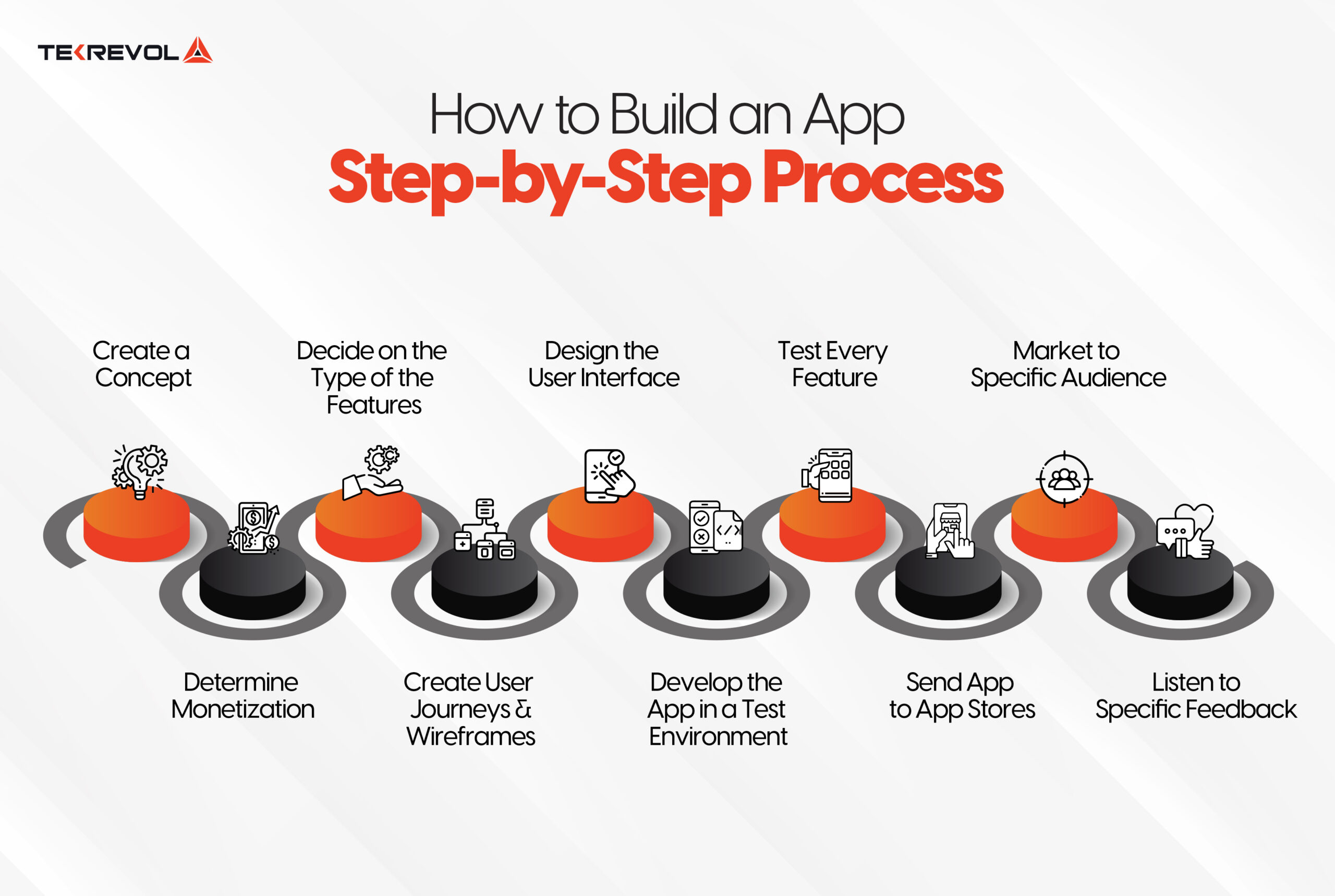
1- Create a Concept
Start app development by defining the app’s concept.
Consider your objectives and how the app will help achieve them. This sets the project’s vision and guides the necessary functionalities and design aligned with your business goals.
“How can I create an app?” This question leads to different sub-questions, and we’ve tried to cover them all for you:
- Who are you making the application for? (Target Audience)
- How will you make your application stand out from the competition? (Marketing strategy)
- Who are your direct competitors?
- What features are you going to add in your application?
- How will you monetize your application?
These basic questions will lead you to create an application with features that will help you gain traction from the relevant audience.
Hence, if you know the answers to all questions, you’re all set to go to the next steps!
2- Competitor Analysis
Usually, there are hardly one or two apps that exactly fit your specific requirements.
Whether it is Uber Eats for catering to your daily food craving or Airbnb for accommodation during travel, users still go for another alternative that suits their personal interest best.
It shows that the audience still considers other options while these giants in their industry are globally recognized for their services.
So, this indicates that you can still make a disruption in the market to create an app by finding the gaps in the existing digital solutions, and make a better version of it.
With in-depth analysis of similar apps in your niche on the App Store and Google Play, you can identify the gaps in the following aspects of the current applications:
- Features:
You can analyze the features of the applications and determine their functionality in the overall flow of the user journey. It will help you to spot any lacking or excessive elements in the app.
- Monetization Scheme:
Monetization is a crucial aspect of app development where you open streams to earn. With a deep audit of the applications, you can determine a scheme for your own application.
- App Updates:
The updates of the applications highly impact the user experience and it can go both ways. So, you have to be critical while analyzing the app maintenance throughout a period.
- Number of Downloads:
The total number of downloads shows the app’s success, as users are ready to give it a space on their device. For that purpose, you can leverage software such as SensorTower to estimate the numbers.
- Rating and Reviews:
Always look into the ratings and read the reviews of the application on its app store. It might take a while, but you can gain deep insights into what the app lacks by reading the audience’s reviews.
Users’ feedback in the form of comments on Google Play is worth considering when you are creating an app.
When it comes to determining the features in your mobile application development, you can categorize them as mentioned below, based on the example of a restaurant booking app:
Must-have features: registration, search, profile, restaurants list
Unique features: reservation for restaurants
Missing features: menu selection
3- Determine Monetization Ways
While it might appear as a later consideration, it’s crucial to contemplate your app’s monetization strategy early, as it impacts your app’s overall performance.
The most common monetization models include:
- In-app advertising:
In-app advertising is the ads you see while using any application, playing a game, or surfing through social media like Facebook, Instagram etc. It’s an effective marketing technique that allows you to advertise your product to the target audience based on the app’s demographics. Example: Instagram
- Third-party in-app ads:
The third-party model involves displaying advertisements from external sources while a user is using the application. You can earn revenue through clicks, impressions, and other relevant engagement metrics.
Example: Free games like Subway Surfers mostly feature banner ads and video ads that players watch to earn in-game rewards.
- e-Commerce apps:
Creating an app can be tough, and using the eCommerce app monetization model makes it easier for you to earn in minutes!
You can sell products or services directly through the application. Users can easily browse, select, and purchase items within the application.
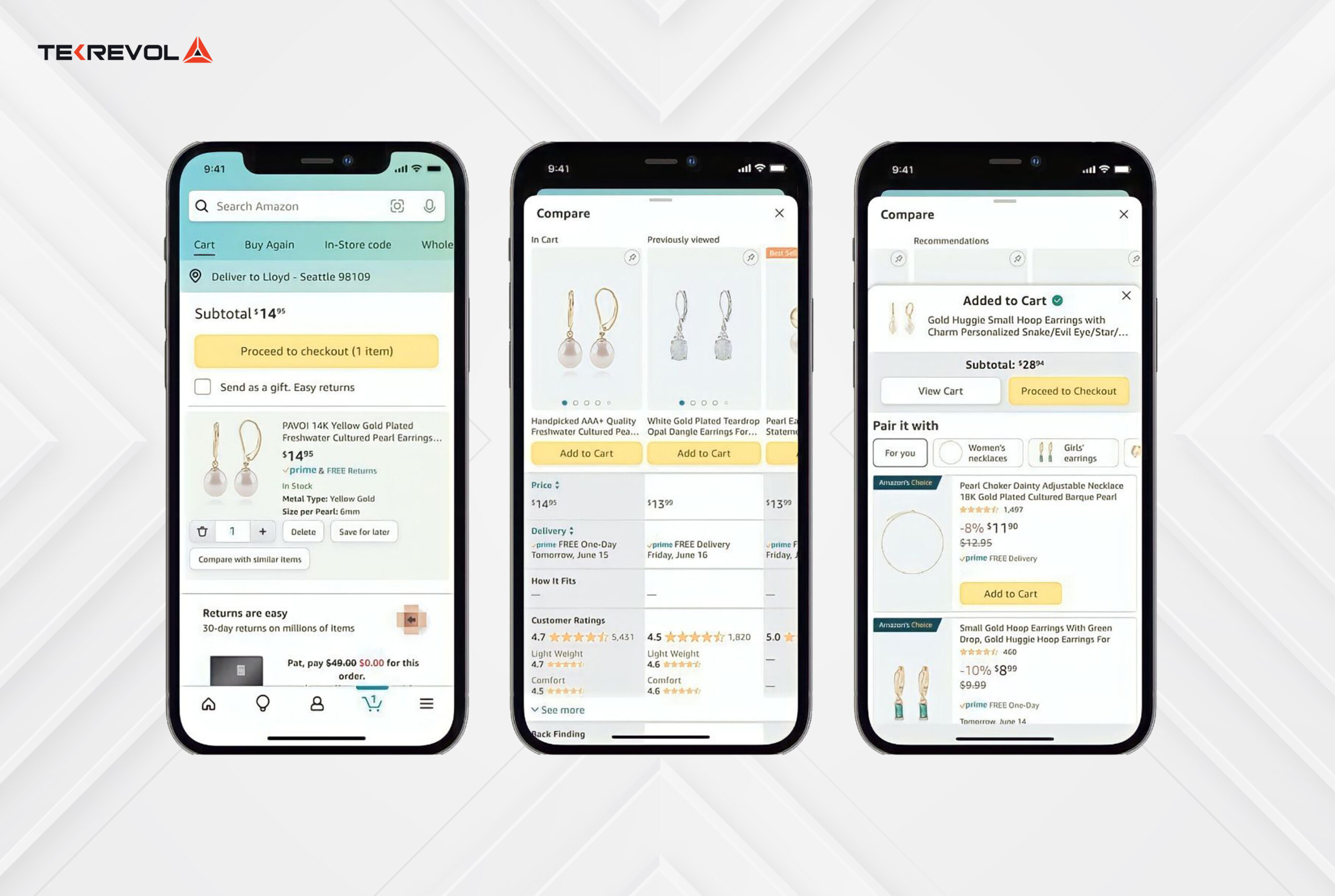
Example: The Amazon application is a prime example of an ecommerce application where users can browse a vast catalog of products, read reviews and make purchases without leaving the application.
- Freemium mobile app:
In this monetization model, you can use a few features of the application for free, whereas, for a complete features overview, you’ll have to pay for the full version.
Example: “Clash of Clans” is a freemium game that can be downloaded for free, but it has an option to purchase in-game currency (gems) to speed up progress and acquire exclusive items.
- Premium mobile app:
Unlike Freemium applications, Premium mobile applications require users to pay an upfront fee to download and access the full range of features.
Example: “Procreate” is a premium drawing app that users pay for once before downloading. Once bought, users enjoy the app’s complete functionality without a subscription.
After this step, you’ll have a clear understanding of your target audience, direct competitors, the channels you’ll be using to reach them, and revenue models.
- Subscription model:
In this model, users are required to purchase a subscription plan to unlock the app’s key features. Various subscription options are available, including monthly, annual, or weekly plans.
Leading platforms such as Google and Apple offer users the capability to manage their subscriptions directly through this model.
Moving on, you can even make money with different monetization methods from mobile game apps. For more insights, visit our detailed blog on ad revenue in mobile gaming.
You can use Business Model Canvas by Alex Osterwalder to describe, design, challenge, invent and pivot your app’s business model.
It primarily consists of nine building blocks, including key partners, key activities, key resources, value propositions, customer relationships, channels, customer segments, cost structure, and revenue streams.
When creating an app, the Business Model Canvas can be a valuable tool to outline the key elements of your application. For example:
Key Activities:
- App development, maintenance, and updates.
Key Resources:
- Skilled developers, technology infrastructure.
Value Propositions:
- What unique value does your app offer?
- What problem does it solve for users?
Customer Segments:
- Identify the target audience for your app.
Channels:
- How will you distribute and promote your app? (e.g., app stores, social media).
Revenue Streams:
- How will your app make money? (e.g., in-app purchases, ads, subscription fees).
Customer Relationship:
- How your application is going to interact with and build relationships with its customers throughout the customer lifecycle.
Cost Structure:
- What key resources are most important?
- What are the most important costs in your app design and development process?
4- Decide on the Type of the Features
A common error is overloading the first app version with excessive features.
Instead, distinguish between desired and essential features, including only the necessary ones in V1. Moreover, user feedback will uncover desired features for future updates.
We’ve carved up the features into two sections:
Core features:
Also known as the MVP (Minimum Viable Product), these contain the key features that fulfill the actual purpose of building the app. They are the minimal features that are enough to satisfy users with the objective the app is developed for.
Additional features:
These features are usually included to enable the user to engage with the core features for performing an action, maintaining the whole flow of the application.
Taking Airbnb as an example to build an app, these are the core features that will have the maximum focus in the development process:
- User registration
- Home page with popular hoteling options
- Favorite hotels
- Search system
- Hotel booking system
- Payment options
Here’s the list of additional features that will have secondary priority in your mobile application development:
- Booking button
- Notifications
- Hotel gallery
- Filters
Having a clear idea of the categorization of your app features, you can set the priorities and collaborate with the development team accordingly. It will not only provide clarity to the mobile app developers working on your app but also enable them to determine a specific timeline to make an app.
Meanwhile, you can always cross-check the idea with the team and enhance it further if it adds value to the product.
As a leading mobile app development company, TekRevol enables you to determine the features of your app, taking into consideration your primary objectives to ensure maximum ROI.
5- Choose the Right Platform For Your Application
Once you are done with the competitor analysis, features listing, and selection of monetization strategies, the next step for you is to choose the right platform for your application. You can choose between iOS and Android.
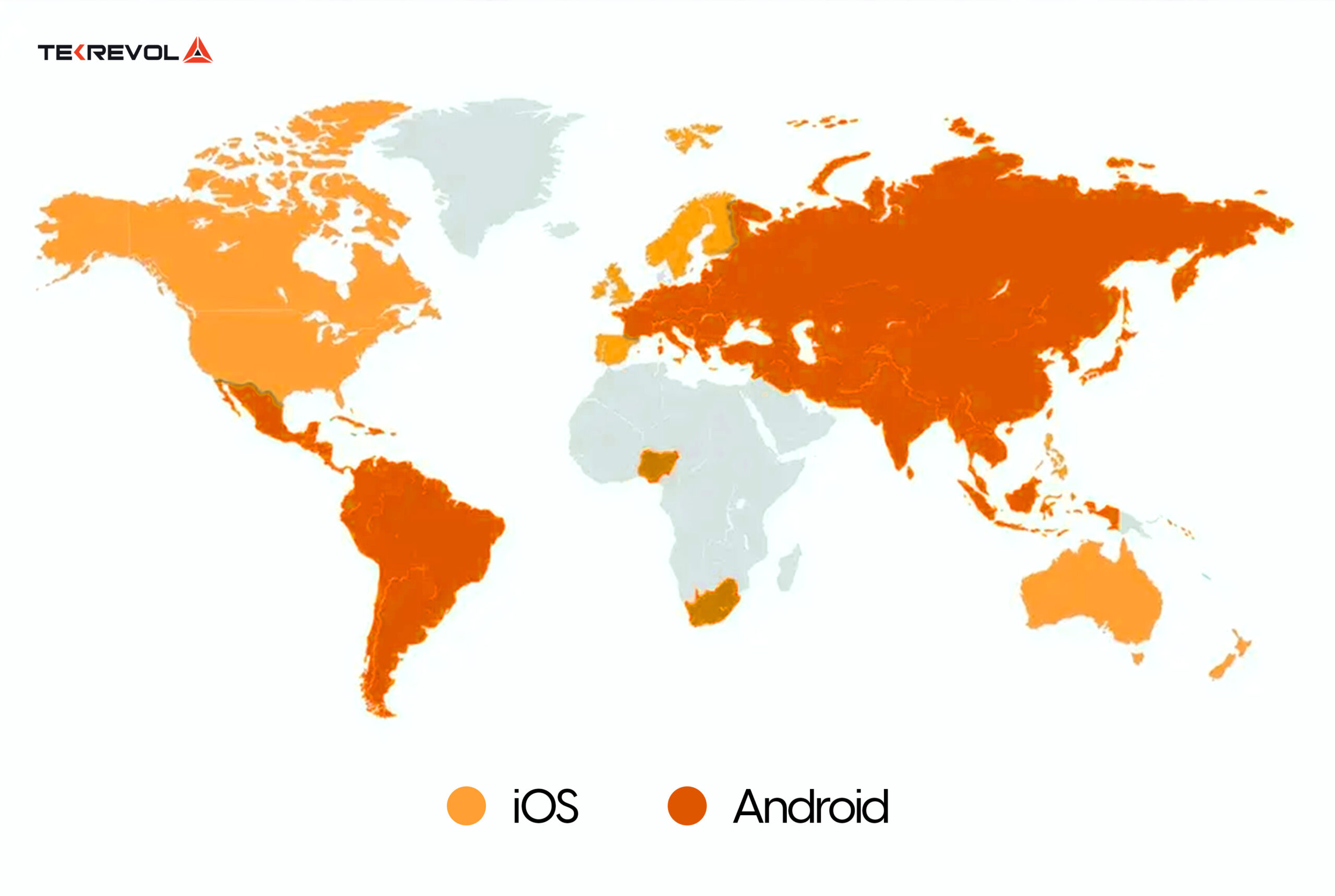
As a general rule, Android has the larger share of users in regions such as Central and South America and India, while iOS is a strong choice for markets like the US, Canada and Australia.
Most users also run recent operating system versions. Before you decide which OS versions to support, check Apple’s iOS adoption figures and Google’s Android version distribution in Android Studio.
Hence it’s your choice whether you opt for Android or iOS for your business application. Decide on your platform based on the target audience you’re targeting.
6- Design the App (UI/UX)
Wireframes and Approvals
To create an application, the first step in design is to create wireframes with all the features that you plan to put in your application.
Applications that use wireframes as a part of the UI/UX design process result in a more intuitive and user-friendly interface.
Wireframes are not the final product; you will still make some edits to them if the team or client doesn’t approve them.
Ensuring seamless collaboration between a development team and stakeholders is crucial for successful app development.
Regular approvals help avoid unnecessary effort on features that might not align with the app owner’s vision.
This collaborative approach maintains the clarity of the whole design process and also saves the project budget by eliminating potential misunderstandings.
Designing the User Interface
How to design an app? Well, once the wireframe and customer journey are approved, an app designer enhances the interface with graphics and designs for a compelling and branded experience.
They create mockups, providing a mid to high-fidelity preview for evaluating the design’s look, feel, accessibility, visual consistency, and functionality enhancements.
There are several guidelines when it comes to the designing of an app for both Android (Material Design Guidelines) and iOS (Human Interface Guidelines).
App Navigation
In iOS applications, the main tabs are placed in a tab bar at the bottom of the screen.
In current Android design (Material Design), main navigation also commonly sits in a bar at the bottom of the screen, while tabs at the top are used to switch between related views.
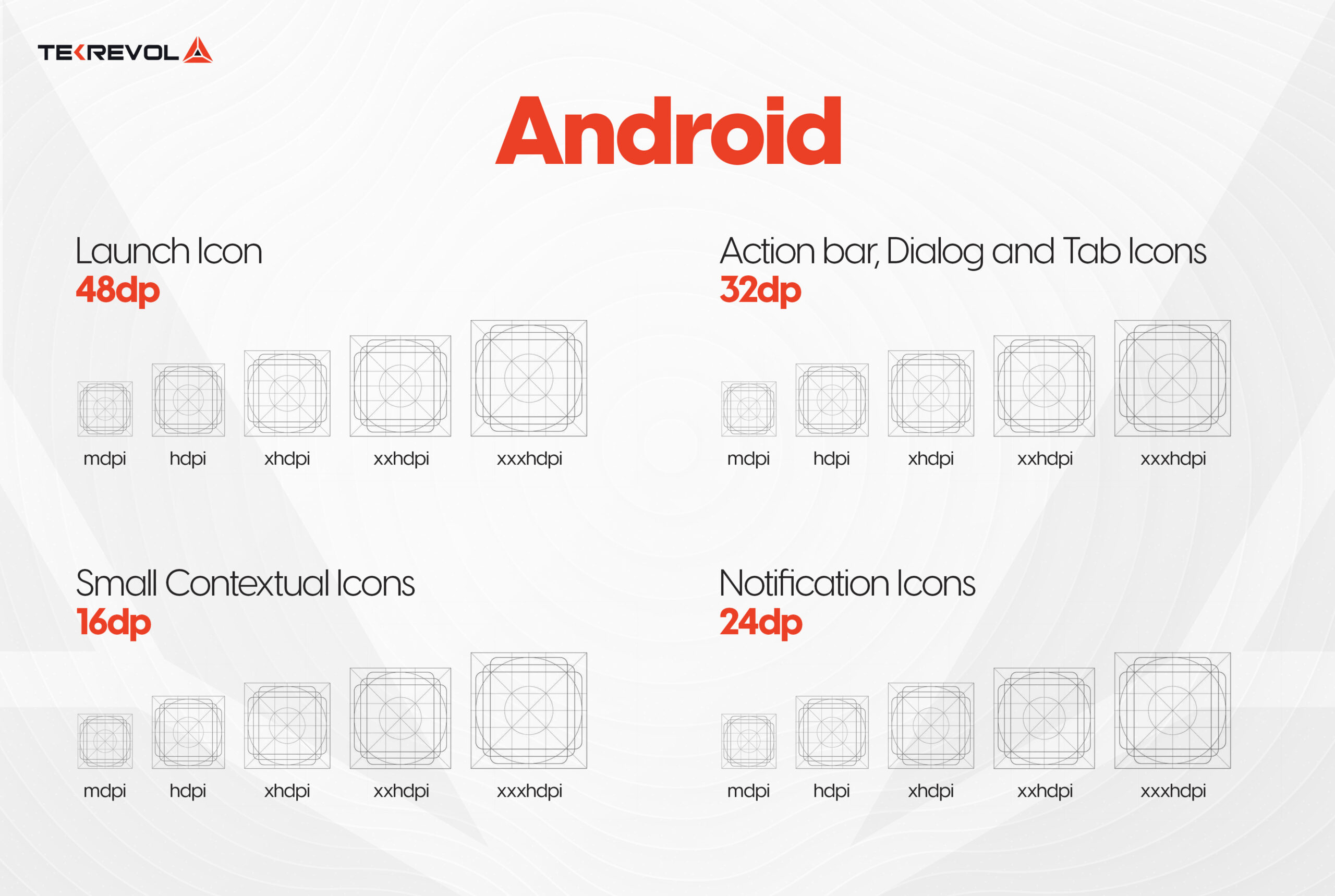
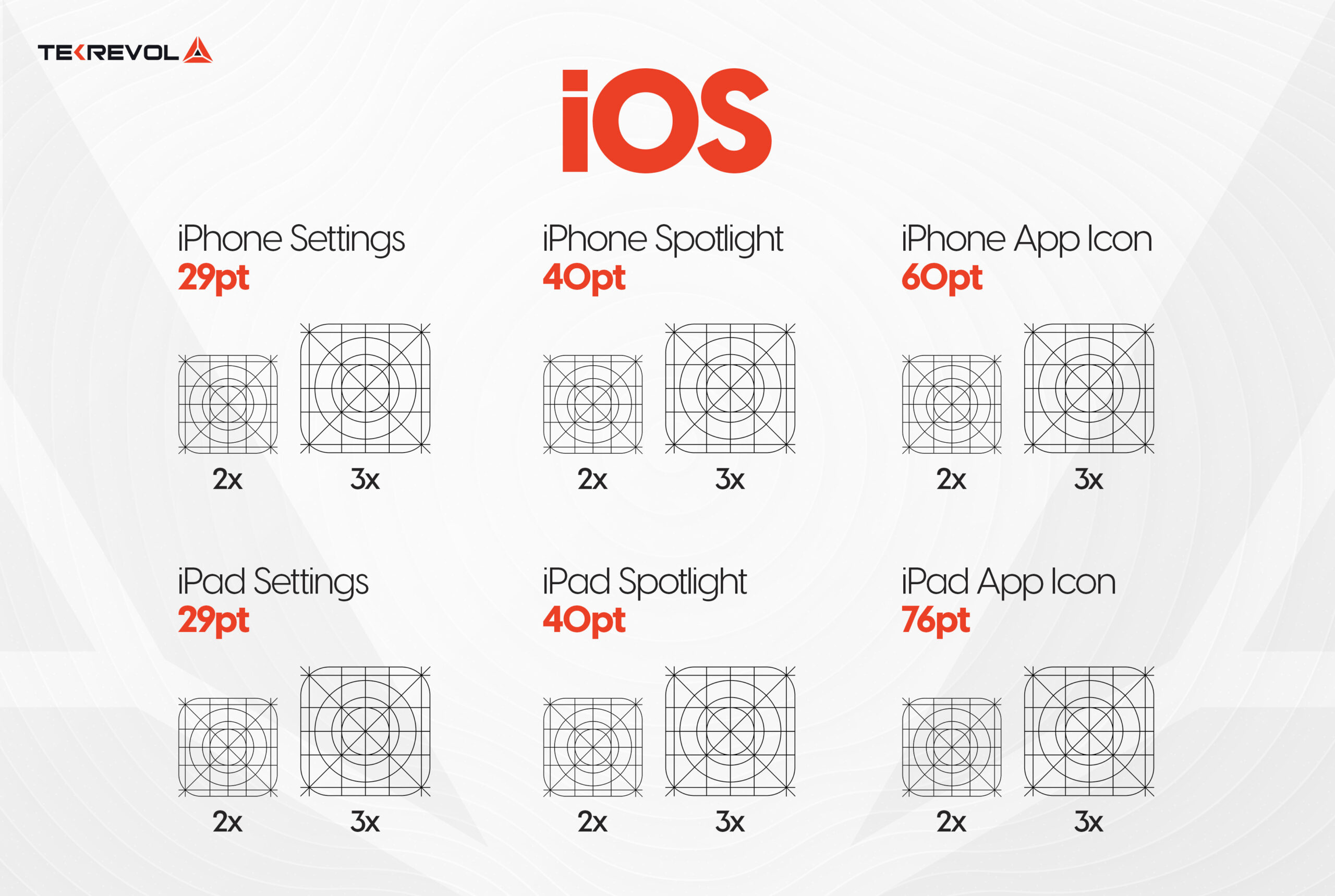
Icon Size
We have attached the size grid for both iOS and Android applications.
For Android:
For iOS:
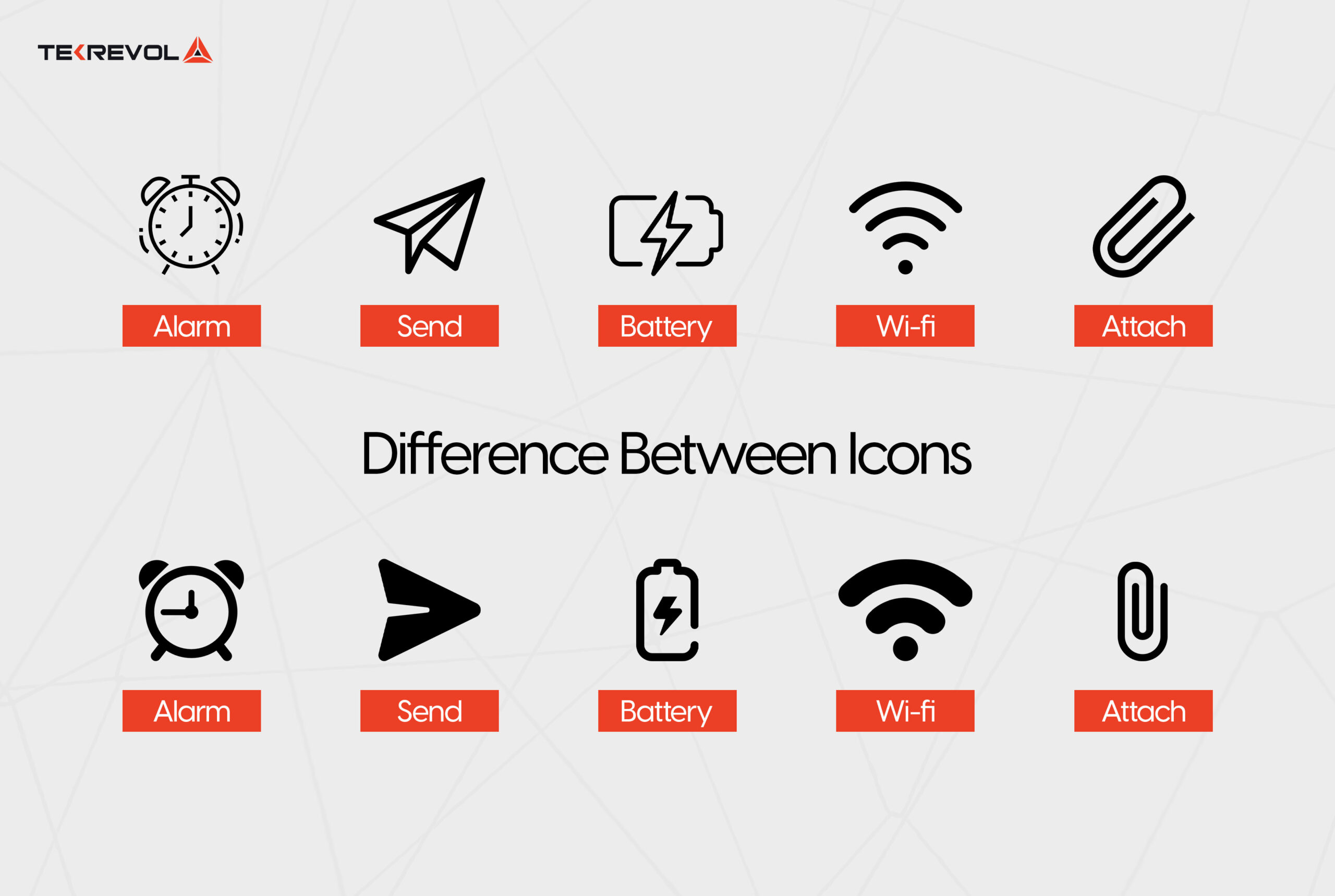
However, the icon’s shape is a bit different for iOS and Android apps.
Moreover, the default font is also different on iOS (San Francisco) and Android (Roboto).
7- Develop the Application
Following the design of the mobile app, the substantial work commences as mobile app developers initiate platform coding.
This should occur in a controlled test environment to enable comprehensive testing throughout the entire development journey.
Moreover, app development firms are responsible for crafting both the customer-facing front end, which users engage with, and a backend system for content management by team members.
8- Test Every Feature
As previously noted, rigorous testing, often numbering in the dozens or even hundreds of iterations, is imperative at every stage of mobile app development.
To achieve this, a dedicated quality assurance specialist should perform comprehensive QA testing to verify that each feature functions as intended.
Identifying and addressing bugs within the testing environment allows developers to rectify issues before the app’s launch, preserving a seamless user experience.
9- App Release On App Store
Upon finishing V1 of your app, an app development agency will release it on relevant app stores, enabling users to download and use it. The primary platforms for this are the Apple App Store and Google Play Store.
Publishing requires a developer account on each store: Apple’s Developer Program costs $99 a year, and Google Play charges a one-time $25 registration fee.
TekRevol’s app developers use the best practices to release an app on the app store without any delays. For your ease, we’ve mentioned the app release process below:
- Once you’re done with the rigorous testing of the application, ensure that it matches all the guidelines of Google Play Store or Apple App Store for app submission.
- If you’re publishing from a new personal Google Play developer account, run a closed test with at least 12 testers for 14 days before you can release to everyone.
- Fill in the app description, preview images, keywords and all the relevant information necessary for submitting your application.
- And yes, you can now submit the application.
- Await the app store’s response to determine whether your app is approved for launch or not.
TekRevol takes complete responsibility for submitting your application to app stores. Explore our launched applications and don’t miss the chance to download them for a more in-depth understanding.
- Want your app approved and live without delays?
- Get a free pre-launch review of your app against Apple's and Google Play's guidelines, and know what to fix before you submit, not after a rejection.
10- Market Your App and Listen to Feedback
Market to a Specific Audience
App stores enable companies to include images, videos, and content for precise audience targeting.
Reliable app design and development firms facilitate effective app marketing on app stores and other platforms like websites and social media.
Moreover, this enhances the number of downloads, leading to increased revenue for your business and more visibility within the app stores.
Listen to Specific Feedback
A crucial point to bear in mind is that app development is an ongoing process. User feedback, app store reviews, bugs, and the need for new features will persist.
On the other hand, periodic updates, whether minor fixes or substantial enhancements, are necessary for existing users and app store releases.
Want to learn more about how to create your own app? Head over to the next section to read all the details on how to make your own app for Android or iOS.
How to Build an App On Your Own?
Apps designed for iOS (Apple) and Android are exclusively available on the Apple App Store and the Google Play Store.
We’ll tell you how to develop apps for iPhone and Android to create your own iPhone or Android projects. However, if you don’t want to learn how to develop apps for Android and iOS, then you can simply develop mobile apps by hiring a trusted mobile app development agency.
How to Build an App for iPhone
Today, the standard programming language for building iOS apps is Swift, together with Apple’s SwiftUI framework for designing screens.
Apple introduced Swift as a more user-friendly, modern alternative to Objective-C, an extension of C with object-oriented features. Objective-C still runs many older apps, but it can be considered somewhat outdated and complex, particularly for individuals new to programming.
Swift is a comprehensive programming language, similar to Objective-C in purpose but simpler to grasp.
Most new iOS apps are built in Swift due to its ease of use, its support for diverse applications, and its strong performance.
Development environment for iOS
How to develop an iOS app? Well, for iOS app development, you primarily need to work with Xcode, Apple’s official development environment for iOS apps. It’s important to note that Xcode is only available for macOS.
Programming for iOS entails two significant limitations.
First, you must own a Mac to build and compile apps, and second, to have your apps published on the App Store, there’s an annual fee of $99. It’s worth mentioning that if you stop paying, your apps are removed from the App Store.
If you’re on the hunt for iOS app development services, then TekRevol can offer you a team of dedicated iOS app developers who can build you a robust iPhone app, assisting you with everything from ideation to design, development to testing, and all the way to launch.
Now that you know how to create an app for iPhone, let’s dig into the insights on how to create a mobile app for Android in the next section.
How to Build an App for Android
There are many programming languages available to build Android apps that are supported by Google.
Kotlin + Android Studio
Kotlin is now Google’s preferred language for Android development. Google announced Kotlin support at its I/O Developer Conference in 2017 and made Android development “Kotlin-first” in 2019.
Apps are built in Android Studio, Google’s official development environment, often with Jetpack Compose, Google’s modern toolkit for building app screens.
Kotlin is interoperable with Java, allowing for the smooth incorporation of Java code into Kotlin projects.
Java
Java was the original language for Android apps and is still fully supported. Thanks to its simple syntax, extensive libraries and large community, you’ll find plenty of Java code examples and references, and many existing apps still use it.
C and C++
C++ is a fitting choice for those who seek a deeper connection with hardware and wish to minimize reliance on Google’s pre-built features.
Although Android Studio supports this language, it requires the Android NDK (Native Development Kit).
C# in .NET MAUI
To use C# for mobile app development, developers now use .NET MAUI with Visual Studio. It replaced the Xamarin framework, which Microsoft stopped supporting on May 1, 2024.
The high-level languages, namely Kotlin, Java, and C#, are well-suited for efficient Android app development. C++, on the other hand, is primarily reserved for specific functionalities where maximum control is essential.
Developing the entire app in C++ would be time-consuming and offer minimal or no advantages.
Nonetheless, if you’re on the lookout for top-tier Android app development services, then TekRevol can be your trusted partner for building a feature-rich Android app.
How Long Does It Take To Build An App?
On average, app development spans from two to twelve months or longer, depending on the app’s complexity and the project’s framework.
Here are the average timelines for app development for different complexity levels:
| App Type | Estimated Time |
| Simple App Development | 2 – 4 months |
| Average App Development | 4 – 8 months |
| Complex App Development | 8 – 12+ months |
Source: TekRevol mobile app development cost guide, 2026.
How Much Does It Cost to Build an App?
Based on TekRevol’s 2026 mobile app development cost guide, the cost of app development varies with the app’s complexity.
Here are the details on how much it costs to build an app with different complexities:
| App Complexity | Cost |
| Basic App | $15,000 to $40,000 |
| Medium Complexity App | $40,000 to $120,000 |
| Complex App | $100,000 to $250,000+ |
What are the Most Popular Global Apps and their Development Cost?
1. Netflix
The Netflix app allows users to access the streaming service’s extensive library of movies, TV shows, documentaries, and other digital content directly from their mobile devices.
The estimated cost for creating an app like Netflix can range from $25,000 – $200,000+.
2. WhatsApp
WhatsApp is a popular messaging application and social media platform that allows users to send text messages, make voice and video calls, share multimedia content, and engage in group chats with their contacts.
The estimated cost for developing an app like WhatsApp can range from $30,000 – $70,000+.
3. Snapchat
Snapchat is a multimedia messaging app and social media platform known for its unique features centered around sharing photos and videos. Developed by Snap Inc., Snapchat has gained popularity among users, especially younger demographics.
The average cost to build an app like Snapchat can range from $45,000 – $100,000+.
4. TikTok
TikTok is a social media platform and mobile app that allows users to create, share, and discover short-form videos. It has become particularly popular for its entertaining and creative content, often featuring music, dances, humor, and various challenges.
The average cost to develop an app like TikTok can range from $60,000 – $100,000+.
5. Teladoc
Teladoc is a pioneering telemedicine app that has redefined healthcare access. It connects users with licensed healthcare professionals for virtual medical consultations.
The estimated development cost for a healthcare app like Teladoc typically ranges from $300,000 to $700,000+.
6. Uber
Uber is a widely-used ride-sharing application that links drivers and passengers worldwide. With this app, users can swiftly request or pre-schedule rides, which are then received by nearby drivers.
The estimated development cost for the Uber app falls in the range of $50,000 to $150,000+.
For more insights, visit our detailed blog on how to make an app like Uber.
7. Instagram
Instagram is a renowned social media platform that is used for photo and video sharing. Users can upload, edit, and share visual content with their followers.
The cost to build an app like Instagram can range from 50,000-250,000.
8. Airbnb
Airbnb is an online platform and marketplace that enables people to list, discover, and book a wide variety of accommodations and lodging options around the world.
Airbnb allows hosts to rent out their properties to travelers seeking short-term stays, providing an alternative to traditional hotels.
The cost to make an app like Airbnb can be around $30,000 for both platforms, iOS and Android.
9. Tinder
Tinder is a popular mobile dating application that allows people to connect with others based on their geographic location.
Users create profiles with photos and brief descriptions, and the app presents them with potential matches in their area.
The estimated cost of developing a dating app like Tinder can range from 44,800-61,200.
10. MoneyLion
The MoneyLion app offers various financial services and tools to help individuals manage their money, build their credit, invest, and achieve their financial goals.
The cost to build a mobile app in Fintech can range from $20,000 to $25,000 or more.
11. Nike Training Club
The Nike Training Club (NTC) is a fitness app developed by Nike, a well-known sports and athletic apparel company. NTC is designed to help individuals achieve their fitness and workout goals by providing a wide range of training programs, workouts, and resources.
The estimated cost for creating a fitness app like Nike Training Club can be around $20,000 and $80,000.
| Popular Apps | Average Cost |
| Netflix | $25,000 – $200,000+ |
| $30,000 – $70,000+ | |
| Snapchat | $45,000 – $100,000+ |
| TikTok | $60,000 – $100,000+ |
| Teladoc | $300,000 – $700,000+ |
| Uber | $50,000 – $150,000+ |
| $50,000 – $250,000+ | |
| Airbnb | $30,000+ |
| Tinder | $44,800 – $61,200+ |
| MoneyLion | $20,000 – $25,000+ |
| Nike Training Club | $20,000 – $80,000+ |
How to Make an App on a Limited Budget?
You can build a mobile app on a limited budget by using Flutter as a platform. Here’s a quick breakdown of the features along with their development time to give you an idea.
| Core Features Of An Application | Backend Development | iOS Development | Android Development | Flutter Development |
| Registration | 47 Hours | 42 Hours | 42 Hours | 44 Hours |
| Search | 22 Hours | 21 Hours | 21 Hours | 21 Hours |
| Profile | 59 Hours | 39 Hours | 39 Hours | 47 Hours |
| Push Notification | 14 Hours | 14 Hours | 14 Hours | 14 Hours |
| Payment Gateway | 45 Hours | 35 Hours | 35 Hours | 42 Hours |
Explore our comprehensive blog on “App Development Costs” for an in-depth understanding of the factors influencing pricing.
How Can TekRevol Help You With Mobile App Development?
We understand that building an app isn’t a one-size-fits-all venture. It’s a detailed process influenced by a multitude of factors, from market research and user experience to platform selection, budget considerations and, lastly, monetization strategies.
If you wish to build an app to test your idea from scratch, then TekRevol’s team of app developers is here to unravel the complexities and guide you through the challenges of building a mobile application.
To turn your app vision into a living, breathing masterpiece, just give the “Let’s Connect” button below a click, and our experts will connect with you for a detailed discussion.
- Ready to turn your app idea into a launch-ready product?
- Secure a free 30-minute session with a senior product developer. You'll leave with your MVP scope, a realistic budget and timeline, and the technical risks to plan for, before you spend a dollar on development.