A CI/CD pipeline is the automated path that takes a code change from commit to a running release, running build, test, and deploy steps in order and stopping when one fails. Teams use it to release smaller changes more often and to catch faults before customers do. This guide defines the terms, walks through the stages, and compares tools by job. It also gives you the TekRevol Pipeline Gate Map, a way to decide what each stage must stop, and covers how to build, measure and secure a pipeline on a custom software development project.
What is a CI/CD pipeline?
A delivery pipeline is a sequence of automated steps that builds, tests and releases every code change. “CI” stands for continuous integration, in which developers merge their work into a shared branch often, and an automated build checks each merge. “CD” stands for continuous delivery or continuous deployment, which carry a tested build toward users. Martin Fowler’s continuous integration article describes the practice as merging to a shared mainline at least daily, with a self-testing build that runs on each merge. A CI pipeline is the first half of a delivery pipeline.
CI vs CD: what is the difference?
Continuous integration merges and tests code; continuous delivery prepares each tested build for release, and continuous deployment releases it with no manual approval.
| Term | What it automates | Who approves the release |
| Continuous integration | Build and test on every merge | No one, it ends before release |
| Continuous delivery | CI plus packaging and staging | A person, before production |
| Continuous deployment | Delivery plus release to production | No one, the pipeline decides |
The difference between a continuous integration pipeline and a continuous delivery pipeline is where the automation ends. A continuous deployment pipeline removes the last manual step. In TekRevol’s judgment, that step is safe to remove only when the test and health gates described below have proved reliable.
What are the CI/CD pipeline stages?
This guide uses five stages: source, build, test, release and deploy. GitLab, IBM and Palo Alto Networks each list four stages, and Octopus lists seven. A guide that lists four, such as source, build, test and deploy, folds the release stage into deploy.
- Source. A commit or merge triggers the run, and early checks run here. TekRevol’s judgment: pipelines commonly start on a push or merge, on a pull request or on a schedule.
- Build. The pipeline packages the code into one versioned artifact.
- Test. Unit and integration tests run.
- Release. The artifact goes to staging, where smoke tests run.
- Deploy. The artifact rolls out to production and a health check runs.
The TekRevol Pipeline Gate Map: what each stage should stop
Every stage should end in one pass or fail gate, because a stage without a gate cannot protect a release. The TekRevol Pipeline Gate Map pairs each stage with a gate, the fault it catches, the action on failure, and the DORA metric it protects.
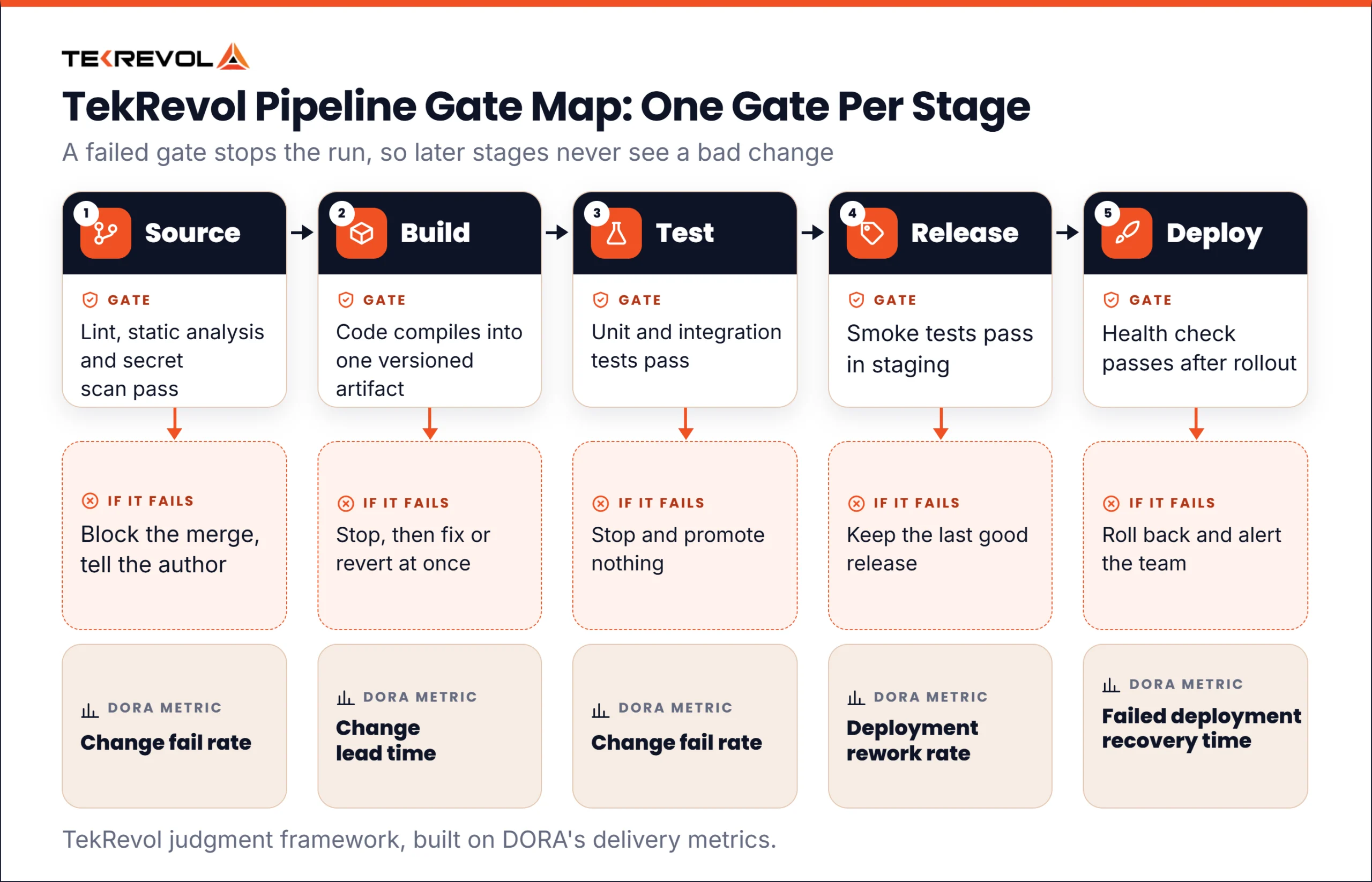
| Stage | Gate | What it catches | If the gate fails | DORA metric it protects |
| Source | Lint, static analysis and secret scan pass | Style faults, obvious defects and leaked credentials | Block the merge and tell the author | Change fail rate |
| Build | The code compiles into one versioned artifact | Broken builds and missing dependencies | Stop the run, then fix or revert at once | Change lead time |
| Test | Unit and integration tests pass | Regressions | Stop the run and promote nothing | Change fail rate |
| Release | Smoke tests pass in staging | Faults that appear only in a production-like environment | Keep the last good release | Deployment rework rate |
| Deploy | A health check passes after rollout | Faults that appear only in production | Roll back to the last good release and alert the team | Failed deployment recovery time |
A failed gate stops the pipeline at that stage, so later stages never see a bad change. Fowler advises fixing a broken build immediately, often by reverting the faulty commit, and the Gate Map follows that rule. A gate must also give the same answer for the same input, and it must finish fast enough that developers wait for it. In TekRevol’s judgment, a gate that fails at random is worse than no gate, because the team learns to ignore it.
Illustrative scenario. A developer merges a change that breaks one integration test. The test gate fails and the run stops before staging. The author fixes the test and the pipeline passes.
The deploy gate works best with a release strategy that makes rollback cheap. Blue-green deployment keeps two production environments and switches traffic from one to the other. Canary deployment sends a small share of traffic to the new release first. Both keep the last good release running, so a rollback becomes a traffic switch that skips a rebuild. In TekRevol’s judgment, blue-green costs more because it needs a second environment, and canary needs traffic control and good monitoring.
CI/CD pipeline tools
No single tool covers a pipeline, so choose tools by job and then check how they connect. This table lists CI/CD tools by job. The tools are examples.
| Job | Examples | Strength | Trade-off |
| Source control | Git, GitHub, GitLab | History and a trigger | Needs branch rules |
| Pipeline runner | Jenkins, GitHub Actions, GitLab CI/CD, CircleCI. TekRevol’s examples: Azure Pipelines | Runs every stage | Pipelines need upkeep |
| Build and package | Gradle, Docker. TekRevol’s example: Maven | Repeatable artifacts | Needs caching |
| Testing and quality | JUnit, Selenium. TekRevol’s example: SonarQube | Automated gates | Can be slow and brittle |
| Artifact storage | JFrog Artifactory, Nexus | One build per version | Another service |
| Deployment | TekRevol’s examples: Argo CD, Spinnaker | Versioned releases | A platform to learn |
| Infrastructure as code | Terraform. TekRevol’s example: Ansible | Rebuilds from files | State needs managing |
| Secrets | TekRevol’s examples: HashiCorp Vault, Azure Key Vault, AWS Secrets Manager | Keeps keys out of scripts | Policies need upkeep |
The strengths and trade-offs are TekRevol’s judgment. Tools labeled TekRevol’s examples come from TekRevol, and the others appear in vendor guides.
How to build a CI/CD pipeline
Build one stage at a time, starting with version control and an automated build, and add a stage only when the one before it runs reliably. This order is TekRevol’s judgment.
- Decide what to automate first. TekRevol’s DevOps automation guide is a related read.
- Put code, build script and pipeline configuration in version control.
- Automate the build into one versioned artifact from a clean checkout. Fowler’s guide suggests aiming for about ten minutes.
- Add automated tests on every merge, starting with fast unit tests.
- Store each artifact and deploy it to staging.
- Add production deployment with a health check and a rollback step.
- Measure the pipeline, then fix its slowest stage first.
A first build pipeline can stay small. Here is an illustrative CI/CD pipeline example.
| Step | What runs | Gate |
| 1. Trigger | A merge to main starts the run | The run starts automatically |
| 2. Build | Compile and package one artifact | The artifact exists |
| 3. Test | Unit and integration tests | All tests pass |
| 4. Release | Deploy the stored artifact to staging | The smoke test passes |
| 5. Deploy | Roll out to production after approval | The health check passes |
How do you measure pipeline results?
Measure a pipeline with DORA’s five software delivery metrics, then compare them before and after each change. DORA’s software delivery metrics guide groups them into throughput and instability, and notes that the set evolved from an earlier four, so older guides may list only four.
| Metric | Group | What it measures | Gate Map stage (TekRevol’s judgment) |
| Change lead time | Throughput | Time from a commit to running in production | Build |
| Deployment frequency | Throughput | How often deployments happen | All five |
| Failed deployment recovery time | Throughput | Time to recover from a failed deployment | Deploy |
| Change fail rate | Instability | Share of deployments requiring hotfixes or rollbacks | Source, Test |
| Deployment rework rate | Instability | Share of deployments that are unplanned work to fix bugs | Release |
In TekRevol’s judgment, record the metrics before you build and again after you add each new gate.
How do you secure the pipeline?
A pipeline holds the keys to production, so it needs the same protection as production. Keep secrets in a secrets manager, not in scripts or configuration files. Scan code and dependencies as pipeline steps, so a vulnerable package fails a gate.
The SLSA framework (Supply-chain Levels for Software Artifacts), version 1.2, grades how far you can trust a build. Its Build track starts at level 1, where each artifact carries a record of how it was built. At level 2, a hosted build platform signs that record, and at level 3 a hardened platform isolates each run. In TekRevol’s judgment, a team starting out should aim for level 1 on a hosted platform and treat level 3 as a later goal.
What goes wrong with pipelines?
Pipelines fail most often through slow builds, flaky tests, long-lived branches and missing rollback plans. The fixes below are TekRevol’s judgment, apart from the points that Fowler and the vendor guides also make.
- Slow builds. Keep the build fast and run slow tests later.
- Flaky tests. A test that passes and fails on the same code erodes trust in every gate. Fix or quarantine it.
- Long-lived branches. Octopus names them as a common problem. Merge to the main branch daily, as Fowler recommends, and use feature flags to hide unfinished work.
- Pipeline sprawl. Many services mean many pipelines. TekRevol’s microservices best practices guide covers how to run those services, and teams that build such systems can plan their pipelines early with TekRevol’s custom software services.
How is AI changing delivery pipelines?
AI-written code raises the number of changes a pipeline must check, so strong gates matter more. DORA’s 2025 research found that AI improves throughput but often costs stability when a team’s foundation is weak, and that AI adoption amplifies the effects a team already has. In TekRevol’s judgment, a team that adds AI assistants before it has reliable test and deploy gates sends its faults through the pipeline faster. This is TekRevol’s reading.
Get help with your pipeline
TekRevol offers DevOps consultancy and environment design. If you want a second opinion on your pipeline, bring your current stages and the points where releases fail. Start with a Free Consultation