DevOps automation is the use of software to run repeatable build, test, release, and operations tasks without manual steps. Teams adopt it to ship changes more often and with fewer mistakes, but automating the wrong task first wastes effort. This guide defines the term, lists what you can automate, and gives you the TekRevol Automation Ladder, a four-question way to decide what to automate first. It then covers how to measure results, which tools fit which job, what goes wrong and where AI fits, with steps a team can follow on a custom software development project.
What is automation in DevOps?
Automation in DevOps means replacing manual, repeatable steps in software delivery with scripts, pipelines and configuration that run the same way every time. DevOps and automation work together because DevOps joins development and operations teams around shared delivery goals, and automation removes the manual handoffs between them. Software delivery automation covers the whole path from a code commit to a running release.
| Term | What it covers | How it relates |
| Automation across delivery | Build, test, release, infrastructure and monitoring tasks across delivery | The whole practice |
| CI/CD | Building, testing and releasing code changes through a pipeline | One part of it |
| IT automation | Any repeatable IT task, such as patching or account setup | The wider field |
This table is TekRevol’s summary. Automating business workflows outside IT is a related field, covered in TekRevol’s business process automation guide.
Benefits of DevOps automation
Automation makes software delivery repeatable, which cuts manual error and shortens the time between a change and its release.
| Benefit | What it should improve |
| Faster delivery | Time from commit to production |
| Fewer failed releases | Share of releases that need a rollback or hotfix |
| Faster recovery | Time to recover from a failed release |
| Less repetitive work | Hours engineers spend on manual, repeatable tasks |
These are expected effects. A team sees them only when it automates the right tasks, so measure before and after.
What can you automate in DevOps?
You can automate six areas of DevOps work: infrastructure provisioning, configuration management, build and test, release and deployment, monitoring and alerting, and security checks.
| Area | What gets automated | Example tools |
| Provisioning | Creating servers, networks and cloud resources from code | Terraform, Pulumi |
| Configuration management | Setting up servers and keeping them in a known state | Ansible, Chef |
| Build and test | Compiling code and running tests on every change | Jenkins, GitHub Actions, CircleCI |
| Release and deployment | Moving a tested build to staging and production | Argo CD, Spinnaker |
| Monitoring and alerting | Collecting metrics and raising alerts | Prometheus |
| Security checks | Scanning code and dependencies as pipeline steps | Scanners that run inside the pipeline |
HashiCorp’s documentation describes infrastructure as code as managing infrastructure through configuration files, so it can be built and changed repeatedly. For cloud DevOps automation, provisioning is often first, which is TekRevol’s judgment. The example tools come from public guides, including Red Hat’s and Northflank’s, and they are examples.
The TekRevol Automation Ladder: what to automate first
The TekRevol Automation Ladder sorts any manual task into automate now, automate next, leave manual, or stabilize first, using four questions. The Ladder is TekRevol’s judgment. It builds on the Google SRE book, which defines toil as operational work that is manual, repetitive, automatable, tactical, without lasting value, and growing with the service. The Ladder adds two checks: whether the steps are stable and whether anyone can tell if the task worked.
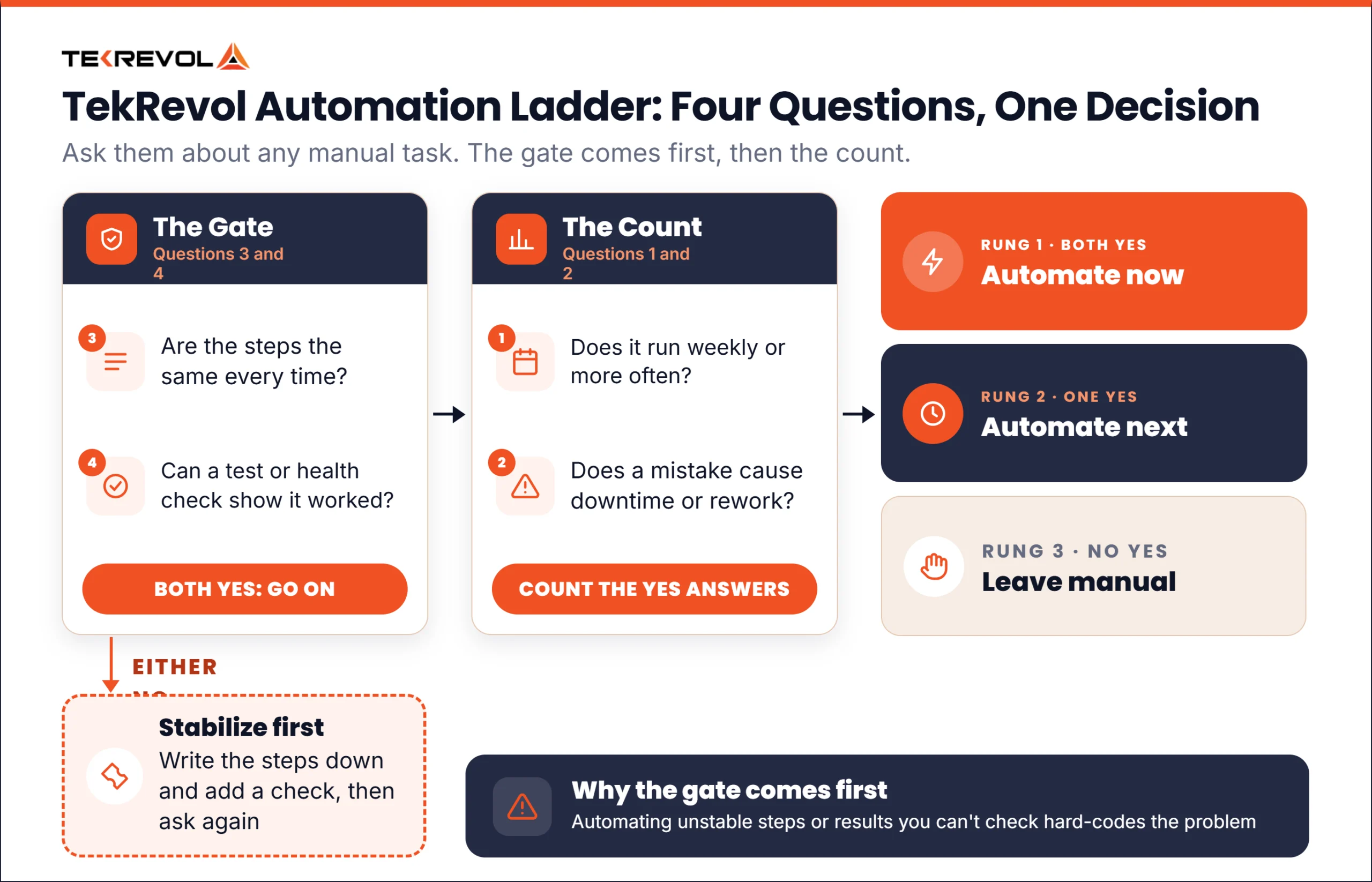
The TekRevol Automation Ladder. TekRevol’s own judgment framework, built on Google’s SRE definition of toil.
Ask these four questions about a task:
- Frequency: does the task run weekly or more often?
- Cost of error: does a mistake cause downtime or rework?
- Stability: are the steps the same every time?
- Check: can a test, health check or status tell you whether it worked?
Start with questions 3 and 4. If either answer is no, stabilize the task first, because automating unstable steps or unverifiable results hard-codes the problem. Then count the yes answers to questions 1 and 2.
| Rung | Rule | Illustrative example |
| Gate: stabilize first | Steps change each time, or no way to check the result | A release checklist whose steps change every sprint |
| 1. Automate now | Stable and checkable, and both frequent and costly | Running the test suite on every code change |
| 2. Automate next | Stable and checkable, and either frequent or costly | Building a test environment once a month |
| 3. Leave manual | Stable and checkable, and neither frequent nor costly | A one-time data migration |
The examples are illustrative scenarios. Work that needs human judgment, such as deciding how to handle an incident, stays with people.
This is an illustrative scenario. A team releases twice a week and copies each build to the server by hand. The task runs often, and a missed step causes downtime (questions 1 and 2: yes). The steps are the same every time, and a health check shows whether the release worked (questions 3 and 4: yes). The task lands on rung 1, so the team scripts the release and runs it from the pipeline. The same team reviews its access list by hand each quarter. The steps change each time, so that task fails the stability gate and stays manual.
How to start automating your delivery process
Start by measuring your current delivery, then automate one task from rung 1 and expand from there. This order is TekRevol’s judgment.
- Baseline the five DORA metrics for one service.
- Apply the Ladder to the manual tasks that slow that service, and pick one rung 1 task.
- Build it into one automated DevOps pipeline, kept in version control, so it runs the same way for every change.
- Add automated tests before you add more deployment steps.
- Measure again after a month, then take the next task.
A first pipeline can stay small. It builds the code and runs the tests, then produces one deployable package. Add deployment, infrastructure, and monitoring steps one at a time, each with its own check.
Teams that want an outside review of their pipeline can ask about TekRevol’s DevOps enablement services, which TekRevol’s DevOps enablement page describes as consultancy and environment design services.
Test automation in DevOps: where does it fit?
Automated tests run as gates inside the pipeline, so a change that fails a test stops before release. Unit tests check small pieces of code, and integration tests check how parts work together. Regression tests check that old features still work. DevOps automation testing also covers end-to-end browser tests, which tools such as Selenium run.
In TekRevol’s judgment, put fast tests early in the pipeline and slow tests later, so developers get quick feedback. A flaky test, which passes and fails on the same code, erodes trust in the pipeline, so fix or quarantine it quickly. Keep manual exploratory testing for the problems nobody has thought to test for yet.
How do you measure the results of automation?
Measure it with DORA’s five software delivery metrics, which show whether delivery got faster and more stable. DORA’s software delivery metrics guide defines them in two groups. The metrics evolved from an earlier set of four, so older articles may list only four.
| Metric | Group | What it measures |
| Change lead time | Throughput | Time from a commit to running in production |
| Deployment frequency | Throughput | How often deployments happen |
| Failed deployment recovery time | Throughput | Time to recover from a failed deployment |
| Change fail rate | Instability | Share of deployments requiring hotfixes or rollbacks |
| Deployment rework rate | Instability | Share of deployments that are unplanned work to fix bugs |
These metrics measure delivery. In TekRevol’s judgment, compare them before and after each automation step.
Which tools automate DevOps work?
No single tool covers every DevOps job, so pick tools by the job and then check how they connect. This table lists automation tools for DevOps teams by job. The tools are examples.
| Job | Examples | Strength | Trade-off |
| Infrastructure as code | Terraform, Pulumi | Rebuilds any environment | State and access need managing |
| Configuration management | Ansible, Chef | Known server state | Another format |
| CI/CD | Jenkins, GitHub Actions, CircleCI | Tests every change | Needs upkeep |
| Deployment and GitOps | Argo CD, Spinnaker | Versioned releases | A platform to learn |
| Containers | Docker, Kubernetes | Same package everywhere | Kubernetes adds work |
| Monitoring | Prometheus | Metrics and alerts | Alerts need tuning |
| Testing | Selenium | Automates browser tests | Can be slow and brittle |
The strengths and trade-offs are TekRevol’s judgment.
What goes wrong with automation?
Automation fails most often through toolchain sprawl, loose control of credentials, brittle pipelines and skill gaps. Northflank names toolchain complexity as a common problem. The fixes below are TekRevol’s judgment.
- Toolchain sprawl. Every added tool needs an owner. Add a tool only for a job the Ladder ranks as rung 1 or 2.
- Credentials. Pipelines hold keys to production. Keep secrets in a secrets manager, outside scripts.
- Brittle pipelines. Store pipeline configuration as code, version it, and review changes to it.
- Skills and culture. Start with one team and one service, then share what worked.
In TekRevol’s judgment, systems split into many services multiply the number of pipelines. TekRevol’s microservices best practices guide covers how those services are run. Teams that build such systems can plan their pipelines early with TekRevol’s custom software services.
How is AI changing automation in DevOps?
AI can speed up parts of DevOps work, but DORA’s 2025 research found that AI improves throughput and often costs stability when a team’s foundation is weak. DORA also found that AI adoption amplifies the effects a team already has. In TekRevol’s judgment, a team with weak tests and no rollback plan simply ships its problems faster. Automate tests and rollbacks first, add monitoring next, then add AI assistance where a person reviews the output. Treat AI-written pipeline configuration like any other code: a person reviews it, and tests run against it before it reaches production.
Is DevOps replaced by AI? The sources reviewed describe AI as an amplifier of existing practices, and none says it replaces DevOps work. That is TekRevol’s reading.
Get help with automating your delivery pipeline
TekRevol offers DevOps enablement, consultancy, and environment design. If you want a second opinion on what to automate first, bring your list of manual tasks and your current DORA numbers. Start with a Free Consultation.