



- Apple indexes only your title, subtitle, keyword field, and screenshot captions for search ranking.
- The app title carries Apple’s heaviest keyword weight, with subtitle ranking a close second.
- Apple ranks apps through three connected signal groups: discovery, conversion, and post-install validation quality.
- Custom Product Pages now rank organically, and Apple doubled page limits to seventy total.
- Download velocity beats lifetime installs; low conversion despite deep impressions actively hurts your ranking.
- Nearly 65% of App Store downloads follow a search, making precise ASO now essential
Nearly 2 million apps compete on the App Store, and most users never scroll past the third search result. If your app isn’t optimized for the Apple App Store, it stays invisible, no matter how good it is.
Apple App Store Optimization (ASO) is the continuous process of improving your iOS app’s visibility and conversion rate within the Apple App Store, often called “SEO for apps.” It covers three core components: metadata (title, subtitle, keywords), creative assets (icon, screenshots, preview videos), and performance signals (ratings and reviews).
Most ASO advice treats the App Store and Google Play as one problem with one playbook. On iOS, that’s costly. Apple’s indexing model is narrower and more literal than Google’s, so every word in your listing carries more weight. That’s why many businesses work with an experienced ASO agency to optimize iOS listings and avoid costly ranking mistakes.
Apple’s App Store sees over 850 million weekly users, and most arrive through search, not featured placements. This guide breaks down Apple’s App Store ranking process and the best practices for optimizing every field to improve visibility and increase installs.
What Is Apple App Store Optimization (ASO)?
Apple App Store Optimization (ASO) is the process of improving your app’s ranking and conversion rate inside Apple’s App Store by optimizing your title, subtitle, keywords, visuals, and reviews. Think of it as SEO, but instead of ranking a webpage on Google, you’re ranking an app listing on Apple’s search algorithm.
People call it different things: “mobile app SEO,” “app store marketing,” “ASO.” Same idea every time. The goal is simple: get found by the right people, then get them to tap “Get.”
ASO covers two main things:
- Getting found: Ranking higher for the keywords people search when looking for an app like yours
- Getting downloaded: Convincing people to tap “Get” once they land on your app page
To do this, you optimize elements like your app title, subtitle, keyword field, description, screenshots, preview video, icon, and ratings. Apple’s algorithm looks at these signals, plus things like download velocity and user engagement, to decide where your app ranks.
Apple App Store optimization statistics consistently back this up: apps that optimize both ranking and conversion elements together see meaningfully higher download rates than those that only chase keywords.
Most guides only talk about the first job. Both matter equally. You can rank #1 for your target keyword and still lose if your screenshots look outdated.
The goal of ASO is almost always downloads, but a few things ride alongside it: brand exposure, review volume, and a healthier mix of acquisition channels so you’re not 100% dependent on paid ads.
Not Sure How Your App Is Performing on iOS Specifically?
TekRevol's ASO team runs a free Apple-only audit and shows you what's leaving downloads on the table.
Get My Free Apple ASO Audit →How Apple’s App Store Search Actually Works
Apple’s ranking system evaluates a smaller, more concentrated set of fields than Google Play, which means each one carries more weight individually.
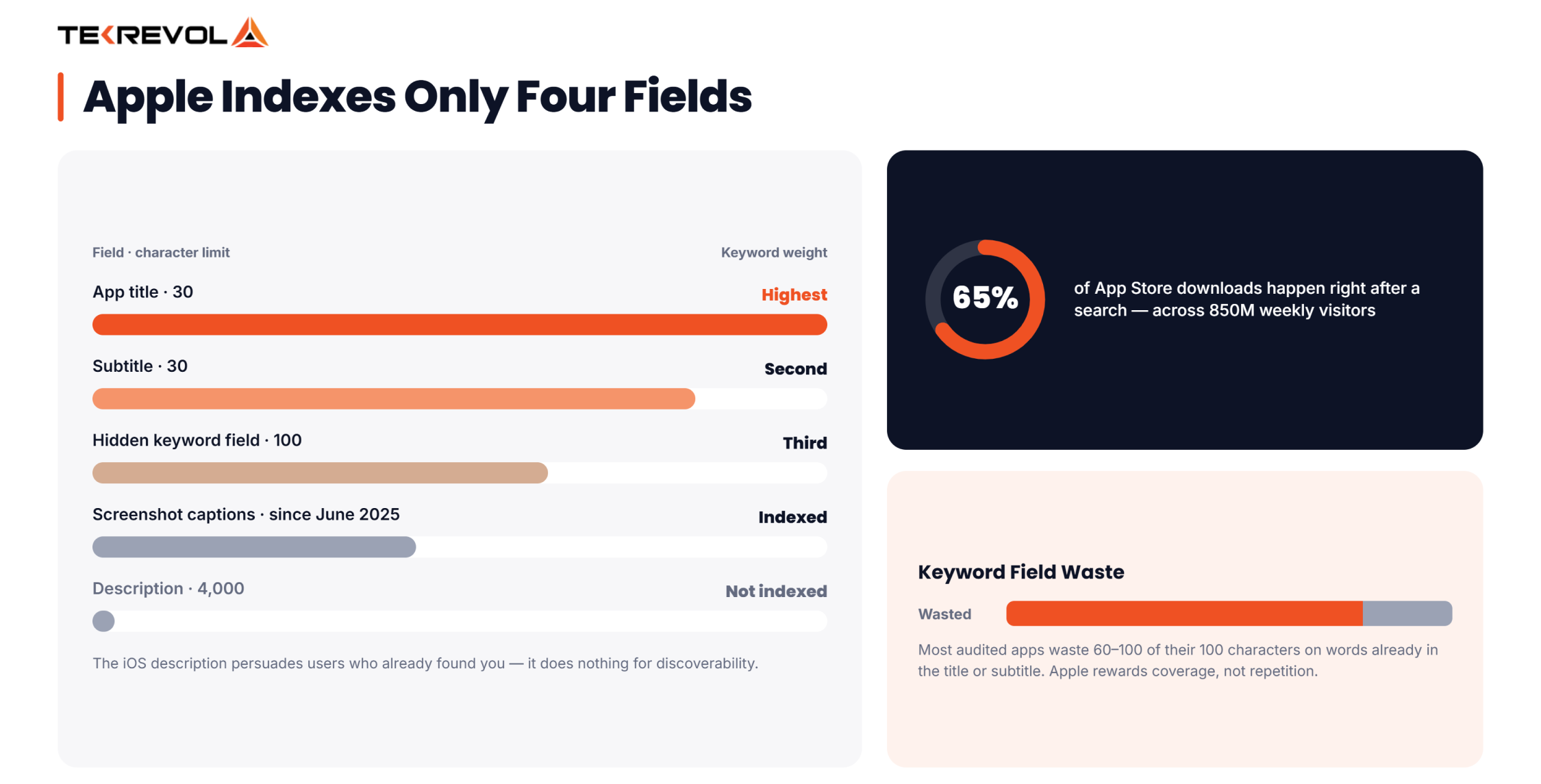
The fields Apple indexes for keyword ranking:
| Field | Character Limit | Indexed for Search? |
| App Title | 30 characters | Yes — highest weight |
| Subtitle | 30 characters | Yes — high weight |
| Keyword Field | 100 characters | Yes — hidden from users, read by algorithm |
| In-App Purchase Names | 30 characters each | Yes |
| Screenshot Captions | Varies | Yes, as of 2025 |
| Long Description | 4,000 characters | No, not indexed for ranking |
That last row surprises a lot of teams. Apple’s long description exists purely to persuade a user who has already found your listing; it does nothing for discoverability. Every keyword that matters for ranking has to live in the title, subtitle, keyword field, or screenshot captions.
Why Apple App Store Optimization Matters
Apple App Store optimization matters because it’s the only channel that gets cheaper and stronger the longer you run it. Paid ads stop the moment you stop paying. ASO keeps working in the background.
- Attracts the right users: Rank for keywords that match what your app actually does, and you pull in people who are already looking for you.
- Lowers acquisition costs: Organic downloads are free downloads; around 65% of App Store downloads happen right after a search.
- Builds trust automatically: Users assume apps ranking near the top are the good ones.
- Compounds over time: More downloads improve your ranking signals. Better ranking brings more downloads.
Take Tamreeni, a fitness app we built with personalized workout plans. According to our internal project data, it has surpassed 3 million downloads and maintains a 60% user retention rate. That kind of retention is exactly the validation signal Apple’s algorithm rewards with a better rank. Getting more downloads is only part of the goal. Long-term success comes from keeping users engaged after they install the app.
Is ASO Worth the Investment?
ASO doesn’t pay off like a paid ad campaign, where $1,000 in spend buys a predictable number of installs this week. It’s a cycle that keeps growing. Better metadata increases visibility, more people download the app, and those downloads help improve rankings. Most teams see the first real movement in month two, with the investment clearly paying for itself by month four.
How Does Apple Rank Apps?
Apple ranks apps using three groups of signals that work together. Discovery signals help the App Store match your app to relevant search queries. Conversion signals show how often people download your app after viewing its listing. Validation signals reflect the quality of the user experience after installation.
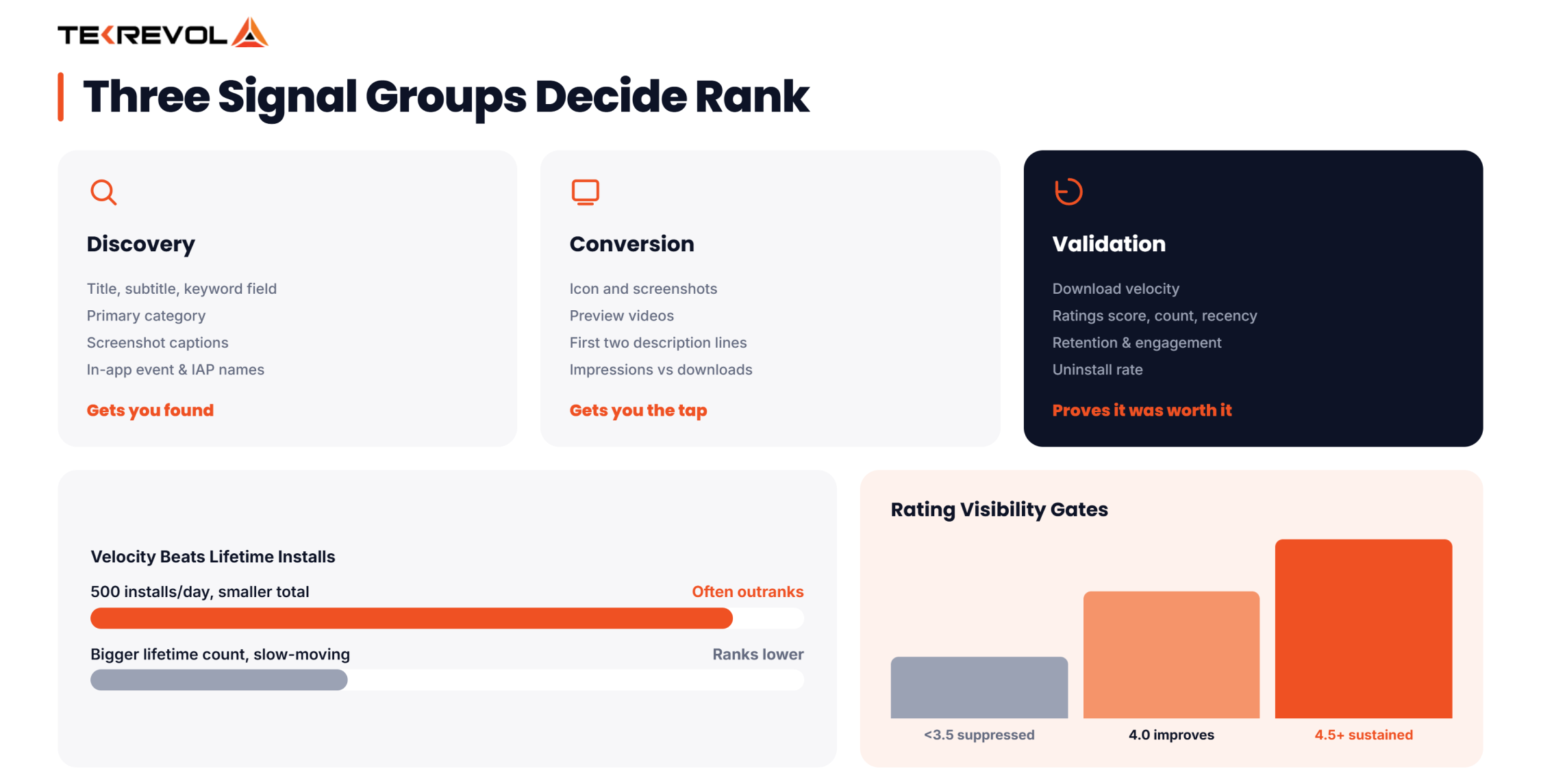
Apple has never revealed its exact ranking algorithm, but these three signal groups consistently influence app visibility and rankings.
Discovery Signals (Getting Found)
- App name: 30 characters, the strongest keyword weight
- Subtitle: 30 characters, second-strongest
- Keyword field: 100 hidden characters, third-strongest
- Category: primary category carries the most weight
- Screenshot captions: indexed for keywords since June 2025
- In-app event and in-app purchase names: smaller but real signals
Conversion Signals (Getting the Tap)
- Icon and screenshots
- App preview videos
- The first two lines of your description
- Listing click-through rate
Validation Signals (Proving It Was Worth It)
- Downloads and download velocity
- Ratings and reviews, average score, count, recency
- Retention and engagement rates
- Uninstall rate
What Apple’s Algorithm Actually Rewards
Knowing the signal categories is one thing. Here’s which ones actually carry the most weight, and which ones get overrated.
Download velocity outweighs lifetime installs. Of all the validation signals, this is the one Apple leans on hardest. An app pulling in 500 installs a day will often outrank a bigger, slower-moving one, regardless of total download count.
Among conversion signals, click-through rate matters less on its own than the relationship between impressions and downloads. High impressions paired with low conversion actually hurts you; it tells Apple your listing doesn’t match what people searching for it actually want.
Retention is the newest piece of the puzzle, and it’s quietly become one of the strongest validation signals. Apple increasingly factors in how long users stick around post-download, not just whether they downloaded at all, since it signals the listing accurately represented the app.
Many people assume launch date, price, and star rating determine rankings, but they don’t. A star rating only carries more weight when it’s supported by a healthy number of reviews.
Apple App Store vs. Google Play: Key Differences
Optimizing for the App Store doesn’t automatically optimize your app for Google Play. Each platform uses different factors to rank and display apps.
| Element | Apple App Store | Google Play |
| Title | 30 characters | 30 characters |
| Subtitle / Short Description | 30 characters (subtitle) | 80 characters (short description) |
| Keyword Field | 100 characters, hidden | None, full description is indexed |
| Description | Doesn’t directly affect ranking | Fully indexed, directly affects ranking |
| Custom Pages | Up to 70 (Oct 2025 update) | Custom store listings by country/campaign |
| Performance Signals | Downloads, engagement, uninstall rate | Downloads, engagement, uninstall rate, Android Vitals (crash/ANR rate) |
Apple App Store Optimization: The Core Elements
Apple App Store optimization comes down to seven elements you can directly edit: title and subtitle, keyword field, category, description, screenshots and preview videos, icon, and reviews.
1. Title and Subtitle: Your Highest-Leverage Real Estate
Your 30-character title and 30-character subtitle are the two strongest ranking signals Apple offers, and they’re also the first thing a user reads. This field has to help users find your app and persuade them to install it, which makes it especially important.
The title should combine your brand name with one high-intent keyword. Use the subtitle to target additional keywords that users actually search for, rather than internal product terminology.
2. The 100-Character Keyword Field
This field is invisible to users but read directly by Apple’s indexing system. A few rules keep it efficient:
- Skip spaces after commas to save valuable characters.
- Choose one version of the keyword. Apple can match both singular and plural searches.
- No repeats of words already in the title or subtitle.
- No branded terms you don’t legally own.
- Front-load by priority; put your highest-value terms first.
Balance high-volume keywords with less competitive ones you have a better chance of ranking for. A keyword you rank for is more valuable than one you can’t.
3. App Category Selection
You get a primary and secondary category, and the primary carries the most weight. Pick based on where real users would actually look for you, not just where your app technically fits.
4. App Description
It doesn’t directly affect rankings, but it can influence whether someone downloads your app. Make the first sentence clear and compelling since it’s visible before users tap “More.” Use the 170-character promotional text field for limited-time offers, feature launches, or seasonal updates, as you can change it without submitting a new app version.
5. Screenshots & App Preview Videos
Your first three screenshots do most of the conversion work. Since June 2025, Apple indexes screenshot caption text for keyword ranking; most apps still leave this free ranking real estate blank. Up to 10 screenshots, 3 preview videos (30 seconds max).
6. App Icon
Your app icon is the most noticeable element on the page. A simple, high-contrast, and distinctive design usually performs better than an overly complex one.
7. Ratings & Reviews
Apple’s rating thresholds function almost like visibility gates:
- Below 3.5 stars: Visibility is actively suppressed.
- 4.0 and above: Rankings improve measurably.
- 4.5 and above: Apple treats the score as a sustained quality signal, reinforcing ranking over time.
The timing of your review request can affect the ratings you receive. Users are more likely to leave positive reviews after they’ve experienced value from your app.
Behavioral Relevance: Apple’s Named Retention Signal
Apple has explicitly named “behavioral relevance” as one of its ranking signals, what happens after install matters as much as what happens before it. Three things feed this signal:
- Session frequency: how often someone opens the app after downloading it
- Retention: whether they’re still active days or weeks later
- Engagement depth: how much they actually use once inside
It works as an ongoing cycle, not a one-time result. When your listing attracts the right users, they’re more likely to stay because the app matches their expectations. Better retention supports stronger rankings, which brings in more of the right users.
This is the same retention-ranking loop that drives Google Play rankings, but on Apple’s side it’s tied specifically to the “behavioral relevance” signal Apple has publicly named, which makes accurate, non-inflated metadata a ranking strategy. Your listing should accurately reflect your app. When expectations don’t match the experience, users are more likely to leave, which can affect your rankings.
Custom Product Pages (CPPs): What Changed in 2026
This is the part most ASO guides haven’t updated yet. Apple doubled the CPP limit from 35 to 70 in October 2025, and since July 2025, you can assign keywords to individual CPPs so they can rank organically in search.
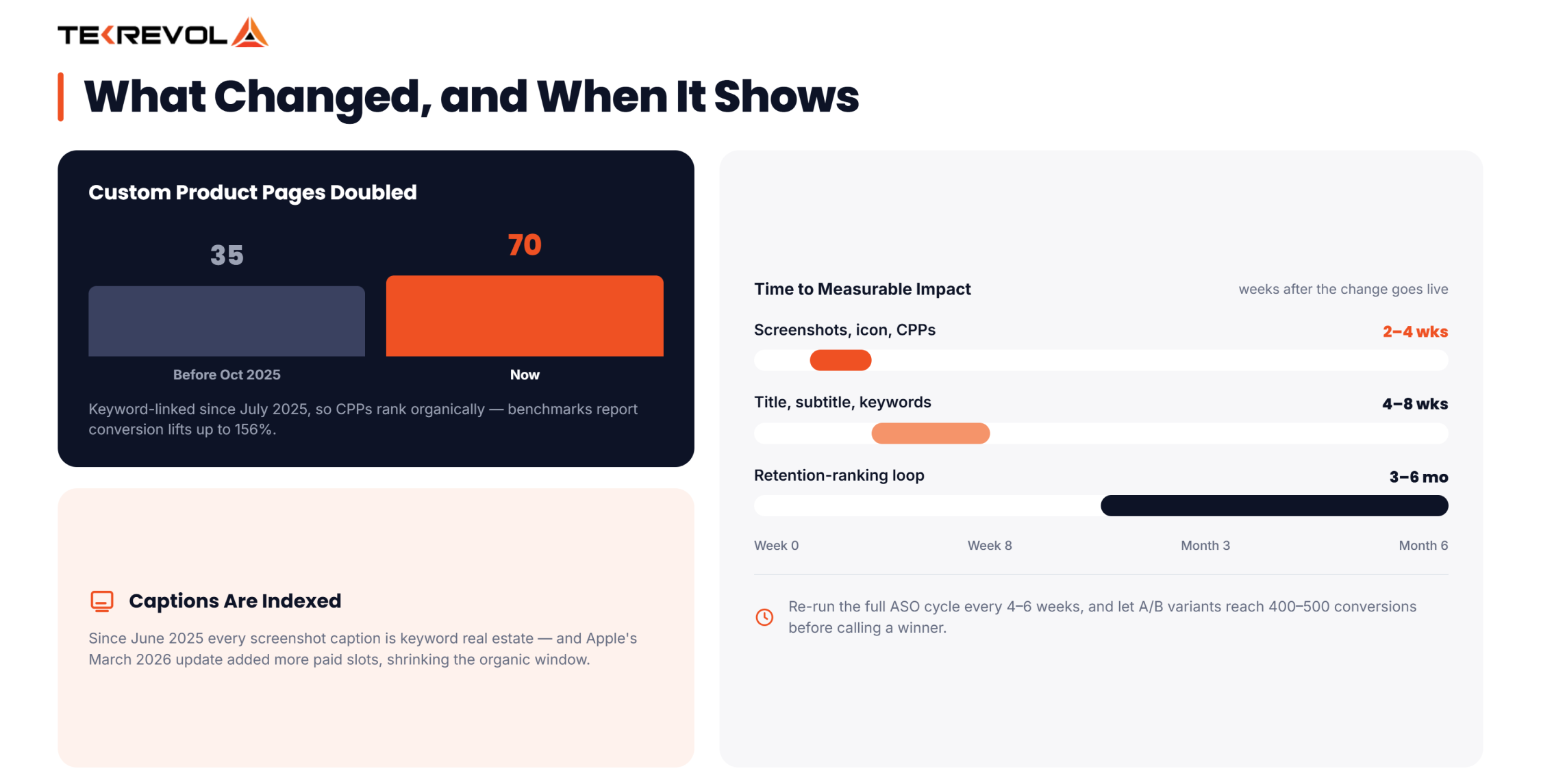
According to Apple, users are more likely to download an app when they land on a relevant Custom Product Page instead of the default listing. Third-party benchmarks have reported conversion increases of up to 156% for well-targeted pages.
On iOS 18, you can also attach a deep link to each CPP, sending users straight to a relevant in-app screen instead of your home screen.
Localizing Your Apple App Store Listing
A single English listing limits your reach. By localizing your title, subtitle, keywords, screenshots, and preview videos for different markets, you can reach more users and improve performance.
Direct translation isn’t enough for App Store localization. The words people search for in German, French, or any other market are often different from a literal English translation. Each market has its own search habits, keyword volume, and competition, so keyword research should be done separately for every region instead of simply translating your English keyword list.
A tiered localization strategy helps you focus your effort where it matters most:
- Top-priority markets: Fully localize your App Store listing with a market-specific title, subtitle, keywords, screenshots, and captions based on local search behavior.
- Growth markets: Localize the title, subtitle, and keyword field using local keyword research, while keeping your existing screenshots and other creative assets.
- Long-tail markets: Translate the title, subtitle, and keywords from your main listing, and continue using the default screenshots and creative assets.
How to Do Apple App Store Search Optimization: Step-by-Step
App Store optimization requires regular updates to stay effective. Focus on keyword research, metadata, visuals, descriptions, reviews, localization, testing, and performance tracking to keep improving your results. Run this ASO cycle every four weeks to keep your app optimized. It’s also an important part of learning how to make a successful app that attracts and retains users.
Step 1: Conduct ASO Keyword Research
Start with 30–50 seed keywords based on what your app does and how real users describe the problems it solves. Then use the best app store keyword research tools to evaluate search volume, competition, and ranking opportunities.
Review the keywords your competitors target, and if you’re running Apple Search Ads, use your search term reports to find the exact queries users search before installing your app. It’s one of the most valuable keyword research sources many teams overlook.
Step 2: Optimize Title, Subtitle & Keyword Field
Use your highest-value keyword in the title. Place secondary keywords in the subtitle, and add the remaining terms to the hidden keyword field without repeating them. Front-load your most important keywords to maximize relevance.
Keep your metadata concise, natural, and aligned with what users are actually searching for. Update your keywords regularly based on search trends and performance data.
Step 3: Build Compelling Visual Assets
Each screenshot should highlight a single benefit with a caption that includes relevant keywords. Strong mobile app branding across your screenshots helps create a consistent and recognizable experience for users.
Skip the preview video if you can’t make it polished, as a poor-quality video can do more harm than good. Use readable text, consistent visuals, and clear messaging to communicate your app’s value within the first few screenshots.
Step 4: Write a Description That Converts
Lead with your strongest benefit in the first sentence. Use short, scannable paragraphs and bullet points to highlight key features. Give users a clear reason to download your app now. End with a compelling call to action that reinforces the value they’ll get. Keep the messaging focused on user benefits rather than simply listing features.
Step 5: Generate & Manage Reviews
The best time to ask for a review is after users complete a meaningful action, like reaching a milestone or finishing a task. Respond to negative reviews quickly and with a personalized reply. Thoughtful responses build more trust than no response at all.
Step 6: Localize Your Listing
Translation alone isn’t enough. People in different markets search using different words, so your listing should reflect local search behavior. Prioritize full localization for your highest-value markets. For smaller markets, a basic localized listing is often enough.
Step 7: Build Out Custom Product Pages
Take advantage of all 70 Custom Product Pages. They’re no longer just for ad campaigns; they can also support your organic App Store strategy. Assign distinct keyword clusters to different CPPs so each one can independently rank, and use deep links so traffic lands on the exact in-app screen that matches the search intent.
Step 8: A/B Test & Track Everything
Apple’s Product Page Optimization lets you test up to three versions of your App Store listing, and icon tests often have the biggest impact. Wait until each variant has around 400–500 conversions before deciding which performs best, as smaller sample sizes can produce unreliable results.
Track your ranking, impressions, and conversion rate throughout the test. If you’re testing keywords, give them four to eight weeks to settle before making additional changes.
How to Track Your ASO Performance?
Optimizing metadata means nothing if you’re not watching whether it moves the numbers. Five metrics tell you almost everything:
- Keyword ranking position: Track your priority keywords weekly. Apple’s own re-indexing means a metadata change won’t reflect immediately; give it 4–8 weeks before judging a keyword update.
- Impressions vs. conversion rate: Review these metrics together. More impressions with fewer conversions usually means your listing needs stronger visuals or messaging, not different keywords.
- Download velocity: Measure how quickly your app is gaining new installs each day and week. This gives a better picture of current performance than lifetime downloads.
- Retention (Day 1 / Day 7 / Day 30): User retention matters just as much as downloads. If people install your app but don’t keep using it, the initial conversion has limited value..
- Rating trend: Pay attention to recent reviews, not just your average star rating. New feedback shows how users feel about your app today.
Review your ASO performance every month, but give each change enough time to show results. Updates to screenshots, icons, and Custom Product Pages usually show an impact within 2–4 weeks. Changes to your title, subtitle, and keywords often take 4–8 weeks. Improvements from better user retention can take 3–6 months to build. Checking results too early is one of the biggest reasons teams think a successful change isn’t working.
The Biggest Apple ASO Updates for 2026
Three changes from the past year have reshaped what a competitive Apple App Store listing looks like.
Screenshot captions are indexed for search
Caption text that used to be purely a design decision is now a ranking input. Blank or generic captions are a missed keyword opportunity on every single screenshot slot.
CPPs rank organically, and the cap has doubled
Covered above, this is the single largest new ranking opportunity Apple has introduced in years, and most apps haven’t touched it yet.
Paid Ads Reduce Organic Visibility
Apple’s March 2026 update added more paid ads to App Store search results, leaving fewer organic spots available. With less organic visibility, every ranking matters more. Strong App Store optimization is now essential for maintaining visibility and attracting downloads.
Curious How Many of Your Competitors Are Already Using CPPs?
TekRevol maps your keyword competitive set, including which competitors are using Custom Product Pages and where open ranking opportunities sit.
Book Your Free Apple ASO Strategy Session →Common iOS App Store Optimization Mistakes to Avoid
Many apps lose visibility because they overuse keywords, skip screenshot captions, keep outdated visuals, and stop optimizing after launch. App Store optimization works best when it’s reviewed and updated regularly.
- Keyword stuffing: Don’t overload your listing with keywords. Use them naturally instead of repeating the same terms in every field.
- Ignoring screenshot captions means missing an easy opportunity to improve your App Store listing.
- Treating CPPs as paid-only: Since July 2025, screenshot captions have become part of your organic App Store strategy. Using them well can help improve visibility.
- Stale visuals: screenshots from two years ago signal an abandoned app.
- Ignoring negative reviews: unanswered complaints erode trust for every future visitor.
- “Set and forget” metadata: one update at launch isn’t a strategy.
- Running paid and organic on the same keywords: if you already rank #1 organically, bidding on the same term just means paying for downloads you’d have gotten free.
Expert Tip: The first 90 days play a major role in your app’s success post-launch. Optimizing your keyword field and subtitle early helps build a stronger foundation for long-term visibility.
Apple App Store Optimization Checklist
Every ranking factor covered in this guide comes down to a short list of fundamentals that need to be in place before launch, and revisited every month after.Use this checklist as a monthly audit. Every unchecked item is a chance to improve your App Store ranking before your competitors do.
| Checklist Item | Why It Matters | Priority |
| Title with brand + one high-intent keyword | Highest-weighted ranking field | Critical |
| Subtitle covering a second keyword cluster | Second-highest-weighted ranking field | Critical |
| 100-character keyword field, no duplication | Every unused character is a missed keyword | High |
| Keyword-aware screenshot captions | Indexed for search since 2025 | High |
| First three screenshots built around core value prop | Primary conversion driver | Critical |
| Rating above 4.0, ideally above 4.5 | Directly affects visibility | High |
| Review prompts timed to success moments | Protects rating quality | Medium |
| Active CPP strategy, keyword-linked | Up to 70 additional organic ranking surfaces | Medium |
| Monthly metadata review | iOS metadata cadence: every 4–6 weeks with release cycle | Ongoing |
How TekRevol Can Help You?
TekRevol is a full-service mobile app development company, which is why our approach to Apple App Store Optimization differs from that of an agency that only touches metadata after launch. Because we build the app, we know exactly what it offers. We create an App Store listing that reflects those features accurately, helping attract the right users from the start.
That same philosophy carries into digital marketing services as well. Since ASO and paid user acquisition send traffic to the same App Store listing, they should work together as one connected strategy rather than as separate efforts managed by different teams with different goals. This alignment helps turn more opportunities into measurable results.
Know Your VR App Budget Before You Build
Tell us what you want to build. We'll break down the scope, development cost, and timeline so you know what to expect.
Get Your VR Cost Breakdown!


