



- Apple Search Ads offers fast paid visibility while ASO builds slower, free, compounding organic App Store rankings.
- Running Apple Search Ads doesn’t directly boost organic rank, but installs and tap-through rate indirectly help.
- Strong ASO helps apps clear Apple’s relevance gate, but bids still determine final ad placement in the auction.
- Apple expanded search ad placements in March 2026, increasing paid competition for the same organic keywords.
- Structure Apple Search Ads campaigns into brand, competitor, category, and long-tail groups to avoid internal self-competition.
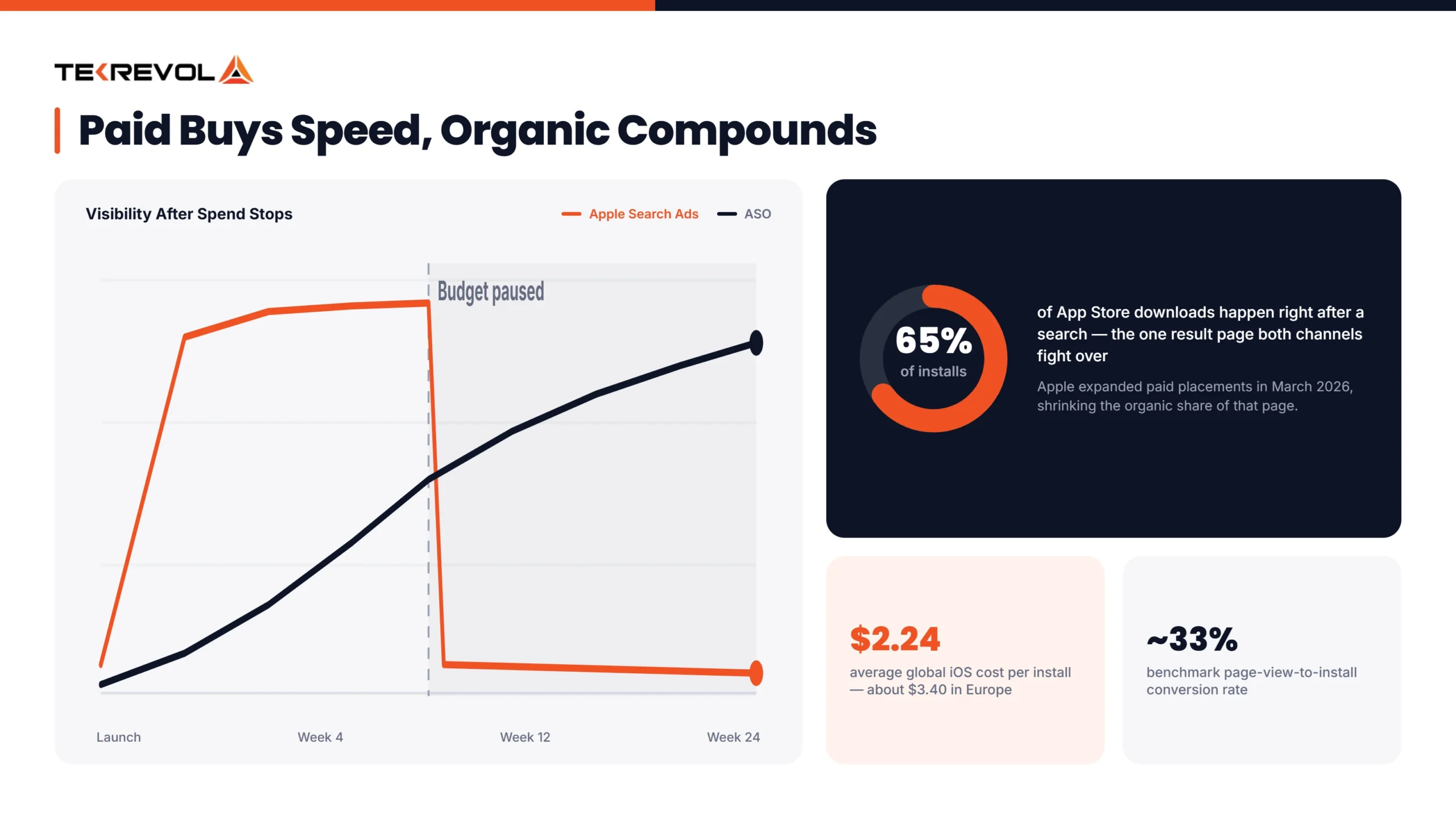
- Nearly 65% of App Store downloads happen right after a search, making search visibility essential.
Apple Search Ads and ASO share the same search results page, so ad spend and organic optimization should be planned as one connected strategy, not two separate budgets.
We get asked this question on almost every call: Should we pay for Apple Search Ads, or put that budget into ASO instead?
The honest answer is that it’s rarely one or the other. Apple Search Ads put your app at the top of search results for keywords you choose, but the moment you stop paying, that visibility disappears. ASO focuses on improving your app’s title, keywords, screenshots, and description to increase organic visibility. It takes time, but once your app ranks well, installs come without ongoing ad spend.
Most founders eventually realize the two aren’t competing strategies; they’re complementary ones. Paid ads get you visibility now. Organic ranking compounds over time. Used together, they tend to outperform either one alone. That’s why an experienced ASO agency uses ASO and Apple Ads together instead of treating them as separate strategies.
This guide covers how ASO and Apple Ads work, their 2026 costs, and how to choose the right strategy for your app.
What’s the Difference Between Apple Search Ads and ASO?
Apple Search Ads are paid advertising; you bid on keywords and pay per tap to appear at the top of App Store search results. ASO (App Store Optimization) is unpaid; you improve your app’s title, keywords, screenshots, and reviews so it ranks and converts better in organic search, without paying for the placement.
Industry benchmarks show that the average iOS cost per install (CPI) is about $2.24 globally, while campaigns in Europe average around $3.40 per install. Actual ASO costs vary by app category, target market, and keyword competition.
What Is App Store Optimization (ASO)?
App Store Optimization is the practice of improving your app’s organic visibility and conversion rate in the App Store and Google Play, without paying for placement. This covers your app title, subtitle, keyword field, description, screenshots, preview video, icon, and ratings and reviews.
Screenshots have significant impact on downloads. App Store conversion rates vary by app category and traffic source. According to AppTweak, the average page view-to-install conversion rate across its benchmark dataset is around 33%, although results differ by category and market.
What Is Apple Search Ads (ASA)?
Apple Search Ads (ASA) is Apple’s paid advertising platform that places your app at the top of App Store search results and other placements, including the Search Tab, Today Tab, and competitor product pages. You bid on keywords, and you pay per tap, not per impression, which means you’re only charged when someone actually interacts with your ad.
Pricing swings a fair amount by category. Industry benchmarks put the average CPI at roughly $8.44 for Finance apps and $6.20 for Shopping, both well above the category median, since users in these verticals carry higher lifetime value, which pushes advertisers to bid more aggressively.
Note: A while back, Apple made a privacy change that made it harder for apps like Meta, TikTok, and Google to track what iPhone users do after seeing an ad. That means those platforms now have less accurate data on whether their ads actually led to a download. Apple Search Ads doesn’t run into this problem, since the ads live inside Apple’s own App Store. Apple can measure the results directly, without needing that outside tracking. That’s why iOS-focused ASO trusts this channel’s numbers more than the others right now.
Apple Search Ads vs ASO: Cost: The Quick Comparison Table
| Factor | Apple Store Search Ads | ASO |
| Traffic type | Paid | Organic |
| Speed | Fast — live in days | Slow — 2 to 4 weeks |
| Cost | Ongoing, per tap ($1.50–$12+ depending on category) | One-time setup, then free |
| Ranking impact | Indirect (installs, tap-through) | Direct (relevance, indexation) |
| Scalability | Capped by budget | Unlimited |
| What you control | Bids, campaigns | Metadata, visuals |
| Typical conversion rate | 60%+ at top of search results | ~33% tap-through-to-install average |
Our Approach:
This is where we push back on a straight cost comparison. When we bring on a new app, we almost always start with Apple Search Ads for keyword discovery, because paid data gives us a real answer in days.
From there, we take whatever’s converting in the ad account and feed it straight into the App Store listing. Apps we’ve run this way tend to build stronger organic rankings within about 90 days than the ones that try to figure out keywords organically from scratch.
Not Sure Which Keywords Are Worth Chasing?
Send us your app, and our ASO team will identify the keywords that are actually worth your budget and growth goals.
Schedule A FREE Consultation Now!How Do Apple Store Search Ads and ASO Actually Work Together?
They’re not separate systems running in parallel. They share one auction and one product page, and every dollar spent on Apple Search Ads sends a user to the exact listing your ASO work built, which is really the whole point.
They’re Both Fighting for the Same Search Result
Nearly 65% of App Store downloads happen right after someone searches. Once you sit with that number for a minute, it reframes the whole conversation.
Paid and organic aren’t operating in different arenas. ASO and ASA both target the same search results. The difference is that Apple Search Ads appear above organic listings, so they compete for the same users.
Why “Which One Should I Use?” Is the Wrong Question
The difference isn’t as clear as many people think. Apple Search Ads target the same keywords your ASO strategy is trying to rank for. A weak App Store listing can also reduce your campaign performance and increase advertising costs.
A well-managed ad account, in turn, hands you keyword data your organic strategy has no other reliable way to get. Choose one and ignore the other, and you’re leaving performance on the table either way; we see this play out with almost every client who’s tried to run them as separate initiatives.
Apple Just Made This More Important
In March 2026, Apple expanded App Store search ads by adding more ad placements in search results. Apple didn’t specify the exact number of ad slots available.
The rollout began in the UK and Japan on March 3, 2026, and expanded to the US and other Apple Ads markets later that month. The feature rolled out gradually as users updated to supported versions of iOS and iPadOS. This change gives advertisers more visibility while increasing competition for organic app listings.
As a result, paid ads now take up more space in App Store search results, making it even more important to invest in both Apple Search Ads (ASA) and App Store Optimization (ASO).
Does Running Apple Search Ads Improve Your Organic Ranking?
Not directly; Apple has never confirmed a formal link between the two. But indirectly, yes, and it’s a real enough effect that we track it with clients running paid campaigns alongside their organic push.
Installs Are a Ranking Signal
Overall install volume is one of the factors that can influence the App Store ranking algorithm, and paid campaigns help increase app installs. More installs can support your organic position on the same keywords you’re bidding on, which matters most right after launch when you have no ranking history to lean on yet.
Tap-Through Rate Signals Relevance
When your ad earns a high tap-through rate on a given keyword, that tells Apple’s algorithm your app genuinely matches that search. Over time, we’ve seen that carry over into stronger organic indexation for the same term.
Organic Uplift Is Real, and You Can Actually Measure It
Some users see your ad, don’t tap it, and download later through an organic search instead. Mobile measurement platforms such as AppsFlyer, Adjust, Branch, and Singular can help estimate the impact of paid campaigns on organic installs.
They do this by comparing install trends during active campaigns with quieter periods, although the results are directional rather than exact because other factors can also affect organic downloads.
Note: Sometimes you’re just paying for downloads that would’ve happened anyway. If ad spend goes up and paid installs go up, but total installs barely move, you’re not gaining new users; you’re buying ones you already had for free. Tracking organic rank and paid spend side by side on the same keyword is the easiest way to catch this before it eats your budget.
Does a Strong ASO Foundation Make Apple Search Ads Cheaper?
Yes, but only to a point. Relevance determines whether your app can enter the auction, while your bid also influences where your ad appears.
Relevance Is a Gate, Not a Ranking Dial
Relevance is a key factor in Apple Search Ads. If your app isn’t relevant to a search query, it may not be eligible to appear, regardless of how much you bid.
Apple uses your app’s metadata to determine its relevance. A well-optimized app title, subtitle, and keywords not only improve organic rankings but also help your app qualify for relevant Apple Search Ads.
Once You’re In, Bid Does Most of the Work
A March 2026 study by ConsultMyApp found that after an app qualifies for the Apple Ads auction, bid and predicted performance play the biggest role in determining its position. The analysis was based on 132 UK keywords and 627 auction observations.
The lower-relevance app still won the top spot in 44% of cases studied because it simply bid more. Apple doesn’t publish a Google-style quality score, so it’s worth not assuming one exists. The honest takeaway, one we repeat to clients often, is that a strong ASO foundation gets you eligible and competitive in the Apple Search Ads auction. It doesn’t erase your ad costs. Bid still matters a lot.
Custom Product Pages Are Where the Two Channels Actually Meet
Custom Product Pages let you create different versions of your App Store listing, different screenshots, different text, different preview video, nd send specific Apple Search Ads campaigns to whichever version fits that search best.
The results make Custom Product Pages worth testing. Ads using CPPs achieved about 9% higher tap-through rates on average and up to 27% higher in search results campaigns. While many of the top apps already use CPPs, adoption is still lower across many other categories, creating an opportunity to stand out.
Haven't Tested a Custom Product Page Yet?
We'll help you set one up and identify the keyword cluster to test it against first, so you can measure what actually improves conversions.
Request CPP Test Plan →How to Use Apple Search Ads Data to Improve Your ASO Strategy
Run exact-match campaigns on the keywords you’re unsure about, then read what comes back. It’s a faster way to get an answer than waiting weeks for an organic signal to confirm a guess.
Structure Your Campaigns Before You Test
Don’t dump all your keywords into one campaign. Split them into four separate campaigns, each with its own budget and its own list of words to exclude. Here’s why: if two of your own campaigns are bidding on the same keyword, you end up competing against yourself and paying more than you need to.
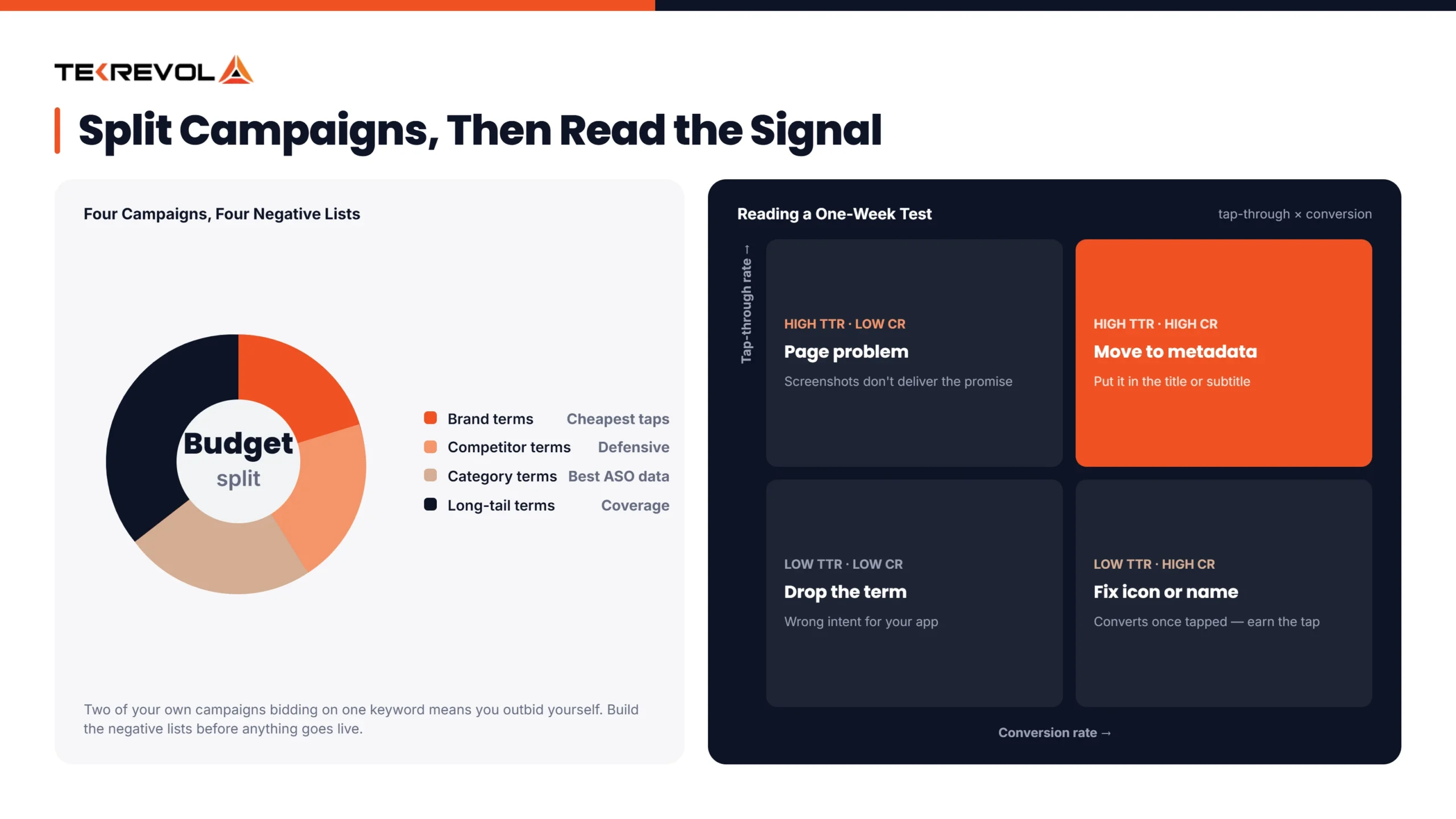
The four groups:
- Brand keywords: People searching for your app’s actual name. These are the cheapest taps you’ll ever buy, and almost everyone who searches for your name already plans to install your app.
- Competitor keywords: your rivals’ app names. You bid on these to catch people who are comparing options or to stop competitors from stealing your own customers.
- Category keywords: generic words describing what your app does (like “budget tracker” or “meditation app”). These bring the most searches, and they’re also the best source of data for improving your app’s organic listing.
- Long-tail keywords: smaller, more specific searches you haven’t fully figured out yet (like “budget tracker for freelancers”). Lower volume, but they round out coverage.
Keep each group in its own campaign. That way, you can control spend and see performance separately for each one, instead of them blurring together.
Test Before You Commit to Metadata
Validating a keyword organically can take weeks and usually means a metadata change that’s not easy to walk back. Testing the same keyword through Apple Search Ads takes days. Run an exact-match campaign, check the conversion rate after about a week, and you’ll have a real answer about whether it belongs in your title or subtitle.
Read the Signals Correctly
Once your test campaign has run for about a week and collected enough taps, here’s how to read what happened:
- High tap-through, high conversion: the keyword works. Worth adding to your metadata.
- High tap-through, low conversion: people are clicking, but the page isn’t delivering on what they expected. That’s a page problem, not a keyword problem.
- Low tap-through: your icon or app name isn’t matching the intent behind that search term.
Feed the Winners Back Into Your Listing
Once a keyword proves itself through paid data, feed it into your ASO strategy by moving it into your title, subtitle, or keyword field. That’s the loop working the way it’s supposed to: paid finds the signal, organic locks it in for free from that point forward.
Keywords are only half of what should carry over, though. On our Save & Win project, the bigger lesson was that engagement follows the actual product experience; we built earning and spending mechanics designed around what users were really motivated by, which drove a 30% increase in engagement. It’s a good reminder that a converting keyword gets someone in the door, but what keeps them is the experience matching the promise.
Key Metrics to Measure ASO and Apple Ads Performance
Most teams look at one dashboard and call it a day. That’s the mistake. Paid and organic tell you different halves of the same story, and if you only watch one, you’ll misread what’s actually happening to your installs.
Track them separately first.
Paid Metrics:
- CPT (Cost Per Tap): what you pay per tap on your Apple Search Ads campaigns. This is set by auction, so it moves with your bid, your competitors’ bids, and how relevant Apple thinks your app is to that keyword.
- TTR (Tap-Through Rate): How often people tap your ad after seeing it. A low TTR usually means your icon, app name, or subtitle isn’t matching what someone expected when they searched that term.
- CR (Conversion Rate): How often a tap actually turns into an install. This lives or dies on your product page: screenshots, preview video, ratings, and how well the page backs up what your ad promised.
- CPA (Cost Per Acquisition): your real cost per install, calculated as CPT divided by CR. This is the number that actually tells you if a keyword is worth the money, not CPT on its own.
- ROAS (Return on Ad Spend): Revenue generated per dollar spent. This closes the loop between ad cost and what an install is actually worth, which matters most for subscription or purchase-driven apps.
Organic Metrics:
- Keyword rank: where you land in search results for your target terms. Rank moves slower than paid metrics, so don’t expect to see change week to week the way you would with a bid adjustment.
- Indexation: which keywords you’re actually ranking for at all, even outside your main title and subtitle. A keyword you’re not indexed for won’t show up, no matter how relevant your app actually is.
- Organic conversion rate: how often someone who found you organically installs, with no ad involved. Comparing this to your paid CR tells you whether your product page converts on its own merit or needs an ad’s momentum to work.
- Organic uplift: install growth you can reasonably attribute to paid activity running alongside it. A well-run ad campaign can lift your organic visibility too, since more taps and installs can signal relevance back to Apple’s algorithm.
Common Mistakes to Avoid When Combining ASO & Apple Ads
The one we see most often is running Apple Search Ads on a listing that isn’t ready. Once that’s wrong, everything downstream is compromised.
Advertising a Weak Listing
If your screenshots and description aren’t converting, ads just burn budget on a page that was never going to close the sale. Our fix: pause spend until the product page converts on its own, then turn ads back on.
Ignoring ASA Data When Updating Metadata
Your ad account has the exact search terms people used before installing. Not using that data for your keyword search strategy is leaving free research sitting on the table. We pull top-converting search terms from the ad account every month and feed them straight into the next metadata update.
Judging Campaigns on CPA Alone
CPA misses organic uplift entirely. An app with a higher CPA might still be quietly growing organic installs in parallel, and that changes the real return-on-spend picture. We always check the organic install trend alongside CPA before calling a campaign a win or a loss.
Letting Keyword Types Compete With Each Other
Brand, competitor, and discovery campaigns need their own negative keyword lists, or they end up bidding against themselves in the same auction. We build the negative lists first, before a single campaign goes live.
Running ASO and Apple Search Ads in Separate Silos
When one team owns paid and another owns organic, the learnings rarely cross over. In our experience, that’s less of a tactical mistake and more of an organizational one, and it’s usually the most expensive kind. Our simplest fix: one shared weekly report both teams look at, so nobody’s optimizing in a vacuum. It’s also why we run ASO, Apple Search Ads, and full digital marketing services as one connected strategy rather than separate vendors.
How to Build a Successful ASO and ASA Strategy? Best Practices
Most teams try to run paid and organic as two separate projects. That’s backwards. Here’s the order that actually works, from the page itself all the way through to the repeat cycle.
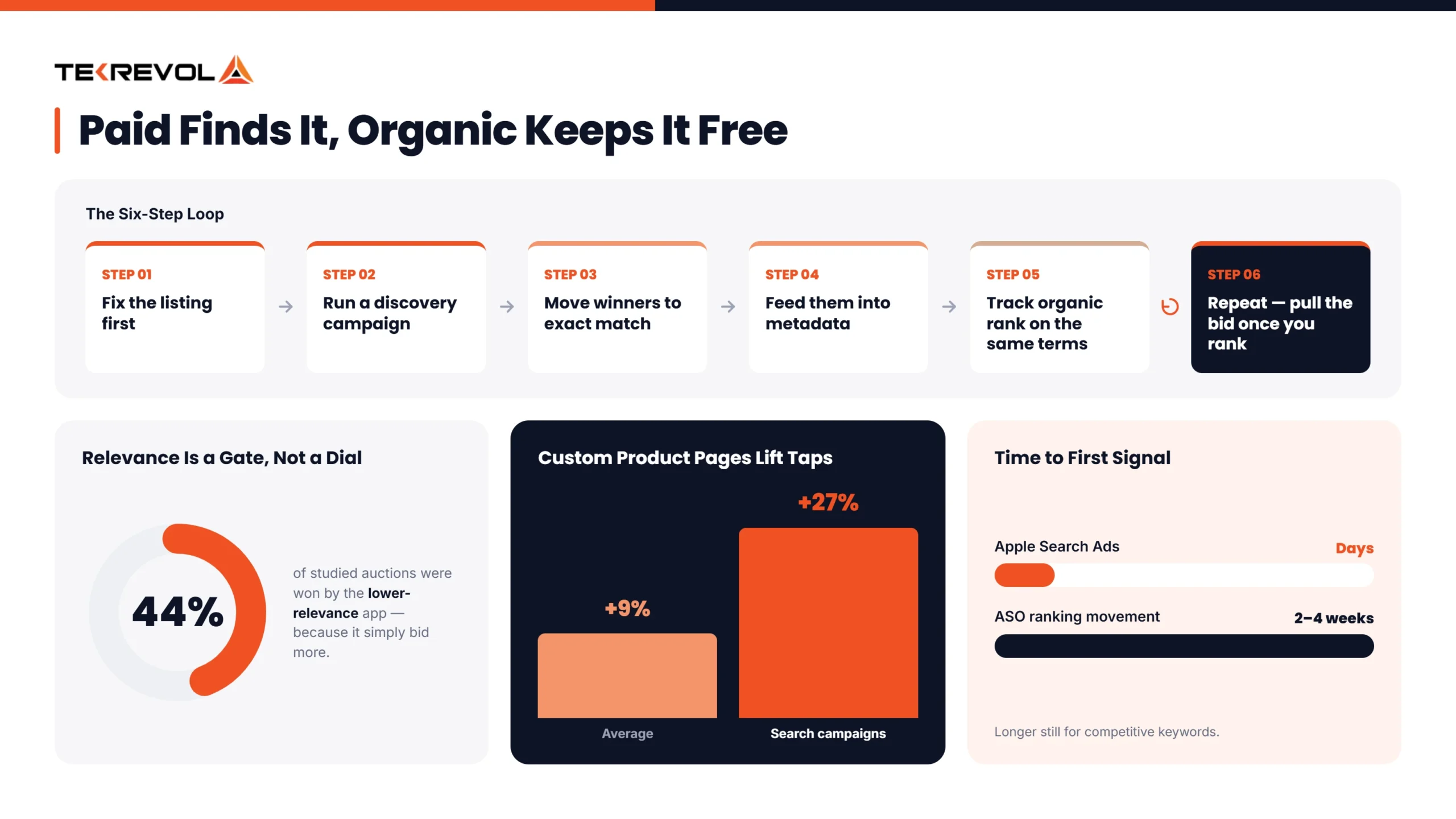
1. Fix Your ASO Foundation First
A relevant app name, screenshots that actually show the app in action, and a solid rating. Advertising to a weak page just wastes spend, no matter how good your targeting is. This step alone is where most budget gets wasted, so don’t skip it just to get a campaign live faster.
2. Launch a Discovery Campaign in Apple Search Ads
Use Search Match to discover relevant search terms automatically, or run one of the best App Store keyword research tools alongside it if you want more visibility into volume and competition.
Once enough data is collected, move the best-performing keywords into exact-match campaigns for better control and optimization. This helps you focus your budget on keywords that have already proven to drive results.
3. Move the Winners Into Exact Match
Move high-converting keywords into exact-match campaigns. Group them by brand, category, competitor, and long-tail terms, and assign separate bids to each group to improve control and performance. Give each campaign its own negative keyword list too, so they stay cleanly separated in the auction.
4. Feed Your Best-Converting Keywords Into Your Metadata
Take the keywords that proved themselves in your paid campaigns and add them to your title, subtitle, or keyword field, whichever spot fits best. This is the fastest way to turn paid spend into a lasting organic asset instead of a recurring cost.
5. Track Organic Rank on the Same Keywords You’re Bidding On
Once a term climbs into your top 10 organically, that’s usually your cue to pull the bid back, since you’re likely paying for installs you’d have gotten anyway. Check this monthly at a minimum, since rank can shift faster than most teams expect.
6. Repeat
Every campaign round hands you fresh data to feed straight back into ASO, and the cycle keeps getting cheaper as it goes. Treat it as an ongoing loop, not a one-time project you finish and walk away from. After users install your app, social media marketing helps maintain engagement and expand your reach across new audiences.
How TekRevol Helps You Get This Right
Everything in this guide is the loop we run for our own clients, day in and day out. Here’s what that actually looks like once it’s not just theory.
As a mobile app development company, we build the app itself, then take care of App Store Optimization once it’s live. We also support your product after launch, so you’re not managing separate vendors for your app, your listing, and your growth.
We treat paid and organic as one connected system, not two separate line items, and the process below is the same loop covered throughout this guide, just run daily across categories from fintech to gaming to on-demand apps.
- Audit your current listing before a single campaign goes live
- Run structured Apple Search Ads split by brand, competitor, category, and long-tail
- Feed every winning keyword straight back into your metadata
- Track organic rank so you know exactly when to pull a bid back
Building an App and Want It Set Up to Rank From Day One?
Let's talk about how we can bake ASO into your app development process from the start, so your app is built with discoverability in mind.
Talk to Our App Development Team


![Estimated Cost to Build a Social Media App for USA [2026 Guide]](https://assets.tekrevol.com/images-tek/uploads/2025/09/socail-media-app-2-400x159.webp)


