



- Google Play Store optimization improves an app’s visibility and downloads through keyword, visual, and behavioral ranking signals combined.
- Winning on Google Play means treating optimization as a continuous monthly practice, not a one-time store listing update.
- Google indexes your full 4,000-character-long description using NLP — natural phrasing beats keyword stuffing every time now.
- Apps rated below 3 stars lose Google Play’s Explore section entirely — ratings function as a ranking factor, not just trust.
- Running Promotional Content every seven days is the fastest way to signal freshness and unlock additional Explore traffic.
TekRevol has driven measurable Play Store results, including 3M+ downloads for Tamreeni and a 30% engagement lift for Save & Win.
34,000 new Android apps launch on Google Play every month. Most disappear within weeks, not because they’re bad, but because nobody can find them. Google Play Store optimization is the practice that decides which apps surface in search and which ones vanish into the noise.
Most guides treat Play Store optimization as a one-time listing task: write a good title, add some screenshots, done. In 2026, that’s not how it works anymore. Google’s algorithm now reads your full description with natural language processing, weighs retention and crash rates alongside keywords, and rewards apps that keep showing up with fresh content. Shortcuts that worked two years ago get quietly penalized today.
TekRevol runs Android app development services for consumer and enterprise apps across fitness, education, retail, and on-demand categories, and Play Store optimization is part of every one of those builds. This guide covers what Google’s ranking algorithm actually responds to right now, and how to build an optimization habit that keeps paying off instead of resetting every quarter.
What Is Google Play Store Optimization?
Google Play Store optimization, also called Google Play ASO or app store optimization for Google Play, is the practice of improving an Android app’s visibility, ranking, and conversion rate inside Google Play through keyword strategy, visual assets, ratings management, and behavioral signals.
Google Play uses a ranking philosophy similar to web SEO services, but built on different inputs. Instead of backlinks and content authority, it looks at downloads, retention, ratings, and how people actually behave inside your app after installing it.
Two discovery surfaces matter here. Search Traffic is keyword-driven; someone types a query, and your app either shows up or it doesn’t. Explore Traffic is editorial and algorithmic curation, Google surfacing apps it thinks fit a category, a moment, or a user’s interests. Winning one doesn’t guarantee the other, which is exactly why optimization has to cover both.
Not Sure Why Your App Isn't Ranking on Google Play?
Get a free Google Play ASO audit covering keyword coverage, metadata gaps, conversion rate analysis, and Android Vitals, all in one report.
Get My Free Google Play AuditHow Does the Google Play Ranking Algorithm Work in 2026?
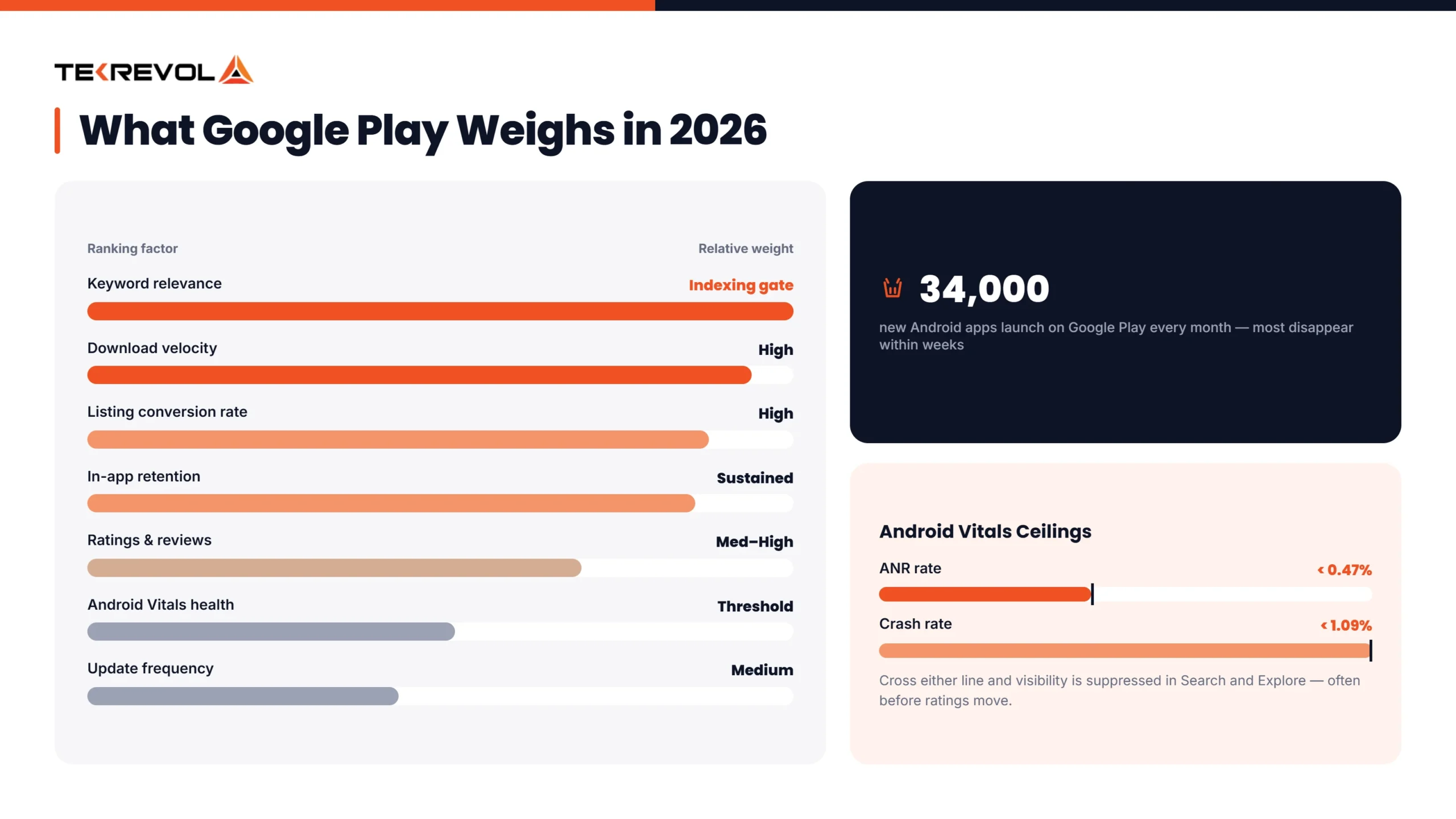
The Google Play ranking algorithm in 2026 evaluates five main signals: keyword relevance in metadata, download velocity, conversion rate on the store listing, in-app retention, and Android Vitals technical health.
Google increasingly uses NLP to understand keyword context, not just exact matches.
| Factor | What Google Measures | Relative Weight |
| Keyword relevance | Match between metadata terms and search query | High — indexing gate |
| Download velocity | Rate of new installs in a rolling window | High — ranking booster |
| Conversion rate | % of listing visitors who install | High — quality signal |
| In-app retention | Day-1/7/30 retention, session frequency, uninstall rate | High — sustained ranking |
| Android Vitals health | ANR rate, crash rate, performance | Medium — threshold penalty |
| Ratings and reviews | Star rating, volume, response rate | Medium-High |
| Update frequency | Recency and cadence of updates | Medium |
Google’s Shift to NLP and Theme-Based Keyword Understanding
Google has been moving away from exact-match keyword indexing toward genuinely understanding what an app is for. A description that naturally covers a topic cluster, “running,” “outdoor fitness,” “GPS tracking,” “training plan”, will rank for related searches even when those exact words never appear in the title.
The practical takeaway: stop repeating the same keyword five times in your long description. Google treats that as spam now. Write like you’re explaining the app to a smart friend, and let the topic cluster speak for itself.
Google Play vs. Apple App Store: Why the Same Metadata Fails on Both
Google Play and the Apple App Store index metadata completely differently, and using one listing strategy on both stores consistently underperforms on each.
Google Play reads your entire 4,000-character description through NLP. Apple only reads your title, subtitle, and a hidden 100-character keyword field.
| Metadata Element | Google Play | Apple App Store |
| Title | 30 characters, most-weighted | 30 characters, most-weighted |
| Short description | 80 characters, indexed | Subtitle — 30 characters, indexed |
| Hidden keyword field | Doesn’t exist | 100 characters, algorithm-only |
| Long description | 4,000 characters, fully indexed | Not indexed for ranking |
| Developer name | Indexed (light weight) | Not indexed |
| User reviews | Indexed for keywords | Not indexed |
| Screenshot captions | Not indexed | Indexed since June 2025 |
If you’re weighing your broader platform decision before you even get to metadata, this breakdown of Android app development covers what building for the Play Store actually involves from the ground up.
The practical takeaway: your iOS hidden keyword strategy has zero value on Google Play. Your Google Play long description strategy won’t transfer to iOS without a full rewrite.
How to Do Google Play Keyword Research
Google Play keyword research follows five steps: brainstorm from real user intent, validate with autocomplete and competitor listings, check search volume and competition, place keywords in the right fields, then measure and adjust every four weeks.
Building Your Keyword List from User Intent
Start with how people describe their problem, not how you describe your product. Google Play’s autocomplete is one of the most accurate signals of real search behavior available, and competitor titles and descriptions show you which keywords are already converting for similar apps.
User reviews are another goldmine; they contain the exact phrasing real people use, which often differs from what a product team would write.
For a deeper look at where to actually find these terms, this guide on how to search keywords for ASO walks through the research process in more depth than this section can.
Keyword Placement by Metadata Field
| Field | Priority Keywords | Character Limit | Focus |
| App title | Primary keyword + brand | 30 | Ranking + recognition |
| Short description | Supporting keyword | 80 | Conversion + indexing |
| Long description | Full keyword cluster | 4,000 | NLP indexing — write for humans |
| Developer name | Category term, if authentic | N/A | Minor signal |
Keyword Research Tools for Google Play
Free options include Google Play Console (limited data, only after publishing), Play Store autocomplete, and manual competitor analysis. Paid tools like AppTweak, App Radar, Sensor Tower, and MobileAction provide volume estimates and ranking difficulty scores. What free tools miss most: real search volume and competitor keyword gap analysis.
Google Play Console keyword data only becomes available after your app is published and indexed. If you’re still in the pre-launch stage, a mobile app development company can help you build a keyword strategy using third-party research tools before launch, since Google Play doesn’t provide native search volume data for unpublished apps.
How to Optimize Google Play Visual Assets for Higher Conversion
Visual optimization on Google Play starts with the icon, since it’s the first thing anyone sees in search results, followed by screenshots, the feature graphic, and an optional promo video for apps where the value is hard to explain in a still image.
App Icon — The First Impression
The icon appears before anyone lands on your listing, which makes it the primary driver of tap-through from search. Bold contrast against the Play Store’s white background works better than subtlety.
One recognizable symbol beats a busy design, and text on the icon should be avoided unless it’s genuinely brand-critical. Test icon variants using Play Store Store Listing Experiments; icon changes tend to produce some of the biggest conversion swings of any single asset.
Screenshots — The Real Conversion Driver
Screenshots do the heavy lifting when there’s no video. Most users never scroll past the third one, so the strongest value proposition needs to live in frames one through three.
A headline, the app UI shown in context, and a short supporting line explaining the benefit tend to convert best. Localizing screenshots for major markets matters too; visual culture and information density expectations shift by region.
Feature Graphic and Promo Video
The feature graphic is mandatory, even without a video, and it doubles as the video thumbnail when one exists. When there’s no video, it acts as a standalone visual ad at the top of the listing.
Promo videos go through YouTube first, then link into Play Console, and the first 15 seconds decide whether anyone keeps watching. Not every app needs one; simple, focused apps often perform fine without.
If your visuals are landing but conversions still feel flat, the rundown of mobile app development tips covers the broader product decisions that affect first impressions beyond just the store listing.
Struggling to Turn Listing Traffic Into Actual Installs?
See exactly which visuals, keywords, and metadata gaps are costing you conversions in one focused audit.
Get My Free Conversion AuditHow to Manage Ratings and Reviews for Google Play Ranking
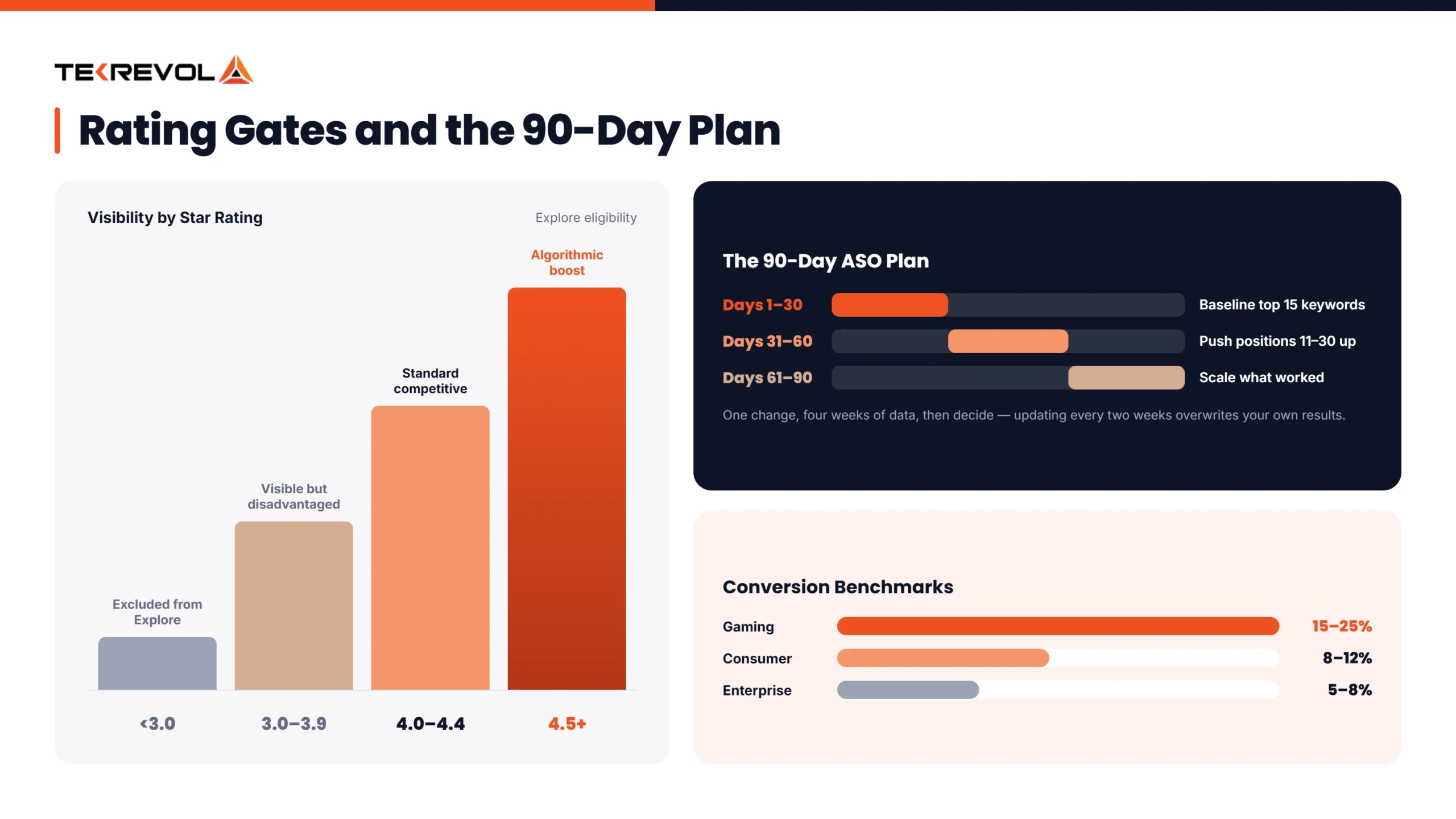
Ratings directly affect Google Play visibility. Apps below 3 stars lose access to Explore traffic entirely, while apps above 4.5 stars get an algorithmic boost. Reviews also feed keyword indexing, since the terms users write in their reviews count toward relevance signals.
| Rating | Impact |
| Below 3.0 | Excluded from Explore entirely |
| 3.0–3.9 | Visible but disadvantaged |
| 4.0–4.4 | Standard competitive range |
| 4.5+ | Algorithmic boost, eligible for featuring |
Timing matters more than volume when it comes to prompts. The best moment to ask is right after a successful action, a workout logged, a purchase completed, or a goal hit. The worst moments are right after installation or during a frustrating error.
A two-step prompt works well: gauge satisfaction first, then route happy users to the Play Store and unhappy ones to an internal feedback form instead. Responding to negative reviews within 48 hours also correlates with better average ratings over time.
The best review strategy isn’t asking everyone, it’s identifying your most engaged users and prompting them at the right moment. Ten enthusiastic reviews beat a hundred reluctant ones.
How Android Vitals Affects Google Play Store Optimization
Android Vitals is Google’s technical performance monitor, and apps that exceed the thresholds for crash rate, ANR (App Not Responding) rate, or excessive battery drain lose visibility in both Search and Explore, making technical health a direct ranking factor, not just an engineering concern.
Google’s threshold for ANR sits below 0.47% overall, and the crash rate needs to stay under 1.09%. Cross either line, and visibility gets suppressed, often before it even shows up in your ratings.
The Android Vitals dashboard in Play Console shows exactly which devices are triggering violations, which makes prioritizing fixes straightforward once you know where to look.
How to Use Promotional Content to Boost Organic Ranking?
Google Play Promotional Content lets apps post in-app events, limited-time offers, and major updates directly in search results and Explore. Running one every seven days, lasting seven days, signals freshness to the algorithm in a way that directly contributes to ranking.
Promotional Content shows up in dedicated sections, alongside search results, on your own listing page, and inside Explore categories. Games benefit the most, since Google actively uses this signal to separate maintained titles from abandoned ones, but non-gaming apps that skip it are leaving Explore traffic unclaimed.
New apps also get a real advantage through pre-registration, which puts them in a dedicated section for up to 90 days before launch and builds an audience that gets notified the moment the app goes live, concentrating install velocity right when it matters most.
Both stores temporarily boost new and recently updated apps, so the smarter move is launching into that window fully optimized rather than fixing things after the fact.
How to Build a 90-Day Google Play ASO Action Plan?
A 90-day Google Play ASO services plan runs in three phases: foundation and launch (Days 1–30), first iteration (Days 31–60), and scaling what works (Days 61–90).
Days 1–30
Finish keyword research, finalize metadata across every field, and get all visual assets live before launch. Once live, monitor Android Vitals daily, respond to every review within 48 hours, and resist changing metadata for the first two weeks; the algorithm needs time to index what you’ve already published. Milestone: a keyword ranking baseline for your top 15 terms.
Days 31–60
Look at which keywords rank in positions 11–30 — those are your fastest wins into the top 10. Adjust the long description to better cover underperforming clusters, one change at a time. Start Promotional Content if it fits your app, and A/B test screenshots once you have enough traffic for meaningful results. Milestone: conversion rate baseline and first review-prompt data.
Days 61–90
Run a second metadata iteration based on real ranking data from Phase 2. Expand Promotional Content to a weekly cycle if it showed a lift. Check which competitors gained or lost ground on your priority keywords, and assess whether a localized listing is worth building for any market showing organic interest. Milestone: measurable movement from your Phase 1 baseline.
Industry Insight: Most ASO changes take 4–6 weeks to show up in rankings fully. Teams that update metadata every two weeks are overwriting their own results before they can measure them. One change, four weeks of data, then decide.
How to Measure Google Play ASO Performance
Measure Google Play performance through five metrics: keyword ranking position, listing conversion rate, organic install volume, Day-7 and Day-30 retention, and review score trajectory, tracked weekly for keywords, bi-weekly for conversion.
| Metric | Consumer Apps | Enterprise/B2B | Gaming |
| Conversion rate | 8%–12% | 5%–8% | 15%–25% |
| Day-1 retention | 25%–35% | 40%–55% | 30%–45% |
| Day-7 retention | 12%–20% | 25%–35% | 15%–25% |
| Average rating | 4.3+ | 4.2+ | 4.0+ |
Getting the listing right is only half the picture, though. This guide on how to market your mobile app covers the paid and organic strategies that work alongside a strong Play Store presence, not instead of it.
How TekRevol Approaches Google Play Store Optimization
TekRevol treats Google Play Store optimization as an ongoing growth strategy, not a one-time task. Every project begins with a comprehensive ASO audit that reviews keyword coverage, description quality, conversion rate, ratings, Android Vitals, and competitor performance.
From there, the team follows a structured optimization cycle that includes:
- Keyword research and metadata updates every four weeks
- Quarterly A/B testing for icons, screenshots, and feature graphics
- Weekly Promotional Content planning for eligible apps
- Monthly performance reporting based on installs, conversions, and retention
This approach has delivered measurable results. Tamreeni, a UAE fitness app built by TekRevol, surpassed 3 million downloads while maintaining 60% user retention, combining effective ASO with a strong in-app experience.
ASO is also supported beyond launch through ongoing optimization, app marketing strategies, and mobile app development practices that prioritize review prompts, Android Vitals compliance, and metadata-aligned UX from day one.
Is Your Android App Live, but Growth Has Stalled?
TekRevol's Google Play experts will audit your listing, uncover ranking opportunities, and provide a prioritized action plan.
Book My Free Google Play Strategy Session


