



- Enterprise software runs shared business processes across whole departments, not individual tasks for individual people.
- Enterprise software and enterprise application software mean the same thing in practice, whatever vendors say.
- A tool used at work isn’t automatically enterprise software, and the distinction is worth keeping.
- The four canonical enterprise application types come from a textbook, not from any vendor’s marketing.
- Integration and change management cost more than licences, and neither shows up on the quote.
- Security for enterprise software means identity, permissions and audit trails long before it means encryption.
Did you know that large organizations lose over $1.4 trillion annually due to fragmented software systems, legacy bottlenecks, and disconnected business workflows? As your company grows, relying on basic consumer-grade tools creates massive operational friction, data silos, and lost revenue opportunities across departments.
Enterprise software solves this growth challenge by serving as a unified digital backbone across your entire organization. It integrates complex business operations ranging from finance, supply chain, and human resources to customer management into secure, scalable platforms designed to automate high-volume processes and accelerate productivity.
This ultimate guide explains what counts as enterprise software and what doesn’t. Then we unpack the types and named enterprise software examples by category. We also lookinto the core architectural patterns, development costs, security considerations, and key implementation benefits.
What Is Enterprise Software?
Enterprise software is large-scale software designed to support organization-wide operations, complex workflows, and data management. Unlike personal apps, enterprise software handles multi-departmental requirements, high user volumes, advanced automation, and seamless system integrations across an entire company.
The word “enterprise” gets stretched a long way in practice, so here’s a test worth applying. Software is enterprise software if it meets most of these:
- Multiple departments depend on the same records. Finance, ops, and sales all read from it.
- It’s a system of record, not a helper tool. If it goes down, work stops.
- It integrates. Data flows in and out of other systems by design, not by export.
- It has administrative depth: Roles, permissions, approval chains, audit trails.
- Rollout needs configuration and change management, not a signup form.
Whether you run a global supply chain or a multi-location health network, robust software infrastructure keeps operations synchronized. If your business needs a tailored software solution, partnering with us for custom software development services ensures every application connects smoothly with your overarching enterprise software suite.
Modernize Your Legacy Infrastructure With Custom Software
Outdated software can slow operations and increase maintenance costs. We modernize legacy systems into secure, scalable enterprise applications built for high concurrency.
Schedule an Enterprise Software AssessmentWhat Are the Key Features of Enterprise Software?
Enterprise software examples share features consumer software never needs: robust multi-tenant architecture, automated workflow capabilities, cross-platform system integration, real-time reporting dashboards, stringent data governance controls, and customized user access permissions across entire organizational structures.
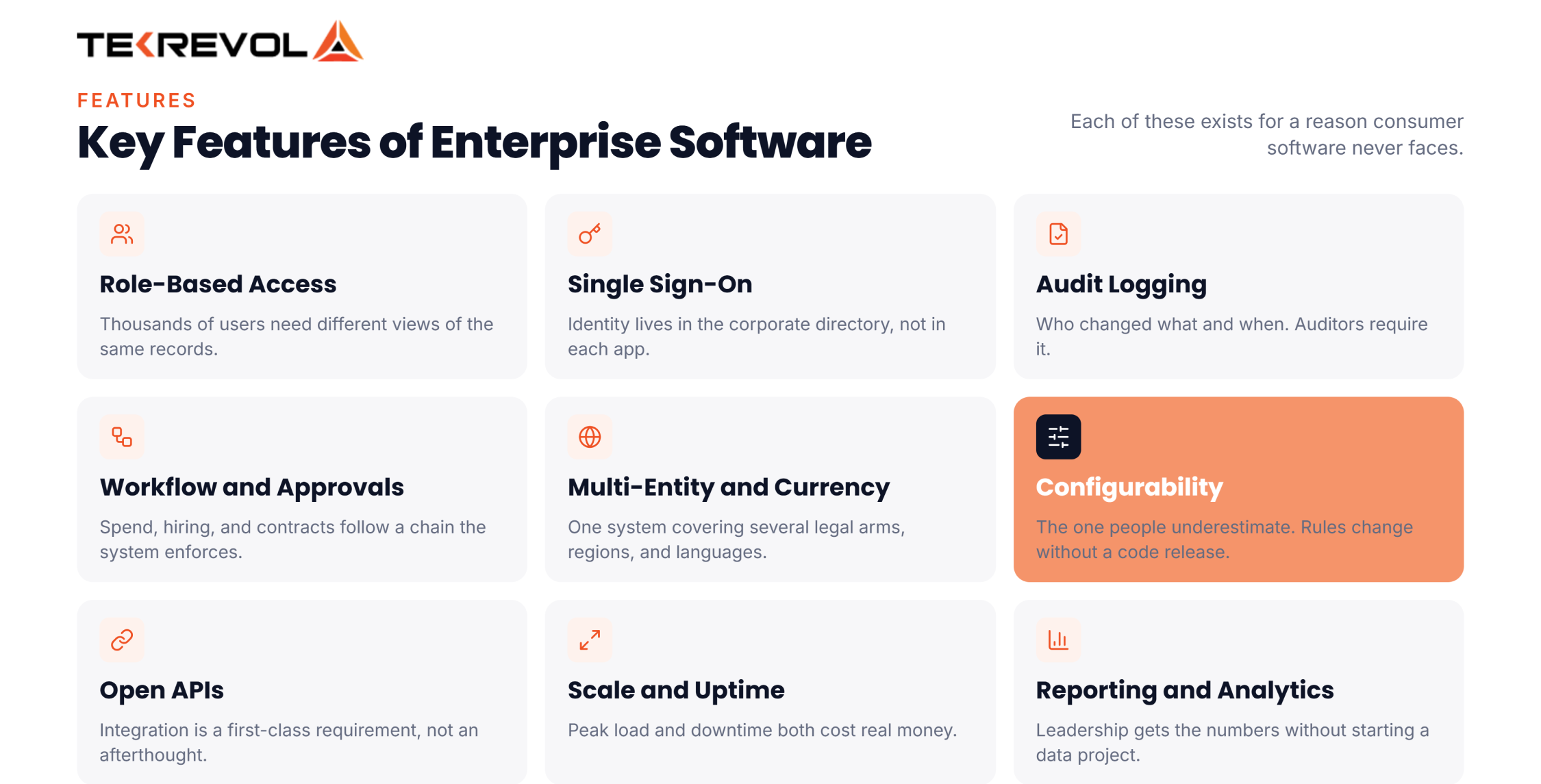
Each of these exists for a reason consumer software never faces.
- Role-based access control: Thousands of users need different views of the same records.
- Single sign-on: Identity lives in the corporate directory, not in each application separately.
- Audit logging: Who changed what and when. Auditors require it; it isn’t a feature request.
- Workflow and approvals: Spend, hiring and contract decisions follow a chain, and the system has to enforce it.
- Multi-entity, multi-currency, multi-language: One system covering several legal arms and regions at once.
- Configurability: Business rules change without waiting for a code release.
- Open APIs: Integration is a first-class requirement here, not an afterthought.
- Scalability and high availability: Peak load and downtime both cost real money.
- Reporting and analytics: leadership needs the numbers without starting a data project first.
Enterprise Software vs Enterprise Application Software: Is There a Difference?
Enterprise software is an umbrella term covering all large-scale systems, tools, and platforms an organization uses. An enterprise software application refers to a specific, single software program or module designed to fulfill a dedicated operational business task.
While people often use these terms interchangeably in conversation, understanding their technical distinction helps when planning your IT budget and architecture. Enterprise software describes the entire technological ecosystem or category. In contrast, an enterprise application is a standalone software product within that broader category.
To put this into perspective, consider the comparison below:
| Feature / Metric | Enterprise Software | Enterprise Software Application |
| Scope | Broad ecosystem of multi-module solutions | Specific program built for a single workflow |
| Primary Goal | Align entire enterprise tech stacks and strategy | Solve a specific task (e.g., ticketing, payroll) |
| Implementation | Multi-year, organization-wide rollouts | Module-by-module or app-specific deployment |
| User Base | All employees, vendors, and partners company-wide | Specific departments or specialized job roles |
| Examples | ERP Ecosystems, Global CRM Frameworks | Salesforce Sales Cloud, Zendesk Ticketing |
What Are the Types of Enterprise Software?
The four canonical types are ERP, SCM, CRM, and knowledge management. In practice, the working set runs wider than that. Most enterprise software examples also cover HR, business intelligence, IT service management, content, procurement, and asset management.
Every department within a business faces distinct operational challenges, which has led to specialized categories of enterprise software examples:
- Enterprise Resource Planning (ERP)
Centralizes core business processes like financial management, inventory, procurement, and manufacturing into one system. Explore how custom systems streamline operations through our tailored ERP software development services.
- Customer Relationship Management (CRM)
Manages sales pipelines, customer service interactions, and marketing campaigns to build long-term client retention. Partner with our specialized CRM developers to build custom sales engines.
- Supply Chain Management (SCM)
Tracks logistics, goods tracking, inventory levels, and supplier relationships from raw materials to final delivery.
- Human Resource Management (HRM)
Handles payroll, employee onboarding, benefits administration, and performance tracking.
- Business Intelligence (BI)
Aggregates complex company data to generate interactive dashboards, predictive analytics, and executive reports.
- IT Service Management (ITSM)
Streamlines internal IT operations, incident ticketing, asset tracking, and service request workflows across tech teams.
- CMS / Digital Experience Platform (DXP)
Manages multi-channel digital content, personalized customer journeys, and web assets at scale across global audiences.
- EAM / Product Lifecycle Management (PLM)
Oversees physical asset health, equipment maintenance schedules, product design phases, and manufacturing lifecycles.
- Knowledge Management Systems (KMS)
Centralizes corporate intellectual property, internal documentation, policy wikis, and team training resources into searchable repositories.
Not Sure Which System You Actually Need?
Send us the process that's breaking, and we'll identify the software category that best fits your business needs.
Schedule Your Free ConsultationTop Enterprise Software Examples by Category
The most widely deployed enterprise software examples include Salesforce for CRM, SAP S/4HANA for ERP, ServiceNow for ITSM, Adobe Experience Manager for DXP, SAP Ariba for procurement, IBM Maximo for EAM, Workday for HRM, and Microsoft Dynamics 365.
To identify how these platforms work in practice, examining real enterprise software examples and enterprise application software examples helps clarify their daily impact across operations:
- Salesforce: The global benchmark among CRM enterprise software examples, allowing sales and support teams to track pipeline leads, automate outreach, and personalize customer communication.
- SAP S/4HANA: A premier choice among ERP enterprise software examples that unifies corporate accounting, procurement, manufacturing, and asset management into a real-time database.
- ServiceNow: A leading enterprise application software example for IT Service Management, automating IT tickets, incident resolution, and internal service desks across large companies.
- Adobe Experience Manager: An enterprise-grade Digital Experience Platform that allows enterprise marketing teams to build, manage, and personalize digital content experiences across mobile and web channels.
- SAP Ariba: A specialized enterprise software application that automates global vendor management, contract negotiations, supply procurement, and spend analysis.
- IBM Maximo / Siemens Teamcenter: Industry-standard Enterprise Asset Management and Product Lifecycle Management platforms used by industrial enterprises to monitor machinery health and streamline product engineering.
- Workday: An industry-leading enterprise application software example in HRM and financial management, giving HR managers automated payroll tools and workforce performance tracking.
- Microsoft Dynamics 365: A unified cloud suite combining CRM and ERP functionalities, serving as one of the most versatile enterprise software examples for growing businesses.
Two traps to watch for when you’re comparing lists.
The word “Enterprise” in a product name proves nothing
QuickBooks Desktop Enterprise is a small-business accounting product. SAP Business One is SAP’s small-business ERP, not S/4HANA. Both get listed as enterprise software examples all the time.
Consumer tools get swept in
Design tools, writing assistants, and video apps show up on plenty of enterprise application software examples lists. Use the test from the first section instead. If one team dropping it wouldn’t break anything else, it isn’t a system of record.
Comparing Enterprise Platforms Right Now?
Tell us the processes involved, and we'll map out what makes sense to buy versus build for your business.
Consult Our Strategy TeamHow Does Enterprise Software Work?
Enterprise software centralises data in a shared database, exposes it through role-based interfaces, and moves it between systems through APIs and integration middleware. The point is that one update propagates instead of being re-entered.
Follow a single order through a working stack and the mechanics become obvious.
- A salesperson closes a deal in the CRM. The opportunity flips to closed-won.
- The ERP picks it up through an integration, creating a sales order and reserving inventory.
- SCM sees the reservation and adjusts demand planning and replenishment.
- Finance invoices from the same order record, so the amount matches what sales quoted.
- Support sees the customer, the product, and the service history when they call, without asking anyone.
Nobody re-keyed anything, and every team saw the same number. That propagation is the whole value proposition. It’s the same integration logic behind most custom software development work at this scale.
It’s also where projects fail. The integrations doing that work are the expensive, invisible part, and our breakdown of API integration cost covers what that layer really runs to.
What Is the Architecture of Enterprise Software?
Enterprise software architecture is typically a multi-tier framework consisting of a presentation layer for user interfaces, an application logic layer for business rules, and a data layer for secure storage, interconnected via APIs and cloud microservices.
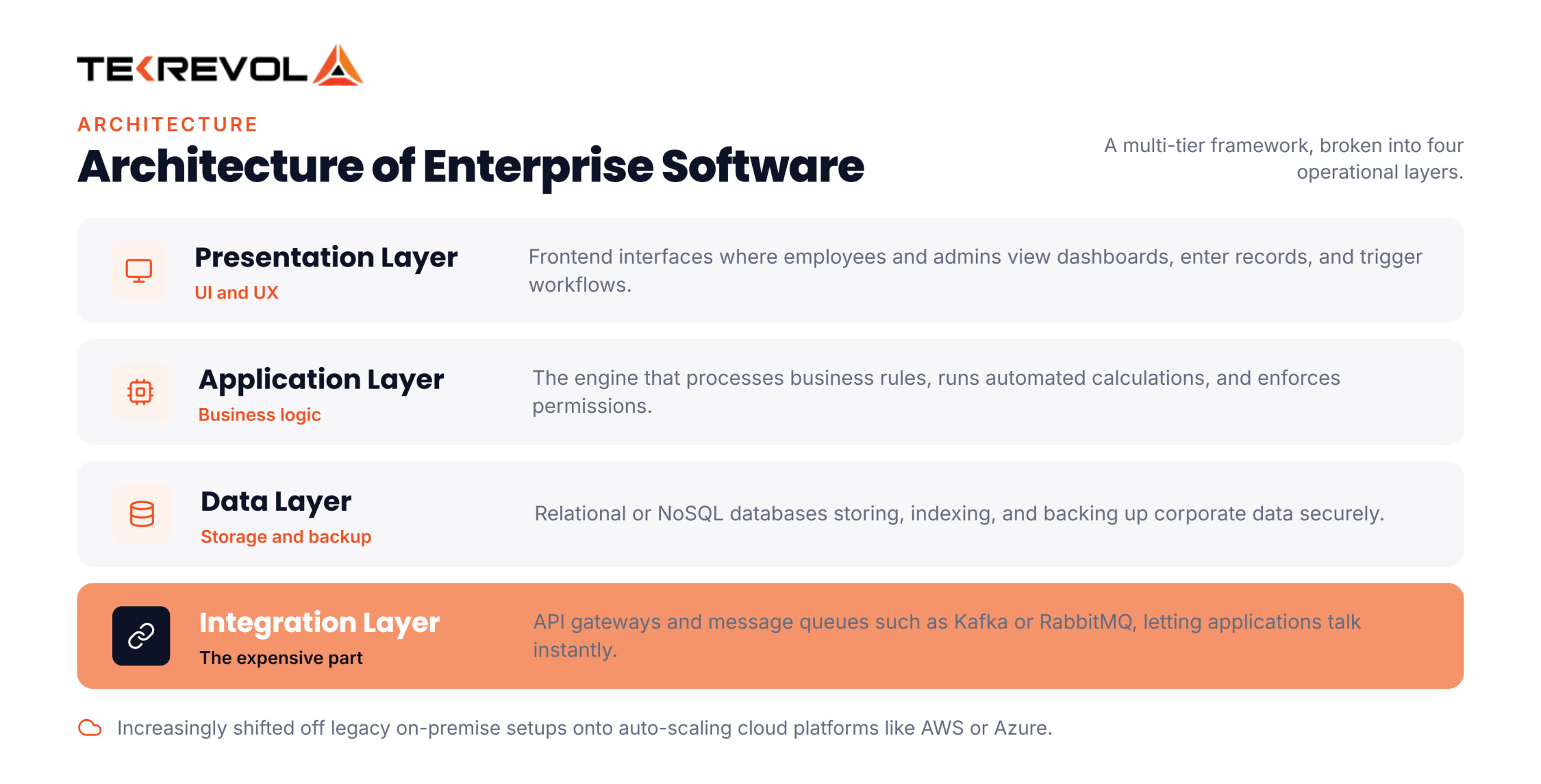
To handle enterprise-scale loads reliably, enterprise software examples architects break the system into distinct operational layers:
- Presentation Layer (UI/UX): The frontend interfaces where employees and admins view dashboards, input records, and trigger workflows.
- Application / Logic Layer: The core engine that processes business rules, executes automated calculations, and enforces permissions.
- Data Layer: High-performance relational or NoSQL databases responsible for storing, indexing, and backing up corporate data securely.
- Integration Layer: API gateways and messaging queues (like Kafka or RabbitMQ) that allow separate enterprise applications to communicate instantly without bottlenecks.
Modern enterprise architectures increasingly rely on cloud infrastructure to shift legacy on-premise setups into resilient, auto-scaling cloud platforms like AWS or Azure.
How Much Does Enterprise Software Development Cost?
Custom enterprise software development costs range from $80,000 for basic internal tools to over $1,000,000 for complex enterprise-wide ecosystems. The cost is driven by system complexity, user concurrency, custom API integrations, security standards, and team location.
Budgeting for custom enterprise software depends heavily on project scope, functional depth, and architectural demands. Here is a typical industry breakdown of development cost tiers:
| Enterprise Software Tier | Feature & Scope Level | Development Timeline | Average Cost Range |
| Basic Enterprise Tool | Single-department tool, basic UI, standard APIs | 3 to 5 months | $80,000 – $150,000 |
| Mid-Scale Enterprise App | Multi-department workflows, CRM/ERP integration, RBAC | 6 to 9 months | $150,000 – $400,000 |
| Large-Scale Platform | High user concurrency, microservices, advanced security | 9 to 14 months | $400,000 – $1,000,000+ |
| Complex Enterprise Ecosystem | Global legacy migration, AI analytics, multi-tenant cloud | 12+ months | $1,000,000 – $3,000,000+ |
In addition to initial development, smart businesses budget 15% to 25% of the original build cost annually for continuous maintenance, cloud hosting, security patches, and platform updates.
What Are the Benefits of Using Enterprise Software?
Enterprise software removes manual handoffs between departments, streamlines data reporting, and ensures everyone operates from a single source of truth.
Pair each benefit with the thing that causes it. That’s what tells you whether you’ll actually get it from the enterprise software examples you’re considering.
- A single Source of Truth comes from a shared database rather than departmental copies. You’ll know it landed when two teams quote the same number without ringing each other first.
- Less Manual Work comes from data propagating instead of being re-keyed. The signal is fewer people spending their mornings on exports.
- Faster Reporting comes from running reports on live operational data. Month-end shortens, and stops being a fortnight of reconciliation.
- Process Compliance comes from approvals the system enforces, rather than a policy document nobody reads. Fewer exceptions turn up in audit.
- Scalability comes from adding new users and new arms of the business as settings, not as projects. Headcount grows faster than admin does.
- Better Decisions come from analytics on complete data instead of fragments. Forecasts stop being argued about in the meeting.
Gartner forecasts that 40% of enterprise applications would carry task-specific AI agents by the end of 2026, against under 5% at the time.
What Are the Security Considerations for Enterprise Software?
Enterprise security is mostly about identity and accountability, not encryption. What procurement actually reviews is single sign-on, role-based permissions, segregation of duties, audit logs nobody can edit, where your data physically sits, and outside certifications like SOC 2 and ISO 27001.
Encryption at rest and in transit is table stakes. Every credible vendor has it. The questions that separate enterprise software examples from each other come later in the buying process. At TekRevol, we build security protocols into the application code from day one:
- Role-Based Access Control (RBAC): Restricts employee data access strictly based on their job responsibilities, preventing unauthorized internal access.
- Data Encryption: Protects sensitive records both in transit across networks and at rest within database servers using advanced cryptographic standards.
- Regulatory Compliance: Ensures software architectures conform to strict industry guidelines such as HIPAA, GDPR, SOC 2, or PCI-DSS.
- Zero-Trust Architecture: Authenticates and validates every request before granting system privileges, neutralizing potential insider and external threats.
The one that bites hardest is segregation of duties. It’s rarely a technical failure. It’s a setup that made sense with twelve staff, stopped making sense at ninety, and nobody went back to it.
Why Choose TekRevol for Enterprise Software Development?
Choosing TekRevol for enterprise-level software development means partnering with a team that designs, builds, and deploys custom platforms tailored strictly to your unique workflows, ensuring high security, scalable performance, and seamless legacy system integrations.
Our enterprise development team works directly alongside your stakeholders to audit legacy infrastructure, map out optimal user journeys, and construct resilient multi-tier platforms. From custom ERP engines to AI-powered CRM systems, we deliver digital solutions that accelerate business growth and drive maximum return on investment.
Ready to Build Custom Enterprise Software That Scales?
TekRevol helps you design and execute tailored enterprise software solutions built for long-term scalability, performance, and business growth.
Book a Strategy Consultation Today


![10 Best Smartwatch Apps [2026 Updated List]](https://d3r5yd0374231.cloudfront.net/images-tek/uploads/2022/04/Blog-info-27-400x226.jpg)


