



- Web development best practices cover performance, security, accessibility, and maintainability; all interconnected.
- Mobile-first CSS and Core Web Vitals (LCP < 2.5s, INP < 200ms) are non-negotiable ranking and conversion factors.
- Security-first architecture using HTTPS, OWASP Top 10, and input validation prevents breaches before code ships.
- WCAG 2.2 AA accessibility is now a legal requirement in the US and EU.
- CI/CD pipelines with automated testing enable daily deploys, under 5% change failure rate, and rollback in under an hour.
- Post-launch monitoring with real-user data (Google Search Console) prevents costly rework.
Is your website slow, hard to maintain, or invisible to search engines? The root cause is almost always the same: a gap in web development best practices, not budget.
Web development standards are the techniques engineering teams use to build fast, secure, accessible, and maintainable websites. They also determine whether a site ranks, converts, and holds up under growth, or needs a costly rebuild six months after launch.
This guide covers 15 best practices in website development, split into two groups. The first group covers best practices to follow during development, from architecture and performance to code quality and security. The second group covers what happens after launch: monitoring, maintenance, and continuous improvement.
Business owners evaluating web development services or startup founders scoping a first build, these web application development best practices are the benchmark to measure. From government platforms to ecommerce systems to enterprise portals, TekRevol follows each across every project.
TLDR: 2026 Web Development Best Practices Checklist
Before the full breakdown, here is a quick overview of the web application development best practices. These principles apply to any website, any stack, any team size:
| Category | Standard | Target |
| Responsive Design | Mobile-first CSS with fluid layouts | 44×44px minimum tap targets |
| HTML Structure | W3C-compliant semantic HTML5 | One H1 per page, logical heading order |
| Architecture | API-first, SSR or SSG for public pages | Stateless services, modular boundaries |
| Performance | Core Web Vitals passing on all pages | LCP <2.5s, INP <200ms, CLS <0.1 |
| Security | HTTPS on every page, OWASP Top 10 | Zero HTTP pages, audited dependencies |
| Code Quality | DRY principles, TypeScript, linting enforced | ESLint and Prettier on every commit |
| Version Control | Git with pull request reviews | No direct commits to the main branch |
| Accessibility | WCAG 2.2 Level AA across all pages | Keyboard-navigable, screen reader tested |
| Tech Stack | Stack matched to project requirements | SSR/SSG support, 10× scale capacity |
| Testing | Automated unit and end-to-end tests | 80% coverage on critical user flows |
| CI/CD Pipeline | Automated build, test, and deploy | Daily deploys, rollback under one hour |
| Technical SEO | JSON-LD schema, semantic HTML, clean URLs | FAQPage, Article, BreadcrumbList schemas |
| Progressive Enhancement | HTML-first, JS layered on top | Functional across all browsers without JS |
| Monitoring | Real-user monitoring from day one | Sentry or Datadog is active before launch |
| Personalization | Geo, behavioral, and edge-based signals | Near-zero latency via edge functions |
Audit Your Website Against These Standards
Talk to the TekRevol team and get a free technical review of your current website against modern web development best practices.
Schedule Your Consultation TodayWhat Are Web Standards?
Web standards are the technical rules that define how websites must be built to work reliably across browsers, devices, and assistive technologies. They are maintained by W3C (World Wide Web Consortium), WHATWG, and ECMA International.
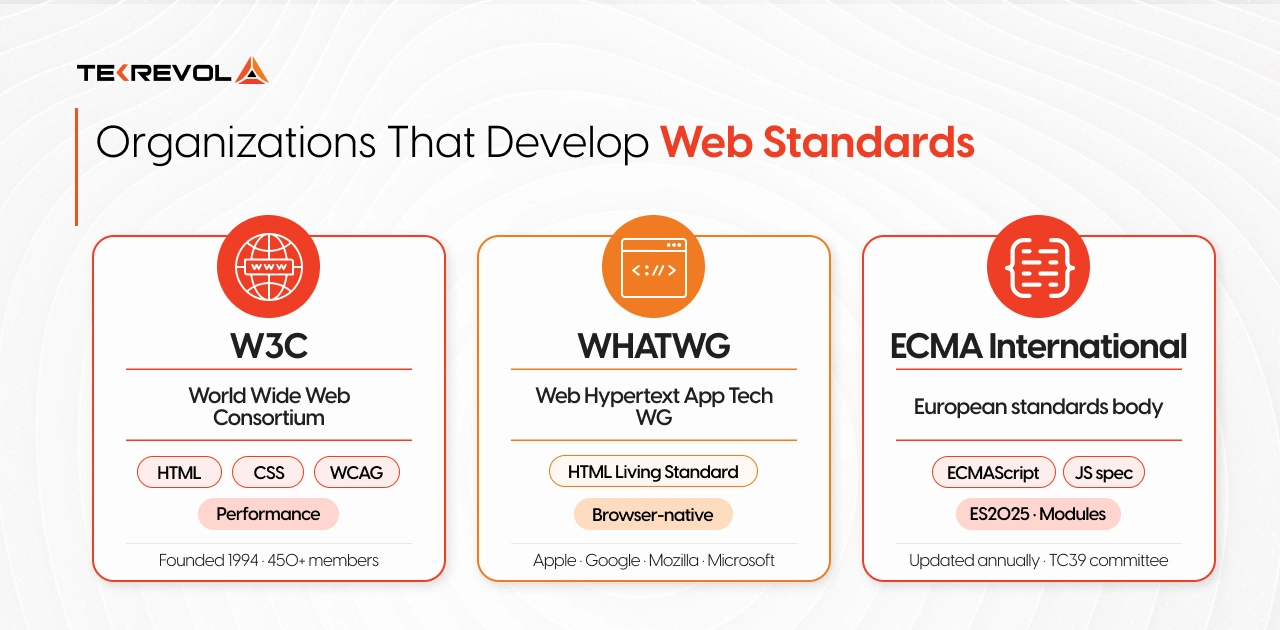
Here is what each standard covers, with a violation and a compliant example:
| Standard | What It Covers | Violation Example | Compliant Example |
| HTML5 | Document structure and meaning | <div class=”nav”> | <nav> |
| CSS3 | Layout and visual presentation | Inline styles on every element | External stylesheet |
| WCAG 2.2 | Accessibility requirements | Images with no alt text | Descriptive alt on every image |
| HTTPS/TLS | Encrypted data transmission | HTTP in production | HTTPS with a valid SSL |
| JSON-LD Schema | Structured data for search | No schema on any page | Article + FAQ schema on key pages |
Ignoring web standards is not a theoretical risk. Inaccessible code creates legal exposure under ADA Title III and the EU Accessibility Act. Partnering with an experienced digital transformation company ensures these standards are embedded into your systems from day one.
How Does the Web Work?
When a user visits a URL, their browser sends a request to a server. The server returns HTML, CSS, and JavaScript. The browser renders those files into the page the user sees.
Here is the full sequence, step by step:
- User types a URL or clicks a link
- The browser sends a DNS query to find the server’s IP address
- The browser opens an HTTPS connection to that server
- Server processes the request and returns HTML, CSS, and JavaScript files
- The browser parses the HTML, loads CSS and JavaScript, and renders the page
- JavaScript runs and may update the page dynamically
Every web development best practice operates somewhere in that chain. Security decisions happen at the server and form input stages. SEO depends on what the server sends back to crawlers. Understanding this flow makes every practice easier to apply correctly.
Quick Overview of the Web Development Process
A professional website development process follows a repeatable structure. Here is what each stage involves:
| Stage | What Happens |
| Planning | Define goals, scope, user flows, and technical requirements |
| Design | Create UI/UX wireframes and system architecture |
| Development | Build frontend, backend, and integrations |
| Testing | Run automated and manual quality checks |
| Deployment | Launch to production through a CI/CD pipeline |
| Maintenance | Monitor, update, and improve after launch |
Each stage creates the inputs for the next one. Planning shapes design. Design shapes architecture. Architecture shapes how testable the code is. Getting realistic about website development cost at the planning stage prevents budget gaps from appearing mid-sprint.
Modern Web Development: Bad Habits vs Best Practices
Most web development problems don’t come from ignorance. They come from shortcuts that feel reasonable under deadline pressure. Here is a side-by-side comparison of bad vs best web development practices:
| Situation | Bad habit | Best practice |
| Starting a new project | Desktop-first CSS, refactor later | Mobile-first from line one |
| Handling user input | Trust the frontend, validate later | Validate on both the frontend and the backend |
| Shipping features fast | Direct commits to main | Feature branch + PR review every time |
| Page performance | Full-size images, no CDN | WebP, lazy load, CDN from day one |
| JavaScript-heavy pages | Client-side rendering only | SSR or SSG for all public pages |
| Post-launch | Monitor only when users complain | Real-user monitoring active before launch |
| Accessibility | Test at the end if time allows | Built in from sprint one — WCAG 2.2 AA |
| Security | Review before launch | Architecture decision before the first line of code |
Each bad habit in this table is a known cause of post-launch rework, and every best practice prevents it.
Web Development Best Practices to Follow During Development
The web application development best practices in this section determine the quality, security, performance, and long-term maintainability. Retrofitting any of them after launch costs significantly more than building them in from the start.
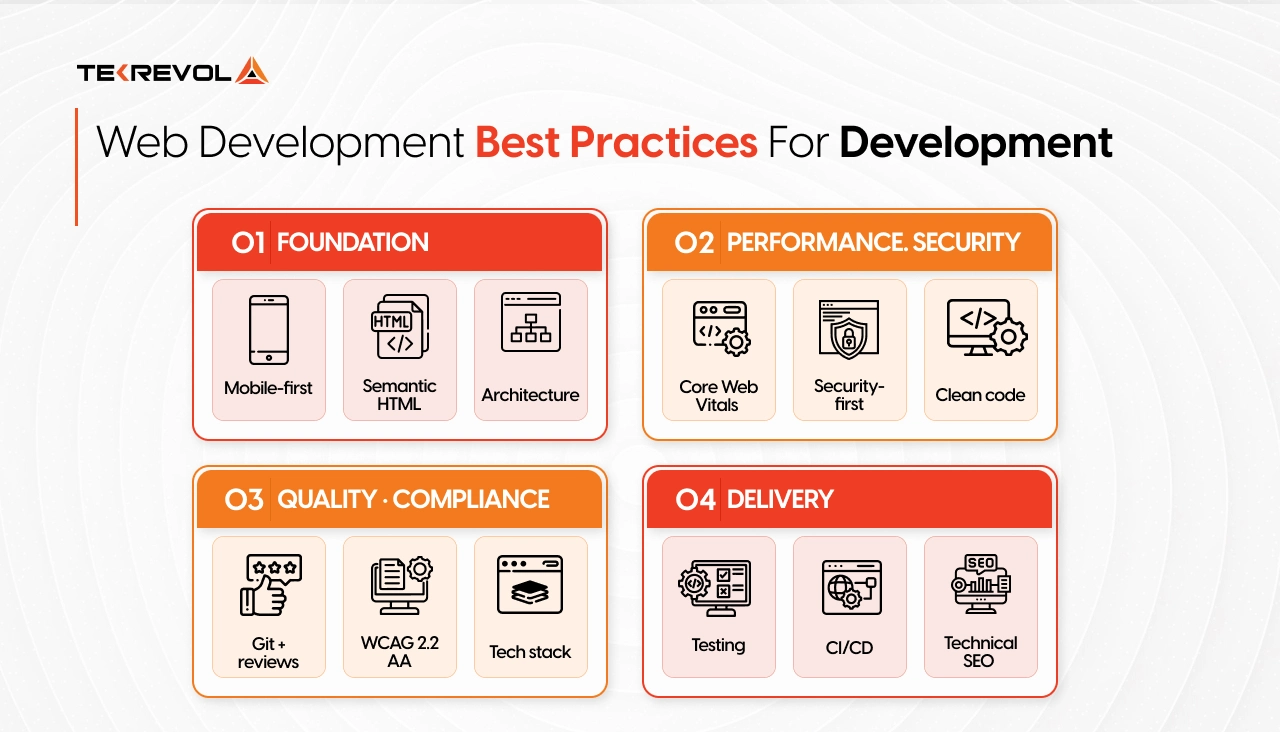
1. Mobile-First, Responsive Design
Mobile-first design means writing CSS for the smallest screen first, then scaling up. It puts your majority audience first.
Over 60% of global web traffic now originates from mobile devices, according to Statista. Writing for desktop and compressing down always produces compromises on the device where most of your users visit.
Here is the practical difference in CSS:
| Desktop-first (problematic) | Mobile-first (correct) |
| css
/* Overrides pile up as you shrink */ .container { width: 1200px; } @media (max-width: 768px) { .container { width: 100%; } } |
css
/* Build up cleanly */ .container { width: 100%; } @media (min-width: 768px) { .container { max-width: 1200px; } } |
Apply these rules across every project:
- Set a minimum tap target of 44×44 pixels on all interactive elements.
- Add <meta name=”viewport” content=”width=device-width, initial-scale=1″> to every HTML page.
- Use CSS Grid or Flexbox for fluid layouts that adapt without JavaScript.
- Set breakpoints based on your own analytics data, not assumed screen widths.
- Test on physical devices before launch. Browser emulators do not replicate real touch latency.
This is one of the best web development practices that affects search rankings. Mobile-first responsive web design also reduces Cumulative Layout Shift (CLS). On a small screen, you cannot hide behind a decorative layout. That discipline improves the desktop experience too.
2. Use Semantic HTML and W3C-Compliant Structure
Semantic HTML uses the correct HTML5 elements for their intended meaning, not just their visual output. A <header> is not the same as a <div class=”header”>.
The W3C HTML5 specification defines each element and its role. These are the structural elements every page should use:
| Element | Correct Use |
| <header> | Site header or section header |
| <nav> | Navigation links |
| <main> | Primary page content (one per page) |
| <article> | Self-contained content, such as a blog post |
| <section> | Thematic grouping within a page |
| <aside> | Supplementary content, such as a sidebar |
| <footer> | Site or section footer |
Semantic HTML is one of those web development best practices that pays dividends in the following areas:
- Search engines use semantic structure to understand what a page is about.
- Screen readers use semantic elements to let people with visual impairments navigate pages by landmark.
- Future browser updates respect semantic HTML, as div-based layouts break more often.
3. Plan for Scalable Architecture
Scalable architecture means your application can handle ten times its current traffic without a full rewrite.
Among web application development best practices, architecture is the one most teams get wrong by rushing. The practical standard for 2026 is an API-first, modular architecture that requires:
- Rendering strategy: Use SSR or SSG for all public pages. Use CSR only for authenticated dashboards where search indexing doesn’t matter.
- Content management: A headless CMS decouples your content layer from your presentation layer. Explore content management systems to match the right tool to your editorial workflow.
- API design: REST for simple, resource-based APIs. GraphQL when clients need flexible queries across multiple data types.
Our web portal development services use the same architecture principles to build internal tools or client-facing platforms at enterprise scale.
4. Performance Optimization and Core Web Vitals
Google uses Core Web Vitals as ranking signals. Pages that fail them rank lower and convert fewer visitors at the same time.
| Metric | What It Measures | Target |
| LCP (Largest Contentful Paint) | How fast the main content loads | Under 2.5 seconds |
| INP (Interaction to Next Paint) | How fast the page responds to input | Under 200ms |
| CLS (Cumulative Layout Shift) | How much the layout shifts while loading | Under 0.1 |
Why it matters
Performance optimization ranks among the most measurable web development best practices. It is a revenue metric. According to Akamai research, a one-second delay in page load time can reduce conversions by up to 7%.
How to improve core web vitals:
- Convert images to WebP or AVIF, 30-50% smaller than JPEG with no visible quality loss
- Lazy load images and videos below the fold
- Minify and code-split JavaScript, ship only what each page needs
- Use a CDN to serve assets from servers near your users
- Enable GZIP or Brotli compression on your server
- Set explicit width and height on every image to prevent layout shift
- Use font-display: swap to prevent invisible text while fonts load
Performance optimization is an ongoing process. Best web development tools like Google PageSpeed Insights, Lighthouse, and WebPageTest give you detailed breakdowns of what’s slowing your site down.
5. Apply Security-First Development Practices
Security-first development treats security as an architecture decision made before the first line of code, not a checklist reviewed before launch.
It is one of the best practices in website development that teams consistently underestimate. The OWASP Top 10 is the industry-standard reference for web application security risks.
Here is what security-first development looks like:
- HTTPS everywhere, free via Let’s Encrypt, required in all production environments
- Validate and sanitize all inputs, on frontend and backend, both; never trust form data
- Parameterized queries: never concatenate user input into a SQL string directly
- bcrypt or Argon2 for passwords, never MD5, never plain text
- Content Security Policy (CSP) headers prevent cross-site scripting (XSS) by controlling which scripts can run
- Role-based access control (RBAC), users access only what their role permits
- Dependency audits in CI, run npm audit or pip audit on every build to catch supply chain vulnerabilities
6. Clean Code, DRY Principles, and Maintainability
Clean code standards form the backbone of web application development best practices. Messy code multiplies bugs, slows onboarding, and makes every future change riskier than it needs to be.
Rules that separate maintainable code from unmaintainable code:
- DRY (Don’t Repeat Yourself), shared logic goes in a function. Repeated in three places? It goes in a module.
- Meaningful names and functions. getUserProfile() tells the next developer exactly what to expect. fn1() tells them nothing.
- Single-purpose functions, a function that does one thing, are easy to test and easy to reuse
- Use TypeScript. It catches entire categories of bugs before they reach production.
- Enforce linting on commit via ESLint and Prettier for consistency without style debate.
- Comment to explain why. The code shows what it does. Comments explain the non-obvious reasoning behind a decision.
7. Implement Git-Based Version Control and Code Reviews
A structured version control workflow protects your codebase from three failure modes: accidental overwrites, untested code, and coordination breakdowns across a team.
Here is the version control process that aligns with web development best practices for production teams:
- Create a feature branch from main for every change, however small.
- Write code and commit with descriptive messages. (“Resolve null pointer on user profile fetch” communicates the change. “fix stuff” does not.)
- Open a pull request against main when the work is ready for review.
- A team member reviews the code before any merge.
- Automated tests run and must pass before the merge proceeds.
- The branch merges only after both review and tests pass.
8. Build for Web Accessibility (WCAG 2.2 AA)
Web accessibility means building for every user, including the 1.3 billion people worldwide living with disabilities. It is also a legal requirement in the US (ADA Title III), the EU (EU Accessibility Act), and a growing list of other jurisdictions.
WCAG organizes accessibility requirements around four principles, abbreviated as POUR: Perceivable, Operable, Understandable, and Reliable.
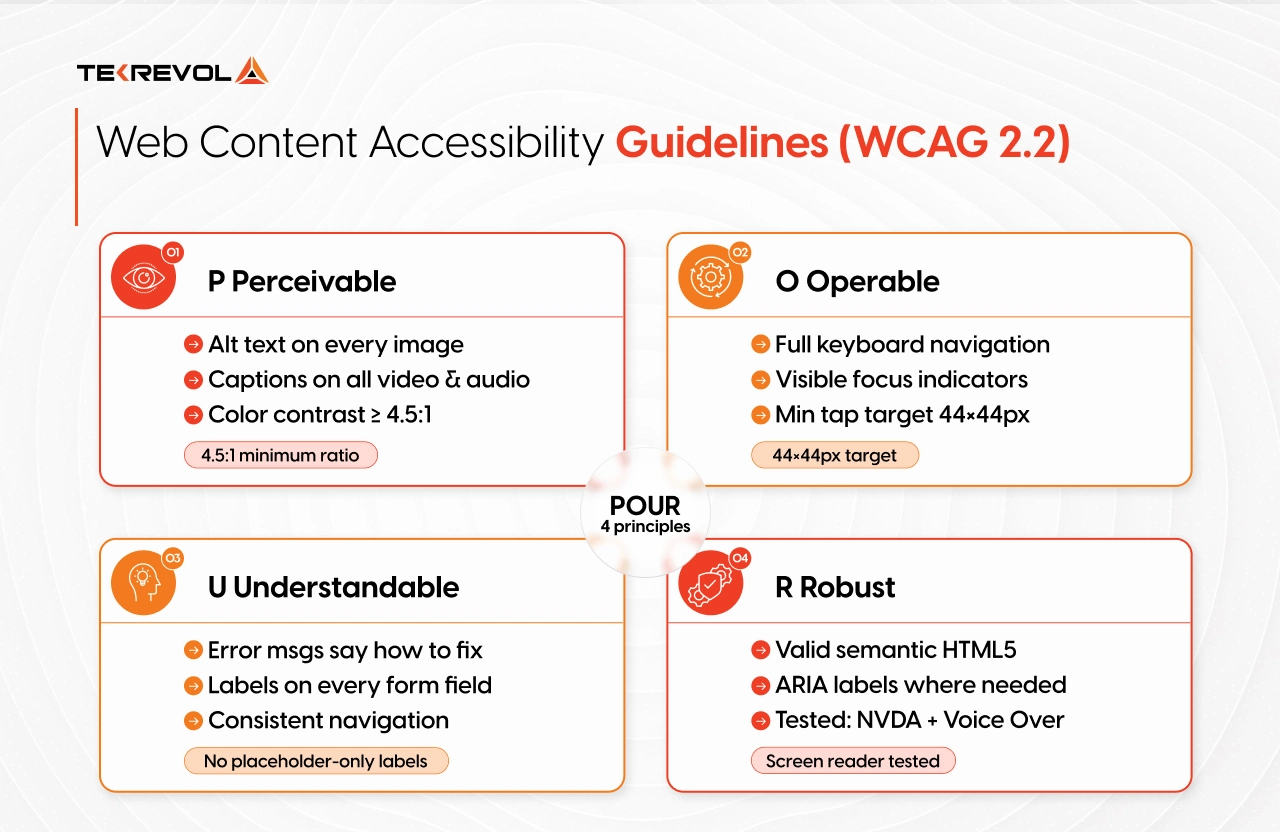
Practical steps to implement:
- Color contrast of at least 4.5:1 between text and background
- All interactive elements must work by keyboard alone
- ARIA labels on elements where semantic HTML does not convey enough meaning
- Captions and transcripts on all video and audio content
- Visible focus indicators on all focusable elements
- Proper <label> elements on every form field (placeholder text alone does not qualify)
- Minimum tap target size of 24x24px (44x44px is the recommended standard)
9. Select a Tech Stack That Fits Your Project
The best web development technologies are not the trendiest ones. It is the one your team can ship fast, maintain long, and scale confidently. This, like all web development best practices, comes down to fit over fashion.
A practical 2026 reference:
| Layer | Options |
| Frontend | React, Next.js, Vue, Nuxt, Astro |
| Backend | Node.js, Laravel, Django, Ruby on Rails |
| Database | PostgreSQL (relational), MongoDB (document), Redis (caching) |
| Hosting | AWS, Google Cloud, Vercel, Cloudflare |
| CMS | Contentful, Sanity, Strapi |
The Teck Stack Decision Framework
Use these five questions as your selection framework:
- Can your team ship in this stack without a long learning curve?
- Does this stack support SSR or SSG for public pages?
- Can this architecture handle ten times the current traffic?
- Does this stack have active maintenance and a mature ecosystem?
- Does the project type match the stack’s strengths?
10. Test at Every Layer of the Stack
Testing strategy belongs at the core of web development best practices. Automated tests do not slow development. Teams with good test coverage ship faster as their codebase grows.
The testing pyramid describes three layers of automated tests:
- Unit tests test individual functions and components in isolation. Fast to run, easy to write. Tools: Jest, Vitest, PyTest.
- Integration tests test how different parts of the system work together. Slower, but they catch interaction bugs that unit tests miss.
- End-to-end (E2E) tests simulate real user flows through the browser. Cypress and Playwright are the standard tools for this.
11. Automate Deployment with a CI/CD Pipeline
DevOps automation is among those web development best practices that directly affect release velocity. CI runs your test suite automatically on every commit. CD deploys commits that pass to staging or production. Together, they replace manual release processes with a reliable, repeatable one.
A basic CI/CD pipeline using GitHub Actions:
- Developer pushes to a feature branch
- GitHub Actions runs linting, type checks, and unit tests automatically
- The branch becomes eligible for PR review upon passing
- On merge, the pipeline runs the full test suite and deploys to staging
- One-click production deployment with automated rollback available.
DORA metrics (from Google’s DevOps Research and Assessment program) define four measures of engineering team performance:
- Deployment frequency: Elite teams deploy multiple times per day
- Lead time for changes: Time from commit to production; elite teams achieve under one hour
- Change failure rate: Percentage of deployments that cause incidents stays under 5%
- Mean time to recovery (MTTR): how fast you fix a failure; elite teams recover in under one hour
Understanding how CI/CD fits into a full-stack web development will be useful if you are evaluating how all the moving parts connect.
12. Integrate Technical SEO Into the Development Process
Technical SEO belongs in sprint one. Search engines cannot rank pages they cannot crawl. Design and content teams cannot fix problems baked into the code.
Core web application development best practices for integrating SEO from the start:
- One <h1> per page, with a logical H2/H3 hierarchy below it
- Descriptive, readable URLs: /web-development-best-practices ranks better than /page?id=142
- JSON-LD schema markup: Article, FAQ, Product, or BreadcrumbList schema on every relevant page
- Submit an XML sitemap and configure robots.txt to guide crawlers toward your indexable content
- Canonical tags to prevent duplicate content penalties on similar pages
- SSR or SSG for any JavaScript-heavy page, a React SPA built with client-side rendering delivers blank HTML to crawlers. Next.js with SSR delivers pre-rendered content
Technical SEO is a developer’s responsibility. A regular web design audit for SEO issues surfaces crawl errors, broken canonicals, missing schema, and slow pages before they affect search rankings.
Web Development Best Practices to Follow After Launch
Launch is the start of the product’s life. What happens after launch determines whether it stays fast, secure, and visible over time. These web development best practices apply when your site goes live.
13. Use Progressive Enhancement for Cross-Browser Compatibility
Progressive enhancement means building your core experience in HTML, then adding CSS and JavaScript on top. It makes your site functional in all of these scenarios.
How to apply progressive enhancement:
- Build forms that submit through native HTML action attributes. Layer JavaScript on top for async submission and inline validation.
- Use <a href> links for all navigation. Enhance with a JavaScript router for faster client-side page transitions.
- Apply CSS to manage all visual states. Add JavaScript animations only where CSS cannot handle the complexity.
- Run cross-browser tests in Chrome, Firefox, Safari, and Edge. Include an older Android browser in your test matrix to catch legacy mobile issues.
This is one of the longest-standing best practices in website development. It remains relevant because the diversity of devices, browsers, and network conditions accessing websites has grown wider each year.
14. Monitor Performance and Maintain the Codebase
Post-launch monitoring is a best practice in website development that most teams treat as optional until something breaks.
A website that is not actively maintained degrades. Dependencies go stale, performance slips, and security vulnerabilities accumulate. Structured website management involves:
- Uptime monitoring: UptimeRobot or Pingdom alerts you the moment your site goes down, before users report it
- Error tracking: Sentry or Datadog catches frontend and backend errors in real time, with context to debug them fast
- Performance monitoring: Lighthouse CI flags performance regressions before they reach production. Google Search Console shows Core Web Vitals data from real users over time.
- Dependency auditing: Run npm audit or pip audit on a monthly schedule. Update packages before they become security incidents.
- Behavior analytics: Hotjar, or Microsoft Clarity, show heatmaps and session recordings so you can see where users get stuck.
15. Apply Personalization to Improve User Relevance
Personalization sits at the intersection of user experience and web development best practices.
Generic experiences convert less than relevant ones. Personalization shows users content that matches what you know about them based on available signals.
Modern personalization techniques:
- Content personalization: Serve different homepage content based on referral source, geography, or previous engagement
- Geo-based personalization: Display local currency, page content in the user’s language, and location-appropriate contact options
- Behavioral personalization: Surface recently viewed products, recommend related content, and adjust navigation based on engagement history.
- Edge-based personalization: Vercel Edge Functions and Cloudflare Workers run personalization logic at CDN nodes near each user, adding relevance with near-zero latency impact
Common Web Development Mistakes to Avoid
The common failure appears across projects of all sizes, stacks, and industries. These mistakes come from speed and deadline pressure, not carelessness. Understanding web development bottlenecks in advance helps you apply web development best practices with greater precision.
| Mistake | Why It Hurts | Fix |
| Skipping mobile testing | DevTools misses real touch and scroll behavior | Test on physical devices before launch |
| No HTTPS in production | Browser warnings; Google ranking penalty | Free SSL cert via Let’s Encrypt |
| Uncompressed, full-size images | The single biggest cause of slow LCP | Convert to WebP, set explicit dimensions |
| No error tracking after launch | Silent failures, you find out when users leave | Add Sentry on day one |
| Skipping code reviews | More production bugs reach users | Make PR review non-negotiable before merge |
| SPA with no SSR | Google may not index content reliably | Use Next.js SSR or SSG for public pages |
| No accessibility testing | Legal risk: 1.3 billion users excluded | Add axe DevTools to your CI pipeline |
| Manual production deployments | Human error with no rollback | GitHub Actions CI/CD before first launch |
| Ignoring Core Web Vitals | Harder and more expensive to fix post-launch | Run Lighthouse in every sprint review |
| No scalability planning | Rewrite required when traffic grows | Design stateless services from the start |
Each mistake breaks one or more of the standards covered in this guide. Recognizing them before launch is less expensive than diagnosing them in production.
Conclusion
The web development best practices covered in this guide are not independent checkboxes. They form a system. Performance improvements help SEO. Semantic HTML helps accessibility. CI/CD improves security and deployment confidence simultaneously.
Each practice reinforces the others when you apply them together. Applying them as a connected framework, rather than a list you tick off once, is what separates sites that hold up under growth from sites that need a rewrite every two years.
Experts at Tekrevol turn ideas into scalable websites by applying this full system across government, retail, and enterprise projects. The foundation in every case was the same: the right standards, the right architecture, and a process that continues after launch.
Ready to Build a Future-Proof Website?
Contact TekRevol to scope your next project against modern web development standards and best practices.
Book Your Free Discovery Call


