



- ASO changed in 2026 because Apple and Google now rank apps by retention and engagement, not just download volume.
- Apple’s App Store Tags are AI-generated labels based on your app’s metadata. You can’t create your own tags, but you can remove ones that are inaccurate.
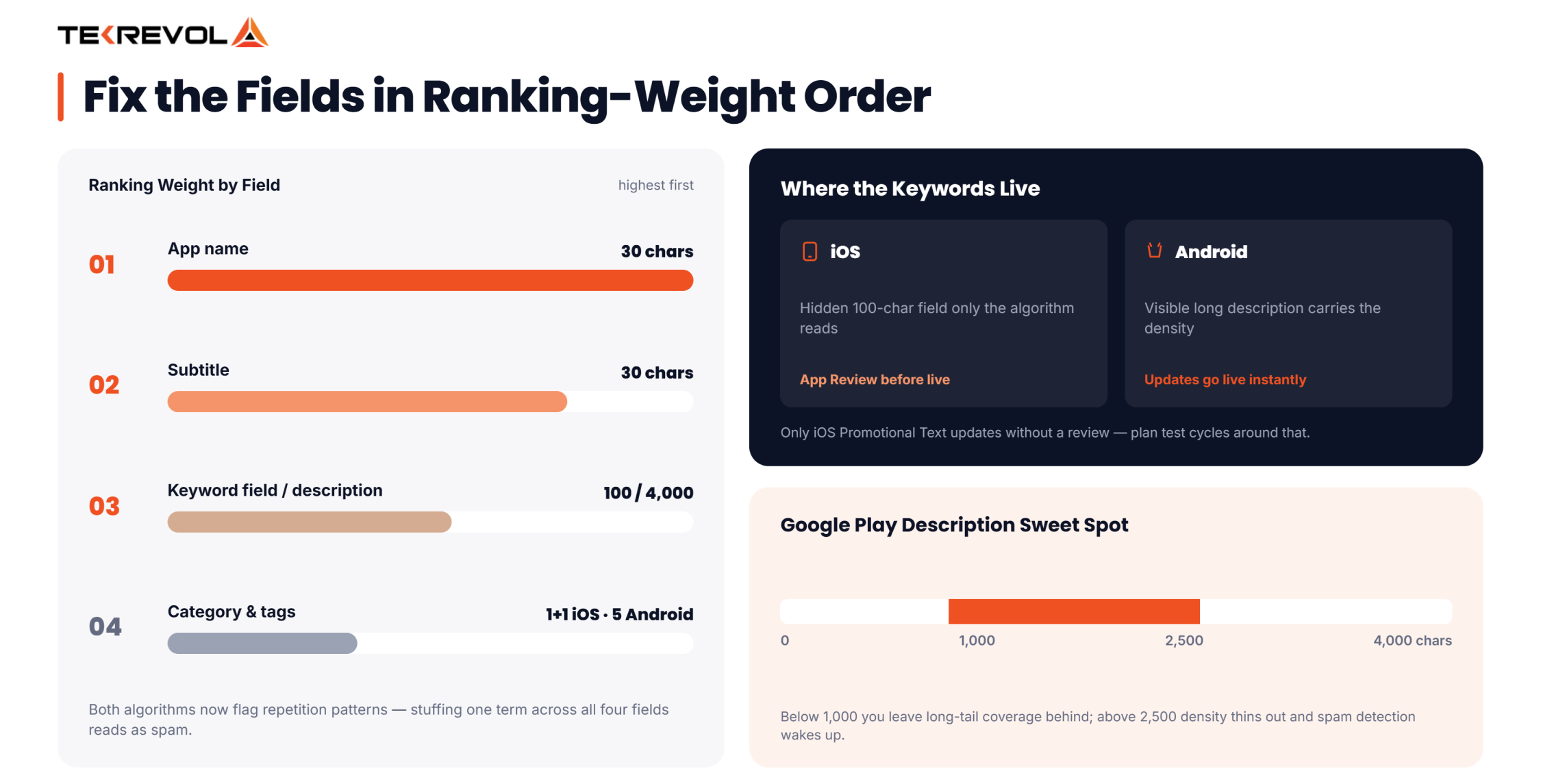
- App name matters most for ASO rankings, followed by subtitle, then keyword field on iOS, or description on Google Play.
- Well-designed app screenshots can lift downloads by 20-40%, since most users decide within seconds and rarely scroll past image two.
- Apple Search Ads don’t boost organic App Store rankings directly, but they do speed up keyword indexing for new apps.
- Custom Product Pages are alternate App Store listings with unique screenshots per search term, and Apple raised the page limit from 35 to 70.
Every year, app discovery gets more competitive. New ranking signals, smarter algorithms, and users who decide in seconds keep raising the bar. What worked in 2023 barely makes an impact in 2026.
Today, ranking well isn’t just about stuffing keywords into a title. It’s about understanding intent, behavior, and how App Store and Play Store algorithms weigh engagement over guesswork.
That’s the gap professional app store optimization services are designed to close, turning shifting algorithm behavior into a repeatable growth advantage instead of a guessing game.
So, what actually works this year? The most effective app store optimization best practices in 2026 focus on four things: precise keyword targeting backed by real search data, visuals that convert rather than just look good, localized listings for global markets, and constant testing that adapts as algorithms evolve. Optimize them well, and your app moves from being seen to being installed.
In this blog, we’ll break down the App Store Optimization best practices, so you know exactly where to focus your efforts.
What Is App Store Optimization?
App Store Optimization (ASO) is the process of improving an app’s visibility and conversion rate inside the App Store and Google Play, so more of the right users find it and choose to install it.
Think of it as SEO for app stores. It combines keyword strategy, metadata, visual assets, ratings, and post-install engagement into one ongoing system.
ASO has two jobs: get your app shown (visibility) and get it tapped (conversion). Most teams only optimize for the first job. The apps winning in 2026 optimize for both at the same time, and that dual focus is really the foundation of every App Store Optimization best practice covered in this guide.
Biggest ASO Changes You Need to Know in 2026
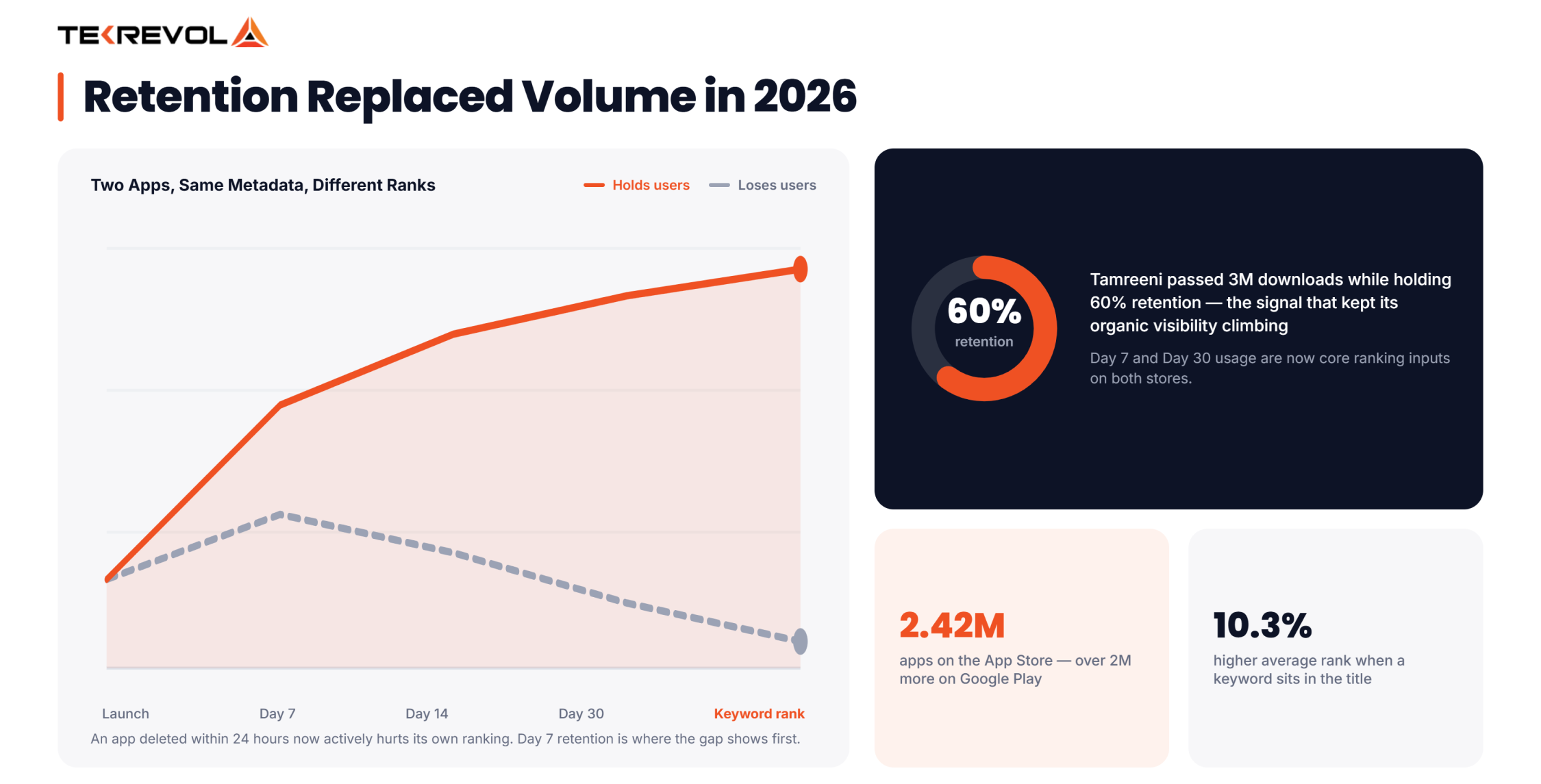
ASO changed in 2026 because both Apple and Google shifted their ranking algorithms from rewarding raw install volume to rewarding retention and engagement. The App Store Ranking Algorithm no longer treats download spikes alone as a quality signal; it now weighs retention and engagement. A high download count used to be enough to climb the charts. Not anymore.
Three forces are driving this shift:
- Retention over installs: Google’s ranking model now tracks whether users stick around, not just whether they downloaded. An app that gets deleted within 24 hours actively hurts its own ranking.
- AI-generated discovery labels: Apple introduced App Store Tags at WWDC 2025. AI now reads your description and screenshots and generates labels that determine where you surface in browse placements, separate from your search rankings entirely.
- Sheer volume of competition: The App Store now holds over 2.42 million apps. Google Play has more than 2 million. “Good enough” metadata isn’t a strategy. It’s a way to get buried on page four.
Optimizing for Apple’s App Store Tags
App Store Tags are short, tappable labels like “budget planner” or “offline map” that Apple automatically generates based on your app’s metadata, screenshots, and description.
You can’t create these tags yourself, but you can influence them by optimizing your app listing and removing any tags that are inaccurate. Since these tags help Apple categorize your app for browsing, clear and relevant metadata is essential for getting the right labels.
- Tags are auto-generated, not manually assigned. Apple determines them from your app listing.
- You have limited control: you can remove inaccurate tags, but you can’t write new ones
- Tags influence browse placements, separate from your search rankings
- Weak or inconsistent metadata increases the odds of getting mislabeled
- Keep your app listing consistent. Your title, subtitle, screenshots, and description should all support the same core message.
- Consistency helps app stores understand your app, while conflicting messages can hurt your visibility.
Every element of your app listing should support the same value proposition. Inconsistency can affect rankings.
Building an Effective App Store Keyword Strategy
Effective app store keyword research in 2026 starts with identifying keywords that have meaningful search volume and realistic competition. Then, organize them into primary, secondary, and long-tail groups instead of relying on a single high-volume term.
Using the best App Store Keyword Research Tools helps uncover search demand, competitor rankings, and emerging keyword trends that are difficult to spot manually. It’s also one of the most overlooked App Store Optimization best practices, as many teams still focus on chasing a single “magic” keyword.
| Keyword type | Where it goes | Density target |
| Primary | Title + subtitle | 2–3% |
| Secondary | Description, first and last paragraph | 1–2% |
| Long-tail | Description body, naturally woven in | As needed, no forced density |
Important factors to consider:
- Balance search volume with keyword difficulty: Ranking #2 for a keyword with moderate traffic often drives more installs than ranking #38 for a highly competitive term. Two-word phrases are usually the sweet spot; they make up roughly half of the top App Store keywords.
- Mine your app reviews for keywords: Users naturally describe your app using the same phrases potential customers search for. Incorporating this language into your metadata improves relevance.
- Use AI-powered App Store Keyword Research Tools: Modern ASO platforms go beyond search volume by identifying keyword intent, tracking emerging trends, and extracting valuable keyword opportunities directly from user reviews, saving hours of manual analysis.
- Keep your Google Play description in the 1,000–2,500 character range: This is the sweet spot for covering secondary and long-tail keywords without diluting density or triggering spam detection.
Not sure which keywords are actually worth chasing?
Send us your app, and our ASO team will pull the ones worth your budget and flag the ones burning it.
Schedule a Free Consultation!Metadata Fields That Influence App Store Rankings
Your app name matters most, followed by your subtitle, then your keyword field (iOS) or description (Google Play), in that exact order of ranking weight.
App Name
The most influential field in your app listing. Apple and Google both give it the most weight when determining search rankings. Lead with your primary keyword, as early in the name as possible, because both the algorithm and the user read left to right.
Both platforms cap your title at 30 characters, so every word has to earn its place. Apps with a keyword included in the title rank roughly 10.3% higher on average than apps without one. This single field is the highest-ROI edit you can make to your listing.
Chase volume too: Apple’s popularity scoring is exponential, so a modest rank gain on a high-volume term beats #1 on a term nobody searches.
Subtitle
Don’t repeat your title with synonyms. Use the subtitle to add a second signal: a use case, a modifier, or your clearest value proposition. Wasting this field on repetition is one of the most common mistakes on the App Store.
Avoid Keyword Stuffing
Both algorithms now detect repetition patterns. Stuffing the same term five times across your title, subtitle, and description doesn’t boost rank anymore. It reads as spam to both the algorithm and the human deciding whether to install.
Category & Tags
Your category choice directly affects which browse sections and charts you’re eligible for. iOS allows one primary category and one optional secondary category.
Android is more generous; you can select up to 5 tags, which widens your discoverability across more browse surfaces than iOS allows. Don’t choose a category based on accuracy alone. Pick one where similar apps are already ranking well.
iOS vs. Android Keyword Optimization
The core difference comes down to where your keywords actually live. Apple gives you a dedicated hidden keyword field that users never see. While Google indexes your entire visible description. That one structural difference changes almost everything about how you write for each platform.
On iOS:
- You get a 100-character hidden keyword field; nobody sees it, only the algorithm reads it
- Don’t waste characters repeating words already covered in your title or subtitle
- Fit your highest-value terms here, since every character counts
- Most metadata changes require a new build submission and App Review approval
- Exception: You can update Promotional Text without submitting a new app review.
On Android:
- There’s no hidden keyword field, everything lives in your visible long description
- Keyword density inside that description actually matters for ranking
- You’re writing for two audiences at once: the algorithm scanning for terms and the human deciding whether to install.
- Metadata updates go live instantly, with no review process to wait on.
Optimizing Screenshots and Visuals for Higher App Store Conversions
Screenshots are the single highest-leverage conversion asset after your icon, and well-designed sets can lift downloads by 20-40% because most users decide within seconds and never scroll past the first two images.
- Icon: Your first impression. Keep it simple, recognizable, and easy to identify.
- Screenshot order: treat the set as a journey, not a random pile of screens. Use your first screenshot to highlight your biggest value.
- Screenshot captions: Apple’s OCR now reads the text overlaid on your screenshots and indexes it for keywords like “Track Sleep Patterns,” earning ranking relevance, while filler like “Beautiful Design” wastes the space.
- Preview videos: Show your biggest benefit immediately, before users swipe away.
- A/B testing: Compare multiple screenshot versions instead of relying on guesswork. Tools like Google Play Experiments and SplitMetrics help identify what converts best.
Custom Product Pages for Better App Store Visibility
Custom Product Pages (CPPs) let you create multiple versions of your App Store listing. Each version can feature different screenshots, videos, and promotional text for a specific audience or campaign.
They used to be locked behind paid ads or direct links only. In mid-2025, Apple expanded Custom Product Pages by allowing keyword targeting. Users searching for specific terms can now see a more relevant version of your App Store listing.
- Apple doubled the page limit from 35 to 70 CPPs per app.
- CPPs can now surface organically, not just through paid traffic.
- Each page can target a completely different use case with its own messaging, while staying on the same underlying app.
- Example: A budgeting app could run one CPP for “student budget tracker” and a separate one for “small business expense tracker,” matching the pitch to what the searcher actually typed.
- Early data shows dramatic conversion lifts when traffic gets routed to a matched CPP instead of the default page.
- Most small teams are still only running one or two pages, which leaves a lot of that opportunity untapped.
Many apps still overlook this feature, making it a simple way to gain a competitive advantage in 2026.
Haven't tested a Custom Product Page yet?
We'll help you set one up and tell you exactly which keyword cluster to test it against first.
Request a CPP Test Plan!Localization Strategies for Global App Growth
Localization matters more than ever in 2026 because it expands your app’s keyword coverage across different markets. It’s more than translation; an effective localization strategy can significantly increase visibility and downloads in new regions.
- Adapt, don’t just translate: A keyword that converts in the US might mean nothing, or mean something different, in Germany or Brazil.
- Extra English locales are underused keyword real estate: Apple lets you localize separately for US, UK, Canada, and Australian English. Almost no one uses all four. That’s extra room for long-tail and regional terms that would look like stuffing if crammed into one primary listing.
- Start with metadata-only localization: Translate your listing before you translate your app. It’s lower effort, and it lets you test a market’s appetite before committing engineering time to a full localized build.
What Off-Metadata Factors Influence App Store Rankings?
Off-metadata factors such as ratings and reviews, download velocity, user retention, and editorial features all influence app store rankings. In 2026, these signals are just as important as optimizing your app’s metadata.
- Reviews and ratings: it’s no longer just your average star count. Recency and consistency of new reviews matter more than a large pile of old five-stars.
- Download velocity: a fast spike in installs signals rising popularity to the algorithm, even when some of that traffic starts as paid acquisition.
- Editorial features: getting placed in the Today Tab, App Store Stories, or a curated collection can lift keyword rankings for months after the feature period ends.
- Retention metrics: Day 7 and Day 30 active usage are now core ranking signals on both platforms. Strong metadata gets someone to install. Only a good product gets them to stay, and staying is what the algorithm rewards now.
Does Apple Search Ads (ASA) Affect Organic Rankings?
No, Apple Search Ads and organic App Store rankings run on separate systems, and running ASA campaigns does not directly boost your organic rank. ASA can help speed up keyword indexing, especially for new apps. Paid clicks provide early relevance signals before organic search data has time to build.
One more distinction worth knowing: Apple’s ad algorithm crawls your app description for ASA targeting, even though that same description has no bearing on organic search relevance. Paid and organic work together to speed up keyword indexing, not directly improve rankings.
What’s New in App Store Engagement Features for 2025-2026?
The newest engagement features are Google’s You tab and Collections, Apple’s App Store Tags, and the Level Up program for games, and all three tie your in-app engagement directly to your store visibility.
- Google’s You tab surfaces content from apps a user already has installed, turning in-app engagement into a discovery channel outside the app itself.
- Collections delivers personalized app recommendations directly on the Android home screen.
- The Level Up program gives games extra store visibility once they hit defined engagement benchmarks, meaning retention now literally buys placement.
- In-App Events (iOS) and promotional content (Android) let you re-engage lapsed users and attract new ones through the same surface, which means acquisition and retention are no longer separate strategies. They’re one system. Engagement doesn’t stop at the store listing. Social media marketing services play a role too, keeping users active between sessions and reinforcing the same signals that support app rankings.
We saw this play out directly on our Save & Win project. The bigger lever wasn’t the listing; it was building earning and spending mechanics designed around what users were actually motivated by, which drove a 30% increase in engagement. Metadata helps users discover your app, but user engagement keeps it visible.
What ASO Mistakes Are Quietly Killing Your Rankings?
The most common ASO mistakes include skipping localization, misusing the first screenshot slot, treating ASO as a one-time launch task, and ignoring review management. Any of these mistakes can weaken an otherwise strong keyword strategy.
- Skipping localization entirely.
- Wasting screenshot slot one on a splash screen or login page.
- Treating ASO as a launch-day task instead of a recurring habit.
- Ignoring reviews instead of responding and tracking sentiment.
- Chasing high-volume keywords you have no realistic shot at ranking for.
How Is AI Search Changing App Discovery in 2026?
A “pre-store” layer now sits above the traditional search funnel. People are asking ChatGPT, Gemini, and Perplexity for app recommendations before they ever open the App Store or Google Play. Users are also shifting toward specific brand or feature searches once they reach the store, because the AI assistant has already narrowed down their options before they arrive.
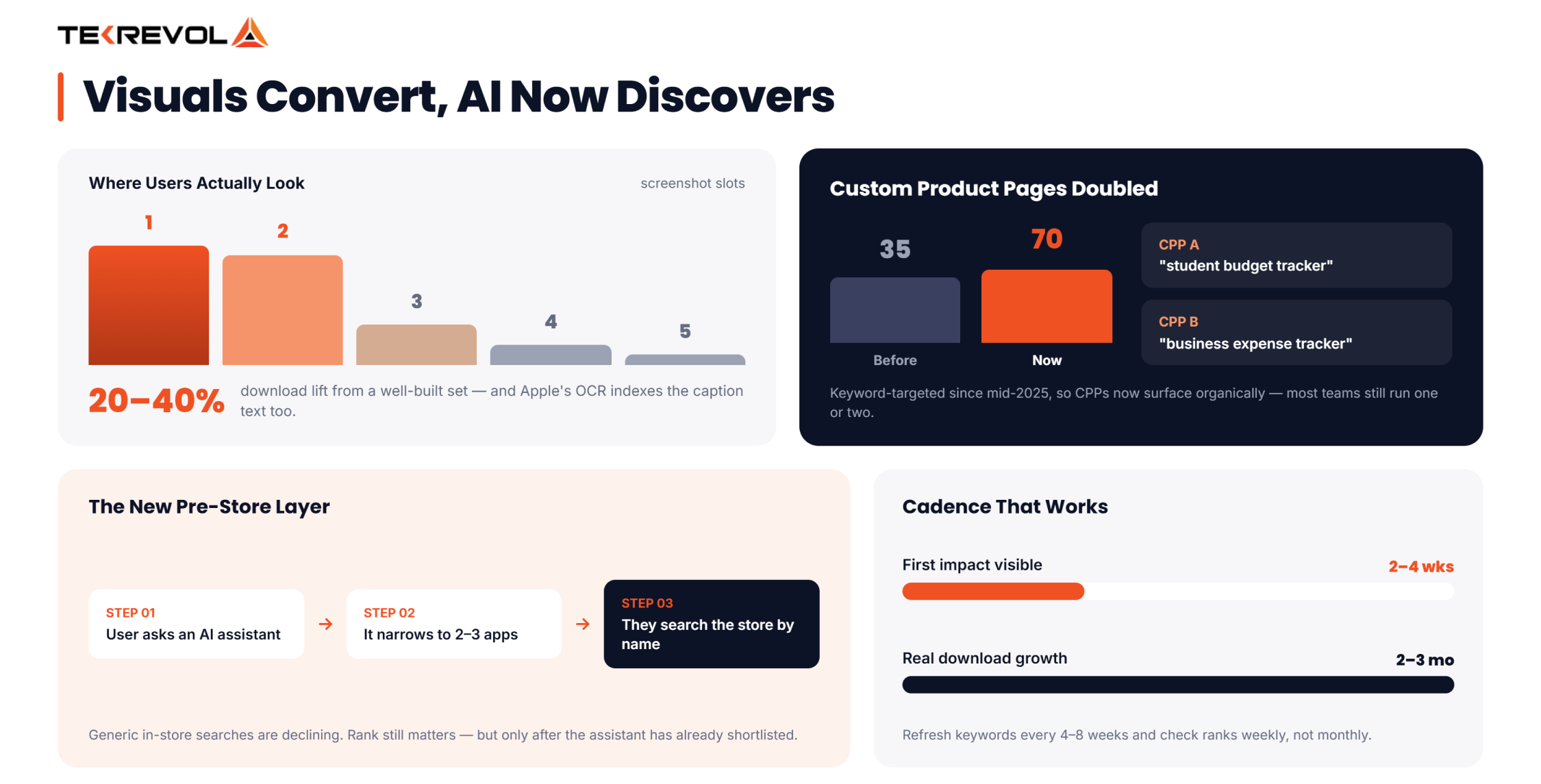
- Users increasingly ask AI assistants for recommendations before opening a store app at all.
- Generic searches inside app stores are declining.
- People are now using longer, more specific questions in AI chats and searching for apps by name once they know what they want.
- Your app listing is no longer always the first thing users see. Often, they see a summary or recommendation before visiting the store.
- Strong app store rankings do not matter if your app is not being mentioned or recommended by these new search tools.
Top-ranking apps aren’t running better tactics; they’re running a better process. Every app sits at one of four stages:
| Stage | What it looks like | Typical outcome |
| Reactive | Metadata set once at launch, never revisited | Rankings decay within 2-3 months |
| Scheduled | Keywords reviewed quarterly, screenshots occasionally updated | Flat or slowly declining rankings |
| Iterative | Continuous A/B testing, monthly keyword refresh, active review management | Steady organic growth |
| Systemic | Retention, engagement, and ASO managed as one connected loop, with dedicated tracking of algorithm shifts | Compounding organic growth, lower dependence on paid UA |
Most apps get stuck at Stage 2 because reaching Stage 4 requires consistent, ongoing effort. When ASO is just one of many priorities, dedicated app store optimization services help provide the focus and weekly improvements needed to keep growing.
Quick ASO Checklist for 2026
Your ASO performance depends on this app store factors checklist. Review them monthly to find hidden issues and keep your app ranking strong.
| Area | What to Do | Why It Matters |
| Keywords | Long-tail, intent-matched, refreshed every 4–6 weeks | Search intent shifts fast; stale keywords lose relevance |
| Title/Subtitle | Highest-value terms up front, no wasted characters | These are your heaviest-weighted ranking fields |
| Screenshots | Screenshots one and two now play a role in how your app is discovered. | Most users decide before scrolling past slot two |
| Custom Product Pages | At least 2–3 built around distinct search intents | Matches your pitch to what each searcher actually typed |
| Ratings | Stay above 4.0, respond to every negative review | Recency and consistency now outweigh raw star count |
| Localization | Metadata first, full build second | Opens new keyword territory without a full translation |
| Cadence | Treat ASO as a monthly habit, not a launch-day task | Rankings decay fast when metadata sits untouched |
How to Monitor Your Rankings?
Monitor your rankings by combining first-party and third-party tools: track ranking and conversion data in App Store Connect and Google Play Console, then layer in a tool like Appfigures for keyword rank tracking, competitor comparisons, and review monitoring across both platforms in one place. Check rankings weekly, not monthly. A keyword can drop out of your top 10 in days if a competitor updates their metadata.
How TekRevol Helps You With ASO?
If you’ve read this far, you already know ASO isn’t won by whoever picks the most keywords. It’s won by whoever keeps showing up, testing, adjusting, and refreshing, while everyone else sets it and forgets it.
As a leading mobile app development company, TekRevol follows a data-driven ASO approach with long-tail keywords, optimized screenshots, Custom Product Pages, and ongoing improvements beyond launch.
We help apps grow beyond the store by keeping users engaged and improving long-term visibility.
Our work spans fitness, fintech, healthcare, and enterprise apps, and every listing we touch gets tracked against real numbers, rankings, conversions, and install growth, not vague promises. If your app is stuck below the fold or you’re launching one that can’t afford to be invisible, our App Store Optimization services show the same proof-first approach behind everything else we build.
Looking for a partner who treats ASO as a system, not a one-time favor?
Partner with TekRevol and put the 2026 strategy from this guide to work with a team that actually keeps it running.
Request a Consult


