


- The best app store keyword research tools model store search algorithms that regular web SEO tools were never built for.
- AppTweak leads for all-around discovery, while Appfigures and ASOMobile win for budget-conscious indie developers today.
- Apple and Google Play rank keywords differently, so one keyword list rarely works well across both stores.
- Free vs paid ASO tools come down to trend data, competitor reverse-engineering, and how many markets you track.
- Apple never shares real search volume, so every tool estimates it. Judge consistency, not the exact numbers shown.
- AI now shapes both keyword discovery inside these tools and whether ChatGPT recommends your app at all.
There are over 4 million apps out there, and most downloads start with a search. So the right keywords are the line between getting found and getting buried.
To break through the noise, smart product teams use the best app store tools. Platforms like AppTweak, Sensor Tower, and ASOMobile help them find the exact phrases their customers use every day.
But the catch is choosing the right one. Because the category spans from free browser extensions that surface basic keyword suggestions to enterprise platforms that combine search intelligence with conversion analytics, A/B testing, and rank tracking across dozens of markets.
This guide ranks the best app store keyword research tools with features, pricing, and a simple way to pick the right fit for your app and budget. It draws on what our ASO services see while helping real apps get found. Let’s dig in.
What Are ASO Keyword Research Tools?
App Store keyword research tools are specialized platforms that analyze search behavior, competition, and ranking opportunities for apps.
These are not the same as web SEO tools. That gap is exactly why ASO vs SEO trips up so many first-time founders. SEO tools focus on Google websites. ASO tools are built for the App Store and Google Play, which have their own ranking rules, keyword fields, and user habits. That is a core part of what app store optimization is as a discipline.
The best app keyword tools solve four critical challenges in your storefront optimization process:
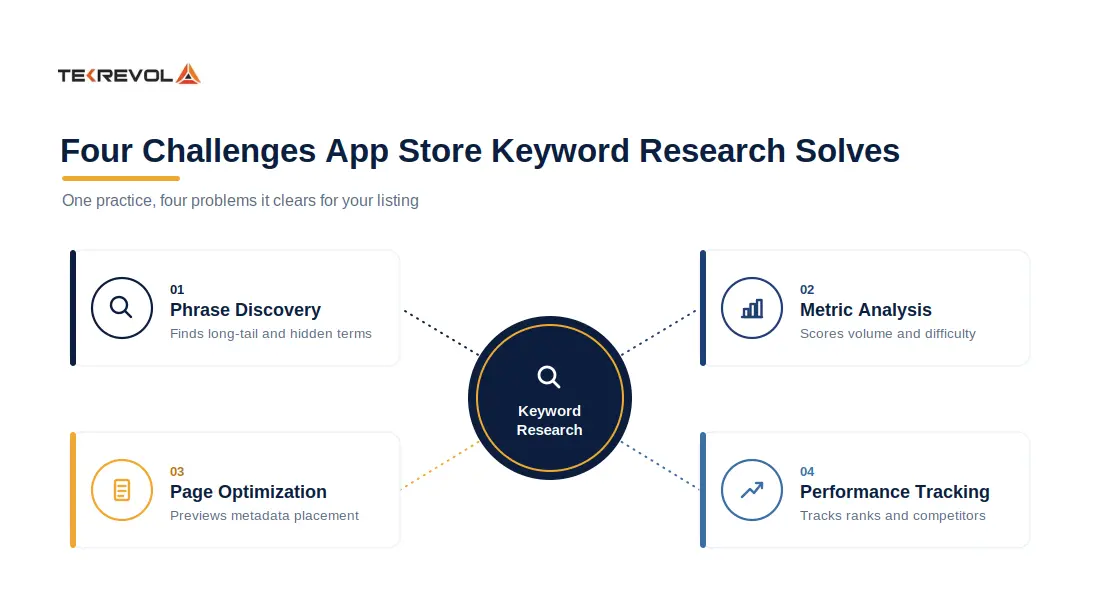
- Automated Phrase Discovery: Instead of manual brainstorming, these platforms automatically surface relevant mobile terms, high-converting long-tail variations, semantic relationships, and hidden search trends.
- Granular Metric Analysis: They deliver actionable data points, including exact search popularity, ranking difficulty, relevancy scores, and forecasted conversion volume to prioritize your metadata strategy.
- Structural Page Optimization: Built-in utilities like real-time metadata previews, character counters, and keyword shufflers help you seamlessly organize high-value terms within your title, subtitle, and store descriptions.
- Competitive Performance Reporting: Automated tracking dashboards continuously monitor your historical ranking shifts, measure the direct impact of metadata updates, and benchmark your progress against market competitors.
Best App Store Keyword Research Tools Comparison at a Glance
Here is a quick ASO tools comparison before we get into the details. Prices are starting points checked in 2026 and can change, so confirm on each vendor’s page.
| Tool | Best for | iOS / Android | Free tier | Starting price (2026) | Standout feature | Rating |
| AppTweak | All-round keyword research | Both | Free trial | Premium (quote-based) | Deep keyword + competitor data | 4.6/5 (G2) |
| App Radar | Multi-market ASO | Both | Yes | From €69/mo (SplitMetrics) | Keyword + paid ads together | 4.3/5 (G2) |
| Sensor Tower | Enterprise market data | Both | No | Custom quote | Download + revenue modeling | – |
| AppFollow | Keywords + review management | Both | Yes | From $139/mo | Review automation + tracking | 4.6/5 (G2) |
| ASOMobile | Budget all-rounder | Both | Yes | Paid plans available | Usable free features | – |
| Appfigures | Indie developers | Both | Free trial | From $9.99/mo | Cheap, real-time data | – |
| Mobile Action | Keywords + Apple Ads | Both | Limited | From $15/mo (Lite) | Apple Search Ads insights | – |
| ASOdesk | Automated monitoring | Both | Free tools | Paid plans (quote) | Keyword automation | – |
| Keyword Tool.io | Free entry point | Both | Yes | Pro (paid) | Autocomplete-based ideas | – |
Sources: vendor pricing pages and G2 ratings, 2026. Ratings shown were verified.
Why Keyword Research Matters for App Store Optimization
Keyword research matters because most people find apps by searching, not by browsing. Get the words wrong, and your app stays hidden no matter how good it is.
Apple has said that around 70% of App Store visitors use search to find apps, and close to 65% of downloads happen right after a search. Your keyword field is one of your biggest growth levers.
The competition is brutal. According to Statista, there are more than 4 million apps across the App Store and Google Play combined. Getting noticed in that crowd takes a plan.
Here is why app store optimization is important and deserves your attention:
- The right keywords put your app in front of people already looking for it.
- Strong organic ranking means you lean less on paid ads to get installs.
- Search traffic tends to convert well because those people want what you offer.
- Spotting keywords your rivals missed is one of the fastest ways to win downloads.
The best app keyword tools decode these specific parameters by isolating unique marketplace search patterns, category-specific trends, and store-specific behavioral signals.
We have seen this play out firsthand. When we worked on the fitness app Tamreeni, matching the right search terms to the right audience helped it reach 3 million downloads with a 60% retention rate.
Ready to Climb the Charts?
Missing out on organic traffic channels inflates your acquisition cost. Our ASO specialists optimize your listing to maximize the marketplace indexing potential.
Get Your Free ASO ConsultationFeatures to Look for in App Store Keyword Research Tools
When evaluating the best ASO tools, look for five features: keyword discovery breadth, competitor analysis depth, ranking and visibility tracking, metadata optimization preview, and localization support.
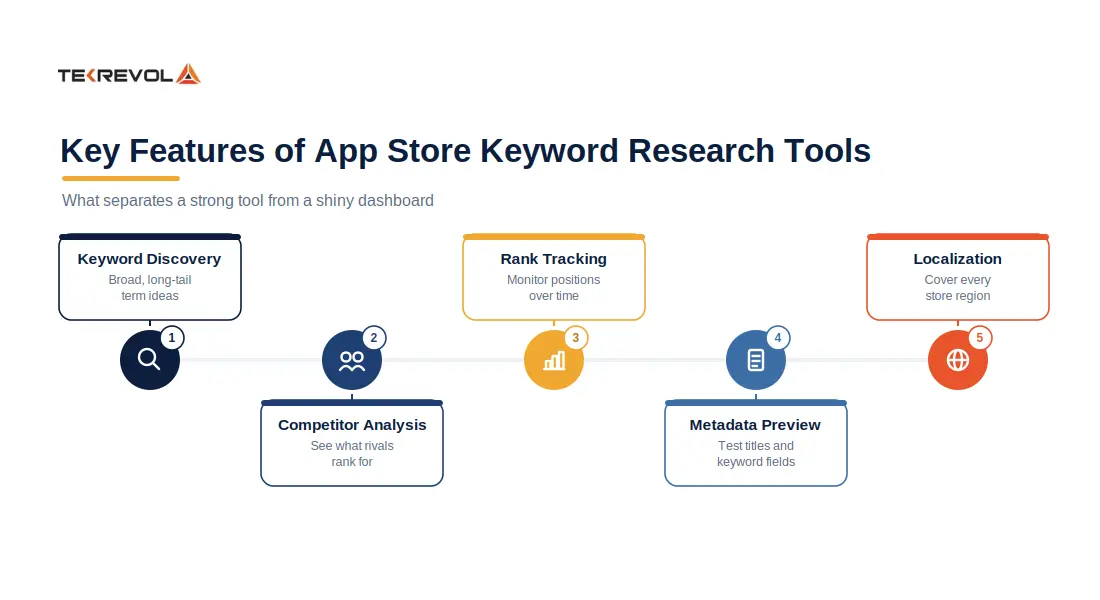
Each category addresses a different stage of the app store optimization process. Let’s break those down so you know what you are paying for.
Keyword Discovery & Volume Data
Strong discovery engines pull candidate keywords from app store search suggestions, competitor metadata, category rankings, and historical search trends. The tool should report keyword volume as a relative popularity score, since Apple and Google do not publish raw query data alongside a competition score.
Search ads data integration matters: tools that ingest Apple Search Ads impression share, or Google Ads Keyword Planner data, provide demand signals not available from organic sources alone.
Without volume and competition metrics, you’re guessing which terms deliver traffic and which burn metadata slots. This is also where the App Store ranking algorithm on each platform starts to shape your choices
Competitor Keyword Analysis
Competitor analysis shows which keywords drive traffic to similar apps. The best platforms let you input a competitor’s app ID and extract the full set of keywords it ranks for, along with each keyword’s position and estimated traffic contribution.
This feature reveals two insights: keywords you’ve overlooked and keywords where your competitor ranks higher despite similar metadata. If a rival app ranks in the top five for a high-volume term you rank twentieth for, that’s a metadata or conversion-rate signal. Smart tracking of your mobile app keywords turns those gaps into a clear action list.
Ranking & Visibility Tracking
Tracking modules monitor your app’s position for a defined keyword list. Look for tools that log rank history over time, send alerts when position changes exceed a threshold, and segment by country or region.
Visibility scores aggregate ranking performance across your keyword portfolio, weighting each term by its volume. This metric answers whether your overall discoverability is improving or declining.
Metadata Optimization & Preview
Metadata preview features render how your title, subtitle, and keyword field will display in search results and product pages. Some platforms highlight keyword density, flag repeated terms that waste character limits, and score metadata relevance against your target keyword set.
Advanced ASO tools simulate the impact of proposed metadata changes on projected rankings before you publish. This capability reduces guesswork: you can test whether moving a keyword from the subtitle to the keyword field improves ranking potential, or whether adding a modifier increases discoverability for long-tail queries.
Global Localization and Multi-Store Support
Apps distributed across multiple countries need localized keyword research for each App Store region. Localization-ready tools pull keyword volume, competition, and ranking data by country and language, so you can tailor metadata to regional search behavior.
Furthermore, it must accommodate the structural differences between marketplaces, serving as both an Apple-optimized tracker and a reliable Google Play Store keyword tool.
How We Ranked Best ASO Tools (Our Vendor-Neutral Methodology)
We ranked these best app store optimization tools on features, data quality, store coverage, Apple Search Ads support, API access, and value for money.
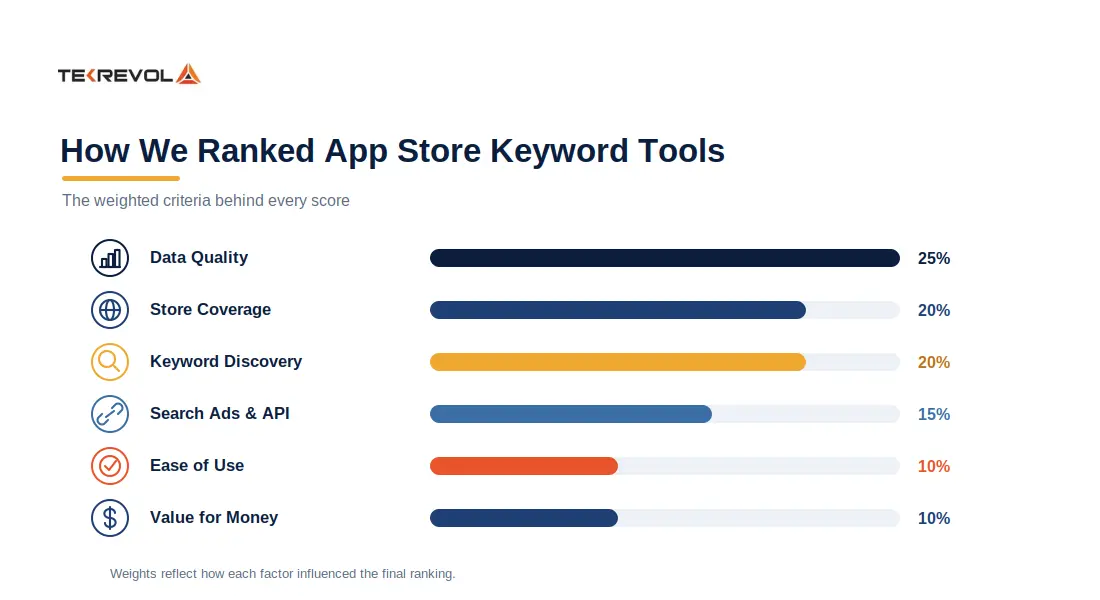
We looked at how deep each tool digs for keywords, how reliable its data feels, and whether it covers both stores. We also weighed the price against what you actually get. Ease of use counted too. A powerful tool that your team avoids is worse than a simple one they use every day.
The Best App Store Keyword Research Tools in 2026
These are the strongest options this year, each with a clear job it does best. Pricing lives in the next section, so here we focus on fit.
AppTweak
AppTweak serves as a premier, all-in-one app store keyword research tool heavily utilized by high-growth product teams and scale-focused agencies. Powered by its proprietary Atlas AI infrastructure, the application shifts standard raw analytical reporting into proactive optimization steps.
Core features:
- Deep keyword discovery with long-tail suggestions
- Strong competitor tracking and timeline history
- Search volume, trends, and difficulty scores
- Review and rating tools built in
Core Advantages: It bridges the gap between organic discovery and paid execution by matching search engine marketing data with direct Apple Search Ads insight maps.
Limitations: It sits at the premium end of pricing. Costs climb as you add apps, keywords, and advanced features.
Best for: Teams that put data quality first and have room in the budget for it.
App Radar (by SplitMetrics)
App Radar is a smart middle ground. It links organic keywords with paid campaigns, so your ASO and Apple Search Ads work together.
Core features:
- Multi-market keyword tracking
- Competitor keyword reverse-engineering
- Store listing updates from inside the tool
- Paid and organic data in one place
Limitations: Very large enterprises may still prefer a heavier market-data suite for category-wide analysis.
Best for: Teams selling in many countries that want power without a steep learning curve.
Sensor Tower
Sensor Tower is the industry name for download and revenue modeling. It is more of a full market-intelligence suite than a pure keyword tool for app store tracking.
Core features:
- Deep download and revenue estimates
- Broad market and category data
- Competitor and trend tracking
- Enterprise-grade reporting
Core Advantages: This platform unifies granular store search tracking with comprehensive financial reporting and download estimation mapping.
Limitations: Pricing is custom and aimed at bigger budgets. It can be more than a small team needs.
Best for: Enterprise teams that track whole categories, not just their own app.
AppFollow
AppFollow uniquely merges fundamental organic metadata search features with automated community engagement dashboards.
Core features:
- Keyword tracking across both stores
- Review automation with Slack and Zendesk
- Competitor monitoring
- A genuine free plan to start
Core Advantages: This tool consolidates product visibility monitoring with automated support frameworks across multiple global stores.
Limitations: Its strongest edge is review management, so pure keyword depth is not always its headline feature.
Best for: Teams that treat ratings and reviews as part of their ASO.
ASOMobile
ASOMobile serves as a versatile, accessible platform tailored for independent software teams, niche creators, and specialized practitioners tracking fundamental ranking structures.
Core features:
- Keyword research and tracking
- Competitor analysis
- A usable free tier
- Simple, beginner-friendly design
Core Advantages: This platform offers a generous ecosystem of 16 free tools covering primary operational discovery vectors.
Limitations: You may outgrow it once you need heavy multi-market data or automation.
Best for: Founders who want app store keyword research tools free of a high upfront cost.
Appfigures
Appfigures excels at bridging the gap between sales analytics and ASO. It provides a comprehensive toolkit for developers who want to manage their entire app growth cycle in one place.
Core features:
- Keyword tracking and suggestions
- Real-time revenue and performance data
- Hourly updates on paid plans
- Beginner-friendly dashboards
Core Advantage: The Keyword Inspector allows you to research any term, see live search results, and view estimated downloads or revenue for top results.
Limitations: It is lighter on enterprise-scale market intelligence than the big suites.
Best for: Indie developers and small budgets that still want reliable data.
Mobile Action
Mobile Action uses AI to help you identify untapped keyword opportunities and refine your store presence. It is highly regarded for its “ASO Intelligence” suite that connects visibility directly to revenue impact.
Core features:
- Keyword tracking and difficulty scores
- Apple Search Ads keyword and creative insights
- Competitor ad intelligence
- Lite plan for smaller teams
Core Advantage: It offers a 360-degree performance snapshot, showing keyword rankings, weekly changes, and historical data.
Limitations: Teams focused only on organic may not use their paid-ads strengths.
Best for: Teams running organic and paid campaigns side by side.
ASOdesk
ASOdesk is an all-in-one tool for keyword tracking, competitor research, and review management. Its automation saves real time.
Core features:
- Automated keyword monitoring
- Competitor keyword research
- Review and reply management
- Apple Search Ads support
Core Advantage: It automates the process of finding relevant search queries by identifying high-volume, low-competition keywords.
Limitations: The feature set can feel like a lot for a very small team with one simple app.
Best for: Teams that hate manual tracking and want automation.
Keyword Tool.io
Keyword Tool.io is a reliable resource for gathering quick, broad keyword suggestions based on autocomplete data from Google Play.
Core features:
- Autocomplete-based keyword ideas
- Both the App Store and Google Play
- Search volume on Pro plans
- API access for AI workflows
Core Advantages: It pulls directly from the Play Store search suggestion function to give you real-world terms that users are typing into their devices.
Limitations: The free version is limited in data. You need Pro for volume and deeper metrics.
Best for: An excellent app store keyword tool free for generating hundreds of long-tail variations
Cost Structure for Keyword Research Platforms
Pricing for the best app store keyword research tools ranges from free to enterprise custom quotes. You pay more for extra apps, more tracked keywords, more markets, and API access. Here is a simple look at 2026 prices.
| Tool | Free tier | Starting price (2026) | What drives the cost |
| Appfigures | Free trial | $9.99/mo | Apps and data history |
| Mobile Action | Limited | $15/mo (Lite) | Keywords and ad data |
| App Radar | Yes | €69/mo (SplitMetrics) | Apps and competitors tracked |
| AppFollow | Yes (free plan) | $139/mo | Team seats and integrations |
| AppTweak | Free trial | Premium (quote) | Apps, keywords, features |
| Sensor Tower | No | Custom quote | Market data scope |
| ASOdesk | Free tools | Paid (quote) | Automation and seats |
| ASOMobile | Yes | Paid plans vary | Feature level |
| Keyword Tool.io | Yes | Pro (paid) | Volume data and API |
Sources: vendor pricing pages, 2026.
Free vs Paid ASO Tools: What You Get at Each Tier
Free-tier ASO tools provide basic keyword discovery and limited tracking, typically capping you at monitoring two apps and twenty keywords. These platforms let you generate initial keyword suggestions, view current search volume estimates, and track rank movement for a narrow set of queries.
You outgrow them the moment you need trend data, competitor spying, or multi-market tracking. Here is a free vs paid ASO tools breakdown to ensure you spend your budget wisely.
| Tier | Good for | Limits |
| Free | First app, basic keyword ideas, learning ASO | Little or no volume data, few competitors, one market |
| Paid | Growing apps, competitor research, many markets | Costs money, and prices rise as you scale |
Most teams adopt a hybrid approach: free tools during discovery, paid subscriptions during the pre-launch sprint and first 90 days post-launch, then downgrade to free unless daily monitoring justifies the recurring cost.
How to Choose the Right Tool for Your App Type and Budget
Choosing the right keyword research tool starts with matching tiers to your team structure, budget, and app portfolio scope. The decision framework boils down to three variables:
- How many apps are you optimizing
- How much technical ASO work happens in-house, and
- Whether you need historical data or can iterate on live signals.
Use this quick decision guide.
| Your Profile | Budget | Best-fit tool(s) | Why |
| Indie or first app | Free to low | Appfigures, ASOMobile, Keyword Tool.io | Enough discovery without high cost |
| Early startup | Medium | AppTweak, App Radar | Real depth as you start to scale |
| Growth or scaleup | Higher | AppTweak, App Radar, ASOdesk | Multi-market plus automation |
| Enterprise | Custom | Sensor Tower, AppTweak | Market data at company scale |
| Agency or many apps | Higher | AppTweak, Mobile Action | Portfolio tracking plus API |
How to Use an ASO Keyword Research Tool
Using one of these tools is simpler than it looks. Follow the same seven steps to search for keywords for app store optimization.
- Start with seed keywords. Write 10 to 15 words that describe your app in plain language. Think action words, features, and your category.
- Expand the list. Feed those seeds into your keyword tool for app store research and let it suggest long-tail and related terms you would never brainstorm alone.
- Check the data. Look at volume, difficulty, and trend for each term. Flag the ones that are popular but still winnable.
- Study competitors. Pull the keywords your rivals rank for. Their gaps are your quickest openings.
- Pick your winners. Choose a mix of a few reach terms and several realistic mid-tail terms you can actually rank for.
- Place them well. Write them into your Apple keyword field, title, and subtitle, or into your Google Play description. Do this per store.
- Track and refresh. Watch your ranks weekly and swap weak keywords every few weeks.
For the full method, see our guide on how to search for keywords for app store optimization.
Role of AI in Modern ASO Keyword Research Tools
AI now works in two directions in ASO. It powers smarter keyword ideas inside the tools, and it has become a discovery channel of its own.
On the tool side, AI helps generate keyword suggestions, translate listings, and spot patterns humans miss. Several platforms now add AI features that take some guesswork out of research, which is a real help for beginners.
The bigger shift is outside the stores. People increasingly ask ChatGPT, Gemini, and Google AI Overviews to recommend apps for them. That means your app can be suggested by an AI, not just found in a search bar.
The scale of this change is hard to ignore. Gartner predicted that traditional search engine volume would drop 25% by 2026 as AI chatbots take over more queries. App discovery is feeling the same pull.
So when you pick app store keyword research tools in 2026, ask if it helps you show up in AI answers too. Some vendors already offer AI-visibility features for exactly this reason. The same idea behind semantic SEO, teaching machines what your app is truly about, now applies to app stores.
Common Pitfalls When Using ASO Keyword Tools
The tool is not the strategy. Here are five recurring errors that undermine ASO keyword strategies even when teams use professional research platforms.
Over-relying on Search Volume
Over-relying on search volume rankings ignores the reality that high-volume keywords often carry competition scores that make ranking impossible for new apps or apps.
- Filter for keywords where the ratio of searches to competing apps creates a realistic ranking opportunity within your install budget.
Ignoring Competition
Ignoring competition scores entirely creates the opposite problem. A keyword with moderate volume and low competition delivers more installs than a high-volume keyword where your app never surfaces.
- Filter every keyword list by competition score first, then rank by volume within the feasible set.
Keyword Stuffing
Keyword stuffing remains a persistent mistake despite algorithm penalties. Repeating the same keyword across the title, subtitle, and keyword field in unnatural patterns triggers ranking suppression.
- Use each high-priority keyword once in the optimal field. title for top-priority terms, subtitle or description for secondary terms, and rely on semantic relevance rather than brute repetition.
Neglecting Localization
Neglecting localization errors costs international visibility. Direct translation of English keywords into Spanish, French, or German produces phrases that native speakers never search.
- Run keyword research separately for each target locale using native-speaker validation, and treat each App Store region as a distinct keyword set rather than duplicating your English metadata.
Treating Data as Ground Truth
Treating tool data as ground truth rather than hypothesis creates strategic blindness. Keyword research tools aggregate historical search data, but none have real-time access to Apple’s or Google’s live ranking logic.
- Use keyword tools to generate a prioritized test list, then validate performance through live A/B testing of metadata variants.
The tools provide the dataset; your judgment, category knowledge, and willingness to test provide the strategy.
How TekRevol Integrates ASO Research Into Mobile App Development
At TekRevol, keyword strategy starts in the discovery phase, not after launch. We build ASO into the product roadmap, so an app’s features, naming, and user flows match how people search in App Store Connect and Google Play Console.
From there, our metadata work shapes every public field. We study category ranking factors and competitors, then let the app store keyword tools guide the title, subtitle, and description. As a digital marketing agency, we tie those keywords to your wider growth plan.
Our launch checklist carries three ASO milestones:
- baseline keyword mapping before the build,
- metadata finalized two weeks before submission, and
- post-launch tracking of the top ten priority keywords.
We then iterate every two weeks using real ranking data, and channels like social media marketing services keep the momentum going after launch.
Ready to Make Your App Go Viral on the App Stores?
From keyword research to a listing that converts, our ASO team handles the whole climb for you.
Claim a Free Success Consultation




![Healthcare App Development in Austin: HIPAA, AI-Native Care & Cost [2026]](https://assets.tekrevol.com/images-tek/uploads/2026/07/Tek-Feature-3-400x204.jpg)
![Fintech App Development in Austin: Cost, Compliance & Build Strategy [2026]](https://assets.tekrevol.com/images-tek/uploads/2026/07/TekRevol-Fintech-Feature-Image-selection-400x208.jpg)


