

Have you ever heard about apps on Google Play Store making billions in revenue? The app industry has exploded, and Android apps are leading the way. you might wonder, “What is Android development?” You’re definitely not alone in asking this! It’s one of the most searched questions on Google, Reddit, and tech forums everywhere.
In short, Android App development refers to the software development process that is specifically created to operate on the Android operating system. In order to create Android app solutions, developers write programs in programming languages such as Kotlin or Java in Android Studio.
Many firms partner with an Android app development company to take their designing, coding, testing, and launching process professionally.
This blog will cover everything about Android development, the process, popular frameworks, the cost involved, and tips on how to create great apps.
The Evolution of Android
What began as a mobile OS has evolved into a versatile platform. Android now runs on tablets, wearables, automotive systems, smart TVs, and IoT devices. From Google’s 2005 acquisition to the first Android phone in 2008, the system has grown beyond anyone’s initial expectations.
Every Android release has come with new features, better performance, and stronger security. The mobile app development process is also transformed, and developers are oriented towards material design, fluid interaction,s and incorporation of key Google services, such as Maps, Firebase, Cloud, and ML Kit.
Now that we have comprehended the evolution and worldwide popularity of Android, let’s explore the programming languages that are used to build its applications.
What is the Android Programming Language?
Android programming is the technical form of codinthatch enables Android devices to undertake some activities. The selection of the right programming language is actually significant as it will determine how you are going to assemble the visual elements, the buttons and menus and the logic behind the scenes, the data storage, network interaction, and even the sensors.
Key components of Android programming include:
- Activities and Fragments: The building blocks of the user interface of an app.
- Services & Broadcast Receivers: To handle background work and events.
- Content Providers: To control and distribute data between applications.
- Intents: A communication system that connects different parts of the application
All of these elements enable developers to create anything, including basic utility applications or highly-featured platforms.
The Power and Potential of Android App Development
Android, which has over 3.9 billion active devices in the world and a market share of about 72 percent in the entire world, gives developers unmatched reach and business opportunities.
Android is a platform that you must consider whenever you decide to develop a mobile application.
Market Penetration
Android smartphones have multiple prices, meaning that users can use the smartphones available in 190+ countries. Approximately 87 percent of all smartphones in the world are running on Android, id which ensures great user penetration.
Low Cost to Get Started
The expense of putting your application on Google Play is only $25, which is a one-time fee and not an annual fee. Within 24-48 hours, your app will generally be live; thus, it is extremely quick and cheap to launch.
Revenue Opportunities
Google Play Store statistics reveal impressive monetization potential, with consumer spending exceeding $47 billion in 2023. Developers can make money through apps using multiple revenue streams, including app sales, in-app purchases, subscriptions, and advertising.
In order to visualize the revenue generated by Android in comparison to iOS to get the latest tendencies in the market, check out our blog Android vs iOS statistics 2026.
Partner with experienced developers who understand what makes apps successful
Building High-Impact Business Apps on Android
Key Features That Make Android Stand Out
Android is not just a platform; it is also a global platform that links billions of devices globally. The platform has set a benchmark for powerful and flexible functionalities. Let us take a closer look at the reasons why Android is such an appealing platform to begin with.
Open-Source Freedom
Android is an open-source system that allows manufacturers and developers to tailor the system to their specific needs. The result of such flexibility is the optimization of mobile phones for gaming, photography, or business purposes. The Android application developers can access the source code and can create applications that are well integrated with the operating system.
Built-In Location Services
Android has strong GPS features, which drive navigation applications, fitness trackers, food delivery services, and social applications. There are several positioning systems that identify exactly where you are anywhere in the world.
Comprehensive Media Support
Android supports most types of media:
- Video: MP4, AVI, MKV, FLV, WebM
- Audio: MP3, AAC, FLAC, WAV
- Images: JPEG, PNG, GIF, WebP, BMP
No conversion tools needed, files just work.
Multi-Device Future
Android can do much more than just be a smartphone in your pocket. The platform powers:
- Wearables: Smartwatches and fitness trackers are devices based on Wear OS.
- Smart televisions: Living room entertainment systems across the globe.
- Automotive Systems: In-car navigation and in-car dashboards.
- IoT Devices: Connected devices, smart house regulators, and thermostats.
Android allows you to innovate with any type of device. Develop it in one place and support your application on various platforms to reach your users wherever they go.
Cloud Integration
The current mobile applications do not operate in isolation, thus require strong back-end development. Android is cloud-integrated by:
- Offloading Processing: Leave applications light by offloading heavy calculations to cloud servers.
- Live-Time Sync: Synchronize information across various devices in real-time.
- Scalable Infrastructure: Scale your backend as your user base increases.
- AI and Machine Learning: Avoid API development and instead leverage advanced functionality through cloud-based APIs.
This cloud-based approach overcomes mobile hardware limitations, delivering desktop-level performance in your mobile app.
Advanced Camera Controls
Android offers developers a high level of control over the camera hardware and allows professional, manual control of the camera with high-quality audio and multiple-lens support, as well as more advanced features such as portrait and night mode.
Efficient File Management
Android provides direct file system access. Users can sort files, access SD cards, transfer files between apps, manage storage, and create backups, offering flexibility that surpasses most other systems.
Modern Web Browsing
The browser engine of Android is WebKit, and it supports HTML5, CSS3, and JavaScript. Sites are properly displayed, applications run without any issues, and streaming works without problems.
Security and Privacy
Modern Android includes comprehensive security:
- Individual app permissions you control
- Biometric authentication (fingerprint, face unlock)
- Regular security updates
- Google Play Protect malware scanning
- Encrypted storage
Understanding security is crucial for developers. Check out our blog on mobile app security best practices for deeper insights.
Popular Programming Languages for Android Development
Creating an Android application might seem easier than it is, and that is why understanding the basics could make it clearer. We will dissect the working of Android applications and what the creators of these applications use.
Kotlin is what most developers use today. It is officially recommended by Google, and rightfully so, as it is cleaner and safer than the older versions. The code is simplified to read and write, and it identifies errors before they develop into issues. Kotlin is most likely the best choice if you are beginning a new Android project.
Java has been around forever in the Android world. Millions of applications are already built using Java, and the documentation and assistance are enormous on the internet. It is fine, but the code is more likely to be longer and more complex than Kotlin. Java will be mainly applied in situations where you maintain an older application or deal with existing systems.
To understand which language is the right fit for your next Android project, explore our in-depth comparison in the guide, Kotlin vs. Java: Which Should You Choose?
Dart is the one you will work with if you create an app with Flutter. Flutter enables writing a single code and using it on both Android and iOS. Such features as hot reload allow you to see the changes immediately as you develop your app. The downside? It’s mostly only useful for Flutter projects.
C++ is when you require seriousness, speed, and power. Imagine high-end video games, video editing apps, or anything that can strain the hardware of the phone to its maximum capability. It is more difficult to learn and code with, but nothing can beat it in pure performance.
Python is not the language of choice when it comes to traditional Android development. Python in mobile app development is the light when it comes to AI, task automation, and backend capabilities. It has easy-to-use machine learning libraries. All you need to keep in mind is that Python, as amobile app development tool, will not provide clean, native Android apps.
JavaScript operates using systems such as React Native. This is a simple move to mobile applications in case you are already in web development. The same code can be used in other platforms, but the apps will not be as convenient as those written in Kotlin or Java.
Want to turn your Android app idea into a market-ready product?
Partner with TekRevol to build scalable, high-performance applications.
Book A FREE Consultation Now!
Top Frameworks and Tools for Android App Development
There are several frameworks for Android app development available to developers so that they can create scalable, high-performing, and efficient apps.
| Framework/Tool | Key Purpose |
| Flutter | Cross-platform apps with near-native performance |
| React Native | Fast development using JavaScript and React |
| Xamarin | C# and . NET-bas ed cross-platform apps |
| Apache Cordova | Simple hybrid apps using web technologies |
| Ionic | UI toolkit for hybrid apps with web frameworks |
| Adobe PhoneGap | Discontinued Cordova-based hybrid framework |
| Titanium SDK | JavaScript-based apps compiled to native code |
Step-by-Step Android App Development for Beginners and Businesses
From planning to launch, every stage of Android app development matters for creating a successful app. Here’s how to navigate each stage of the process.
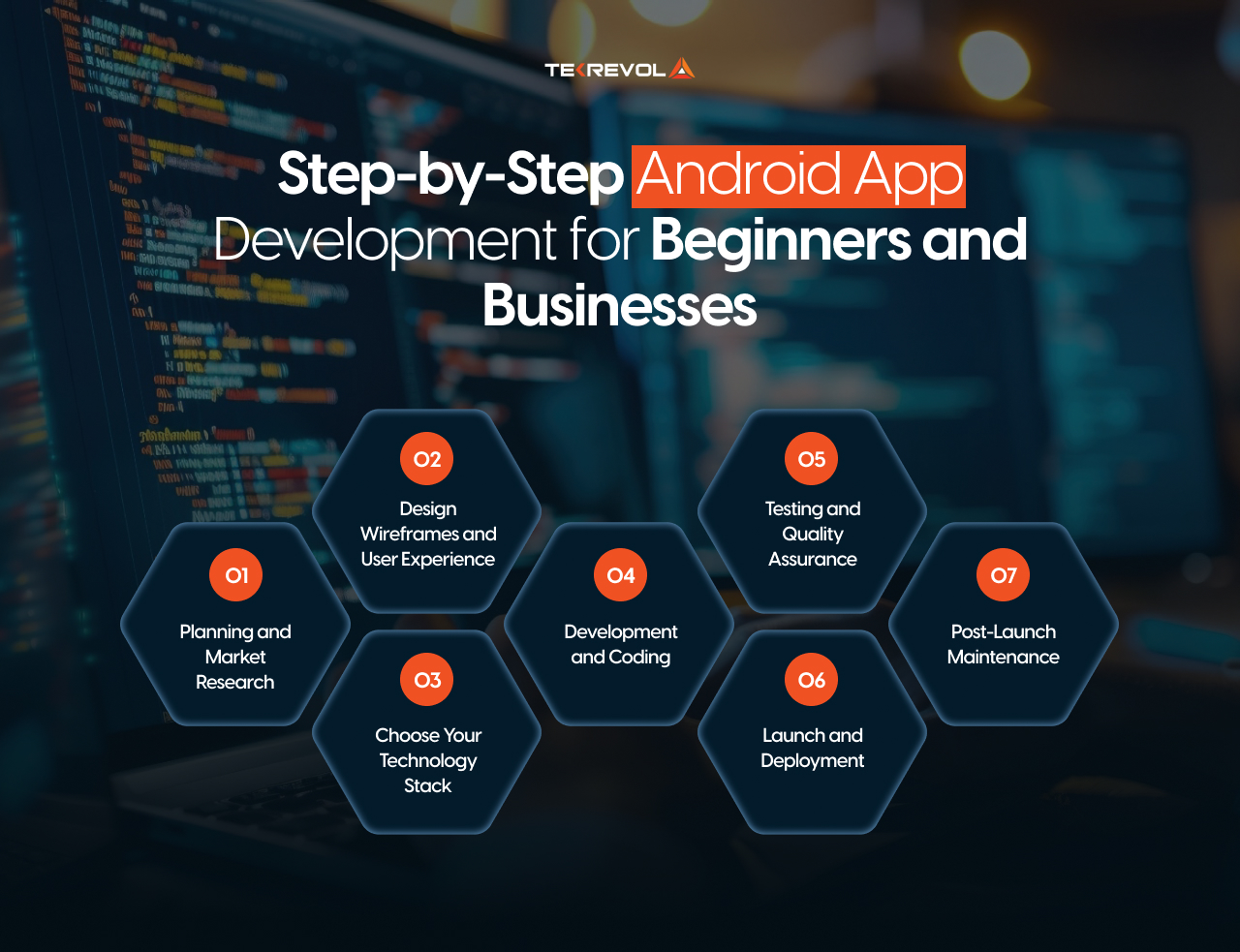
1. Planning and Market Research
The initial part in developing your app is defining what you are developing and who will be using it. Ask yourself:
- What is the problem that such an app will solve?
- Who is your target audience?
- What are the ones that are obligatory, and which are not?
- Who are your competitors, and what is special about your application?
Look at the applications that are already present in your category. Look at reviews of customers and see what pleases them and what makes them furious. Such experience will enable you to evade the commonest traps and seize opportunities that your competitors have missed.
2. Design Wireframes and User Experience
Wireframing is a visual map of your app that is developed prior to the actual development. Pay attention to the development of a clear customer experience:
- Make navigation easy.
- Emphasize the critical tasks that users want to perform.
- Ensure screen consistency.
- Support multiple sizes and orientation screens.
For insights on creating effective mobile experiences, explore our guide on mobile app UI/UX design.
3. Choose Your Technology Stack
The type of technology that you use influences the rate of development, performance of the apps, and future maintenance:
- Kotlin: A modern Android language that’s brief, reliable, and Google-approved.
- Java: Dynamic and stable with large libraries and ecosystem.
- Flutter: An Android and iOS native app, developed in Dart.
- React Native: Build cross-platform applications in JavaScript and React.
Knowing your options helps, but building great Android apps requires deeper insight. Learn about the Complexities of Android app development to confidently handle challenges at every development phase.
4. Development and Coding
Now comes the actual building phase. Android Studio is the primary official development environment of Google, but it is not the only one. Take a look at the Android top IDEs to find the tools that may be more effective. Developers then:
- Write the core application logic
- Implement user interface components
- Integrate APIs for external services
- Set up databases for data storage
- Add third-party features (payment processing, analytics, social sharing)
The process of development occurs in phases. Using the principles of MVP development, it is better to create the core features and test them first, and then add secondary ones gradually. This repetitive process identifies issues at an early stage when they can be readily corrected.
5. Testing and Quality Assurance
Testing differentiates between good and great apps. A malfunctioning application will get bad ratings and be removed in a short period of time, and therefore, proper testing will be required:
- Functional Testing: Are all the features functioning as expected?
- Performance Testing: Does the application run well without consuming battery or using too much data?
- Security Testing: Does it protect user information and transactions?
- Compatibility Testing: Is it compatible with a variety of Android versions and types of devices?
6. Launch and Deployment
The preparation before launching includes the following major steps:
- Google Play Store Set up: This is a one-time cost of 25 dollars, and you can fill out your store listing.
- Optimize Your Listing: Compose an interesting description of your app, select effective keywords, prepare attractive screenshots, and, where possible, make a preview video.
- Get Recommended: Have your application comply with content policies and the technical requirements of Google Play.
- Ready Support Material: Have a privacy policy, terms of service, and support number to answer user questions.
After it is submitted, Google normally takes 24-48 hours to review and approve apps.
7. Post-Launch Maintenance
When starting your app, it does not mean the end, but the beginning. Effective applications need continuous maintenance:
- Track crash reports and correct bugs in a short time.
- Reaction to user feedback and reviews.
- Measure analytics and know the way people utilize your app.
- Improved release with additions of features.
- Maximize performance depending on real-life usage data.
Frequent updates demonstrate to the users that they are actively operating the app, and this increases ratings and retention.
How Much Does It Cost to Develop an Android Application?
Android app development cost normally relies on various factors such as the complexity of the app, the requirements of the design, and the experience of the development team.
| App Type | Estimated Cost | Timeline |
| Basic App | $30,000 – $80,000 | 4-8 weeks |
| Moderate App | $80,000 – $150,000+ | 8-16 weeks |
| Complex App | $150,000 – $300,000 | 16-24+ weeks |
Note: These values are changing depending on feature complexity, design needs, and expertise of the development team. Native programming in Kotlin or Java typically provides better performance, particularly when a feature-rich application is needed, a nd its functionality is advanced.
Looking for transparent pricing on your Android app project?
Share your project details with our team to get a precise estimate, or use our cost calculator.
Calculate Now!Can You Develop Android Apps Without Coding Using AI?
YesAI tools can indeed be used to assist in the creation of an Android application, yet a human developer cannot be substituted.
AI is able to produce code and eliminate bugs, create tests, and describe concepts. It is like a secret assistant that accelerates the routine of the coding process. Nevertheless, it takes a skill and a craft of a developer to create a complete, polished, and working app.
Where AI Can Help
- Code Suggestions: AI will be able to write snippets in Kotlin or Java when it comes to such common features as buttons, lists, or API calls.
- Debugging Help: It is possible to copy an error message into ChatGPT, and so, sometimes it can even propose how something has gone wrong and fix it.
- Writing Tests: AI applications can generate simple test cases of your application functionality.
- Explain Code: The elaborating AI can make a complicated subject simple when you are not sure how to tackle it.
Why Hiring Android Developers Is Still Crucial
AI can’t handle everything. Even critical activities such as app architecture, user experience design, performance tuning, and solving complex problems still need human experience and creativity.
Tools like ChatGPT, GitHub Copilot, and Google Gemini are useful helpers, not replacements. They make developers faster and more efficient, but the vision, strategy, and final responsibility remain in human hands. That’s precisely why companies hire Android app developers, for the critical thinking and creative problem-solving that AI cannot provide.
Revenue Models for Android Applications
Android The apps market is a flourishing ecosystem that is bringing in hundreds of billions of revenue. As almost 97 percent of applications are free to download, Developers have built sophisticated models to generate revenue from their products. These revenue models are vital aspects that anyone who wants to achieve success in the competitive app market understands.
In-App Advertising
In-app Advertising is considered to be one of the best monetization techniques, and the amount of ad money in the world is expected to hit roughly 390 billion dollars in 2025. Appsshoww banner ads, video ads, or ful,l-screen interstitials. Users pay developers a certain amount when they watch or click ads. Video advertisements are especially effective since users have a choice of watching the rewarded video to receive in-game rewards or features.
In-App Purchases
The users purchase virtual goods, enhancement features, or in-game currency. This model has been popular, particularly in gaming applications where people purchase power-ups, coins, or cosmetic upgrades. It is a way of earning billions every year from mobile games.
Subscriptions
Applications cost a subscription fee of either monthly or annual to continue accessing premium content or functions. This model is popular with streaming services, productivity applications, a nd fitness platforms. It offers consistent and reliable revenue.
Freemium Model
Apps have simple functions at no cost, with extra services charged. The paid versions are usually upgraded by a small percentage, 1-5% of users, yet the sheer number of free users makes this profitable.
Paid Apps
Some apps charge an upfront download fee, though this is less common now. It works best for specialized tools or professional apps that offer clear, immediate value.
Partner with TekRevol for Your Android Development Project
TekRevol stands out as a leading mobile app development company with deep expertise in Android app development. With a team of 200+ designers, developers, and consultants, TekRevol is recognized as a leading digital solutions company by platforms such as Clutch and DesignRush.
TekRevol brings extensive experience in Android app development, having successfully delivered solutions across 11 diverse industry sectors. Tamreeni represents one of TekRevol’s most successful Android app development projects, emerging as a rising star in the UAE’s fitness industry.
TekRevol offers full end-to-end offerings, such as bespoke user interface/user experience design, strict quality assurance testing, Google Play Store integration, as well as maintenance and support services.
Have an Android App Idea?
Turn it into a market-ready solution with TekRevol's expertise.
Schedule a Call Today!


![Fintech App Development in Austin: Cost, Compliance & Build Strategy [2026]](https://d3r5yd0374231.cloudfront.net/images-tek/uploads/2026/07/TekRevol-Fintech-Feature-Image-selection.jpg)


