
You’re checking your phone and notice an app you never downloaded: “CQATest.” Your heart skips a beat. Is this malware? Am I being tracked?
Relax. You haven’t been hacked.
The CQATest application is technically a built-in testing program pre-installed on your Android phone when it was manufactured. Many insights about such apps can be better understood with guidance from a mobile app development company familiar with Android systems.
The application becomes active only after it is triggered. Neither is it bad, nor a spy, nor will it have any impact on the performance of your phone.
Still, that doesn’t answer all your questions. What is CQATest? Why is it taking up space on your phone? Can you safely remove it? And most importantly, should you be worried about it at all?
This blog explains what the CQATest app is, why it appears, if it’s safe, and how to fix any issues it may cause.
What is CQATest App?
CQATest is also known as the Certified Quality Auditor Test or occasionally, the Comprehensive Quality Assurance Test. It is a testing and diagnostic app that is installed on Android smartphones by the manufacturers (mostly LG); they install it once the devices are manufactured.
The CQATest app works like a quality inspector’s toolkit. Technicians perform diagnostics to ensure all hardware and software components function properly, even before your device is sold.
They examine the speaker quality, the performance of the camera, the touchscreen sensitivity, the quality of the microphone, the accuracy of the sensors, and many other hardware elements.
The Technical Details
The app typically appears in your system as com.lge.cqatest on LG devices or com.samsung.android.cqa on some Samsung phones. Being a system-level application, it requires deeper access to hardware. Only a skilled custom software development company can implement similar diagnostic tools safely for internal testing or enterprise solutions.
It is a system-level application, and this means that it has more access to the hardware of your phone compared to the normal applications you download on the Google Play Store. It needs this access to do extensive hardware diagnostics.
Don’t Let Bugs or Glitches Ruin Your User Experience
Partner with TekRevol for complete testing, QA, and post-launch support to ensure top performance.
Schedule a FREE Consultation!What Exactly Does the CQATest App Do?
The CQATest app will not serve the interests of the common people, since it is an app in the background that is used by the manufacturers and developers of devices to ensure that everything on your phone works as intended.
When a mobile device app receives a poor experience, approximately 94% of users will uninstall it within the first 30 days, highlighting how critical early quality assurance and testing are.
Here’s a breakdown of what the CQATest app actually does:
| Category | Purpose | Description |
| Hardware Testing | Checks physical components | Test the screen, speakers, camera, mic, vibration, and sensors for accuracy and responsiveness. |
| Software Validation | Ensures smooth system performance | Verifies sensor calibration, network connectivity, and OS stability to prevent software bugs. |
| Issue Detection | Identifies underlying problems | Detects performance drops, security flaws, and system glitches before they affect users. |
Why Android Phones Come With CQATest?
You might be wondering: if this is a factory testing tool, why is it still on my phone after I bought it?
Great question. Here’s the reality:
1. Factory Testing Requirements
Before shipping, manufacturers ensured that each device was of standard quality. CQATest lets factory workers go through a list of tests very fast in order to help identify flawed units before they go to a customer.
2. Service Center Diagnostics
When you are sending your phone to an official repair center, CQATest can be used by faculty to identify hardware issues. It aids them in determining whether it is a software glitch or a genuine hardware glitch.
3. Warranty Claims
In case you place a warranty claim, the service centers can check it with diagnostic apps to determine whether the problem is real or created by the user or due to software malfunctions.
4. Cost and Efficiency
Uninstalling system applications on every single computer implies additional development efforts and may lead to compatibility problems with other system features. It is just more convenient and cheaper for manufacturers to install such tools, yet most users will never open them.
Is CQATest Safe? Security and Privacy Concerns
As per the research, experts warn that pre-installed Android software can sometimes introduce vulnerabilities affecting both privacy and security. This, of course, leaves the users with a sense of suspicion when a new app such as CQATest simply appears.
However, there’s no reason to panic; the CQATest app is completely safe.
CQATest Is Not Spyware
The CQATest app is a legitimate diagnostic tool, not spyware. It’s built by your phone’s manufacturer to test performance and hardware reliability. It does not:
- Record conversations
- Track your location
- Steal personal data
- Share info with third parties
- Monitor browsing activity
In short: CQATest on Android is safe and part of your phone’s system, not a security threat.
Dormant by Default
CQATest stays inactive under normal conditions. It doesn’t drain your battery, use mobile data, or run in the background. It only activates during testing or service checks.
While the app isn’t harmful, a few things can trigger issues:
- Accidental Activation
It may appear if certain button combinations or software glitches occur. When active, it might:
- Show test screens
- Slow down your phone
- Drain the battery temporarily
- Security Vulnerabilities
According to ASEE, 75% of mobile apps suffer from security vulnerabilities. Like any system app, CQATest may have rare security flaws. In case of an exploit (which is very rare), hackers may seek unauthorized access. Luckily, such vulnerabilities are fixed in time by the manufacturers with official updates.
- Malware Disguises
There are also counterfeit applications resembling system tools. Make sure that the package name is correct; authentic ones are com.lge.cqatest (LG) or com.Motorola (Motorola).
What Happens When the CQATest App Runs in the Background?
Even though the CQATest app is internal-testing-based software, it can even hit a snag when it comes as unforeseen on your phone. These issues are normally temporary and are caused by the running of diagnostic tests in the background by the app.
| Issue | What Happens |
| Unresponsive Home Button | The home button may lag or stop responding, making navigation tricky. |
| Display Lag or Freezing | The screen can be frozen or sluggish, sh with a general impact on the usability. |
| Built-in Apps Failing | Even basic applications such as Camera, Settings, or Dialer crash or do not open. |
| Performance Degradation | Excessive RAM and CPU load might result in battery depletion, overheating, or slow performance. |
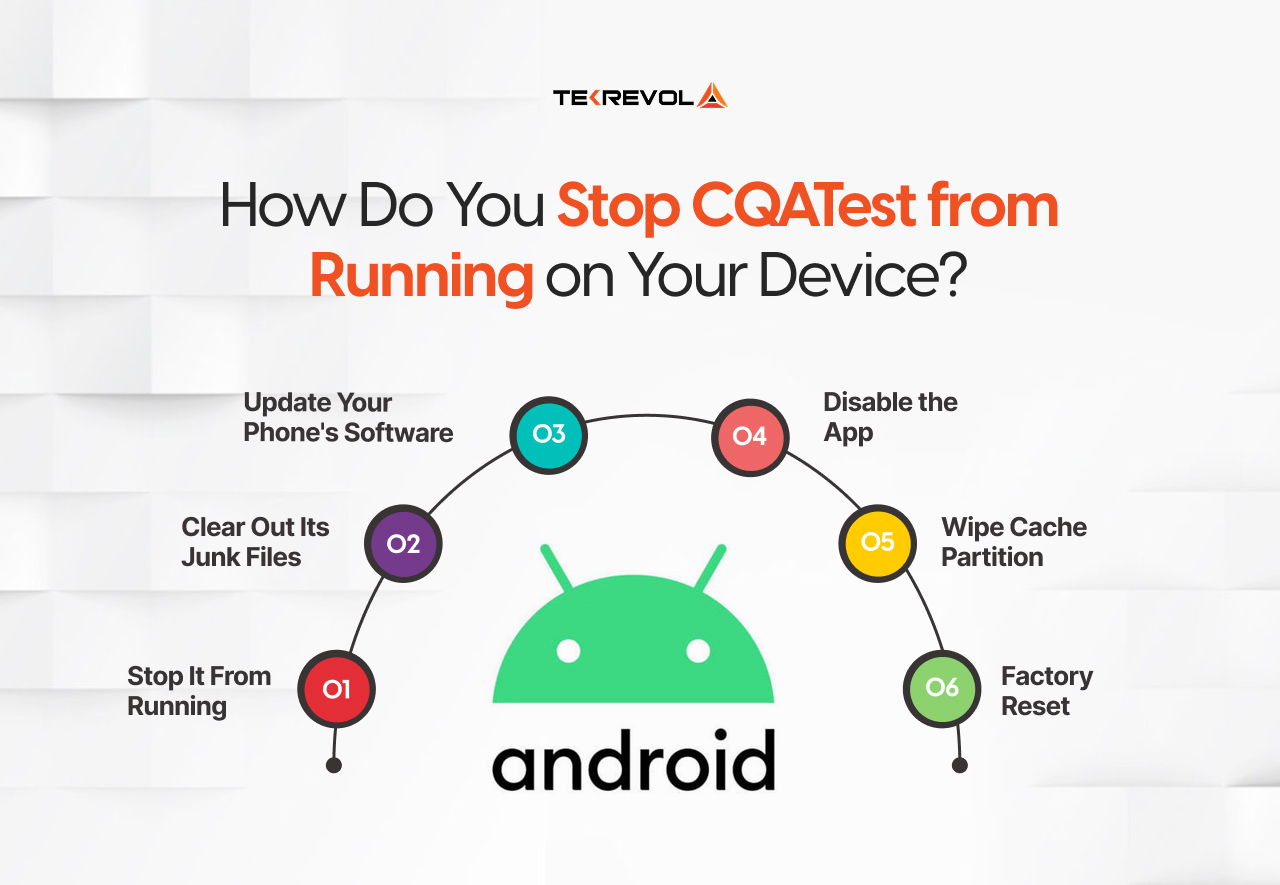
How Do You Stop CQATest from Running on Your Device?
Here’s the honest truth: you cannot fully disable the CQATest app, since it is embedded into the operating system of your phone. It is like attempting to take the pillars out of a house; it is a part of it.
But don’t worry. CQATest can be annoying, but it is easy to ensure that it does not create any trouble. Here’s what actually works:
Option 1: Stop It From Running (Quickest Fix)
This immediately shuts down CQATest if it’s active and annoying you.
Here’s how:
- Open Settings on your phone
- Tap Apps (might say “Apps & Notifications” on some phones)
- Find CQATest in the list (you may need to tap “Show system apps“)
- Tap Force Stop
What this does: Kills the app instantly. It won’t run again until something triggers it, which rarely happens.
Option 2: Clear Out Its Junk Files
Sometimes CQATest acts weird because it has corrupted temporary files. Clearing these often fixes strange behavior.
Here’s how:
- Go to Settings > Apps > CQATest
- Tap Storage
- Hit Clear Cache first
- If problems continue, tap Clear Data too
What this does: Removes temporary files without affecting your personal stuff like photos or contacts.
Option 3: Update Your Phone’s Software
Manufacturers often fix bugs that make system apps misbehave. A simple update might solve your CQATest issues entirely.
Here’s how:
- Open Settings
- Scroll to About Phone (or “System”)
- Tap Software Update or System Update
- Install any available updates
- Restart your phone
What this does: Bug fixes and also does a better job of background system app behavior.
Option 4: Disable the App (Strong Solution)
When CQAtest continues to keep coming out or eating up your battery, the only way to stop it is by disabling it.
Here’s how:
- Go to Settings > Apps > CQATest
- Tap Disable or Turn Off
- Confirm when prompted
Note: Not all phones will allow you to turn off some system applications. In case you do not have the Disable option, this trick does not apply to your computer.
Option 5: Wipe Cache Partition (Advanced)
This process performs a thorough cleanup of system temporary files while keeping your personal data safe.
Here’s how:
- Switch off your cell phone.
- Press and hold the Power + Volume Down buttons (combo of buttons depends on brand)
- On the recovery menu, use volume buttons to navigate.
- Select Wipe Cache Partition
- Confirm and wait for it to complete
- Select Reboot System Now
Warning: This looks intimidating, but it won’t delete your photos, apps, or settings. It only clears temporary system files.
Option 6: Factory Reset (Nuclear Option)
Only do this if CQATest is seriously disrupting your phone and nothing else has worked. This wipes everything and starts fresh.
WARNING: This deletes ALL your data. Back up everything first!
Here’s how:
- Back up your photos, contacts, and important files first!
- Go to Settings > System > Reset Options
- Tap Erase All Data (Factory Reset)
- Confirm and wait for the process to complete
- Set up your phone like new
What this does: Returns your phone to the exact state it was when you first bought it. CQATest will still be there (it’s part of the system), but all glitches will be gone.
CQATest vs. Other Diagnostic Apps
Research found that on some Android devices, approximately 16% of pre‑installed apps showed hidden behaviors. While CQATest is one of the most comprehensive diagnostic tools on Android devices, it’s not the only option available. Here’s how it compares to other diagnostic solutions:
| Diagnostic Tool | Platform / Access Method | Primary Capabilities |
| CQATest | Pre‑installed on specific Android devices | Deep system‑level hardware & software tests, integrated with device firmware |
| Service Mode (Samsung) | Samsung phones via dialer code (#0#) | Test sensors, display, touch, and connectivity tailored to Samsung hardware |
| Hardware Test (OnePlus) | OnePlus phones via engineering mode | Hardware diagnostics (battery, touchscreen, sensors) specific to OnePlus devices |
| Google’s Built‑in Diagnostics | Stock Android (via Settings > About Phone) | Basic checks (battery, storage, network stats) — not as detailed as manufacturer tools |
| Third‑Party Apps (e.g., Phone Doctor Plus) | Any Android device via the Play Store | Good for user‑level diagnostics, but limited access to deep system components |
Wrapping Up
While tools like CQATest play a role in device diagnostics, achieving truly reliable app performance requires a comprehensive approach. That’s where TekRevol steps in, offering end-to-end app testing, quality assurance, and ongoing app maintenance and support services.
As a top mobile application development company, we offer a solution that encompasses all the life cycle stages of your application. Be it testing with real devices, network simulations, checking the native features, or performance optimization, TekRevol ensures top performance for your app with consistent maintenance, robust mobile app security, and a user experience that delights people globally.
Your App Deserves to Be Perfect
From design and development to testing and support, TekRevol ensures your app shines from day one.
Get Your FREE Consultation!