
- AI-driven mobile apps use machine learning, NLP, and computer vision to personalize experiences, automate tasks, and predict user behavior in real time.
- The AI mobile app development process has 5 phases: strategy, data architecture, model selection, integration, and testing, skipping any one kills your launch.
- AI app development cost in 2026 ranges from $40,000 for a focused MVP to $300,000+ for a full-scale, multi-model enterprise app.
- Choosing the right AI model matters more than the framework; a poorly chosen model on a great stack still underperforms.
- On-device AI (Core ML, TensorFlow Lite) beats cloud inference for speed and privacy; cloud wins on model complexity. Know which you need before architecture begins.
Most apps built today will be obsolete within two years. Not because the idea was wrong, but because they were built without intelligence baked in from the start. Users in 2026 expect apps that know them, adapt to their behavior in real time, and get sharper with every interaction. That is not a premium feature anymore. That is the baseline.
The problem is that most teams approach AI app development the same way they approached mobile development a decade ago, bolting on features and hoping the product feels smart. It never does.
This guide covers the full picture. From choosing the right tech stack and selecting the right models to real cost numbers, integration approaches, and the exact mistakes that drain six-figure budgets before a single user sees the product.
If you are a founder trying to move fast, a product lead managing competing priorities, or a CTO who needs to make the right architectural call the first time, this is your technical playbook for 2026.
And if you are at the stage where you need an experienced AI development company in your corner before you commit to a direction, that conversation is worth having early rather than after the first rebuild.
What Are AI-Driven Mobile Apps?
AI-driven mobile apps are applications that use machine learning models, natural language processing, or computer vision to deliver personalized, adaptive, and predictive user experiences, rather than relying on fixed rules or static logic.
The difference between a regular app and an AI-powered one is simple: a regular app does what you programmed it to do. An AI app learns from data, adapts to each user, and makes decisions your team never explicitly coded.
Examples you already use:
- Spotify — AI-driven playlist generation from listening behavior
- Google Maps — real-time route prediction from traffic pattern ML models
- TikTok — a recommendation engine that learns preferences from scroll depth and dwell time
- Face ID — on-device computer vision for biometric authentication
Core technologies powering AI mobile apps:
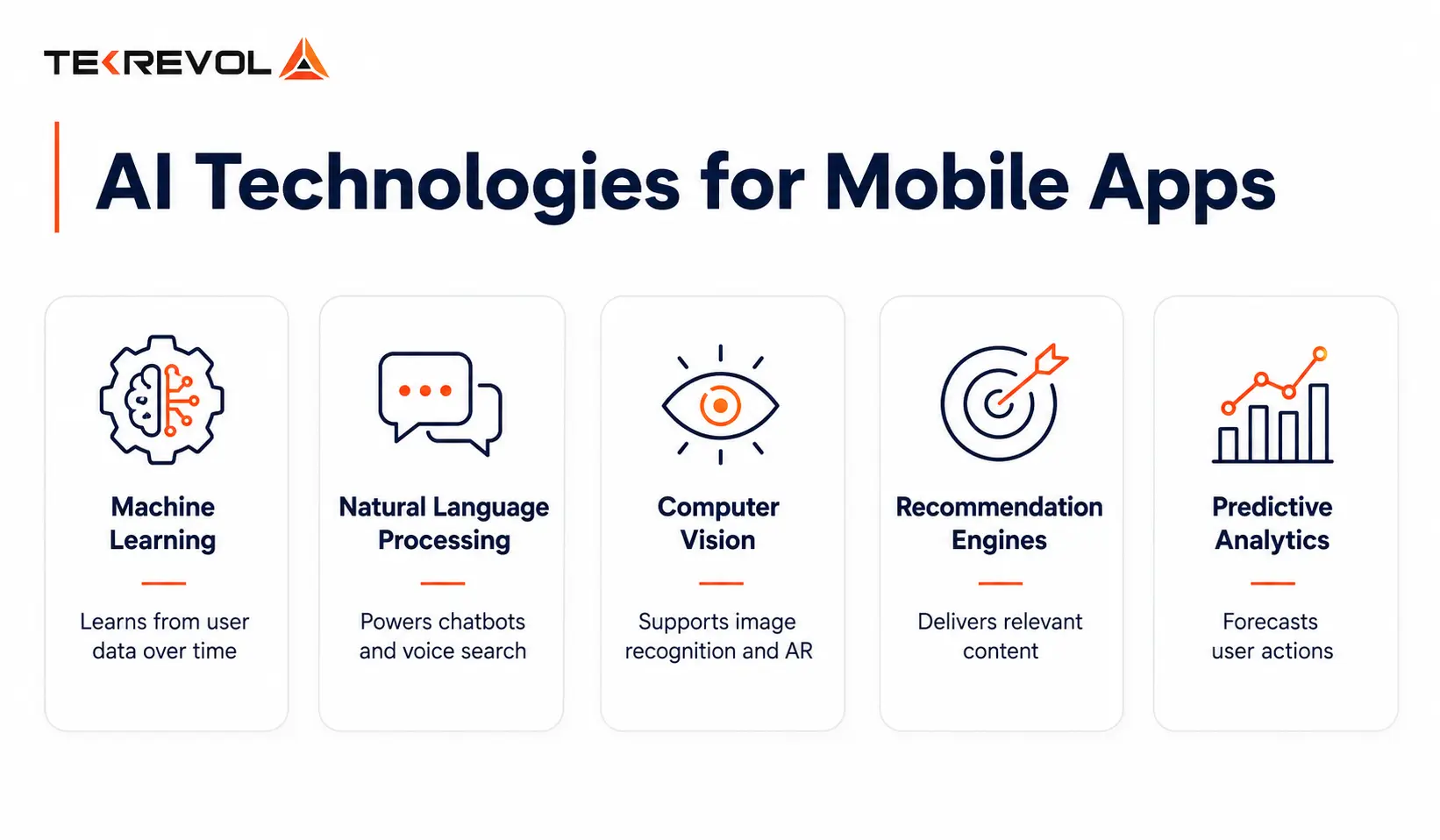
| Technology | What It Does |
| Machine Learning (ML) | Learns patterns from user data, improves predictions over time |
| Natural Language Processing (NLP) | Powers chatbots, voice search, sentiment analysis, and auto-fill |
| Computer Vision | Enables facial recognition, AR overlays, and image-based search |
| Recommendation Engines | Surfaces the right content, product, or feature at the right moment |
| Predictive Analytics | Anticipates user actions before they happen |
Your AI App Idea Has a Shelf Life. Build It Now.
Share your AI app idea with TekRevol. We'll validate your concept, identify the right AI use cases, and provide a technical roadmap with realistic timelines and transparent cost estimates,.
Claim Your Free AI App ConsultationWhy Build an AI-Powered Mobile App In 2026?
The global AI in mobile app market is on an explosive growth trajectory, with projections estimating it will reach $14.9 billion by 2026. This growth is being driven by a fundamental shift in how users interact with apps and how businesses are responding to those expectations.
Personalization has emerged as the defining competitive advantage. According to McKinsey (2025), apps with AI-driven personalization see 40% higher user engagement, while Salesforce reports that 72% of users are more likely to return to an app that tailors their experience. These figures represent the difference between an app users keep and one they delete.
The efficiency gains on the operational side are equally compelling. IBM (2025) found that AI chatbots reduce customer service costs by up to 30%, while Google AI Blog data shows that on-device AI inference cuts app response time by 60–80% compared to cloud-only models, a performance leap that directly impacts user retention and satisfaction.
The businesses winning in mobile right now are not building better UI. They are building smarter apps. Every month you ship a static app, you are ceding ground to a competitor whose app is learning. To understand how this intelligence layer is reshaping entire business operations, see how AI is transforming enterprise workflows.
The 5-Phase AI Mobile App Development Process
Building an AI-powered mobile app follows a 5-phase process: product strategy, data architecture, AI model selection, app development and integration, and testing and deployment. Rushing or skipping any phase is the single biggest reason AI apps fail to deliver ROI.
Phase 1: Product Strategy and AI Use Case Definition
This is where most teams fail. They decide to “add AI” before defining what problem the AI is actually solving, and that backward thinking is expensive.
Good AI use cases for mobile apps share three things: a repeatable user action that generates data, data that can improve a future decision or experience, and an improvement that is measurable, such as engagement rate, task completion, or session length.
Before your team writes a single line of code, you need honest answers to four questions.
- What specific user behavior are you trying to improve?
- What data do you have, or need to collect in order to train or run the model?
- Is on-device inference fast enough, or do you need cloud compute?
- And what does success actually look like in 90 days?
The output of this phase should be a product brief that covers AI use cases, data requirements, success KPIs, and an initial model hypothesis. Without it, you are not building an AI app, you are building a feature looking for a purpose.
Phase 2: Data Architecture and Pipeline Design
Here is a truth most AI vendors will not tell you upfront: AI is only as good as its data. This is where roughly 60% of AI projects quietly die, not in development, but in data preparation.
Your data architecture needs to define where data comes from (user behavior, in-app events, third-party APIs, sensor data), where it lives (on-device vs. cloud, structured vs. unstructured), how it moves (collection → cleaning → labeling → model-ready format), and how it stays compliant with GDPR and CCPA regulations.
One of the most consequential decisions at this stage is the on-device vs. cloud question, and it is not one-size-fits-all.
| On-Device (Core ML, TensorFlow Lite) | Cloud (AWS SageMaker, Google Vertex AI) | |
| Latency | Faster inference, no latency | 100–500ms round-trip |
| Connectivity | Works offline | Requires internet |
| Privacy | Data never leaves the phone | Centralized training and retraining |
| Model size | Limited (~100MB) | Unlimited complexity |
| Best for | Face recognition, predictive text, and basic recommendations | Large LLMs, real-time analytics, multi-model pipelines |
Neither approach is universally better; the right call depends on your use case, your users, and your risk tolerance.
Phase 3: AI Model Selection and Tech Stack
Choosing the right model matters more than choosing the right framework. A well-chosen model on a simple stack will outperform a poorly chosen model on the most sophisticated infrastructure every time.
Here is how common mobile AI use cases map to model types and tooling:
| Use Case | Model Type | Tools |
| Personalized recommendations | Collaborative filtering, deep learning | TensorFlow, PyTorch |
| NLP / Chatbot / Voice | Transformer models, LLMs | GPT-4 API, Gemini API, LLaMA |
| Image recognition / AR | CNNs, vision transformers | Core ML, TensorFlow Lite, MediaPipe |
| Predictive analytics | Gradient boosting, time-series ML | XGBoost, Prophet, scikit-learn |
| Anomaly/fraud detection | Isolation forests, autoencoders | PyOD, TensorFlow |
And here is what a production-ready AI mobile tech stack looks like in 2026:
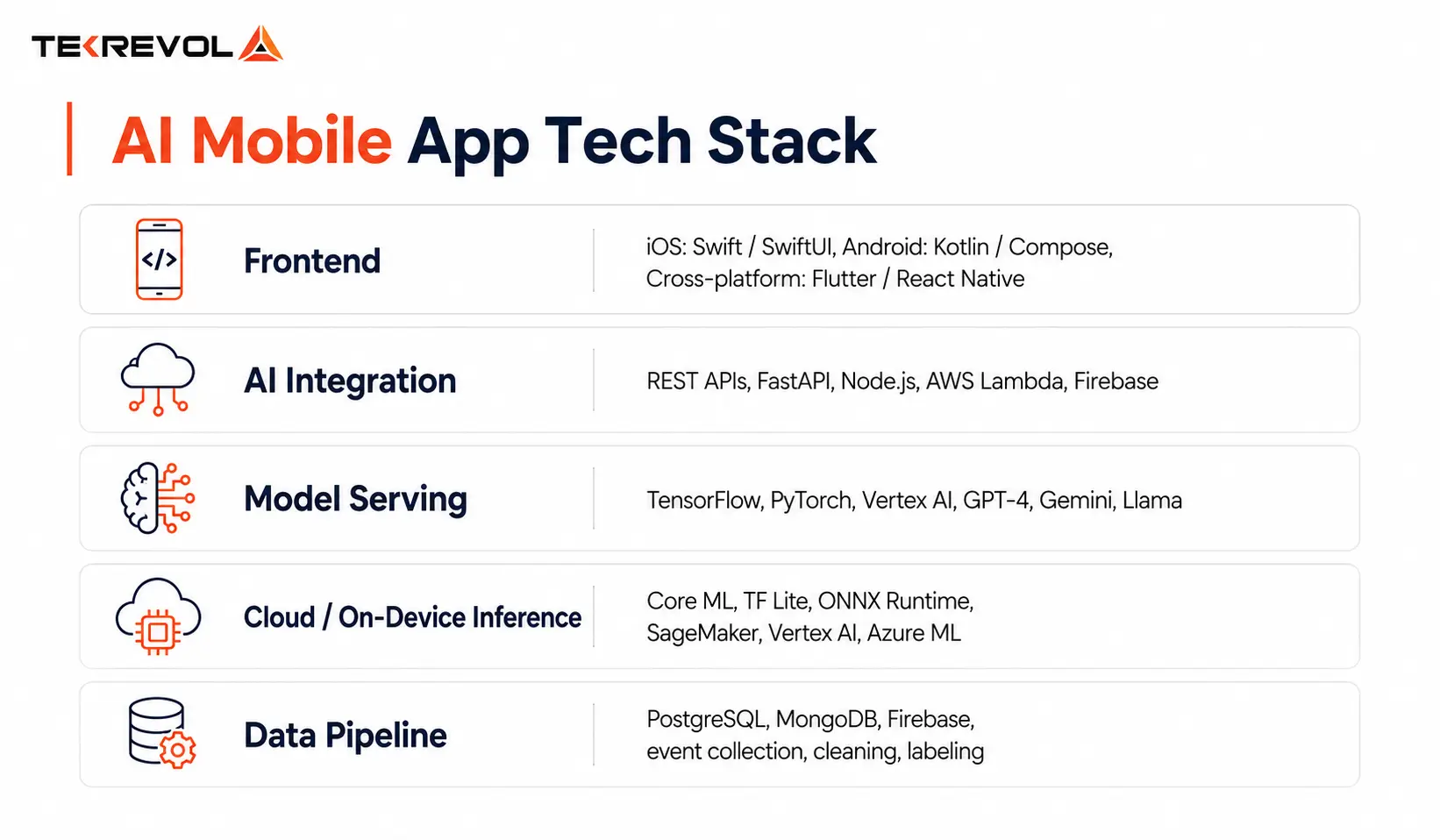 If you want to see how these stack choices play out across different product types, explore TekRevol’s full AI development capabilities. The portfolio covers everything from on-device inference to LLM-powered enterprise tools.
Phase 4: Development and AI Integration
How you integrate AI into a mobile app comes down to three methods. The right one depends on your model complexity, latency requirements, and data privacy needs.
Method 1: API-Based AI Integration connects your app to a third-party AI service via REST API, OpenAI, Google Cloud AI, AWS AI Services. It is the fastest path to market, ideal for chatbots, text generation, image analysis, and speech-to-text. You skip model training entirely, and the API stays current. The trade-off is latency (100–500ms round-trips), API costs at scale, and vendor dependency. Expect a 2–4 week build timeline.
Method 2: On-Device Model Deployment puts a pre-trained or fine-tuned model directly on the user’s device using Core ML or TensorFlow Lite. Zero latency. Works offline. Maximum privacy. It is the right call for face recognition, real-time image processing, predictive text, and any feature that cannot afford a round trip to a server. The constraint is model size, you are working within roughly 100MB, and updates require a new app release. Plan for 4–8 weeks.
Method 3: Hybrid AI Architecture runs lightweight models on-device for speed-critical features while routing complex inference to the cloud. It is the architecture of choice for production-grade apps that need both real-time response and model depth. More powerful and more complex to maintain. Budget 8–14 weeks.
Choosing between these methods is one of the most important decisions in the entire build. If you are evaluating custom software development approaches, it is worth understanding how your partner makes this call, because the wrong method chosen early is expensive to reverse later.
Phase 5: Testing, Deployment, and Model Monitoring
AI apps have an extra testing layer that purely functional apps do not: model validation. You are not just testing whether the feature works; you are testing whether the AI is actually right.
A solid pre-launch testing checklist covers unit tests for data pipeline functions, model accuracy benchmarking against a baseline, A/B testing AI features against a non-AI version in production, edge case testing for unusual inputs, latency testing under real-world network conditions, and a privacy audit confirming no PII is logged or passed to third-party models.
Post-launch monitoring is non-negotiable, and it is where a lot of teams drop the ball after go-live. You need model drift detection because accuracy degrades as user behavior changes over time. You need a retraining schedule, ideally every 60–90 days.
And you need a feedback loop, capturing user signals like skips, abandonment, and thumbs-down ratings, to continuously improve the model on real-world data.
How Much Does It Cost To Build an AI-Powered Mobile App In 2026?
AI app development cost in 2026 ranges from $40,000 for a focused single-feature AI MVP to $300,000+ for a multi-model enterprise application.
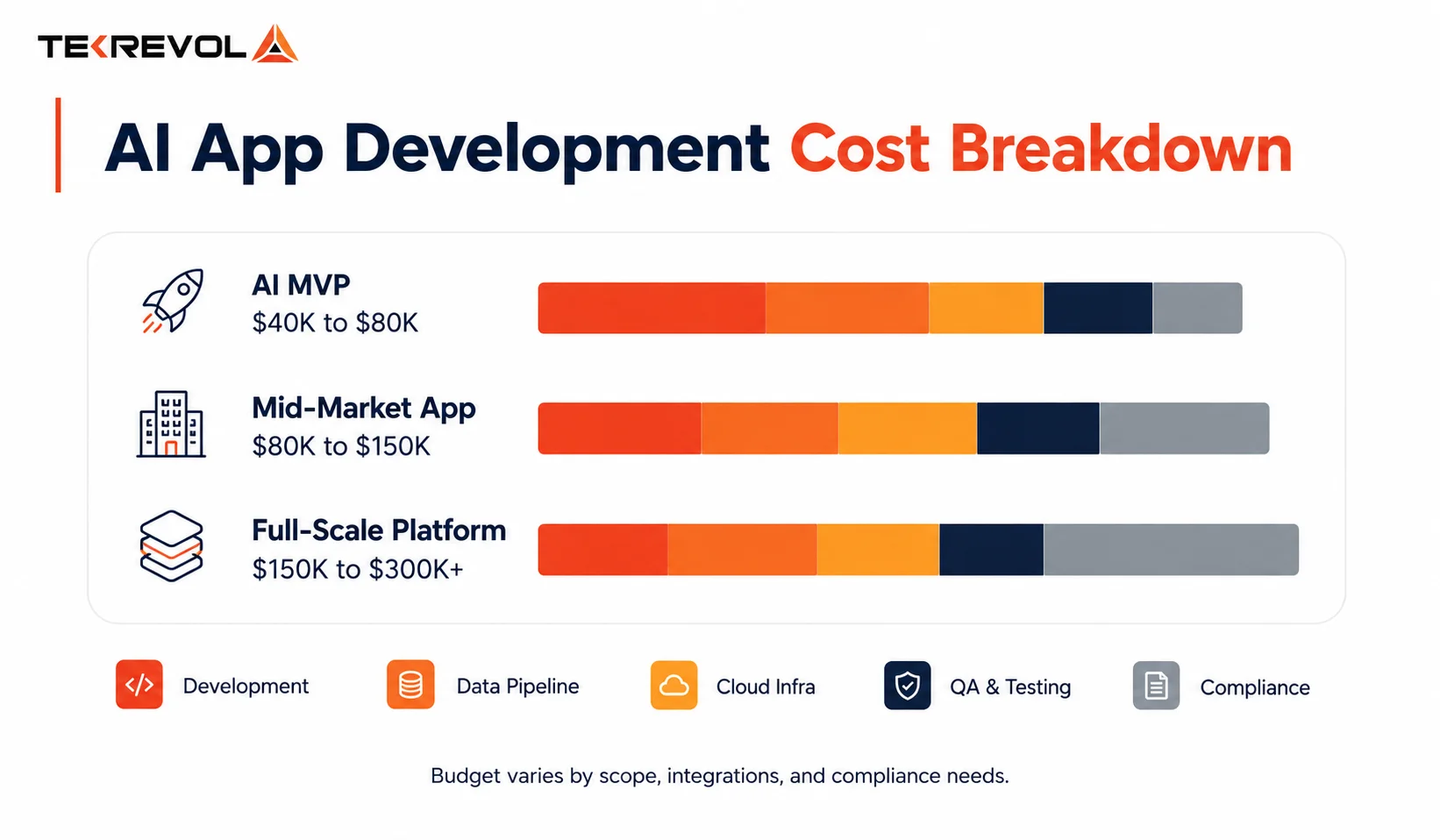
Cost by Project Type:
| Project Type | Estimated Cost | What’s Included |
| AI MVP (single feature) | $40,000–$80,000 | 1 AI feature, API-based integration, basic data pipeline |
| Mid-Market AI App | $80,000–$150,000 | 2–3 AI features, hybrid on-device + cloud architecture, custom model fine-tuning |
| Full-Scale AI Platform | $150,000–$300,000+ | Multi-model architecture, custom ML training, full data pipeline, retraining infrastructure |
Cost by AI Feature:
| Feature | Cost to Add |
| AI Chatbot (API-based, e.g., GPT-4) | $8,000–$20,000 |
| On-device recommendation engine | $20,000–$50,000 |
| Computer vision/image recognition | $25,000–$60,000 |
| Voice recognition + NLP | $15,000–$40,000 |
| Predictive analytics dashboard | $20,000–$45,000 |
| Custom LLM fine-tuning | $30,000–$80,000+ |
The Hidden Cost Stack:
| Cost Category | Share of Total |
| Model training and data labeling | 15–25% |
| Cloud infrastructure (GPU compute) | 10–20% |
| Privacy and compliance (GDPR, CCPA) | 5–15% |
| QA and model validation | 10–15% |
| Post-launch model retraining | $3,000–$12,000 per 90-day cycle |
Key AI Features Your Mobile App Needs in 2026
Artificial intelligence is no longer a competitive advantage; it is becoming a baseline expectation. Users want apps that understand their needs, automate routine tasks, provide instant support, and deliver personalized experiences.
Whether you’re building a consumer app, enterprise platform, or industry-specific solution, these AI capabilities are shaping the next generation of mobile applications.
1. Hyper-Personalization Engine
AI-powered personalization goes beyond simple recommendations by continuously learning from user behavior, preferences, and engagement patterns. It can dynamically adjust content, product suggestions, notifications, and user journeys in real time. This creates a more relevant experience for every individual user.
The result is higher retention, stronger engagement, and improved customer satisfaction. According to McKinsey, companies that excel at personalization generate significantly more value from customer interactions.
2. AI Chatbot and Virtual Assistant
Modern AI assistants can handle customer support, onboarding, appointment scheduling, and product guidance without human intervention. Using Natural Language Processing (NLP), they understand user intent and provide contextual responses around the clock. This improves response times while reducing operational costs for businesses. AI chatbots also help scale support during peak demand periods. IBM reports that organizations continue to adopt conversational AI to improve service efficiency.
3. Smart Search and Voice Recognition
Traditional search relies on keywords, while AI-powered search understands meaning, context, and intent. Voice recognition enables hands-free interactions, making apps more accessible and convenient. These technologies help users find information faster and complete tasks with less effort. Advances in on-device processing have also improved privacy and response times. Voice-enabled experiences are becoming standard across retail, healthcare, and productivity applications.
4. Computer Vision and Augmented Reality (AR)
Computer vision allows mobile apps to analyze images, recognize objects, and interpret visual information in real time. Combined with AR, it creates immersive experiences such as virtual try-ons, image scanning, and interactive product demonstrations. In healthcare, AI-driven imaging solutions are helping improve diagnostics and patient outcomes. Businesses investing in Healthcare App Development are increasingly integrating these capabilities into mobile solutions. Grand View Research projects substantial growth in the computer vision market over the coming years.
5. Predictive Notifications and Push Intelligence
AI can determine the best time, message, and channel to engage each user based on behavioral patterns. Instead of sending generic notifications, apps can deliver highly personalized communication that feels relevant and timely.
This reduces notification fatigue and increases user interaction rates. Predictive engagement also helps improve retention and conversion metrics. As competition for user attention grows, intelligent notification systems are becoming essential.
6. Biometric Authentication
AI-powered biometric authentication uses facial recognition, fingerprints, and behavioral patterns to verify user identity. It provides a secure alternative to passwords while reducing friction during login.
Modern biometric systems are highly accurate and help protect sensitive user information. They are particularly valuable in banking, healthcare, and enterprise applications. Strong security combined with convenience makes biometrics a key feature for future-ready mobile apps.
7. On-Device AI for Offline Capability
On-device AI enables machine learning models to run directly on smartphones without relying on internet connectivity. This reduces latency, improves privacy, and lowers cloud processing costs. Offline AI is especially important for healthcare, logistics, and field-service applications where connectivity may be limited.
Frameworks such as TensorFlow Lite and Core ML make deployment increasingly accessible. As mobile hardware becomes more powerful, on-device intelligence will continue to expand.
Common Mistakes in AI Mobile App Development
Artificial intelligence can dramatically improve mobile applications, but only when implemented strategically. Many businesses rush into AI development without proper planning, leading to higher costs, poor performance, and disappointing user experiences. Here are some of the most common mistakes companies make when building AI-powered mobile apps.
1. Adding AI After the App Is Built
AI works best when it’s part of the product strategy from the beginning. Trying to add personalization, recommendations, or predictive features after launch often creates a disconnected user experience.
Successful AI implementation starts with defining how data will be collected, processed, and used throughout the customer journey from day one.
2. Choosing the Wrong Inference Location
Not every AI task should run in the cloud. Applications that require real-time responses, such as facial recognition or object detection, can suffer from noticeable delays when every request is sent to a remote server.
Before development begins, teams should carefully evaluate latency requirements and determine whether processing should happen on-device, in the cloud, or through a hybrid approach.
3. Skipping Data Labeling
Even the most advanced machine learning model is only as good as the data used to train it. Poorly labeled or inconsistent datasets can lead to inaccurate predictions and unreliable outcomes.
Businesses should treat data preparation and labeling as a critical investment rather than an afterthought, ensuring models learn meaningful patterns instead of random noise.
4. No Retraining Plan
AI models are not “set it and forget it” technologies. User behavior changes, market conditions evolve, and data patterns shift over time.
Without a structured retraining strategy, model performance gradually declines. Organizations should include regular model evaluation, retraining schedules, and performance monitoring within their AI development roadmap.
5. Ignoring On-Device Storage Limits
On-device AI provides faster performance and better privacy, but mobile devices have limited resources. Large machine learning models that perform well in testing environments may become impractical on real-world smartphones.
Developers should optimize model size, memory consumption, and processing requirements to ensure a consistent experience across a wide range of devices.
6. Building Before Validating the Use Case
One of the costliest mistakes in AI development is creating a sophisticated solution for a problem users do not actually have. Technology should solve a genuine business or customer challenge, not exist simply because it’s trendy.
Launching a lightweight proof of concept before full-scale development helps validate demand, gather feedback, and reduce unnecessary investment.
Industries such as healthcare have been particularly successful in using proof-of-concept approaches before scaling AI initiatives. Many organizations exploring modern healthcare solutions first validate their concepts through pilot projects before investing in full-scale platforms. For businesses considering AI-driven patient engagement, diagnostics, or remote monitoring, learning about modern approaches to healthcare app development services can provide valuable insights into building scalable and compliant digital health solutions.
For additional guidance on implementing machine learning capabilities in mobile applications, Google’s ML Kit documentation remains one of the most widely used resources for developers.
How to Choose an AI Mobile App Development Partner
Before you sign with any vendor, ask them five questions. Their answers will tell you everything.
- Can you show me a live AI-powered mobile app you built, not a demo, a real product with real users? Anyone can mock up an AI feature. Far fewer have shipped one.
- What was the AI use case, and how did you measure whether it worked? Vague answers here usually mean the AI was a marketing claim, not a product decision.
- How do you handle model retraining post-launch, is that in scope or a separate engagement? A partner who has never thought about this has never maintained a production AI app.
- What is your compliance approach for apps handling user data in regulated industries? HIPAA, GDPR, CCPA, if they hesitate, walk away.
- Do you use pre-built APIs, fine-tuned open-source models, or custom-trained models, and how do you decide? The answer should depend on your use case, not their preferred tooling.
A partner who answers all five with specifics, not generalities, is a partner who has actually shipped AI products.
Why Choose TekRevol for AI-Driven Mobile App Development
TekRevol is not a dev shop that learned AI last year. We have been building AI-powered mobile products since 2018, and our portfolio is public proof.
- 150+ AI-capable engineers across mobile, backend, ML, and data engineering
- Proven production AI apps — Tamreeni (3M+ downloads), Reverto, Kinekt, MiloCare+
- ISO 27001 certified — enterprise-grade security on every project
- Full-stack AI capability — NLP, computer vision, custom LLM fine-tuning, on-device model deployment
- HIPAA-compliant builds for health-adjacent apps from the architecture stage
- Phased delivery with defined KPIs — in writing, before code is written
- Post-launch model monitoring and retraining as a standard offering
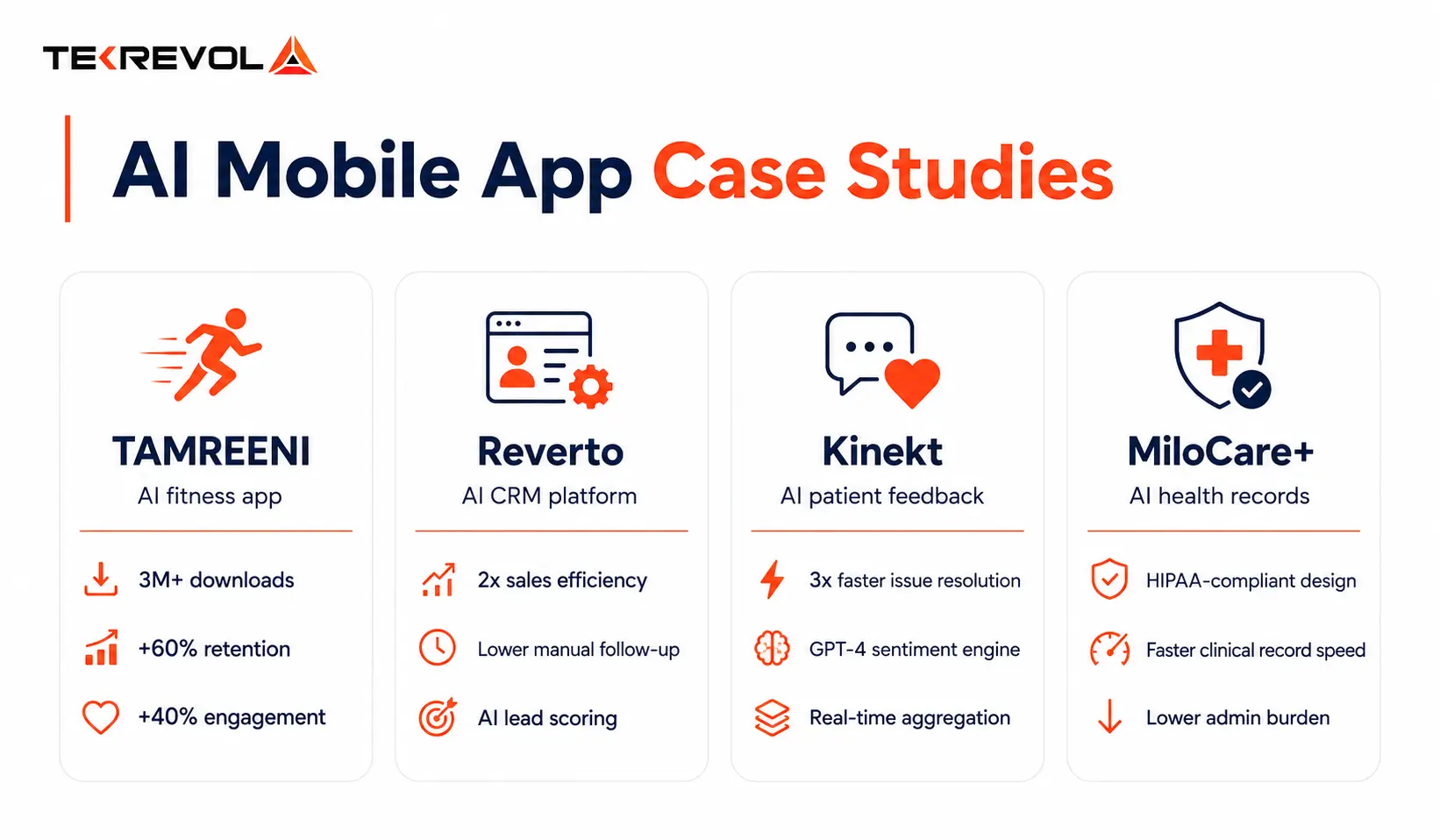
We do not build AI features. We build AI products where intelligence is the core value proposition, not a bullet point on a feature list. Whether you need custom software tailored to your specific business model or are ready to scope a full build, our custom software development services are structured around outcomes, not deliverables.
The Future of AI-Driven Mobile Apps
The roadmap ahead is not incremental; it is a fundamental shift in what mobile apps are capable of.
Agentic AI is the most significant near-term leap. Rather than simply responding to user input, AI agents take action on the user’s behalf, booking appointments, reordering products, and managing calendars autonomously, whether running on-device or cloud-connected. If you want to understand where this is heading, TekRevol’s AI agent development practice is already building in this space.
Multimodal AI will define the next generation of health and productivity apps, systems that simultaneously process text, images, audio, and sensor data in a single inference call, producing richer, more context-aware responses than any single-modality model can.
On-Device LLMs are making conversational AI genuinely private. Models like Gemini Nano and Apple Intelligence push large language model inference directly onto devices, delivering powerful AI that works fully offline with zero data leaving the phone. For healthcare, finance, and any regulated industry, this is a game-changer.
Real-Time AI Personalization closes the gap between session-based adaptation, where an app adjusts between sessions, and true real-time adaptation, where the app responds to user behavior as it happens within a single session. The difference in engagement is measurable.
Federated Learning at Scale solves the privacy paradox of collective intelligence. Apps improve their AI models by learning from millions of devices simultaneously, without ever centralizing individual user data. Privacy-preserving AI at scale stops being a differentiator and becomes the baseline expectation.
The teams building these capabilities into their apps today are not just ahead; they are building the gap that later entrants will struggle to close.
Conclusion
Building an AI-driven mobile app in 2026 is not about adding a chatbot and calling it AI. It is about choosing the right use case, building the right data architecture, selecting the right model, and shipping a product that gets measurably better the more people use it.
Tamreeni did not hit 3 million downloads because of its design. It hit 3 million downloads because the AI made every user’s experience feel like it was built for them personally.
Build Your AI App With TekRevol
Ready to turn your AI app idea into a real product? Talk with our AI experts to validate your concept, plan the right features, and create a roadmap for a successful launch.
Book Your Free AI App Consultation