



- Build an app if your users open the product daily, need offline access, or rely on hardware like GPS, camera, or biometric login.
- Websites cost $8K–$50K+ and launch in weeks; native apps cost $25K–$120K+ and take three to nine months to build.
- Apps convert roughly 3x higher than websites, but websites still drive over 75% of ecommerce traffic and discovery.
- PWAs now match near-native speed and offline caching while keeping Google indexing, an advantage native apps lack.
- Build the website or PWA first to validate demand cheaply; build native only once usage data justifies it.
- Small businesses need only a website; mid-market runs hybrids; enterprise justifies native apps through higher user volume
Building a mobile app can easily cost $50,000 or more. So before you spend that kind of money, you need to ask a simple question: does your business actually need an app, or would a good mobile website do the job? A lot of business owners assume an app is the “next step” once they have a website. But that’s not always true.
If your customers need to use your service often, want notifications, or need features like GPS or offline access, go with an app. If they just need quick info or browse occasionally, a mobile-friendly website is cheaper, faster to launch, and works just as well. When in doubt, a mobile app development company can help you decide based on how your users actually behave, not guesswork.
In this guide, we’ll break down the real differences between apps and websites, and how to figure out which option makes sense for your business before you spend a dollar.
What’s the Difference Between a Mobile App, a Mobile Website, and a Web App?
A mobile app is downloaded software that lives on your home screen and works offline. A mobile website is a normal site that resizes for phone screens and needs no installation. A PWA sits in between, installable without an app store, partly offline, and still indexed by Google.
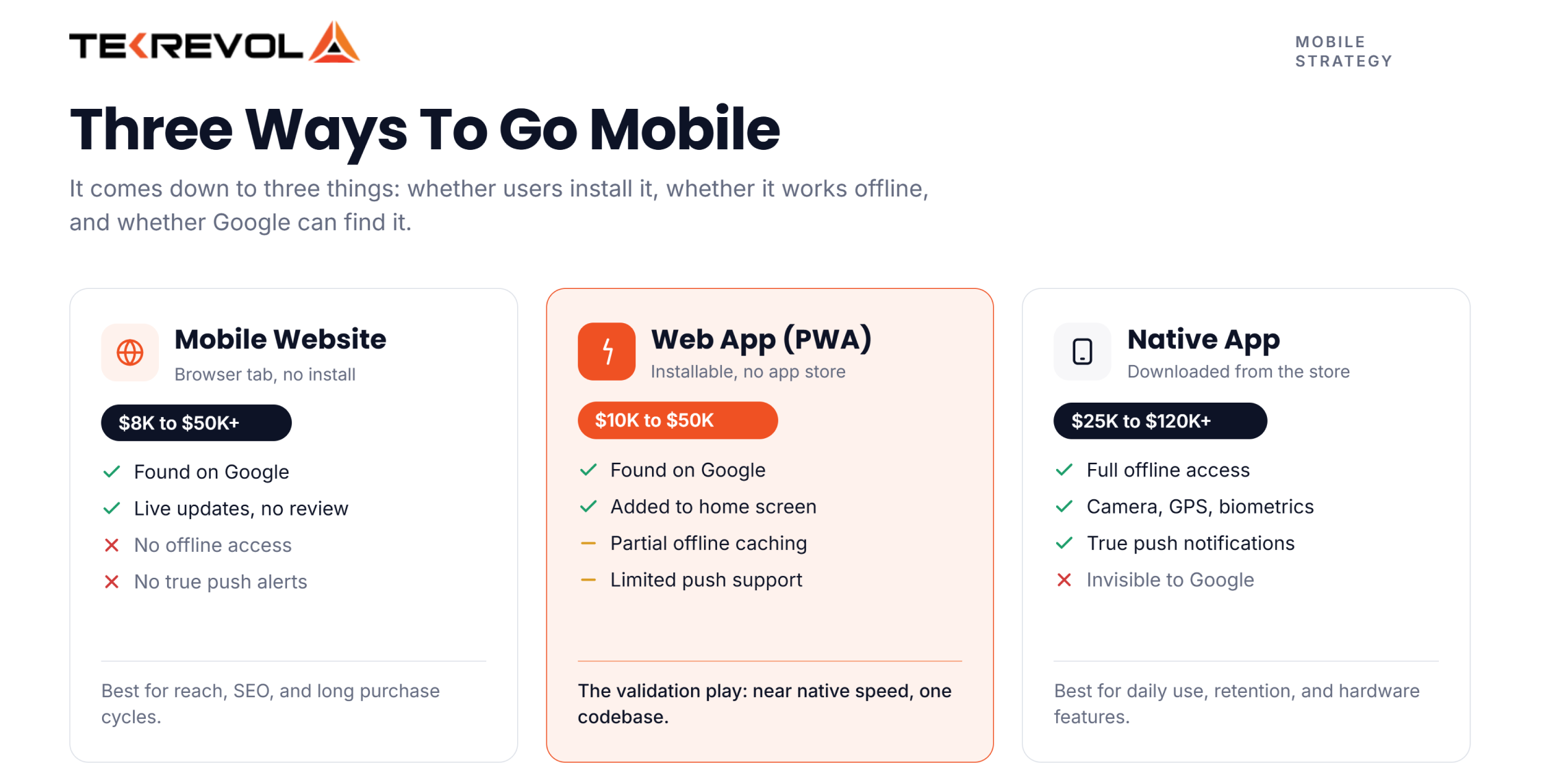
The difference comes down to three things: installation, offline access, and discoverability. Here’s the quick breakdown.
| Mobile Website | Web App (PWA) | Native App | |
| Install required? | No | No (can be “added” to home screen) | Yes |
| Found on Google? | Yes | Yes | No |
| Works offline? | No | Partially | Yes |
| Push notifications? | No | Limited | Yes |
| Typical cost | $8K–$50K+ | $10K–$50K | $25K–$120K+ |
Native app: Built for iOS or Android, downloaded from the App Store or Play Store. Instagram, Coca-Cola’s promotional app, and IKEA’s AR-based shopping app are all examples; each leans on a device capability (camera, AR, push) that a browser can’t fully replicate.
Mobile website: A normal website that adjusts to fit a phone screen. No install, just a browser tab.
Web app (PWA): The middle ground, feels app-like, works without a full download, skips app store review entirely.
For a deeper breakdown of the technical distinctions, check out our guide on website vs. web application.
When You Actually Need a Mobile App (Not Just Want One)
You need a mobile app when your product depends on offline access, push notifications, or hardware the browser can’t reach. Outside of those cases, a website usually does the job for less money and less risk.
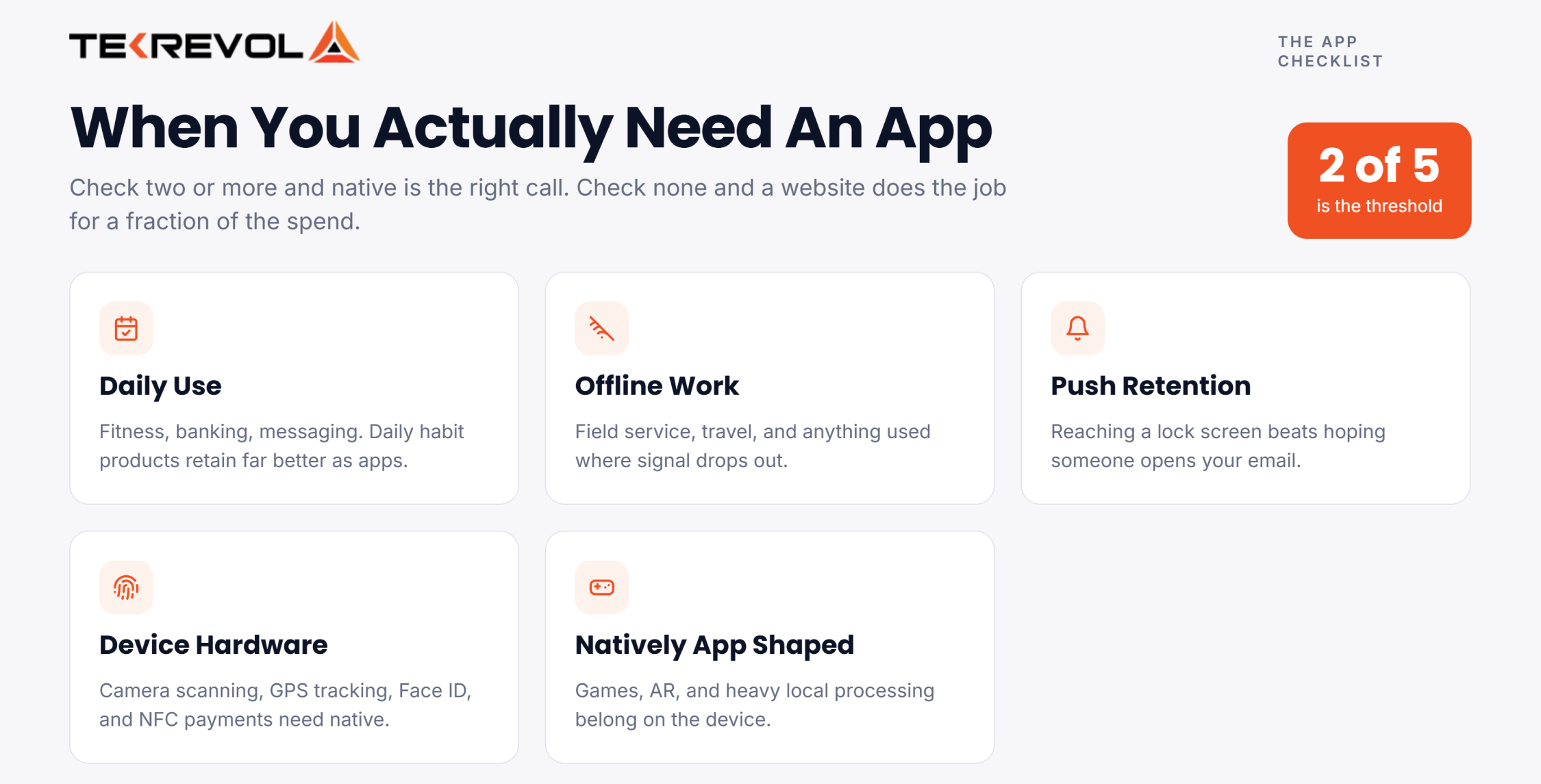
Run through this checklist. If you check two or more, an app is the right call:
- Your users open the product daily: Fitness trackers, banking apps, messaging tools — daily-use products retain better as apps.
- You need offline functionality: Field service tools, travel apps, or anything used somewhere without a reliable signal.
- You need push notifications for retention: Re-engagement lifts significantly when you can ping a user’s lock screen instead of hoping they check email. See our full guide to app user retention strategies for what actually moves the number.
- You need device hardware: Camera scanning, GPS tracking, biometric login, NFC payments — none of this works reliably in a browser.
- The product is inherently app-native: Games, AR experiences, and anything with heavy local processing belong in an app.
What Are the Pros and Cons of a Mobile App?
Mobile apps win on speed, offline access, and device features, but cost more and are invisible to Google search.
Advantages:
- Works offline or with a poor connection
- Full access to camera, GPS, biometrics, NFC
- Push notifications for direct re-engagement
- Faster load times because data is cached locally.
- Higher average order value and repeat purchase rates once installed
Disadvantages:
- Not indexed by Google, discovery depends on App Store/Play Store search (ASO), a smaller, more competitive channel than organic web search. See how ASO differs from web SEO if you’re weighing discovery strategy before committing to native.
- Higher upfront cost ($25K–$120K+)
- App updates require store approval, taking hours on Google Play and days on the Apple App Store.
- Users must find, download, and install before getting any value, a real drop-off point
- Maintenance runs 15–25% of the build cost every year
When Is a Mobile Website the Smarter Business Move?
A mobile website is the better call when you need broad reach, fast updates, or SEO visibility, which describes most businesses. If your product doesn’t clear the app checklist above, a website saves tens of thousands of dollars with zero functional downside for your actual use case.
- You need to reach across every device instantly: No install step, no OS restrictions, no “sorry, we don’t support Android 9.”
- SEO and discoverability matter: Apps are invisible to Google. A website shows up in search the day it launches, which is why bringing in an SEO agency early, rather than after launch, tends to pay off the most.
- You update content often: Blog posts, pricing changes, new pages, all live instantly, no app store review queue.
- You’re testing an idea or working with a tight budget: Validate demand on a website before you commit six figures to a native build.
- Your product has a long purchase cycle: Real estate, B2B services, and high-ticket items don’t need daily engagement; they need to be found.
What Are the Pros and Cons of a Mobile Website?
Mobile websites win on reach, cost, and search visibility, but can’t match an app for offline use or device access.
Advantages:
- Indexed by Google, the single biggest advantage over native apps
- No install step, works instantly on any device with a browser
- Cheaper to build ($8K–$35K typically) and faster to launch (weeks, not months)
- Updates go live instantly, no app store review queue
- One codebase works across iOS, Android, and desktop
Disadvantages:
- No offline access
- No true push notifications
- Limited access to device hardware compared to native
- Generally lower conversion rate per visitor, though it reaches far more visitors overall
Every successful product starts with a clear roadmap.
We help you build websites and mobile apps that create lasting business value.
Get Started Today!Which Converts Better: A Mobile App or a Mobile Website?
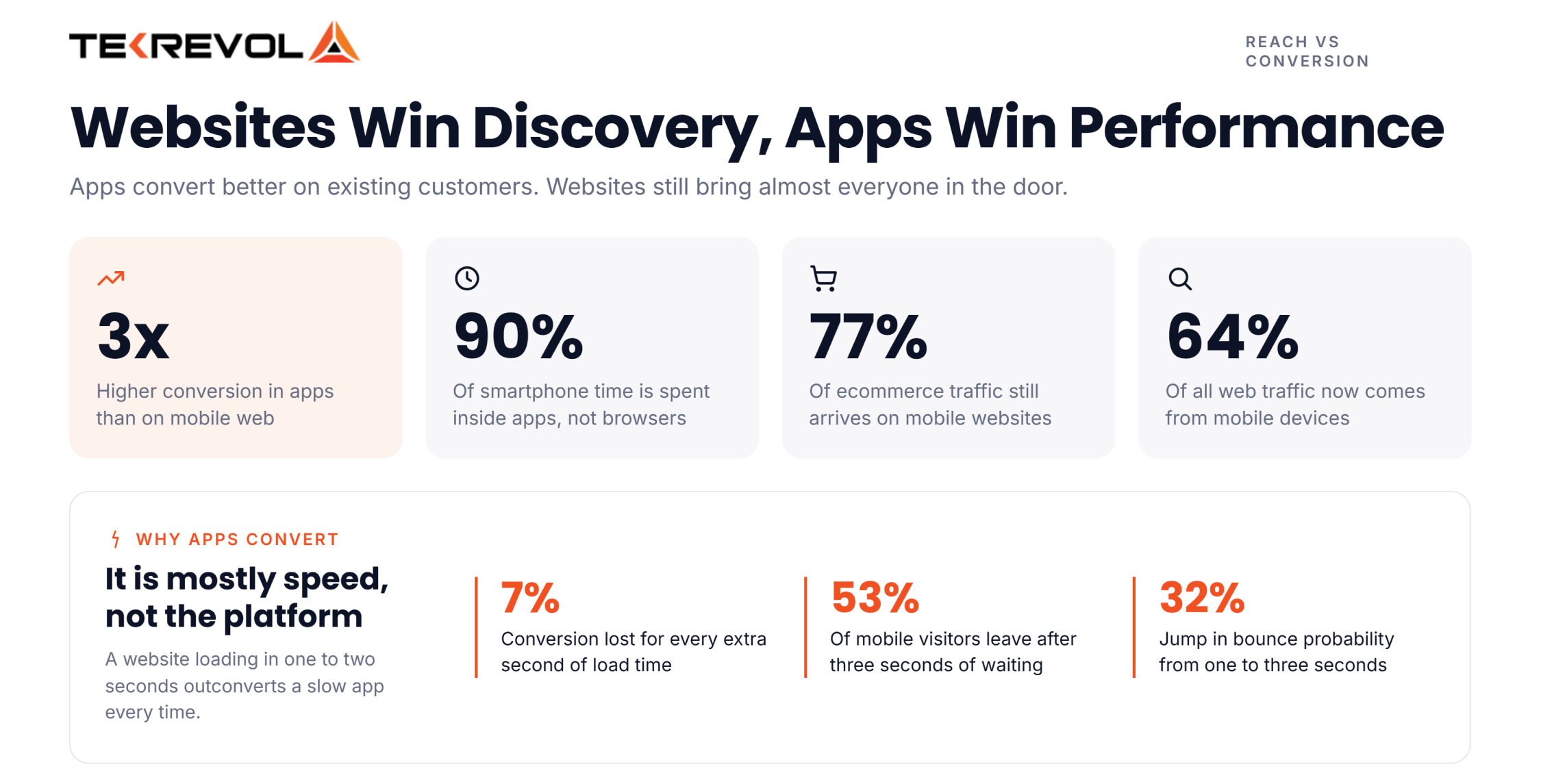
- Apps convert roughly 3x higher than mobile websites, but websites still drive the majority of traffic and discovery.
- More than 90% of smartphone usage time is spent in mobile apps rather than browsers.
- 75–77% of e-commerce traffic still comes through mobile websites.
- Mobile accounts for 62–64% of all web traffic.
Bottom line: Websites win discovery, apps win performance with existing customers.
Why Do Apps Convert Better Than Websites?
Apps convert better mainly because they’re faster, and speed has a direct, measurable effect on whether someone buys.
- A one-second delay in page load time cuts conversions by roughly 7%.
- Over half of mobile visitors, around 53%, abandon a site outright if it takes longer than three seconds to load.
- Google’s own data shows bounce probability jumps 32% when load time goes from one second to three.
This doesn’t mean your website is doomed; it means speed isn’t optional if you’re choosing the website path. A well-optimized mobile website in the 1–2 second range will outconvert a slow, bloated app every time. Before you blame the platform, audit the load time.
If a website is the right fit for your business today, these 10 Website Performance Optimization Strategies can help you maximize its performance.
How Do You Decide Between a Mobile App and a Website?
Use these five questions to decide which option makes the most sense for your business. If most of your answers point to an app, investing in a mobile app is likely worthwhile. If they point to a website, you’ll probably get better value by focusing on your website first.
1. How Often Will People Use It?
- Choose an app if customers will use it every day or several times a week, such as for banking, fitness tracking, messaging, or food delivery.
- Choose a website if people only visit occasionally, such as to read information, book an event, or browse products.
Simple rule: Frequent use favors an app. Occasional use favors a website.
2. Does It Need to Work Offline?
- Choose an app if users need access without an internet connection, such as note-taking, navigation, or field service apps.
- Choose a website if users are almost always online and offline access isn’t essential.
- Consider a PWA if you want limited offline support without the cost of building a native app.
3. Does It Need Phone Features?
- Choose an app if your product relies on features like GPS tracking, biometric login (Face ID or fingerprint), or advanced camera functions.
- Choose a website if users only need simple features like uploading a photo or sharing their location once.
4. What’s Your Budget?
- Under $25,000: A website or Progressive Web App (PWA) is usually the most cost-effective option.
- $25,000–$50,000: Either a PWA or a single-platform app may be a good fit, depending on your users.
- $50,000–$120,000+: A native iOS and Android app is a practical option if you also budget for ongoing maintenance.
5. How Will Customers Find You?
- Choose a website if your business depends on Google search, SEO, or people sharing links.
- Choose an app if most users will come through app stores, push notifications, referrals, or existing customers.
Bottom line: If visibility in search engines is essential, start with a website. If your goal is to keep existing customers engaged, an app can provide a better experience.
Should You Build Both a Mobile App and a Mobile Website?
Yes, most growing businesses eventually run both, using the website for discovery and SEO and the app for retention and repeat engagement. This isn’t a compromise; it’s the most common pattern among businesses with an established user base.
The website (or a PWA) brings in new customers through search and gets updated constantly. The app serves the people who already know you and use the product often, with push notifications, offline access, and a faster experience.
TekRevol’s own client work makes this concrete: when Select Dealer came to TekRevol, the gap wasn’t retention. It was a clunky, outdated web experience slowing dealers down. A rebuilt website, not an app, lifted their efficiency by 40%. It’s a good reminder that “app” isn’t the default upgrade; the fix should match where the business is actually losing ground.
When “both” makes sense:
- You have meaningful mobile traffic already and a segment of repeat users.
- Your acquisition channel (SEO, paid search, social) depends on being indexed and linkable.
- Your retention economics (repeat purchase rate, subscription renewals) justify the extra 15–25%/year in app maintenance.
When “both” is premature:
- You haven’t validated demand yet; build the website or PWA first
- Budget is under $50K total, pick one, prove it works, then expand
Are PWAs a Good Alternative to Native Apps in 2026?
Yes, for many businesses, a Progressive Web App (PWA) can be a cost-effective alternative to a native app. PWAs now deliver fast performance, offline access, and app-like experiences without requiring an app store download. However, they aren’t the right choice for every project.
PWAs Have Closed Much of the Performance Gap
Modern web technologies have made PWAs faster and more reliable than ever. Features like offline caching, push notifications, and background syncing now deliver an app-like experience for eCommerce stores, booking platforms, customer portals, and business tools.
That said, native apps still provide better performance for graphics-intensive games, augmented reality (AR), advanced camera features, and apps that rely heavily on device hardware.
PWAs Offer Better Visibility Through Search
Unlike native apps, PWAs can be indexed by search engines. This means customers can discover your business through Google Search, share links directly, and access your platform without installing anything.
For businesses that rely on SEO and organic traffic, this is one of the biggest advantages of choosing a PWA over a native app.
Lower Development Costs and Faster Launches
A single PWA works across desktop, Android, and iOS browsers, reducing development time and maintenance costs compared to building separate native apps.
Many businesses launch a PWA first to validate demand and user behavior before investing in a full native mobile app.
Native Apps Still Deliver the Best Mobile Experience
If your product depends on advanced hardware features such as continuous GPS tracking, biometric authentication, Bluetooth devices, AR experiences, or high-performance graphics, a native app remains the better choice.
Native apps also provide deeper operating system integration and the smoothest user experience for customers who interact with your product frequently.
Does a Mobile App or Mobile Website Generate More Revenue Per Customer?
However, apps and websites serve fundamentally different roles in your sales funnel:
- Mobile Websites excel at top-of-funnel acquisition via SEO and broad audience reach.
- Mobile Apps excel at bottom-of-funnel retention and driving repeat purchases from existing customers.
| Metric | Mobile Website | Mobile App |
| Primary Advantage | Customer acquisition via search & reach | High retention & repeat purchases |
| Average Order Value (AOV) | Baseline | 10–30% higher |
| Customer Lifetime Value (LTV) | Baseline | 2.8x–6x higher |
| Monthly Repeat Purchase Rate | 15–25% | 35–45% |
| Checkout Experience | Standard form entry | Instant via saved payments & biometric login |
If your main goal is reaching new audiences, invest in your mobile website; if you are ready to maximize customer loyalty and revenue per user, build an app. For brands doing over $500K in mobile sales, an app isn’t just an expense; it is your highest-yielding customer retention channel.
How Much Does a Mobile App vs. Mobile Website Cost in 2026?
Building a mobile website costs $8,000 to $50,000+, whereas a mobile app costs $25,000 to $300,000+.Beyond the initial build, a native mobile app carries significantly higher ongoing infrastructure and maintenance overhead.
| Tier | Cost Range | What You Get |
| MVP (single platform) | $25,000–$60,000 | Core features only, one OS |
| Mid-market app | $50,000–$120,000 | Cross-platform, moderate feature set |
| Enterprise app | $300,000–$500,000+ | Multi-department, deep integrations, full compliance |
The hidden costs nobody puts in the proposal:
- App store fees: $99/year (Apple) and $25 one-time (Google), small, but easy to forget
- Push notification infrastructure: free tiers exist (Firebase), but scaled tools like OneSignal or Braze run $15K–$100K+/year at enterprise volume
- Crash monitoring and bug tracking: Sentry or Bugsnag, $26–$500+/month depending on team size
- Annual maintenance: 15–25% of your original build cost, every year, forever, the line item that quietly wrecks budgets
- Security hardening for regulated data: encryption libraries, penetration testing, and compliance audits add further cost for finance/health apps specifically
A $60,000 app costs another $9,000–$15,000 every single year just to stay alive, before a single new feature ships. Run that math before you commit to native.
How Does the Right Choice Change by Business Size?
Small businesses rarely need native apps on day one; mid-market often needs both; enterprise justifies native through scale.
- Small business: For local businesses and early-stage startups, MVP development usually begins with a responsive website or PWA instead of a native app. It lets you validate your idea, attract early users, and refine your product before investing in a full mobile app.
- Mid-market: As businesses grow, a website alone may no longer meet customer and operational needs. Many adopt a hybrid strategy, using a website to attract new users and a cross-platform app to improve retention and streamline day-to-day operations.
- Enterprise: At scale, native apps are usually justified because the retention and engagement math works in your favor across a large user base. Multi-department rollouts, deep system integrations, and compliance requirements push costs to $300K+, but the ROI scales with user volume.
Common Mistakes That Waste Your App Development Budget
Most wasted budget comes from skipping validation, not from picking the “wrong” platform outright.
- Building an app before validating the idea: Launch on web first. Prove people want it. Then decide if native is worth the spend.
- Ignoring app store approval timelines: Apple’s review process can add days to weeks to every release, plan your roadmap around it.
- Underestimating annual maintenance: That 15–25% yearly cost isn’t optional. Budget for it from day one, not after the invoice shows up.
- Choosing native when cross-platform would’ve worked: Flutter and React Native cut development cost by 30–50% compared to building separate iOS and Android codebases, often with no noticeable difference for the end user.
- Skipping the security conversation for sensitive data: If you’re touching payments or health data, the security architecture decision needs to happen before the platform decision, not after.
How TekRevol Builds Mobile Experiences That Actually Convert
Most businesses that ask whether they need a mobile app or a website are solving the wrong problem. The better question is: Where are you losing customers, during discovery or after they’ve already engaged with your business?
That’s where we begin. Every project starts with an audit of your customer journey to identify where users drop off. If the biggest opportunity is improving online visibility, conversions, or lead generation, our web development services focus on building fast, SEO-friendly websites that turn visitors into customers. If long-term engagement, repeat purchases, or operational efficiency is the priority, we recommend a mobile app designed around those goals.
Rather than pushing the most expensive solution, TekRevol matches the technology to your business objectives. Whether that’s a website, a mobile app, or a combination of both, we build digital experiences that solve the right problem and deliver measurable business results.
Turn user intent into revenue with a purpose-built mobile experience.
Share your challenges, and we'll recommend the technology that delivers the best ROI.
Get in Touch


