



- Top selfie apps grow with AI editing, AR filters, and instant social sharing features.
- AR SDKs like Banuba and DeepAR can cut development time from 14 weeks to 3–5 weeks.
- AR camera technology now powers ecommerce, beauty, healthcare, and EdTech industries.
- ARKit and ARCore still outperform Flutter and React Native for real-time camera precision.
- ARKit delivers sub-mm facial tracking accuracy for premium cosmetic try-on experiences.
- Banuba and Snap Camera Kit licensing costs range from $5K–$25K yearly.
- Modern selfie apps now favor natural AI enhancement over heavy “plastic” face filters.
- AR virtual try-on can reduce ecommerce product returns by up to 40%.
- Low-end device optimization is the biggest reason AR app budgets exceed expectations.
- Basic selfie app MVPs start around $15K–$35K, while enterprise apps exceed $250K.
It usually starts with something simple, a quick selfie before heading out. You swipe through a few filters, smooth the lighting, maybe try a virtual lipstick shade, and suddenly you’re not just taking a photo, you’re interacting with a mini experience.
Now imagine that same camera helping someone try on sunglasses before buying, tracking their skin condition over time, or even training through a virtual coach. That’s the shift most people don’t notice that camera apps quietly evolved from fun tools into powerful, AI-driven platforms shaping entire industries.
Behind every “effortless” filter or real-time effect is a complex system of face tracking, rendering pipelines, and on-device intelligence. And as demand grows across beauty, retail, and healthcare, businesses are no longer asking if they should build a camera app; they’re asking how to do it right.
For teams exploring advanced capabilities like AR filters or personalized AI experiences, investing in custom AI development is becoming a key part of building apps that feel responsive, intelligent, and truly user-centric.
The Camera App Market
For most people, the “camera app” is all about beauty filters and selfie touch-ups. But the real business opportunity is broader, and growing much faster than the consumer market alone suggests.
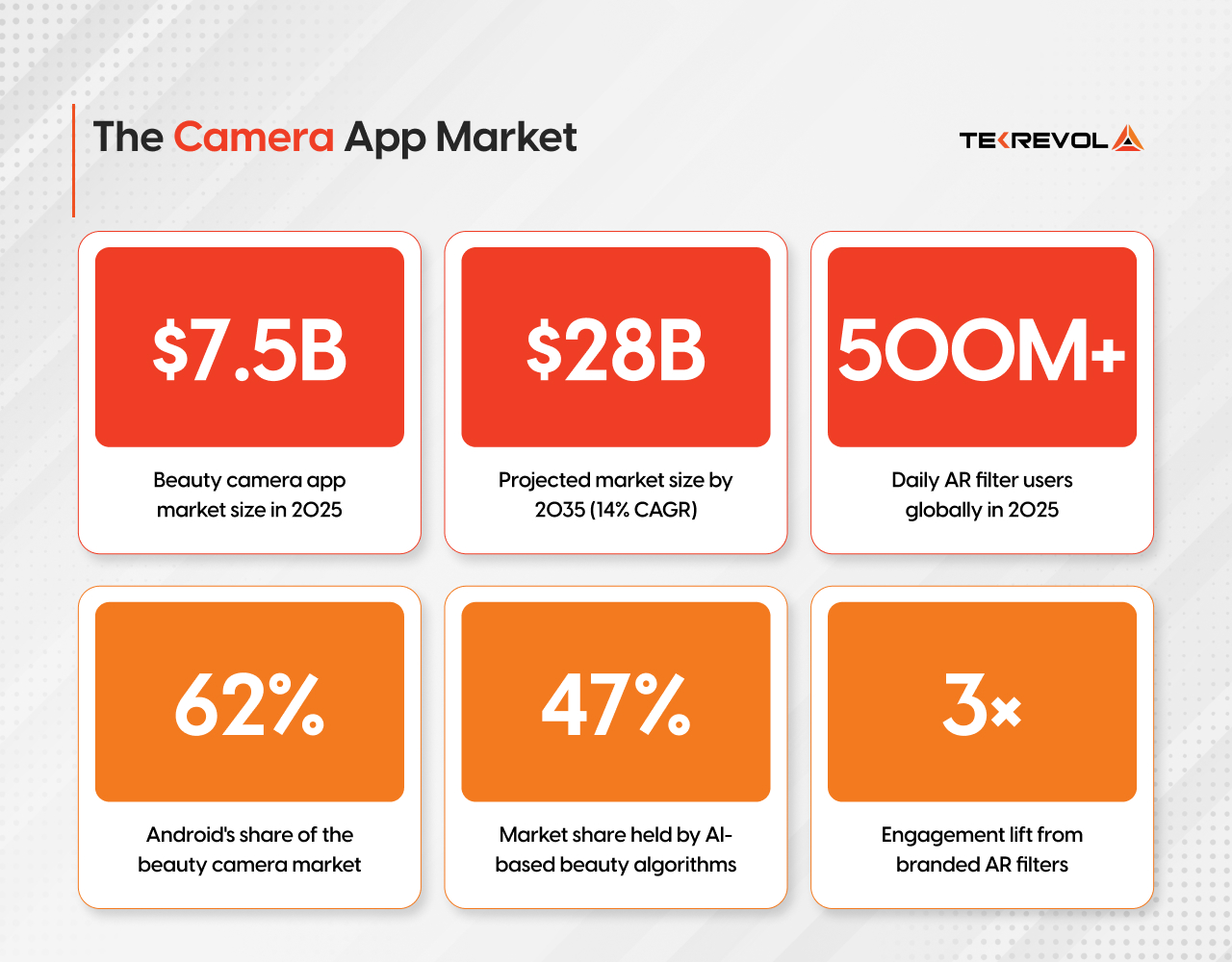
Beyond selfies, camera technology is reshaping entire industries.
Camera Tech Is Now a Revenue Tool
Fashion brands are losing 30% of revenue to returns. Beauty counters are losing foot traffic to e-commerce. Dermatology clinics are drowning in appointment backlogs. In each case, the fix isn’t a new product; it’s a smarter camera.
Here’s what that looks like across the verticals investing heaviest right now:
Fashion & Retail
Virtual try-on reduces return rates by up to 40% and lifts conversion when shoppers can see a product on their body before buying. It turns a product page into a fitting room.
Beauty & Cosmetics
Real-time AR makeup lets customers test 50 shades of lipstick in 30 seconds without touching a tester. L’Oréal, MAC, and hundreds of indie brands have already made this table stakes.
Healthcare & Dermatology
AI-powered skin analysis apps give clinicians a repeatable, documented baseline for tracking conditions like acne severity, pigmentation, and rosacea, without a physical visit.
EdTech & Corporate Training
Face-tracked AR personas, gamified progress rewards, and interactive simulations drive completion rates that static video content never could.
Top Camera Apps — Technical Breakdown
Before building, it pays to know what the best in the market are actually doing under the hood. Here’s how five leading camera apps implement their core differentiators:
| App | Platform | Key Tech | Differentiator | Real-Time AR | AI Editing |
| Snapchat | iOS & Android | Lens Studio, ARCore/ARKit, ML | Community AR lens marketplace (250k+ lenses) | ✔ | ✔ |
| YouCam Makeup | iOS & Android | Perfect Corp AI, ARKit | Real-time makeup try-on; 1.2B+ AR interactions in 2026 | ✔ | ✔ |
| FaceApp | iOS & Android | GAN models, Neural Rendering | AI aging, gender swap, expression change | ✘ | ✔ |
| SNOW / B612 | iOS & Android | SNOW Corp AI, face mesh | Viral sticker AR + social sharing loop | ✔ | ✔ |
| Facetune | iOS & Android | Lightricks AI engine | Professional-grade post-edit: skin, teeth, reshape | ✘ | ✔ |
Core Features to Build a Camera App
There’s a meaningful difference between a camera app that works and one that keeps users coming back. Here’s the feature set that actually drives retention.
Essential Layer (MVP)
- Real-time camera capture — photo and video with multi-resolution support
- Basic filter pipeline — brightness, contrast, saturation adjustments via GPU shaders
- Face detection — identifying facial landmarks as anchors for overlays
- Gallery & media management — save, organize, preview captures
- Social sharing — native share sheet integration (Instagram, WhatsApp, TikTok)
Growth Layer (Post-MVP)
- AR filter overlays — 2D/3D face-mapped effects using ARKit or ARCore
- Beauty algorithm — skin smoothing, blemish removal, teeth whitening
- Background removal/replacement — semantic segmentation via ML Kit or CoreML
- Style transfer — neural rendering to apply artistic styles to captures
- Live streaming filters — real-time effects over video output (for creator tools)
Enterprise Layer (B2B / Vertical)
- Virtual try-on module — product AR overlay synced to a product catalogue
- Skin analysis API — pigmentation, texture, and condition scoring for health/beauty
- SDK/white-label packaging — camera module embeddable in third-party apps
- Analytics dashboard — filter usage heatmaps, session length, conversion tracking
How to Build a Camera App: Step-by-Step
This is where most guides wave their hands. Let’s get concrete. Building a camera app follows a well-defined progression; skipping steps here is the #1 reason teams end up rebuilding from scratch.
1. Define Platform and Camera Access Strategy
Decide: native iOS, native Android, or cross-platform. Native gives you full access to Camera2 API (Android) and AVFoundation / ARKit (iOS). Cross-platform frameworks like Flutter or React Native can work for basic apps, but often hit limits when it comes to real-time camera pipelines. For AR-heavy apps, native is almost always the right call.
2. Set Up the Camera Capture Pipeline
On Android, use Camera2 API or CameraX (Jetpack). On iOS, use AVCaptureSession with AVCaptureVideoPreviewLayer. Configure frame resolution (720p for preview, 4K for capture), frame rate targets (30fps baseline, 60fps for AR), and buffer formats (YCbCr for ML processing, BGRA for GPU rendering).
3. Implement Face Detection & Landmark Tracking
Use ML Kit Face Detection (cross-platform) or Apple’s Vision framework (iOS). For high-fidelity work, e.g., 468-point face mesh, use ML Kit’s Face Mesh API. This gives you the anchor points on which to register AR overlays with sub-millimeter precision. Latency target: under 20ms per frame.
4. Build the Filter Rendering Pipeline
Process frames through a GPU shader chain using Metal (iOS) or OpenGL ES / Vulkan (Android). A typical pipeline: raw camera frame → face detection → landmark mapping → shader transform → display buffer. Keep heavy AI inference off the render thread — run it async and apply results to the next frame.
5. Integrate AR Overlays
Choosing between native AR frameworks and third-party SDKs is a foundational decision that affects your entire engineering roadmap. Native options (ARKit on iOS, ARCore + ML Kit on Android) offer high precision and full control but require significant development time, up to 14 weeks for a production-ready pipeline. SDKs like Banuba, DeepAR, or Snap’s Camera Kit cut that to 3–5 weeks at the cost of licensing fees and some customization limits.
- ARKit (iOS) uses a 52-blendshape face model at 60 fps via the TrueDepth sensor, sub-millimeter accuracy, ideal for premium cosmetic try-on, but costly to build (~10–14 weeks).
- ARCore (Android) works without a depth sensor, so it’s more device-compatible but less geometrically precise; pairing it with ML Kit’s 468-point face mesh improves accuracy significantly.
- Third-party SDKs (Banuba, DeepAR, Snap Camera Kit) offer ready-made face tracking and rendering in 3–5 weeks; licensing runs $5,000–$25,000/year, depending on MAU volume.
- Customization ceiling with SDKs is rarely hit for standard commercial apps, but can be a constraint if filter quality is a core differentiator.
- Critical early decision: Determine if your filters are face-mapped (works with any approach) or environment-aware (requires ARKit world tracking or ARCore scene understanding — most SDKs won’t suffice).
6. Add AI-Powered Post-Processing
On-device AI inference has matured fast. Two years ago, running a background removal model at 30fps on a mid-range Android device required aggressive model compression that hurt output quality. Today, the NNAPI on Android and the Neural Engine on Apple Silicon handle quantized models efficiently enough that real-time segmentation, skin smoothing, and style transfer are all achievable on devices from 2021 and newer, without the cloud round-trip that kills perceived latency.
The workflow for adding AI post-processing breaks into three stages. First, model selection: choose pre-trained models where available, MediaPipe Selfie Segmentation for background removal, MediaPipe Face Mesh for landmark-based beauty effects, rather than training from scratch.
Second, optimization: convert to TensorFlow Lite (Android) or CoreML (iOS), apply INT8 quantization, and benchmark on your minimum supported device. Third, pipeline integration: run inference on a background thread and feed results to the render thread asynchronously. Never block the camera preview on AI output; render the previous result while the next one computes.
For beauty algorithms specifically, frequency-domain skin smoothing (separating fine texture from tone, then selectively smoothing tone while preserving texture) produces more natural results than simple Gaussian blur at any intensity setting. It’s the difference between skin that looks retouched and skin that looks like skin.
7. Performance Optimization & QA
Profile with Instruments (iOS) or Android Studio Profiler. Targets: camera preview at 30fps with no dropped frames, memory under 200MB peak, battery drain under 8% per hour. Test across low-end devices, 20–30% of your users are on hardware from 3–5 years ago.
8. Distribution & Analytics
App Store / Play Store submission with App Tracking Transparency compliance (iOS 14.5+). Instrument filter usage events in Mixpanel or Amplitude to understand which effects drive engagement. A/B test filter packs to optimize conversion from free to premium.
Building AR Filters: ARKit vs ARCore
This is where iOS and Android diverge most sharply from an engineering standpoint. The choice of AR framework shapes your entire filter pipeline, so it’s worth understanding the tradeoffs before you commit.
| Feature | ARKit (Apple / iOS) | ARCore (Google / Android) |
| Platform | iOS 11+ (iPhone 6s and above) | Android 7.0+ (ARCore-certified devices) |
| Face Tracking | TrueDepth Camera (iPhone X+) — depth-accurate 52-point blendshape | Front camera face detection (RGB only — no depth sensor) |
| Face Mesh Fidelity | High — depth data enables sub-mm precision geometry | Medium — RGB estimation, accuracy varies by lighting |
| Body Tracking | Full body pose estimation (ARKit 3+) | Pose estimation via ML Kit Pose Detection |
| Environment Mapping | LiDAR scanner on Pro models — detailed 3D mesh of surroundings | Plane detection, depth API on supported devices |
| Eye Tracking | Built-in ARFaceAnchor eye tracking | Not natively supported |
| Light Estimation | Directional & environmental intensity | Directional light estimation via Environmental HDR |
| Integration Language | Swift / Objective-C with SceneKit, RealityKit | Kotlin / Java; Unity and Unreal Engine supported |
| Cross-platform SDK options | Unity AR Foundation, Banuba, DeepAR | Unity AR Foundation, Banuba, DeepAR, Vuforia |
| Best for | Premium beauty filters, precise makeup try-on, face sculpting | Social AR effects, mid-range device support, broad reach |
ARKit gives you the depth. ARCore gives you the reach. For most commercial apps, you need both, and that means planning a platform-specific rendering pipeline from day one.
For apps targeting both platforms with AR features, AR Foundation (Unity) provides a unified API layer that abstracts ARKit and ARCore. It’s the practical choice for teams who can’t maintain two separate native implementations, but expect 10–15% overhead in rendering performance vs. pure native.
Our iOS app development services leverage ARKit’s TrueDepth camera for premium cosmetic try-on apps.
In contrast, our Android app development company prioritizes ARCore + ML Kit combinations to maximize compatibility across mid-range devices that dominate emerging markets.
Partner with TekRevol for a High-Impact Selfie App
Our team knows how to transform creative features into engaging mobile experiences—building selfie apps designed for user retention, performance, and market impact.
Get Started with Your Dream AppVirtual Try-On: The Retail & Fashion Use Case
Virtual try-on is no longer a novelty feature for enterprise apps; it’s a conversion tool. Brands using AR try-on report meaningful lift in purchase intent and a reduction in product returns that can account for 20–30% of revenue in fashion e-commerce.
Here’s how the technical stack for a virtual try-on module breaks down:
| Component | Technology | Purpose |
| Face/Body Detection | ML Kit Pose Detection, ARKit Body Tracking | Anchor points for placing product overlays accurately |
| 3D Product Assets | glTF / USDZ models, Blender pipeline | Photorealistic product renders that respond to lighting |
| Skin Tone Matching | Custom CNN / on-device ML model | Adapts makeup/color product appearance to the user’s tone |
| Physics Simulation | SceneKit / RealityKit rigid body physics | Jewelry, accessories that move naturally with head motion |
| Product Catalogue Sync | REST API + CDN-hosted 3D assets | Pulls live inventory; associates AR model with SKU |
| Conversion Tracking | Firebase / Mixpanel events | Tracks “try-on → add to cart” funnel |
The critical engineering challenge in virtual try-on isn’t the AR itself; it’s the asset pipeline. Retailers often have thousands of products. Creating quality 3D models for each is expensive. The solution most production apps use is a hybrid: high-quality 3D models for hero products + fast 2D overlay approximation for large catalogues, with an ML model trained to swap 2D product textures onto tracked body regions.
TekRevol’s retail software services provider team advises clients to resist the urge to convert their full product library upfront. A focused pilot of 50–100 AR-ready SKUs lets you validate conversion uplift before scaling the asset pipeline.
AI-Powered Editing Features
The market has spoken: users want AI editing that looks natural, not plastic. The “Instagram face” filter aesthetic is in retreat. What’s winning now is subtle, personalized enhancement, adjustments that adapt to the individual face rather than applying a blanket treatment.
Key AI Editing Capabilities
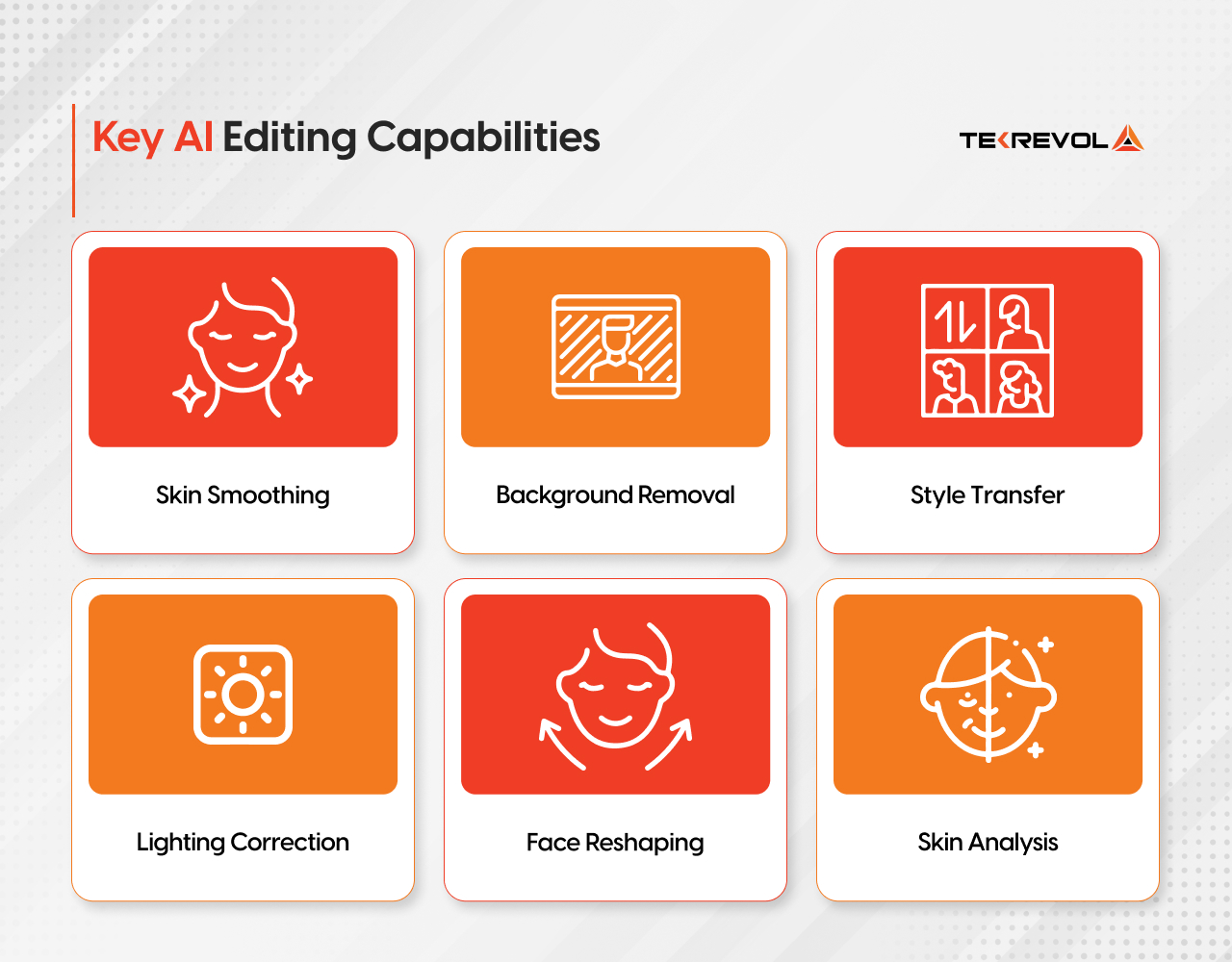
Skin Smoothing
Frequency-domain separation retains skin texture while reducing blemishes. Models trained on diverse skin tones avoid the “wax face” problem of earlier approaches.
Background Removal
Semantic segmentation via DeepLab or MediaPipe Selfie Segmentation. Runs at 30fps on mid-range hardware. Handles complex edges like hair with transformer-based models.
Style Transfer
Neural style transfer using lightweight CNN architectures (MobileNet base). Applied per-capture rather than real-time to manage compute. Increasingly replaced by diffusion-based approaches for quality.
Lighting Correction
AI relighting models simulate studio lighting from a single image. BytePlus and Tencent RTC SDKs now offer this on-device at under 50ms via NPU acceleration.
Face Reshaping
Thin face, jawline, nose, eye size, done via 3D face mesh warp rather than 2D distortion. The mesh-based approach prevents the unnatural warping artifacts of older methods.
Skin Analysis
Dermatological scoring (acne, pigmentation, pores) using custom CNNs. Used in healthcare and premium beauty apps to give personalized skincare recommendations.
Tech Stack for a Camera App
There is no single right stack; it depends on your platform target, team expertise, and the complexity of your AR/AI features. Here’s what a production-grade camera app looks like at each layer:
| Layer | iOS | Android | Cross-Platform |
| Language | Swift 5+ | Kotlin | Flutter / React Native |
| Camera API | AVFoundation, AVCaptureSession | CameraX / Camera2 API | camera package (Flutter) |
| AR Framework | ARKit, RealityKit | ARCore | AR Foundation (Unity) |
| Face Detection | Vision framework, ARFaceAnchor | ML Kit Face Detection, Face Mesh | ML Kit (cross-platform) |
| GPU Rendering | Metal, SceneKit | OpenGL ES, Vulkan | Unity / Unreal Engine |
| On-Device AI | CoreML, Create ML | TensorFlow Lite, NNAPI | TFLite (via plugin) |
| AR SDK (optional) | Banuba, DeepAR, Snap Lens | Banuba, DeepAR, ARCore | Banuba SDK (cross-platform) |
| Backend | Node.js / Python (FastAPI) + Firebase or AWS Amplify for real-time sync | ||
| Media Storage | AWS S3 / Firebase Storage + CloudFront CDN | ||
| Analytics | Mixpanel / Amplitude + Firebase Crashlytics | ||
Key Stack Decision: Native SDK vs Third-Party AR SDK
Using ARKit/ARCore natively gives you maximum control and performance, but building a full face-filter pipeline from scratch takes a senior team 4–6 months. Third-party SDKs like Banuba or DeepAR compress that to 4–6 weeks with comparable quality; the tradeoff is SDK licensing cost ($5k–$25k/year, depending on MAU tier) and some loss of fine-grained control. For most commercial apps, the SDK approach wins in terms of time-to-market.
Development Cost: What Does a Camera App Actually Cost?
Cost depends heavily on feature scope, platform choices, and whether you use third-party SDKs. The following table breaks down realistic ranges for a US-based or nearshore development engagement. Teams in South Asia (like TekRevol) can deliver the same quality at 40–55% lower cost.
| App Type | Key Features | Timeline | Cost Range (USD) |
| Basic Camera App (MVP) | Capture, basic filters, gallery, share | 6–10 weeks | $15,000 – $35,000 |
| Beauty / Selfie App | Face detection, beauty algo, AR stickers, in-app purchase | 12–18 weeks | $40,000 – $80,000 |
| Full AR Filter App | ARKit/ARCore integration, 3D overlays, real-time effects, AR SDK | 16–24 weeks | $70,000 – $130,000 |
| Virtual Try-On App (Retail) | Body/face tracking, 3D product assets, catalogue sync, analytics | 20–30 weeks | $90,000 – $180,000 |
| Enterprise / Healthcare Imaging | Custom AI models, HIPAA compliance, skin analysis API, dashboards | 24–40 weeks | $120,000 – $250,000+ |
AR/VR Development — Enterprise Immersive Apps
TekRevol’s dedicated AR/VR practice has shipped augmented reality applications for entertainment, events, and B2B clients. From the High Def Events platform, which enables users to create videos and visuals of auction products with interactive AR features, to educational applications incorporating realistic AR simulations, the team brings ARKit, ARCore, and Unity-based AR Foundation experience across iOS and Android.
For brands exploring camera features, virtual try-on, or immersive marketing campaigns, this background is directly relevant.
Explore our AR/VR services
How TekRevol Builds AI Camera Experiences
TekRevol approaches camera app development the way most agencies approach their flagship products, with a dedicated pipeline for each technical layer rather than a generalist team adapting as they go.
On the AR side, the team has hands-on experience with ARKit and ARCore integration across consumer and enterprise projects. That means face tracking implementations that hold precision across varied lighting conditions, 3D filter pipelines tuned for real-world device performance, and AR try-on features built around actual retail workflows rather than demo scenarios.
For projects requiring cross-platform AR, the team works with both AR Foundation and third-party SDKs, selecting based on the specific fidelity and timeline requirements of each build.
On the AI side, TekRevol’s engineering practice covers the full on-device inference workflow, model selection, quantization, pipeline integration, and performance tuning across iOS and Android. Real-time face detection, beauty enhancement algorithms, background segmentation, and skin analysis features have all been shipped in production apps, not just prototyped.
The camera SDK integration work, whether that’s CameraX and Camera2 API on Android, or AVFoundation on iOS, is handled natively, which matters when you’re targeting smooth real-time filter performance rather than acceptable performance. Frame rate consistency, memory management, and battery efficiency are treated as first-class requirements rather than post-launch polish.
The result is camera experiences that feel immediately responsive, visually refined, and technically sound on the devices your users actually carry, which is the bar the 2026 market sets, and the one TekRevol builds to.
TekRevol also supports apps that connect with larger ecosystems through integrated and AI-powered functionality built via intelligent AI development services.
Whether your goal is research comparison or full-scale launch, TekRevol delivers AI camera experiences that are practical, reliable, and ready for the 2026 market.
Build a Camera Experience Users Will Love
TekRevol integrates AR, AI, and real-time image processing into camera apps across mobile, wearables, and web—creating immersive experiences built for engagement and scale.
Book a Free Demo!


