


- The best low-code platforms for web development in 2026 are Bubble, WeWeb, Retool, OutSystems, and Webflow, each of which leads a specific use case category.
- Low-code platforms for web development cut development time by up to 10xs, but the right platform depends on your use case.
- Vendor lock-in is a major risk when code export isn’t available.
- Hidden costs can increase total platform expenses by 3–5x.
- AI-assisted generation inside low-code platforms speeds up setup but introduces structural risks.
- TekRevol builds production-grade web products using strategic low-code components, where they accelerate delivery.
You want to build a web product. You have a timeline. You may not have six senior developers on standby. Low-code platforms for web development exist precisely for this situation, and in 2026, the best of them can genuinely compete with custom-built products across a wide range of use cases.
The problem is that nearly every platform markets itself as fast, flexible, and scalable. While many are right in some areas, they often fall short in others that only become apparent as your product grows. Selecting the wrong platform can create costly limitations at the worst possible moment, when your user base is expanding, and rearchitecting isn’t a realistic option.
That’s why getting the selection right the first time matters so much. As a web development company that has built 500+ web products across industries, TekRevol has worked with, alongside, and in spite of every major low-code platform on the market.
This guide gives you the real picture, which platforms lead which use cases, what the hidden costs look like, and a scorecard to match your team’s readiness to the right platform tier.
What Are Low-Code Platforms for Web Development?
That distinction matters. Low-code is not no-code. No-code tools eliminate writing code entirely. They’re faster to start, but they hit hard ceilings quickly. Low-code keeps developers in control of the parts that require real customization, while automating the repetitive structural work that slows teams down.
Here’s where each approach fits:
| Approach | Who Uses It | Customization | Ceiling | Best For |
| No-Code | Non-developers | Low | Low–Medium | Marketing pages, simple tools |
| Low-Code | Developers + technical teams | High | Medium–High | Web apps, portals, internal tools |
| Custom Code | Senior engineers | Unlimited | None | Complex systems, SaaS products |
The line between low-code and no-code is blurring in 2026. AI-assisted generation features inside platforms like WeWeb and Bubble now let non-developers go further than before. But the architectural limits haven’t changed, only the speed at which you can reach them.
Not sure if low-code is right for your web project?
We assess your use case, technical resources, and growth goals to determine whether a low-code platform or custom solution is the better fit.
SBook a free scoping call.Why Low-Code Web Development Has Reached a Tipping Point
Low-code platforms for web development are mainstream now because the global developer shortage made them structurally necessary, not just convenient.
The numbers confirm it:
This growth isn’t just about convenience; it’s a response to the shortage of software developers. Low-code platforms help smaller teams build and launch products much faster without needing large engineering teams.
However, faster development comes with trade-offs. Issues like vendor lock-in, rising usage costs, and limited customization can become challenges as your product grows.
Is Your Team Ready? The Low-Code Platform Readiness Scorecard
Before picking a platform, run this five-part scorecard. It tells you which platform tier your team is ready for, and prevents the most common and expensive mistake in low-code adoption: choosing an enterprise platform at startup scale, or a no-code tool at enterprise scale.
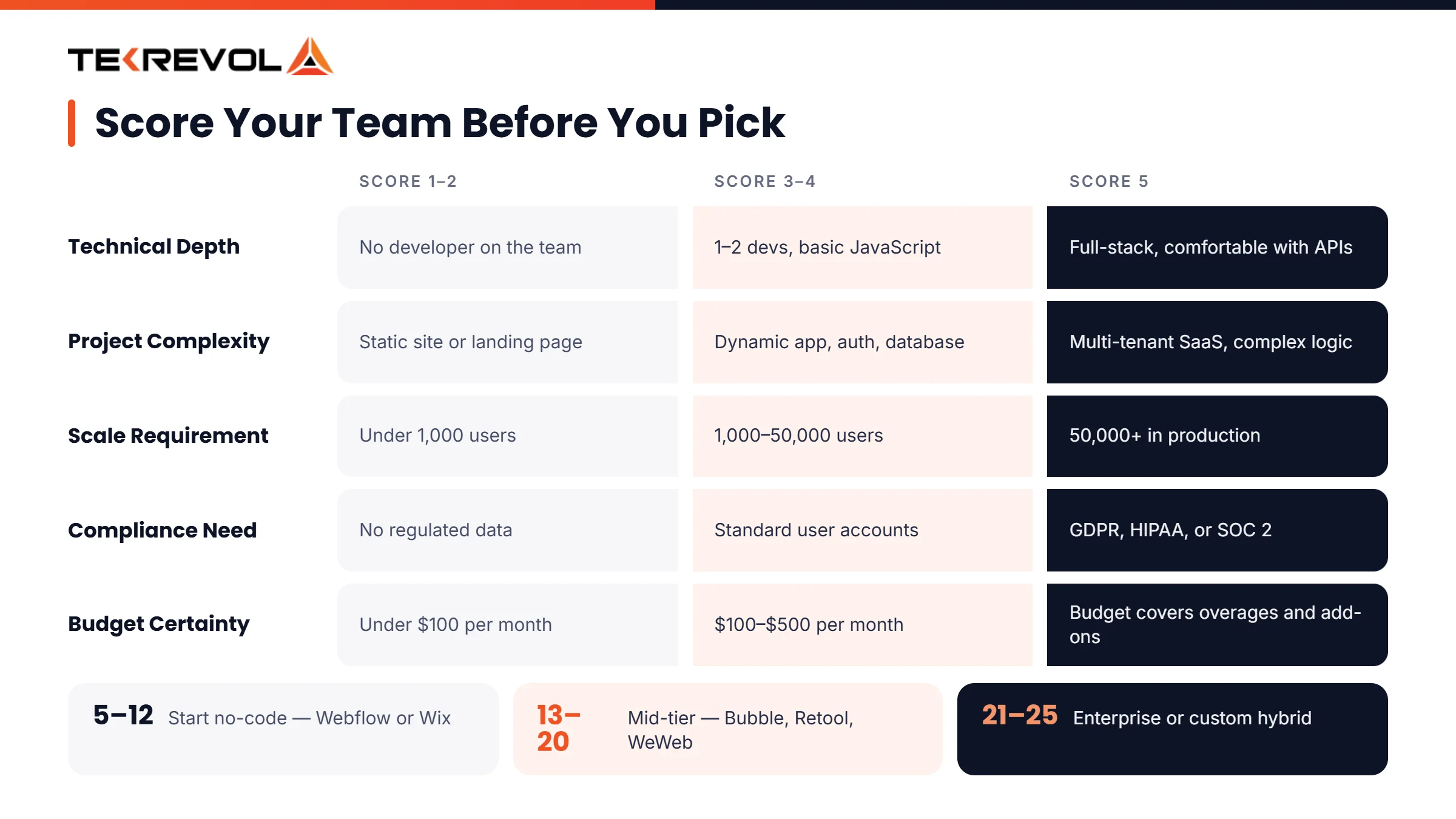
Score yourself 1–5 on each dimension:
| Dimension | Score 1–2 (Not Ready) | Score 3–4 (Deployment-Ready) | Score 5 (Optimized) |
| Technical Depth | Non-technical team, no developer | 1–2 developers, basic JS knowledge | Full-stack developers comfortable with APIs |
| Project Complexity | Static site or landing page | Dynamic web app, user auth, database | Multi-tenant SaaS, complex business logic |
| Scale Requirement | Under 1,000 users | 1,000–50,000 users | 50,000+ users, high-traffic production app |
| Compliance Need | No regulated data | Standard user accounts | GDPR, HIPAA, SOC 2 required |
| Budget Certainty | Under $100/month | $100–$500/month | Defined budget including overages and add-ons |
What your score means:
- 5–12: Start with a no-code tool (Webflow, Wix). Low-code complexity will slow you down at this stage.
- 13–20: Mid-tier low-code platforms (Bubble, Retool, WeWeb). Target one use case, validate it, then expand.
- 21–25: Enterprise low-code (OutSystems, Mendix) or a custom build with low-code components.
You should also check the best web development tools along with a full technology stack, alongside platform options, before making this call.
What to Build and Which Low-Code Web Platform Fits It
The right platform depends on what you’re building, not which features a product page lists. Most teams make platform decisions by comparing feature checklists. That’s the wrong framework. The right question is: what does my product actually need to do?
Here’s a use case matrix that gives you a direct answer:
| What You’re Building | Best Platform Category | Examples |
| Marketing website or landing pages | No-code | Webflow, Wix |
| Internal tools, dashboards, and admin panels | Low-code | Retool, Appsmith |
| Customer-facing web app with auth + database | Low-code | Bubble, WeWeb + Xano |
| Client portal or B2B SaaS | Low-code / custom hybrid | WeWeb, OutSystems |
| Enterprise multi-department platform | Enterprise low-code | OutSystems, Mendix, Power Apps |
| Rapid MVP for investor validation | Low-code or hybrid | Bubble, custom MVP |
For teams deciding between a platform approach and a fully custom build, TekRevol’s web application development guide walks through that decision in detail.
Top 8 Low-Code Platforms for Web Development in 2026
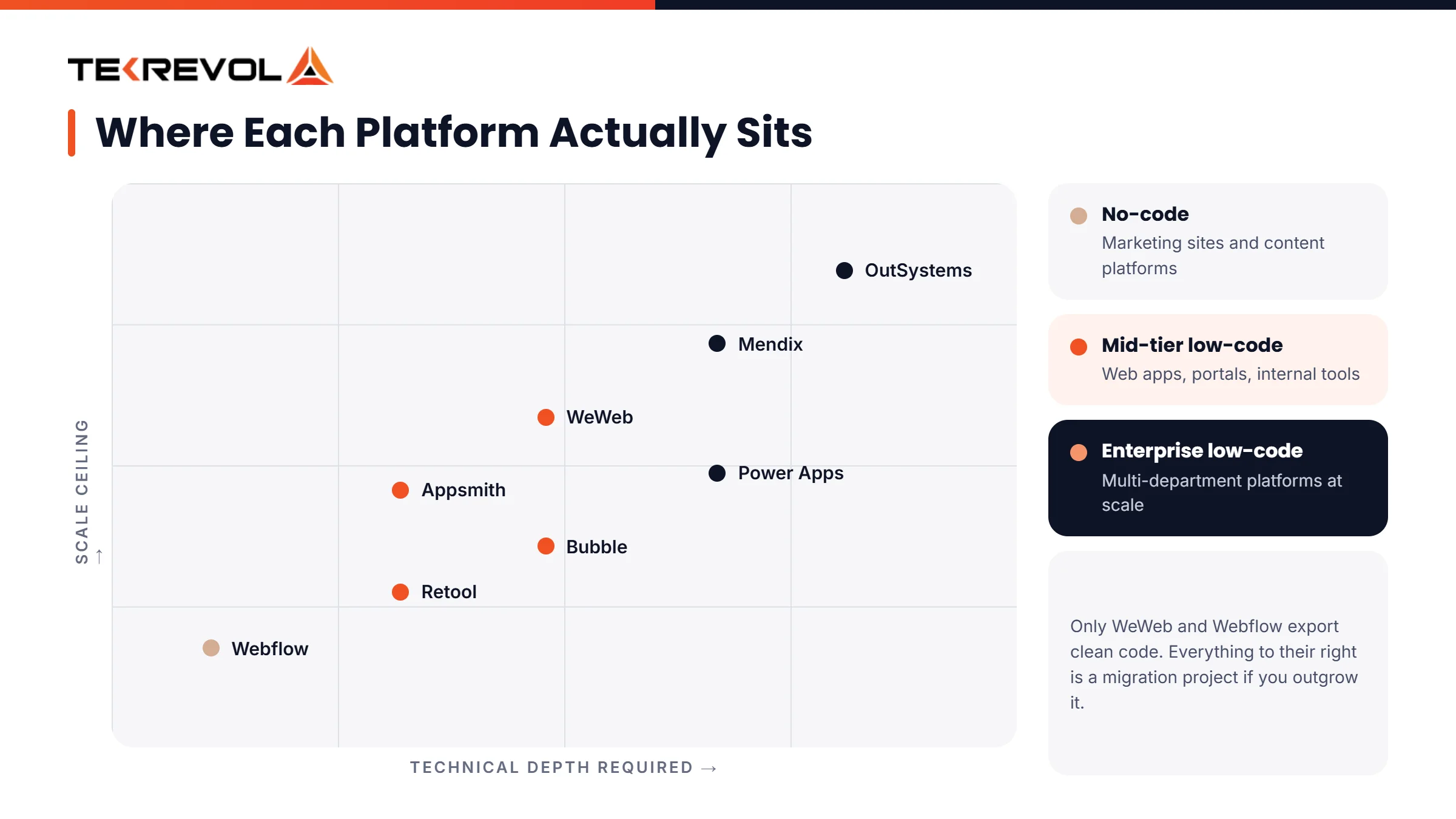
The eight platforms below lead their respective use case categories in 2026. Each entry includes what the platform genuinely does well, its pricing tier, and one honest limitation that marketing pages don’t highlight.
1. OutSystems
Best for: Enterprise web application development at scale
Pricing: Enterprise only (starts ~$5,000+/month)
OutSystems is the platform of choice for large organizations building mission-critical web applications. Its low-code environment supports full-stack development with deep ERP and CRM integrations, compliance tooling, and scalability to millions of users. It’s widely used in banking, healthcare, and government.
Watch out: Vendor lock-in is real and intentional. OutSystems apps don’t export to clean, portable code. If you outgrow the platform or pricing changes, migration is a significant engineering project, not a weekend task.
2. Mendix
Best for: Teams with mixed developer and business analyst membership
Pricing: Free tier available; Pro starts ~$1,875/month
Mendix uses a model-driven architecture that lets business analysts and developers collaborate in the same environment. It handles complex process-heavy workflows better than most low-code platforms and has strong AI-assisted development features in its 2026 release.
Watch out: The learning curve is steeper than that of competitors. Teams that deploy without proper training lose the speed advantage the platform is supposed to deliver.
3. Bubble
Best for: Startups building full-stack web apps with small teams
Pricing: Free tier; paid plans from $29–$349/month
Bubble is the most capable true low-code platform for complex relational data and custom workflows. The plugin ecosystem is massive. Founders have shipped real SaaS products on Bubble that raised funding and scaled to tens of thousands of users.
Watch out: Performance at scale requires architectural discipline. Complex Bubble apps built without a developer who understands the platform’s data layer can get slow as user counts grow.
4. WeWeb
Best for: Developers who want a visual frontend for building with exportable code
Pricing: Free tier; paid plans from $49/month
WeWeb outputs clean Vue.js code, a genuinely rare combination of visual speed and technical ownership. You build your frontend visually and retain the code. Pair it with Xano or Supabase for the backend, and you have a full-stack product that can be extracted from the platform if needed.
Watch out: The backend has to come from a separate tool. WeWeb is a frontend builder, not a full-stack platform. Teams expecting an all-in-one solution need to plan the architecture accordingly.
5. Retool
Best for: Internal operational tools and admin dashboards
Pricing: Free for up to 5 users; paid from $10/user/month
Retool is the fastest path from a database to a functional internal tool. SQL queries, REST API connections, and pre-built UI components snap together quickly. Thousands of developer teams use it for ops dashboards, customer support tools, and back-office interfaces.
Watch out: Retool is not designed for customer-facing products. It’s an internal tool builder. Trying to use it as a customer app platform creates UX and performance problems that the platform wasn’t built to solve.
6. Webflow
Best for: Marketing websites, agency client sites, and CMS-driven content platforms
Pricing: Free tier; CMS from $23/month; Business from $39/month
Webflow produces production-grade, semantically correct HTML and CSS. Visual CSS control and animation capabilities are unmatched in the no-code/low-code category. The native CMS handles content-heavy sites well. It’s the best platform in its class for what it does.
Watch out: Webflow is not a low-code platform for web apps. Its database, authentication, and business logic capabilities are limited without significant third-party integrations. Teams that try to build a web application on Webflow instead of a website consistently run into this ceiling.
When evaluating Webflow, it’s helpful to consider how it compares with other top web technologies for web development and where it fits within the broader technology stack.
7. Microsoft Power Apps
Best for: Organizations already embedded in the Microsoft 365 and Azure ecosystem
Pricing: $5–$20/user/month (plus Microsoft 365 licensing)
Power Apps integrates natively with SharePoint, Teams, Dynamics, and Azure. For organizations already paying for Microsoft infrastructure, the integration depth is hard to match. Governance tooling and security controls are enterprise-grade.
Watch out: Power Apps’ value drops significantly outside the Microsoft ecosystem. If your stack doesn’t include Azure or M365, a different platform will serve you better.
8. Appsmith
Best for: Open-source internal tool development for developer-led teams
Pricing: Free self-hosted open-source; Cloud from $20/month
Appsmith’s core differentiator is simple: it’s open-source and self-hostable. No vendor dependency. No data leaves your infrastructure. The integration library is strong, the community is active, and the platform is genuinely extensible for technical teams.
Watch out: Setup requires more initial configuration than hosted alternatives. Teams expecting the same out-of-the-box experience as Retool will need more time to reach the same productivity level.
Read the reviews. Still not sure which platform fits your build?
TekRevol has shipped production web products on these platforms, plus fully custom builds when no platform was the right call.
Schedule a free 30-minute platform consultation.The Hidden Cost Stack: What Platform Pricing Pages Don’t Tell You
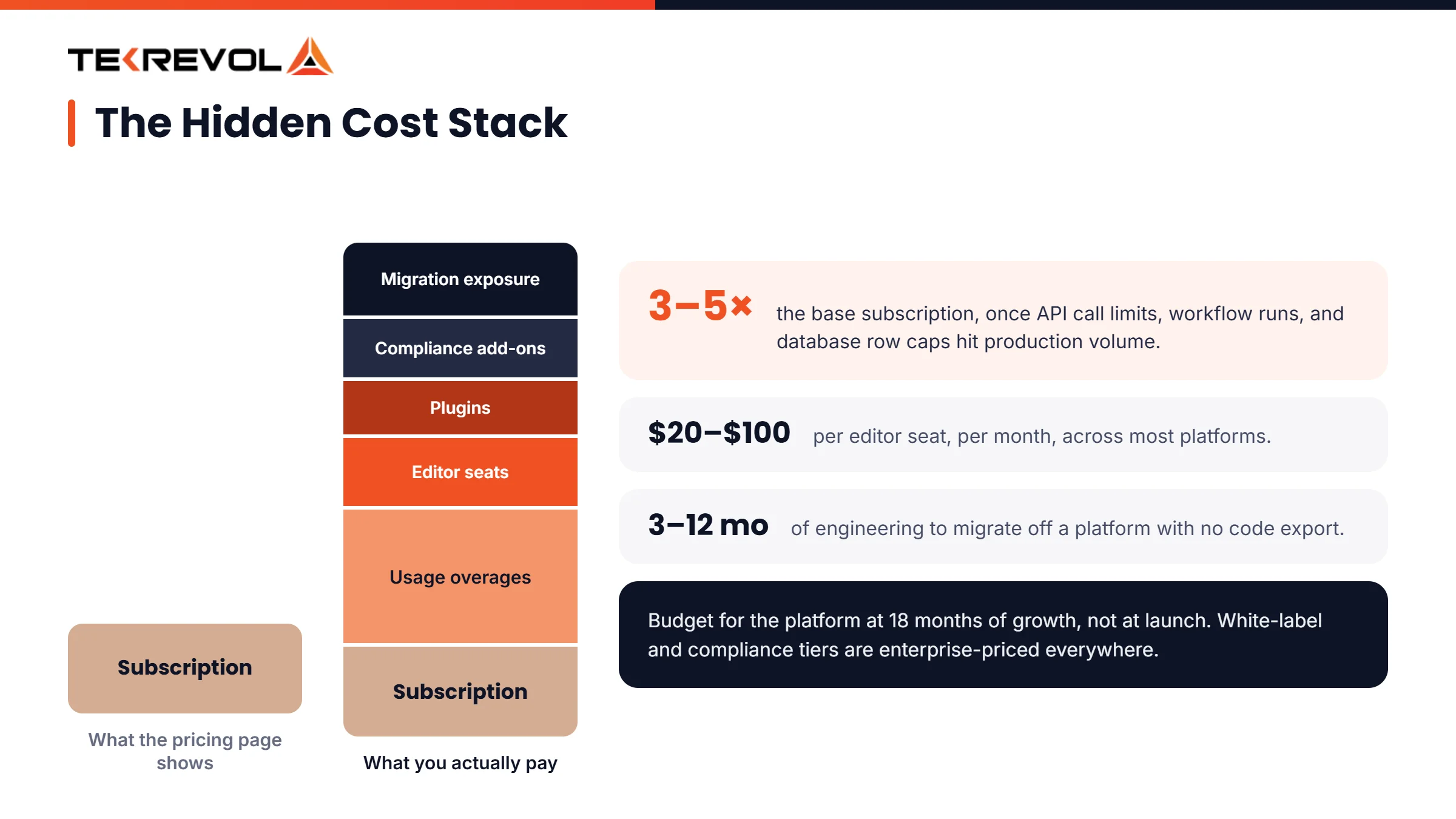
The monthly subscription is the smallest part of the total cost of operating a low-code platform. The categories below are what teams consistently don’t budget for and what creates the sticker shock that hits 12–18 months into a platform commitment.
- Usage-based overages: API call limits, workflow run limits, and database row caps can 3–5x the base subscription cost at real production scale
- White-label and branding tiers: Removing platform branding from client-facing products is almost always locked behind enterprise pricing
- Additional editor seats: Per-user pricing for team members adds $20–$100/user/month across most platforms
- Plugin and integration ecosystem: Premium connectors and third-party plugins add $10–$100+ each
- Migration cost: Moving your app if you outgrow the platform is an engineering project, often 3–12 months of work, depending on how deeply you built into the platform’s native data layer
- Compliance add-ons: HIPAA Business Associate Agreements and SOC 2 audit support are enterprise-tier features on most platforms, often inaccessible at mid-tier pricing
Before choosing a platform, it’s worth reviewing the website development cost across different development approaches, which TekRevol’s guide explains in detail.
AI Inside Low-Code Platforms: What’s Actually Changed in 2026
Every major low-code platform for web development added an AI layer in 2025–2026. The value varies significantly, and the tradeoffs are worth understanding before you treat AI-assisted generation as a feature differentiator.
Here’s what AI actually does inside these platforms:
- Generates component templates and page layouts from text prompts
- Writes conditional logic and workflow steps
- Suggests database schemas based on the described use cases
- Produces initial navigation structures and form configurations
AI-generated low-code apps can introduce hidden architectural issues, especially on platforms like Bubble, where workflows may function correctly but struggle to scale efficiently.
At the same time, the gap between low-code and custom development is shrinking. AI coding tools are accelerating traditional development, while AI-powered features are making low-code platforms more capable. The focus is no longer on choosing one approach over the other, but on finding the right mix for your product.
Platforms that support code export, such as Webflow and WeWeb, offer valuable flexibility by allowing teams to transition to custom development if needed.
For organizations looking to extend AI capabilities beyond the platform layer, TekRevol’s AI development services help integrate custom AI solutions regardless of the underlying technology stack.
6 Mistakes Teams Make When Choosing a Low-Code Web Development Platform
Getting the web development platform selection wrong is expensive. These six patterns account for most of the failures:
- Choosing based on demos, not real-world performance. Most platforms look similar in demos; the real differences appear with larger datasets, concurrent users, and complex workflows.
- Ignoring exit costs. Platforms without code export can create long-term dependency and expensive migration challenges.
- Confusing low-code with no-code. No-code platforms often have scalability limits that may require a full rebuild later.
- Underestimating enterprise learning curves. Platforms like OutSystems and Mendix require training, which can delay the speed benefits they promise.
- Choosing the wrong platform tier. Enterprise tools can be excessive for startups, while simpler platforms may not support long-term growth.
- Treating compliance as an afterthought. Verify support for GDPR, HIPAA, SOC 2, and other requirements before development begins.
How TekRevol Approaches Low-Code in Professional Web Development
TekRevol integrates low-code platforms into specific phases of professional builds, not as a replacement for custom engineering, but as a deliberate speed layer for the right components.
The approach is consistent across engagements. Low-code tools accelerate rapid prototyping and internal tool development. Custom development handles the proprietary logic, complex integrations, and scalability requirements that no platform can deliver reliably.
For teams evaluating whether a low-code approach or a custom-developed web product is the right fit, that decision depends on use case, scale requirements, compliance needs, and timeline. TekRevol’s custom software development services give teams a clear framework for making that call with full cost and timeline visibility before committing to a direction.
Building a web product in 2026 without the right platform?
TekRevol helps teams choose the right platform, build efficiently, and transition to custom development when the time is right.
Start with a free discovery session.



![Hire React Native Developers in Austin: Cost, Talent Pool & Where to Find Them [2026]](https://assets.tekrevol.com/images-tek/uploads/2026/07/Hire-React-Native-Developer-in-Austin-Featured-Image-400x225.webp)


