


- Austin restaurant apps split into three builds: branded ordering, in-house delivery, or multi-vendor marketplace.
- DoorDash charges 15%, 25%, or 30% on delivery orders, against restaurant margins of roughly 3–5%.
- An owned app usually pays back once repeat delivery volume passes a few hundred monthly orders.
- Your POS decides the timeline more than your feature list does, especially on legacy systems.
- Texas moved food truck health permits to a single statewide DSHS license on July 1, 2026.
- Austin apps need 8.25% combined sales tax and, for trailers, a location that changes daily.
Austin runs on tacos, barbecue, and food trucks, but for the restaurants behind them, a big slice of every delivery order now goes to a third-party app. On DoorDash or Uber Eats, commissions that commonly run 15–30% can quietly erase a kitchen’s already-thin margin. Your own app changes that math.
Restaurant and food ordering app development in Austin is how local spots take back control: a branded ordering app, a delivery marketplace, or QR table ordering that keeps customers, data, and margin in-house. What it costs comes down to features and integrations far more than screens.
This guide covers what a restaurant or food ordering app costs in Austin and the app types you can build. Ahead: the own-app-versus-DoorDash math, how they plug into your POS, and how to pick an Austin app development company that’s shipped one before.
What Is Restaurant and Food Ordering App Development?
Restaurant and food ordering app development means building the software customers use to browse a menu, order, pay, and get food. It covers branded single-restaurant apps, multi-restaurant delivery marketplaces, in-store QR and table ordering, and cloud-kitchen platforms. Each fits a different business and budget.
The type you build shapes cost, integrations, and who your customer even is.
A branded app serves one restaurant’s regulars, while a delivery marketplace like a local DoorDash connects many restaurants and drivers. QR ordering speeds up dine-in service, and cloud kitchens run delivery-only brands. Same industry, genuinely different builds.
| App type | What it does | Best for |
| Branded ordering app | One restaurant’s menu, orders, loyalty | Single spots, multi-location groups |
| Delivery marketplace | Many restaurants, drivers, dispatch | Startups, aggregators |
| QR / table ordering | Scan, order, pay at the table | Dine-in restaurants, bars |
| Cloud kitchen platform | Delivery-only brands and ops | Ghost kitchens, virtual brands |
Our on-demand app development work spans branded ordering apps, delivery marketplaces, and the dispatch tools behind them.
Weighing an Owned Food Ordering App for Austin?
Send us your idea and we'll provide a free, scoped consultation tailored to your business goals and app requirements.
Get a Free App ConsultationWhy Build a Restaurant or Food App in Austin?
Austin is a food-obsessed, tech-forward city, which makes it ideal for a food app. Online food delivery is a multibillion-dollar market that keeps growing, per Statista, and Austin diners already expect to order from their phones. A direct app captures that demand without paying a middleman.
The competitive pressure is real. When every nearby restaurant is one tap away on a delivery app, the spot with its own fast, loyal-customer app quietly keeps more of its regulars.
Austin also gives food startups a live test market: dense neighborhoods, a young population, and a culture that tries new spots constantly. That means quick, honest feedback on a new app instead of a slow guessing game.
For most local restaurants, though, the driver is simpler: margin. Every order that comes through your own app instead of a third-party platform keeps the commission in your pocket, which adds up fast over a year.
How Much Does a Restaurant or Food Ordering App Cost in Austin?
A branded ordering app for one Austin restaurant runs $35,000 to $70,000. Add your own delivery dispatch and driver tracking, and it’s $80,000 to $150,000. A multi-vendor marketplace with restaurants, couriers, and diners starts around $150,000.
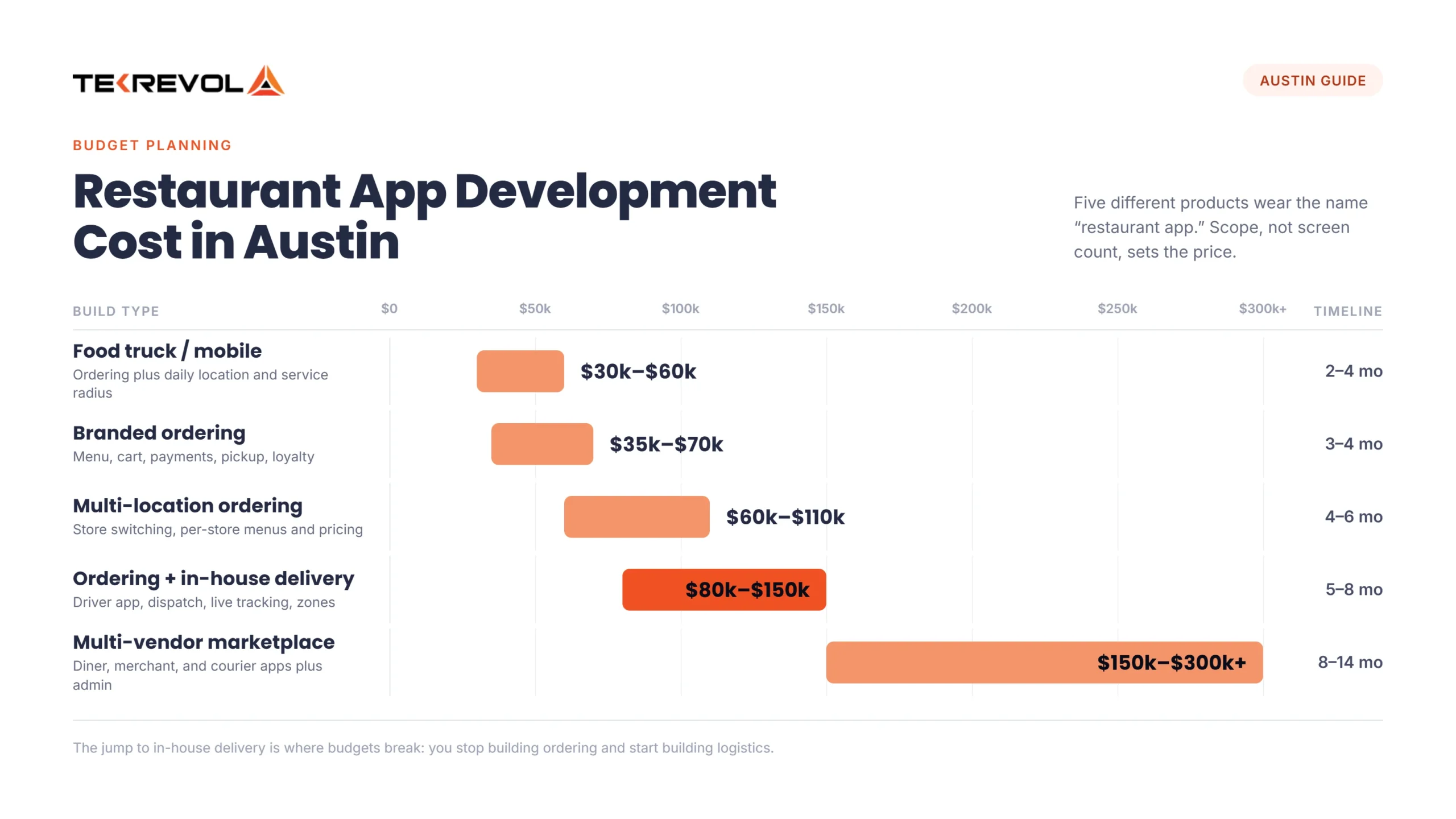
“Restaurant app” describes three different products. Here’s the split:
| Build type | What it does | Planning bracket | Timeline |
| Branded ordering app (one location) | Menu, cart, payments, pickup, loyalty | $35,000–$70,000 | 3–4 months |
| Multi-location ordering | Adds store switching, per-store menus and pricing | $60,000–$110,000 | 4–6 months |
| Ordering + in-house delivery | Adds driver app, dispatch, live tracking, zones | $80,000–$150,000 | 5–8 months |
| Multi-vendor marketplace | Diner, merchant, and courier apps plus admin | $150,000–$300,000+ | 8–14 months |
| Food truck / mobile vendor | Ordering plus daily location and service radius | $30,000–$60,000 | 2–4 months |
Three things move the number. Whether you’re building one app or three. Whether you need real-time dispatch, which is genuinely hard engineering and prices like it. And POS integration, covered below.
The jump from row two to row three is where most budgets break. Once you dispatch your own drivers, you’re no longer building an ordering app; you’re building an on-demand delivery app in Austin, a different product with different engineering.
Not Sure Which Budget Range Your Idea Fits Into?
Send us your project scope, and we'll provide a free, itemized estimate tailored to your requirements.
Get a Free Project EstimateShould You Build Your Own App or Rely on DoorDash and Uber Eats?
Both, usually, but the balance matters. Third-party apps bring reach and new customers, at a 15–30% commission per order. Your own app costs upfront but keeps that commission, your customer data, and your brand. Most restaurants use third-party apps for discovery and their own app for regulars.
Here’s the trade-off in plain terms, because it drives the whole decision.
| Factor | Third-party apps | Your own app |
| Cost per order | 15–30% commission | Payment fees only after build |
| Customer data | Owned by the platform | Owned by you |
| Reach | High, built-in audience | You market it yourself |
| Brand control | Limited | Full |
The smart play for most Austin restaurants isn’t either-or. Use the big platforms to get discovered, then use your own app with loyalty and better prices to pull repeat customers off them. Over a year, moving even a third of orders to your own app can pay for the build.
What Features Does a Restaurant or Food App Need?
The features that matter most make ordering fast and bring people back. A clear menu, easy reordering, fast checkout, real-time order tracking, and loyalty rewards do more than any flashy extra. Push notifications and ratings come next, once the core flow is smooth.
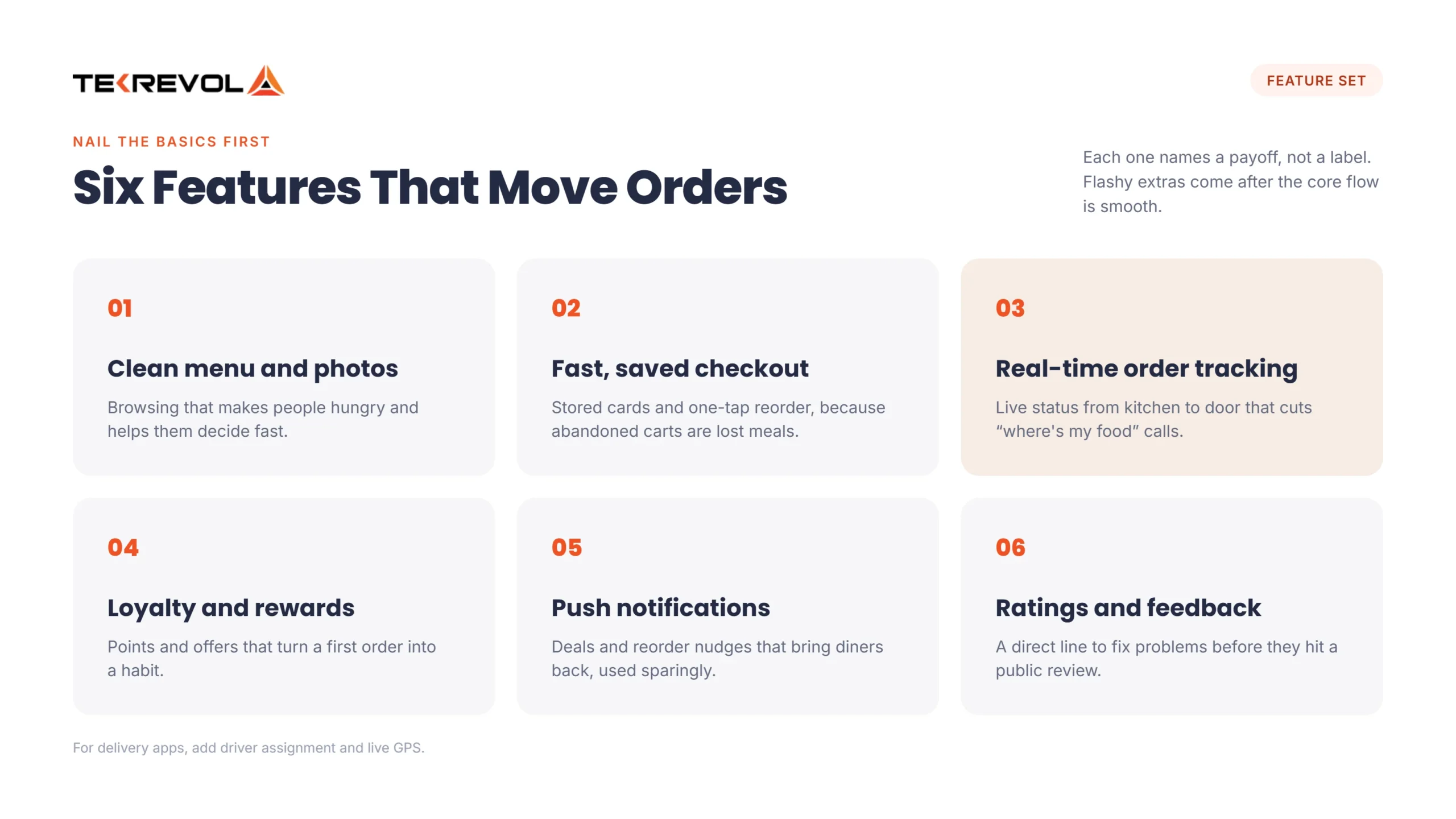
We tell restaurant clients to nail the basics before anything fancy. Here’s the core set, with the payoff each one earns:
- Clean menu and photos: browsing that makes people hungry and helps them decide fast.
- Fast, saved checkout: stored cards and one-tap reorder, since abandoned carts are lost meals.
- Real-time order tracking: live status from kitchen to door that cuts “where’s my food” calls.
- Loyalty and rewards: points and offers that turn a first order into a habit.
- Push notifications: deals, specials, and reorder nudges that bring diners back, used sparingly.
- Ratings and feedback: a direct line to fix problems before they hit a public review.
Notice each feature names the payoff, not just the label. For delivery apps, driver assignment and live GPS matter too. Our food delivery app roadmap covers the full feature set.
P.S: These same retention mechanics carry retail app development in Austin, where the second purchase is what makes the build pay.
How Does a Food Ordering App Connect to Your POS?
Through POS integration. The app links to your point-of-sale: Toast, Square, Clover, or similar, so orders flow straight to the kitchen without anyone re-keying them.
This is the part restaurants underestimate, and it’s where a build quietly succeeds or fails.
If orders don’t drop cleanly into your POS, someone is retyping tickets during the dinner rush exactly when mistakes happen, and tables wait. A clean integration keeps every channel in one system, so your sales reporting and inventory stay accurate instead of scattered across apps.
Menu sync matters just as much, so when you 86 an item or change a price, it should update in the app instantly rather than hours later. That two-way link between app and POS is the difference between a tool your staff trusts and one they quietly work around.
Worried About Connecting an App to Your POS?
Talk to TekRevol's Austin team, and we'll scope your POS integration requirements at no cost.
Book a Free ConsultationToast, Square, or Clover: Which One is Best for Austin?
The best POS for food ordering app depends on your size and setup. Toast is built for full-service restaurants and deep online ordering, while Square is the easiest and cheapest, a favorite among Austin cafes and food trucks, and Clover offers flexible hardware but can tie you to a single payment processor.
There’s no single best POS; there’s a best one for your kind of spot.
| POS | Best for | Online ordering | Watch out for |
| Toast | Full-service and multi-location restaurants | Strong, restaurant-native | Higher cost, restaurant-only |
| Square | Cafes, food trucks, new or small spots | Solid and easy to set up | Fewer deep restaurant features |
| Clover | Operators who want hardware flexibility | Works via its app market | Processor lock-in through your bank |
For a custom ordering app, what matters most is clean API access. Square’s API is well-documented and developer-friendly, Toast integrates through its partner program, and Clover offers an app market and API.
Whichever you run, confirm your development partner can connect to it before you commit; a POS your app can’t reach cleanly becomes a daily headache.
How Long Does it Take to Build a Food Ordering App?
Three to four months for a single-location branded app. Five to eight with in-house delivery. Eight to fourteen for a marketplace. POS integration and app store review are the two phases owners forget to budget time for.
| Phase | Single location | With in-house delivery | Marketplace |
| Discovery & scoping | 2–3 weeks | 3–4 weeks | 4–6 weeks |
| UI/UX design | 3–4 weeks | 4–6 weeks | 6–8 weeks |
| Development | 6–10 weeks | 12–20 weeks | 20–36 weeks |
| POS integration | 2–8 weeks | 2–8 weeks | 4–10 weeks |
| QA & testing | 2–3 weeks | 3–5 weeks | 5–8 weeks |
| App store review | 1–2 weeks | 1–2 weeks | 1–2 weeks |
| Total | 3–4 months | 5–8 months | 8–14 months |
POS integration usually runs in parallel with development, which is why the phases add up to more than the total.
Menu content is the schedule risk nobody plans for. Photos, descriptions, and modifier logic on a hundred-item menu takes real hours, and it lands on someone already running a restaurant. Start it in week one.
What Does the Restaurant App Cost to Run After Launch?
Budget 15% to 20% of build cost per year. On a $50,000 app, that’s $7,500 to $10,000 annually for hosting, OS updates, POS API changes, and bug fixes. Payment processing is separate, around 2.9% plus $0.30 per online transaction.
What owners underbudget, in order:
- Store compliance — Apple and Google ship breaking changes yearly
- POS API changes — your POS vendor updates on their schedule, not yours
- Menu upkeep — ongoing staff time or a service line
- Customer acquisition — the big one
That last item kills more restaurant apps than any technical problem. Moving regulars off marketplaces takes table tents, receipt inserts, staff prompts, and a real incentive. Budget it before development ends.
How Do Food Delivery Apps Make Money?
Delivery marketplace apps earn through a mix: commission from restaurants, delivery fees from customers, service fees, subscriptions like a free-delivery membership, and in-app restaurant advertising. A branded restaurant app earns differently. It doesn’t charge commission; it saves it.
If you’re building a marketplace, the model shapes the whole product.
- Restaurant commission: a percentage of each order the platform sends a restaurant.
- Delivery and service fees: what the customer pays on top of the food.
- Subscriptions: a monthly plan for free or reduced delivery.
- Featured placement and ads: restaurants pay to rank higher in the app.
Pick the mix that fits your market, then build the billing to match. A commission-heavy model and a subscription model pull the product in different directions, so decide early.
What Do the New Texas Food Truck Rules Change For Your App?
Since July 1, 2026, Texas HB 2844 has replaced city and county health permits for mobile food vendors with one statewide DSHS license. Your health permit now travels across Texas. Your location doesn’t. Cities still control zoning, parking, and fire inspections.
That matters in Austin, where trailers aren’t a niche. Confirm current requirements at the Texas DSHS mobile food vendors page before building against it.
The app consequence is the part nobody covers. A brick-and-mortar app is built around a fixed address. A truck app can’t be under the new license; your trailer can work a Round Rock brewery Friday and a South Congress lot Saturday without re-permitting.
That puts three things in the build a standard restaurant app doesn’t have:
- Location as a variable the owner updates from their phone, feeding the map and pickup instructions
- Live service radius: delivery zones and ETAs recalculate off today’s coordinates
- Owner-controlled ordering hours, so you don’t take orders nobody is there to cook
Decide this before development starts. Retrofitting it costs far more than building it in.
What Should You Ask an Austin App Development Company?
Ask whether they’ve integrated your exact POS, who owns the code, what maintenance covers, and whether they’ll show a project in your budget range. Vague answers on any of these are a warning sign.
- Have you integrated our exact POS? Not “we do POS integrations.” Toast, Square, Clover, and legacy systems are different problems. Ask for one specific example.
- Who owns the source code and customer data? Should be you, in writing, in the contract.
- What’s in the maintenance agreement? Name the items: OS updates, POS API changes, bug fixes, hosting, response times.
- Can you show a restaurant project in our budget range? A firm that only builds $300,000 marketplaces will scope your $50,000 app like one.
- Do you understand fixed-address versus mobile vendor builds? Given how much of Austin runs on trailers, a partner who hasn’t thought about it will hand you a retrofit bill later.
If you’re comparing firms, TekRevol’s Austin app development team works across on-demand, retail, and food service.
Restaurant & Food App Projects We Deliver
Proof beats promises here. TekRevol built Reck’N, a restaurant platform that drove 25% more bookings alongside better socializing and order management. Plus a multi-restaurant food app built on video-first discovery, and the wins came from smooth ordering and real integration rather than decoration.
| Project | Category | What we built | Result |
| Reck’N | Restaurant platform | Booking, ordering, and social features | 25% more bookings and order management |
| Multi-Restaurant Delivery | Food delivery | Video-first discovery, order, and delivery | Faster, more engaging ordering |
The pattern is consistent: in food, the win comes from fast ordering and clean POS and delivery integration.
Why Choose TekRevol for Restaurant & Food App Development in Austin
We’ve built the integration-heavy end of food tech, not just the menu screen: restaurant platforms, delivery apps, and the POS and dispatch plumbing that makes them actually work at service time.
Here’s why Austin businesses choose TekRevol:
- Food-app track record: shipped restaurant and delivery products, including Reck’N with its 25% booking lift.
- Integration depth: experience wiring apps into POS and delivery systems, which is where most food builds break.
- Full-stack capability: from the customer app to the driver app, admin panel, and backend, built to work together.
- Local accountability: a downtown Austin team at 701 Brazos St you can meet, with a 4.8 rating across 83+ Clutch reviews.
Ready to Build a Food App Austin Diners Will Keep on Their Phones?
Talk to TekRevol's Austin team and get an itemized project scope tailored to your app's features and business goals.
Start Your Project





![Hire React Native Developers in Austin: Cost, Talent Pool & Where to Find Them [2026]](https://assets.tekrevol.com/images-tek/uploads/2026/07/Hire-React-Native-Developer-in-Austin-Featured-Image-400x225.webp)


