



- Photo editing app development costs $20,000–$40,000 for a basic MVP and $60,000–$120,000 for a full AI-powered platform.
- iOS and Android use different real-time photo processing tech stacks, impacting cost and timelines.
- AI beauty filters and face tracking drive far more downloads than basic editing tools.
- Real-time 30fps video processing is one of mobile app development’s toughest engineering challenges.
- The photo editing app market is expected to surpass $1 billion by 2027, led by AI filters.
- TekRevol builds AI-powered photo editing apps with GPU processing and AR face tracking.
The photo editing app market is projected to exceed $1 billion by 2027. That number is not driven by basic crop-and-brightness tools. It is driven entirely by AI filters, real-time beauty effects, and AR face tracking that have fundamentally reset what consumers expect from a camera app.
VSCO built a community around film-style color grading. Facetune turned AI skin retouching into a mainstream consumer product. BeautyPlus added anime filters and hit 1 billion downloads. Every one of these products succeeded because it solved a technically difficult problem — real-time image processing at consumer-grade performance — and wrapped it in an interface anyone could use in under five seconds.
Photo editing app development is not a simple mobile build. It requires GPU rendering pipelines, frame-rate-stable AI inference, platform-specific camera APIs, and an architecture that handles all of this without draining the battery in ten minutes.
This is the complete technical and commercial guide, built for consumer app entrepreneurs, social media platform builders, and beauty tech founders who want to understand exactly what they are building before they start. Partnering with an experienced mobile app development company that has built AI-integrated camera apps is the fastest path from concept to a product that actually competes.
Let’s get into it.
The Photo and Camera App Market: Why Now Is the Right Time to Build
The global photo editing app market size is estimated at USD 1178.22 million in 2026 and is projected to reach USD 1796.69 million by 2035, growing at a CAGR of 4.8% from 2026 to 2035.
This growth is driven by AI filter adoption, short-form video growth, and the mainstreaming of beauty tech among Gen Z and millennial consumers.
The market signals that matter for builders:
- The global digital photography market is projected to grow from $109.4 billion in 2025 to $236.4 billion by 2034, at a CAGR of 8.94%.
- Facetune has been downloaded over 100 million times since launch, demonstrating sustained demand for AI retouching
- BeautyPlus surpassed 1 billion downloads across its lifetime, validating the global scale of the beauty app category
- VSCO reported 200 million registered users, proving that non-AI editing apps can build massive communities when the product experience is strong
- Short-form video platforms (TikTok, Instagram Reels, YouTube Shorts) have created a new demand category: real-time video filter effects that work during recording, not just in post-production
Three specific trends are creating builder opportunities right now:
AI Democratization
TensorFlow Lite and MediaPipe have made on-device AI inference fast enough for real-time mobile applications that would have required cloud processing three years ago.
This shift has accelerated the rise of intelligent mobile experiences across categories, similar to many of the best AI apps available today, allowing smaller teams to build Facetune-level features without building the infrastructure to match.
AR Maturity
ARKit (iOS) and ARCore (Android) have both reached production maturity for face mesh tracking. Building AR filter effects that stick accurately to a moving face, the way Snapchat lenses do, is now achievable without building a proprietary AR engine, especially with the rapid evolution of augmented reality app development frameworks and toolkits
Niche Market Gaps
The dominant apps serve general audiences. Niche photo editing apps for specific aesthetics (film photography simulation, professional skin retouching, brand-consistent filter packs) are consistently outperforming generalist competitors in specific App Store categories.
Your Filter Idea Deserves More Than a Generic Camera App.
TekRevol builds AI camera apps with GPU pipelines and ARKit face mesh, optimized for 30fps.
Get a Free Estimate.What Are the Core Features Every Photo Editing App Needs?
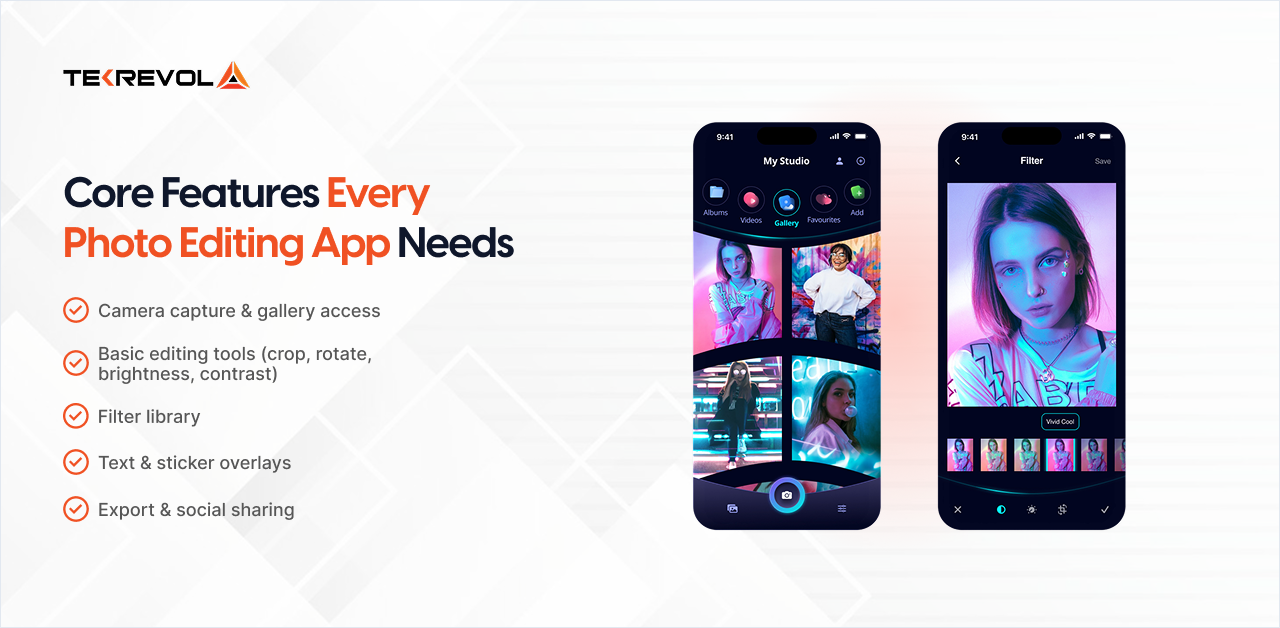
A competitive photo editing app requires five core feature sets at launch: camera capture and gallery access, basic editing tools, filter libraries, text and sticker overlays, and export with social sharing. AI-powered features can then be layered on top after the core editing experience is established.
Camera Capture and Gallery Access
Every photo editing app development project starts here. Camera access requires platform-specific API implementation, and this is where iOS and Android diverge immediately.
iOS Implementation
- The AVFoundation framework handles camera capture
- AVCaptureSession manages the camera pipeline
- Photos framework handles gallery access and permission flows
- AVCaptureVideoPreviewLayer renders live camera previews
Android Implementation
- Camera2 API is the current standard (legacy Camera API is deprecated)
- CameraX (Jetpack library) simplifies Camera2 implementation and is recommended for most beauty app development projects in 2026
- MediaStore API manages gallery access and media retrieval
Key camera features to implement:
- Front and rear camera switching with smooth transition
- Tap-to-focus and auto-exposure adjustment
- Flash control (auto, on, off, torch)
- Capture resolution settings, different resolutions for preview vs. full-resolution save
- Live camera preview with filter overlay (this is where GPU rendering enters the picture)
Basic Editing Tools
Standard non-destructive editing controls that adjust image properties without permanently modifying the source file:
- Crop and straighten with aspect ratio presets (1:1, 4:5, 16:9)
- Rotate and flip
- Brightness, contrast, saturation, and vibrance sliders
- Highlights and shadows adjustment
- Sharpness and clarity
- Vignette and grain effects
Non-destructive editing means adjustments are stored as a parameter stack that can be undone at any point. This requires a rendering pipeline that reapplies the full adjustment stack on every parameter change, which is a GPU performance requirement, not just a UI requirement.
Filter Library
Pre-built filter packs that apply a defined set of color grade adjustments in one tap. Filters are essentially saved parameter configurations applied through the same rendering pipeline as manual adjustments.
Technical implementation:
- iOS: Uses Core Image and CIFilter chains to layer multiple image adjustments into a single visual effect.
- Android: Uses OpenGL ES fragment shaders that process every image pixel directly on the GPU in real time.
Filter performance is determined entirely by how efficiently the GPU pipeline is implemented. A poorly optimized filter that drops to 20fps on a live camera preview will cause immediate user abandonment.
Text and Sticker Overlays
Compositing layers on top of the base image, text with font and color controls, sticker assets from a library, and user-imported images.
Technical requirement: layer management system that maintains z-order, position, scale, and rotation for each overlay element. This is typically implemented as a compositing layer separate from the base image editing pipeline.
Export and Social Sharing
Output the edited image at full resolution with all adjustments applied. Share directly to Instagram, TikTok, Snapchat, Twitter/X, and the device photo library.
Platform sharing APIs:
- iOS: UIActivityViewController for native share sheet
- Android: Intent.ACTION_SEND for native share functionality
- Direct Platform Sharing: SDK integrations like the Instagram Graph API enable in-app posting to specific platforms.
What AI-Powered Features Actually Drive Downloads?
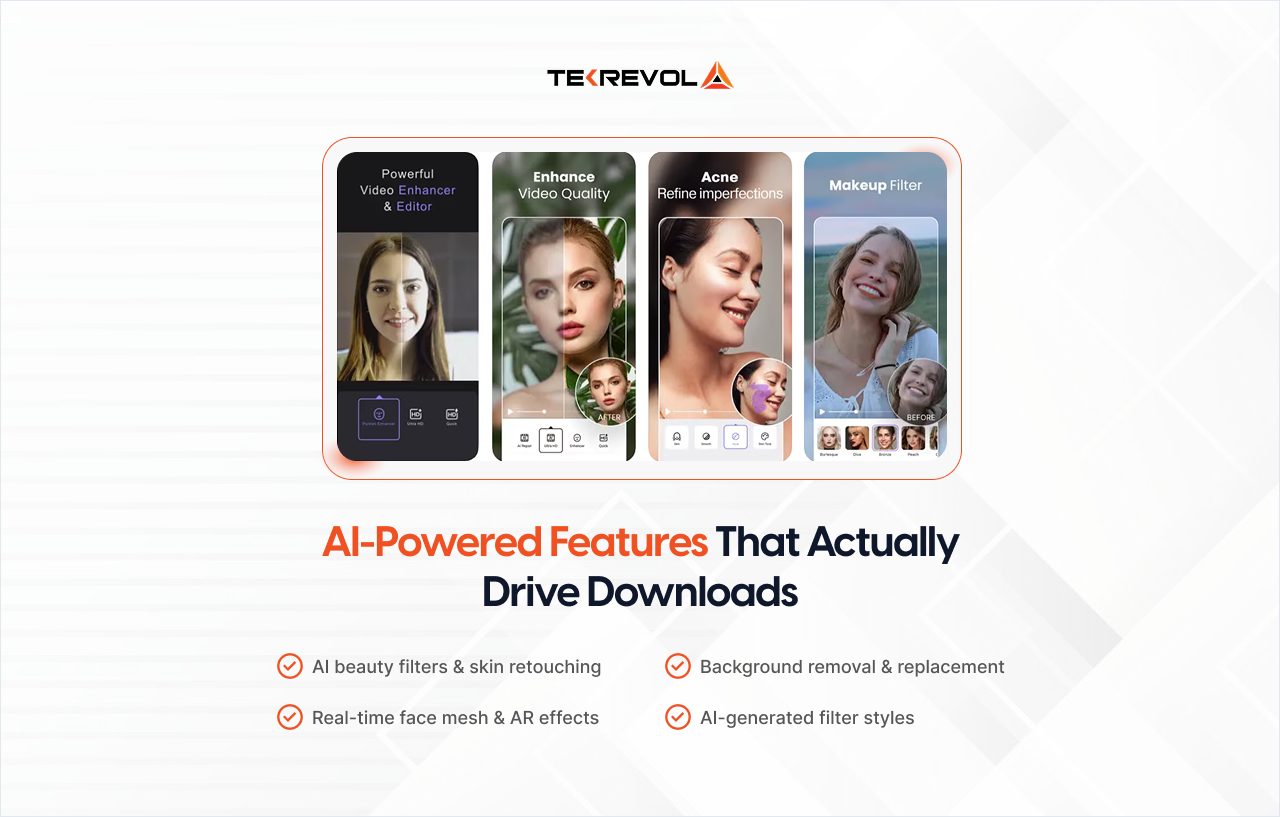
The AI features that drive downloads in photo editing apps are AI beauty filters with skin retouching, real-time face mesh and AR effects, background removal and replacement, and neural style transfer, and each requires a fundamentally different technical implementation.
This is the section that separates apps that get downloaded once from apps that get five-star reviews and word-of-mouth growth. AI app development services are where the real differentiation happens.
AI Beauty Filters and Skin Retouching
This is what Facetune built its business on, and what every serious photo editing app development project needs to get right.
AI skin retouching involves two distinct technical processes:
Skin Detection
A machine learning model identifies which pixels in the image are skin vs. non-skin. This must be accurate enough to apply smoothing to skin areas without affecting eyes, hair, teeth, or background.
MediaPipe’s Selfie Segmentation model is the most commonly used solution for this; it runs efficiently on-device using TensorFlow Lite.
Skin Enhancement
Once skin regions are identified, enhancement algorithms are applied:
- Gaussian blur or bilateral filter for smoothing (bilateral filter preserves edges, which looks more natural)
- Frequency separation for texture-preserving retouching
- Hue/saturation adjustment targeting skin tone ranges specifically
- Spot removal using patch-based inpainting algorithms
The Real Engineering Challenge
These operations must run live on the camera preview at 30fps while the user moves. Every frame requires fresh segmentation, filter reprocessing, and GPU optimization simultaneously.
If thermal performance is not optimized properly, devices begin throttling, causing lag, overheating, and frame-rate drops.
Real-Time Face Mesh and AR Effects
Face mesh is the technical foundation of Snapchat-style AR filters, digital objects that track accurately to facial features as the face moves in three dimensions.
If you want to explore how these capabilities translate into real-world selfie and beauty applications, modern implementations are already widely used in these apps.
iOS: ARKit + Vision Framework
- ARKit Face Tracking: Uses ARFaceAnchor to generate a real-time 3D face mesh with 1,220 vertices.
- Performance: Updates at 60fps on Face ID-enabled iPhones with the TrueDepth camera.
- Fallback Support: Apple’s Vision framework provides 2D facial landmark detection for non-TrueDepth devices.
- Rendering Layer: AR effects are rendered using RealityKit or SceneKit on top of the tracked face mesh.
Android: ARCore + MediaPipe
- ARCore Face Augmentation: Enables real-time AR face effects on supported Android devices.
- MediaPipe Face Mesh: Detects 468 3D facial landmark points using TensorFlow Lite on-device AI models.
- Wider Device Support: Unlike ARKit, MediaPipe works across a broader Android ecosystem without specialized hardware.
- Real-Time Processing: Supports live facial tracking and AR overlays directly on mobile devices.
What you can build on top of face mesh:
- Virtual glasses and accessories that follow head rotation
- Makeup effects (lipstick, eyeshadow, blush) that conform to facial geometry
- Face deformation effects (Snapchat-style distortions)
- Emotion-reactive filters that change based on smile detection or eye openness
Background Removal and Replacement
Real-time background removal separates the subject from the background and replaces it with a solid color, a different image, or an animated effect.
Technical implementation:
- MediaPipe Selfie Segmentation — binary segmentation model that classifies each pixel as person or background. Runs at 30fps on most modern mobile devices. Produces a segmentation mask that is applied as a compositing operation
- TensorFlow Lite custom model — for applications requiring higher quality segmentation at the cost of higher inference time
The quality challenge with background removal is edge accuracy — hair is the hardest subject to segment cleanly. Production-quality background removal requires post-processing of the segmentation mask edges (matting algorithms) to blend hair pixels realistically rather than producing a hard cutout line.
AI-Generated Filter Styles (Neural Style Transfer)
Neural style transfer applies the visual style of a reference image (a painting, a photograph, an aesthetic) to the content of your photo. This is how apps create watercolor, oil painting, and film-style effects, with many modern iOS apps now using advanced on-device AI processing for faster, real-time performance.
On-Device Style Transfer
- Uses feedforward convolutional neural networks trained for specific visual styles.
- TensorFlow Lite models typically process images in 0.5–2 seconds on modern mobile devices.
- Each filter style usually requires a separate trained AI model file.
- Model size optimization becomes important when supporting multiple styles.
Real-Time Processing Challenges
- Live camera style transfer requires heavy GPU and AI optimization.
- Real-time neural rendering is usually limited to high-end flagship devices.
- Most production apps apply style transfer after photo capture instead of during live preview.
How to Build a Photo Editing App: Step-by-Step
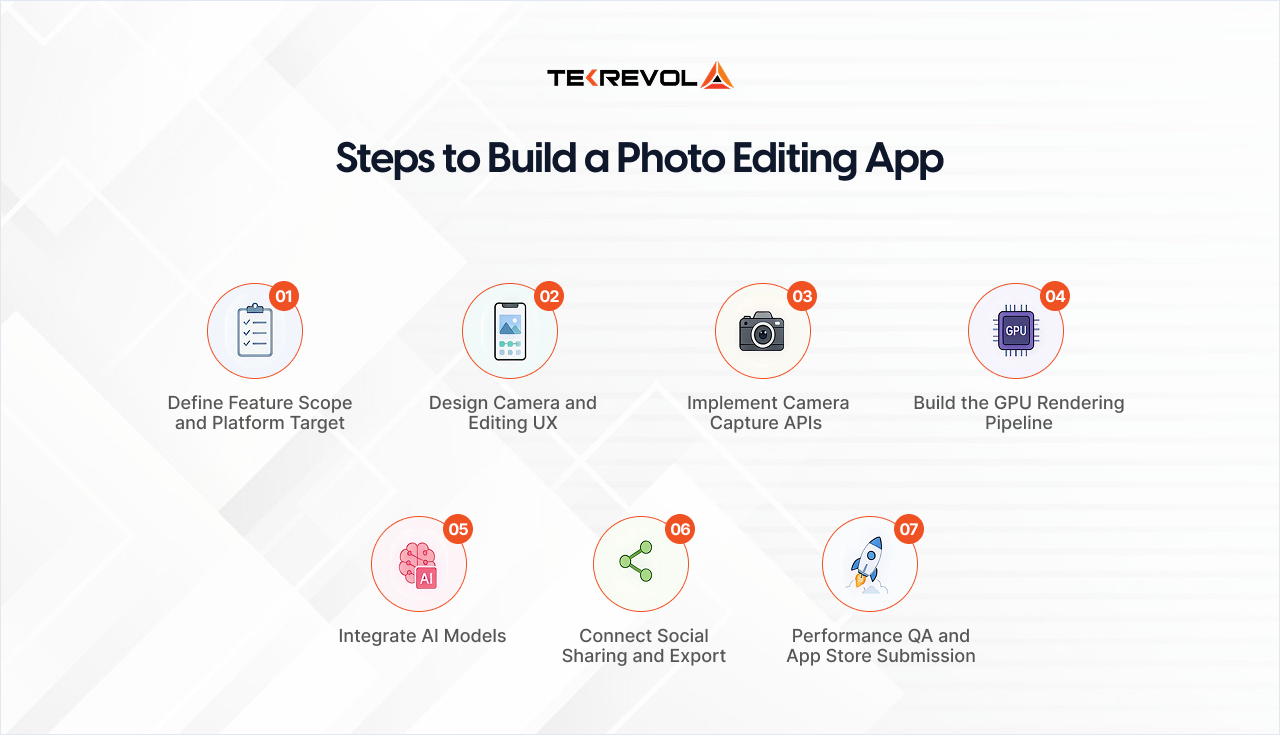
Building a photo editing app involves seven key stages, starting with feature planning, platform selection, and designing the camera and editing UX. The process also requires real-time performance optimization, scalable backend architecture, and seamless user experience design.
The process then moves into camera API integration, GPU rendering, AI feature implementation, social sharing connectivity, and final performance QA before App Store release.
Step 1: Define Feature Scope & Platform Target
Before development begins, define the product direction clearly. Decide whether the app will launch on iOS, Android, or both platforms. Identify the primary differentiating feature — AI beauty filters, AR effects, professional color grading, or style transfer.
You should also separate the MVP feature set from future versions early in the planning phase. These decisions directly affect:
- Tech stack selection
- AI framework choice
- Development timeline
- Overall project cost
Step 2: Design the Camera & Editing Experience
The camera experience must feel instant, smooth, and distraction-free. Users interact with editing tools quickly, so the interface should never interrupt the camera flow.
At this stage, teams focus on:
- Fast camera launch
- Minimal editing interface
- Real-time filter previews
- Smooth editing transitions
- Optimized user flow
The complete editing journey should be wireframed before development starts. Since real-time previews rely on rendering performance, the UI and GPU filter pipeline must be developed together.
Step 3: Implement Camera Capture APIs
This phase handles native camera integration and live preview rendering.
iOS: Uses AVFoundation for camera capture and processing.
Android: Uses CameraX for modern camera implementation.
Core functionality includes:
- Live camera preview
- Filter overlay compositing
- Camera permissions
- Gallery access handling
- Photo/video capture setup
Step 4: Build the GPU Rendering Pipeline
This is the most technically critical part of the app.
The rendering pipeline processes filters and visual effects in real time. To maintain a premium user experience, the app must consistently render at 30fps or higher without lag or dropped frames.
- iOS Rendering Stack
- Core Image
- Metal GPU acceleration
- Android Rendering Stack
- OpenGL ES shaders
This stage defines the app’s overall performance ceiling and visual smoothness.
Step 5: Integrate AI Models
AI capabilities are added using frameworks like TensorFlow Lite for on-device processing.
Popular AI-powered features include:
- Skin retouching
- Face mesh tracking
- AR beauty filters
- Background removal
- Neural style transfer
Developers must optimize inference speed, thermal performance, and GPU utilization to prevent overheating and frame drops during extended usage.
Step 6: Add Social Sharing & Export Features
Once editing is complete, users expect fast export and seamless social sharing.
Key implementations include:
- Full-resolution export
- Native share sheet integration
- Instagram connectivity
- TikTok sharing support
- Optimized image compression
Export quality and rendering speed are heavily optimized during this phase.
Step 7: Performance QA & App Store Submission
Before launch, the app undergoes extensive real-device testing across low-end, mid-range, and flagship devices.
Testing focuses on:
- Frame rate stability
- Battery consumption
- Thermal performance
- Crash detection
- Memory optimization
- App Store compliance
After QA approval, the app is prepared for App Store and Google Play submission.
Got a Camera App Idea That's Been Sitting Too Long?
TekRevol turns photo editing app concepts into rated and downloaded products with AI filters, real-time GPU pipelines, and App Store-ready builds.
Let's Build It TogetherWhy Is Real-Time Processing the Hardest Technical Problem in Photo Editing App Development?
Real-time photo and video processing in a camera app is technically demanding because the GPU must apply filter computations to every frame at 30fps. At the same time, AI inference, face tracking, and battery optimization compete for the same hardware resources simultaneously.
Most founders underestimate this. It is worth explaining exactly why.
The Frame Rate Problem
A live camera preview running at 30fps gives your processing pipeline 33 milliseconds per frame. In that 33ms window, the app must:
- Receive the raw camera frame from the capture session
- Apply color space conversion (camera output is typically YUV; rendering requires RGB)
- Run the filter pipeline (Core Image or OpenGL ES shader execution)
- If AI features are active: run the ML model inference (face segmentation, face mesh)
- Composite any AR overlay elements onto the frame
- Send the composited frame to the screen buffer
Miss the 33ms window on any frame and the preview stutters. Drop below 24fps and the live preview feels broken. On mid-range devices, every millisecond counts.
GPU vs. CPU Processing in Photo Editing Apps
Image processing in modern camera apps must run on the GPU, not the CPU. A CPU-based filter pipeline that performs well on flagship devices can drop to 5fps on mid-range smartphones.
iOS GPU Pipeline
- Metal Framework: Provides direct access to GPU acceleration on iOS.
- Core Image Integration: Core Image uses Metal internally on modern Apple devices.
- Custom Metal Shaders: Used for advanced filters and high-performance rendering control.
Android GPU Pipeline
- OpenGL ES 3.0: Commonly used for fragment shader-based image processing.
- Vulkan Support: Available on Android 7+ for lower-overhead GPU rendering.
- RenderScript Deprecation: Older RenderScript pipelines now require migration to OpenGL ES or Vulkan.
Core Performance Principle
- Every per-pixel operation should run as a parallel GPU shader program.
- Sequential CPU-based pixel processing is typically 100–1000x slower than GPU rendering.
- Efficient GPU optimization is essential for smooth real-time filters and battery performance.
The AI Inference Problem
Running a TensorFlow Lite face segmentation model adds approximately 5–15ms of inference time per frame on a modern mobile device. Running face mesh on top of that adds another 5–10ms. This leaves very little headroom for the rendering pipeline within the 33ms budget.
Solutions:
- Run AI inference on every other frame (15fps inference, 30fps render) — acceptable for most effects
- Use hardware acceleration: Neural Engine on Apple devices, NNAPI on Android — both significantly reduce inference time
- Model quantization: 8-bit quantized models run 2–4x faster than 32-bit floating point with minimal quality loss
Thermal Throttling and Battery
Sustained GPU + AI workload generates heat. Modern mobile processors throttle CPU and GPU performance when the device reaches thermal limits — typically after 10–15 minutes of sustained heavy processing. This causes the frame rate to drop gradually in longer sessions.
Mitigation Strategies:
- Adaptive quality: reduce filter complexity or AI inference frequency when thermal state is elevated
- Efficient model selection: smaller, faster models for real-time preview; higher-quality processing for final image save
- Sleep rendering when the app is backgrounded or the screen is static
Getting thermal performance right requires testing on physical devices across multiple device generations, simulator testing reveals nothing about real-world thermal behavior.
What Is the Right Tech Stack for a Photo Editing App?
The recommended tech stack for photo editing app development in 2026 includes Core Image, Metal, and ARKit for iOS, along with OpenGL ES and ARCore for Android app development services. AI features are typically powered by TensorFlow Lite and MediaPipe, while Flutter with platform-specific camera modules supports efficient cross-platform development.
iOS Tech Stack
| Layer | Technology | Purpose |
| Camera Capture | AVFoundation | Camera session management, live preview |
| Image Processing | Core Image | Filter chains, color adjustments |
| GPU Rendering | Metal | Custom shaders, high-performance GPU access |
| Face Tracking | ARKit | 3D face mesh, AR effect anchoring |
| AI Inference | TensorFlow Lite + Core ML | Skin segmentation, style transfer |
| Face Landmarks | Vision Framework | 2D face detection on non-TrueDepth devices |
ARKit’s ARFaceAnchor requires a TrueDepth camera (Face ID-capable iPhones from iPhone X onward). For face mesh on older devices, Vision framework’s VNDetectFaceLandmarksRequest provides 2D landmark detection. This is a real consideration for your target device support range.
Core Image provides 200+ built-in filters that cover most basic editing needs. For custom filter effects not covered by built-in CIFilters — specific film emulation looks, custom color science — Metal shaders provide direct GPU programming.
Android Tech Stack
| Layer | Technology | Purpose |
| Camera Capture | CameraX (Jetpack) | Camera session, preview, capture |
| Image Processing | OpenGL ES 3.0 | Fragment shaders for filter rendering |
| Face Tracking | ARCore Augmented Faces | 3D face mesh on supported devices |
| AI Inference | TensorFlow Lite | On-device ML model inference |
| Face Landmarks | MediaPipe Face Mesh | 468 3D landmarks, broad device support |
| Segmentation | MediaPipe Selfie Segmentation | Background removal, skin detection |
Android’s fragmentation is the most significant technical challenge in real-time photo filter tech stack decisions. There are thousands of Android device models with varying GPU capabilities.
OpenGL ES 3.0 is supported on Android 4.3+ (effectively universal), but shader performance varies enormously between a Samsung Galaxy S25 and a budget Android device. Your QA process must test on actual low-end, mid-range, and high-end devices.
Cross-Platform: Flutter
Flutter supports photo editing app development for both iOS and Android from a single codebase, but camera and GPU processing features require platform-specific plugins.
- camera plugin — Wraps AVFoundation (iOS) and CameraX (Android) for basic capture
- image_filter — Basic Core Image / OpenGL ES filter access
- For advanced features (ARKit, Metal shaders, ARCore) — platform channels to native iOS/Android code are required
Flutter is appropriate for how to build a camera app project where the filter effects are applied to captured photos rather than the live preview.
For real-time filter preview with AI features, native iOS and Android implementations consistently outperform Flutter’s camera plugin layer due to reduced latency in the camera-to-render pipeline.
AI and ML Stack
| Framework | Platform | Use Case |
| TensorFlow Lite | iOS + Android | On-device model inference |
| MediaPipe | iOS + Android | Face mesh, segmentation, pose detection |
| Core ML | iOS | Apple-optimized model inference, Neural Engine access |
| NNAPI | Android | Android hardware neural network acceleration |
| ARKit | iOS | 3D face tracking, environment understanding |
| ARCore | Android | Face augmentation on supported devices |
What Does Photo Editing App Development Cost?
Photo editing app development costs around $20,000–$40,000 for a basic MVP with standard filters and editing tools. A full AI-powered app with real-time beauty filters, AR face effects, and background removal can cost between $60,000–$120,000, depending on platform choice and AI feature complexity, which aligns closely with broader estimates for mobile app development costs across modern AI-driven applications
Cost by MVP Tier
| Tier | Features | Cost | Timeline |
| Basic MVP | Camera capture, standard filter library (20 filters), crop/brightness/contrast, social sharing | $20,000–$40,000 | 2–4 months |
| AI-Powered MVP | Basic MVP + AI skin retouching, face detection, background removal | $40,000–$70,000 | 4–6 months |
| Full Platform | AI MVP + real-time AR face mesh, neural style transfer, video filter support, sticker library | $75,000–$120,000 | 6–9 months |
| Enterprise Platform | Full platform + brand filter SDK, white-label licensing, creator tools, analytics dashboard | $120,000–$200,000+ | 9–12+ months |
Phase-by-Phase Cost Breakdown
| Phase | Deliverable | Cost Range |
| Discovery and architecture | Tech stack decision, AI model selection, performance requirements | $3,000–$8,000 |
| UI/UX design | Camera interface, editing flow, filter browser, onboarding | $8,000–$18,000 |
| Camera and rendering pipeline | AVFoundation/CameraX setup, GPU filter pipeline, real-time preview | $10,000–$25,000 |
| Core editing features | Crop, adjustments, filter library, layer management | $8,000–$20,000 |
| AI feature integration | TensorFlow Lite models, MediaPipe, ARKit/ARCore face tracking | $12,000–$30,000 |
| Social sharing and export | Full-res export, share APIs, platform integrations | $4,000–$8,000 |
| QA and performance testing | Device testing, frame rate benchmarking, thermal testing | $5,000–$12,000 |
| App Store submission | Metadata, screenshots, compliance review | $2,000–$4,000 |
iOS vs. Android Cost Difference
iOS-Only Build
- Lowest baseline development cost.
- ARKit offers industry-leading mobile face tracking capabilities.
- Core Image and Metal provide mature GPU processing frameworks.
- Swift and the iOS app development company ecosystem are widely supported.
Android-Only Build
- Similar baseline cost to iOS development.
- Requires 15–20% higher QA budget due to device fragmentation.
- OpenGL ES shader optimization needs specialized expertise.
Cross-Platform (Flutter)
- Reduces cost by roughly 20–30% compared to separate native builds.
- Best suited for apps applying filters after photo capture rather than live preview.
- Advanced ARKit and GPU features still require native platform integrations.
Dual Native Development (iOS + Android)
- Costs approximately 40–60% more than a single-platform build.
- Ideal for apps requiring maximum AR performance and full native feature access.
- Provides deeper optimization for ARKit, ARCore, and GPU-intensive workflows.
What Is the Realistic Development Timeline?
A basic photo editing app MVP takes 2–4 months from discovery to App Store submission. A full AI-powered platform with real-time face mesh and neural style transfer takes 6–9 months.
The AI integration and performance QA phases are consistently the longest and most commonly underestimated.
| Phase | Duration | Key Milestone |
| Discovery and architecture | 1–2 weeks | Tech stack confirmed, AI models selected |
| UI/UX design | 2–4 weeks | Approved designs for all screens |
| Camera and GPU pipeline | 3–5 weeks | Live preview with filters at 30fps |
| Core editing features | 2–4 weeks | Full editing toolset functional |
| AI feature integration | 3–6 weeks | Real-time AI effects running on target devices |
| QA and performance testing | 2–4 weeks | Frame rate, battery, thermal benchmarks passed |
| App Store submission | 1–2 weeks | App live on App Store and Google Play |
| Total (Basic MVP) | 2–4 months | – |
| Total (Full AI Platform) | 6–9 months | – |
The AI integration phase is where most projects encounter unexpected delays. TensorFlow Lite model optimization for on-device performance, thermal testing across device tiers, and frame rate debugging under sustained AI + GPU load all take longer than initial estimates suggest.
What Monetization Model Works for Photo Editing Apps?
The most effective monetization models for photo editing apps include freemium access with premium filter packs, subscriptions for full feature access, and one-time in-app purchases.
Subscription models typically generate the highest long-term value for retention-focused apps, while brand filter partnerships create additional revenue opportunities.
Freemium with Premium Filter Packs
- Free tier: 10–20 standard filters, basic editing tools
- Premium filter packs: $0.99–$4.99 per pack (10–20 filters per pack)
- One-time purchase removes friction; users buy what they want
- Best for: apps with distinctive filter aesthetics and loyal user communities
Subscription Model
- Monthly: $2.99–$9.99/month
- Annual: $19.99–$59.99/year (typically priced at 30–50% discount vs. monthly)
- Unlocks: full AI feature access, all filters, ad-free experience, cloud backup
- Best for: apps with broad feature depth where there is ongoing value for continued subscription
- Note: Apple takes 15–30% commission on subscription revenue through the App Store; factor this into pricing
In-App Purchases (One-Time Unlocks)
- Individual AI features unlocked permanently: $1.99–$7.99 each
- Full app unlock: $4.99–$14.99 one-time purchase
- Best for: apps where users want ownership rather than ongoing subscription commitment
Brand Filter Partnerships
- Beauty and fashion brands pay to have branded filter packs featured in the app
- Revenue: $5,000–$50,000+ per brand campaign depending on app user base size
- Users get free access to branded filters; brand gets product exposure and try-on capability
- This model scales with user base — requires 100,000+ MAU to attract brand interest
Advertising (Ad-Supported Free Tier)
- Interstitial ads between editing sessions
- Banner ads in the filter browser
- Revenue: $2–$8 CPM depending on audience
- Best combined with a premium upgrade path — ads motivate paid conversion
Why Is TekRevol the Right Partner for Photo Editing App Development?
TekRevol is the right partner for photo editing app development because of its experience building AI-powered mobile apps with real-time GPU processing, AR face tracking, and TensorFlow Lite integrations. Its full-cycle team handles everything from architecture and UI/UX design to development, QA, and App Store deployment.
Photo editing app development requires a rare combination of mobile engineering expertise. Most development teams can build a standard mobile app. Very few have the specific depth required to build a 30fps GPU filter pipeline, optimize TensorFlow Lite models for thermal performance, and implement ARKit face mesh, all in one product, on budget, and on schedule.
TekRevol brings that depth:
- GPU rendering expertise — Metal and Core Image on iOS, OpenGL ES on Android, with performance benchmarking built into QA processes from day one
- AI model integration — TensorFlow Lite deployment, MediaPipe face mesh, on-device AI optimization for the full range of target devices — not just flagship models
- ARKit and ARCore implementation — 3D face tracking, AR effect anchoring, and real-time AR compositing across the supported device range
- Platform-specific depth — understanding that iOS and Android have fundamentally different camera APIs, different GPU architectures, and different AI acceleration hardware, and building for each accordingly
- Cross-platform capability — Flutter builds with native platform channel integrations where real-time performance requires it
- Performance QA — Frame rate benchmarking on low-end, mid-range, and high-end devices. Thermal testing under sustained processing load. Battery drain measurement under real use conditions
- End-to-end delivery — from camera API implementation to App Store submission, with a single PM accountable for the full timeline
Whether you are building a beauty app development product to compete with Facetune, an AR filter platform targeting TikTok creators, or a professional photo editing tool for the photography market, TekRevol has the technical capability and the delivery process to build it right.
Building a Camera or Photo Editing App?
TekRevol builds AI-powered camera apps with real-time processing and AR integrations optimized for smooth mobile performance.
Get a Free Estimate for Your Project →


