

Ever feel like learning web development is a mountain of things to master all at once? HTML, CSS, JavaScript, design, debugging… It’s a lot.
However, today, you have a new set of tools to help you reach that mountain much faster: Artificial Intelligence.
AI is transforming the way we develop web-based applications. It’s a kind of having a professional coach and creative collaborator, and a tireless AI coding assistant rolled into one- and that too at your fingertips. This is not an issue of substituting your creativity, but making it act like a booster.
This guide is going to present the straightforward, technical steps on how to apply AI in web development. You will get the skill to switch from concept to a live website in a quicker manner with a more substantial assurance than ever before.
What Is AI in Web Development?
Before we delve into the how-to, it is important to make clear what AI is in web development. Initially, the notion of using AI-powered website development to develop websites may evoke the image of robots in the future, who create complete websites, and we are sitting back and sipping our coffee.
The Artificial Intelligence in web design & development refers to technologies such as machine learning, natural language processing, and pattern recognition that help in performing different development tasks.
However, AI web development platforms are already or are intended to be used by more than 84% of developers, which is a significant improvement over recent years. This is not only a trend, but it is becoming the new norm.
To businesses and agencies that provide web development services, this is an opportunity to provide higher-quality projects within a smaller amount of time, building prototypes and a refined end product. AI does the repetitive work, and developers focus on strategy, architecture, and user experience design.
Want an AI-powered website that drives results?
We combine intelligent technology and expert design for next-level web experiences.
Let’s Get Started!Beginner-Friendly AI tools for Web Development
These AI tools for web development serve to fill the gap between an idea and an interface, enabling any modern web development company to be able to provide high-fidelity prototypes and more refined products within a shorter period of time.
A recent survey conducted revealed that more than 70% of design and development teams are currently incorporating at least one AI tool into their main workflow, and it is not a new idea anymore. The following is a list of the main AI tools, divided according to their main purpose in the web development process:
| AI Tool | Key Feature | Who It’s For |
How It Helps in Web Development |
| Wix ADI | Builds websites from simple user input | Beginners | Quickly generates functional websites without coding |
| Framer AI | Creates responsive layouts from short prompts | Developers & Designers | Speeds up design workflow and prototyping |
| Durable | Generates full websites in seconds | Small business owners | Reduces development time for simple, ready-to-launch sites |
| Canva AI | AI-powered design assistance | Designers & Developers | Helps create web graphics, layouts, and UI elements efficiently |
| TeleportHQ | Converts design mockups into code automatically | Designers & Developers | Bridges the gap between design and development by generating clean HTML/CSS |
| Uizard | AI-based website and app prototyping | Beginners & Teams | Turns sketches or text prompts into interactive prototypes quickly |
How to Use AI in Web Development: 7 Steps to Get Started
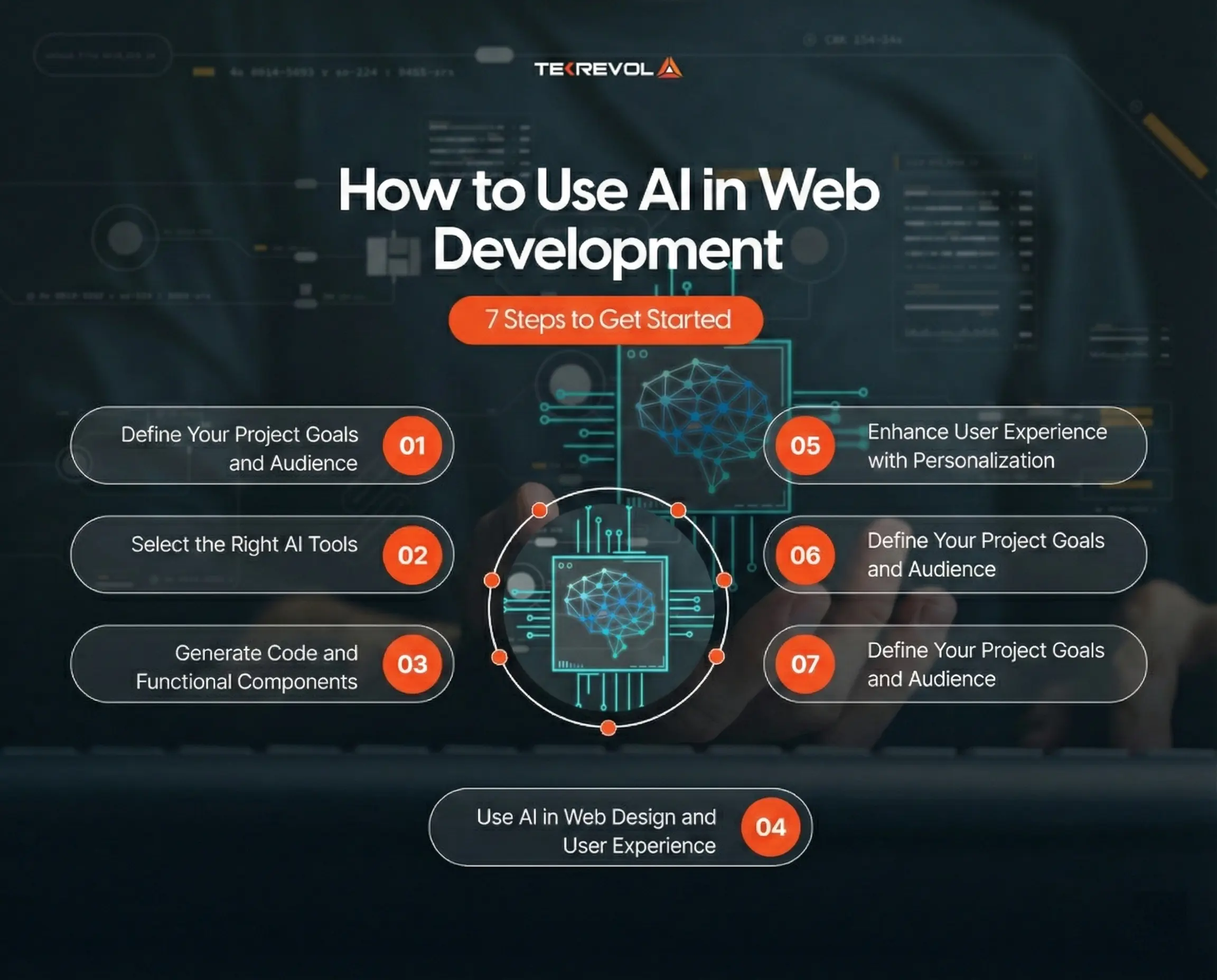
AI is a force multiplier; however, it must be properly directed. A vague prompt brings vague, fragmented code. The following is a step-by-step guide on how to integrate AI in web development.
Step 1: Define Your Project Goals and Audience
To begin using artificial intelligence in web design & development, it is always good to have an idea of why you are creating your site or application. Do you need a blog, portfolio, or online store, or something more advanced? In case you are concentrating on ecommerce website development, understanding your target audience and objectives will be very important.
The AI tools can be used to then propose designs, code, and plan user flows that are actually sensible to your project. Goals help to maintain the flow of work and avoid burnout.
Example prompt: You can use:
The e-commerce site I’m creating is focused on custom artwork, allowing clients to make and possess artisan art. Can you suggest a technical stack for it, along with the reasoning? What challenges might I encounter, and what should I think about?
This clarity is crucial because how to use AI in web development begins with clear instructions.
Step 2: Select the Right AI Tools
Various AI web development platforms have different uses. Some specialize in front-end design, others provide support in coding or backend logic, and others in testing, optimization, or SEO. Examples include:
- Framer AI, TeleportHQ: Generate responsive front-end layouts quickly
- GitHub Copilot, Wix ADI: AI-assisted coding for AI backend development and AI front-end development
- Testim, Mabl: Automate testing and debug workflows
The selection of the appropriate tool will make AI fit your development process in a natural and efficient way.
Step 3: Generate Code and Functional Components
AI can now help to write HTML, CSS, JavaScript, or even backend code. Through giving prompts or project details, AI tools can help with front-end development and make work easier, such as:
- Suggest reusable functions or modules
- Fix common coding errors
- Build complete components, like forms, navigation menus, or APIs
Several AI web development platforms have visual builders with AI logic, which simplifies the conversion of designs to functional interfaces.
Step 4: Use AI in Web Design and User Experience
One of the first places where AI is used to add value is in Web design. The artificial intelligence in web design assists with the study of user behavior, layout recommendation, and even the creation of visuals.
AI design tools can:
- Recommend color schemes and typography
- Create layout suggestions based on user intent
- Improve accessibility and usability
Step 5: Enhance User Experience with Personalization
AI in Web development can ensure websites are smarter and more user-friendly. Through user behavior, AI can:
- Suggest information or items.
- Create user-friendly adjustments to the UI.
- Enhance access and interaction.
Even beginners can implement AI-based personalization using simple AI software that is integrated into web systems.
Step 6: Optimize Performance and Security
The performance is paramount when it comes to user retention and rankings in search engines. however, AI website optimization tools are used to optimize:
- Find pages that are not loading fast and streamline code.
- Determine memory leaks or backend bottlenecks.
- Emphasize security weaknesses.
According to a survey, websites that utilize AI-driven performance tools are loaded up to 30 times faster, and this means that AI has a practical use in web development.
Step 7: Test, Debug, and Iterate
AI-assisted testing platforms can simulate various interactions occurring among users, machines, and browsers.
- Detect errors before launch.h
- Maximize navigation and layout.
- Ensure responsive design
This is because you want to make sure that your website or application is not only functional but also reliable and easy to use.
Best Practices of Using AI in Web Development
Through trial and error, we’ve established some guidelines that maximize AI’s benefits while avoiding pitfalls.
1. Maintain a Human Touch
The coding, layout, and even content suggestions can be done by AI, although human input is required. Any work created by AI has to be checked repeatedly in order to make sure that it satisfies the project goals, your company, and the needs of your readers. However, human control ensures that your site or application maintains authenticity and emotional appeal.
2. Review and Validate AI Outputs
AI has a lot of power, yet it is not reliable. Defect, inefficiency, or inconsistency can exist in automatically generated code or design elements. Never hesitate to thoroughly test the code by testing designs to be responsive and see to it that all the AI proposals meet technical needs and functional needs before implementation.
3. Keep Context Clear for AI
Artificial intelligence is effective with instructions and context. Use elaborate prompts and keep a good record. Subdivision of big tasks into small, subject-centered divisions makes the AI output either pertinent and precise, whether these are a backend functionality, a frontend module, or a layout component.
4. Stay Updated with AI Features
Web development AI tools are changing at an alarming rate. Not only that, the new releases can bring time-saving features and smarter design recommendations. Always check out new features to be efficient and streamline your workflow.
Common Challenges in Using AI for Web Development (And How to Overcome Them)
Although AI speeds up web development and makes it more efficient, it also brings challenges. But Developers must investigate and understand these concerns to ensure that AI serves as an assistant, not an obstacle.
Challenge 1: AI Misinterpretations and Faulty Code
The issue: AI is able to compose a code that seems to be right, yet it is not.
How to overcome it:
- Do not just trust the AI-generated code.
- Test all the code before implementation.
- Get AI descriptions of code behaviour.
- Compare outputs of other AI tools on significant functions.
Challenge 2: Over-Reliance and Skill Degradation
The issue: The excessive use of AI can result in the inability to code or solve problems.
How to overcome it:
- Continue with the manual coding as a way of preserving the significant development competencies.
- Take a detailed look at every AI-generated code.
- Use AI as a learning tool by asking AI to expound on the concepts.
- Figure out solutions alone, and then apply AI help…
Challenge 3: Context Limitations
The issue: AI tools can have a hard time working with large or messy codebases or lose context when working with multiple prompts.
How to overcome it:
- Break down tasks into smaller, focused requests.
- Provide clear, detailed context in AI prompts.
- Maintain thorough code documentation that AI can reference.
- Use AI for specific modules or functions rather than entire applications.
Challenge 4: Cost Concerns
The issue: AI tools of high quality may be used as a subscription, and it may become expensive very quickly.
How to overcome it:
- Begin with free levels or free AI tools in areas of learning and small projects.
- Assessing ROI, time can be the key that justifies the cost of AI.
- Opt to use affordable alternatives, such as the free version of Tabnine, personally.
- View AI tool subscriptions as investments in the business, as they directly increase productivity.
AI in Web Development: How It’s Changing the Game
Artificial intelligence has become a common practice in contemporary web development processes. According to a recent HubSpot report, 93% of web professionals have used AI, and almost half of them have directly used AI in the creation of websites. Clearly, such figures represent an apparent paradigm change, as AI is not an option anymore; it is a viable way to develop more quickly and efficiently.
Here’s how AI is making an impact on web development today.
Building and Coding Websites Faster
It is now possible to create complete web pages, layouts, and code samples in minutes with the help of AI. Tasks like page structuring and writing repetitive code now take much less time to complete.
Simplifying Content Creation
The biggest aspect of any site is the content, and it happens to be one of the most time-consuming parts. When it comes to writing, proposing graphics, or even proposing an idea, AI boosts the rate of content creation and provides developers and teams with a formidable foundation to build upon.
Using Built-In Best Practices
The AI website builder tools are trained according to existing trends, usability standards, and performance benchmarks. This implies that websites are developed with established practices. In fact, some tools use previous data and experience to create sites that suit particular industries and business goals.
Testing, Optimizing, and Improving Performance
AI is also involved once a site has been made live. Though Developers can use it to test the design and functionality changes, monitor the behaviour of the users, and see where they need improvements.
Conclusion
Now that we have discussed all the necessary tools, steps, and strategies to implement AI into your website, it is time to put everything into practice. However, in case you are still not understanding,
TekRevol is here to step in.
At TekRevol, we specialize in delivering cutting-edge website development services that seamlessly integrate the latest AI technologies into every project. We have a team of experienced programmers who know how to leverage AI in web development to design websites that are not only aesthetically pleasing but also smart, efficient, and user-friendly.
Take your web development to the next level.
Let TekRevol guide you in adding chatbots and machine learning for better results.
Schedule a Consultation





![How Much Grocery App Development Costs [Complete Breakdown for 2026]](https://d3r5yd0374231.cloudfront.net/images-tek/uploads/2026/03/Tek-Feature-11.jpg)