



- Mobile app keywords are search terms users type to find apps in stores.
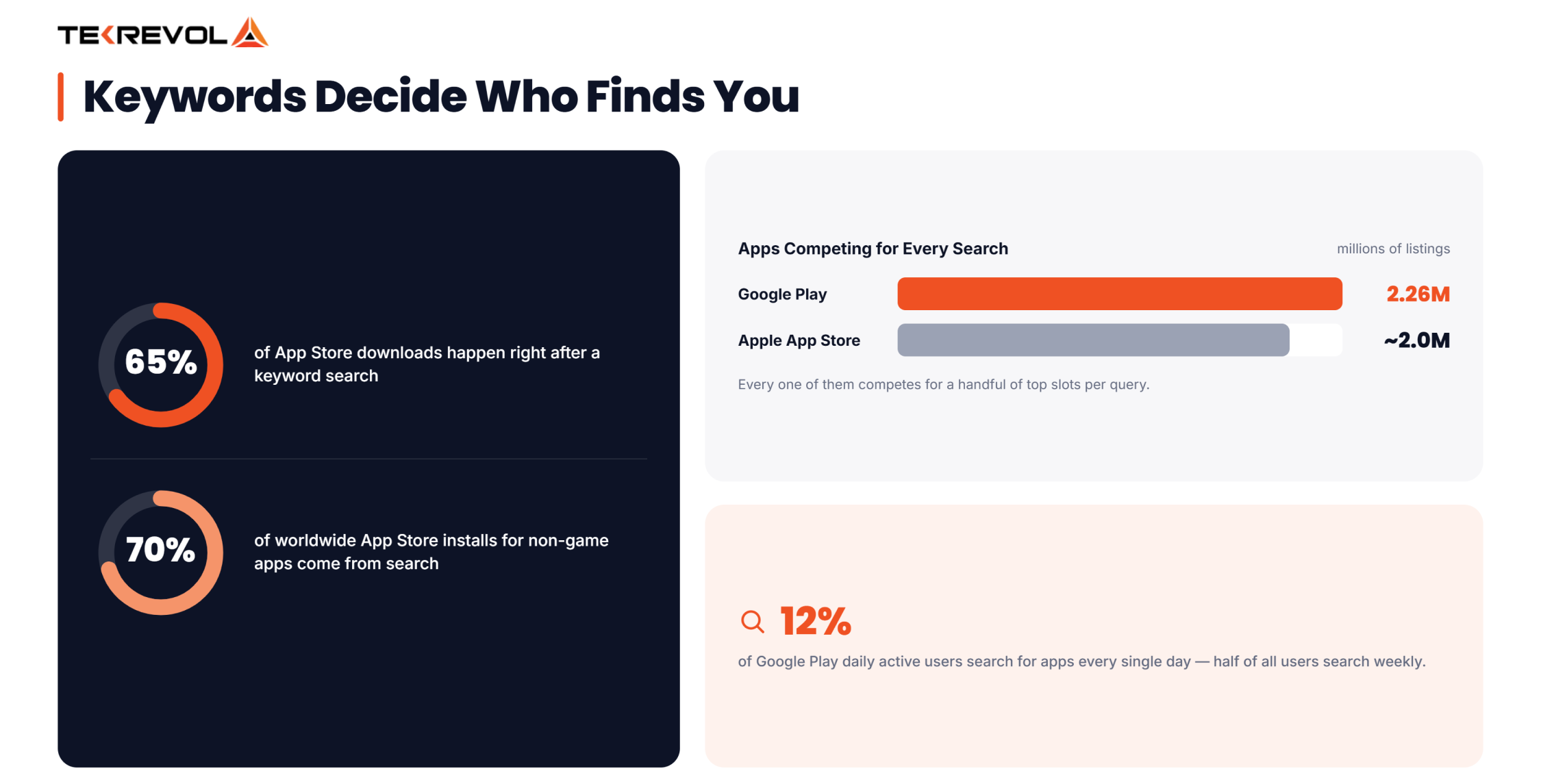
- Nearly 65% of App Store downloads happen right after a keyword search.
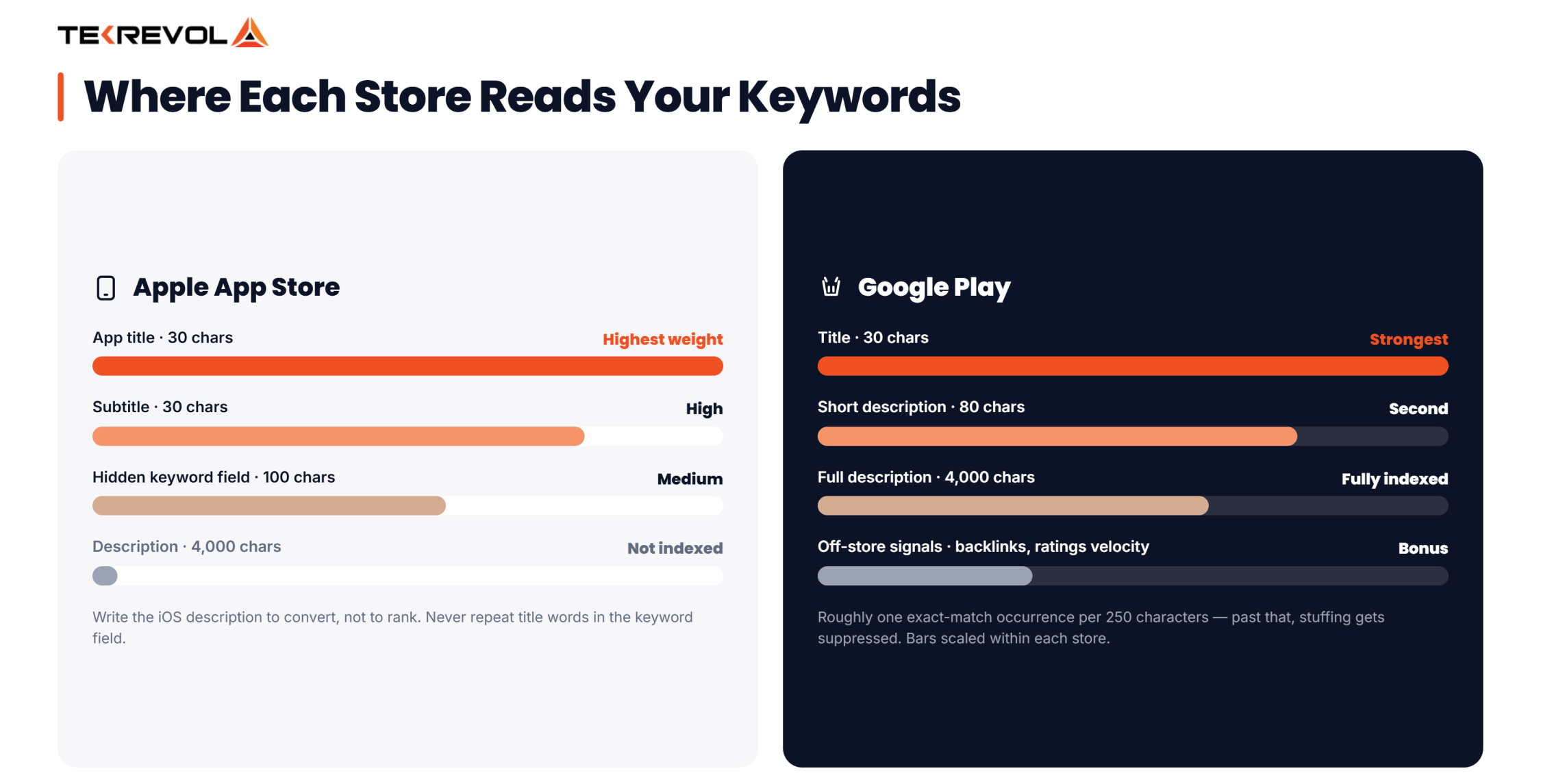
- Apple indexes the title, subtitle, and a hidden 100-character keyword field.
- Google Play indexes your title, short description, and full description text.
- Pick keywords by balancing relevance, search volume, and ranking difficulty together.
- Refresh your keyword set every 4 to 6 weeks based on ranking data.
Your app could be the best in its category and still sit invisible on page five of search results. Sounds unfair? It happens every single day.
The reason is almost always the same. The team behind the app never took mobile app keywords seriously. They picked a clever name, wrote a description that sounded nice, and hoped the downloads would follow. They rarely do.
Keywords are how the App Store and Google Play understand what your app does and who should see it. Get them right, and you earn free, high-intent traffic month after month. Get them wrong, and even paid ads struggle to save you.
This guide walks you through finding, placing, and refining keywords step by step. Stick with it till the end, because the last two sections are where most apps win or lose.
What Are Mobile App Keywords and Why Do They Matter?
Mobile app keywords are the words and phrases people type into the App Store or Google Play search bar when they look for an app. Think “budget tracker,” “sleep sounds,” or “food delivery near me.” When your listing contains the terms your audience actually searches, the store algorithms match your app to those queries and show it in the results.
Why should you care this much about search? Because search is where downloads come from. Apple’s own data shows that almost 65% of App Store downloads happen directly after a search. That is not browsing, not featured lists, not word of mouth. Someone typed a phrase, saw an app, and installed it within moments.
The competition for those searches is brutal. Statista reported around 2.26 million apps available on the Google Play Store, and Apple’s marketplace holds roughly two million more. Every one of them is fighting for a handful of spots at the top of each search result. Your keywords decide whether you show up in that fight at all.
How App Store Algorithms Read Keywords??
Both stores work on a simple principle. They scan specific text fields in your listing, extract the terms, and build an index that connects your app to search queries. When a user searches, the algorithm ranks all matching apps based on keyword relevance plus performance signals like downloads, ratings, retention, and update frequency.
Here is the part many founders miss. Keywords get you into the race, but they do not win it alone. A perfectly optimized listing with a 2.1-star rating still sinks. Treat keywords as the foundation of visibility, then let app quality do the rest of the climbing.
Want your app to top the charts?
Avoiding common pitfalls is only half the game; success depends on having the right game development team by your side.
Get in TouchHow to Find Mobile App Keywords That Actually Rank?
Finding the right mobile app keywords is a research job, not a guessing game. The goal is to build a list of 50 to 100 candidate terms, then narrow it down to the ones you can realistically rank for. Here is the process that works in 2026.
Start With Seed Keywords
Seed keywords are the obvious, core terms that describe what your app does. A meditation app starts with “meditation,” “calm,” “sleep,” and “mindfulness.” Write down every function, feature, and problem your app solves. Ask yourself one question for each: would a stranger type this to find an app like mine?
Do not filter anything at this stage. A messy list of 30 to 40 seeds is exactly what you want. You will trim it later with real data.
Study Competitor Listings
Your competitors already did keyword research, and their listings are public. Search your main seed terms and open the top five apps for each. Read their titles, subtitles, and descriptions carefully. Note the phrases that repeat across multiple competitors, because repetition usually signals a term with proven search volume.
Then look for the gaps. If every rival targets “workout planner” but nobody targets “home workout no equipment,” you may have found a lane with real demand and thin competition.
Knowing the market numbers helps here too, and our breakdown of mobile app download statistics shows exactly which categories are crowded and which still have room.
Use Autocomplete and Search Suggestions
Type your seed keywords into the App Store and Google Play search bars, one letter at a time. The autocomplete suggestions that appear are pulled from actual user searches, which makes them a free window into demand.
“Budget” might surface “budget planner for couples” or “budget tracker with bank sync.” Those long-tail phrases often convert better than the short head terms because the intent behind them is sharper.
Mine Reviews for User Language
Read reviews of your app and your competitors’ apps. Users describe features in their own words, and those words are frequently different from yours. You call it “expense categorization.” They call it “sorting my spending.” Guess which phrase they type into search?
This step is where professional teams pull ahead. A dedicated app store optimization practice combines review mining with volume data to find phrasing that both matches user language and carries measurable search traffic.
Best Tools for App Keyword Research
Manual research gets you far, but tools give you the numbers behind each term: search volume, difficulty scores, and competitor rankings.
Choosing a solid Play Store keyword tool or an iOS research platform saves weeks of trial and error.
| Tool | Best For | Standout Feature | Pricing Model |
| AppTweak | iOS and Android teams | Keyword relevance and difficulty scoring | Paid, tiered plans |
| Sensor Tower | Competitor intelligence | Download estimates per keyword | Paid, enterprise-leaning |
| Mobile Action | Budget-conscious teams | Keyword tracking with ASA integration | Freemium |
| AppFollow | Review-heavy categories | Review mining plus keyword tracking | Freemium |
| Google Keyword Planner | Google Play app keywords | Web search volume as a demand proxy | Free |
| Apple Search Ads | iOS app keywords validation | Real impression counts per search term | Pay per tap |
A few practical notes on using them well. First, no single Play Store keywords tool has perfect data, because neither Apple nor Google publishes exact search volumes. Every tool estimates. Cross-check any keyword you plan to build your listing around in at least two tools before committing.
Second, Apple Search Ads deserves special mention even if you never plan to run paid campaigns. Its impression data comes straight from Apple, so it doubles as the most accurate free validator for iOS app keywords.
Run a tiny test campaign, check which terms generate impressions, and feed the winners back into your organic metadata.
Third, treat a Play Store keywords tool as a compass rather than a map. The data points you in the right direction, but your final call should always factor in relevance to your actual features. Ranking for a term your app cannot deliver on just buys you uninstalls and angry reviews.
iOS App Keywords: How Does Apple Indexes Your Metadata?
Apple gives you three indexed fields, and every character in them counts. Understanding how each field works is the difference between iOS app keywords that rank and metadata that wastes space.
The 100-Character Keyword Field
The App Store has a hidden keyword field, invisible to users, where you enter up to 100 characters of comma-separated terms. This field exists solely for the search algorithm, making it the most efficient real estate you own. A few rules squeeze maximum value from it:
- Separate terms with commas and no spaces, so “budget, tracker, expense” instead of “budget, tracker, expense.”
- Never repeat words that already appear in your title or subtitle. Apple indexes each word once, so repetition burns characters for zero gain.
- Use single words over phrases where possible. Apple automatically combines individual words into phrases, so “budget” and “planner” together can rank for “budget planner.”
- Skip plurals, articles, and your own app name. The algorithm handles most plural forms, and your brand name is indexed by default.
Title and Subtitle Carry the Most Weight
Your app title (30 characters) is the strongest ranking signal on iOS, followed by the subtitle (30 characters).
The pattern that wins is brand name plus your single most valuable keyword phrase, something like “Fintrack: Budget Planner.” The subtitle then covers your second priority, such as “Track Spending & Save Money.”
The weighting matters more than most teams realize. A keyword in your title can outrank the same keyword buried in a competitor’s hidden field, even when that competitor has more downloads.
Search behavior on iOS also skews heavily toward these matches. Sensor Tower found that search drove 70% of worldwide App Store installs for non-game apps, which means your title and subtitle choices directly control the majority of your acquisition.
| iOS Field | Character Limit | Indexed for Search | Ranking Weight |
| App Title | 30 | Yes | Highest |
| Subtitle | 30 | Yes | High |
| Keyword Field | 100 | Yes | Medium |
| Description | 4,000 | No | None (conversion only) |
| In-App Purchase Names | 30 each | Yes | Low |
One more thing worth flagging. The iOS description is not indexed for search at all, which surprises almost everyone coming from a web SEO background. Write it to convert readers into installers, not to stuff terms.
And since iOS app keywords behave so differently from Android, teams building for Apple’s ecosystem often lean on specialized iPhone app development company partners who handle metadata as part of the launch process rather than as an afterthought.
The best time to optimize your app for success is now!
Avoiding common pitfalls is only half the game; success depends on having the right game development team by your side.
Get in TouchGoogle Play App Keywords: How Google Indexes Your Listing
Google Play takes the opposite approach from Apple. There is no hidden keyword field. Instead, Google crawls the visible text of your listing the same way it crawls a webpage, which means Google Play app keywords live inside content your users actually read.
The Three Fields That Matter
Google indexes three text areas, each with its own weight:
- App title (30 characters). The strongest signal, same as iOS. Lead with your most important term.
- Short description (80 characters). The second strongest signal and the text users see first on your listing. It has to rank and sell at the same time.
- Full description (4,000 characters). Fully indexed, unlike Apple’s. This is where the bulk of your Google Play app keywords belong.
Because the full description is indexed, Google Play rewards well-written, keyword-aware long-form copy.
The best app marketing strategies aim to include your primary term two to four times across the description, weave in secondary phrases naturally, and mention them early. Terms that appear in the first few lines seem to carry slightly more weight than ones buried at the bottom.
Keyword Density Without Stuffing
Google’s algorithm penalizes keyword stuffing, and the penalty is not theoretical. Listings that repeat a phrase ten times in robotic sentences get suppressed. The working guideline used by most ASO practitioners is roughly one exact-match occurrence per 250 characters of description text, wrapped in sentences a human would actually enjoy reading.
Demand on the platform justifies the care. Google’s own search team shared that 12% of daily active users search for apps every single day, and half of all users search weekly. That is a constant river of intent flowing through the Play search bar.
Understanding the scale of the platform helps you set realistic targets, and our roundup of Google Play Store stats covers download volumes, category saturation, and publisher counts in detail.
One Android-specific bonus worth using: Google factors in some off-store signals, including backlinks to your Play listing and the ratings velocity of your app. Earning mentions on relevant blogs and directories gives your Google Play app keywords a push that Apple’s closed system simply does not offer.
How to Use Mobile App Keywords for Higher Rankings?
To rank higher using mobile app keywords, you must strategically place your target terms in high-weight App Store and Google Play metadata fields, specifically the App Title, Subtitle (iOS) / Short Description (Android), and the hidden Keyword Field, and continuously iterate based on performance data.
While keyword research gives you a list of opportunities, actual search visibility is determined by a systematic two-part process:
- Strategic Placement: Aligning high-volume keywords with the metadata fields that app store algorithms weigh most heavily.
- Performance Maintenance: Monitoring rank volatility, defensive updating, and swapping underperforming terms for higher-converting alternatives.
If you’ve been waiting for how these best app marketing promotion strategies work, this is the part that will help you out.
The Keyword Priority Matrix
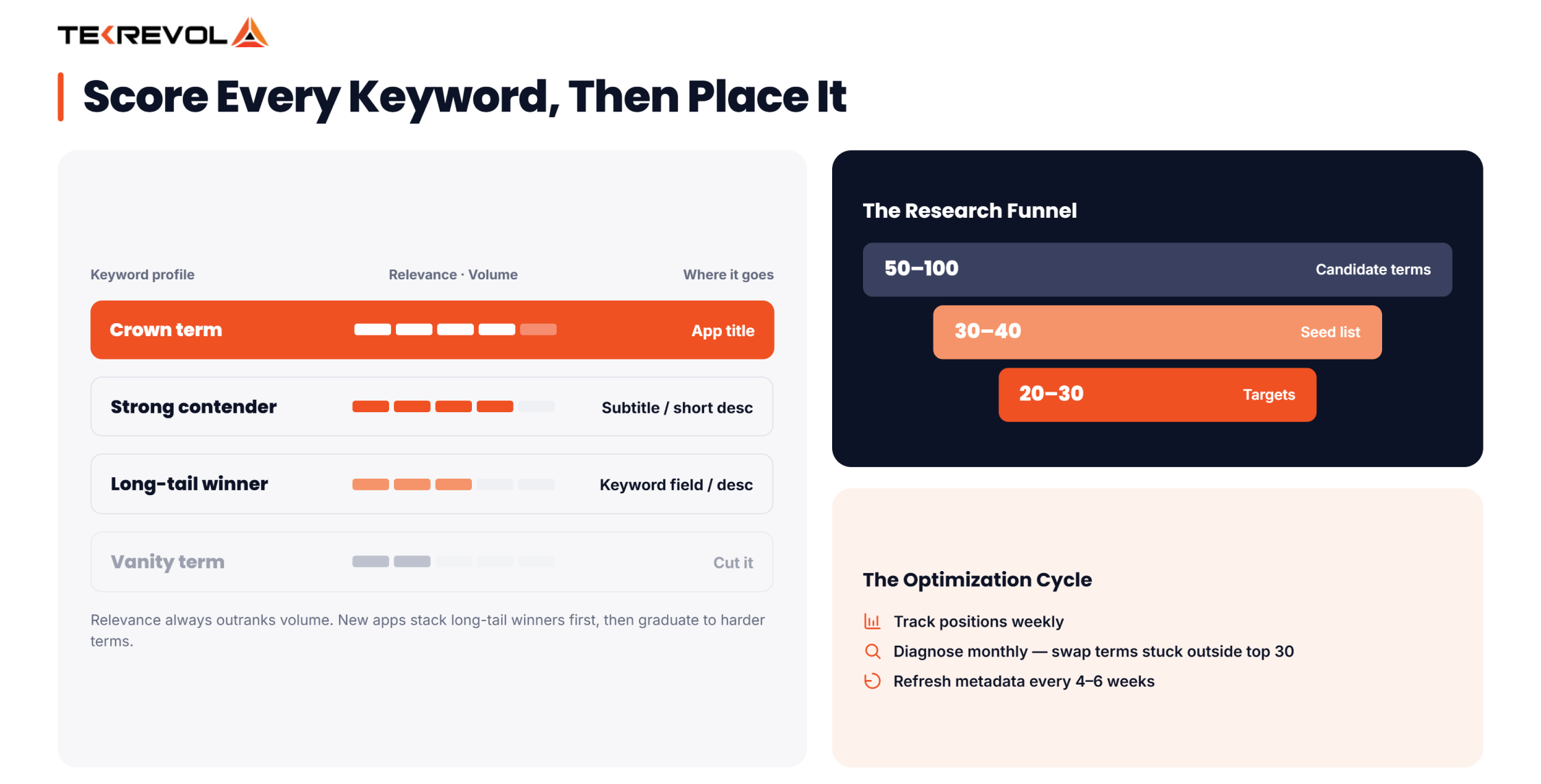
Not all keywords deserve your title. Score every candidate term on three factors, each from 1 to 5, then place it according to its profile:
| Keyword Profile | Relevance | Volume | Difficulty | Where It Goes |
| Crown term | 5 | 4–5 | Any | App title |
| Strong contender | 4–5 | 3–4 | Low–Medium | Subtitle / short description |
| Long-tail winner | 4–5 | 2–3 | Low | Keyword field / full description |
| Vanity term | 2–3 | 5 | High | Cut it |
| Filler | Any | 1 | Any | Cut it |
The matrix forces one discipline that separates ranking apps from invisible ones: relevance always outranks volume.
A “vanity term” like “free games” might show huge search numbers, but if your app is a budgeting tool, chasing it wastes your strongest fields on traffic that will never install.
New apps should stack their metadata with long-tail winners first, build download velocity, then graduate to higher-difficulty terms in later updates.
Track, Test, and Refresh Every Cycle
Keyword optimization is not a launch task. It is a cycle. Here is the cadence that consistently moves rankings:
- Track weekly: Monitor your position for every target keyword. Any tool from the table earlier handles this automatically.
- Diagnose monthly: Terms stuck outside the top 30 after four weeks are usually too competitive for your current download volume. Swap them for easier variants.
- Update metadata every 4 to 6 weeks: Each app update is a chance to test new terms. Change a few keywords at a time so you can attribute movement to specific edits.
- Feed conversion data back in: A keyword that ranks #3 but converts poorly is a targeting problem. Revisit whether the intent behind the term matches what your screenshots promise.
Keywords also do not operate in a vacuum. Ratings, retention, and update frequency all feed the same ranking algorithms, which is why store visibility works best inside broader app marketing strategies that cover the full funnel.
And once your rankings start moving, layering on the mobile app promotion strategies that drive external traffic creates a compounding loop, because stores reward apps that bring users in from outside.
The teams that get this loop right usually plan for it before launch. Baking keyword research into the build phase, the way an experienced mobile app development partner does, means your app name, feature set, and store listing all pull in the same direction from day one.
Common Mobile App Keyword Mistakes to Avoid?
Even solid research gets undone by execution errors. These are the mistakes we see most often in listings that underperform:
- Optimizing once and forgetting. Search trends shift, competitors update, and seasonal demand moves. A keyword set from eight months ago is stale.
- Copying a competitor’s exact keywords. Their download volume lets them rank for terms you cannot touch yet. Match their strategy, not their list.
- Ignoring localization. Translating your keywords for each major market often doubles reach. Both stores index localized metadata separately, and competition in non-English locales is usually far thinner.
- Stuffing the Google Play description. Repetition past natural reading rhythm triggers suppression, and it reads terribly to the humans deciding whether to install.
- Wasting iOS keyword field characters. Spaces after commas, repeated title words, and plural duplicates quietly eat the 100 characters that should be working for you.
- Chasing volume over intent. A thousand irrelevant impressions lose to a hundred searches from people who actually want what you built.
Fix these six issues, and most listings jump within one or two update cycles, even before adding a single new keyword.
How TekRevol Can Help?
Mobile app keywords decide whether your app gets discovered or buried. You now know how to build a seed list, validate terms with the right tools, place them across Apple’s indexed fields and Google Play’s descriptions, and refresh them on a steady cycle using the priority matrix.
Doing all of that consistently is where TekRevol comes in. Our ASO team handles keyword research, metadata optimization, localization, and A/B testing across both stores, backed by 800+ successful projects.
Whether you need a full listing overhaul or an app built with discoverability planned from the first sprint, we treat rankings as an engineering problem with measurable outcomes. Your app deserves to be found, and we make sure it is.
Stop leaving your visibility to algorithmic chance. Reach out to TekRevol today for a tailored keyword audit, and let’s start turning search impressions into high-converting, loyal app downloads.
Ready to make your app go viral on the app stores?
Avoiding common pitfalls is only half the game; success depends on having the right game development team by your side.
Get in Touch


![How to Build a Selfie & Camera App: AR Filters, AI Editing & Cost [2026]](https://assets.tekrevol.com/images-tek/uploads/2025/09/Tek-Feature-32-400x160.jpg)


