



- System software runs the machine, while application software helps a person get a specific job done.
- The reliable test is who the software serves: the machine and the code above it, or a person.
- System software is a wider category than the operating system, and the two get confused constantly.
- Browsers, databases, and hypervisors sit on the boundary, and honest answers there depend on the layer.
- Reference sources treat this as two categories, not three, with programming tools inside system software.
- Building system software costs more and takes longer, because a bug there takes everything down with it.
Ask five people to explain system software vs application software, and you’ll get five fuzzy answers, most of which lean on the word “platform.” It sounds like textbook trivia. It isn’t.
Here’s the clean test. System software runs the machine. Application software runs on top and does a job you actually care about. Windows is system software. The browser you’re reading this in is application software. One serves the hardware, and the other serves you.
That line has real money attached to it. Gartner expects worldwide IT spending to hit $6.37 trillion this year, and it tracks application software and infrastructure software as two separate budget lines. Which side your project lands on decides who builds it, what it costs, and how carefully you ship updates.
In this guide, we’ll cover what each type does and compare them side by side. We’ll walk through the main types of each, then look at the messy edge cases where the textbook line quietly breaks down.
What’s the Difference Between System Software and Application Software?
System software vs application software comes down to one thing: purpose. System software manages the computer’s hardware and resources so everything runs. Application software performs specific tasks for the user, like writing documents, editing photos, or browsing websites.
Everything else follows from that one distinction.
System software starts when the machine starts. It runs whether you’re at the computer or not, and you rarely touch it. An app starts when you open it, does a job, then closes.
One quick note on wording. “Software” is the broad term for both. “Program” and “app” usually mean the second kind. People swap these terms loosely, which is part of why the topic gets muddled.
Building Software and Unsure What You Actually Need?
We'll map your idea to the right architecture and give you a cost range, in one free call.
Schedule Your Free ConsultationWhat is System Software and What Does It Do?
System software is the layer that controls a computer’s hardware and provides a platform for other software to run on. It includes the operating system, device drivers, firmware, utility programs, and language processors like compilers.
System software handles four jobs that never stop running:
- Resource management: Deciding which program gets CPU time, and how much memory each one is allowed to hold.
- Hardware abstraction: Letting a program save a file without knowing anything about the drive it writes to.
- Security and isolation: Preventing one app from reading another’s memory or damaging critical system files.
- Device contact: Translating generic orders into commands a particular printer, camera, or graphics card knows.
System software holds deep privileges, so the engineering bar for it sits much higher. A bug in a photo editor annoys somebody, while a bug in a device driver can crash an entire fleet of machines. You can learn more in indepth by reading our guide on System Software: Features, Types, and Examples.
What are the Main Types of System Software?
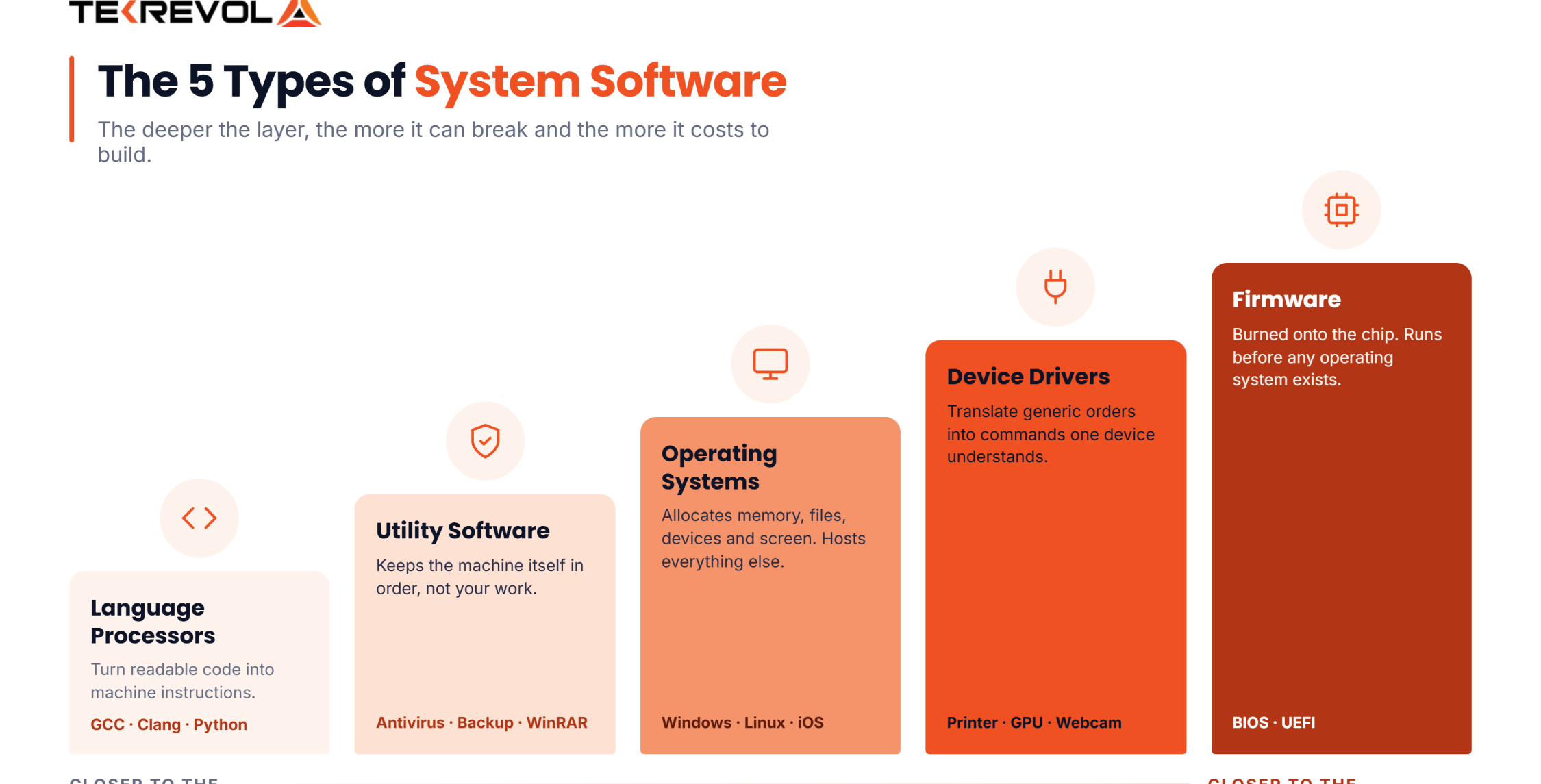
The four types of system software are operating systems, device drivers, utility software, and language processors. Some classifications add firmware as a fifth category, since it sits closest to the hardware and often ships burned into the chip itself.
Each sits at a different depth between your hardware and your apps. Here’s what each type does.
1. Operating Systems
IBM defines an operating system as a collection of software that manages a computer’s hardware and applications by allocating resources. It handles memory, files, devices, security, and the screen you look at. Windows, macOS, Linux, Android, and iOS are all operating systems, and everything else on the machine runs on top of one.
2. Device Drivers
Drivers act as translators between the OS and one piece of hardware. Your printer, graphics card, and webcam each need one. Without the right driver, the OS knows a device is there but has no idea how to talk to it.
3. Utility Software
Utilities take care of upkeep: antivirus scanners, disk cleanup tools, backup software, and file zipping. They count as system software because they work on the machine itself, not on anything you’re making.
4. Language Processors
These turn code a person can read into something the machine can run. That covers compilers (GCC, Clang), interpreters (Python, Ruby), and assemblers. Coders use them daily, but they act on the system, not on your files.
Firmware, the Fifth Type
Firmware is code written onto the hardware itself, like BIOS or UEFI on a motherboard. It runs before the OS loads. Some lists fold it into system software, and others keep it apart. Both views hold up.
What is Application Software?
Application software is any program built to perform a specific task for the user rather than to run the computer. Word processors, browsers, games, accounting tools, and mobile apps are all examples of application software, installed and opened as needed.
The test is simple: if a person opens it to get something done, it’s an app. Apps sit on top of the OS and lean on it fully. Photoshop can’t save a file unless the OS deals with the disk. Chrome can’t reach the web unless the OS sets up the network link.
Apps are also built in higher-level languages like Java, Python, C#, JavaScript, or Swift, since they never touch hardware. That makes them quicker to build and easier to change, which is why most custom software development work sits in this group.
What are the Main Types of Application Software?
The types of application software include productivity software, business and enterprise software, web browsers, multimedia software, games, communication tools, and educational software. They split further into general-purpose software sold to everyone and custom software built for one organisation.
| Type | What it is | Examples | Who it’s for |
| General purpose | Off-the-shelf tools for common tasks | Microsoft Word, Excel, Chrome | Anyone |
| Custom / bespoke | Built for one organization’s workflow | An internal claims-processing tool | One company |
| Enterprise | Runs core business operations at scale | SAP, Salesforce, Oracle ERP | Large organizations |
| Mobile | Built for phones and tablets | Uber, Spotify, banking apps | Consumers and field teams |
| Web / SaaS | Runs in a browser, nothing installed | Google Docs, Slack, HubSpot | Distributed teams |
| Utility-style apps | User-facing tools with narrow jobs | Calculators, PDF readers, media players | Anyone |
There’s a second split that matters. General-purpose apps are built once and sold to everyone, like Excel. Custom apps are built for one firm’s own way of working, like a delivery company’s routing tool. Custom software development costs more upfront and fits exactly. That’s the trade.
10 Differences Between System Software and Application Software
The 10 system software vs application software differences cover purpose, users, installation, execution, dependency, programming language, size, interaction, complexity, and examples. System software serves the machine, and application software serves the person using it.
| Basis | System software | Application software |
| Purpose | Runs and manages the computer | Performs specific tasks for the user |
| Who it serves | The hardware and other software | The end user |
| Installation | Installed with the machine or OS | Installed by the user as needed |
| Execution | Starts at boot, runs continuously | Starts when opened, stops when closed |
| Dependency | Runs independently | Cannot run without system software |
| Programming language | Low-level: C, C++, assembly | High-level: Java, Python, C#, JavaScript |
| User interaction | Minimal and mostly indirect | Direct and constant |
| Size | Generally smaller and tightly optimised | Ranges from tiny to very large |
| If it fails | The whole system may stop working | Only that one program stops working |
| Examples | Windows, Linux, drivers, BIOS, compilers | Chrome, Word, Photoshop, Zoom, Spotify |
The 5 differences that matter most
Purpose (machine or user), dependency (system software runs alone, apps don’t), start-up (boot or on demand), contact (background or direct), and what breaks (the whole box or one window). Those five settle nearly every case you’ll meet.
Not Sure Which Category Your Project Falls Into?
Tell us what you're building, and we'll scope it honestly, even if the answer is you don't need custom.
Consult Our ExpertsExamples of System Software Vs Application Software
Examples of system software include Windows, macOS, Linux, Android, iOS, BIOS, printer drivers, antivirus programs, and compilers like GCC. Application software examples include Chrome, Microsoft Word, Photoshop, Zoom, Spotify, WhatsApp, and Excel.
Set side by side, the pattern becomes obvious.
| Function | System Software Example | Application Software example |
| Desktop | Windows 11, macOS | Microsoft Word, Photoshop |
| Mobile | Android, iOS | WhatsApp, Instagram, Uber |
| Hardware control | NVIDIA graphics driver, printer driver | None, apps don’t touch hardware directly |
| Startup | BIOS, UEFI | None, apps need the OS running first |
| Maintenance | Disk Cleanup, Norton Antivirus, WinRAR | None |
| Development | GCC compiler, Python interpreter | Visual Studio Code, Postman |
| Media | Audio driver | Spotify, VLC, Netflix |
Two of those rows deserve a second look:
- Antivirus counts as system software because it watches the machine, even though you can open its window.
- VS Code is an app, even though coders use it to build system software. What a tool is used for doesn’t change what it is.
How Do System Software and Application Software Work Together?
System software and application software work together in layers. Hardware sits at the bottom, firmware and drivers above it, then the operating system, then applications on top. Each layer talks only to the ones directly next to it.
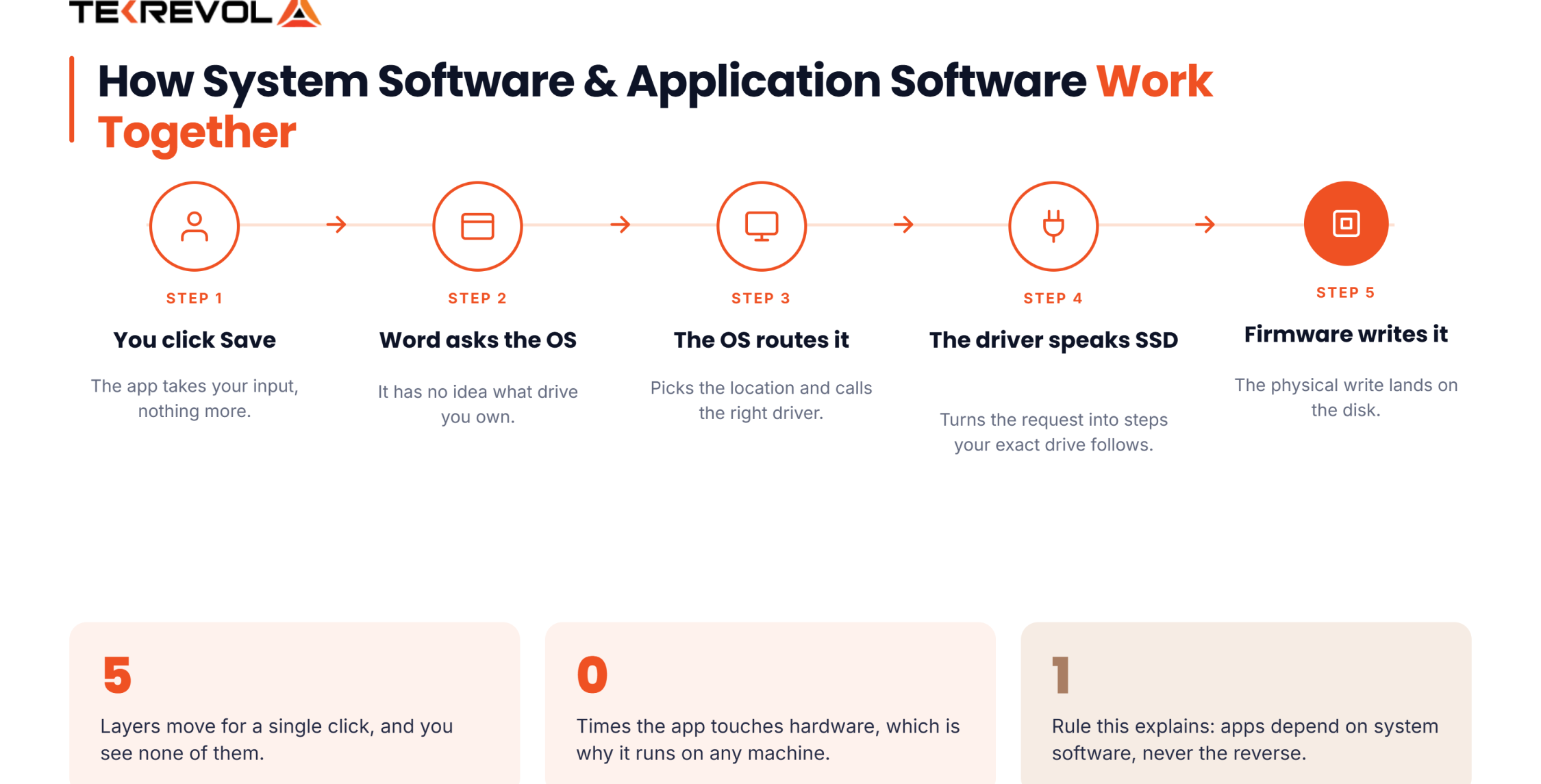
Walk through what happens when you save a file.
- You click Save in Word. That’s the app taking your input.
- Word asks the OS to write a file. It has no idea what kind of drive you own.
- The OS works out where the file goes and hands the job to the right driver.
- The driver turns that into steps your exact SSD can follow.
- The firmware on the drive does the physical write.
Five layers for one click. The app never touches hardware, and the hardware never knows Word exists. That split is the whole point, since it means Word runs on any machine without a rewrite for each one.
It also explains the dependency rule. Apps need system software because they simply cannot reach the hardware alone.
Need Software That Aligns with the Systems You Already Run?
We'll review your current stack and show you where a new build would slot in, free.
Consult Our Strategy TeamWhere Does Middleware Fit Between System and Application Software?
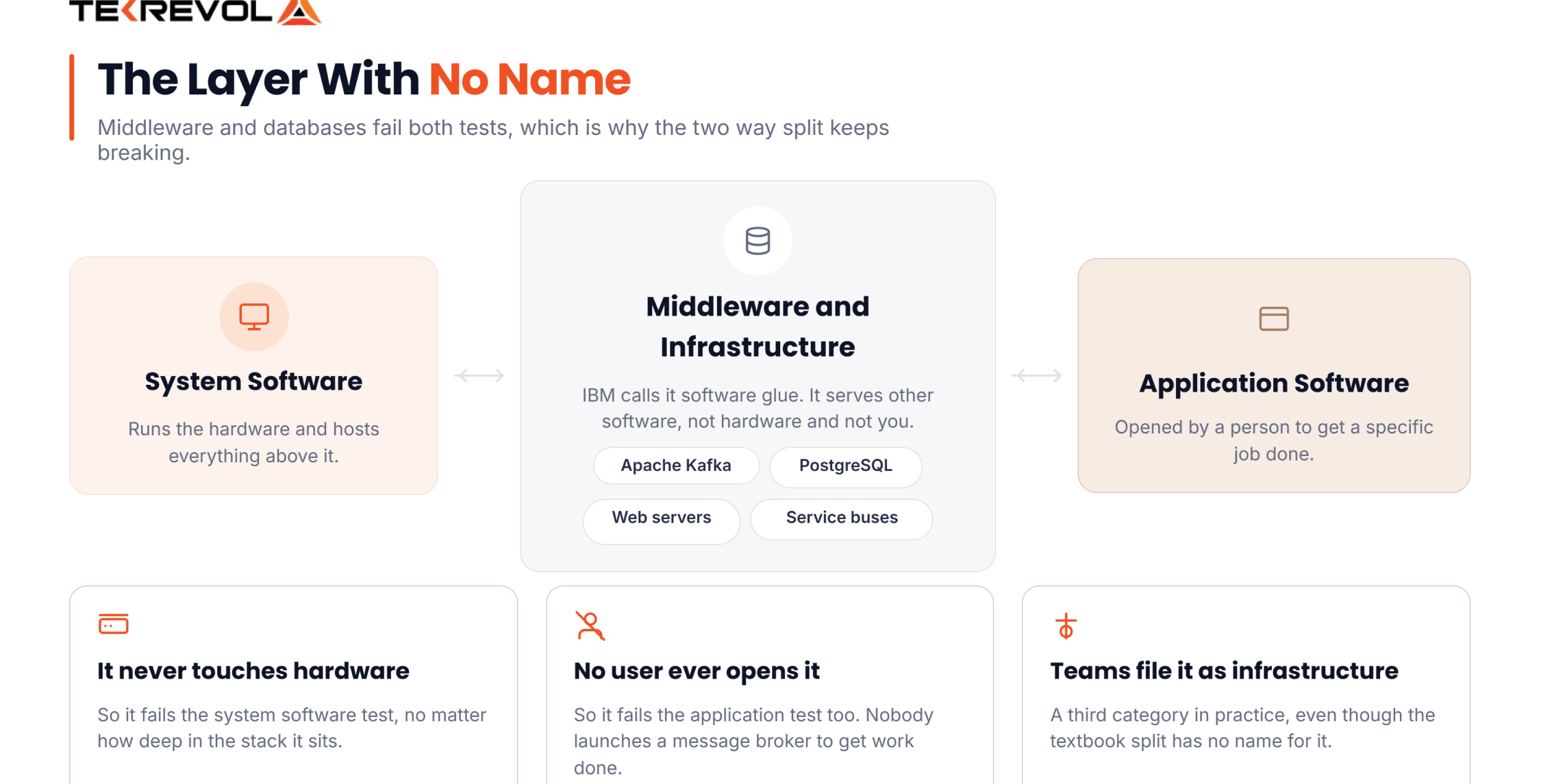
Middleware sits between system software and application software, connecting applications to each other and to back-end resources like databases. IBM calls it “software glue” that binds different systems together, which makes it a genuine third category rather than either extreme.
IBM defines middleware as “software that enables one or more kinds of communication or connectivity between applications or components in a distributed network.” Message brokers, web servers, service buses, and tools like Apache Kafka all sit here.
So which is it? Middleware doesn’t run hardware, so it’s not system software in the strict sense. But no user ever opens it, so it isn’t an app either. It serves other software, which is a third thing.
Databases sit in the same grey zone. PostgreSQL doesn’t run hardware, and nobody opens it to get work done, yet nearly every app leans on one. Most teams file databases and middleware under “infrastructure,” a group the textbook split has no name for.
Planning a system where these layers matter? Our cloud services work on exactly this part of the stack.
Why Does System Software vs Application Software Difference Matter?
The system software vs application software difference matters because the two categories have completely different costs, timelines, and engineering skill requirements. Application software is faster and cheaper to build. System software demands specialist low-level engineers, longer timelines, and far more rigorous testing.
If you’re buying software for your business, you’re almost surely buying an app. A CRM, a booking tool, a mobile app, an internal dashboard. These get built in high-level languages, on top of an existing OS, by coders who are easy to find.
System software is a different world. Drivers, embedded firmware, and OS parts need engineers who work in C or Rust and know memory and hardware inside out. That talent pool is small, rates run high, and one bug can kill a whole device rather than one screen.
| Factor | Application software project | System software project |
| Typical languages | JavaScript, Python, Java, Swift, Kotlin | C, C++, Rust, assembly |
| Talent availability | Wide | Narrow and specialised |
| Testing burden | Moderate | Very high, failures are system-wide |
| Typical timeline | Weeks to months | Months to years |
| Relative cost | Lower | Substantially higher |
How Do You Tell Which Category Your Software Belongs To?
To tell which category software belongs to, ask three questions: does a human open it to get a task done, can it run without an operating system, and does it manage hardware or resources? The answers place almost anything correctly.
Run them in order.
- Does a person open it to get a task done? Yes, and it’s an app. This one settles most cases on its own.
- Can it run with no OS beneath it? Yes, and it’s system software. Firmware and operating systems pass. Nothing else does.
- Is its job running hardware, resources, or other software? Yes, and it’s system software. This catches drivers, utilities, and compilers that question one missed.
If the answer is no three times, it’s likely middleware or infrastructure, the gap we covered above.
System Software vs Application Software Tricky Cases
| Software | Category | Why |
| Google Chrome | Application | You open it to do a task. It needs an OS. |
| Antivirus | System (utility) | Its job is protecting the machine, not doing your work |
| Android | System (OS) | Manages hardware and hosts every app on the phone |
| Visual Studio Code | Application | A developer opens it to work. Its purpose doesn’t change what it is. |
| GCC compiler | System (language processor) | Acts on code for the system, not on user data |
| Docker | Infrastructure | Manages containers, not hardware. Sits between the layers. |
| PostgreSQL | Infrastructure | No end user opens it, but it doesn’t manage hardware either |
| BIOS / UEFI | System (firmware) | Runs before any OS exists |
Notice that three of those eight don’t fit the two-way system software vs application software split at all.
Why Choose TekRevol for Software Development?
TekRevol is a custom software development company building application software for businesses across 11 industries. We’ve delivered 800+ projects with a team of 500+ IT professionals, covering CRM, ERP, SaaS, mobile, cloud, and AI-powered products.
What working with us actually involves.
- We tell you which category you’re in. Most software development projects fall into application software, and it should be priced and scheduled that way. If your project genuinely needs low-level work, we’ll say so upfront rather than discovering it in month four.
- We build on proven platforms. Rather than reinventing infrastructure, we build on established operating systems, databases, and cloud services, which keeps your timeline and budget sane.
- Breadth across the stack. Web, mobile app development, cloud, AI, and enterprise systems, with the integration work between them handled by the same team.
- Independently reviewed. 4.8 out of 5 across 83 verified Clutch reviews, plus recognition from Forbes as one of America’s Best Startup Employers.
Got a Software Idea and No Clear Starting Point?
Book a 30-minute call, and we'll tell you what to build, what to buy, and roughly what it costs.
Schedule Your Free Consultation


