

Ready to Scale Your Business Workflows?
Bring us the workflow and we'll identify key features, proper frameworks, and scalable architectures for your software.
Consult Our Strategy Team

Open your laptop right now and count how many programs are actually running: your email client, a browser tab, maybe Slack or Spotify humming in the background. Every single one of those is application software. Ask most people to actually define the term, though, and they’ll stall out somewhere around “well… it’s an app, right?”
That gap between using something daily and being able to explain it is exactly where this guide starts. Application software is any program built to help you do a specific task: write, browse, message, edit, manage a budget instead of running the computer itself. That’s the whole idea in one sentence.
This guide explains how application software works, its key features, the types you’ll run into most, and common application software examples. Since we are a custom software development company building custom business software for a living, we’ll also show you how to tell when the free or off-the-shelf option has stopped being enough.
Application software is any program built to perform a specific task for the end user: writing a document, editing a photo, tracking a sale, joining a call. It runs on top of the operating system and exists to get your work done.
Application software sits in a four-layer stack. You act on the interface; the app processes that request; it asks the operating system for resources like memory or storage; and the OS instructs the hardware. The result travels back up the same path.
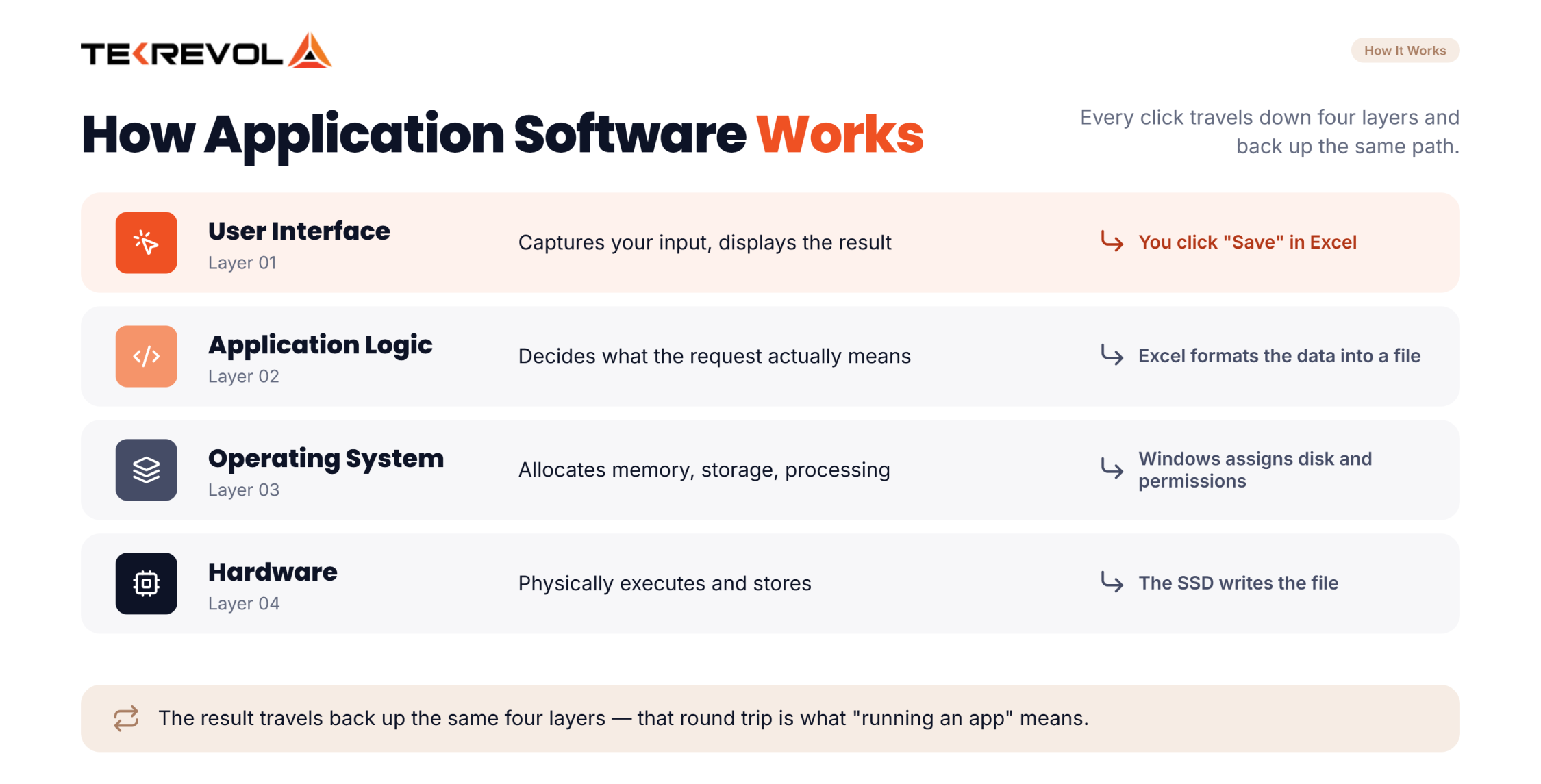
Every click travels down and back. That path explains most of what confuses people about software.
| Layer | What it does | Example in action |
| User interface | Captures input, displays results | You click “Save” in Excel |
| Application logic | Decides what the request means | Excel formats the data into a file |
| Operating system | Allocates memory, storage, processing | Windows assigns disk space and permissions |
| Hardware | Physically executes and stores | The SSD writes the file |
Work with expert engineers to define your requirements, screens, data fields, and technical roadmap up front.
Schedule Your Strategy SessionGood application software shares seven features: a task-specific interface, defined scope, data storage and retrieval, API integration, access control, regular updates, and multi-device access. These separate real products from scripts that happen to run.
Vendor sites list what a product includes. This is what the category requires.
System software manages the computer’s hardware and runs mostly in the background, while application software is what you interact with directly to complete a task. One keeps the machine alive; the other is why you turned it on.
System software is the foundation: the operating system (Windows, macOS, Linux), device drivers, and the utilities that keep everything talking to each other. Application software, by contrast, is what pulled you toward the computer in the first place: a document, a browser tab, a game.
Here’s the split laid out side by side:
| Aspect | System Software | Application Software |
| Job | Runs and manages the computer itself | Helps you complete a specific task |
| Who interacts with it | Mostly invisible, runs in the background | You open, click, and use it directly |
| Examples | Windows, macOS, device drivers, antivirus utilities | Word, Chrome, Slack, Photoshop |
| Installed by | Comes with the device | Chosen and added by the user |
| Depends on | Runs directly on the hardware | Depends on system software to run at all |
If you want the fuller map of how software gets categorized, not just application vs. system we’ve broken that down separately in our guide to types of software development.
Application software breaks down into eight core categories, based on the job it’s built to do: productivity, business, communication, creative work, browsing, education, entertainment, and custom-built tools. Most programs you use every day fall into one of these.
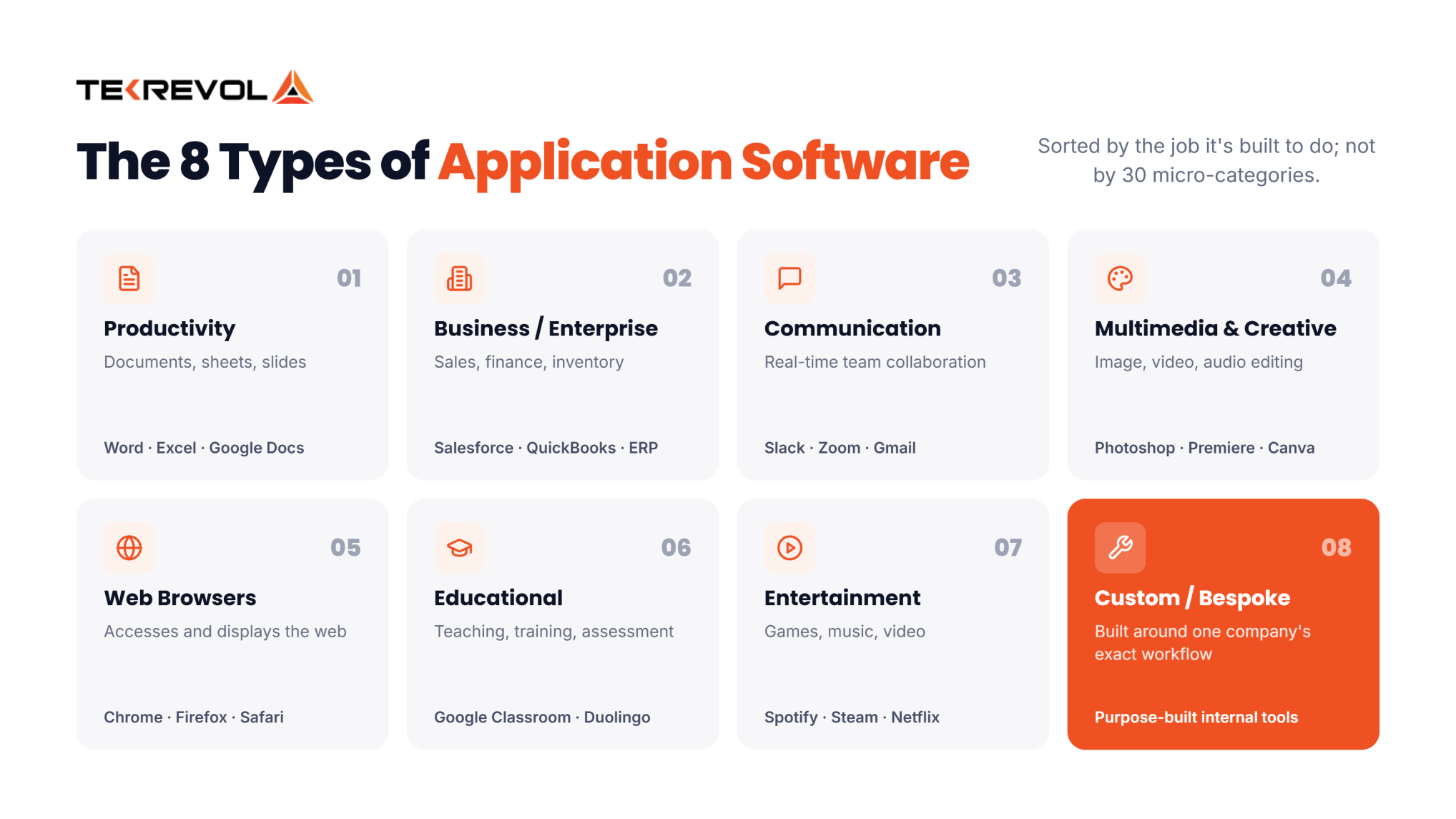
Some lists online stretch this out to 20 or 30 micro-categories. We’re not doing that here. Most of those are just narrower slices of the same eight jobs. Here’s the quick reference, then we’ll walk through each one:
| Type | What It Does | Common Examples |
| Productivity / General-purpose | Creates and edits documents, sheets, and slides | Microsoft Word, Excel, Google Docs |
| Business / Enterprise | Runs core functions like sales, finance, and inventory | Salesforce, QuickBooks, ERP platforms |
| Communication & Collaboration | Connects teams and customers in real time | Slack, Zoom, Gmail |
| Multimedia & Creative | Edits images, video, and audio | Adobe Photoshop, Premiere Pro, Canva |
| Web Browsers | Accesses and displays websites | Chrome, Firefox, Safari |
| Educational | Supports teaching and learning | Google Classroom, Duolingo |
| Entertainment | Delivers games, music, and video | Spotify, Steam, Netflix |
| Custom / Bespoke | Solves one business’s exact workflow | Purpose-built internal tools |
Productivity software helps you create and edit everyday work: documents, spreadsheets, and presentations. It’s usually the first application software most people ever learn to use.
This is the category with the biggest install base on the planet. If your business runs on proposals, reports, or budgets, this is the software touching almost every one of them.
Creates, edits, and formats written documents. You get styling and layout, spell and grammar checks, comments, tracked changes, and version history. Every department that produces contracts, proposals, policies, or reports lives in one of these.
Organizes data into rows and columns and calculates across it. You get formulas, pivot tables, charts, filters, and rules that flag bad data. Finance, operations, and analysts reach for these first. It’s the most flexible business tool which is also the risk, since plenty of firms run critical processes on files nobody has audited in years.
Builds and delivers slide-based content for meetings, pitches, and training. You get templates, transitions, speaker notes, embedded media, and presenter view. Sales, marketing, and internal comms teams use it most.
Business application software runs the operational side of a company. Think sales tracking, accounting, inventory, or customer relationships, not general tasks. It’s built for a role, not for everyone.
A CRM like Salesforce keeps sales and customer data in one place instead of scattered across spreadsheets. On the larger end, ERP platforms tie finance, inventory, and operations together in one system. We build this kind of setup through our ERP development services.
Stores structured data and lets you retrieve it reliably at scale. You get queries, indexes, permissions, backups, and copies that stay in sync. Developers and data teams own these, but every other app on this page depends on one. Most business software is really a database with an interface bolted on top.
Communication software lets teams and customers message, call, or video chat without leaving their desk. It’s quietly replaced most internal email over the last decade. Remote teams lean on it for the continuity an office used to provide. This category grew fastest after 2020, and it’s also where most app-switching fatigue begins.
These software edits or plays photos, video, and audio. It covers creative work including design, music, and video editing. This is software built for output that people actually see or hear.
Creates and edits visual assets, split between raster (pixel) and vector (shape) work. You get layers, masking, colour control, export presets, and shared component libraries. Designers, marketers, and product teams are the main users. Interface design is now a discipline of its own.
Plays, records, and edits audio and video. Simple tools handle playback and format swaps. Bigger ones add multi-track timelines, colour grading, audio mixing, and export presets per platform. Marketing, content, and training teams use it daily now that video is a default business format.
A web browser is application software built for one job: finding and showing web pages. That fits the exact definition of a program solving a user’s task. You get tabs, extensions, saved logins, sync across devices, and developer tools. Everyone uses one, and IT now treats it as managed infrastructure.
Educational software delivers teaching, training, and assessment. You get course building, sign-ups, progress tracking, quizzes, certificates, and reports. Schools use it to teach. Companies use the same tools for compliance training and onboarding, where the reporting matters as much as the content.
Entertainment software delivers games, music, or video for leisure rather than work. It’s the largest category by sheer time spent, even if it’s rarely the one people think of first.
Spotify streams music. Steam distributes and runs games. Netflix handles video. All three are application software doing exactly what the definition says, helping you complete a task. In this case, the task is relaxing.
Models real-world systems so you can test something expensive before committing to it. You get physics and stress models, 3D design, what-if testing, and charts. Engineering, manufacturing, and product teams rely on it. The value is entirely in the failures you catch on screen instead of in production.
Protects devices, data, and identities. You get threat detection, password storage, two-factor sign-in, single sign-on, and access logs. IT and security own it, but the real job is invisible. Every app above turns into a risk the moment access goes unmanaged.
Stores files centrally and syncs them across devices and people. You get folder permissions, file versions, share links that expire, offline sync, and backups. It’s the quiet backbone of remote work. It’s also the first place company data leaks when access rules go unmanaged.
Custom application software is built for one business’s exact workflow, not sold to the general public. It sits at the opposite end of the spectrum from an off-the-shelf productivity tool.
Instead of you adjusting your process to fit a template, a custom-built platform gets shaped around how your team actually works, which matters more than it sounds once your business outgrows what a generic tool was built to handle.
The business application software most companies depend on are CRM, ERP, HR, accounting, project management, analytics, e-commerce, and marketing platforms. These eight run core operations, and together they account for most enterprise software spending.
Gartner’s July 2026 forecast puts worldwide software spending at $6.37 trillion for 2026, up 15.5% on 2025, and the application software examples below take a large share of it.
| Business Function | What the software handles | Application Software Examples |
| CRM | Leads, deals, customer history | Salesforce, HubSpot, Zoho CRM |
| ERP | Finance, supply chain, inventory | SAP S/4HANA, Oracle NetSuite |
| HR & payroll | Hiring, time, benefits, payroll | Workday, BambooHR, Rippling |
| Accounting | Invoicing, bookkeeping, reporting | QuickBooks, Xero, FreshBooks |
| Project Management | Tasks, sprints, timelines | Jira, Asana, Monday.com, ClickUp, Trello |
| Analytics & BI | Dashboards, reporting, modeling | Power BI, Tableau, Qlik Sense |
| E-commerce | Storefront, checkout, orders | Shopify, WooCommerce, Magento |
| Marketing | Campaigns, email, automation | HubSpot, Mailchimp, Klaviyo |
CRM software solutions track every customer interaction from first enquiry to renewal, so the relationship survives staff turnover. You get contact records, deal stages, activity logs, email sync, and forecasts.
Connects finance, inventory, procurement, and operations into one data model, so a sale updates stock and the ledger at once. You get the ledger, purchase orders, stock control, production plans, and reports that span departments. Heavy to implement, which is why ERP development projects live or die on scoping rather than software choice.
Handles the employee lifecycle end to end. You get applicant tracking, onboarding, time and leave, benefits, and pay runs with tax filing. Compliance is the real driver here since payroll errors carry legal and financial risk a spreadsheet won’t shield you from.
Manages the money coming in and going out. You get invoices, expenses, bank matching, tax, and year-end statements. Finance teams run it or in smaller firms, the founder does. The most regulated category on this list, which is why the local edition often matters more than the brand name.
Organizes who is doing what, by when. You get task assignment, dependencies, timelines, boards, workload views, and time tracking. Fit beats features here: Jira suits engineering sprints, Asana suits marketing workflows, and using either for the wrong job creates friction.
Turns raw data from your other systems into something a decision-maker can read. You get data connectors, models, scheduled dashboards, drill-down, and alerts. More of it now ships with machine learning built in, which is why AI development and BI projects overlap so heavily.
Runs the storefront and everything behind it. You get catalogues, cart and checkout, payment gateways, orders, shipping rules, and tax. Build-versus-buy bites hardest in this category, because platform limits surface exactly when web development requirements get specific.
Plans, sends, and measures campaigns across channels. You get email builders, audience segments, automated sends, landing pages, and reporting on what worked. Its value rests almost entirely on the quality of data feeding it, which is why marketing tools and CRM get bought together, something our digital marketing agency sees constantly.
Yes. A mobile app is application software built specifically to run on a phone or tablet instead of a desktop computer. It still helps you complete one specific task directly; the device changes, but the underlying definition doesn’t move at all.
The confusion usually comes from the word “app” itself. It got so tied to phones that people forget it’s just short for “application.” A banking app, a food delivery app, and a desktop accounting program are all doing the same conceptual job: helping a user complete a task on different hardware. We go deeper on how that software actually gets planned and built in our guide to app development software.
Application software makes work faster, more accurate, and shareable, and it scales a process past manual limits. The costs are subscription spend, vendor dependency, security exposure, training time, and the integration debt that builds as tools multiply.
| Advantages | Disadvantages |
| Automates repetitive work and cuts manual error | Recurring subscription cost that rarely goes down |
| Makes data searchable, shareable, reportable | Vendor lock-in; your data sits in someone else’s system |
| Scales a process without scaling headcount | Every new app is a new security surface |
| Standardizes how a team works | Training time is routinely underestimated |
| Vendor handles updates and patches (SaaS) | Integration debt grows as tools multiply |
Buying software got easy; governing it didn’t. Any team with a card can add a tool in minutes. BetterCloud’s 2026 State of SaaS report found only 56% of apps in use carry IT approval, so more than four in ten sit outside anyone’s view.
That costs you three ways:
Buy when your process is standard and a mature product already models it well. Build when the process is your competitive advantage, when no product fits without heavy workarounds, or when per-seat costs at your scale exceed a build.
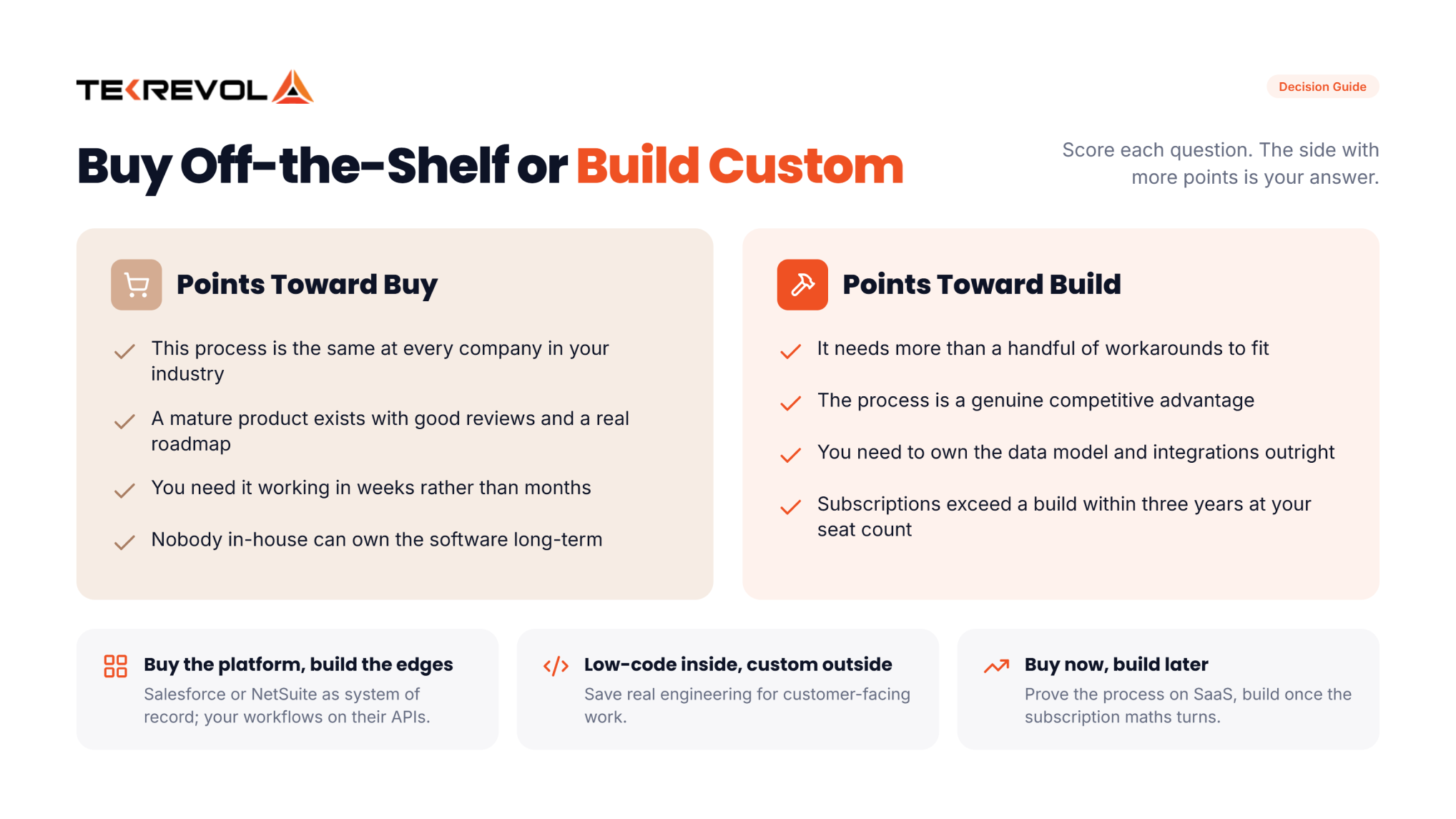
Most advice here comes from people selling one of the two options. Here’s a neutral score sheet instead.
| Question | Yes points toward |
| Is this process the same at every company in your industry? | Buy |
| Does a mature product exist with good reviews and a real roadmap? | Buy |
| Would it need more than a handful of workarounds to fit? | Build |
| Is this process a genuine competitive advantage? | Build |
| Do you need to own the data model and integrations outright? | Build |
| Would subscription cost exceed a build within three years at your seat count? | Build |
| Can you hire someone to own the software long-term? | Build |
| Do you need it working in weeks rather than months? | Buy |
We'll analyze your stack and give you a recommendation that prioritizes your ROI over selling a custom project.
Claim Your Honest Stack ReviewApplication software costs vary widely depending on whether you are buying off-the-shelf software (SaaS/commercial apps) or building custom software from scratch.
For pre-made applications (like Microsoft 365, Adobe Creative Cloud, or Salesforce), costs depend on the licensing model:
If you are hiring developers to build a custom web, desktop, or mobile app, total costs are driven by scope, features, and team location:
| Complexity | Typical Cost (USD) | Description & Examples |
| Simple / Basic | $10,000 – $40,000 | Basic functionality, simple UI, minimal backend (e.g., internal task loggers, basic utility apps). |
| Mid-Level | $40,000 – $150,000 | Includes user accounts, custom UI, payment gateways, and APIs (e.g., e-commerce, booking systems). |
| Complex / Enterprise | $150,000 – $500,000+ | Real-time features, AI capabilities, heavy security, and high scalability (e.g., healthcare platforms, fintech). |
Key factors driving custom costs include feature complexity, target platforms (iOS, Android, Web), developer hourly rates, and ongoing maintenance which typically runs 15%–25% of initial development annually. Our custom software development cost breakdown works through those.
Start with the workflow, not the feature list. Confirm the software models how you actually work, check it integrates with what you run, verify the security and data-export terms, then pilot it with the team who’ll use it daily.
TekRevol builds application software around a documented workflow rather than a feature list. Discovery produces a written spec, architecture gets decided before code, and the estimate covers hosting and upkeep.
Custom software goes wrong in predictable places. Here’s how we handle each one.
We map the process as it actually runs, including the exceptions people work around. That becomes a written spec: screens, data fields, user roles, and sign-off criteria. You own that document whether or not you build with us.
Data model, integration points, sign-in, and hosting get settled up front. Reworking a data model after launch is the priciest fix in custom software development, and it’s nearly always avoidable.
Cross-platform for most business apps. Native where speed or hardware access demands it. We’ll tell you when your requirement doesn’t justify the stack you asked for.
Every link to your CRM, ERP, or payment provider is a line item with its own testing. Treating integration as an afterthought is why so many builds land late.
Automated tests on core logic. Manual testing on real workflows. A staging site your team can use before launch. Bugs caught in staging cost a fraction of bugs caught by your customers.
Hosting, security patches, OS and framework updates, support If you’d rather run it in-house later, IT staff augmentation hands it over cleanly instead of locking you into a support contract.
You get repository access, deployment notes, and full IP transfer on completion. Anything less means you can’t switch vendors without rebuilding.
Bring us the workflow and we'll identify key features, proper frameworks, and scalable architectures for your software.
Consult Our Strategy Team


Application software means a program written to perform a specific task for a person, rather than to operate the computer itself. The term exists to separate it from system software such as Windows or Android. Any program you deliberately open to get something done — write, calculate, design, message, sell — counts as application software.
Its purpose is turning a manual task into a faster, more accurate, repeatable one. Application software captures data, stores it in a structured way, processes it, presents it, and then shares it. That combination lets one person handle work that once needed several people, and lets a whole team work from one set of information.
Microsoft Excel is the clearest single example — you open it deliberately, it performs a defined task, and removing it doesn’t stop your computer from working. Other everyday application software examples include Google Chrome, Adobe Photoshop, Slack, WhatsApp, Salesforce, and QuickBooks. Each one does a specific job for a user rather than running the machine.
The main benefits are automation of repetitive work, fewer manual errors, searchable and shareable data, and the ability to scale a process without adding headcount proportionally. Business software also adds reporting that makes team performance visible. The trade-offs are recurring subscription cost, vendor dependency, and a larger security surface with every extra tool you add.
Yes, when it performs a task for a user. ChatGPT and GitHub Copilot are both application software that run on a model instead of on fixed rules. The bigger shift is embedding: Gartner expects 40% of all enterprise applications to include task-specific AI agents by the end of 2026, up from under 5% in 2025.
Waqar Adil is a seasoned full-stack developer with over 6 years in web, mobile, and desktop applications, specializing in frameworks like Node.js, React.js, Laravel, and CakePHP. He also excels in leading offshore teams, managing client communications, and optimizing DevOps practices for scalable deployments.

One of the most common questions we receive from clients is: how much does custom software development cost? As a leading custom software development company, we understand why businesses ask this question. However, even after years of delivering tailored software...
Read More
So you’ve come up with an awesome software concept – perhaps the next social network sensation, some revolutionary AI tool, or perhaps a humble to-do list that you will finally use (as opposed to the last five). So how do...
Read More
Adding the element of personalization has always been a critical factor in building successful products in every business. The software industry is no different! Going digital and embracing digital transformation is not enough in today’s fast-paced technology world! Businesses need...
Read MoreGet valuable consultation form our professionals to discuss your projects. We are here to help you with all of your queries.
Collaborate with us and become a trendsetter through our innovative approach.


