



Developing websites has evolved from having simple forms and static content, which are no longer enough. Today’s users want to have fast, intuitive, personalized experiences on their websites with a smart interface. Integrating Artificial Intelligence into Web Development is not an option; it gives businesses a huge advantage over their competitors.
AI has created a new era of web development by changing the way websites work and how users interact with websites through chatbots that provide immediate responses to inquiries to personalized content recommendations, to intelligent search capabilities.
Businesses that effectively integrate AI into their web development create a user experience that feels less like an application and more like an experience.
This guide will provide a step-by-step guide to integrating AI into your websites, practical tools to use, real-life examples of how other businesses are integrating AI into their website development processes, and best practices to help you avoid the pitfalls.
This guide will be useful to developers, business owners, and anyone considering using Web Development Services or providing Web Development Services. This guide is designed to be very practical, straightforward, and easy to read.
What Is AI in Web Development?
Before discussing how to use AI in Web Development, it’s good to know how to define AI in the world of Web Development.
In Web Development, AI means the application of machine learning algorithms, natural language processing, computer vision, and data-driven automation methods to improve both the development of web applications and the overall experience of using them on your computer or mobile device.
Rather than being based solely on hard-coded logic, a website built using AI will learn from the interaction of its visitors to evolve and grow over time. This is where the future of AI is headed.
Research conducted by the MIT Technology Review has identified an increase in the amount of AI-based systems that have been integrated into many of our routine daily digital products, such as websites and web applications, to enhance our accessibility and use of these products through more effective processes.
Build Smarter Websites with AI
Start applying proven AI website optimization techniques to improve performance and engagement.
Talk to our experts today!Why Businesses Are Focusing on AI Website Integration?
Businesses continue to invest so much time, energy, and resources into the development of new AI-driven websites because the business environment is changing rapidly.
Therefore, companies must adapt to stay competitive. Here’s some insight into how or why integration of AI into your website development may be needed now more than ever:
- As a result of a more globalized marketplace, consumers now expect a highly structured and dynamic website experience rather than just a static website layout.
- To have any success at this level, businesses must provide adequate customer support around the clock and usually support with an AI-based chatbot or virtual assistant developed using the principles of Natural Language Processing, or NLP.
- Businesses will have to leverage the benefits of data to make quicker, better-informed decisions as well.
- AI allows for further automation and streamlining business operations, reducing both labour costs and manual tasks.
- The scalability and flexibility of AI-powered web applications enable companies to meet marketplace demand.
In fact, many leading companies are learning about new optimisation techniques from online courses like YouTube on optimising and ranking content.
The same principles used to optimise and rank online apply to creating a better user experience on your website.
According to a report published by Gartner, AI will impact at least 80% of customer interactions on the web over the next few years.
Step-by-Step Guide: How to Integrate AI in Web Development
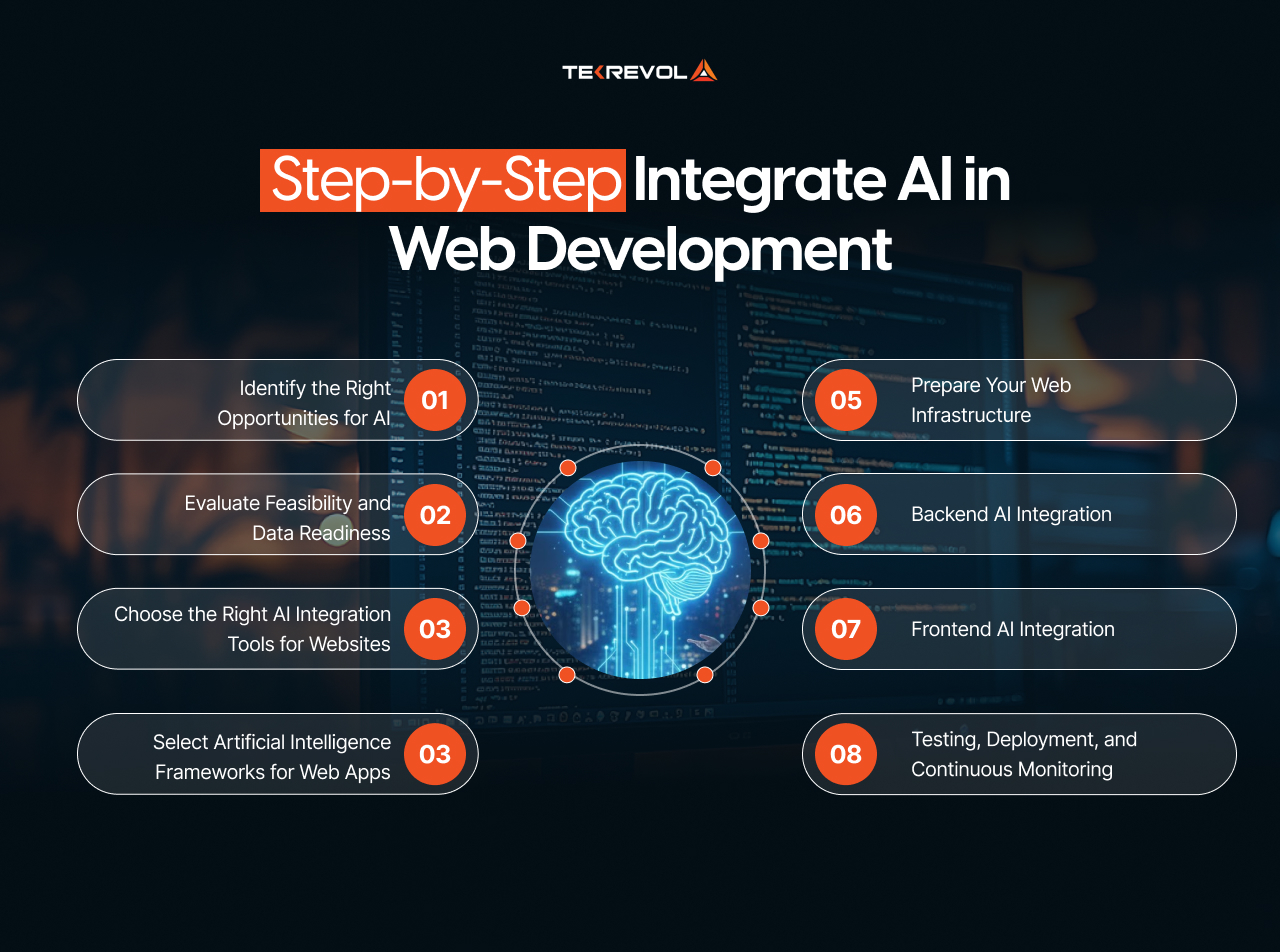
Let’s walk through a realistic and strategic approach to AI integration in web development.
1. Identify the Right Opportunities for AI
The first step in how to integrate AI in web development is not choosing a tool; it’s identifying the problem.
Ask questions like:
- Are users dropping off quickly?
- Is customer support overwhelmed?
- Is content engagement low?
- Is manual data analysis slowing decisions?
Common AI use cases include:
- Integrating chatbots in websites.
- Recommendation engines.
- AI-powered search.
- Predictive analytics.
- Automated content moderation.
AI works best when it solves a clear problem, not when it’s added for hype, especially when businesses take the time to hire the right experts for AI agent development
2. Evaluate Feasibility and Data Readiness
AI depends on data. Before moving forward with how to integrate AI in web development, assess:
- Do you have enough quality data?
- Is your data structured and clean?
- Can you use third-party data or APIs?
- Do privacy regulations apply?
As highlighted by Harvard Business Review, poor data quality is one of the main reasons AI projects fail.
3. Choose the Right AI Integration Tools for Websites
Selecting the right tools plays a massive role in successful AI implementation.
Popular AI Integration Tools for Websites
- OpenAI APIs – Natural language processing and conversational AI.
- Google Cloud AI – Vision, speech, and predictive analytics.
- AWS AI Services – Scalable AI software for web development.
- Azure Cognitive Services – Language, search, and decision-making tools.
These platforms help developers integrate AI without building models from scratch, making how to integrate AI in web development faster and more cost-effective.
4. Select Artificial Intelligence Frameworks for Web Apps
For custom AI features, frameworks are essential. If you’re thinking about taking your AI capabilities further, this guide on how to start an AI automation agency in the USA provides insights into building scalable, AI-driven systems from the ground up.
Top Artificial Intelligence Frameworks for Web Apps
- TensorFlow – Ideal for scalable machine learning models.
- PyTorch – Preferred for experimentation and research-driven projects.
- Scikit-learn – Great for data analysis and predictions.
Frameworks allow deeper control when off-the-shelf AI software for web development isn’t enough.
5. Prepare Your Web Infrastructure
A critical but often overlooked part of how to integrate AI in web development is infrastructure readiness.
Ensure:
- Backend scalability (cloud hosting is ideal).
- Secure API key management.
- Fast data pipelines.
- Compliance with privacy laws (GDPR, CCPA).
AI features can be resource-intensive, so planning this beforehand prevents performance bottlenecks.
6. Backend AI Integration
Backend integration is the engine behind smart features.
This usually involves:
- Sending user requests to AI APIs.
- Processing AI-generated responses.
- Storing insights for future learning.
For example, integrating chatbots in websites typically requires backend logic that connects user messages with an AI language model and returns accurate responses in real time.
7. Frontend AI Integration
Frontend design determines how users experience AI.
Key considerations:
- Simple, intuitive interfaces.
- Clear AI responses (no confusion).
- Feedback loops (thumbs up/down, ratings).
AI website optimization techniques often fail when users don’t understand how to interact with intelligent features.
8. Testing, Deployment, and Continuous Monitoring
The final step in how to integrate AI in web development is ongoing improvement.
You should:
- Test AI accuracy with real users.
- Monitor performance metrics.
- Track engagement and conversions.
- Continuously retrain models.
According to McKinsey Insights, organizations that continuously optimize AI systems see significantly higher ROI.
Future-Proof Your Website with AI
The future of AI in web development is already here. Don’t get left behind.
Get Started Now!Use cases of AI in Web Development
While AI is transforming many things in our daily lives, it is also changing how we create, optimize, and experience websites. The best way to understand how to use AI in web development is to see where it provides value.
1. Enhancing the Development Process
AI not only gives us the ability to create better websites, but it also gives us a better way to build them.
2. Coding Assistants
With tools such as GitHub, Copilot, and many other AI-powered coding assistants, AI enables developers to create more efficient code by predicting logic, reducing duplication of code, and reducing coding errors.
3. Automated Testing
AI-based systems aid in identifying potential errors, bottlenecks, and system security risks as early as possible and as cheaply as possible before they happen. This not only saves time but also prevents costly repairs to these problems.
4. Designing Using AI
Some AI platforms will use user behavior data to generate suggestions on layouts and color schemes, and ultimately, on UX enhancements of a site, as opposed to guessing what the best design would be.
5. Using AI to Enhance User Experience
Of the uses for AI in the web design process, this area is arguably the most utilized or recognized.
6. Getting Personal With Users
AI monitors user activity so that it can generate tailored content, product recommendations, or site layout based on user preferences; it’s a very well-utilized tactic for many modern e-commerce websites.
7. The Role of AI-Powered Chatbots in a Website
AI chatbots allow websites to easily handle frequently asked questions, help users navigate to the right content, and serve as an always-available source of customer support, thus lowering support costs and increasing customer happiness.
8. Content Generation & SEO
Because of AI’s assistance with content outlining, structural improvement, and keyword optimization, marketers now have more time to spend on strategic planning instead of performing repetitive tasks.
9. Image and Video Recognition
The use of AI to recognize images and videos is common on e-commerce, health care, and media platforms, where it analyzes user-uploaded visuals for improved moderation, search accuracy, and product discovery assurance.
Best Practices for AI in Web Development
If you truly want to master how to integrate AI in web development, following real-world guidance matters as much as theory. Developers actively sharing experiences on platforms like Reddit, Quora, SitePoint, and Medium consistently point to these best practices.
1. Keep AI Transparent
Users should always know when they’re interacting with AI. Whether you’re integrating chatbots in websites or recommendation engines, transparency builds trust.
2. Focus on Performance
AI should improve speed and usability, not slow your site down. Choosing the right AI integration tools for websites and optimizing models properly are key AI website optimization techniques.
3. Prioritize Data Privacy
AI systems depend on data, but privacy must come first. Secure APIs, ethical data usage, and compliance are essential when working with artificial intelligence frameworks for web apps.
4. Start Small and Scale Gradually
A common recommendation is to test one feature, like chatbots or AI-powered search, before scaling. This phased approach is often highlighted in long-form developer guides, including this Medium article on full-stack AI development.
These practical tips for AI website integration help reduce risk and improve outcomes when using modern AI software for web development.
5. Human Oversight Still Matters
AI should assist decision-making, not replace it entirely. Teams building smart web apps using AI emphasize continuous monitoring to prevent errors, bias, or poor UX.
6. Think Long-Term
The future of AI in web development points toward adaptive, learning-based systems. Planning early with scalable tools and frameworks ensures your web apps stay relevant as AI evolves. Following these best practices for AI in web development helps businesses create AI-powered websites that are fast, secure, trustworthy, and built to scale.
Tips for AI Website Integration That Actually Work
Smart AI adoption isn’t about using every tool available. It’s about using the right AI in the right place. These practical tips for AI website integration help teams build better results without unnecessary complexity.
1. Use AI Where It Adds Real Value
AI should solve a clear problem, not create extra layers. Many teams begin with layout suggestions, basic automation, or no-code or free AI website builder tools for beginners.
2. Measure Impact with Real KPIs
Track what matters: the conversion rates, bounce rates, load speed, and engagement. AI insights are only useful when they’re tied to measurable outcomes. Understanding the key phases of the website development process helps teams place AI at the right stage for maximum impact.
3. Don’t Over-Automate Too Early
Automation is powerful, but overdoing it early can hurt UX. Start small with features like chat support or content recommendations before expanding. Many developers learn this the hard way, as explained in practical optimization lessons shared in this YouTube ranking video:
4. Combine AI Insights with Human Judgment
AI can analyze patterns, but humans provide context. The most effective teams blend AI outputs with human decision-making, especially when building scalable platforms such as those used in modern eCommerce website development.
These practical tips for AI website integration help businesses avoid costly mistakes while preparing for the evolving future of artificial intelligence in web development.
5. Other AI Website Optimization Techniques for Better Performance
AI can also optimize websites behind the scenes. Popular AI website optimization techniques include:
- Predictive load balancing that adjusts resources based on traffic patterns is a method often supported by advanced tools discussed in this overview of web development services.
- Smart caching that learns which content users access most and delivers it faster.
- Dynamic UX testing that adapts layouts and flows in real time based on user behavior, a concept closely tied to ideas explored in machine learning–powered app innovation.
- AI-driven SEO analysis that identifies content gaps, keyword opportunities, and technical issues more efficiently than manual audits, often powered by systems built on natural language processing.
Search engines increasingly reward fast, user-focused websites. That’s another key reason why integrating AI in web development now plays a major role in visibility, rankings, and long-term performance.
The Future of AI in Web Development
The future of AI in web development is not about flashy features; it’s about seamless intelligence.
We’re moving toward:
- Fully adaptive interfaces.
- Emotion-aware chatbots.
- Predictive UX design.
- Autonomous web apps.
As reported by Forbes, “AI-powered digital experiences will soon become the baseline expectation, not a differentiator”.
What’s Next?
Smart web apps using AI will:
- Learn continuously from users.
- Adjust interfaces automatically.
- Anticipate user needs.
- Reduce friction across journeys.
Businesses that understand how to integrate AI in web development today will be better prepared for tomorrow’s digital demands.
Wrap Up
We’ve covered many of the critical elements, including tools, steps, best practices, and how to implement AI into Web Development, and now it’s time to start putting those theories into practice.
For new developers, implementing AI will be challenging when it comes time to select and choose which technologies, frameworks, and workflows you should use to create your site’s functionality.
For this reason, TekRevol is here to help. We provide cutting-edge Website Development Services designed to integrate Advanced Designs with Intelligent AI Capabilities through our team of skilled experts.
Our skilled Development Team leverages AI to create effective, aesthetically pleasing websites that will appeal to customers while providing smart, scalable, and exceptional user experiences for all types of businesses in a rapidly changing Digital Landscape.
Turn Your Website into an Intelligent Experience
From integrating chatbots in websites to advanced personalization, AI can redefine how users interact with your brand.
Schedule a Free Strategy Call!


