


- AR app development ranges from $15,000 for simple builds to $300,000+ for enterprise-grade projects.
- AR type affects cost more than feature count: marker-based, WebAR, markerless, and face tracking are priced very differently.
- 3D asset production can consume 50% to 70% of total development hours on a content-heavy build.
- Face tracking triggers US biometric privacy law, adding a compliance workstream that most quotes leave out entirely.
- Biometric consent, HIPAA safeguards, and COPPA compliance together can add $8,000 to $60,000 depending on sensitivity.
- Simple apps ship in 4 to 8 weeks, while enterprise AR often requires six to twelve months.
- Post-launch support, SDK updates, and content refreshes run 15% to 25% of the build cost yearly.
AR is no longer just a novelty for gaming or social media. Businesses are using it to let customers visualize products, experience spaces, try on products virtually, and interact with digital content in the real world. As adoption grows across retail, real estate, healthcare, education, and gaming, one question comes up quickly: how much does it cost to build an AR app?
On average, AR app development costs range from $15,000 to $300,000+ in the US. A basic app with filters or image markers costs $15,000 to $40,000. A markerless placement app runs $50,000 to $120,000. Virtual try-on with face tracking runs $60,000 to $150,000, and enterprise or industrial AR passes $120,000.
Because AR relies on 3D modeling, spatial tracking, and real-time rendering, costs can vary dramatically based on complexity and platform. That’s why partnering with an experienced AR development company can make all the difference, helping you plan smarter, prioritize the right features, and launch without overshooting your budget.
In this guide, we’ll break down the key factors that influence AR development costs, what you can expect to pay at different complexity levels, and where your budget is likely to go.
Average Augmented Reality App Development Cost in 2026
Augmented reality app development costs $15,000 to $300,000+ in the US market. Marker-based AR starts near $15,000, WebAR runs $20,000 to $60,000, and markerless placement apps reach $120,000. Enterprise and industrial AR exceeds $120,000 and regularly passes $300,000.
| AR project type | US cost range | Timeline | What you get |
| Marker-based AR | $15,000–$40,000 | 4–8 weeks | QR or image trigger, static 3D overlay, single platform |
| WebAR (no app install) | $20,000–$60,000 | 6–12 weeks | Browser-based, link or QR entry, lighter 3D, widest reach |
| Projection-based AR | $30,000–$90,000 | 4–10 weeks | Projects content onto physical surfaces via a projector; no device needed. |
| Superimposition AR | $40,000–$100,000 | 8–14 weeks | Replaces or augments part of a real object with a virtual view. |
| Markerless / SLAM placement | $50,000–$120,000 | 3–5 months | Surface detection, scaled placement, IKEA Place style |
| Face tracking / virtual try-on | $60,000–$150,000 | 4–6 months | Face mesh, real-time rendering, plus biometric compliance work |
| Location-based AR | $70,000–$180,000 | 4–8 months | GPS anchoring, POI database, backend, Pokémon GO style |
| Enterprise / industrial AR | $120,000–$300,000+ | 6–12+ months | CAD conversion, ERP or IoT integration, offline mode, device fleet |
Two things drive AR costs: 3D content can cost more than coding, and the AR type matters more than overall complexity. Marker-based AR, for example, is usually cheaper than face or spatial tracking.
Not sure which AR type your idea actually needs?
Tell us what you want users to do, and we'll map it to the cheapest AR type that delivers it, with a scope, cost, and timeline you can take to a budget meeting.
Book a Free Scoping CallAR Development Cost Breakdown by App Type
AR apps can vary widely in cost depending on the technology behind the experience. From simple marker-based apps to advanced spatial AR, each type comes with different development and content requirements.
Marker-Based AR: $15,000 to $40,000
Marker-based AR triggers content from a QR code, a printed image, or product packaging. Because the app only has to recognize one known image, tracking is straightforward, and the 3D content is usually light. Most packaging campaigns, business cards, and museum placards sit here. It’s also the fastest way to test whether your audience will actually scan anything, which is the real risk with AR marketing.
WebAR: $20,000 to $60,000
WebAR lets users access an AR experience through a mobile browser without installing an app. This reduces friction at the point of entry and can make campaigns easier to launch and share. However, browsers have limitations around sensor access, file sizes, performance, and device compatibility. If you use a commercial WebAR platform such as 8th Wall, remember to account for its recurring license fees alongside development costs.
Projection-Based AR: $30,000 to $90,000
Projection AR uses light to overlay digital visuals onto real-world surfaces without requiring a phone or headset. It’s often used in retail windows, exhibitions, and industrial environments. Hardware, setup, calibration, and installation typically make up most of the cost.
Superimposition AR: $40,000 to $100,000
Superimposition AR overlays or replaces real-world objects with digital versions. Examples include dental scan overlays and changing the color or appearance of furniture. The main cost comes from accurate object recognition, especially when the app must identify complex or irregular shapes.
Markerless and SLAM AR: $50,000 to $120,000
Unlike marker-based AR, markerless AR does not need a QR code or image target. It detects floors, walls, and other surfaces to place and anchor 3D objects, making it ideal for virtual furniture placement and room visualization.
Costs climb with the size of your product catalog because every SKU needs a properly optimized 3D model. Twenty products are a different project from three hundred. Our ecommerce app development services team handles the catalog and commerce layer that these experiences plug into.
Face Tracking and Virtual Try-On: $60,000 to $150,000
Face tracking maps a live face mesh so makeup, glasses, or jewelry render correctly as the user moves. Technically, it’s well-supported by ARKit and ARCore, so the engineering isn’t the hard part. The compliance is.
Scanning face geometry in the US triggers biometric privacy laws in several states, which is a real budget line covered in its own section below. Skip that conversation and your $60,000 app becomes a legal problem.
Location-Based AR: $70,000 to $180,000
Location-based AR connects digital experiences to real-world GPS locations. Behind the scenes, the app needs a backend, location database, and content management system to manage and deliver AR content.
Pokémon GO is a famous example. Costs scale with the number of locations and how often content changes, so a city-wide tour costs far more than a single campus.
Enterprise and Industrial AR: $120,000 to $300,000+
Enterprise AR covers remote assistance, guided maintenance, warehouse picking, and technician training. Unlike consumer AR, these solutions often require deeper system integration and specialized 3D workflows. Costs can include converting engineering CAD files into headset-ready models and connecting the app with ERP or IoT systems.
Offline functionality can add further development for facilities with limited connectivity, while device fleet management increases the cost of deployment and ongoing support.
AR App Development Cost by Feature
Individual AR features are priced separately from the base build. Cloud storage runs $5,000 to $15,000. User accounts run from $3,000 to $10,000. Real-time multiplayer runs $20,000 to $80,000. Feature-level pricing is how you cut scope without guessing at it.
Most quotes hand you one number for the whole app, which makes trimming impossible. Here’s what the common additions actually cost on a US build.
User Accounts and Authentication
Estimated Cost: $3,000–$10,000
User accounts support registration, login, profiles, and access control. Social login is usually simpler, while custom authentication with multiple user roles requires more development.
Cloud Storage and Asset Delivery
Estimated Cost: $5,000–$15,000
AR apps often need cloud storage and fast delivery for large 3D assets. Costs depend on asset size, storage requirements, and expected traffic.
Analytics and Event Tracking
Estimated Cost: $5,000–$15,000
Analytics help track how users interact with AR features and where they drop off. This data can guide product improvements and future feature decisions.
In-App Purchases or Payments
Estimated Cost: $8,000–$20,000
Adding payments requires secure transaction handling and integration with app stores or payment systems. Additional security and review requirements can also increase the development effort.
Push Notifications
Estimated Cost: $3,000–$8,000
Push notifications keep users informed about new content, offers, updates, or reminders. Basic notifications are straightforward, while personalized campaigns require more backend work.
Social Sharing and Capture
Estimated Cost: $5,000–$12,000
Social sharing lets users capture AR experiences as images or videos and share them directly. Supporting reliable camera capture and sharing across devices adds development and testing work.
Multi-Language Support
Estimated Cost: $4,000–$10,000 per Language
Localization involves translating text and adapting the interface for different languages. Additional work may be needed for longer text, voice content, and layout changes.
Real-Time Multiplayer or Shared AR
Estimated Cost: $20,000–$80,000
Shared AR allows multiple users to interact within the same virtual environment. It requires session synchronization, real-time communication, hosting, and additional testing.
AI or ML Features
Estimated Cost: $15,000–$60,000
AI features such as object detection and personalized recommendations require model integration and testing. For custom solutions, preparing and labeling training data can become a major cost.
Offline Mode
Estimated Cost: $10,000–$30,000
Offline functionality allows AR experiences to work without a reliable internet connection. It requires local data storage, synchronization, and careful handling of updates when the device reconnects.
Admin Dashboard or CMS
Estimated Cost: $12,000–$35,000
A dashboard or CMS lets your team manage AR content without relying on developers for every update. It can include tools for managing products, 3D assets, users, and campaign content.
US Compliance Costs to Include in Your AR Budget
Compliance can add a meaningful cost to AR apps that handle facial data, children’s information, health data, or public-sector users. The requirements vary by use case, but planning for them early helps avoid expensive changes later.
| Compliance Workstream | Typical US Cost | When It Applies |
| Illinois BIPA: Biometric consent flows | $8,000–$20,000 | Face tracking or virtual try-on |
| Texas CUBI | $5,000–$15,000 | Facial or biometric data collected in Texas |
| COPPA | $5,000–$15,000 | AR apps used by children under 13 |
| ADA / WCAG 2.1 AA | 10–15% of build | Public sector, education, and covered organizations |
| HIPAA safeguards | $15,000–$40,000 | Healthcare AR handling protected health information |
| SOC 2 readiness | $20,000–$60,000 | Enterprise clients and procurement requirements |
Planning compliance early helps you avoid expensive rework and legal risks later. For AR apps handling sensitive data, treat compliance as part of the development budget.
Key Factors That Affect AR App Development Cost
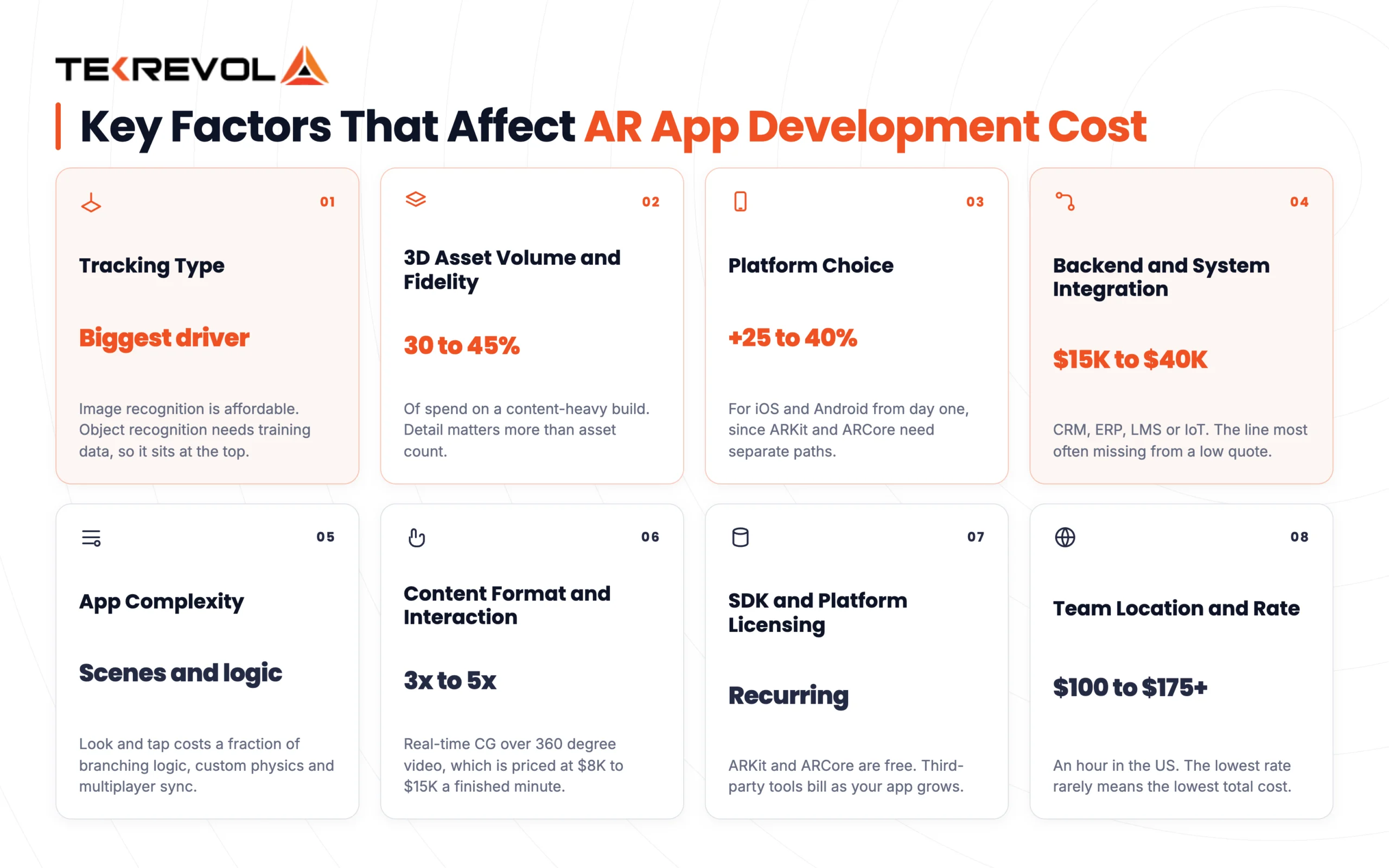
Factors driving AR cost fall into three groups: what the app recognizes, how much custom 3D content it needs, and what it connects to. Tracking type, asset volume, and backend integration move the number far more than feature count does.
App Complexity
More features, scenes, and interaction types mean more development hours. A single-scene app with basic look-and-tap interaction costs a fraction of an app with branching logic, custom physics, and multiplayer sync.
| Complexity | Estimated US Cost | Timeline | What’s Included |
| Simple | $20,000–$50,000 | 6–10 weeks | Single scene, look-and-tap interaction, mostly stock assets, one platform, no integrations |
| Medium | $50,000–$200,000 | 3–6 months | Multiple scenes, hand-tracked interaction, custom 3D assets, branching logic, LMS or backend integration, analytics |
| Enterprise | $200,000–$500,000+ | 6–12+ months | Multiplayer sync, custom physics, AI-driven scenarios, haptics, ERP integration, security review, regulated validation |
Content Format and Interaction Depth
Format is the heavyweight. Real-time computer-generated environments cost three to five times what 360° video costs, and adding free-form interaction with real failure states pushes it further.
| Format | Estimated US Cost | What the User Actually Does |
| 360° Video | $25,000–$60,000 | Looks around, watches, taps hotspots |
| Real-time CGI (guided) | $75,000–$180,000 | Moves through a built environment, limited actions |
| Real-time CGI (free-form interaction) | $125,000–$300,000+ | Manipulates objects, can fail, can retry |
360° video is also priced per finished minute, typically $8,000 to $15,000. Multipliers apply to the same content scope delivered in three different ways, not to three different-sized projects.
Ask yourself whether the user needs to do something or just see something. That one answer moves your budget more than any other decision on this list.
Tracking Type
Tracking is one of the biggest cost drivers in AR development. Image recognition is relatively affordable, while surface mapping, face tracking, and object recognition require more advanced processing and testing.
| Tracking Type | Relative Cost | Typical Use |
| Image/Marker Tracking | Low | Product labels, posters, packaging |
| Surface Tracking | Medium | Furniture placement, room visualization |
| Face/Body Tracking | high | Virtual try-ons, filters, fitness |
| Object Recognition | Highest | Custom product or equipment recognition |
Object recognition sits at the top because it needs training data. Recognizing any real-world object is a machine learning problem, not just a rendering one.
3D Asset Volume and Fidelity
Custom 3D assets are often the single largest line item in an AR budget. On a content-heavy build, asset production typically runs 30% to 45% of total spend. A photorealistic sofa costs far more than a simple stylized prop, and photogrammetry of real products adds another layer of work.
| Asset Type | Cost Impact | Example |
| Stock 3D assets | Low | $0 – $100 per asset (marketplace license) |
| Customized existing assets | Moderate | $100 – $1,000 per asset |
| Custom 3D environments | High | $5,000 – $50,000 per environment |
| Realistic characters and animations | High | $1,000 – $10,000+ per character (modeling + rigging + animation) |
| Photogrammetry / digital twins | Very High | $10,000 – $30,000 per location scanned |
The cost depends less on how many assets you need and more on how detailed and unique they are. Stylized 3D assets cost far less than photorealistic ones, while complex environments can require hundreds of artist hours.
Platform Choice
The platform you choose affects development effort, device compatibility, testing, and optimization requirements. While cross-platform development can reduce duplicated work, AR experiences often still need platform-specific adjustments for the best performance.
| Platform | Typical dev cost | Notes |
| iOS only (ARKit) | $20,000–$80,000 | Best tracking, narrower US reach, faster to ship |
| Android only (ARCore) | $25,000–$90,000 | Device fragmentation adds QA hours |
| Cross-platform (Unity) | $40,000–$150,000 | One codebase, but per-platform optimization is still needed |
| WebAR | $20,000–$60,000 | No install, plus platform license fees |
| Apple Vision Pro (visionOS) | $50,000–$200,000+ | Separate RealityKit and SwiftUI stack |
Building for both iOS and Android from day one adds roughly 25% to 40% over a single platform. Start with the platform your target audience already uses, then expand once adoption data justifies the investment. Our mobile app development services team can help you plan the right rollout strategy.
SDK and Platform Licensing
Core AR frameworks such as ARKit and ARCore are free, but third-party tools can add recurring licensing costs. These fees can become significant as your app grows, especially with cloud recognition, multiple projects, or commercial deployments.
Our guide to AR frameworks and SDKs compares the technical trade-offs in more depth.
| SDK / platform | Cost Model |
| ARKit (iOS) | Free |
| ARCore (Android) | Free |
| RealityKit | Free, iOS and visionOS only |
| Vuforia | Free tier, then paid plans for cloud recognition and volume |
| 8th Wall (WebAR) | Monthly subscription per project |
| Snap Lens Studio / TikTok Effect House | Free to build, distribution locked to that platform |
| Unity Pro | $2,310 per seat per year above $200,000 revenue or funding |
Unity raised Pro and Enterprise pricing by 5% on January 12, 2026. The Unity Runtime Fee was canceled in September 2024 and does not apply. See Unity’s pricing page.
Backend and System Integration
Connecting AR to a product catalog, CRM, ERP, LMS, or IoT feed adds $15,000 to $40,000, depending on how many systems are involved. This is the line most commonly missing from a low quote, so confirm it in writing. Our API integration services team handles this boundary on most enterprise builds.
| Integration | Typical Cost Impact | Example Use |
| Product Catalog | $5,000–$15,000 | Product details and pricing |
| CRM | $8,000–$20,000 | Customer and lead data |
| ERP | $15,000–$30,000+ | Inventory and order data |
| LMS | $10,000–$25,000 | AR-based learning content |
| IoT Systems | $15,000–$40,000+ | Real-time device data |
Team Location and Rate
Where your development team is based can significantly affect your AR app budget. Hourly rates vary by region, but the lowest rate does not always mean the lowest overall cost.
| Region | Typical agency rate |
| United States | $100–$149/hour |
| Canada / Australia | $100–$149/hour |
| Western Europe | $80–$150/hour |
| Central & Eastern Europe | $40–$100/hour |
| South Asia | $25–$49/hour |
The lowest hourly rate is not always the most cost-effective option. For AR projects, experience, communication, and the ability to handle 3D work efficiently can have a bigger impact on your final budget than the hourly rate alone. If you want more control, IT staff augmentation sits between hiring and full outsourcing.
AR Development Cost Breakdown by Stage
AR development typically breaks down into five cost areas: discovery and design (15%), 3D asset production (30%), development and integration (32%), QA and device testing (14%), and deployment (9%). These stages often overlap, so the total project timeline is usually shorter than adding each stage’s duration separately.
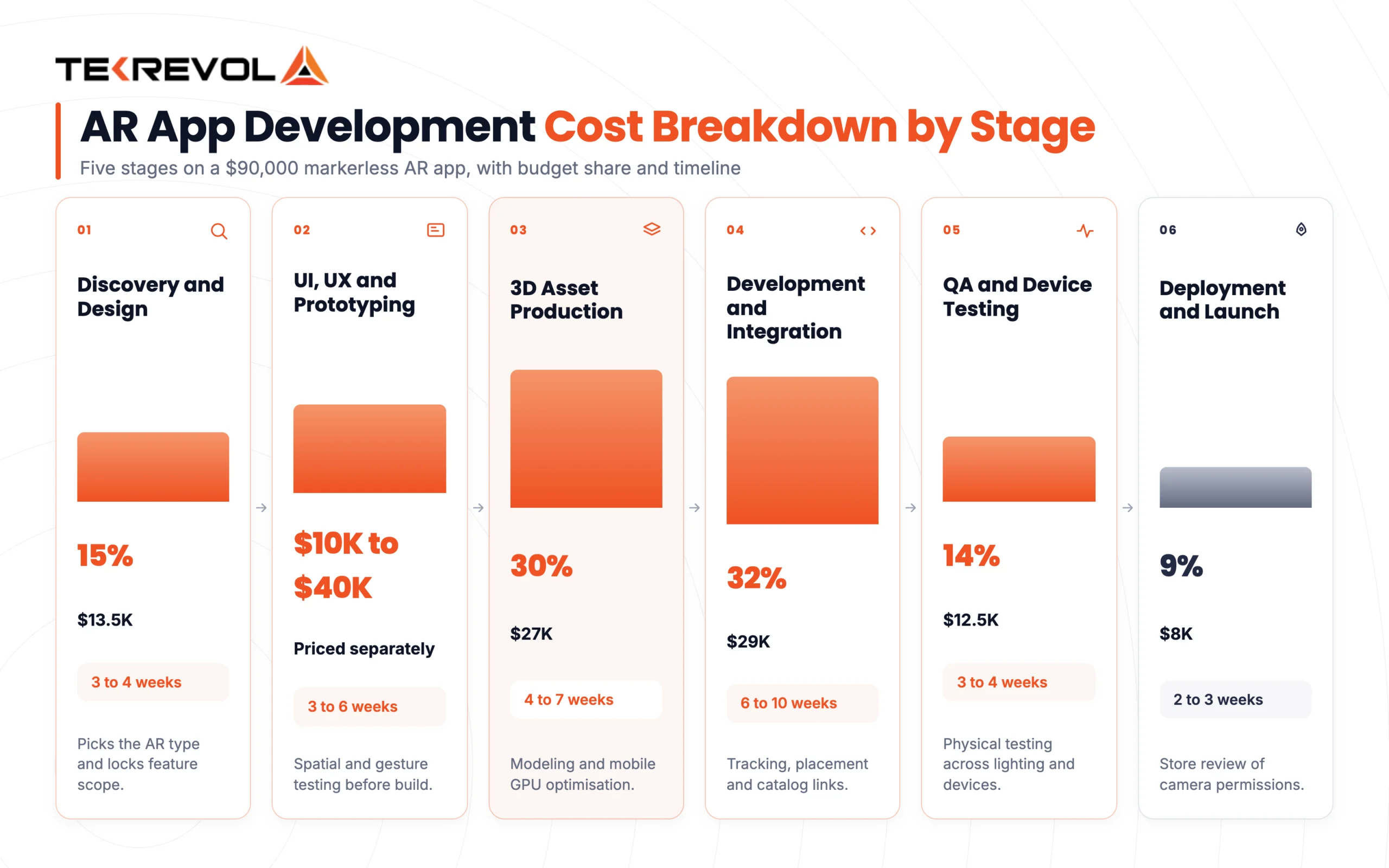
For a $90,000 markerless AR app, a realistic split looks like this.
Discovery and Design: 15%
Estimated Cost: $13,500 | Estimated Timeline: 3–4 weeks
Every AR project starts with planning. The team defines the app’s goals, understands the target users, and selects the right AR approach, such as marker-based, markerless, or SLAM tracking. Getting these decisions right early helps avoid costly changes later.
- Market research and feasibility study
- Defining the target platform and AR technology
- Setting core feature scope
- Competitive benchmarking
UI/UX Design & Prototyping
Estimated Cost: $10,000 – $40,000 | Estimated Timeline: 3–6 weeks
Once the goals are clear, designers create wireframes and interactive prototypes. Unlike standard apps, AR design must account for space, lighting, movement, and how users interact with their surroundings. Prototyping helps identify usability issues before development begins.
- Wireframing core user flows
- Interactive prototype builds
- Spatial and gesture testing
- User feedback and iteration
3D Asset Production: 30%
Estimated Cost: $27,000 | Estimated Timeline: 4–7 weeks
Asset production covers modeling, texturing, lighting, and optimization for mobile GPUs. AR is harsher than most 3D work because assets have to look right against real-world lighting on a phone screen. Reusable assets pay for themselves from your second campaign onward.
Development and Integration: 32%
Estimated Cost: $29,000 | Estimated Timeline: 6–10 weeks
This is where the core AR experience is built, including tracking, interactions, UI, analytics, and backend or catalog connections. AR often requires more engineering effort than VR because developers must handle real-world recognition and accurately place digital elements within the user’s surroundings.
QA and Device Testing: 14%
Estimated Cost: $12,500 | Estimated Timeline: 3–4 weeks
AR QA is physical and slow. Someone tests tracking across lighting conditions, surfaces, device models,s and camera qualities, because AR fails in ways simulators never reproduce. Android fragmentation makes this worse.
Our work on Pure Plank, which reached 98% user satisfaction and a 50% lift in engagement, came from exactly this kind of hands-on usability testing rather than feature count.
Deployment and Launch: 9%
Estimated Cost: $8,000 | Estimated Timeline: 2–3 weeks
Deployment covers App Store and Play Store review, AR-specific privacy disclosures, analytics verification,n and launch monitoring. Apple and Google both scrutinize camera-permission apps more closely, so build in a review buffer.
AR Development Costs Across Different Industries
AR costs by industry vary with asset volume and regulation. Retail and marketing AR starts around $15,000. Healthcare and industrial AR runs $120,000 to $300,000+, because clinical validation, safety documentation, and system integration all add costs consumer apps never carry.
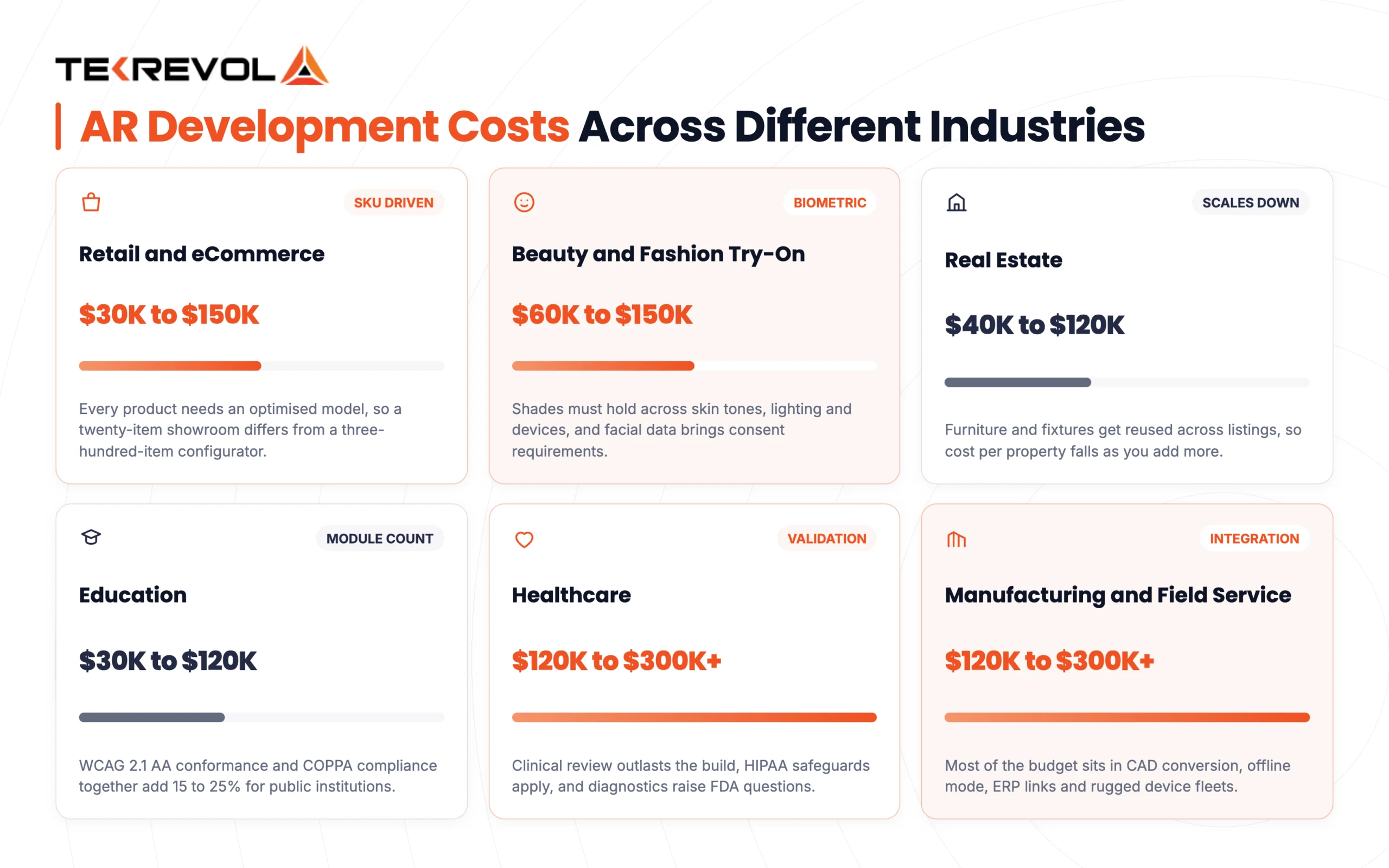
Retail and eCommerce AR: $30,000 to $150,000
Retail is where AR pays back fastest, mostly through fewer returns. Cost tracks SKU count directly, since every product needs an optimized model. A twenty-item showroom is a different project from a three-hundred-item configurator. Our piece on virtual reality and AR in shopping covers where the conversion lift shows up.
Beauty and Fashion Try-On: $60,000 to $150,000
Beauty and fashion AR apps typically cost more because they need accurate face or body tracking, realistic product placement, and reliable color rendering. Makeup shades must look consistent across different skin tones, lighting conditions, and devices. If the app collects facial or biometric data, additional privacy, consent, and compliance requirements can also increase development costs.
Real Estate AR: $40,000 to $120,000
Real estate AR apps can support virtual staging, property information overlays, and 3D visualization of unbuilt properties. Costs can decrease as you scale because furniture, fixtures, and other 3D assets can be reused across multiple listings. With the right real estate app development service providers, these AR experiences can also connect seamlessly with property listings, CRMs, and other real estate platforms.
Education AR: $30,000 to $120,000
Education AR budgets are driven by module count and accessibility requirements. Public schools and universities usually require WCAG 2.1 AA conformance and COPPA compliance for younger students, which together add 15% to 25%.
Healthcare AR: $120,000 to $300,000+
Healthcare AR can support use cases such as vein visualization, surgical planning, and medical device training. The development itself is only part of the timeline; clinical reviews and validation can take much longer.
Projects that handle patient data also need HIPAA safeguards, while diagnostic applications may require FDA considerations. As a result, healthcare AR projects can take months beyond the initial build to validate and prepare for use.
Manufacturing and Field Service AR: $120,000 to $300,000+
Industrial AR supports guided maintenance, remote expert assistance, and warehouse picking. Much of the budget goes beyond the AR experience itself, covering CAD conversion, offline functionality, ERP integration, and support for ruggedized device fleets.
AR Game Development Cost Breakdown
AR game development costs $40,000 to $250,000+, and the split point is mechanics and monetization, not visual polish. A single-player, single-mechanic game sits at the bottom. A live-service game with multiplayer, seasonal content, and in-app purchases sits at the top and stays there because live-ops is an ongoing cost.
| Game Type | Cost Range | What Drives It |
| Single-mechanic mobile AR game | $40,000–$90,000 | One core interaction, local play, minimal backend |
| Multi-level AR game with progression | $90,000–$180,000 | Save states, level design, leaderboard backend |
| Location-based multiplayer AR game | $180,000–$250,000+ | Persistent world state, real-time sync, anti-cheat, map data |
| Live-service AR game (ongoing content) | $250,000+ initial, plus 20–30% of build cost per year | Seasonal drops, in-app purchases, live-ops team |
Monetization affects development as much as the business model. Ads, in-app purchases, and paid features each require different backend and payment systems. Treat monetization as a separate development cost.
Our game app developers scoped live ops and monetization as part of the initial build rather than bolting them on post-launch. For mechanics, engine choice, and design considerations beyond cost, see our full AR game development cost guide.
How Long Does AR App Development Take?
AR app development takes 4 weeks to 12 months, depending on the app’s complexity, AR features, 3D assets, integrations, and testing requirements. Here’s how that timeline typically breaks down:
| AR project Type | Typical Timeline | What drives it |
| Marker-based AR | 4–8 weeks | Asset count, single trigger |
| WebAR | 6–12 weeks | Browser QA across devices |
| Markerless / SLAM | 3–5 months | Catalog size, tracking tuning |
| Face tracking / try-on | 4–6 months | Color accuracy plus compliance review |
| Location-based AR | 4–8 months | Backend, POI data, content pipeline |
| Enterprise AR | 6–12+ months | CAD conversion, integrations, security review |
What Does an AR App Cost After Launch?
Launching an AR app is only the beginning of the investment. Ongoing costs cover bug fixes, SDK and OS updates, device compatibility, new 3D content, hosting, analytics, and platform licenses.
Most AR apps require around 15%–25% of the initial build cost per year for maintenance and ongoing improvements. The cost can rise as you add new devices, update AR features, or expand the experience with fresh content.
Year-One Support and Maintenance
Estimated Cost: 15%–25% of Build Cost
This covers bug fixes, OS and SDK updates, device compatibility testing, performance improvements, and minor content changes. Regular maintenance helps prevent compatibility issues after major iOS, Android, or AR framework updates.
Year 2+ Refresh
Estimated Cost: 25%–40% of Build Cost
Long-term costs can increase as new devices enter the market and existing AR features need optimization. This budget can also cover refreshed 3D assets, UX improvements, and new features.
WebAR Platform License
Estimated Cost: $100–$3,000+/month
WebAR platforms may charge based on traffic, projects, features, or usage. These recurring fees should be included when estimating the total cost of a browser-based AR experience.
New 3D Assets
Estimated Cost: $500–$5,000 per Model
New products, SKUs, or campaign items often require additional modeling, texturing, and optimization. Reusing existing assets can significantly reduce these ongoing costs.
Cloud Recognition and Hosting
Estimated Cost: $200–$2,000/month
Cloud costs may include image or object recognition, asset storage, CDN delivery, databases, and backend infrastructure. Usage typically grows as more customers interact with the AR experience.
Analytics and A/B Testing
Estimated Cost: $100–$1,000/month
Analytics and A/B testing tools help measure engagement, identify drop-off points, and improve the AR experience based on actual user behavior.
AR has higher maintenance needs than a typical app because OS, SDK, camera, and device updates can affect tracking and performance. For enterprise deployments, also consider $10,000–$30,000 for training, rollout, and change management.
How Do AR and VR Development Costs Compare?
AR costs less than VR at the entry level and less at the top end. Simple AR starts near $15,000, while basic VR starts around $20,000. Enterprise AR reaches $300,000, while advanced VR simulations pass $500,000 because they build entire environments.
| AR | VR | |
| Entry level | $15,000–$40,000 | $20,000–$50,000 |
| Mid range | $50,000–$150,000 | $50,000–$200,000 |
| Advanced | $120,000–$300,000+ | $200,000–$500,000+ |
| Hardware you rely on | Phones people already own | Headsets you buy and manage |
| Biggest cost driver | Tracking accuracy in the real world | Volume and fidelity of built 3D content |
| Biggest hidden cost | US biometric compliance | Headset fleet and change management |
The real difference is distribution. AR reaches people who already own the device. VR requires putting hardware on heads, which is a logistics cost that never appears on a development quote. That’s why AR usually wins for customer-facing work at scale, and VR wins for focused, high-stakes training.
Best Practices to Reduce AR App Development Costs
Reducing AR app development costs comes down to picking the right AR type and reusing what you build, not stripping out features users care about. Marker-based AR costs roughly a third of markerless. A reusable asset library makes every later campaign cheaper.
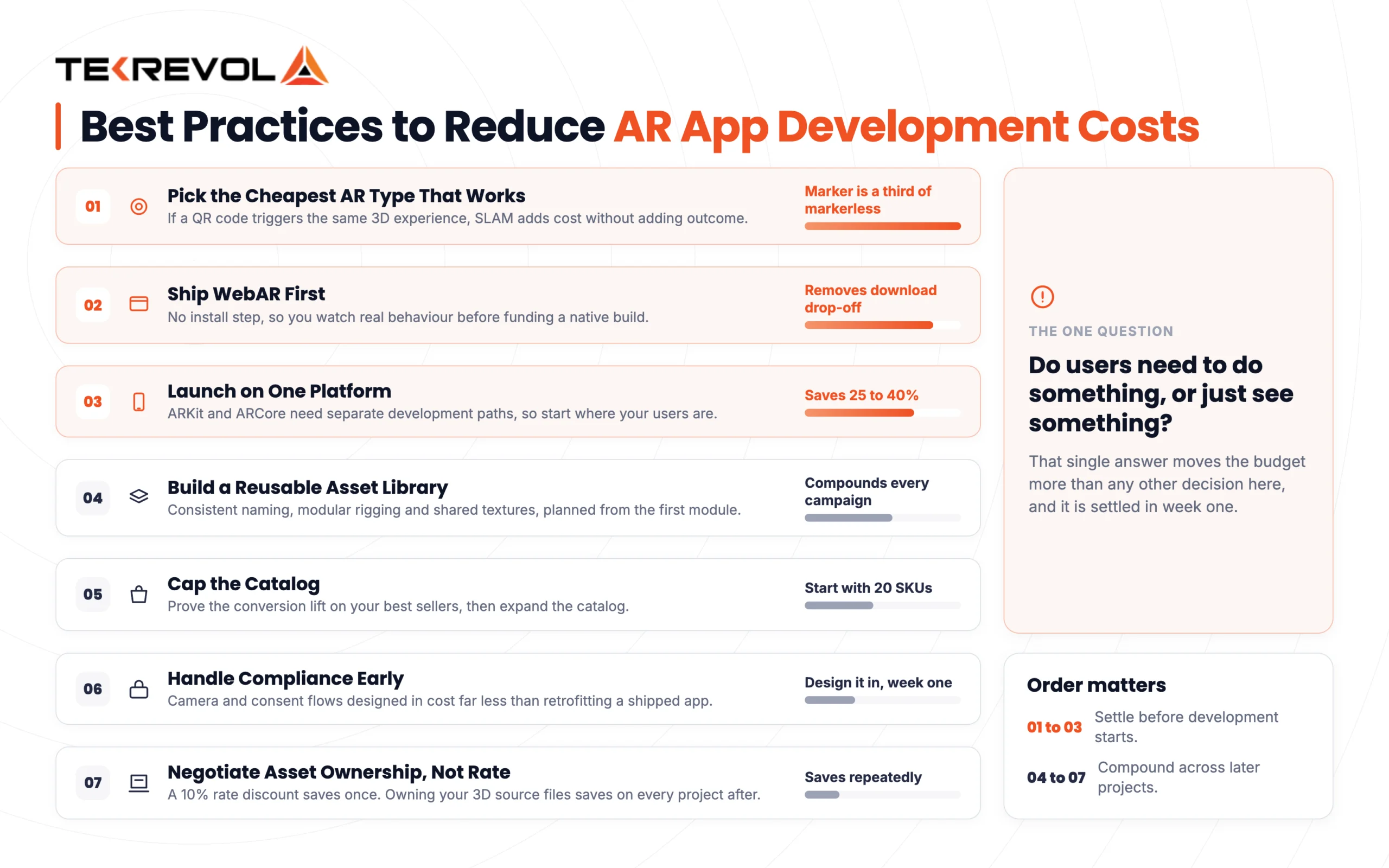
Here are seven levers, roughly in order of impact.
1. Pick the Cheapest AR Type That Delivers the Outcome
Not every AR experience needs advanced tracking such as surface detection or SLAM. If a simple QR code can trigger the same 3D product experience, adding markerless AR only increases development costs without improving the result. This is the single highest-impact decision in the entire project, and getting it right can cut your budget in half before development even starts.
2. Ship WebAR First
WebAR removes the install step entirely, which means no download drop-off and a much faster path to real user data. Instead of guessing whether people will engage with a native app, you launch in-browser, watch actual behavior, and only fund a native build once you know the concept works. It’s the cheapest way to validate demand before committing to heavier engineering.
3. Launch on One Platform
Building for iOS and Android simultaneously from day one typically adds 25–40% to your budget, since ARKit and ARCore require separate development paths. Focus your first launch on the platform your users already use most. Once you have real adoption data, you can make a more informed decision about expanding to the second platform.
4. Build a Reusable Asset Library
3D assets are usually the most expensive line item in an AR project, but they don’t have to be a recurring cost. If your first module is built for reuse, future campaigns can cost much less. Consistent naming, modular rigging, and shared texture sets make it easier to adapt existing assets. The key is planning for reuse from the start, not adding it later.
5. Cap the Catalog
You don’t need all three hundred SKUs live on day one. Start with your twenty best-selling products, prove the conversion lift, and expand the catalog once you have real performance data. This keeps 3D asset production costs proportional to actual demand instead of front-loading spend on inventory that may never justify an AR treatment.
6. Handle Compliance Early
Camera and data-consent flows are far cheaper to design into the app from the beginning than to retrofit later. A consent flow built in early costs far less than adding one later. This is especially true when app store requirements or regional privacy laws require changes to an already-built product.
7. Negotiate Asset Ownership, Not Rate
A 10% discount on the development rate saves you once. Owning your 3D source files can save you across every future project because you can reuse, resize, and repurpose assets without rebuilding them. Ownership creates savings that compound over time.
Optimize Your AR App Development Costs With TekRevol
We help you assess your requirements, choose the right AR technology, and build a solution that delivers value without unnecessary development costs.
Discuss Your AR Project!What Do Real AR Apps Cost to Build?
Real AR apps show that focus beats spending. IKEA Place proved markerless placement with one job to do. Pokémon GO required global backend infrastructure. The gap between them is scope. Estimates below are for comparable builds today.
A note on method. Nobody publishes their AR development budget. Below is what’s publicly known, plus where a comparable build would sit using the tiers above.
IKEA Place: Markerless Placement, Done Simply
IKEA Place does one thing: it puts true-to-scale furniture on your floor. Built on ARKit at launch, it deliberately avoided social features, gamification, and everything else. A comparable markerless placement app today sits at $50,000 to $120,000, with catalog size driving most of the variance.
Pokémon GO: Location AR at Global Scale
Pokémon GO’s cost lies in infrastructure, not in AR. Persistent world state, real-time multiplayer, anti-cheat, and mapping data for millions of concurrent users dwarf the AR layer, which is comparatively simple. A location-based AR app with a real backend starts at $70,000 to $180,000 and scales with concurrency rather than with visual polish.
Beauty Try-On Tools: Where Compliance Became the Story
AR makeup try-on is technically a solved problem. What made it expensive for several US brands was biometric privacy litigation, with class actions filed over tools at Mary Kay and Ulta. Budget $60,000 to $150,000 for the build, then add the compliance workstream covered earlier. Treating that as optional is how a mid-size project turns into a legal one.
Enterprise Field Service AR: Integration Is the Cost
Industrial AR for guided maintenance looks simple in a demo, but rarely is. The expense is CAD conversion, ERP integration, offline mode, and device management, not the overlay. Comparable builds run $120,000 to $300,000+.
For more examples of what’s shipping, see our roundup of the best augmented reality apps.
Emerging Trends Will Change AR App Development Cost?
Emerging trends push AR costs in both directions. The global AR market is projected to reach $207.16 billion in 2026 and $2.80 trillion by 2034, growing at a 38.5% CAGR from 2025 to 2034. Growth that fast changes tooling, talent rates, and buyer expectations, which is why a quote from 2024 doesn’t hold today.
Spatial Computing Raises Development Costs
Vision Pro and smart glasses introduce new platforms, hardware requirements, and testing environments. Building for these devices can cost more than phone-based AR, so they make the most sense when your target audience already uses the hardware.
AI Can Increase or Reduce Costs
AI can lower the cost of creating 3D assets, textures, and variations, but adding AI features such as object recognition or recommendations increases development and infrastructure costs. The final impact depends on how deeply AI is integrated into the app.
WebAR Can Lower Entry Costs
WebAR lets users access AR experiences through a browser without installing a native app. For campaigns, product visualization, and other lightweight experiences, this can reduce development costs and make testing easier.
Cloud Rendering Shifts the Budget
Cloud and edge rendering can move demanding processing away from the user’s device. This can reduce hardware requirements, but it replaces some upfront costs with ongoing hosting and infrastructure expenses.
Privacy Requirements Add Development Work
AR features involving faces, biometrics, or personal data can require additional consent, security, and compliance measures. Addressing these requirements during development is usually more efficient than adding them after the product is built.
Partner With TekRevol for AR App Development
Your AR idea deserves more than a demo that looks good on a screen. TekRevol combines AR development, 3D expertise, and product engineering to build experiences that work reliably in real-world environments. From the prototype to a production-ready app, we help you make the technology practical, scalable, and ready for users.
At Tekrevol, we’ve shipped AR experiences across retail, gaming, and enterprise use cases, and we scope every project the same way, starting with the AR type that actually fits your use case, not the one that sounds most impressive in a pitch deck.
- Transparent, stage-by-stage pricing, with the hourly rate and the hours both stated
- Reusable 3D asset strategy, built for your second campaign and not just your first
- Compliance scoped upfront when your app touches faces, children,n or public-sector clients
- You own your assets, including source files, models, and textures
Have an AR concept in mind?
Share your project details, and we’ll help you turn your AR idea into a seamless, engaging experience.
Talk to Our AR Experts


