



- Choose customize when you need fast deployment with deep integration at a lower cost than a full build.
- Buy SaaS when queries are standard, the timeline is under 6 weeks, and the volume is under 5,000 monthly.
- Build only if a productized chatbot, strict data sovereignty, exotic requirements, or vendor lock-in risk exists.s
- Off-the-shelf SaaS chatbots go live in weeks but fail when compliance, deep integrations, or custom logic kicks .in
- Foundation model customization delivers 70–80% of build-level control at 30–50% of the cost, making it the default choice for most enterprises.
- Custom AI chatbot builds cost $90,000–$250,000 in Year 1 and take 3–6 months to reach production
If you’re evaluating AI chatbot options in 2026, the decision is simpler than most vendors make it sound, but only if you ask the right questions before selecting a platform.
Here’s the straight answer: Buy when your use case is standard, your timeline is under 6 weeks, and volume stays below 5,000 conversations monthly. Build when the chatbot is core IP, compliance demands full data control, or SaaS pricing becomes uneconomical at scale. Customize a foundation model on your own data when you need both speed and control at 30–50% of a full build’s cost.
That decision determines your costs, your capabilities, and your technical debt for the next three years. Getting it wrong costs $150K–$300K and 12 months of runway.
TekRevol’s AI development team has navigated this exact decision with enterprise buyers across fintech, healthcare, and SaaS. This guide gives you the full picture, real costs, real timelines, and a clear framework, so you make the right call before it costs you.
What Is an AI Chatbot in 2026? (And Why the Old Definition Is Dead)
An AI chatbot in 2026 is a conversational system that reads your documents, connects to your CRM, handles multi-turn conversations, and escalates to a human when needed — without writing a single line of code.
The problem is that many enterprises jump straight into the build-vs-buy AI chatbot debate. The more important question comes first: which chatbot architecture does your use case actually require?
The architecture type determines every decision that follows: cost, timeline, vendor selection, and integration depth. It’s also the first question our AI chatbot development company asks before recommending any path. Here are the most common chatbot types used
Rule-Based Bots
Rule-based chatbots are the fastest and cheapest option, best for simple, linear workflows with fewer than 30 query types.
Cost: $5,000–$30,000 | Timeline: 2–4 weeks
Deploy when: Your AI virtual assistant development needs are straightforward, fewer than 30 query types, linear flow, low-stakes responses.
LLM-Powered Bots
LLM bots understand free-text, maintain context, and generate natural responses using models like GPT-4o or Claude 3.5. Powerful, but without retrieval grounding and output validation, hallucinations aren’t edge cases. They’re operating costs.
Cost: $25,000–$100,000 | Timeline: 4–8 weeks
Deploy when: Queries are diverse, unpredictable, or require natural first-line triage.
Fine-Tuned LLM Chatbots
Fine-tuning takes a foundation model and trains it specifically on your data, your terminology, your tone, your business logic. The result isn’t a model that retrieves your content. It’s a model that thinks in your language.
Cost: $60,000–$300,000+| Timeline: 6–12 weeks
The fine-tuning process:
- Collect 500–2,000 domain-specific QA pairs or conversation examples
- Structure training data as question → ideal response pairs
- Submit to fine-tuning API, model trains over 1–2 weeks
- Evaluate against domain-specific accuracy benchmarks
- Deploy fine-tuned endpoint to production
Deploy when: Legal, medical, financial, or technical domains where generic models mishandle terminology and RAG alone can’t hit accuracy requirements.
Hybrid Bots
Hybrid bots combine deterministic logic for critical paths with an LLM for open-ended conversation. Hard rules govern anything where a wrong answer carries consequences. The LLM handles the rest. The switch between layers is invisible to users.
Cost: $80,000–$400,000 | Timeline: 3–9 months
Deploy when: Your product is complex, your industry is regulated, or the cost of wrong answers exceeds the cost of proper architecture.
Agentic AI Chatbots
Agentic bots don’t answer questions. They complete work. Where a standard LLM generates a response, an agentic system decides which tools to use, executes actions across your systems, interprets results, and iterates — without a human at each step. Demand for AI agent development has outpaced every other category in 2026 precisely because it’s the only architecture that actually executes work instead of describing it. And the rise of AI agents and workflow automation has made that shift impossible to ignore.
Cost: $150,000–$500,000+ | Timeline: 8–16 weeks
Deploy when: Your use case needs real actions, not just answers (e.g., resolving IT tickets or processing refunds).
What Is the Build vs Buy AI Chatbot Decision: And Why It’s Different in 2026
The build vs buy AI chatbot decision comes down to three options: license a SaaS platform, build a proprietary system from scratch, or customize a foundation model on your own data.
For most of the 2010s, only the first two existed. Foundation models were inaccessible. The middle path barely existed. The cost gap between buying and building was enormous.
2026 changed all three variables.
Buy means licensing a SaaS chatbot platform. You configure it, integrate it with your systems through supported connectors, and pay a monthly or per-conversation fee. Intercom Fin, Zendesk AI, Salesforce Einstein, and Drift are the major names. Setup time runs 2–8 weeks. IP belongs to the vendor.
Build means developing a custom AI chatbot from the foundation up, choosing your LLM, building your orchestration layer, engineering your integrations, and owning every line of code and every model weight. Timeline runs 4–12 months. IP belongs entirely to you.
Customize means taking a foundation model- GPT-4o, Claude, Llama 3, or Mistral- and wrapping it with your proprietary data layer, RAG pipeline, integration stack, and governance framework. You are not building the underlying model. You are building everything that makes it behave like your product, your company, and your compliance requirements.
Why 2026 Changed the Calculus for Enterprise Chatbots
The build vs buy AI chatbot calculus changed in 2026 because four market shifts fundamentally altered the cost, capability, and compliance landscape for every path.
- Open-weight models made “custom” viable. Models like Llama, Mistral, and Falcon broke the economics of vendor lock-in. For the first time, building on production-grade models without per-call API pricing is realistic.
- Regulation changed the risk equation. The EU AI Act introduced enforceable transparency requirements for AI systems. Data governance and vendor access control are now board-level decisions, not technical ones.
- SaaS chatbots hit structural limits. Platforms that handled Q&A in 2022 can’t handle multi-step workflows or internal system integrations in 2026. What worked for FAQ bots doesn’t work for operational automation.
- Agentic AI expanded the job description. Ion Enterprise buyers now expect chatbots to trigger workflows, update CRM records, and execute multi-step tasks autonomously. Most SaaS platforms weren’t built for any of that.
Not Sure Where to Start?
One conversation with TekRevol’s AI experts can map your use case, budget, infrastructure, and compliance requirements to the right implementation path—before you invest a single dollar.
Start the Conversation →Build vs Buy AI Chatbot: The Core Decision Framework
The default answer in 2026 is to buy. For 90%+ of businesses- e-commerce, SaaS, services, healthcare, fintech— a SaaS chatbot platform delivers everything you need at a fraction of the cost and a fraction of the time. You should only build if one of five specific conditions applies to your situation.
If any of these five apply, building may be the right call. If none apply, stop here and buy a platform.
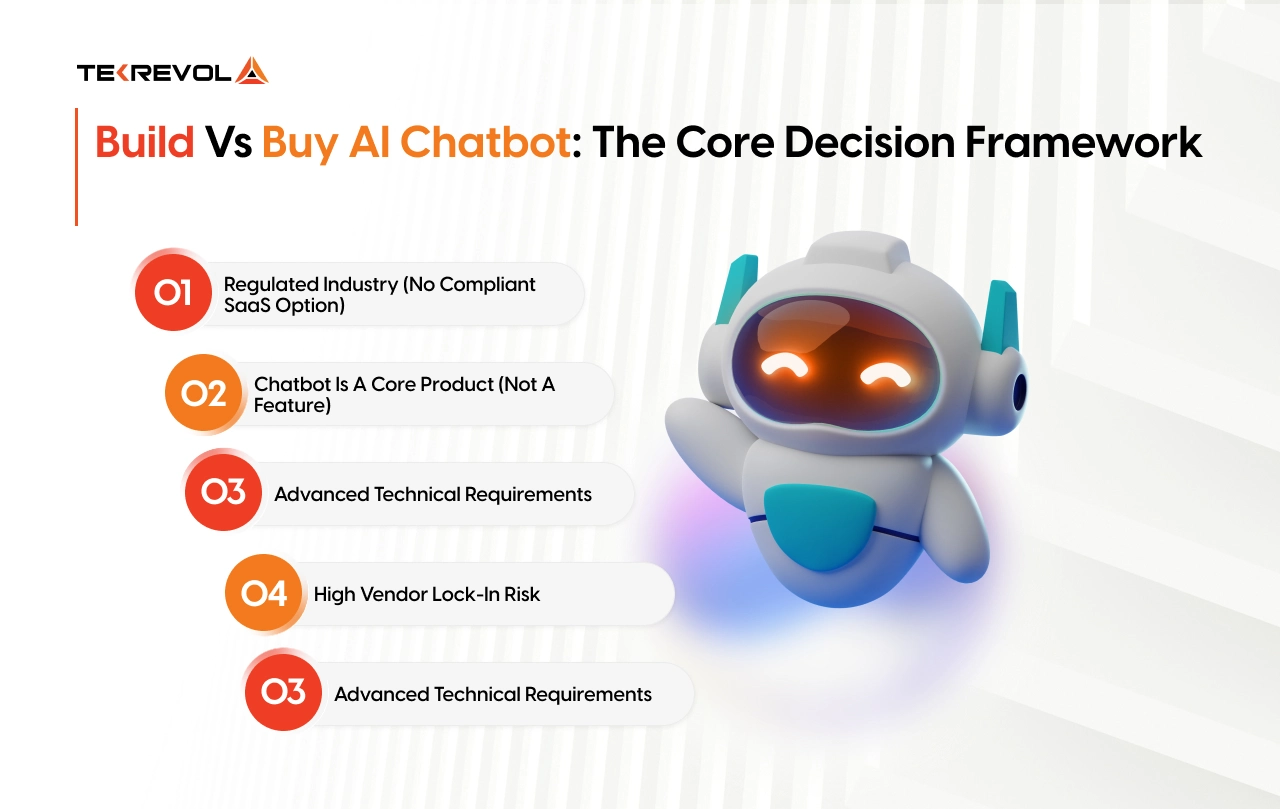
Condition 1: Regulated industry (no compliant SaaS option)
Healthcare (HIPAA, PHI handling), financial services (FFIEC, PCI-DSS), or government contracting where vendors do not hold required certifications. Before assuming this applies, check current platform compliance pages.
Most enterprise SaaS platforms added HIPAA BAAs and SOC 2 Type II in the last 18 months. But for workflows where data must stay on your infrastructure with no exceptions, no SaaS platform closes the gap entirely.
Condition 2: Chatbot is a core product (not a feature)
You are building developer tools, a vertical SaaS, or any offering where the chatbot is a core feature you resell or white-label. You cannot build a competitive moat on a competitor’s platform. You need full-stack ownership.
Condition 3: Advanced technical requirements
Real-time voice with sub-200ms latency. On-device offline operation. Custom proprietary models trained on millions of domain-specific examples. Most enterprises believe they are in this category. Most are not. The architecture review clarifies which requirements are genuinely exotic versus achievable through platform configuration.
Condition 4: High vendor lock-in risk
If a vendor tripling prices or shutting down would create a business-critical failure, building makes sense. But verify this honestly — most modern SaaS platforms offer data export and open APIs. The lock-in risk is architectural, not theoretical, for some deployments and negligible for others.
Condition 5: Dedicated long-term engineering team available
Building requires 2–4 engineers for 4–6 months upfront, then ongoing maintenance indefinitely. Without a committed team, you build a chatbot that performs well at launch and quietly decays by month 18.
Option 1 — Buy: Off-the-Shelf AI Chatbot Platforms
Buying an off-the-shelf AI chatbot platform is the right call when your use case is standard, your timeline is under 6 weeks, and conversation volume stays below 5,000 per month. It gives you live deployment fast, lower upfront cost, and enough capability for most FAQ, lead capture, and appointment workflows.
For 95% of small businesses and many standard enterprise support functions, the capability gap between SaaS and custom development has closed to near zero. The cost gap has not.
What Buying Actually Gets You
Modern SaaS platforms have shipped capabilities that would have taken a custom development team 3–6 months to build just three years ago. Today, out of the box, you get:
- RAG-powered retrieval over your knowledge base.
- Multi-model support (GPT-4o, Claude, Gemini) switchable per use case
- Native CRM integrations (Salesforce, HubSpot, Zendesk, Shopify)
- Analytics dashboards, conversation logging, escalation routing
- Lead capture, webhook support, API access for programmatic control
- SOC 2 and GDPR compliance documentation from the vendor
Real Cost of SaaS Chatbot Platforms in 2026
| Tier | Monthly cost | Annual Cost | Notes |
| Entry / Free | $0–$50 | $0–$600 | Basic FAQ, micro-SMB |
| Mid-market | $100–$500 | $1,200–$6,000 | Standard support, SMB |
| Enterprise (Intercom, Zendesk AI) | $1,500–$4,000+ | $30,000–$100,000+ | Omnichannel, large org |
| Per-resolution pricing (Intercom Fin) | $0.99/resolution | Variable | Gets expensive fast at scale |
The price listed on a vendor’s website is typically the starting point, not the final investment. Once you factor in higher conversation volumes, advanced AI capabilities, white-label requirements, premium support, and non-native integrations, the total cost of ownership can increase significantly.
What do the major platforms actually cost in 2026
Before signing any SaaS chatbot contract, there is one calculation every enterprise buyer skips: take your projected monthly AI resolutions, multiply by the per-resolution fee, and add it to your seat costs. The four platforms that dominate this space all charge both — and the real invoice is almost always 2–3x what the pricing page shows.
| Platform | Real monthly cost at 1,000 resolutions | The billing trap | Fails when |
| Intercom Fin | ~$1,400–$1,650 (seats + $0.99/resolution) | No volume discount or cap at any tier | Monthly resolutions exceed 3,000 — bills compound with no ceiling |
| Zendesk AI | ~$2,200–$2,800 (seats + $50/agent AI add-on + $1.50–$2.00/resolution overage) | Since January 2026, overages have been auto-billed with zero prior notification | Deep proprietary integrations and legacy systems outside Zendesk’s connector set |
| Salesforce Agentforce | ~$15,000+/mo for a 50-user enterprise team | Professional services add $50,000–$150,000 on top; unused Flex Credits expire at year-end | Any team not already running Salesforce CRM cannot be purchased as a standalone |
| Drift (Salesloft) | $2,500–$5,000/mo flat (no per-resolution fee) | Product announced sunset in March 2026; migrating customers to 1mind as successor. | Long-term commitments — signing a multi-year contract on a sunsetting product is a serious lock-in risk |
Every platform on this list charges a platform fee plus a variable AI usage fee, meaning the number on the pricing page is never the number on your invoice. Run your projected 18-month conversation volume through the math before any vendor demo.
The 3 Scenarios Where Buying Fails Enterprise
SaaS chatbot platforms fail in three specific scenarios. All three are common in enterprise environments.
1. Compliance-heavy industries (HIPAA, PCI-DSS, SOC 2)
SaaS platforms may be certified, but they are rarely compliant with your exact use case. In regulated environments, vendor data handling and contract terms often force compromises that create legal and architectural friction.
2. Deep proprietary system integrations
SaaS tools integrate well with standard platforms, but struggle with custom CRMs, legacy systems, or internal tools. This leads to workarounds that increase complexity and long-term maintenance costs.
3. High-volume + proprietary knowledge workflows
At scale, SaaS pricing increases quickly while performance plateaus. Complex domain knowledge, multi-step workflows, and internal logic often exceed what configuration alone can solve.
Option 2 — Build: Custom AI Chatbot Development
Building a custom AI chatbot is the right call when the chatbot is your product, when your data literally cannot leave your servers, or when conversation volume makes SaaS pricing economically absurd at scale. It’s the most expensive path upfront. It’s also the highest-value path long term, but only when the conditions are right.
Here’s what building actually means.
What Building Actually Means
Building means creating the chatbot from the ground up. Your team, or an AI development company, handles the design, integrations, deployment, and ongoing maintenance. You own the technology, the data, and the roadmap.
There is no dependency on a vendor’s pricing changes, product decisions, or platform limitations. That level of control has a real cost. Here’s the honest breakdown for a production-grade custom chatbot:
| Timeline | Component | Cost Range |
| Weeks 1–2 | Architecture + infrastructure | $15,000–$40,000 |
| Weeks 3–4 | Data preparation + RAG pipeline | $20,000–$60,000 |
| Weeks 5–10 | Core development + integrations | $40,000–$100,000 |
| Weeks 8–12 | Fine-tuning + model evaluation | $10,000–$30,000 |
| Weeks 10–14 | Security + compliance documentation | $5,000–$20,000 |
| 3–6 months | Year 1 total | $90,000–$250,000 |
| Perpetual | Year 2+ ongoing operations | $25,000–$60,000/year |
The 5 Conditions That Justify Building
Build when at least one of these is true. If none apply, close this section and go straight to the buy or customize path.
- The chatbot is a product you sell: If conversational AI is a core feature you resell or white-label, you cannot build a competitive moat on a competitor’s platform. You need to own the architecture.
- Compliance rules out every viable SaaS option: Check current platforms first, most added HIPAA BAAs, and SOC 2 Type II in the last 18 months. But if genuine certification gaps remain after that review, custom is your only path.
- Your data cannot leave your infrastructure: For banks, insurers, government contractors, and healthcare providers handling PHI, using third-party cloud services is not a preference; it is often a regulatory restriction.
- Volume makes SaaS pricing uneconomical: Above 10,000–15,000 conversations per month, custom operational costs typically beat SaaS within 6–12 months. Run the 3-year TCO at your volume before signing anything.
The IP Protection That Smart Buyers Lock In First
The smartest move in any custom build isn’t the tech stack. It’s making sure everything you build is legally yours before the first line of code is written.
Before signing any custom development agreement, three things must be in writing:
- Full ownership of model weights
- Full ownership of training data pipelines
- Full ownership of fine-tuning scripts
If a vendor hesitates on any of these, walk.
Model drift is the second unplanned cost most buyers miss. Chatbot accuracy degrades as real-world conversations shift away from training data; the failure point is consistently 6–12 months post-launch. Most build contracts don’t include retraining obligations. Get the model drift SLA in writing before you sign.
TekRevol’s Generative AI Development practice structures every build engagement around four non-negotiables: full IP ownership, documented compliance architecture, post-launch retraining SLA, and named client references in your industry.
Got a Build Requirement No Platform Can Handle?
Share your requirements with our experts, and we’ll design the right architecture, technology stack, and scalability strategy to support your unique business needs.
Book Your Free Technical Consultation →Option 3 — Customize: The 2026 Default for Smart Enterprises
Customizing a foundation model on your proprietary data is the fastest-growing enterprise AI chatbot approach in 2026 because it delivers platform speed with architectural control at a fraction of the cost of building from scratch.
Most enterprise deployments land here. Not because it is a compromise. Because it is the architecturally correct answer for most business chatbot solutions.
What Customization Actually Means (The Boost Path)
The customization path in 2026 looks like this: start with a capable foundation model accessed via API, then layer four proprietary elements on top that you own and control.
Layer 1 Fine-tuning: Train the base model on your domain-specific data, internal documentation, resolved support tickets, product guides, policy documents. The model learns your terminology, your tone, and your business logic.
Layer 2 RAG pipeline: Build a retrieval layer over your live knowledge base. The model retrieves verified source documents before generating responses, grounding outputs in your actual data and reducing hallucination rates to production-acceptable levels.
Layer 3 Integration layer: Connect to your CRM, ERP, ticketing system, and any live data sources the bot needs to access. This is the layer SaaS platforms strain at. In a customized build, you engineer it once and own it permanently.
Layer 4 Governance and monitoring: Define escalation logic, human handoff triggers, audit logging, and retraining schedules. This layer is yours. It reflects your compliance requirements and your risk posture.
The Full Customization Stack — What You Own vs What the Vendor Owns
| layer | What It is | Vendor or Yours |
| Foundation model | GPT-4o, Claude 3.5, Llama 3 | Vendor (API access) |
| Fine-tuning | Domain data, tone, business rules | Yours |
| RAG retrieval pipeline | Internal knowledge base + vector DB | Yours |
| System integrations | CRM, ERP, ticketing, HRIS | Yours |
| Orchestration logic | Conversation flow, escalation rules | Yours |
| Governance + monitoring | Audit logs, drift detection, retraining | Yours |
| Conversation UI | Brand-aligned interface | Yours |
| Hosting environment | Private cloud or on-premise | Yours |
When Customizing Wins
Customize when:
- You need to live faster than a full build allows, but you need more control than SaaS offers
- Your use case requires proprietary knowledge retrieval but not a ground-up model architecture
- You want predictable operational costs without SaaS volume-based pricing at scale
- Your integration requirements exceed what SaaS connectors support natively
- The 6–12-month TCO break-even against SaaS makes the upfront investment rational
TekRevol’s Custom Software Development practice builds this full customization stack, from foundation model selection through fine-tuning through integration with existing enterprise infrastructure. Every engagement starts with a data audit, not a platform demo.
Build vs Buy vs Customize: Full Head-to-Head Comparison
The clearest way to evaluate the build vs buy AI chatbot decision is to compare all three paths across the factors that determine long-term enterprise value: cost, control, compliance, and time to production.
| Criterion | Build | Buy | Customize |
| Time to Launch | 4–6 months | Hours to 2 days | 2–4 weeks |
| Upfront Cost | $60K–$150K | $0–$5K | $10K–$40K |
| 3-Year Total Cost | $300K–$600K | $9K–$45K | $45K–$100K |
| Integration Depth | Unlimited | Standard connectors only | High |
| Data Sovereignty | Full control | Depends on vendor policies and SLAs | High |
| IP Ownership | Full ownership | No ownership | Ownership of custom layers and configurations |
| Model Flexibility | Full choice of models | Limited to vendor-supported models | High flexibility |
| Compliance Control | Full control | Defined by platform capabilities | Selective control |
| Maintenance Burden | Fully managed internally | Managed by vendor | Shared responsibility |
| Team Requirement | 2–4 engineers or more | No dedicated engineering team required | Typically 1 engineer |
| Agentic AI Upgrade Path | Native support | Limited capabilities | Native support |
| Hallucination Control | High effort to implement and maintain | Moderate control | Strong control through RAG and customization |
| Brand Voice Accuracy | Full customization | Limited to platform settings | High customization |
| Vendor Dependency | None | high | Low to medium |
| Long-Term ROI (Year 3+) | Strong long-term value | Strong short-term value (Year 1) | Strong value across Years 1–3 |
The Conversation Volume Breakeven Point
Most enterprise buyers never run this calculation before picking a platform. They should.
At low volumes, SaaS wins on pure economics. At high volumes, the math flips, and fast. Here’s where each path makes financial sense:
| Monthly Conversations | What the Economics Say |
| Under 2,000 | SaaS beats custom TCO — buy without hesitation |
| 2,000–5,000 | SaaS and custom approach parity — evaluate by use case |
| 5,000–10,000 | A customized build typically hits breakeven within 12 months |
| 10,000–50,000 | Custom or hybrid builds beat SaaS on 3-year TCO in most cases |
| Over 50,000 | Per-resolution SaaS pricing becomes the dominant cost driver — Build wins outright |
Run this calculation before vendor demos or pricing negotiations. The numbers tell you which path is rational.
Find Out Exactly When Custom Beats SaaS for Your Volume
We analyze your conversation volume, usage patterns, and operational costs against real-world SaaS pricing and custom development expenses—giving you a clear financial breakpoint based on data, not opinions.
Book Your Free 30-Minute Session →The AI Stack Framework — Build Where It Matters, Buy Where It Doesn’t
The real question isn’t “should we build or buy the chatbot.” It’s “at which layer of the AI stack do we actually need proprietary control — and where is off-the-shelf good enough?”
Most businesses overbuild the wrong layers and underbuild the ones that actually drive competitive advantage. Here’s how to split it correctly.
The Layers You Should Always Buy
Foundation model. You’re using GPT-4o, Claude, or Gemini. You’re not training a model from scratch. Nobody outside a hyperscaler should be. The decision is which model fits your use case, not whether to use one.
| Model | Input cost | Best For | US Compliance |
| OpenAI GPT-4o | $2.50–$10/MTok | RAG, agentic workflows, fine-tuning | SOC 2 Type II, HIPAA BAA available |
| Anthropic Claude 3.5 Sonnet | $3–$15/MTok | Complex reasoning, 200K context, safety-critical | HIPAA BAA available, US-hosted |
| Meta Llama 3 (open-source) | Free; ~$0.002/MTok hosted | Full data sovereignty, on-premise | No vendor data exposure — HIPAA private cloud |
| Google Gemini 1.5 Pro | $1.25–$5/MTok | Multimodal, Google Workspace integration | FedRAMP Moderate in progress |
| Mistral (open-source) | Free; ~$0.14–$0.81/MTok API | Cost efficiency, self-hosted option | EU-based — evaluate for cross-border |
Orchestration tooling
LangChain, LlamaIndex, LangSmith- solid options exist for all of it. Buy unless your requirements are highly specific.
- LangChain supports 50+ LLM providers, 20+ vector stores, and 100+ tools. Default choice for RAG and agentic builds requiring complex multi-step workflows.
- LlamaIndex specializes in data indexing and RAG optimization. Best for document-heavy deployments where retrieval precision matters more than workflow execution.
Vector databases.
Compute and model serving are commodities in 2026. Building your own is a distraction unless your scale is genuinely extraordinary.
| Database | Hosting | Best For | HIPAA Ready |
| Pinecone | Managed SaaS | Fast deployment, no DevOps | Via BAA |
| Weaviate | Self-hosted or cloud | Full data control, private cloud | Self-hosted |
| Qdrant | Self-hosted or cloud | High performance, cost-efficient | Self-hosted |
| pgvector (Postgres) | Self-hosted | Teams are already on Postgres | Self-hosted |
For HIPAA workloads: In the US, common production stacks include Weaviate (self-hosted) or Anthropic on AWS for HIPAA. FedRAMP use cases often rely on Vertex AI or Azure OpenAI, while SOC 2 workloads commonly use OpenAI, Anthropic, and Pinecone.
The Layers You Must Own
The integration layer: How your chatbot connects to your internal data, workflows, and systems. This is almost always a build. Your internal systems are specific to your organization. A vendor that claims to integrate with everything integrates well with none of it.
Orchestration and prompt design: The system prompts govern your bot’s behavior, the escalation logic, and the rules around tool use. These encode your business logic. They belong inside your organization, not locked inside a vendor’s platform.
Your training data and retrieval config: Your policies, products, processes, and resolved ticket history. This knowledge is yours. It must be portable and controlled by your team regardless of what platform sits on top.
Governance and monitoring: How you track what the bot is doing, audit its decisions, and catch drift before it hits customers. A vendor tool might cover part of it. The accountability framework is yours to own.
Where Enterprise AI Chatbot Projects Actually Fail
Enterprise AI chatbot projects don’t fail in production. They fail in the three weeks before procurement, when the wrong path is chosen based on assumptions, vendor demos, and optimistic timelines instead of architecture.
Failure Mode 1: Starting With Technology Instead of the Problem
“We want an AI chatbot” is not a brief. What workflow should it automate? What is the target resolution rate? What does measurable success look like at 30 days, 90 days, and 12 months? Organizations that start with technology selection and work backward to problem definition consistently underperform those that define the problem first.
Failure Mode 2: Underestimating Maintenance Costs
Launch is 20% of the total three-year cost. The chatbot needs updating every time your product changes, pricing shifts, or policies are revised. Teams that don’t budget for ongoing maintenance end up with an accuracy-degrading chatbot within six months. Budget at least 20–30% of your initial build cost annually for maintenance before approving any development contract.
Failure Mode 3: The Retraining Problem Nobody Plans For
AI model accuracy degrades over time as real-world conversation patterns shift away from training data. The industry failure point is consistently 6–12 months post-launch. For SaaS deployments, the platform updates for all customers simultaneously, not for your specific use case. For custom builds, retraining is your responsibility. Get the model drift SLA and retraining terms in writing before signing any agreement.
Failure Mode 4: Scope Creep at Launch
The deployments that succeed start with one workflow. They define one measurable success target: a 70% resolution rate on order status queries. They hit it. They measure it for 30 days. Then they expand. The deployments that fail start with “automate all customer support across six channels in four languages” and launch with a bot that handles 14% of queries at inconsistent quality.
Failure Mode 5: No Human Handoff Design
Every chatbot needs a defined escalation path. What triggers a handoff? Who receives it? How is context passed without the customer repeating themselves? Teams that skip this design step discover it at launch, when frustrated customers escalate to agents who have no conversation context.
AI Customer Support Chatbot: The 4 Use Cases With the Strongest Enterprise ROI
The highest-ROI AI customer support chatbot deployments target the highest-volume, most-repetitive workflows where automation rate is measurable, and cost-per-interaction math is clear.
1. Tier-1 Support Deflection — The Clearest ROI
Chatbots handle up to 80% of routine support inquiries. At $15–$40 per human-handled ticket, deflecting 5,000 tickets per month at 70% automation saves $52,500–$140,000 monthly. Enterprises report $8 returned for every $1 invested in chatbot implementation, but only when the bot is integrated with live data, not deployed as a static FAQ widget.
See our full breakdown of the cost to build a conversational AI chatbot app to understand what that investment actually looks like.
2. Internal IT Helpdesk Automation
Password resets, software access requests, hardware procurement tickets, VPN configuration. Automation rates of 60–75% are standard in enterprise IT helpdesk deployments. At $25–$50 per human-handled IT ticket and 10,000 tickets per month, 65% automation saves $162,500–$325,000 monthly. This use case has the fastest enterprise adoption rate in 2026 because the data is internal, compliance requirements are manageable, and the ROI is immediate.
3. Appointment and Scheduling Automation
AI scheduling chatbots reduce no-show rates by 10–40% and eliminate front-desk workload for booking, rescheduling, and reminder workflows.
4. AI-Powered Lead Qualification
41% of enterprise chatbot deployments targeted sales workflows. Companies using AI-powered lead qualification report 55% higher-quality leads entering the pipeline, with human SDRs engaging only pre-qualified prospects.
Chatbot Implementation Strategy: The 5-Phase Enterprise Execution Model
A strong chatbot implementation strategy follows five phases: data infrastructure audit, scope definition, architecture and build, integration and QA, and post-launch monitoring with scheduled retraining. The technical decision, build, buy, or customize, accounts for 30% of what determines success. Execution accounts for the other 70%.
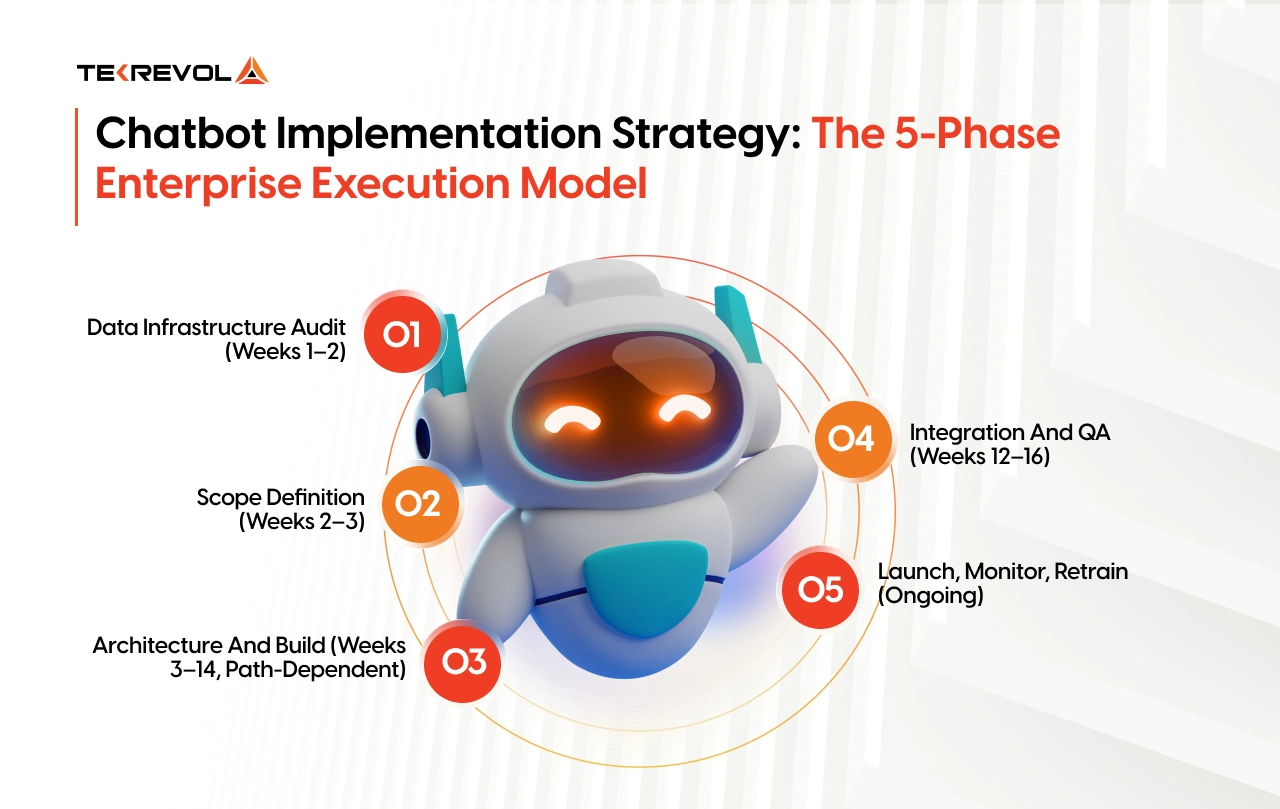
Phase 1: Data Infrastructure Audit (Weeks 1–2)
Map every data source the chatbot needs to access. Where does customer data live? What systems hold conversation history? Which integrations are required? What compliance requirements apply to each data type? Teams that skip this step discover integration blockers at week 10, not week 2.
Phase 2: Scope Definition (Weeks 2–3)
Define the single workflow the chatbot owns at launch. Not five. One. Set measurable success criteria before development begins: target resolution rate, maximum escalation rate, average handling time reduction, CSAT improvement target. If you cannot measure it before launch, you cannot manage it after.
Phase 3: Architecture and Build (Weeks 3–14, Path-Dependent)
Design conversation flows, integration layers, fallback protocols, and human handoff triggers. For custom and customized builds, this includes model selection, RAG pipeline construction, fine-tuning, and compliance documentation. For buy deployments, this is platform configuration, knowledge base ingestion, and flow design. Shorter timeline. Same need for careful design.
Phase 4: Integration and QA (Weeks 12–16)
Connect to CRM, ERP, ticketing, and every live system the bot needs to access. Run load testing at 2× expected conversation volume. Test edge cases, failure states, and escalation paths. Complete compliance documentation as a pre-launch gate, not a post-launch checkbox.
Phase 5: Launch, Monitor, Retrain (Ongoing)
Deploy to one channel first. Monitor resolution rates weekly for the first 90 days. Schedule the first retraining cycle at month three, not month twelve. Expand to additional workflows only after the first workflow hits its success target for 30 consecutive days.
4 Questions That Filter Bad AI Chatbot Vendors in One Conversation
The fastest way to filter AI chatbot vendors is to ask four questions that no capable partner hesitates to answer. Most RFP processes waste 60 days evaluating vendors who cannot deliver production-ready enterprise systems. These questions cut that to one session.
Question 1 — Show me a production deployment in my industry. Ask to examine actual conversation flows, escalation architecture, and integration setup from a live enterprise deployment. Vendors who describe capabilities without naming clients are building expertise on your budget.
Question 2 — Who owns the model weights, training pipeline, and IP when the contract ends? If the answer is anything other than “you own everything, completely, in writing,” the conversation ends. Full IP ownership means model weights, training data pipelines, conversation logs, and fine-tuning scripts. All of it, in writing, before signing.
Question 3 — What is your contractual SLA for model drift, and is retraining included? AI chatbot accuracy degrades within 6–12 months as production conversation patterns diverge from training data. A vendor without a contractual retraining SLA is selling you a depreciating asset with no maintenance plan.
Question 4 — Produce your compliance documentation within 24 hours. Ask for architecture diagrams showing data flow, audit log examples, and BAA templates. A vendor with genuine compliance credentials delivers these in one business day. One without them asks for more time and never delivers.
How TekRevol Helps Businesses Choose the Right Approach
TekRevol doesn’t start with a recommendation. Every engagement starts with your data.
As a leading mobile app development company with deep AI expertise, TekRevol puts the technical architecture and compliance review first — before any proposal, before any technology selection, before any line of code. The team maps your existing integrations, data infrastructure, compliance requirements, conversation volume, and deployment timeline. Then they tell you which path — buy, build, or customize-, fits your specific environment. Sometimes the honest answer is a SaaS platform. TekRevol says so.
That approach is what FindBestWebDevelopment evaluated when they ranked TekRevol the #1 AI Development Company in 2026, not for the volume of projects shipped, but for technical depth, delivery consistency, and measurable client ROI across every engagement.
Want to Know Which AI Path Fits Your Business Operations?
TekRevol’s AI specialists evaluate your existing infrastructure, workflows, and business objectives to provide a clear technical recommendation tailored to your operational needs.
Book a Free Technical Architecture Review →


