



- The software development life cycle has seven phases, running from initial planning through to long-term maintenance.
- SDLC is a framework describing phases; Agile and Waterfall are methods for moving through them.
- Security belongs in every phase, not bolted on just before release as a final gate.
- AI agents compress the coding phase hardest, which shifts the bottleneck onto review and testing.
- Maintenance is the longest and most underestimated phase — most teams budget for the build, not the years after
PMI’s Pulse of the Profession 2026 found that 72% of complex projects succeed when teams apply a structured framework, against 61% when they don’t. That eleven-point gap is roughly what structure is worth.
The software development life cycle is software’s version of that structure. It’s the seven phases every project passes through: planning, requirement analysis, design, development, testing, deployment, and maintenance. That holds whether you run them once in sequence or repeat them every two weeks.
Below we walk through all seven phases, with the deliverable and exit criteria for each. Then we cover the models, roles, tools, how security fits, and what AI agents are really changing. It’s the walkthrough we’d give a client as a custom software development company.
What Is the Software Development Life Cycle?
The software development life cycle is a structured framework that breaks software delivery into defined phases, each with its own activities, deliverables, and sign-off point. It exists so teams know what happens next, who owns it, and what “done” looks like.
Is SDLC a methodology, a framework, or a process?
It’s a framework, and this is the single most-asked question in this topic that almost nobody answers cleanly.
Here’s the hierarchy that resolves it:
- The SDLC names the phases any software effort passes through. Descriptive — it tells you what happens, not how.
- Models and methodologies: Waterfall, Agile, Spiral, V-Model, decide how you arrange, repeat, or compress those phases. Prescriptive.
- Scrum sits inside Agile. It fixes roles and events but deliberately leaves the engineering practices to you, which is why its own stewards call it a framework rather than a methodology.
Still not sure where your project sits in this hierarchy?
We map your build against the SDLC and tell you whether Waterfall, Agile, or a hybrid model.
Talk to a Software ArchitectWhat Are the 7 Phases of the SDLC?
The seven phases are planning, requirements analysis, design, development, testing, deployment, and maintenance. Each one has a deliverable that must exist before the next phase starts. Skipping a deliverable is what turns a phase gate into a formality.
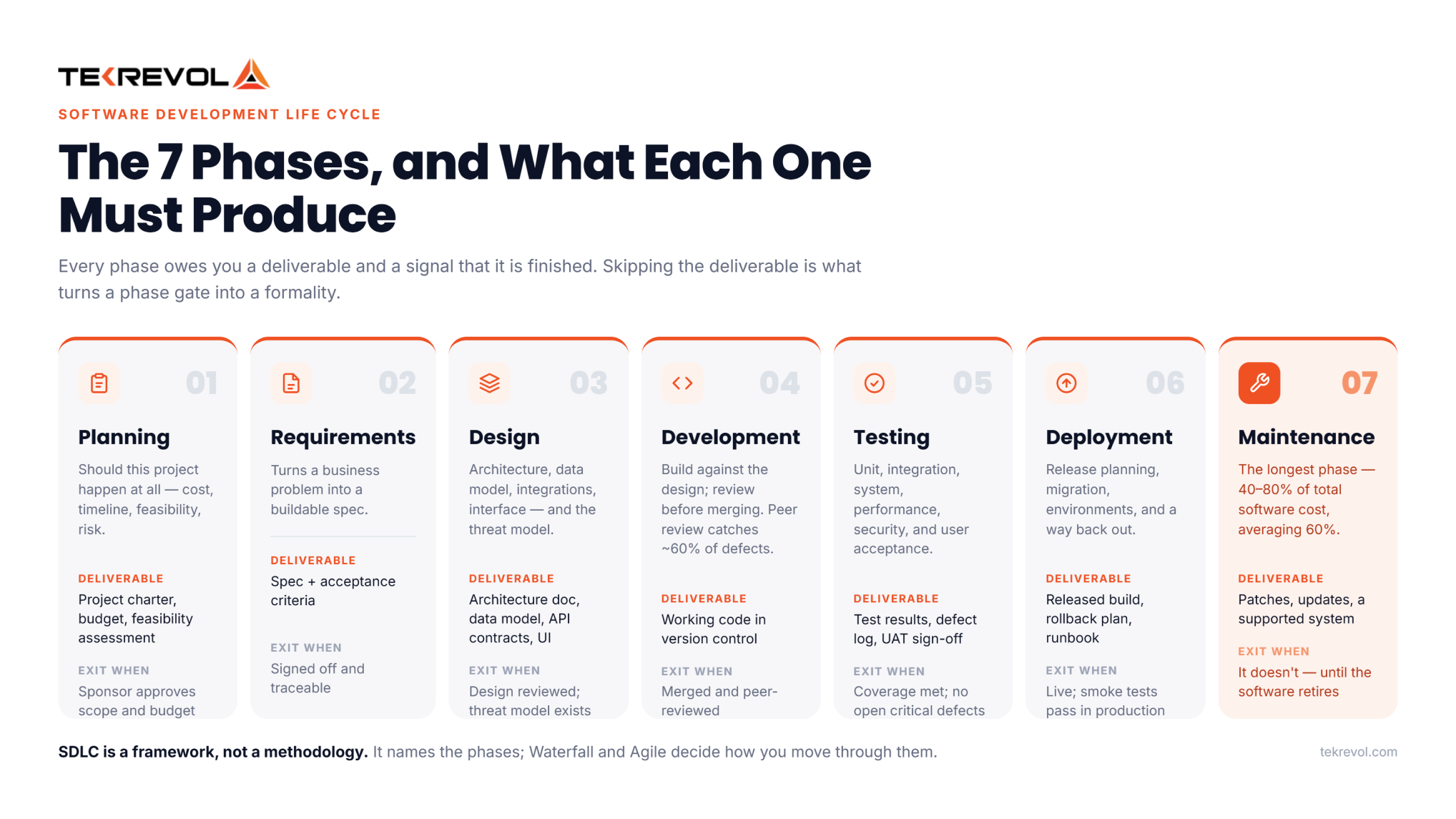
Most guides list the phases of the software development life cycle and stop there. The part that actually helps is knowing what each phase must produce, and what proves it’s finished.
| Phase | Key deliverable | Exit criteria |
| Planning | Project charter, budget, feasibility assessment | Scope and budget approved by the sponsor |
| Requirement analysis | Requirements specification, acceptance criteria | Requirements signed off and traceable |
| Design | Architecture document, data model, API contracts, UI designs | Design reviewed; threat model complete |
| Development | Working code in version control | Code merged and peer-reviewed |
| Testing | Test results, defect log, UAT sign-off | Coverage target met; no open critical defects |
| Deployment | Released build, rollback plan, runbook | Live in production; smoke tests pass |
| Maintenance | Patches, updates, support tickets | Ongoing — reviewed at each release |
Phase 1: Planning
Decides whether the project should happen at all. The team defines the problem, estimates cost and timeline, checks technical and commercial feasibility, and identifies the risks that could sink it. Business sponsors and project managers own this phase.
- Deliverable: a project charter with scope, budget, and a feasibility assessment
- Exit when: the sponsor has approved scope and budget in writing
- Where it goes wrong: approving a budget before anyone has checked whether the integration you’re assuming actually has an API
Phase 2: Requirement Analysis
Turns a business problem into a specification someone can build against. Business analysts run stakeholder interviews, write down what the software must do, and set acceptance criteria: the testable statements that define “working.”
- Deliverable: a written requirements spec with acceptance criteria
- Exit when: requirements are signed off, and each one traces to a business objective
- Where it goes wrong: collecting feature requests instead of understanding the process. A feature list describes a product; a workflow describes your business.
Phase 3: Design
Converts requirements into a technical blueprint. Architects settle the architecture, data model, integration points, and tech stack. Designers produce the interface. The threat model belongs here too, because decisions made at this stage are the expensive ones to reverse.
- Deliverable: an architecture doc, data model, API contracts, and UI designs
- Exit when: the design has been reviewed, and a threat model exists
- Where it goes wrong: designing the screens before the data model. Reworking a data model after launch is the single most expensive fix in software.
Phase 4: Development
Writes the code. Developers build against the design, commit to version control, and review each other’s work before merging. Coding standards, branching strategy, and definition of done all get enforced here rather than negotiated.
- Deliverable: working code merged into the main branch.
- Exit when: the feature is code-complete and peer-reviewed
- Where it goes wrong: treating peer review as a formality
Phase 5: Testing
Verifies the software does what the requirements said and doesn’t break what already worked. It covers unit, integration, system, performance, security, and user acceptance testing. QA engineers run it; the business signs off on UAT.
- Deliverable: test results, a defect log, and UAT sign-off
- Exit when: the coverage target is met, and no critical defects remain open
- Where it goes wrong: compressing testing because development ran late. The schedule slips either way; the only choice is whether it slips before or after users see it.
Phase 6: Deployment
Moves the software into production. It covers release planning, data migration, environment setup, and a rollback path for when something goes wrong. Mature teams automate this, so a release is routine rather than an event.
- Deliverable: a released build, a rollback plan, and a runbook
- Exit when: the release is live, and smoke tests pass in production
- Where it goes wrong: no rollback plan.
Automating this properly is most of what DevOps automation actually delivers.
Phase 7: Maintenance
Keeps the software working and useful. It covers bug fixes, security patches, framework and OS updates, tuning, and new features. It’s the longest phase by a wide margin, and the most underestimated.
- Deliverable: patches, updates, and a system that stays supported
- Exit when: it doesn’t; maintenance ends when the software is retired
- Where it goes wrong: budgeting for the build and not the life
Robert Glass, writing in IEEE Software, put maintenance at 40–80% of total software cost, averaging 60%. Our custom software development cost guide breaks down how that lands in practice.
Want to know exactly which phase your project is really in?
TekRevol can audit your project against these seven gates and tell you what's missing.
Get a free phase audit →What Are the Different Types of Software Development Life Cycle Models?
SDLC models decide how you move through the seven phases. Waterfall runs them once in sequence. Agile repeats them in short iterations. Spiral loops through them in risk order. V-Model mirrors a test phase against every design phase. The phases don’t change; the choreography does.
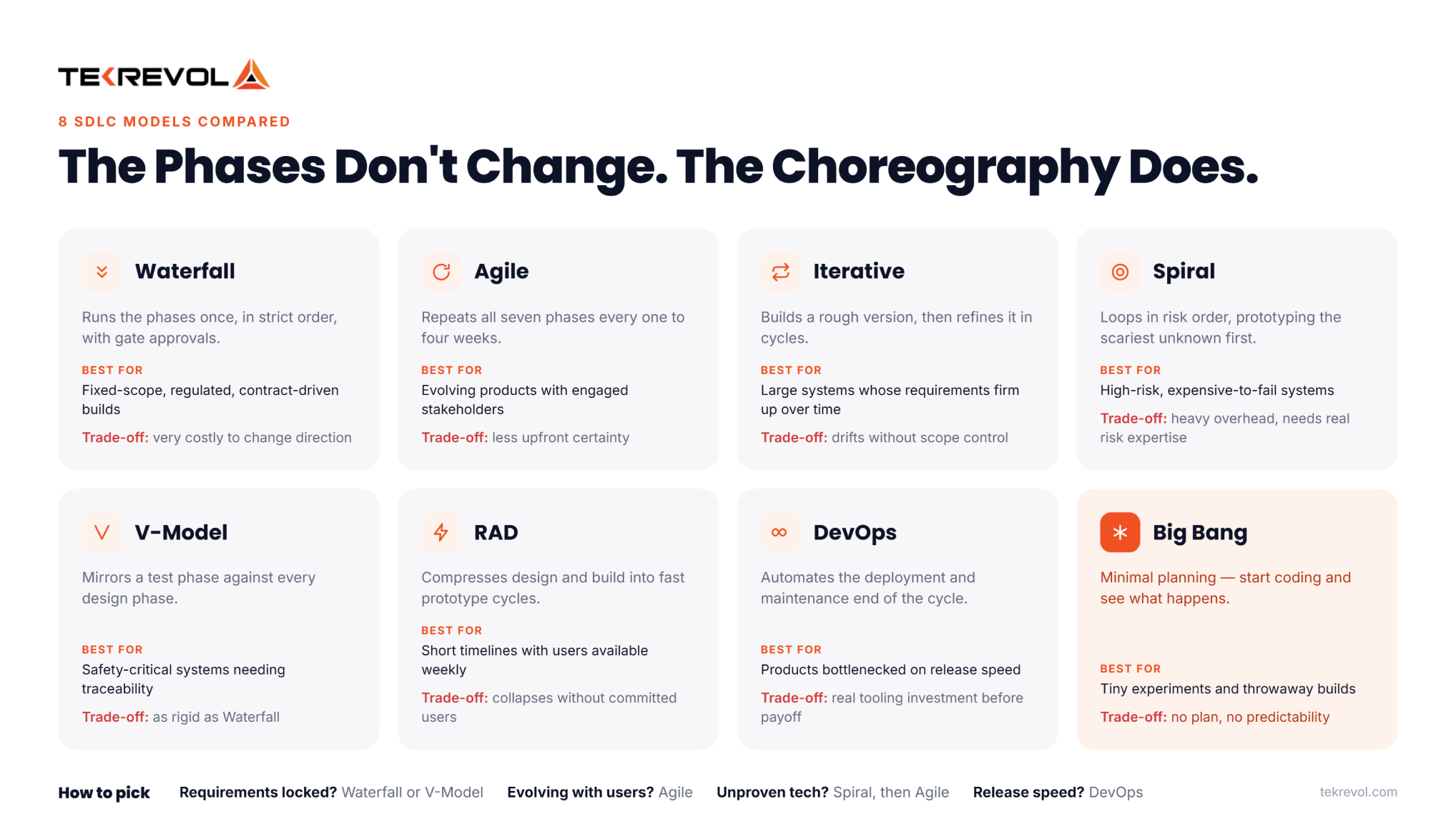
| Model | How it runs the phases | Best for | Main trade-off |
| Waterfall | Once, in strict order, with gate approvals | Fixed-scope, regulated, contract-driven builds | Very costly to change direction |
| Agile | Repeats all phases every 1–4 weeks | Evolving products with engaged stakeholders | Less upfront certainty |
| Iterative | Builds a rough version, then refines it in cycles | Large systems where requirements firm up over time | Can drift without strong scope control |
| Spiral | Loops in risk order, prototyping the scariest unknown first | High-risk, expensive-to-fail systems | Heavy overhead; needs real risk expertise |
| V-Model | Mirrors a test phase against every design phase | Safety-critical systems needing traceability | As rigid as Waterfall |
| RAD | Compresses design and build into fast prototype cycles | Short timelines with users available weekly | Collapses without committed users |
| DevOps | Automates the deployment and maintenance end | Products bottlenecked on release speed | Real tooling investment before payoff |
| Big Bang | Minimal planning, start coding | Tiny experiments and throwaway builds | No plan, no predictability |
How to pick
- Requirements locked and audited? Waterfall or V-Model
- Requirements evolving with real users? Agile
- Tech nobody has proven yet? Spiral first, then Agile
- Release speed the real bottleneck? DevOps as no amount of sprint tinkering substitutes for it.
Our guide to types of software development goes deeper on where each model fits.
How Does the Software Development Life Cycle Ensure Project Success?
It doesn’t guarantee success but removes specific failure modes. Defined phases catch bad assumptions before they’re expensive, sign-off points stop silent scope drift, and traceable requirements mean the thing you built is the thing that was asked for.
The mechanism is worth being precise about, because “the software development life cycle improves outcomes” is the kind of claim that gets repeated without evidence.
- It forces decisions to be made in the right order. Feasibility before budget. Data model before screens. Requirements before estimates. Most expensive project failures trace back to a decision made before the information needed to make it existed.
- It makes change visible and priced. Without phase gates, scope moves silently, and nobody notices until the deadline. With them, a change is a documented decision with a cost attached.
- It catches defects earlier, where they’re cheaper. Boehm and Basili reported in IEEE Computer that fixing a problem after delivery is often 100 times costlier than fixing it during requirements and design. The same paper adds a caveat: for small, non-critical systems, the ratio is closer to 5:1. Both halves matter. The escalation is real. The multiplier depends on what you’re building.
- It reduces rework. The same analysis found projects spend roughly 40–50% of effort on avoidable rework. That’s the number the process is fighting.
What Are the Benefits of Using the Software Development Life Cycle?
A defined life cycle gives you steady delivery, earlier defect detection, clearer ownership, controlled scope, audit evidence, and faster onboarding. The cost is real overhead; meetings, documents, and gates all come out of build time.
| Benefit | What it actually means |
| Predictable delivery | A defined cadence gives a real answer to “when will this be ready?” |
| Earlier defect detection | Problems surface at design review instead of in production |
| Clear accountability | Each phase has a named owner, so decisions don’t stall |
| Controlled scope | Changes become documented, priced decisions rather than silent drift |
| Audit evidence | Traceability from requirement to test result falls out as a by-product |
| Faster onboarding | A new developer learns a documented process in days, tribal knowledge in months |
| Better estimates | Phase-level history makes the next project’s estimate less of a guess |
Benefit summary compiled by TekRevol
What Are the Tools and Techniques Used in the Software Development Life Cycle?
Each phase leans on different tooling. Planning uses project tracking, analysis uses requirement management, design uses diagramming, development uses IDEs and version control, testing uses automation, deployment uses CI/CD pipelines, and maintenance uses monitoring and error tracking.
| Phase | Tool category | Common options | Free/open source |
| Planning | Project tracking, roadmapping | Jira, Azure DevOps, Linear, Monday.com | OpenProject, Redmine |
| Requirement analysis | Requirement management, docs | Confluence, Notion, Jama Connect | Wiki.js, Markdown in Git |
| Design | Diagramming, UI design, modelling | Figma, Lucidchart, Miro, draw.io | draw.io, Penpot, PlantUML |
| Development | IDE, version control, code review | VS Code, JetBrains, GitHub, GitLab | VS Code, Git, GitLab CE |
| Testing | Test automation, management | Selenium, Cypress, Playwright, TestRail | Selenium, Playwright, JUnit |
| Deployment | CI/CD, infrastructure as code | Jenkins, GitHub Actions, GitLab CI, Terraform | Jenkins, Terraform, Ansible |
| Maintenance | Monitoring, logging, error tracking | Datadog, New Relic, Sentry, Grafana | Grafana, Prometheus, Sentry (self-hosted) |
Techniques worth more than the tools
- Requirements traceability. Link every requirement to a test case. It sounds bureaucratic until an auditor asks you to prove a feature works, or a stakeholder asks why something was built.
- Peer review. Boehm and Basili found peer reviews catch around 60% of defects. In our experience, it’s the highest-return practice in the life cycle, though that ranking is our judgment rather than theirs.
- Definition of done. A written checklist for what “finished” means. Without it, “done” means “the developer stopped working on it.”
- Version control discipline. Short-lived branches and frequent merges. Long-running branches are where integration pain is manufactured.
How Do You Integrate Security Into the Development Lifecycle?
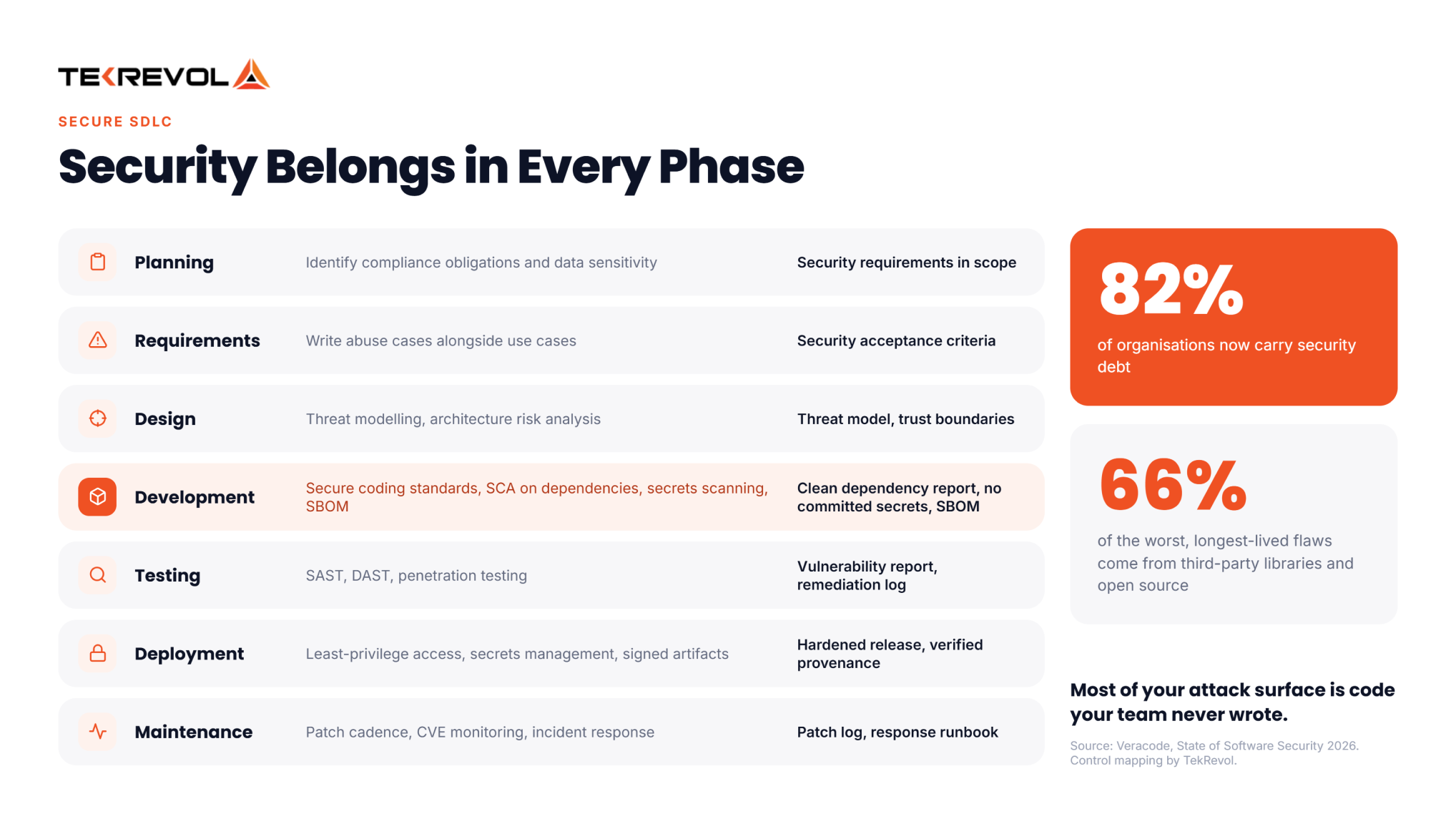
Security belongs in every phase, not only in testing. Set security requirements at planning. Threat model at design. Scan dependencies during development. Run SAST and DAST in testing. Manage secrets at deployment, and patch through maintenance.
Here’s what each phase actually owes you.
| Phase | Security activity | What it produces |
| Planning | Identify compliance obligations and data sensitivity | Security requirements in scope |
| Requirement analysis | Write abuse cases alongside use cases | Security acceptance criteria |
| Design | Threat modelling, architecture risk analysis | Threat model, trust boundaries |
| Development | Secure coding standards, SCA on dependencies, secrets scanning, SBOM generation | Clean dependency report, no committed secrets, SBOM produced |
| Testing | SAST, DAST, penetration testing | Vulnerability report, remediation log |
| Deployment | Least-privilege access, secrets management, signed artifacts | Hardened release, verified provenance |
| Maintenance | Patch cadence, CVE monitoring, incident response | Patch log, response runbook |
Security control mapping developed by TekRevol.
How Are AI Agents Changing the SDLC?
AI agents compress the development phase hardest, which pushes the bottleneck onto review, testing, and deployment. The seven phases don’t disappear. What changes is where the work sits and which phase gates suddenly carry much more weight.
The adoption is real. Google Cloud’s 2025 DORA report found 90% of software professionals using AI at work, spending a median of two hours a day with it. GitHub’s Octoverse 2025 reported over a million pull requests created by its Copilot coding agent between May and September 2025.
What changes, phase by phase
| Phase | What AI agents change | What still needs a human |
| Planning | Faster research, competitor and feasibility summaries | The decision to proceed, and the budget |
| Requirement analysis | Drafting user stories and acceptance criteria from notes | Knowing which requirement is actually wrong |
| Design | Generating diagrams, schema drafts, interface options | Architecture trade-offs and the threat model |
| Development | The biggest compression — code generation and refactoring | Judging whether generated code fits the system |
| Testing | Test case generation, coverage gap detection | Deciding what “good enough to ship” means |
| Deployment | Pipeline configuration, release note drafting | Go/no-go and rollback judgment |
| Maintenance | Log analysis, triage, patch suggestions | Root cause and architectural decisions |
The finding that should change how you plan
DORA’s 2025 research found AI use now tracks positively with delivery throughput, but still tracks negatively with stability. Teams ship more, and break more.
That’s a life cycle problem, not a tooling problem. If phase four produces three times the output, phases five and six have to absorb it. Teams with disciplined peer review and automated testing handle that. Teams without it ship faster into production incidents.
Our approach on AI development services projects is to tighten the review and test gates first, then add agents. The other order produces velocity you can’t trust.
Partner With TekRevol to Build Software the Right Way
TekRevol runs the full software development life cycle with named owners and written deliverables at every phase. Discovery produces a specification you own, architecture is settled before code, and the estimate covers maintenance rather than stopping at launch.
Software projects fail in predictable places. Here’s how we handle each one.
- Discovery → a spec, not a pitch. A written spec with screens, data, roles, and acceptance criteria — yours to keep, and to compare against other quotes.
- Architecture, settled early. Data model, integrations, and threat model locked before code, while they’re still cheap to change.
- Every requirement traces to a test. “Done” is demonstrable, not an opinion, and it’s audit-ready.
- Security in the phases, not bolted on. Dependency scanning, SAST/DAST, secrets management, and a patch cadence, start to finish.
- Estimates that include the years after launch. Hosting, patching, and support are priced up front. Want to take it in-house later? You get the source code, docs, and full IP.
Ready to build it right the first time?
Book a free 30-minute call with a TekRevol solutions architect to scope your project, timeline, and cost.
Schedule a Free Consultation


