



- Mobile app design costs $5,000 to $100,000 in 2026, with most MVP designs landing near $10,000.
- Design should take 20% to 25% of your total app budget, according to 2026 industry research.
- Screen count drives design cost more reliably than any tier label an agency puts on it.
- Redesigning an app typically costs 40% to 70% of building a full design from scratch.
- Security features like two-factor authentication and consent flows add real, overlooked costs to your budget.
- Every third-party integration you add brings an extra $500 to $3,000 in hidden design work.
- AI-driven interfaces and AR experiences can add $8,000 to $50,000 to your total design budget.
- Designer location swings your hourly rate from $20 to $150 for functionally identical design work.
Ever wondered why one app quote comes in at $10,000 while another for a similar idea hits $80,000? You’re not imagining things. Mobile app design pricing genuinely varies this much, and it rarely comes down to any single factor. So what does app design actually cost?
On average, the cost to design a mobile app ranges from $5,000 for a simple MVP to $100,000 for a complex, custom-built application. Most startup MVPs land between $5,000 and $15,000. That gap reflects how many screens you need, how many user types the app serves, which platforms it ships on, and the mobile app development company you choose.
Here’s the framing most cost guides miss. Design isn’t a standalone purchase; it’s a proportion of your build, and industry research puts that proportion at 20% to 25% of the total app cost.
In this blog, we’ll walk you through exactly what shapes that price difference, from design complexity and platform choice to team location and expertise, so you know precisely what you’re paying for before you request a quote.
How Much Does It Cost to Design a Mobile App?
Mobile app design costs $5,000 to $100,000 in 2026. A simple MVP design runs $5,000 to $15,000, a medium-complexity app $15,000 to $40,000, and a complex multi-role app $40,000 to $100,000 or more.
| Design tier | 2026 cost | Design hours | Timeline |
| MVP / simple | $5,000–$15,000 | 100–250 hours | 3–6 weeks |
| Medium complexity | $15,000–$40,000 | 250–500 hours | 6–10 weeks |
| Complex | $40,000–$100,000 | 500–1,000 hours | 10–18 weeks |
| Enterprise / multi-role | $100,000+ | 1,000+ hours | 18+ weeks |
Those tiers are useful for orientation and fairly useless for evaluating a quote, because nobody agrees on what “medium complexity” actually means. Three variables genuinely determine your number: how many screens you need, how much thinking each screen requires, and your designer’s hourly rate. We’ll price all three below.
If you want the wider picture, including engineering, our app development cost guide covers the full build.
What Percentage of Your App Budget Should Go to Design?
Design typically accounts for 20% to 25% of the total mobile app development budget. For a $60,000 project, that puts the design budget at roughly $12,000 to $15,000. Smaller projects under $10,000 often allocate around 10% to 15% to design.
This is the single number we wish more founders knew before requesting quotes, because it converts app design cost from an uninformed guess into a predictable ratio.
Industry research breaks app development costs down across the major stages of the product lifecycle
| Project stage | Share of total budget |
| Discovery and planning | 10%–15% |
| Design (UI/UX) | 20%–25% |
| Development | 40%–55% |
| Testing and deployment | 15%–20% |
Run your own budget through it, and the design number falls out:
| Your total app budget | Expected design spend | What that buys |
| $30,000 | $6,000–$7,500 | MVP design, 10–15 screens, light research |
| $60,000 | $12,000–$15,000 | Full UX process, 20–30 screens, design system |
| $120,000 | $18,000–$24,000 | Multi-role UX, custom components, usability testing |
| $250,000 | $37,500–$50,000 | Complex flows, motion design, full design system |
Two patterns are worth noticing here. Larger projects spend a smaller percentage on design, dropping to 15% to 20% above $50,000, because a design system built once gets reused across dozens of subsequent screens. Very small projects also spend proportionally less, closer to 10% to 15%, mostly because they skip research entirely rather than because design became cheaper.
Why it matters: if a quote allocates design just 5% of your build, you’re purchasing screens without the thinking behind them. If it allocates 40%, ask what’s driving that. Neither figure is automatically wrong, but both genuinely require an explanation.
What Is the ROI of Investing in Mobile App Design?
The ROI of mobile app design shows up in completion rates, not just aesthetics. Research from the Baymard Institute found that 70.22% of online shopping carts are abandoned, with many of the leading causes linked to usability and checkout experience rather than price alone.
This is the part of the budget conversation that usually goes missing. Design gets discussed as a cost and rarely as a lever, so it becomes the first thing trimmed.
- 18% abandoned because the app forced them to create an account
- 17% abandoned because the checkout process was too long or complicated
- 17% abandoned because of technical failures during checkout
- 12% abandoned because they couldn’t work out the total cost upfront
We’re not using the common claim that every dollar spent on design returns $100 because it’s difficult to verify. A more practical way to look at ROI is redesign cost. A redesign can cost 40% to 70% of the original design cost, which means getting the UX wrong the first time can make you pay for much of the design work twice. Good research and testing upfront can help avoid that extra cost.
What Does Mobile App Design Cost From MVP to Complex App?
App design cost rises roughly 10x from MVP to complex. An MVP design costs $5,000 to $15,000 for 10 to 15 screens. A medium app costs $15,000 to $40,000 for 25 to 40 screens. Complex apps exceed $40,000.
The jump between these tiers isn’t really about visual polish at all. It’s about how many genuinely distinct people your application has to serve simultaneously.
MVP / simple app design ($5,000–$15,000)
One user type, one core journey, and roughly 10 to 15 screens. You receive research light enough to complete within a week, wireframes, a clickable prototype, and finished screens, all delivered in a single, consistent visual style. Typically 100 to 250 design hours across 3 to 6 weeks.
This is the appropriate tier when you’re still validating whether people actually want the product. Our MVP development services are frequently used for projects at this stage, helping teams test core ideas without overspending on features and design.
Medium-complexity app design ($15,000–$40,000)
Two user types (payment or booking flows), an administrative view, and roughly 25 to 40 screens. You receive genuine user research, a proper design system keeping components consistent, and at least one round of usability testing. Typically 250 to 500 hours across 6 to 10 weeks.
The dominant cost driver here is that second user type. Adding an administrator or service-provider role doesn’t simply add a handful of screens; it introduces an entirely parallel journey carrying its own states and permissions.
Complex app design ($40,000–$100,000+)
Three or more roles, dashboards, real-time data, custom motion, sometimes AR or AI interfaces. 50+ screens, 500 to 1,000+ hours, 10 to 18 weeks. Expect multiple ozaato xh ureoenzt, accessibility work, and a component library maintained as e ovgczskx deliverable.
What Factors Affect Mobile App Design Costs?
The factors that most affect mobile app design cost are screen count, number of user roles, platform coverage, designer location, and custom motion or illustration. The scope of the app determines the required design hours, while geographic location influences the hourly rate.
Here’s each one, roughly in order of budget impact.
1. Number of screens
Screen count is the single most reliable predictor of design cost, and it’s precisely the number most quotes conveniently leave out. Designers estimate in screens because a screen is the actual unit of work being produced.
| Screen type | Design hours each | Cost at $50/hour |
| Simple (static content, list, settings) | 4–8 hours | $200–$400 |
| Standard (forms, profile, search, checkout) | 8–16 hours | $400–$800 |
| Complex (dashboard, data visualization, role-based) | 16–40 hours | $800–$2,000 |
| Advanced (AI interface, AR view, custom motion) | 40+ hours | $2,000+ |
2. Number of user roles
Adding a second user type remains the most consistently underestimated cost in app design. One role means designing one journey. Two roles that interact, like a buyer and a seller, mean designing two journeys plus every state where those journeys intersect: notifications, handoffs, permissions, and separate empty states for uzob elkn.
As a working rule, each additional role adds 30% to 50% to your total design hours, which considerably exceeds the most individual features.
3. Platform coverage
Designing for both iOS and Android isn’t quite double the work, but it certainly isn’t free either. The two platforms carry meaningfully different navigation conventions, typography standards, and component behaviors.
| Platform approach | Cost impact |
| Single platform (iOS or Android) | Baseline |
| Both platforms, shared design language | +15% to +30% |
| Both platforms, fully native to each | +40% to +60% |
| Adding tablet or responsive web | +25% to +50% |
Most teams should design once and then adapt. A cross-platform development approach maintains a single component library and adjusts platform-specific patterns only where the conventions genuinely differ.
4. Designer location and rate
The same 200 hours of design work costs $4,000 or $30,000, depending oairig on where your designer is located. We break the regional rates down in full below.
5. Custom motion, illustration, and 3D
Standard stock components are inexpensive. Bespoke visual assets are emphatically not.
- Custom icon set: $500–$3,000
- Illustration set (8–12 pieces): $1,500–$8,000
- Micro-interactions and transitions: $2,000–$10,000
- 3D assets or complex animation: $5,000–$25,000+
Founders often ask for these features first, but we usually recommend leaving them for later, unless motion is key to what makes the product different.
6. Research depth
Research is the line item founders cut first and regret most.
- Light (competitor review, existing personas): 20–40 hours
- Standard (user interviews, journey mapping): 40–80 hours
- Deep (field research, new or regulated category): 80–160 hours
An unfamiliar industry costs considerably more to design for, simply because the designer must first understand how the work genuinely happens before attempting to simplify it.
7. Design system
A design system represents a one-time investment of 40 to 80 hours that makes every subsequent screen cheaper to produce. Below roughly 15 screens, it frequently isn’t worthwhile. Above 25 screens, skipping it costs considerably more than building it, because accumulated inconsistency eventually becomes expensive rework.
8. Accessibility and compliance
Designing to WCAG standards adds 10% to 20% to design hours: contrast checking, focus states, screen reader flows, and touch target sizing. For healthcare, government, education, and enterprise buyers, it isn’t optional, and retrofitting it later costs several times more than building it in.
9. Security and compliance screens
Security features are a design cost, not just an engineering one, and they’re routinely left out of screen counts entirely. Every security decision creates interface work.
| Security feature | Extra design work | Typical added cost |
| Two-factor authentication | Entry, resend, recovery, and failure states | $800–$2,500 |
| Biometric login | Permission priming, fallback, opt-out paths | $500–$1,500 |
| Role and permission management | Admin screens, access states, error messaging | $2,000–$6,000 |
| Consent and privacy flows (GDPR) | Consent capture, preference centre, data export | $1,500–$5,000 |
| Audit trails and activity logs | Log views, filtering, export interfaces | $2,000–$5,000 |
A single requirement like “users can log in securely” can quickly become six or seven screens once you add password resets, account recovery, two-factor authentication, and error states.
10. Third-party integrations
Every integration you connect brings interface work along with it. Payments need confirmation, failure, retry, and receipt screens. Maps need permission priming and offline states. Chat needs message states, delivery indicators, and empty conversations.
Budget $500 to $3,000 of design work per integration, on top of whatever the engineering costs. Payment providers and identity systems usually justify it. Analytics and marketing integrations rarely need dedicated screens in version one.
11. Your industry
The same screen can cost more to design in some industries than others because the level of scrutiny and complexity varies.
| Industry | Design cost impact | What drives it |
| Fintech and banking | +40% to +80% | Compliance-grade clarity, error prevention, transaction confirmation, trust signals |
| Healthcare | +30% to +60% | Consent flows, accessibility requirements, sensitive data handling |
| Enterprise and B2B | +20% to +40% | Multi-role permissions, admin tooling, SSO and onboarding |
| E-commerce and retail | Baseline | Established patterns, mature component libraries available |
| Content and media | Baseline to +15% | Familiar navigation conventions, fewer edge cases |
Apps in regulated industries often require more design work because errors can be costly. A confusing payment screen in fintech can lead to incorrect transactions or costly mistakes, making clear confirmations and error prevention essential.
Unfamiliar industries also cost more simply because the designer has to learn how the work happens before simplifying it.
12. Branding maturity
If you already have a brand with defined colors, type, and voice, your designer starts at screen one. If you don’t, budget $3,000 to $15,000 for brand work first. Our mobile app branding guide covers what that includes.
13. Revision rounds
Most agency contracts include two or three rounds of revisions. Beyond that allowance, additional revisions are typically billed hourly. The cheapest option isn’t always the agency that includes the most revision rounds; it’s the one that helps you reach a final design efficiently with a clear decision-maker on your side.
What Does Multi-Device Support Add to App Design Cost?
Multi-device support adds 25% to 90% to app design cost. Tablet layouts add 25% to 50%, foldables add 15% to 30%, and a fully adaptive layout system adds 20% to 40%. Phone-only remains the cheapest starting point.
Older cost guides break this down by individual handset model, which stopped being useful years ago. Nobody designs for a specific phone now. You design for size classes, and the cost follows how many of them you commit to.
| Device coverage | Added design cost | What the work involves |
| Phones only, one platform | Baseline | Single size class, portrait-first |
| Phones, both platforms | +15% to +30% | Platform conventions, shared component library |
| Add tablet layouts | +25% to +50% | Genuinely different layouts, not stretched phone screens |
| Add foldables | +15% to +30% | Folded and unfolded states, continuity between them |
| Full adaptive system | +20% to +40% | Breakpoints, reflow rules, orientation handling |
The case for paying it is stronger than it used to be. Google’s adaptive apps documentation reports more than 580 million large-screen Android devices in use, describes large-screen devices as one of the fastest-growing segments of Android users, and notes that adaptive apps can rank higher on Google Play and be more likely to be featured in Editors’ Choice.
Google also reports that large-screen users spend considerably more than phone-only users, which is worth weighing if your monetization depends on purchases rather than ad impressions.
Breakdown of App Design Process Cost at Each Stage
The app design process runs five stages: discovery, wireframing, prototyping, visual design, and handoff. Discovery and wireframing take 30% to 40% of design hours. Visual design takes the most calendar time but rarely the most thinking.
| Stage | Hours | Typical cost | What you get |
| Discovery and research | 40–80 | $2,000–$5,000 | User personas, journey maps, competitor teardown, feature priority |
| Information architecture and wireframes | 60–100 | $3,000–$6,000 | Screen inventory, navigation structure, low-fidelity layouts |
| Prototyping | 80–160 | $4,000–$9,000 | Clickable prototype, tested flows, interaction states |
| Visual design and design system | 100–300 | $5,000–$18,000 | Final screens, component library, icons, typography, color |
| Developer handoff and QA | 20–40 | $1,000–$3,000 | Specs, assets, annotated states, design review during build |
Two stages are most often left out, and both decisions can cause problems later.
Skipping discovery doesn’t actually remove the work involved. It relocates those decisions into the visual design stage, where changing your mind means redrawing finished screens rather than repositioning boxes in a wireframe.
Skipping prototyping means your first genuine usability feedback arrives only after developers have already built the product. A design change may take hours to fix in a prototype, but the same change in production can require weeks of development work.
For a deeper look at how interface decisions shape the experience, our guide to designing an app UI for seamless UX walks through the principles we design against.
How Much Do App Designers Charge by Region?
App design rates typically range from $20 to $150 per hour, depending on the designer’s location, experience, team structure, and project complexity. North American designers generally command the highest rates, while teams in Latin America, Eastern Europe, and Asia tend to offer lower hourly rates. These differences can significantly impact your total design budget, especially on larger projects.
| Region | Typical hourly rate | 200 design hours | 500 design hours |
| North America | $50–$150 | $10,000–$30,000 | $25,000–$75,000 |
| Central & Northern Europe | $50–$125 | $10,000–$25,000 | $25,000–$62,500 |
| UK | $40–$105 | $8,000–$21,000 | $20,000–$52,500 |
| Eastern Europe | $40–$60 | $8,000–$12,000 | $20,000–$30,000 |
| Latin America | $20–$50 | $4,000–$10,000 | $10,000–$25,000 |
| Asia | $20–$50 | $4,000–$10,000 | $10,000–$25,000 |
Here’s context that puts agency rates in perspective. The U.S. Bureau of Labor Statistics reports a median annual wage of $98,090 for web and digital interface designers as of May 2024, which works out to roughly $47 an hour before employer overhead.
So when a US agency quotes $120 an hour, most of that gap isn’t profit margin. It represents benefits, recruitment, project management, quality assurance, bench time, and the fact that a senior designer is reviewing the junior designer’s work. Whether that’s worth paying for depends entirely on your project, but it’s worth understanding rather than resenting.
Why it matters: the hourly rate is not a proxy for quality. A $30/hour designer requiring 400 hours costs more than a $60/hour designer requiring 180 hours. Request the hour estimate and the rate as separate figures, then compare the resulting totals.
How Much Does App Design Cost by Team Type?
App design typically costs $15 to $60 per hour with a freelancer, $25 to $120 per hour with an agency, and $6,000 to $12,000 per month for an in-house designer. Freelancers often have the lowest hourly rates, but they can require more time and effort to manage.
| Team type | Rate | Typical MVP design cost | Best for | The catch |
| Freelance designer | $15–$60/hour | $3,000–$12,000 | Tight scope; you can art-direct | No backup, no QA, availability risk |
| Design agency | $25–$120/hour | $8,000–$30,000 | Full process from research to handoff | You pay for a process you may not need |
| In-house designer | $6,000–$12,000/month | $18,000–$36,000 per quarter | Products that iterate continuously | 6–10 weeks to hire before work starts |
| Staff augmentation | $30–$90/hour | $6,000–$20,000 | You have a product lead, need capacity | You still run the process |
The real comparison isn’t hourly rate versus hourly rate. It’s the total cost of working with a designer throughout the project. A freelancer charging $30 an hour can become expensive quickly if you need to spend your own time sending Figma files, reviewing work, and managing them several times a week.
Hiring in-house makes sense once design becomes genuinely continuous rather than project-based. Below that threshold, you’re paying a full salary through the quiet periods. If you need design capacity without going through the hiring cycle, IT staff augmentation is a middle ground.
Not Sure Whether to Hire, Contract, or Outsource Your Design?
We'll map your screen count and timeline against all four models and tell you which one costs less over twelve months, even when it isn't us.
Consult Our Strategy Team!How Do You Estimate App Design Cost Per Screen?
Estimate app design cost per screen with this formula: (screens × hours per screen) + design system + research, multiplied by your designer’s hourly rate. Most MVPs land between 100 and 250 total design hours.
Design costs are often estimated by screen, which makes this model easy for founders to understand. Here’s how the numbers work, with the full calculation shown upfront.
Step 1: Count and classify your screens
| Screen type | Hours each |
| Simple (splash, settings, static content, empty states) | 4–8 |
| Standard (login, profile, list, form, checkout) | 8–16 |
| Complex (dashboard, map view, chat, role-based admin) | 16–40 |
Step 2: Add the fixed work
| Item | Hours | When you need it |
| Discovery and research | 40–80 | Always |
| Design system and components | 40–80 | Above 15 screens |
| Prototyping and usability testing | 40–80 | Always, if you can |
| Developer handoff | 20–40 | Always |
Step 3: Multiply
Formula: (screen hours + fixed hours) × your designer’s hourly rate
Worked example: a 15-screen MVP
- 10 simple screens × 6 hours = 60 hours
- 5 standard screens × 12 hours = 60 hours
- Discovery = 40 hours
- Prototyping and testing = 40 hours
- Handoff = 20 hours
- Total: 220 hours
At $50 an hour, that totals $11,000. At $100 an hour, it becomes $22,000. At $30 an hour, it’s $6,600. Identical work, three dramatically different invoices, and now you can see exactly which variable moved between them.
Why it matters: whenever a design quote arrives as a single undifferentiated number, request the screen count and the hourly rate separately. If a studio won’t break its quote into those two components, you can’t make a meaningful comparison with another provider’s estimate.
How Much Does It Cost to Redesign an Existing App?
Redesigning an existing app costs $2,000 to $40,000, generally 40% to 70% of a from-scratch design. A visual refresh runs $2,000 to $8,000. A full UX overhaul with new flows costs nearly as much as designing from scratch.
| Redesign type | Cost | What changes |
| Visual refresh | $2,000–$8,000 | Colors, type, icons, spacing. Flows stay as they are |
| Design system retrofit | $8,000–$20,000 | Components standardized, inconsistencies removed |
| Partial UX rework | $10,000–$25,000 | Two or three problem flows rebuilt, rest untouched |
| Full UX overhaul | $25,000–$40,000+ | Navigation, information architecture, and screens rebuilt |
A redesign is cheaper than an original design in one respect and more expensive in another. You already understand what your users actually do, which eliminates considerable guesswork. But you also have existing users with established habits, so every change carries a retention risk that a first launch simply doesn’t.
Before commissioning a full overhaul, establish whether your underlying problem is visual or structural. A dated appearance costs a few thousand dollars to correct. A confusing navigation structure is a genuinely expensive problem, and no quantity of fresh color solves it.
8 Hidden Costs in Mobile App Design That Grow Your Budget
Hidden app design costs include stock assets, design tool licenses, extra revision rounds, localization, accessibility retrofits, and post-launch design updates, and can run from $5,000 to $25,000 per year.
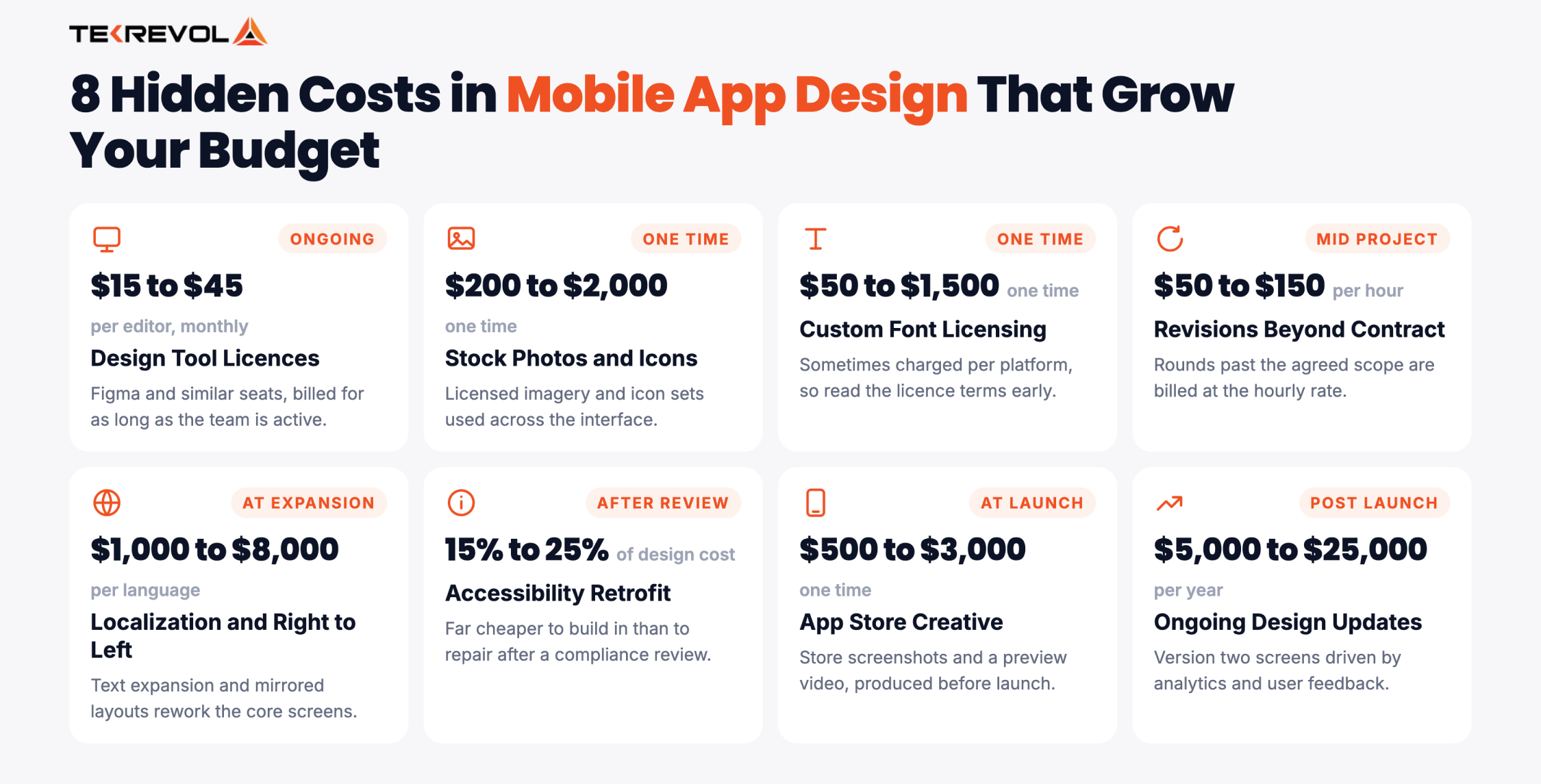
| Hidden cost | 2026 price | When it hits |
| Design tool licenses (Figma and similar) | $15–$45 per editor, monthly | Ongoing |
| Stock photography or icon licenses | $200–$2,000 | One-time |
| Custom font licensing | $50–$1,500 | One-time, sometimes per platform |
| Revision rounds beyond contract | $50–$150/hour | Mid-project |
| Localization and right-to-left layouts | $1,000–$8,000 per language | At expansion |
| Accessibility retrofit | 15%–25% of original design cost | After a compliance review |
| App store creative (screenshots, preview video) | $500–$3,000 | At launch |
| Ongoing design updates | $5,000–$25,000 per year | Post-launch |
Localization and accessibility are two areas teams often overlook. Both are relatively inexpensive to account for during the initial design phase but can become costly to fix later. If you plan to support multiple languages or target enterprise customers, make those requirements clear from the start.
Worried About What Your Quote Leaves Out?
Send us any design proposal you've received, and we'll tell you which costs it excludes before you sign anything.
Discuss Your Strategy Today!How Long Does It Take to Design a Mobile App?
Designing a mobile app typically takes 3 to 18 weeks. The timeline depends on the project’s scope and design depth, as outlined in the timeline breakdown below. While compressing schedules is possible, rushing often increases costs without significantly shortening the calendar.
| App type | Design timeline | Runs alongside development? |
| MVP / simple | 3–6 weeks | Usually finishes first |
| Medium complexity | 6–10 weeks | Overlaps after wireframes are approved |
| Complex | 10–18 weeks | Runs continuously through the build |
Design and development don’t always need to happen one after another. Once the wireframes are approved, developers can start building the core architecture while the designer finishes the visual details. This can save 2 to 4 weeks without increasing the project cost.
What genuinely cannot be compressed is feedback. Usability testing requires real users on real calendars, and adding more designers doesn’t persuade participants to respond faster.
7 Ways to Reduce App Design Cost
Reduce app design costs by negotiating a blended team rate, limiting the number of user roles, and starting with a reusable component library.
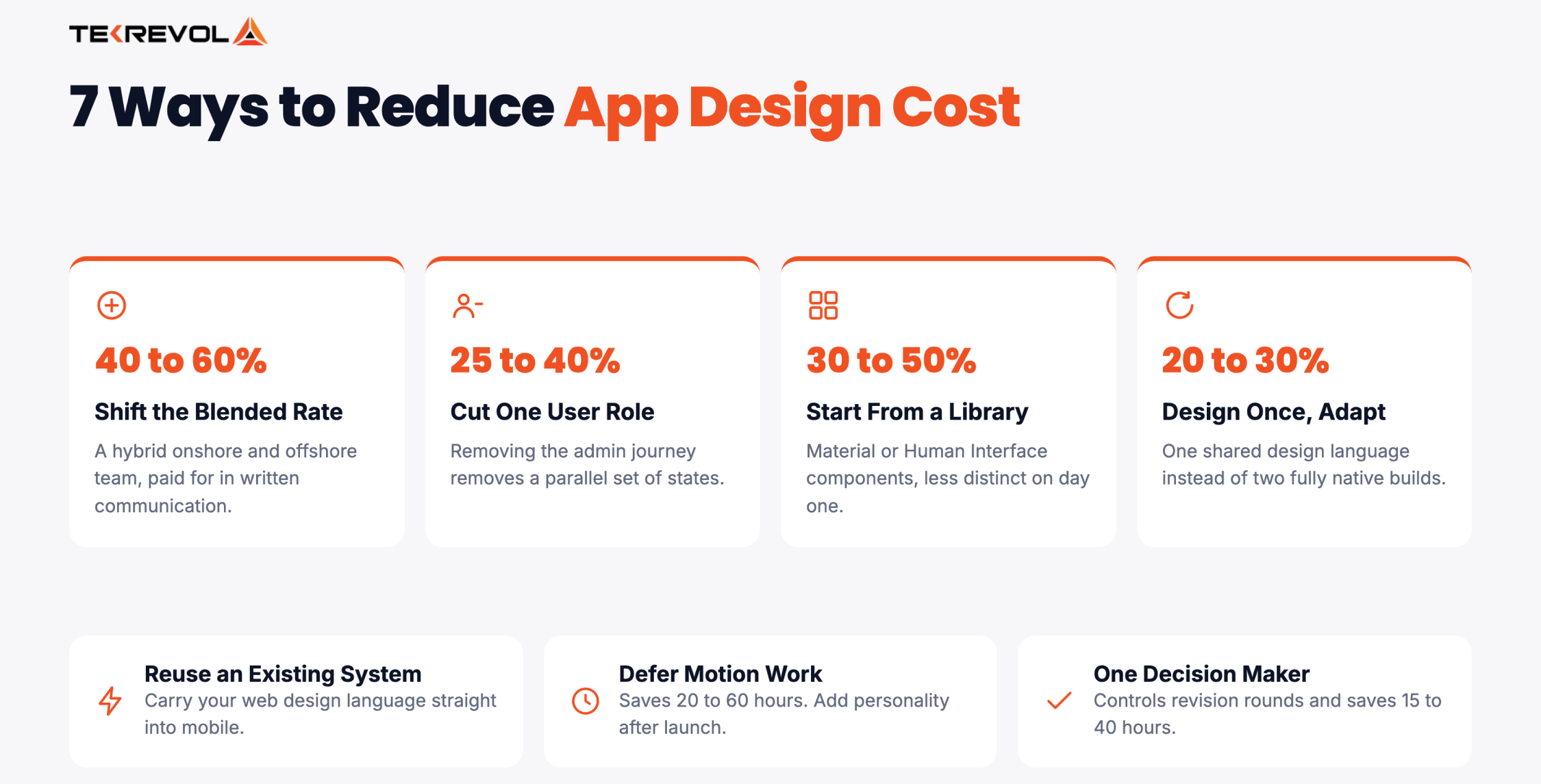
Most advice on this topic tells you to “prioritize your features” and then stops there, which is a sentiment rather than a number. Below is what each lever is genuinely worth, so you can choose the cuts that hurt least rather than the ones that merely sound most sensible.
What actually works:
- Change your team’s blended rate: Moving from an onshore team to a hybrid arrangement can reduce costs by 40% to 60%. The trade-off is that you may need to rely more on written communication and manage less overlapping work time.
- Cut one user role: Removing the admin or provider journey saves 25% to 40% of screen hours because you’re removing a parallel set of states rather than a handful of screens. That audience waits for version two.
- Start from a component library: Material Design or Human Interface components save 30% to 50% of visual design hours. The trade has less visual distinctiveness on day one.
- Reuse an existing design system: Reuse your web design language if you already have one. Our web development projects often carry an existing system straight into mobile.
- Design once and adapt: A shared design language across both platforms saves 20% to 30% of screen hours compared to building fully native for each. Slightly less platform-native feel.
- Defer motion and illustration: Shipping with standard interactions saves 20 to 60 hours. Add personality later, once you know which screens people actually use.
- Appoint a single decision-maker: Controlling revision rounds saves 15 to 40 hours. Someone internally has to own the call.
What Will New Mobile App Design Trends Cost to Build in 2026?
New design trends carry real costs. AI-driven interfaces add $8,000 to $30,000, voice interfaces add $5,000 to $15,000, and AR experiences add $15,000 to $50,000. Accessibility-first design adds 10% to 20% and is the one most likely to be required.
| Trend | Added design cost | Worth it when |
| AI-driven and conversational interfaces | $8,000–$30,000 | The AI is the product, not a feature bolted on |
| Voice interaction | $5,000–$15,000 | Hands-free use is genuinely core, as in automotive or fitness |
| AR or spatial experiences | $15,000–$50,000 | Physical context matters, as in retail try-on or navigation |
| Accessibility-first design | +10% to +20% | Almost always, and mandatory for regulated and enterprise buyers |
| Adaptive and foldable layouts | +20% to +40% | Large-screen users are a meaningful share of your market |
| Dark mode and theming | $1,500–$5,000 | Users spend long sessions in the app, or it’s expected in your category |
Two of these deserve different treatment from the rest.
Accessibility isn’t really a trend: It’s a requirement arriving on a schedule set by regulators and enterprise procurement rather than by design fashion. Designing it costs 10% to 20%. Retrofitting it costs several times that.
AI interfaces are where budgets get lost: A chat box is simple to add, but designing for AI mistakes takes more work. Users need clear ways to handle slow, incorrect, uncertain, or refused responses. If you’re building AI-powered products, budget for the failure states rather than the happy path.
How Do You Choose the Right App Design Partner?
The cheapest way to overspend on design is hiring the wrong partner. Here’s what to check before you sign anything.
Ask to see shipped products, not concepts
Dribbble shots and concept work are marketing material. Ask for products currently live in the app stores, then download two of them. You’ll learn more in ten minutes of actual use than from any case study page.
Ask who is doing the work
The people in the pitch are often not the people on the project. Ask directly which designers will be assigned, how senior they are, and who reviews their work. A team of three juniors and a team of three designers are very different purchases at the same rate.
Ask for a screen-level estimate
Any studio that can’t break its number into screens, hours, and a rate either hasn’t scoped your project or doesn’t want you comparing it. This one question filters more effectively than any other.
Ask what happens at handoff
Find out whether developer handoff, design QA during the build, and post-launch fixes are included in the price or billed separately. This is the single most common place for a cheap quote to become an expensive project.
Ask about the states
Ask how they handle empty, loading, and error states, and whether those are counted in the screen estimate. The answer tells you immediately whether you’re talking to someone who ships products or someone who makes screens.
Confirm who owns the files
You should own your design files, your source assets, and your component library outright. Confirm it in writing. It matters enormously the first time you change partners.
Why it matters: the difference between a good and bad design partner rarely shows up in the quote. It shows up in month three, when you find out what the number actually covers.
Why Choose TekRevol for Mobile App Design?
TekRevol handles mobile app design as part of the complete product build, with design hours clearly estimated and designs handed directly to the development team. We’ve delivered design work across 11+ industries.
Our goal isn’t to offer the lowest design price. We focus on transparent estimates, showing the hours behind each screen and recommending where the scope can be simplified.
How we approach app design:
- We scope in screens, not tiers: You get a screen-by-screen estimate, so you can see exactly what each part of the interface costs and cut with real information.
- We test prototypes before code: Usability problems get found at the cheapest possible moment rather than the most expensive one.
- We design for the build: Our designers and engineers scope together, which means fewer handoff surprises and less rework billed back to you.
- We build a system, not just screens: Above 15 screens, you get a component library, so screen forty costs a fraction of screen four.
You can see how these decisions played out across real products in our project portfolio.
Plan Your App Design With Confidence
Get an expert assessment of your screens, design requirements, timeline, and estimated project cost.
Get Your Estimate


![Detailed Comparison of Telemedicine vs In-Person Care [What Patients Actually Prefer & Why]](https://assets.tekrevol.com/images-tek/uploads/2026/03/imgi_1_Tek-Feature-9-400x182.webp)


