



- Software maintenance ensures applications remain secure, bug-free, and operational long after their launch.
- The four types are corrective, adaptive, perfective, and preventive, and each one gets triggered differently.
- The ISO/IEC/IEEE 14764:2022 standard actually defines five types, adding additive work to the familiar four.
- Budget roughly 15% to 20% of your original build cost every year for ongoing maintenance.
- Technical debt consumes about a third of developer time, per CISQ research on software quality.
- Maintenance is not optional work; it’s the longest and usually most expensive phase of the life cycle.
Launching software is an exciting milestone for any growing business, but pushing code to production is really only the beginning of your product’s journey. Without continuous oversight, operational updates, and regular bug fixes, even the best applications start to slow down, develop security vulnerabilities, and crash under peak user traffic.
Software maintenance is everything you do to a product after it ships: fixing bugs, keeping up with new phones and browsers, improving what users find clunky, and heading off problems early. It runs for years, and it often costs more in total than the build did.
This guide covers all of it, from what we handle daily as a software development company. We’ll define the four types with examples, show what the international standard actually says, and walk through the process. Then break down costs and name the tools teams use and how to plan.
What Is Software Maintenance?
Software maintenance is the process of modifying a product after delivery to correct faults, adapt it to a changed environment, improve performance, or prevent future problems. It’s the final and longest phase of the software development life cycle.
The work includes fixing bugs users report, updating your application when Apple or Google change their platform requirements, patching a library carrying a newly disclosed security flaw, tuning a database query that got slow as data volumes grew, and reorganising code so the next feature doesn’t take three weeks.
Most of this work responds to the world changing around software that hasn’t changed at all. Your code can be perfectly fine on Monday and broken by Friday because a browser retired an interface.
That’s the mental shift worth making. Software doesn’t wear out mechanically the way physical equipment does. It falls behind its environment instead, which is precisely why this work never really finishes.
Paying for Maintenance Without Knowing What You Get?
Book a free review of your current setup, and we'll identify what's missing and where your maintenance coverage can improve.
Consult With Us TodayWhat Are the Four Types of Software Maintenance?
The four types of software maintenance are corrective, adaptive, perfective, and preventive. Corrective fixes defects, adaptive responds to environment changes, perfective improves what already works, and preventive addresses latent faults before users ever hit them.
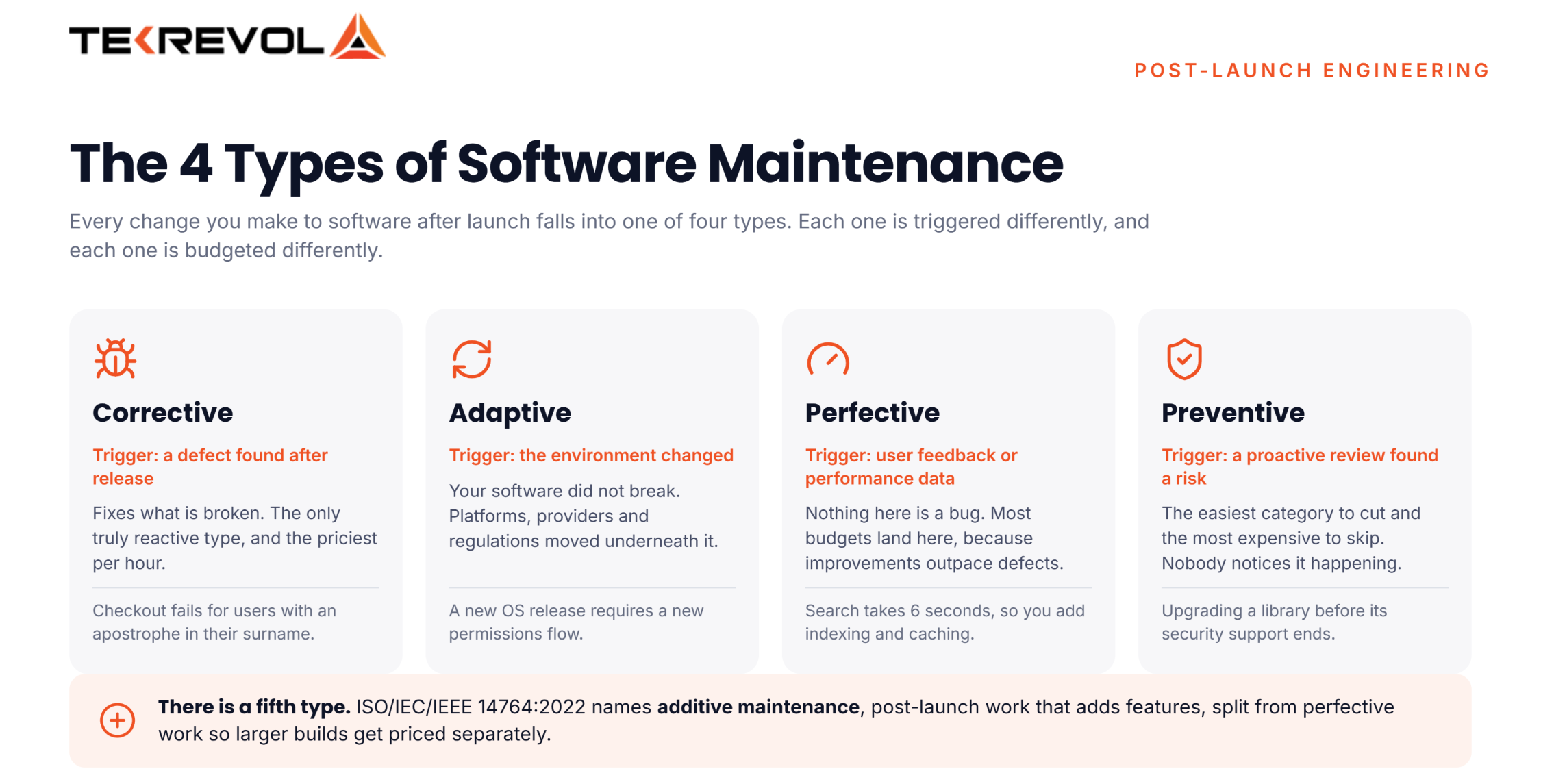
Here’s each one with what actually triggers it.
| Type | What triggers it | Real example |
| Corrective | A defect found after release | Checkout fails for users with apostrophes in their surname |
| Adaptive | The environment changed | iOS 27 requires a new permissions flow, so your app needs updating |
| Perfective | User feedback or performance data | Search takes 6 seconds, so you add indexing and caching |
| Preventive | Proactive review found a risk | Upgrading a library before its security support ends |
Corrective Software Maintenance
Corrective work fixes what’s broken. A user reports that invoices show the wrong tax rate, or an error pops up on your dashboard, and a developer tracks it down and ships a fix.
It’s the type everyone thinks of first, and the only one that’s truly reactive. It’s also the priciest per hour, since it lands with no warning and cuts across whatever was planned.
How much of it you get is a clue in itself. A steady stream of live bugs means your testing is missing things, so the real fix sits upstream, not in the bug queue.
Adaptive Software Maintenance
Adaptive work responds to changes entirely outside your control, which for hosted systems usually falls to a cloud support and maintenance team. Operating systems update, browsers retire interfaces, payment providers revise their integrations, and tax regulations shift. The environment moved underneath it.
This is the category most business owners consistently underestimate. Apple and Google both push significant platform changes annually, and applications that ignore them eventually stop being accepted into the stores.
Regulation drives a considerable amount of it too. A privacy law changes what consent you must capture, and a perfectly functional product suddenly requires new screens.
Perfective Software Maintenance
Perfective work improves software that already works. Users say a task takes too many clicks, data shows people dropping out of a form, or a report that used to load fast now takes ten seconds.
Nothing here is a bug. The software does just what it was built to do. It’s that “what it was built to do” turns out not to be enough.
Most budgets get spent here over time, because feature requests and speed work pile up faster than bugs do.
Preventive Software Maintenance
Preventive work addresses problems before anyone experiences them, and it is where engineering best practices pay off most. Upgrading a framework before its support window closes, reorganising a module that’s becoming difficult to change, adding tests around fragile code, or replacing a library nobody maintains anymore.
It’s the easiest category to cut and the most expensive to skip. Nobody notices preventive work happening. Everybody notices its absence roughly two years later.
The classic pattern: a team defers upgrades for three years, then confronts a migration that would have been routine annually and has now become a project in its own right.
Additive Maintenance: The fifth type
ISO/IEC/IEEE 14764:2022, titled “Software engineering, Software life cycle processes, Maintenance,” sets out five types. Next to the familiar four, it names Additive Maintenance: changes made after launch to add features. It splits this from perfective work on purpose, to handle bigger feature builds.
The same standard also names emergency maintenance, meaning unplanned changes that keep a system running while a proper fix gets built.
Why Is Software Maintenance Important?
Software maintenance is important because software degrades relative to its environment even when nobody touches it. Platforms change, dependencies get vulnerabilities, data grows, and user expectations rise. Unmaintained software becomes insecure, then unusable, then unsupportable.
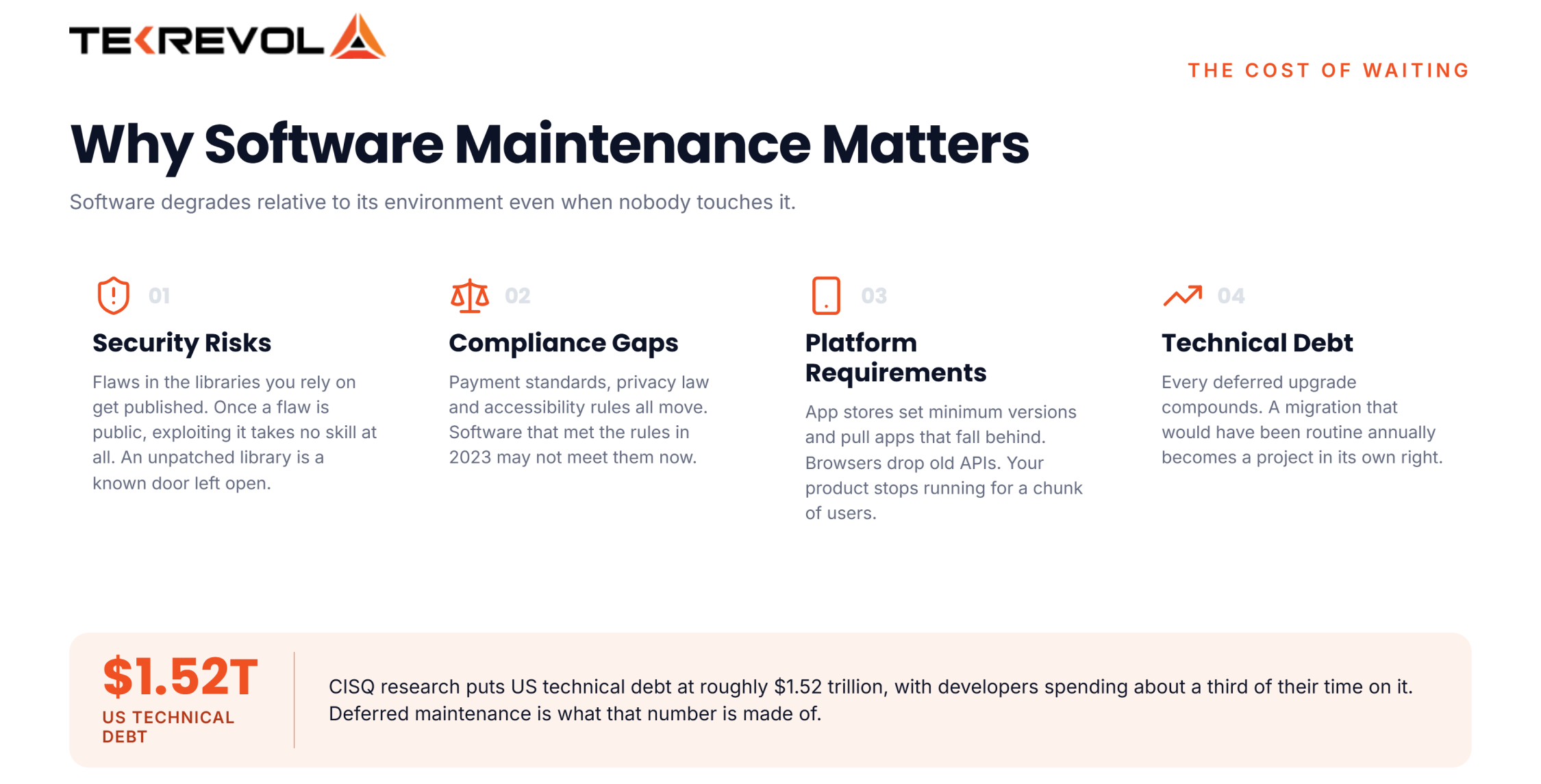
Four consequences of skipping it, roughly in the order they arrive.
- Security Risks: Flaws get made public in the libraries you rely on. Once a flaw is public, using it takes no skill at all. An unpatched library is a known door left open.
- Compliance: Rules change. Payment standards, privacy law, and access rules all move. Software that met the rules in 2023 may not meet them now.
- Platform Requirements: App stores set minimum versions and pull apps that fall too far behind. Browsers drop old APIs. At some point, your product just stops running for a chunk of users.
- Technical Debt: CISQ research puts US technical debt at roughly $1.52 trillion, with developers spending about a third of their time on it. Put-off maintenance is what that number is made of.
The blunt truth is that this phase is where most of your total cost lands. Treat it as an afterthought, and the biggest part of your spend is the part you never planned.
What Does the Software Maintenance Process Involve?
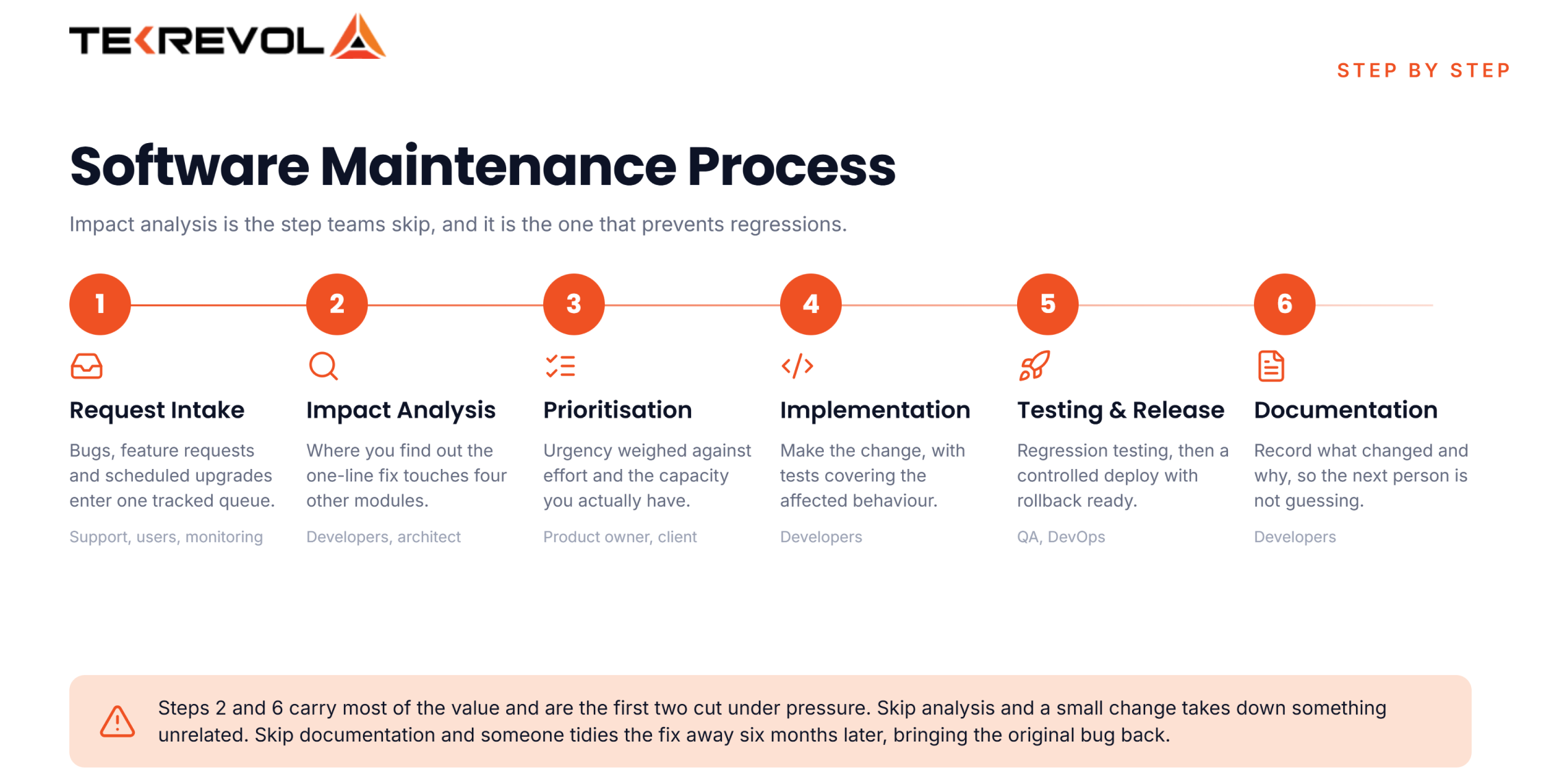
The software maintenance process involves six steps: receiving the request, analysing its impact, designing the change, implementing and testing it, releasing it, then updating documentation, effectively repeating the development life cycle phases in miniature.
| Step | What happens | Who’s involved |
| Request intake | Bug report, feature request, or scheduled upgrade enters a tracked queue | Support, users, monitoring tools |
| Impact analysis | Assess what the change touches, the risk, and the effort | Developers, architect |
| Prioritisation | Weigh urgency against effort and available capacity | Product owner, client |
| Implementation | Make the change, with tests covering the affected behaviour | Developers |
| Testing and release | Regression testing, then a controlled deploy with rollback ready | QA, DevOps |
| Documentation | Record what changed and why, so the next person knows | Developers |
Two steps carry most of the value, and both get cut under pressure.
- Impact analysis is where you find out the one-line fix touches four other modules. Skip it, and a small change takes down something unrelated.
- Documentation is where the thinking lives. Six months on, nobody recalls why the fix took that shape, and with no record, someone will “tidy it up” and bring the original bug back.
What Does Software Maintenance Cost?
Software maintenance costs roughly 15% to 20% of your original software development cost every year, though the range is wide. Simple apps sit lower, and complex or regulated systems run higher. The first year after launch is usually the most expensive.
Here’s how that translates in practice.
| Original build cost | Annual maintenance at 15% to 20% | Rough monthly |
| $50,000 | $7,500 to $10,000 | $625 to $835 |
| $120,000 | $18,000 to $24,000 | $1,500 to $2,000 |
| $350,000 | $52,500 to $70,000 | $4,375 to $5,835 |
What actually drives the number
- Complexity and integrations: Every outside connection is one more thing that can change with no warning.
- Regulatory load: Health and finance builds carry audit work that a marketing site never will.
- User volume: More users means more edge cases, more support tickets, and more servers.
- Code quality at handover: Well-tested, documented code is far cheaper to look after than the other kind.
- Platform count: iOS, Android, and web each need their own updates on their own timing.
The costs people forget
Hosting and servers. Outside licences and API fees. Monitoring and error tools. App store accounts. Certificates and domains. And the hours your own team spends sorting and testing, which is real money even though no invoice ever shows it.
What Software Maintenance Tools Do Teams Use?
Software maintenance tools cover four jobs: monitoring what’s breaking, tracking what needs fixing, scanning for vulnerabilities, and measuring code quality and most of them already sit inside your wider software development tool stack. Most teams run one tool per job rather than a single platform.
Here are essential software maintenance tools categorized by their function in the maintenance lifecycle:
- Issue Tracking & Management: Jira, Asana, Linear (Used to log change requests and track bug resolution).
- Version Control & Collaboration: GitHub, GitLab, Bitbucket (Manage code branches and pull request reviews).
- Static Code Analysis & QA: SonarQube, ESLint, Coverity (Detects code smells, security vulnerabilities, and technical debt).
- Error & Performance Monitoring: Sentry, Datadog, New Relic (Captures real-time runtime crashes and server bottlenecks).
- CI/CD Automation Pipelines: Jenkins, GitHub Actions, CircleCI (Automates build testing and production deployments).
How Do You Build a Software Maintenance Plan?
Build a software maintenance plan by defining what’s covered, agreeing response times by severity, setting a recurring budget, naming an owner from your software team’s role structure, and scheduling preventive work. Put it in writing before launch, not after the first outage.
Six things every plan needs:
- Scope: Exactly which types are covered. Corrective and adaptive work usually is. Perfective and additive work often sits outside a standard retainer, and that’s where arguments start.
- Severity levels and response times: A payment outage and a wonky button are not the same urgency. Set the tiers and the response you expect for each.
- A recurring budget: Set it as a share of build cost, reviewed each year, rather than signing off every fix one at a time.
- A named owner: One person answerable for the software’s health, not a shared inbox.
- Booked preventive slots: Put upgrades and clean-up in the calendar as repeat work. Preventive work that isn’t booked never happens.
- A monitoring baseline: Error tracking and uptime alerts, so problems reach you before they reach your users.
If your software runs on cloud servers, patching and scaling belong in the plan too. Our cloud services team handles that layer alongside the app itself.
Why Choose TekRevol for Software Development & Maintenance?
As a custom software development company, TekRevol follows all the practices we’ve discussed on every project we deliver, and maintenance is written into the engagement rather than sold back to you afterwards.
Here’s what our maintenance and support work actually covers.
| Maintenance | What we handle |
| Corrective | Monitoring, triage, and fixes, with severity tiers agreed upfront |
| Adaptive | OS, browser, and platform updates before store compliance becomes a problem |
| Perfective | Performance tuning and UI/UX improvements driven by real usage data |
| Preventive | Dependency upgrades, security audits, and refactoring on a schedule |
| Compliance | Regulatory updates for healthcare, fintech, and other regulated builds |
Two things worth knowing before you talk to anyone about this.
We scope it before launch, not after. Which types are covered, what response times apply, and what sits outside the retainer. Getting that in writing early is what stops the awkward chat in month three.
We publish our rates. A typical app starts around $250 to $500 a month, using 20% of build cost as the yearly planning baseline. You’ll know roughly where you stand before the first call.
Ready to Optimize Your Software Maintenance Strategy?
Don't wait for system failures or security vulnerabilities to disrupt your operations. Build a proactive maintenance strategy that keeps your software secure and reliable.
Let's Connect!


