



- A webhook is an event-driven HTTP callback; it sends real-time data from one app to another the moment something happens.
- Webhooks work via HTTP POST requests. When a trigger event fires, the source app pushes a JSON payload to a pre-configured URL on your server.
- Webhooks are not APIs; APIs are request-based (you ask, they answer). Webhooks are push-based (they tell you automatically).
- Top webhook use cases include payment processing (Stripe), order updates (Shopify), DevOps alerts (GitHub), and CRM automation (Salesforce).
- Security is non-negotiable; always validate webhook signatures, enforce HTTPS, and implement retry logic to protect your endpoints.
- Businesses using webhooks cut integration overhead, as real-time event-driven architecture reduces server load.
A webhook is a real-time, event-driven HTTP POST request, the moment something happens in App A, it instantly fires data to App B. A payment clears, a form gets submitted, a repo receives a push, no waiting, no polling, just one app notifying another the second something changes.
Think of it like your bank’s push notification. You don’t call the bank every five minutes to check if your paycheck landed. You get an alert the second it hits. Webhooks work exactly the same way for software, which is why developers often call them “Reverse APIs”, instead of your app sitting on the receiving end of requests, it’s the one doing the notifying.
No repeated API calls. No wasted server resources. Just event-driven communication that reacts in real time. If you’re building connected software in 2025, webhooks aren’t a nice-to-have, they’re the backbone of how modern applications talk to each other.
Webhook Meaning — Breaking It Down
The word webhook = web (it travels over HTTP) + hook (it “hooks” into an event and triggers an action).
| Term | What It Means |
| Event | Something that happens (payment made, user signed up) |
| Trigger | The condition that fires the webhook |
| Endpoint | The URL on your server that receives the data |
| Payload | The JSON data sent in the HTTP POST request |
| Response | Your server’s 200 OK confirms receipt |
A webhook is an HTTP-based callback function that allows lightweight, event-driven communication between two application programming interfaces (APIs). That’s the textbook answer.
How Does a Webhook Work? (Step-by-Step)
A webhook works by sending an HTTP POST request to a specified URL the moment a defined event occurs in the source system.
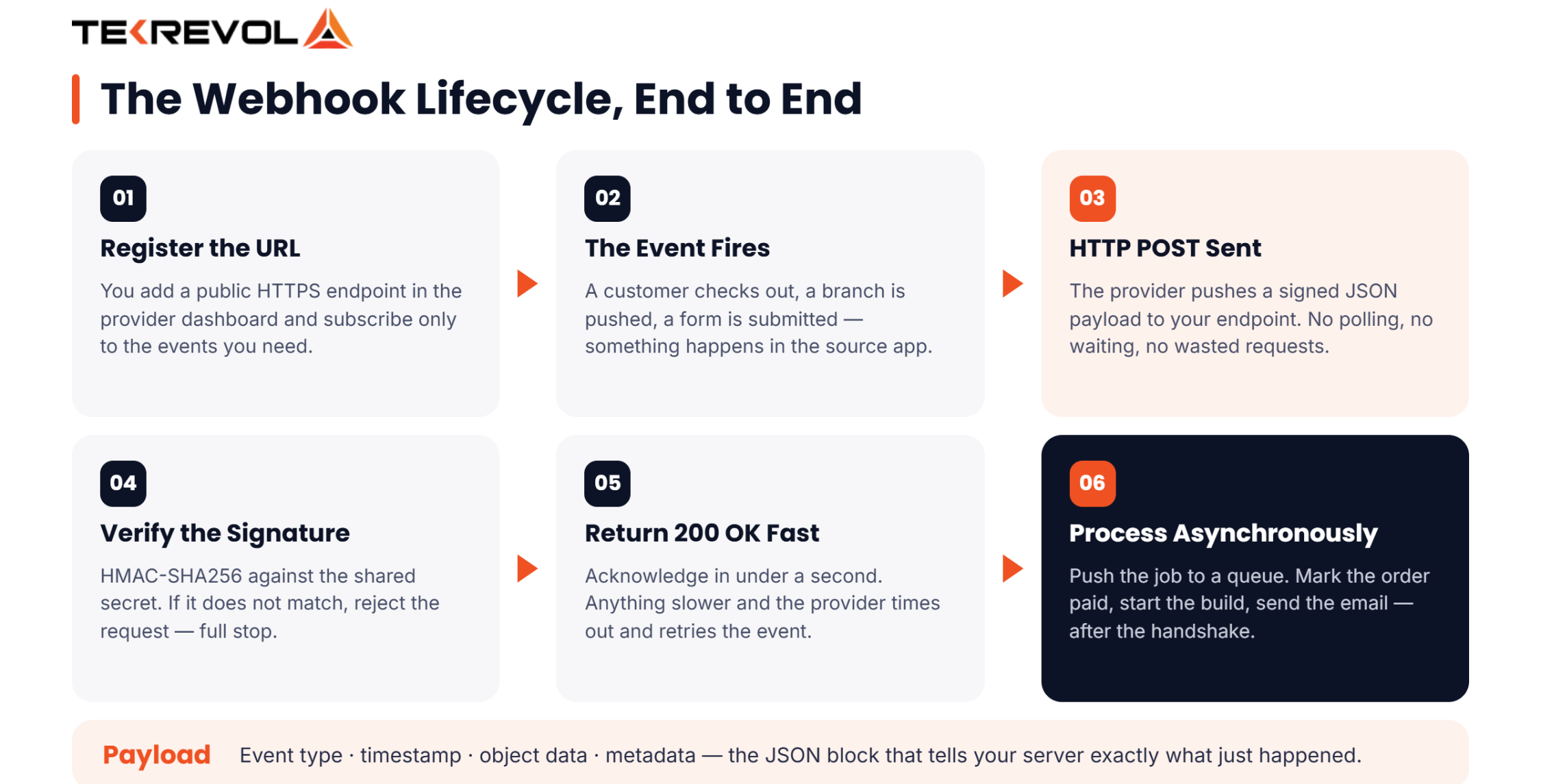
Here’s the exact flow:
The Webhook Lifecycle
[Event Occurs] → [Source App Triggers Webhook] → [HTTP POST Sent to Endpoint URL] → [Your Server Receives Payload] → [Your App Processes Data] → [200 OK Response Sent Back]
Step-by-step:
- You register a webhook URL with the provider (e.g., Stripe dashboard → add endpoint URL)
- A trigger event fires (customer completes checkout)
- The provider sends an HTTP POST request to your URL with event data
- Your server receives the payload (usually JSON)
- Your app processes the data (marks order as paid, sends a confirmation email)
- Your server returns a 200 OK to confirm receipt
To implement a webhook, you add an API to your app. The API includes a webhook property that points to a URL for a different web app. When a user does something that triggers an event, the API sends data from that event to the webhook URL, and the app returns the result of the webhook.
What Data Does a Webhook Send?
Webhooks send a JSON payload — a structured block of data about what just happened. The payload typically includes:
- Event type (e.g., payment.succeeded)
- Timestamp of the event
- Object data (order details, customer info, transaction ID)
- Metadata (account ID, environment: test/live)
Webhook Payload Example (JSON)
Here’s what a real Stripe payment webhook looks like:
Your server reads this, finds the matching order in your database, and marks it paid. All in under a second.
Your App Deserves Better Than Duct-Tape Integrations
We build webhook-powered systems that scale cleanly, perform reliably, and stay production-ready as your app grows.
Get a Free API ConsultationWebhooks vs. APIs: What’s the Difference?
The core difference: APIs are pull-based; webhooks are push-based. You ask an API for data. A webhook sends you data without being asked.
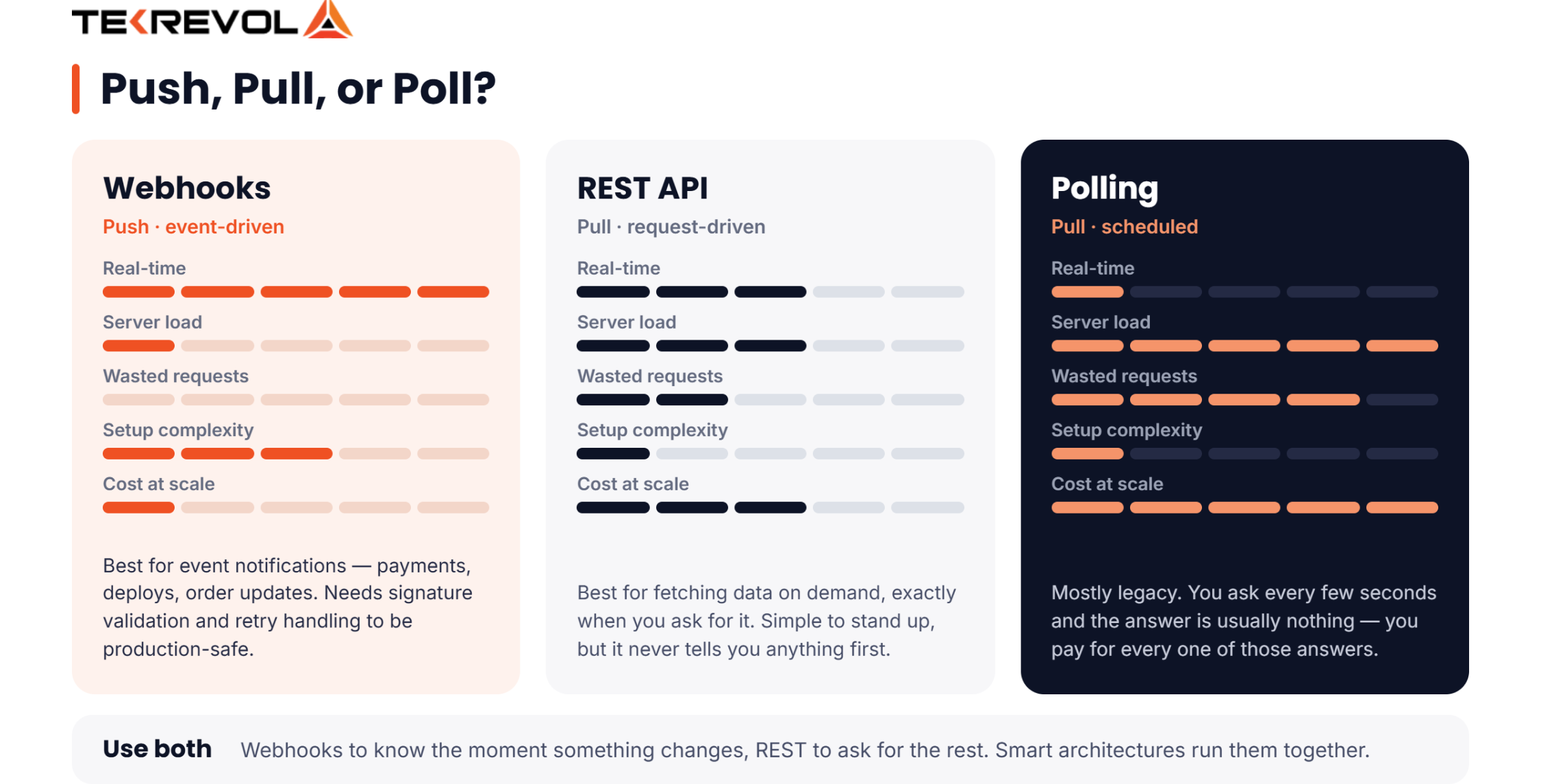
This distinction matters enormously for performance and architecture.
Polling vs Webhooks: Why Polling Is Dead
Polling = your app pings an API every X seconds, asking “anything new?” Most of the time, the answer is no. You’ve wasted compute, bandwidth, and time.
Webhooks = your app sits quietly until the source fires a POST. Zero wasted requests.
| Feature | Webhooks | REST API | Polling |
| Communication Type | Push (event-driven) | Pull (request-driven) | Pull (scheduled) |
| Real-Time? | Yes | Near-real-time | Delayed |
| Server Load | Low | Medium | High |
| Setup Complexity | Medium | Low | Low |
| Best For | Event notifications | On-demand data fetch | Legacy systems |
| Wasted Requests | None | Some | Many |
Bottom line: if you need real-time data flow between systems, webhooks win. If you need to query data on demand, REST APIs are your friend. Smart architectures use both.
What Are Webhooks Used For? (Real-World Use Cases)
Webhooks are used for real-time event notifications between apps, including payment confirmations, order updates, CI/CD alerts, CRM triggers, and third-party SaaS integrations.
E-Commerce & Payment Notifications
When a customer pays, your system needs to know now. Stripe, PayPal, and Square all use webhooks to fire payment.completed events the moment a transaction clears. Your backend catches it, updates inventory, triggers fulfillment, and sends a confirmation email. This is why modern on-demand app development depends heavily on webhook architecture.
CRM & Sales Automation
When a lead fills out a form, a webhook can instantly push that contact into your CRM, assign it to a sales rep, trigger an onboarding email sequence, and log the event without a human touching anything. Salesforce, HubSpot, and Pipedrive all support this via webhooks. Pair this with a solid CRM development solution, and you’ve got a fully automated sales pipeline.
DevOps & CI/CD Pipelines
GitHub, GitLab, and Bitbucket fire webhooks on every push, pull request, and merge. Your CI/CD tool (Jenkins, CircleCI, GitHub Actions) catches those webhooks and kicks off builds, tests, and deployments automatically.
Communication Apps (Slack, SMS)
Slack webhooks let you post messages to channels automatically, error alerts, deploy notifications, and daily reports. Twilio webhooks fire when an SMS or call comes in, allowing the app to respond in real-time.
SaaS & Third-Party Integrations
This is where software integration solutions shine. Tools like Zapier and Make are built almost entirely on webhooks. One event in Tool A cascades into actions across 5 other tools — no code required.
Webhook Examples From Apps You Already Use
Major platforms like Stripe, GitHub, Shopify, Twilio, and Slack all use webhooks to deliver real-time event data to your application.
Stripe Webhooks
Stripe fires webhooks for everything: payments, refunds, subscription renewals, failed charges. You configure an endpoint in the Stripe dashboard, and it sends signed JSON payloads to your URL. The stripe-signature header lets you verify every event is legitimate.
Key events: payment_intent.succeeded, invoice.payment_failed, customer.subscription.deleted
GitHub Webhooks
GitHub webhooks power the entire DevOps ecosystem. Push to main → webhook fires → CI/CD pipeline starts → app deploys. You can configure webhooks per repository or organization and filter by event type.
Key events: push, pull_request, release, issues
Shopify Webhooks
Shopify merchants use webhooks to sync orders with fulfillment centers, update inventory across platforms, and trigger post-purchase automations.
Key events: orders/create, products/update, customers/create
Twilio Webhooks
Twilio uses webhooks to let your app know when events happen, such as receiving an SMS message or getting an incoming phone call. When the event occurs, Twilio makes an HTTP request to the URL you configured, including event details such as the incoming phone number or the body of an incoming message.
Slack Webhooks
Slack’s Incoming Webhooks let you post messages to any channel programmatically. Your monitoring tool detects a server spike → fires a webhook → Slack posts an alert in #ops. Your team knows in seconds.
How to Set Up a Webhook (Beginner-Friendly Walkthrough)
To set up a webhook, create a public HTTPS endpoint on your server, register it with the provider, write logic to handle the incoming payload, and return a 200 OK response.
Step 1 — Create a Webhook Endpoint (URL)
Your endpoint is just a URL that can receive HTTP POST requests. Example in Node.js/Express:
This URL must be publicly accessible (not localhost). Use a tool like ngrok for local testing.
Step 2 — Register the Webhook with the Provider
Go to your provider’s dashboard (Stripe, GitHub, Shopify) and add your URL. Select which events you want to subscribe to. Don’t subscribe to everything, only to what your app needs.
Step 3 — Handle the Incoming Payload
Parse the JSON body. Extract the event type. Route it to the right handler function. Example:
Step 4 — Respond with a 200 OK
Always respond immediately with a 200 OK. Don’t run heavy processing before responding — you’ll time out. Acknowledge receipt first, then process asynchronously.
Need help architecting this at scale? Our custom API development services handle this from spec to production.
Webhook Security — How to Keep Your Endpoints Safe
Secure webhooks by validating the provider’s signature, enforcing HTTPS, implementing idempotency, and whitelisting known IP addresses.
Anyone can hit your endpoint with a POST request. You need to verify that the data is coming from your trusted provider, not a bad actor.
Validate the Signature
Every major provider (Stripe, GitHub, Shopify) signs their webhook payloads with a secret key. Validate this on your server:
If the signature doesn’t match, reject the request. Full stop.
Use HTTPS Only
Never expose a webhook endpoint over plain HTTP. Your data is in transit — encrypt it. Use TLS 1.2+.
Implement Retry Logic
Providers retry failed webhooks if you don’t return a 200 OK. Your system needs to handle duplicate events gracefully using idempotency keys; check if you’ve already processed an event before acting on it.
Whitelist IP Addresses
Some providers publish their IP ranges. Whitelist them at the firewall level. Anyone outside those IPs gets blocked before they reach your code.
Security Best Practices Table
| Security Measure | Why It Matters | Implementation |
| Signature Validation | Prevents spoofed requests | Use HMAC-SHA256 verification |
| HTTPS Enforcement | Encrypts data in transit | TLS 1.2+ certificate |
| Idempotency Keys | Prevents double-processing | Store event IDs, check before processing |
| IP Whitelisting | Blocks unauthorized senders | Firewall rules |
| Payload Expiry Check | Prevents replay attacks | Check created timestamp (reject if >5 min old) |
| Rate Limiting | Prevents DDoS via webhook flood | Implement per-source rate limits |
Common Webhook Challenges (and How to Fix Them)
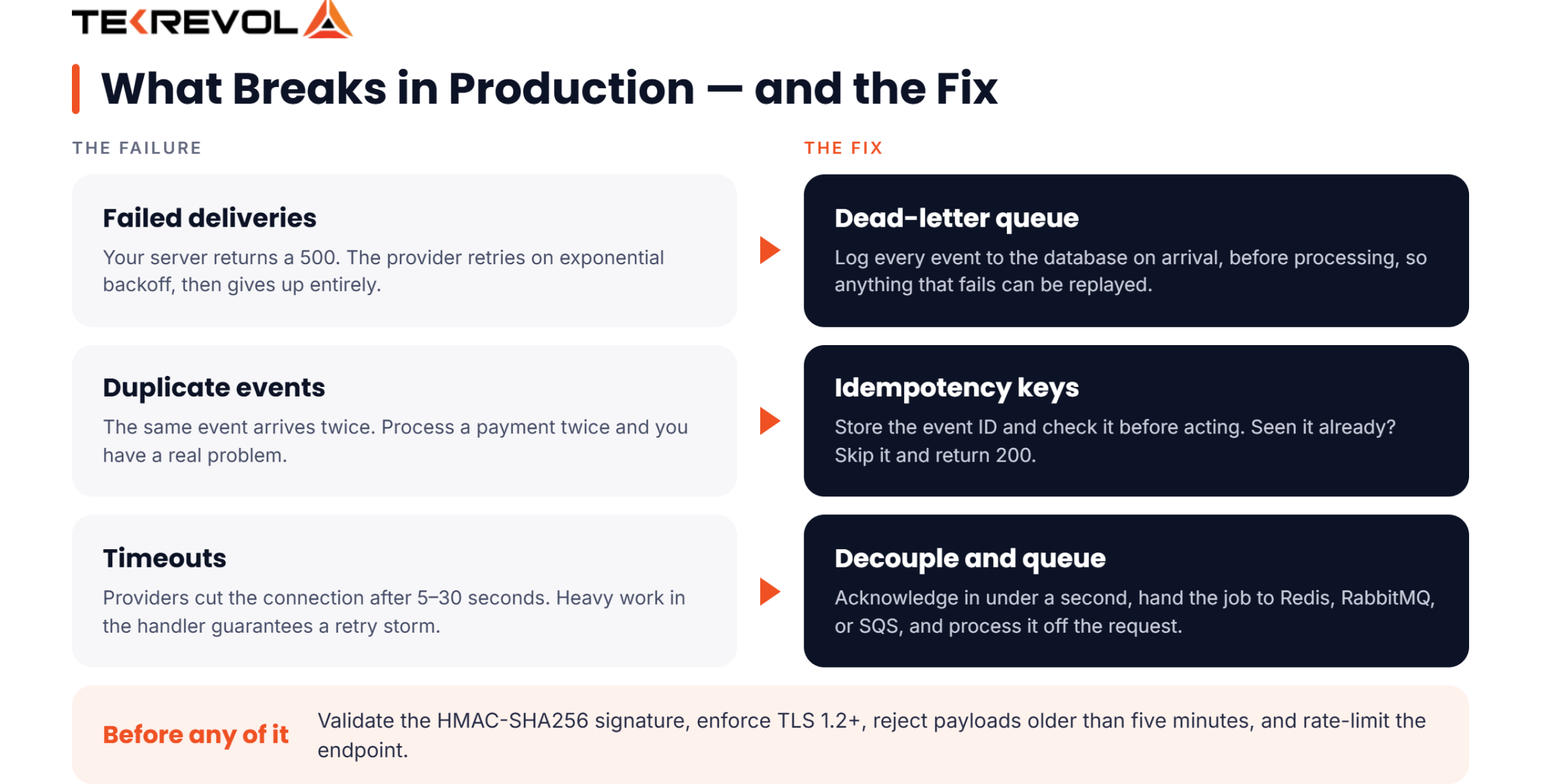
The most common webhook problems are failed deliveries, duplicate events, and timeout errors, all of which can be solved with proper architecture.
Failed Deliveries & Retries
Your server goes down. The provider tries to deliver a webhook and gets a 500. What happens? Most providers retry but with exponential backoff (1 min, 5 min, 30 min). Eventually, they stop.
Fix: Set up a dead-letter queue. Log every incoming webhook immediately to a database before processing. If something fails mid-processing, you can replay it.
Duplicate Events
Even with retries, you can receive the same event twice. If you process a payment twice, you’ve got a big problem.
Fix: Store the event ID. Before processing, check: “Have I seen evt_1abc123 before?” If yes, skip it.
Latency and Timeout Errors
Providers typically timeout after 5–30 seconds. If your handler takes 45 seconds to run a database migration and send emails, you’ll get a timeout and a retry.
Fix: Decouple receipt from processing. Acknowledge the webhook in under 1 second, push the job to a queue (Redis, RabbitMQ, SQS), and process asynchronously.
Building this kind of resilient architecture is what our enterprise application development team does every day.
Why Choose TekRevol for Webhook & API Integration?
TekRevol builds production-grade webhook and API integration systems for startups, mid-market companies, and enterprise clients from architecture design to full deployment.
We’ve shipped cloud integration services across fintech, e-commerce, healthcare, and SaaS. Here’s what sets us apart:
Our Expertise in Custom API Development
We design event-driven architectures that are secure, scalable, and maintainable. Every custom API development project starts with a deep dive into your data flows, failure modes, and growth projections.
What we handle:
- Webhook endpoint design & hardening
- Multi-provider event orchestration
- Retry logic, dead-letter queues, and idempotency
- Real-time monitoring & alerting
End-to-End Software Integration Solutions
We specialize in connecting complex systems: ERP, CRM, payment gateways, logistics platforms, and communication tools. Our software integration solutions have helped clients automate thousands of manual workflows.
Enterprise-Grade Cloud Integration
From AWS Lambda functions to Azure Event Grid, we architect cloud integration that handles millions of webhook events per day without breaking a sweat. Serverless, containerized, or hybrid, we build for your infrastructure.
Conclusion
Webhooks are the connective tissue of the modern web. They’re how Stripe knows to mark your order as paid, how GitHub deploys your code, and how Slack knows to ping your team.
Understanding what a webhook is and how to implement one securely is no longer a “nice to have.” It’s table stakes for any team building connected software in 2025.
If you’re ready to build event-driven integrations that actually hold up in production, TekRevol is your team. We’ve done it across every major platform, at every scale. Let’s build something that works.
Your Integration Backlog Won't Fix Itself.
Let TekRevol turn your webhook headaches into a clean, automated system in weeks.
Book Your Free Strategy Session


