



- Building a community chat app like Discord requires real-time WebSockets, voice infrastructure, and role-based permissions from day one.
- A basic MVP with channels, roles, and moderation typically costs between $30,000 and $50,000.
- Voice and video are the most expensive pieces, often adding $20,000 to $40,000 in development costs alone.
- Use a managed chat infrastructure for your MVP. Go custom once growth justifies the complexity.
- Validate text engagement first before investing heavily in expensive voice and video infrastructure.
At some point, every growing community hits the same wall: the group chat is too noisy, the team workspace is too expensive, and every off-the-shelf platform is too generic to actually own.
That’s the moment the question becomes unavoidable: what would it actually take to build our own?
The same features that define the best community platforms today, real-time messaging, voice channels, roles, and permissions, are now buildable by a reliable mobile app development company.
Building a community chat app in 2026 means making the right architecture decisions before writing a single line of code, because teams that get this wrong aren’t just delayed, they’re rebuilding from scratch six months later.
This guide walks you through everything: the architecture, the features worth building, the tools that save you the most time, and the realistic cost of launch. A clear path from idea to platform.
What Is a Community Chat App & Why Discord’s Model Won
A community chat app is a persistent, server-based platform where groups communicate through organized channels, not temporary group chats. That distinction sounds small. It isn’t.
From Group Chats to Community Platforms
Building a messaging app sounds straightforward until you hit the real decision: are you building for conversations, or for communities? The answer changes everything.
WhatsApp and Messenger are built around conversations. Discord is built around communities. That’s a fundamentally different product.
In a group chat, messages disappear into a scroll, no structure, no history, no sense of place. A community platform flips that. Servers contain channels, each with a purpose: #general, #announcements, #help. New members join and immediately know where they are.
Discord figured this out early, starting with gamers, then expanding to creators, educators, brands, and enterprises. The server-channel model works for almost every kind of human community.
Who’s Building Discord-Like Apps Right Now?
The builders in this space aren’t who you’d expect. It’s not just gaming startups.
- Gaming studios are building in-house community hubs for their player bases
- EdTech platforms creating virtual classrooms that actually feel alive
- SaaS companies building customer communities to reduce churn
- Creator economy platforms running exclusive fan spaces behind a paywall
- Enterprises are replacing Slack for large-scale internal communication at a lower cost
The use case shapes everything: the features you build, the architecture you choose, the costs you’ll carry. Know your vertical before you write a line of code.
Why Build a Custom Community Chat Platform?
Every community has unique needs that generic tools cannot fully address. Building a custom chat app eliminates that gap, delivering an experience built specifically for your users, your workflows, and your long-term goals.
- Gaming communities need deep game integrations, match stats, in-game event triggers, and live player profiles. A custom platform built for a specific player base can deliver all of that natively.
- DAO governance platforms need voting mechanisms, wallet authentication, and on-chain action triggers built directly into the community layer. Building these natively is far more reliable than patching them together with bots.
- Brand fan platforms need custom branding, content gating, tiered membership, and commerce integrations. Running your fan community on a third-party tool means no first-party data, no control, and no differentiation.
- Enterprise teams need compliance controls, data sovereignty, SSO, and audit trails requirements that consumer platforms were never designed to meet.
The gap between what generic tools offer and what specific communities actually need keeps growing. That gap is exactly where custom platforms win.
Your Community Deserves More Than a Generic Tool.
Let's design a platform built specifically for your users, your workflows, and your growth goals.
Get a Free Consultation — Worth $300The Growing Market Behind Community Chat Apps
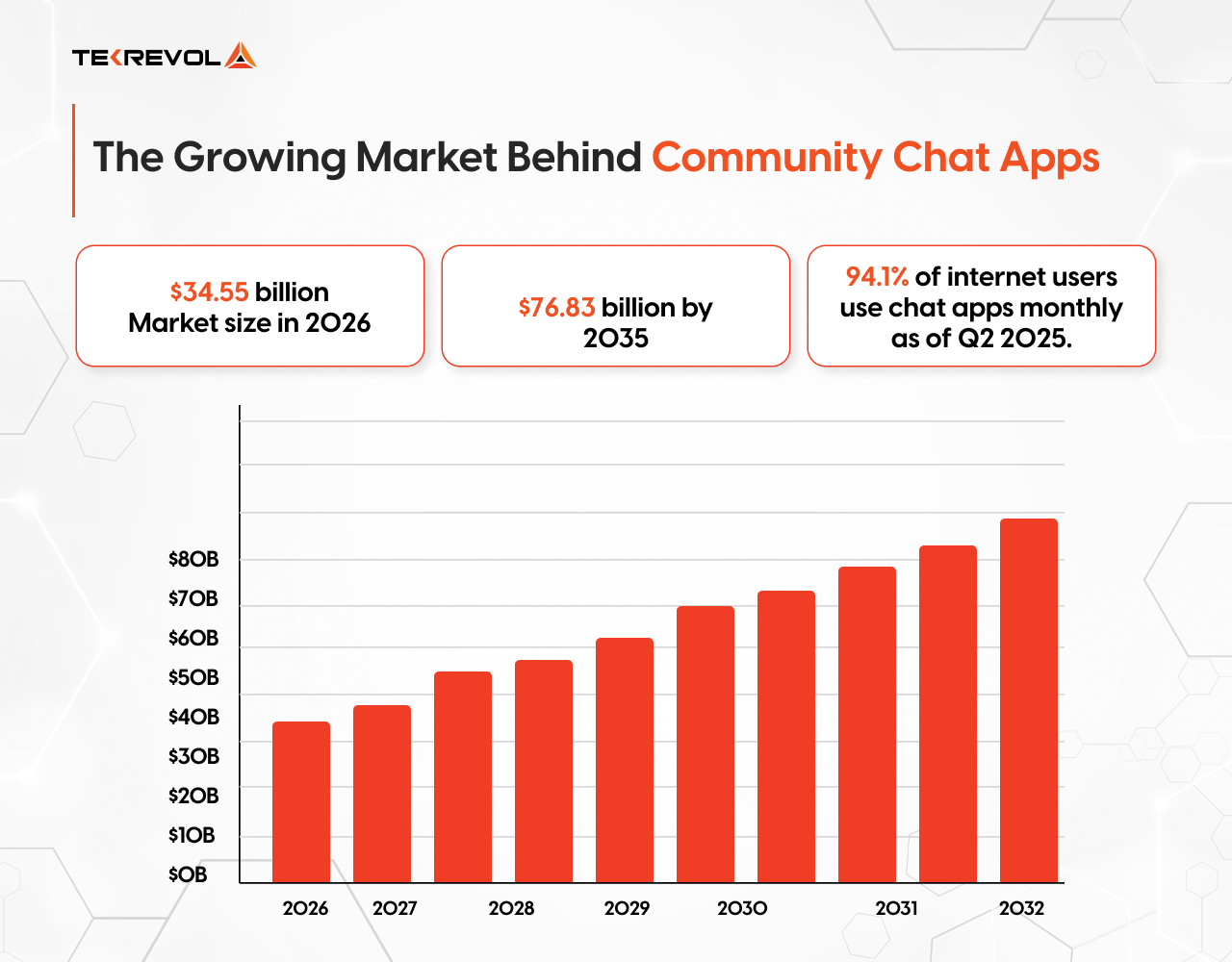
Community chat is one of the fastest-growing segments in the software industry.
- The Instant Messaging App Market stood at $34.55 billion in 2026 and is projected to reach $76.83 billion by 2035, growing at a CAGR of 9.3%.
- 94.1% of internet users worldwide accessed chat apps monthly as of Q2 2025.
- 5.1 billion people, nearly 63% of the global population, used instant messaging platforms by mid-2024.
Core Features to Build a Community Chat App
Every community chat app needs the same structural foundation; get these right, and everything else builds cleanly on top.
| Feature | What it Covers | Why It Matters |
| Servers & Channels | Server creation, text, announcement, voice, and stage channels, read/unread state tracking | The structural backbone that separates a community platform from a basic group chat |
| Direct Messaging | One-on-one and group DMs, read receipts, typing indicators, file sharing, persistent history | Users need to reach each other outside shared channels; presence state matters most here |
| Role-Based Permissions | Owner, Admin, Mod, Member roles, channel-level overrides, permission inheritance | Without a solid permission system, moderators can’t do their job, and communities fall apart. |
| Push & In-App Notifications | APNs for iOS, FCM for Android, per-server and per-channel preferences, @mention alerts | Done right, users come back. Done wrong, they turn notifications off entirely — or uninstall |
| Message Search & History | Full-text search via Elasticsearch or Typesense, CDN media delivery, data retention policies | Users need to find decisions, files, and conversations from weeks or months ago |
| Voice Channels | WebRTC-powered audio streaming, join/leave freely, latency under 150ms | Communities that talk in real time stay active longer than text-only platforms |
| Video Calls & Screen Sharing | One-on-one and group video, screen sharing, HD quality via SFU architecture | Essential for creators, remote teams, and enterprise users |
| Moderation & Safety Tools | AutoMod, keyword filters, mute/kick/ban controls, content reporting, audit logs | One toxic incident handled badly can empty a server overnight |
| AI Moderation & Chatbots | LLM-based content classification, onboarding bots, FAQ automation, sentiment analysis | Scales your safety and engagement layer beyond what any human team can handle |
| File Sharing & Media | File uploads with type validation, virus scanning, CDN delivery, and size limits | Storage and bandwidth costs grow fast — efficient media handling is non-negotiable |
| Bot & Integration Support | Public API, OAuth scopes, webhook support, sandboxed bot execution | Communities that automate and integrate tools stay active significantly longer |
| Member Profiles & Presence | Avatars, bios, status indicators, multi-device session handling | Presence state makes the platform feel alive — the difference between a tool and a community |
If your community platform also needs one-on-one messaging as a primary feature rather than a secondary one, our guide on how to develop a messaging app like WhatsApp covers the DM-first architecture in detail.
Technology Stack Breakdown: Every Layer of a Community Chat App
Building a community chat app isn’t just a feature problem; it’s an engineering problem. Every layer introduces complexity, and complexity drives cost.
| Stack Layer | Tools | Why It Drives Cost |
| Frontend | React, React Native, TypeScript, Electron | Supporting multiple platforms multiplies engineering effort |
| Backend | Node.js, Express, GraphQL, REST APIs | Modular architecture increases complexity but improves scalability |
| Real-Time | WebSockets, Socket.io, Redis Pub/Sub | Scaling persistent connections while maintaining message order is hard |
| Voice | WebRTC, LiveKit, mediasoup, Agora | Media servers consume far more resources than standard backend services |
| Video & Screen Share | WebRTC, mediasoup, 100ms, Stream Video | Bandwidth demands scale exponentially with each participant added |
| Database | PostgreSQL, Redis, Cassandra, ScyllaDB | High write volumes and search indexing grow into high costs at scale |
| File Storage & CDN | AWS S3, Cloudflare R2, CloudFront | CDN and media processing introduce recurring operational costs |
| Security | OAuth 2.0, JWT, SSL/TLS, rate limiting | Must be built into every layer — not added on top |
What Discord’s Architecture Actually Teaches Us
Before making architecture decisions, it’s worth understanding how the platform you’re modeling actually works under the hood, and what lessons actually apply to your build.
Elixir for concurrency: Discord’s signaling servers run on Elixir, built on the Erlang VM. When managing millions of simultaneous voice connections, Elixir’s lightweight process model handles the load without breaking. Most Node.js stacks would buckle at that scale.
Rust for performance-critical services: Where latency is measured in milliseconds, Discord uses Rust for memory safety without garbage collection. Random GC pauses are not an option when real-time performance is the product.
Database decisions follow bottlenecks, not assumptions: Discord moved from MongoDB to Cassandra in 2017 as message volume scaled, then fully migrated to ScyllaDB in 2022, reducing their largest cluster from 177 nodes to 72 and cutting tail latency significantly. The lesson isn’t the specific database; it’s that Discord changed its data layer multiple times as real bottlenecks emerged, not in anticipation of them.
The real takeaway: Choose tools optimized for your actual bottlenecks, not the ones you’re most familiar with. For most early-stage teams, PostgreSQL + Redis + a managed WebSocket layer gets you further than a premature Elixir rewrite.
Scalability Considerations: How to Handle Sudden Traffic Surges
Community apps can spike in traffic without warning. A viral moment, a product launch, a live event, concurrent users can multiply overnight.
Horizontal scaling for WebSocket servers
WebSocket connections are stateful — each user holds a persistent connection to a specific server instance. Redis pub/sub coordinates events across instances so messages route correctly regardless of which node the user is on. Design for this from day one; retrofitting it means rewriting your messaging layer under a live product.
Message queues for traffic spikes
When 10,000 users send messages simultaneously, your app layer can’t process all of them instantly. Redis pub/sub handles moderate scale. Kafka handles serious scale. Start with Redis. Know when to upgrade.
CDN for media delivery
Every image and file attachment gets requested repeatedly, sometimes millions of times. Serve from the edge, not the origin. AWS CloudFront and Cloudflare are the standard choices. Neither is optional at scale.
Database read replicas
Write to your primary. Read from replicas. As message volume grows, read traffic dwarfs write traffic. Read replicas distribute the load and prevent your primary from becoming a bottleneck.
Build vs. Buy: Chat API or Custom Architecture?
This is the first decision every founder should make. There’s no universal right answer.
| Factor | Custom Build | Chat API (Sendbird / Stream) |
| Time to MVP | 18–26 weeks | 1–3 weeks |
| Upfront cost | $80K–$150K | Low ($0–$500/month early) |
| Cost at scale (500K MAU) | Predictable infra cost | $15K–$40K+/month |
| Customization | Unlimited | Limited to API features |
| Data ownership | Full | Vendor holds your data |
| Vendor lock-in | none | High after 12–18 months |
| Voice/video | Custom WebRTC | Requires separate integration |
| Compliance (HIPAA, GDPR) | Configurable | Dependent on the vendor |
Use a Chat API if: Chat is a supporting feature, not your core product. You need to validate fast before committing to infrastructure spend.
Build custom if: Real-time communication is your product’s core differentiator. You need full control over data, moderation, or compliance. You’re building for a niche that no API supports out of the box.
TekRevol Recommendation: For most early-stage products, start with a managed chat API and design your architecture so the chat layer is abstracted. When you hit the ceiling, migration is a replacement project, not a full rebuild.
Custom Build or Chat API — Which Path Is Right for You?
Get an honest answer from TekRevol's architects before you commit to either.
Book Your Free Strategy CallStep-by-Step Guide to Building a Community Chat App
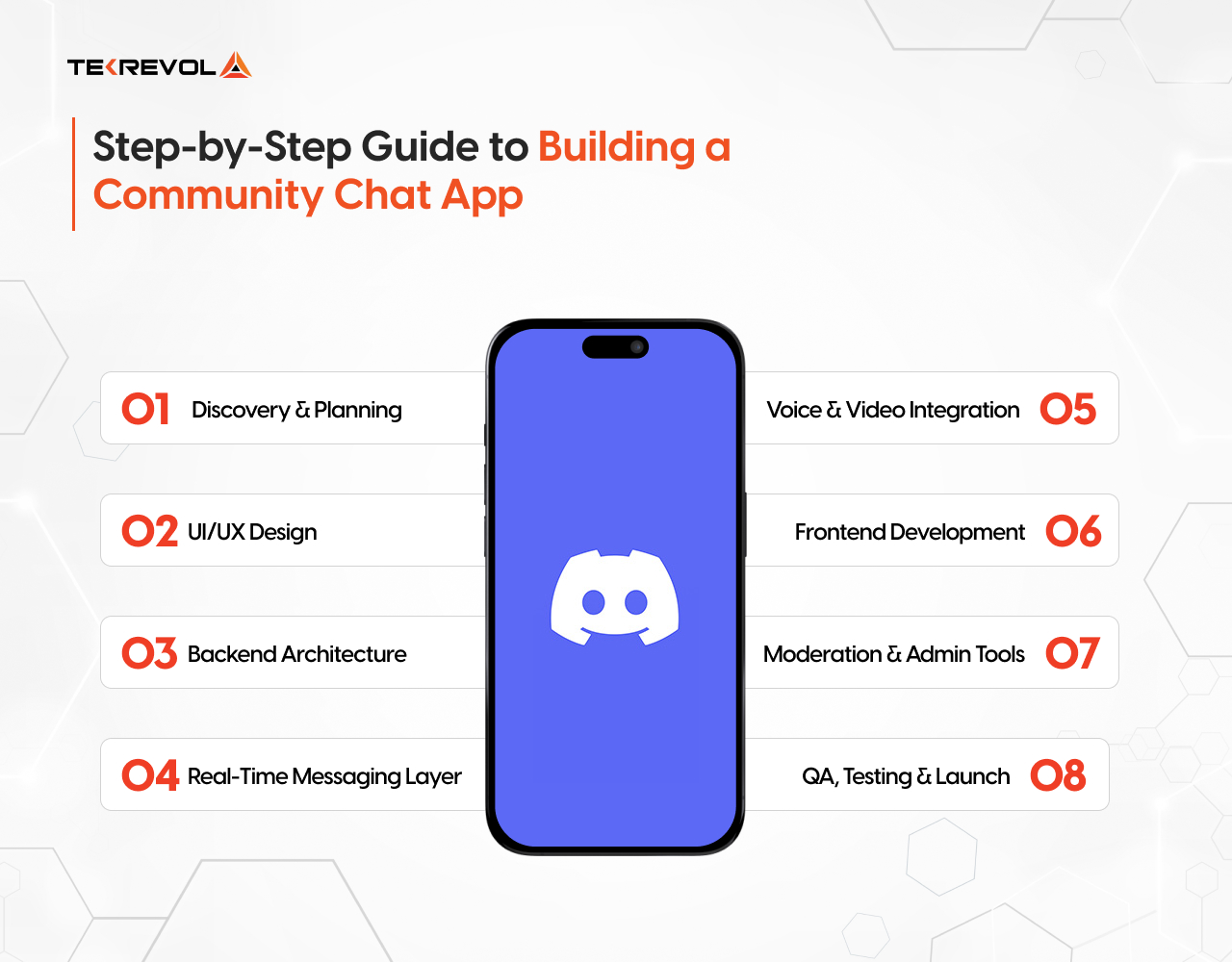
A production-ready community chat app takes 18–26 weeks. Here’s how that time breaks down.
Step 1: Discovery & Planning
Estimated Timeline: 1–2 weeks
Estimated Cost: $2,000–$5,000
Define feature scope, choose your tech stack, and finalize architecture decisions before writing a single line of code. This step looks like overhead. It isn’t; every hour spent here saves five in development.
- Define core features and cut scope ruthlessly
- Choose a tech stack and finalize the architecture
- Map out data models and the permission system on paper
- Align stakeholders before development begins
Step 2: UI/UX Design
Estimated Timeline: 2–3 weeks
Estimated Cost: $5,000–$10,000
UI/UX design is where product decisions get made cheaply. Every layout finalized here is a costly code change avoided later.
- Build wireframes and user flows for all core screens
- Design a component system for web and mobile
- Prototype key interactions for stakeholder sign-off
- Finalize layouts before a single line of code is written
Step 3: Backend Architecture
Estimated Timeline: 3–4 weeks
Estimated Cost: $10,000–$20,000
Backend development is where your platform’s foundation gets built, including database schema, server, and channel data models, user authentication, role-based permission system, and API structure. Everything else in the project sits on top of this layer. Rushed backend development creates problems that compound for months.
A weak data model here creates technical debt that runs through the entire project; schema changes after launch are painful, slow, and expensive.
- Set up the database schema for users, servers, channels, and roles
- Build user authentication with social login support
- Design and implement a role-based permission system
- Structure APIs cleanly for frontend and mobile consumption
Step 4: Real-Time Messaging Layer
Estimated Timeline: 3–4 weeks
Estimated Cost: $10,000–$20,000
WebSocket infrastructure, Socket.io setup, typing indicators, read receipts, message delivery, and Redis pub/sub coordination across instances. This is the highest-traffic system in your entire app and the heaviest engineering lift of the build.
Important: REST polling is not a substitute; if your messaging layer isn’t built on WebSockets from day one, you’ll rewrite it.
- Set up a WebSocket server with Socket.io.
- Build message delivery, edits, deletions, and reactions
- Implement typing indicators and read receipts
- Configure Redis pub/sub for multi-instance coordination
Step 5: Voice & Video Integration
Estimated Timeline: 3–4 weeks
Estimated Cost: $20,000–$40,000
Voice and video are the most technically complex parts of the build, and the biggest cost driver. Before writing a line of code, understand the architecture decision that defines everything else.
A Selective Forwarding Unit (SFU) is a media server that receives each participant’s audio/video stream and forwards it selectively, without mixing or re-encoding. It’s what makes the group voice scale. The alternatives (mesh and MCU) both break down past 3–4 participants for different reasons: mesh from bandwidth explosion, MCU from compute cost. For a Discord-like platform, SFU is the only viable choice.
| Architecture | Best for | Weakness |
| Mesh (P2P) | 1-on-1 calls | Collapses past 3–4 users |
| SFU | Community voice channels | Needs a dedicated media server |
| MCU | Legacy conferencing | High CPU, added latency |
LiveKit is the faster path to ship. Mediasoup gives you full self-hosted control. Also factor in STUN/TURN servers for NAT traversal, easy to miss, meaningful in your infra budget.
- Integrate WebRTC transport layer.
- Deploy and configure SFU (LiveKit or mediasoup) on dedicated infrastructure.
- Build a voice channel join/leave flow with mute and speaking indicators
- Add video calls and screen sharing on top
Step 6: Frontend Development
Estimated Timeline: 3–4 weeks
Estimated Cost: $15,000–$30,000
A community platform is only as good as the experience it delivers. This step builds the full frontend — web, iOS, and Android, with real-time event handling, push notifications, and media sharing working seamlessly across every device your users are on.
- Build a web app in React with real-time WebSocket event handling
- Develop iOS and Android apps in React Native
- Implement push notifications and an in-app notification center
- Build media upload, preview, and CDN delivery
Step 7: Moderation & Admin Tools
Estimated Timeline: 1–2 weeks
Estimated Cost: $5,000–$10,000
Moderation is not a Phase 2 feature; it’s a launch requirement. This step covers every tool your team needs to manage behavior at scale: mute, kick, and ban controls, keyword filters, content reporting, audit logs, and a full admin dashboard.
- Build mute, kick, and ban controls with temporary and permanent options
- Implement keyword filters and auto-mod rules
- Set up content reporting and audit logs
- Build an admin dashboard for server and platform management
Step 8: QA, Testing & Launch
Estimated Timeline: 2–3 weeks
Estimated Cost: $5,000–$10,000
Load testing, WebSocket stress testing, security audit, bug fixes, staged rollout, and production deployment. Never skip load testing on the real-time layer; it will fail in ways your local environment never revealed.
- Run load tests on the WebSocket infrastructure and message delivery
- Conduct a security audit across auth, permissions, and APIs
- Fix bugs surfaced in QA before any public exposure
- Launch to a small group first, then scale gradually
AI Moderation Tools Every Community Platform Should Use
The platforms winning in 2026 aren’t hiring moderation armies; they’re building systems that catch toxicity, hate speech, and abuse before a human ever sees it. The tooling is mature, the integration is lightweight, and there is no longer a credible reason to delay it to a later phase.
Tools that do the heavy lifting:
- Perspective API (Google/Jigsaw): flags toxic messages in real time with fully configurable thresholds. Set it to flag at 70%, notify a moderator at 85%, and auto-delete at 95%. You control the sensitivity; the API handles the volume.
- OpenAI Moderation Endpoint: free for OpenAI API users, fast, and covers harassment, self-harm, and violent content in a single API call per message
- AWS Rekognition / Hive Moderation: automated flagging for image and video content. If your platform allows media uploads, text-only moderation is not enough. These tools close that gap without building anything custom.
How this looks in practice depends heavily on your product; our AI app development company covers the full picture across verticals.
5 Common Mistakes When Building a Community Chat App
Most teams don’t fail because they chose the wrong framework. They fail because they underestimated the operational complexity of real-time systems. These are the mistakes that show up most consistently.
1. Shipping without moderation
Skipping moderation to hit a launch date is the most common mistake, and the most damaging. One toxic incident that goes unaddressed can empty a server overnight and permanently damage trust in your platform. Mute, ban, and keyword filtering aren’t Phase 2 features. They’re pre-launch requirements.
2. Using REST polling instead of WebSockets
REST polling (repeatedly asking the server “any new messages?”) creates artificial latency, hammers your server with unnecessary requests, and breaks down completely under load. Real-time messaging requires persistent WebSocket connections from day one. Retrofitting this later is a full architectural rewrite.
3. Not designing for WebSocket horizontal scaling
WebSocket connections are stateful; each user holds a persistent connection to a specific server instance. If you don’t add Redis pub/sub coordination from the start, scaling to multiple server instances breaks message delivery. This is the single most common infrastructure mistake in real-time apps, and it surfaces exactly when you can least afford it: during a traffic spike.
4. Skipping load testing on the real-time layer
Unit tests don’t catch WebSocket failures under concurrent load. Your local environment never will either. Load test with realistic concurrent connection counts before launch. Tools like Artillery or k6 can simulate thousands of simultaneous WebSocket connections. The failure modes (dropped messages, connection storms, queue backup) only appear under real load.
5. Building voice before validating text
Voice and video account for 40–60% of the total development cost and timeline. Building it before you’ve validated that users actually stay and engage with your text platform is a costly bet. Launch with text channels, prove retention, then invest in the voice layer. The architecture supports adding it later; your runway might not support building it first.
What It Actually Costs to Build a Community Chat App
Building a community chat app like Discord costs between $30,000 and $150,000+, depending on feature scope, platform count, and whether you use a managed chat API or custom infrastructure.
| Feature Scope | Estimated Cost | Timeline | What’s Included |
| MVP — Text + Channels | $30K–$50K | 12–16 weeks | Server/channel structure, text messaging, roles, basic moderation, push notifications |
| Full Platform — Voice + Video | $80K–$150K | 20–30 weeks | Everything in MVP plus WebRTC voice channels, SFU integration, video calls, screen sharing, and message search |
| Enterprise-Grade Platform | $150K–$300K+ | 30–45 weeks | Full custom infrastructure, compliance controls, SSO, audit logs, multi-platform, scale architecture |
Community Chat App Development Cost by Feature
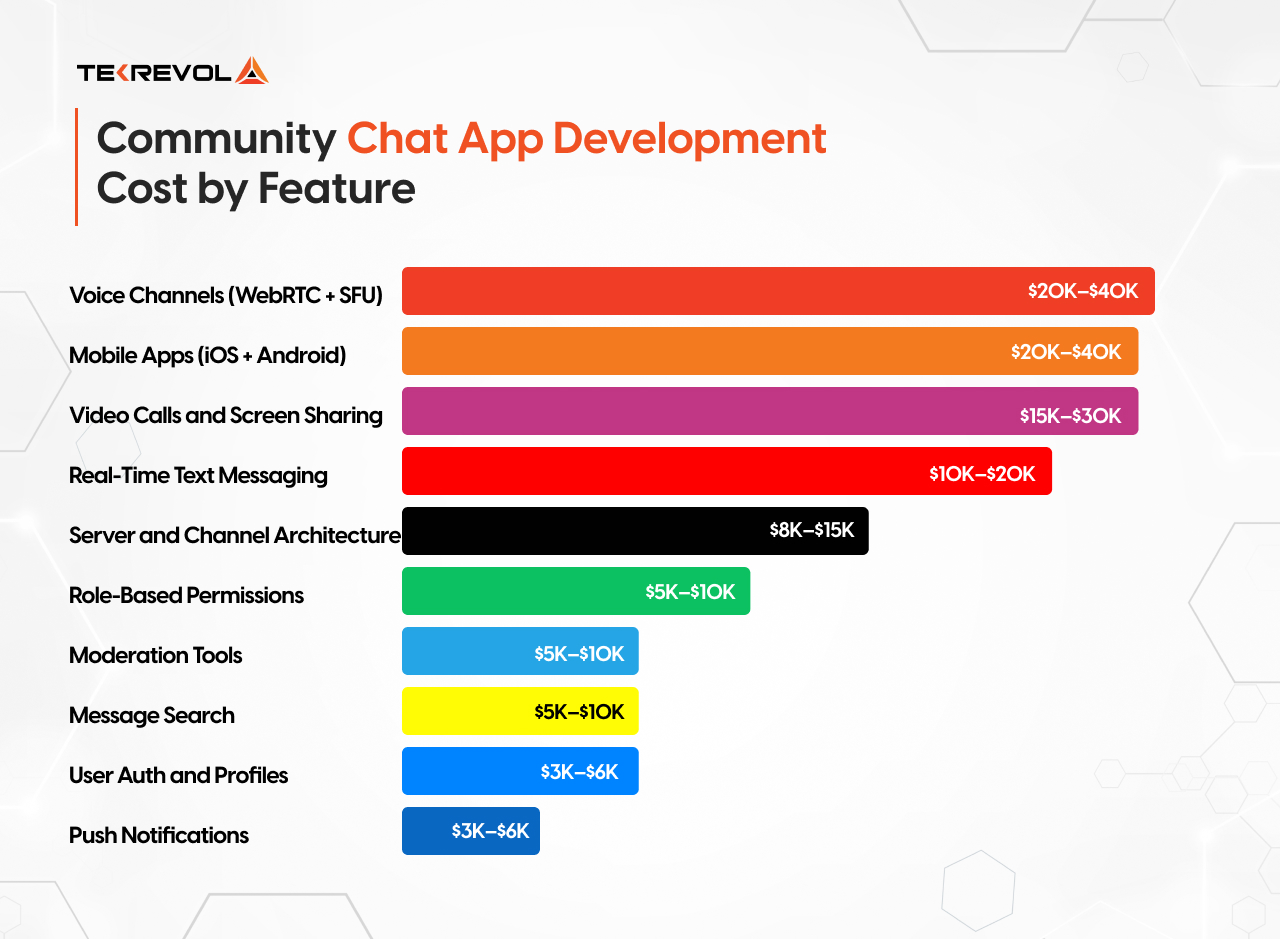
Not all features cost the same to build, and knowing where the heavy lifting is helps you prioritize smartly. Voice and video are the single biggest cost variable. If you’re budget-constrained, build the text and channel layer first, validate it, then layer in voice and video once you have traction and funding to match.
| feature | Estimated Development Cost |
| User Auth and Profiles | $3K–$6K |
| Server and Channel Architecture | $8K–$15K |
| Real-Time Text Messaging | $10K–$20K |
| Role-Based Permissions | $5K–$10K |
| Push Notifications | $3K–$6K |
| Voice Channels (WebRTC + SFU) | $20K–$40K |
| Video Calls and Screen Sharing | $15K–$30K |
| Moderation Tools | $5K–$10K |
| Message Search | $5K–$10K |
| Mobile Apps (iOS + Android) | $20K–$40K |
For a broader view of how these costs compare across different app categories and complexity tiers, our complete mobile app development cost guide breaks it down by feature scope, team size, and region.
Ongoing Costs After Launch: What to Budget For
The development cost gets all the attention. The operational cost is what actually determines whether your platform survives.
Infrastructure Cost at Different Scales
| Scale | Monthly Infra Cost | Key Cost Drivers |
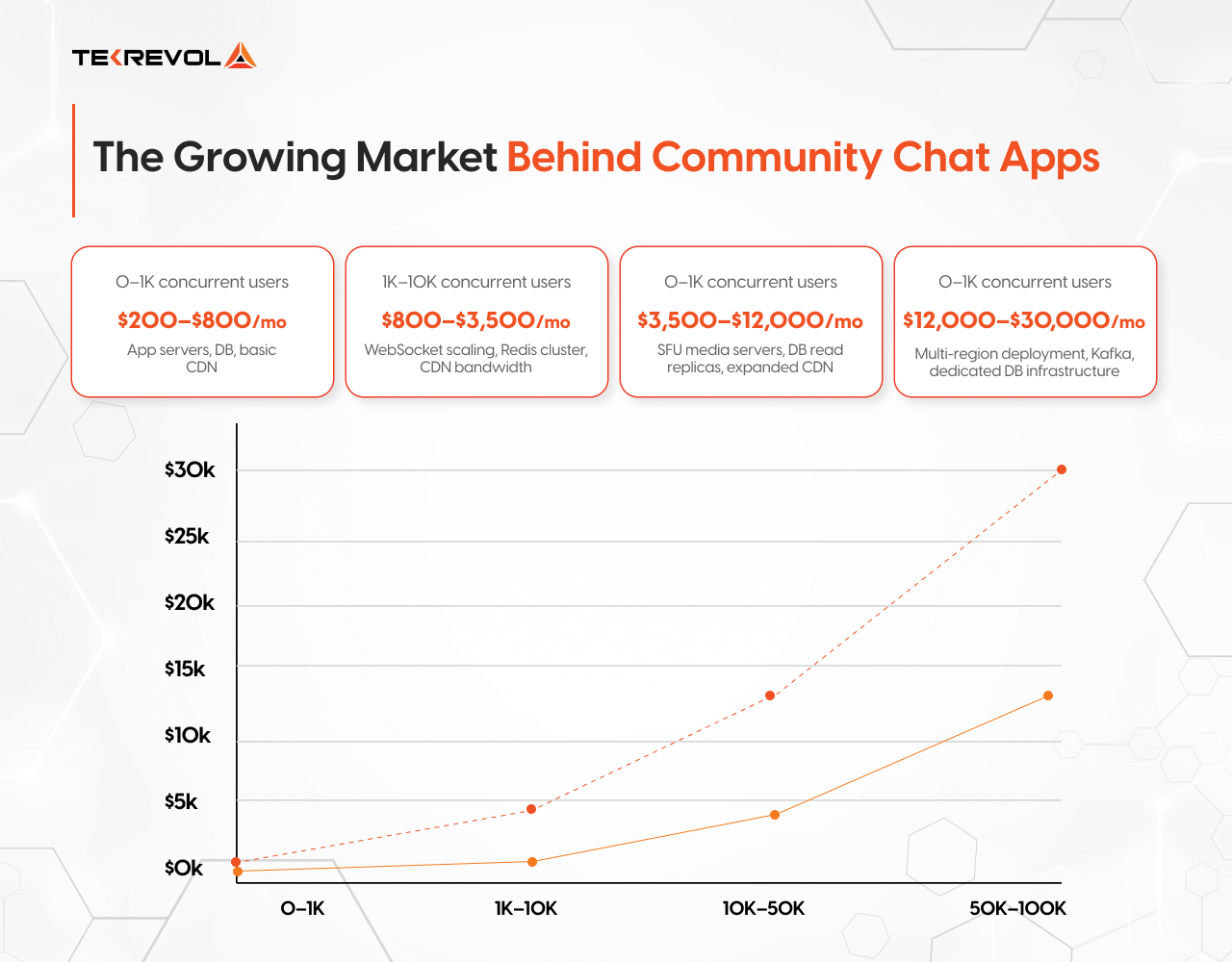
| 0–1K concurrent users | $200–$800/mo | App servers, DB, basic CDN |
| 1K–10K concurrent users | $800–$3,500/mo | WebSocket scaling, Redis cluster, CDN bandwidth |
| 10K–50K concurrent users | $3,500–$12,000/mo | SFU media servers, DB read replicas, expanded CDN |
| 50K–100K concurrent users | $12,000–$30,000/mo | Multi-region deployment, Kafka, dedicated DB infrastructure |
Monetization Models for Community Chat Platforms
Building the platform is only half the equation. Here’s how community chat apps generate revenue, and which models make sense at different stages.
Premium Subscriptions (The Nitro Model)
Discord’s Nitro tier ($9.99/month) is the clearest template: give power users enhanced file uploads, custom emojis, profile badges, and higher-quality streaming. The key insight is that Nitro buyers aren’t paying for access; they’re paying for expression and status within their communities. Your premium tier should follow the same logic: what do your most engaged users want to show off?
Server Boosts and Community Upgrades
Let server owners, not just individual users, pay for platform-wide upgrades: higher member limits, custom invite links, vanity URLs, expanded channel counts, better audio quality. This model works because it aligns payment with the people who are most invested in a community’s growth.
Paywalled Communities and Creator Monetization
Gate specific servers or channels behind a paid membership. A creator charges $5/month for access to their private Discord-equivalent; your platform takes a 10–15% cut. This model works particularly well for EdTech platforms, creator communities, and brand fan spaces, and it turns your platform into a revenue stream for your users, which dramatically increases retention.
Enterprise and Team Plans
B2B community platforms can charge per-seat or per-server at significantly higher price points. Compliance features, SSO, audit logs, and SLA guarantees justify $15–$50/user/month in enterprise contexts, margins that consumer subscription models can’t touch.
Why Choose TekRevol for Community Chat App Development
TekRevol brings years of hands-on experience building scalable, feature-rich community chat applications tailored to your unique business needs. From concept to launch, our team ensures a seamless development process backed by cutting-edge technology and user-centric design.
We combine technical excellence with a deep understanding of community engagement, delivering chat solutions that are secure, reliable, and built to grow with your audience.
- Full-Stack Chat Expertise: End-to-end development covering real-time messaging, push notifications, media sharing, and more.
- Custom Architecture & Scalability: Solutions engineered to handle thousands of concurrent users without compromising performance.
- Cross-Platform Development: Seamless experiences across iOS, Android, and web using the latest frameworks.
- Security & Compliance First: Built-in encryption, data privacy protocols, and compliance standards to keep your community safe.
Start Building the Community Platform Your Users Actually Deserve.
TekRevol has shipped real-time platforms across gaming, EdTech, enterprise, and creator verticals. Yours is next.
Claim Your Free $300 Consultation Today


